Shadowsocks-libev: 3.2.3-1 version installed on Debian 9 error, prompt Main pro Cess exited, code=exited, status=218/CAPABILITIES
What version of shadowsocks-libev are you using?
3.2.3
What operating system are you using?
Debian 9 x64
What did you do?
root@libev:~# history
0 apt update
1 apt upgrade
2 apt-get install openssh-server
3 service ssh start
4 apt-get install vim
5 vim /etc/sshd_config
6 PermitRootLogin yes
7 reboot
8 nano /etc/apt/sources.list
9 deb http://ftp.debian.org/debian stretch-backports main
10 apt -t stretch-backports install shadowsocks-libev
11 systemctl status shadowsocks-libev
root@hostname:~# service shadowsocks-libev status
● shadowsocks-libev.service - Shadowsocks-libev Default Server Service
Loaded: loaded (/lib/systemd/system/shadowsocks-libev.service; enabled; vendo
r preset: enabled)
Active: failed (Result: exit-code) since Mon 2019-02-11 06:38:26 U
TC; 5min ago
Docs: man:shadowsocks-libev(8)
Process: 3174 ExecStart=/usr/bin/ss-server -c $CONFFILE $DAEMON_ARGS (
code=exited, status=218/CAPABILITIES)
Main PID: 3174 (code=exited, status=218/CAPABILITIES)
Feb 11 06:38:26 hostname systemd[1]: Started Shadowsocks-libev Default Server Se
rvice.
Feb 11 06:38:26 hostname systemd[3174]: shadowsocks-libev.service: Faile
d at step CAPABILITIES spawning /usr/bin/ss-server: Invalid argument
Feb 11 06:38:26 hostname systemd[1]: shadowsocks-libev.service: Main pro
cess exited, code=exited, status=218/CAPABILITIES
Feb 11 06:38:26 hostname systemd[1]: shadowsocks-libev.service: Unit ent
ered failed state.
Feb 11 06:38:26 hostname systemd[1]: shadowsocks-libev.service: Failed w
ith result 'exit-code'.
 biliair
All 10 comments
Is there a developer or any one who can answer this question? Thank you
biliair
on 15 Feb 2019
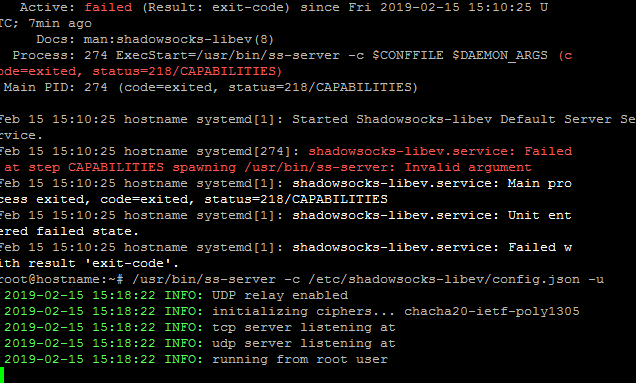
Type the command line
/usr/bin/ss-server -c /etc/shadowsocks-libev/config.json -u
2019-02-16 07:45:33 INFO: UDP relay enabled
2019-02-16 07:45:33 INFO: initializing ciphers... chacha20-ietf-poly1305
2019-02-16 07:45:33 INFO: tcp server listening at 202...:10000
2019-02-16 07:45:33 INFO: udp server listening at 202...:10000
2019-02-16 07:45:33 INFO: running from root user
The SS service is running normally and the data transmission is normal.
Just exit the putty window and get an error
Process: 3174 ExecStart=/usr/bin/ss-server -c $CONFFILE $DAEMON_ARGS (
Code=exited, status=218/CAPABILITIES)
Already added the above content in the self-starting file rc.local, still starting the error
biliair
on 16 Feb 2019
I also encountered the same problem.
 alitime
on 25 Feb 2019
alitime
on 25 Feb 2019
@biliair Have you solved it?
alitime
on 25 Feb 2019
Same error on Ubuntu 16.04 LTS. Solution?
 digititus
on 26 Feb 2019
digititus
on 26 Feb 2019
Same error on Ubuntu 16.04 LTS. Solution?
I have it too(
 AndrewP-GH
on 28 Feb 2019
AndrewP-GH
on 28 Feb 2019
3.2.4 Same error on debian & ubuntu
alitime
on 2 Mar 2019
I've found solution:
Open file /lib/systemd/system/shadowsocks-libev.service
and remove/comment these lines:
CapabilityBoundingSet=CAP_NET_BIND_SERVICE
AmbientCapabilities=CAP_NET_BIND_SERVICE
AndrewP-GH
on 2 Mar 2019
I've found solution:
Open file/lib/systemd/system/shadowsocks-libev.service
and remove/comment these lines:
CapabilityBoundingSet=CAP_NET_BIND_SERVICE
AmbientCapabilities=CAP_NET_BIND_SERVICE
The problem still exists!!!
alitime
on 6 Mar 2019
Seems like a problem on Openvz servers, that don't have the net bind capability.
The changes suggested by AndrewP work!
 pjrobertson
on 3 May 2019
pjrobertson
on 3 May 2019
Related issues
 rule2c
·
4Comments
rule2c
·
4Comments
 zhfreal
·
4Comments
zhfreal
·
4Comments
 xuhuigithub
·
4Comments
xuhuigithub
·
4Comments
 blackgear
·
3Comments
blackgear
·
3Comments
 triaqu
·
4Comments
triaqu
·
4Comments
Most helpful comment
I've found solution:
Open file
/lib/systemd/system/shadowsocks-libev.serviceand remove/comment these lines:
CapabilityBoundingSet=CAP_NET_BIND_SERVICEAmbientCapabilities=CAP_NET_BIND_SERVICE