Shadowsocks-libev: The right way to start/stop shadowsocks-libev
What version of shadowsocks-libev are you using?
3.1.0
What operating system are you using?
SMP Debian 4.9.51-1 (2017-09-28) x86_64 GNU/Linux
What did you do?
I found two method to start ss:
way1:
sudo /etc/init.d/shadowsocks-libev start # for sysvinit, or
this way doesn't work for me, but it replied [ok]
way2:
sudo ss-server -c /etc/shadowsocks-libev/config.json -f .ss.pid
This way worked for me , but I can't find the way to stop it(expect kill the_process, there isn't a way something like ss-server stop.
What did you expect to see?
I just want to know which way is the better one?
If the first one is the better one, but why it doesn't work for me? any configeration I missed?
If the 2nd is the choice, Is there a good way to stop the ss-server, I found that if I run sudo ss-server -c /etc/shadowsocks-libev/config.json -f .ss.pid repeatedly , then a lot of process will be created.
That's not what I want, obviously.
What did you see instead?
way1 doen't work for me.
for way2 can't found a good way to stop the ss-server process.
What is your config in detail (with all sensitive info masked)?
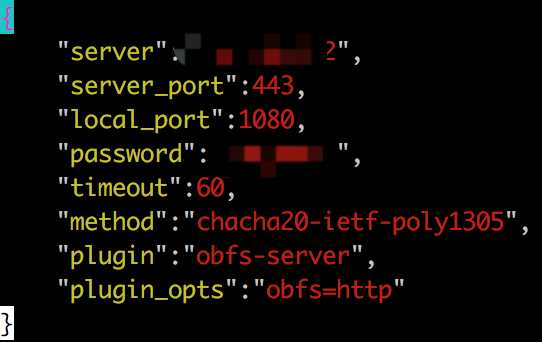
End
Thanks so much for what your team did!
 sethcreate
All 27 comments
I Had read https://github.com/shadowsocks/shadowsocks-libev/issues/1580 , but didn't worked for me.
sethcreate
on 21 Oct 2017
sudo /etc/init.d/shadowsocks-libev stopsudo kill -9 $(cat .ss.pid)
 eastmalon
on 23 Oct 2017
eastmalon
on 23 Oct 2017
I think it would be great If there was a command like ss-server start/stop/status/restart/log .
sethcreate
on 23 Oct 2017
ss-libev already provides systemd service and sysvinit service for users to use when installed from distribution package. I think implementing another start/stop layer is unnecessary.
If you find any difficulties when using ss-libev as system service, feel free to submit issues here and describe your problem.
 hosiet
on 23 Oct 2017
hosiet
on 23 Oct 2017
sudo /etc/init.d/shadowsocks-libev start doesn't work for me. I don't know why? Any else information need to be provided ?
sethcreate
on 23 Oct 2017
If you are on Debian 9: stop using things inside /etc/init.d/. This file only exists for compatibility purposes with old init system.
Please use systemctl command to manage ss-libev's service as described in "Configure and start the service" part in README.md. You will need basic knowledges about systemd.
hosiet
on 23 Oct 2017
@hosiet Thx for your patient explain, I'll try later, and let you know the result!
sethcreate
on 23 Oct 2017
@hosiet I executed sudo systemctl start shadowsocks-libev , but ss didn't started successfully!
Any advice?

sethcreate
on 23 Oct 2017
try
sudo systemctl start shadowsocks-libev@config
 lxx4380
on 24 Oct 2017
lxx4380
on 24 Oct 2017
@lxx4380 Failed to start [email protected]: Unit [email protected] not found.
sethcreate
on 24 Oct 2017
@lxx4380 Your words are misleading because that service never exists.
If you look into files provided by ss-libev packages in /lib/systemd/system/, there are several service files related to ss-libev:
- shadowsocks-libev.service
- [email protected]
- [email protected]
- [email protected]
- [email protected]
The first one is the example default service which reads /etc/shadowsocks-libev/config.json and all other services are template services that accepts a config file name as argument to distinguish between each other instances. I don't know if there are any other words that can better explain things, but anyone who knows a little about systemd should be able to utilize them.
Note that none of them are written to work seamlessly with simple-obfs. You may have to modify them using commands like systemctl edit to fit your need.
hosiet
on 24 Oct 2017
@madeye @hosiet I still want to recommand that ss-libev should has the commands ss-server start/stop/status/restart/log just like shadowsocks-python . Since the commands are easy to understand and use.
sethcreate
on 24 Oct 2017
Personally I'm not for this idea. Anyway, this decision should be made by the main maintainer here.
hosiet
on 24 Oct 2017
@hosiet You're right. I wrote a wrong command. However obfs works really well on my server:
~# systemctl status shadowsocks-libev -l
● shadowsocks-libev.service - Shadowsocks-libev Default Server Service
   Loaded: loaded (/lib/systemd/system/shadowsocks-libev.service; disabled)
   Active: active (running) since Tue 2017-10-24 15:13:53 UTC; 7min ago
     Docs: man:shadowsocks-libev(8)
 Main PID: 14484 (ss-server)
   CGroup: /system.slice/shadowsocks-libev.service
           ├─14484 /usr/bin/ss-server -c /etc/shadowsocks-libev/config.json -u
           └─14485 obfs-server
@ghuiii Can you provide full log of shadowsocks-libev.service?
lxx4380
on 24 Oct 2017

@lxx4380
sethcreate
on 24 Oct 2017
@ghuiii It's almost always better to manage services in the way distro provides.
 leonshaw
on 25 Oct 2017
leonshaw
on 25 Oct 2017
I don't think the picture you provided has enough information to find out what's wrong.
You may need to provide more detailed information like this:
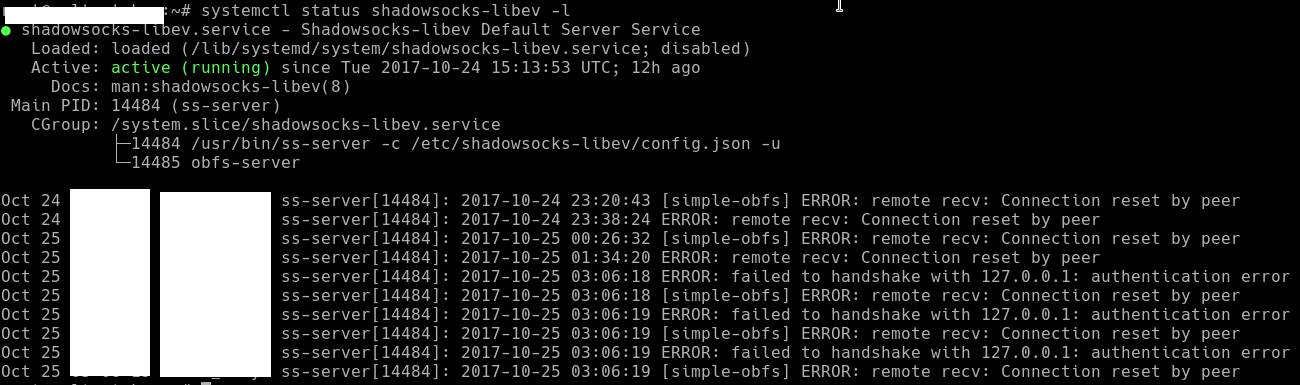
lxx4380
on 25 Oct 2017
@lxx4380 That's all , I checked it again.
ss-server works well for me, currently I gived up the systemctl command.
And Killed by sudo kill.
sethcreate
on 25 Oct 2017
leonshaw
on 25 Oct 2017
There's no fundamental difference between shadowsocks-libev.service and [email protected].
If you want to debug and find out the problem, please provide complete screenshot of output of systemctl status shadowsocks-libev.service.Previous screenshot missed some critical part of the log thus I cannot tell you the reason of problem.
hosiet
on 25 Oct 2017
There must be some text after "[simple-obfs]", and that is just what we need.
lxx4380
on 25 Oct 2017
@lxx4380 You're right, I missed the important part.

sethcreate
on 25 Oct 2017
Or use port higher than 1024, or edit the service to let ss-server run with root privileges.
lxx4380
on 25 Oct 2017
@debug18 Still doesn't work
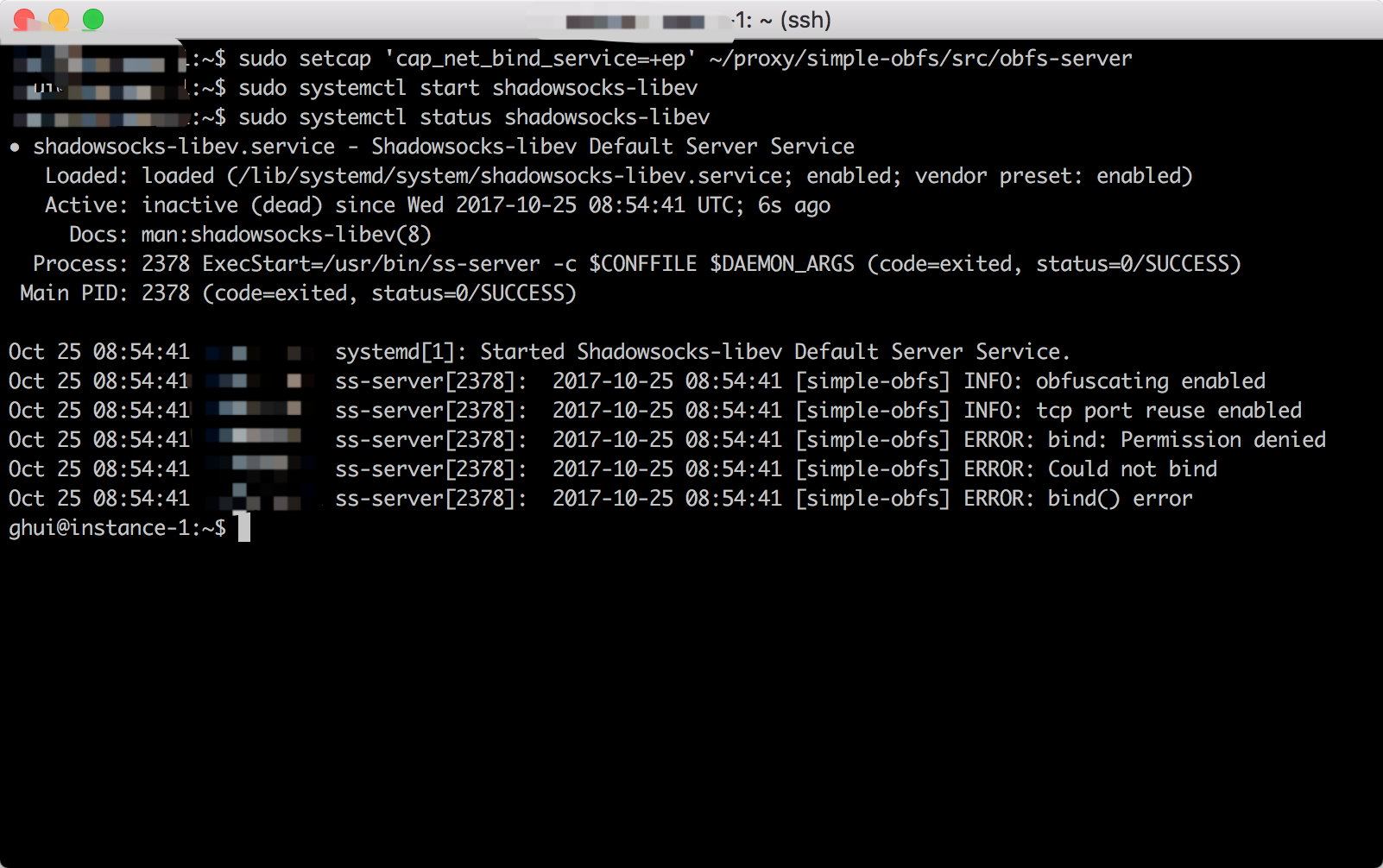
sethcreate
on 25 Oct 2017
/usr/local/bin/obfs-server
lxx4380
on 25 Oct 2017
You should not install from source. Coz you are not so familiar with Linux.
 debiansid
on 25 Oct 2017
debiansid
on 25 Oct 2017
supervisorctl works, or just write a simple shell script:
#!/bin/bash

if [[ $1 == "on" ]]; then
  ss-server -c /etc/shadowsocks.json -u -f /etc/sss.pid
  echo "Shadowsocks turned on"
elif [[ $1 == "off" ]]; then
  kill -9 $(cat /etc/sss.pid)
  echo "Shadowsocks turned off"
else
  echo "Usage: on/off"
fi
 dlc9113
on 27 Oct 2017
dlc9113
on 27 Oct 2017
Related issues
 qianguozheng
·
4Comments
qianguozheng
·
4Comments
 iceberg1369
·
3Comments
iceberg1369
·
3Comments
 mcmxciv
·
3Comments
mcmxciv
·
3Comments
 yuhaiyang
·
4Comments
yuhaiyang
·
4Comments
 cranetht
·
3Comments
cranetht
·
3Comments
Most helpful comment
@lxx4380 Your words are misleading because that service never exists.
If you look into files provided by ss-libev packages in
/lib/systemd/system/, there are several service files related to ss-libev:The first one is the example default service which reads
/etc/shadowsocks-libev/config.jsonand all other services are template services that accepts a config file name as argument to distinguish between each other instances. I don't know if there are any other words that can better explain things, but anyone who knows a little about systemd should be able to utilize them.Note that none of them are written to work seamlessly with simple-obfs. You may have to modify them using commands like
systemctl editto fit your need.