Shadowsocks-android: v4.4.2 后台服务启动失败:请选择配置文件
Please read FAQ then answer these questions before submitting your issue. Thanks!
Environment
- Android version: 7.1.1
- Device: 锤子坚果pro 2
- Shadowsocks version: 4.4.2
- Last version that did not exhibit the issue (if applicable):
Configuration
_Put an x inside the [ ] that applies._
- [x] IPv4 server address
- [ ] IPv6 server address
- [x] Client IPv4 availability
- [ ] Client IPv6 availability
- Encrypt method:
- Route
- [ ] All
- [ ] Bypass LAN
- [ ] Bypass China
- [x] Bypass LAN & China
- [ ] GFW List
- [ ] China List
- [ ] Custom rules
- [ ] IPv6 route
- [ ] Apps VPN mode
- [ ] Bypass mode
- Remote DNS: 8.8.8.8
- [ ] DNS Forwarding
- Plugin configuration (if applicable):
- [ ] Auto Connect
- [ ] TCP Fast Open
- If you're not using VPN mode, please supply more details here:
What did you do?
Just install v4.4.2 and import my server config.
What did you expect to see?
Connect successfully.
What did you see instead?
后台服务启动失败:请选择配置文件
 luffyke
All 42 comments
it's normal for 4.3.3 version.
luffyke
on 25 Dec 2017
Post a screenshot if possible.
 madeye
on 25 Dec 2017
madeye
on 25 Dec 2017
It could be caused by database corruption. Post a logcat if possible.
 Mygod
on 25 Dec 2017
Mygod
on 25 Dec 2017
@madeye @Mygod sorry, i have uninstalled v4.4.2, and install 4.3.3, it's expected now.
luffyke
on 25 Dec 2017
And i do the same action for 4.3.3 and 4.4.2
luffyke
on 25 Dec 2017
Just click you profile.
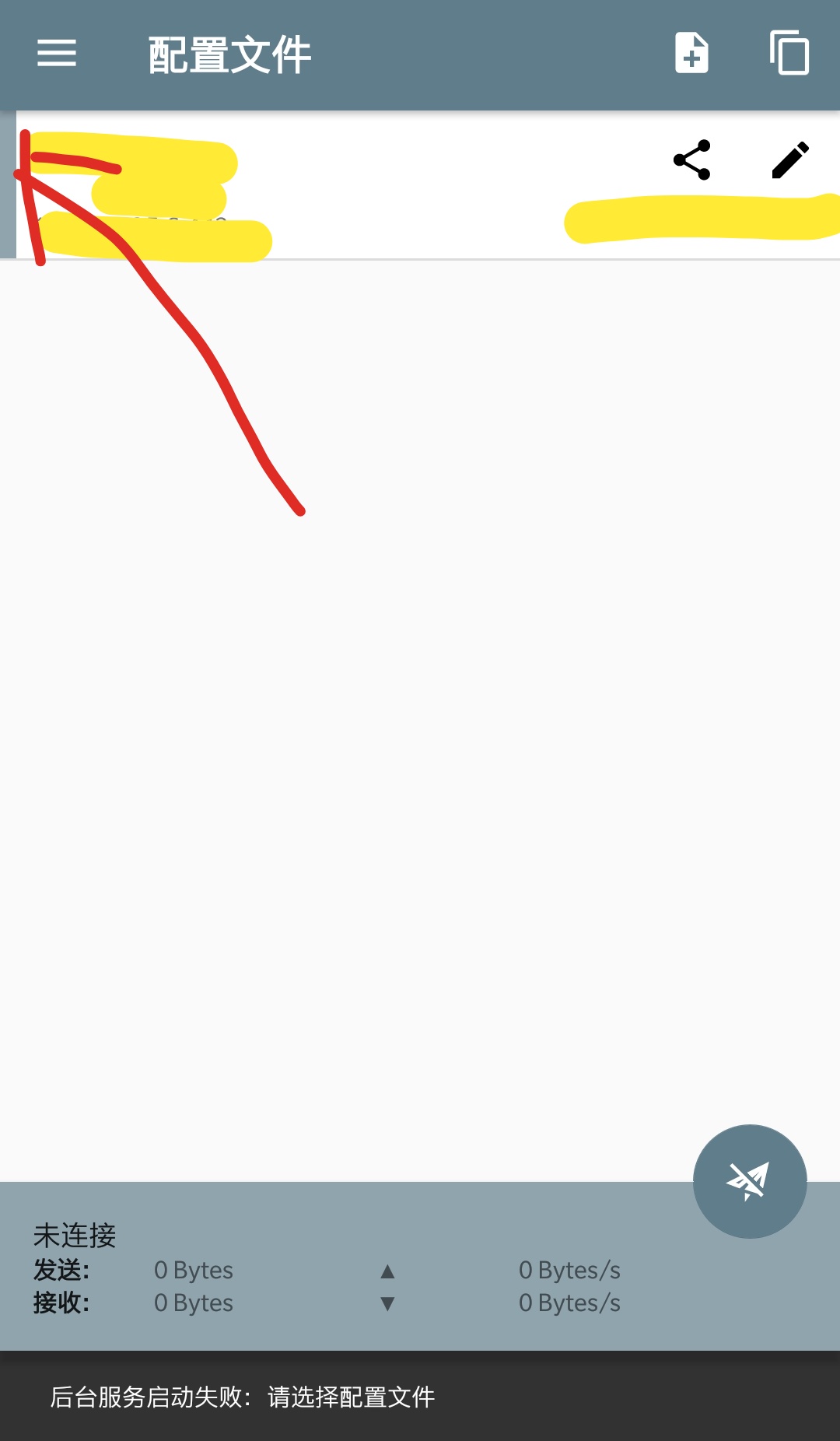
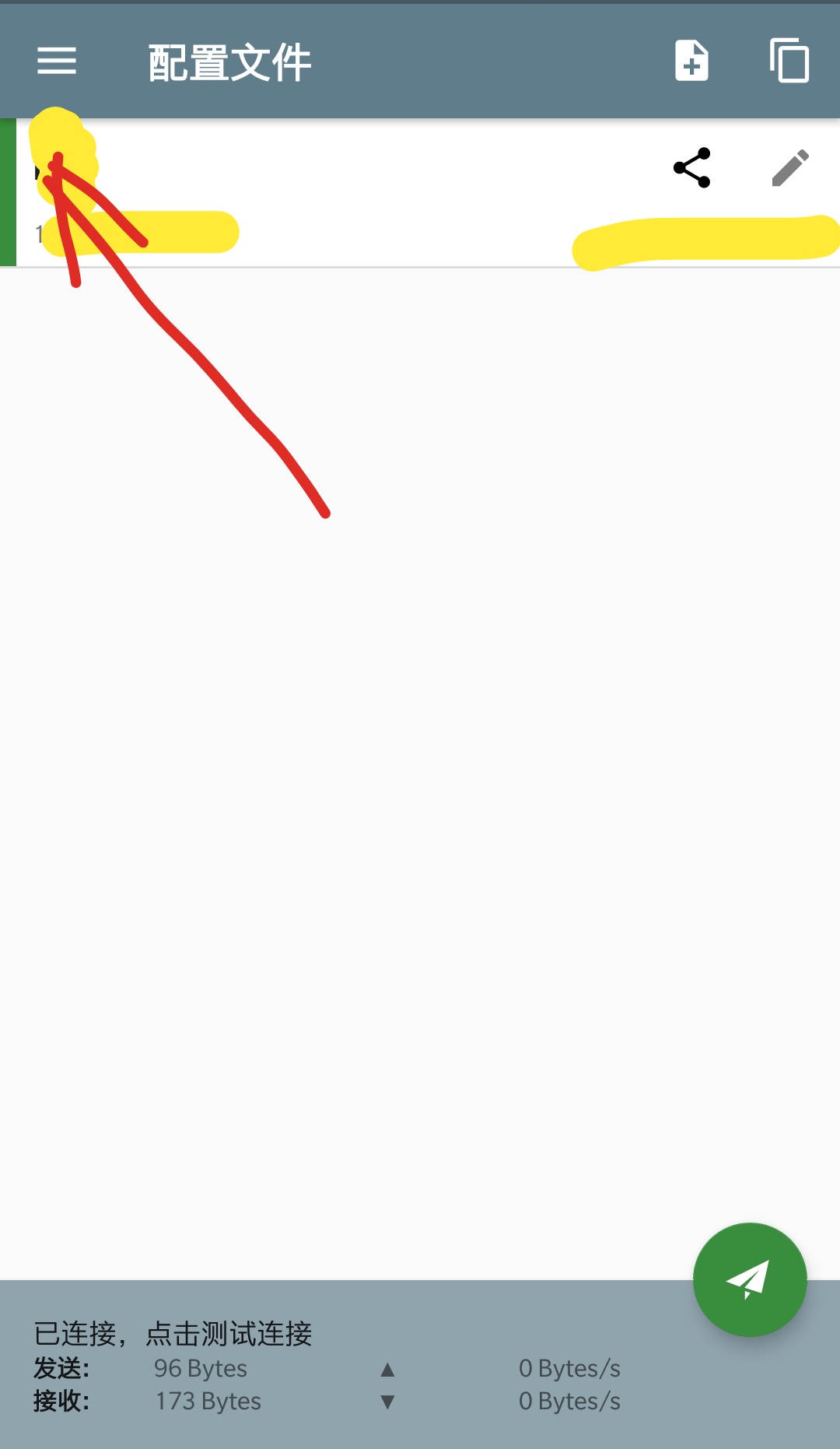
 whour
on 25 Dec 2017
whour
on 25 Dec 2017
@whour i have clicked
luffyke
on 25 Dec 2017
After updating to 4.4.2, the profile selected before was unselected, so you need to select it again manually before connecting.
 iKirby
on 25 Dec 2017
iKirby
on 25 Dec 2017
@iKirby i'm confirm that i have selected profile.
luffyke
on 26 Dec 2017
Same issue here.
Android version: 7.0.0
Device: Meizu Pro6 plus
Shadowsocks version: 4.4.3
 airycanon
on 4 Jan 2018
airycanon
on 4 Jan 2018
4.4.4 小米
同样的问题
发现是直接升级的安装会有问题,把原来已安装的ss删掉,再重新安装就好了
 Windsmild
on 7 Jan 2018
Windsmild
on 7 Jan 2018
@Windsmild 我删除旧版重新安装仍然是同样的问题。
airycanon
on 8 Jan 2018
Same issue here.
Android version: 7.0.0
Device: Meizu Pro6 plus
Shadowsocks version: 4.4.5
 isxiao
on 19 Jan 2018
isxiao
on 19 Jan 2018
我昨天拿了一台原来装了shadowsocks-android旧版的手机,然后下载4.4.5的apk安装(系统会替换掉原来的app),这样的安装方式导致上述错误,没有调用系统提示会打开VPN的提示框。
然后我把4.4.5卸载,重装(这时候的安装是原来手机没有存在shadowsocks-android旧包),又回归正常(系统提示会打开VPN的提示框)
luffyke
on 20 Jan 2018
@luffyke 我的情况跟你类似:
- 存在旧版,覆盖安装,没有弹出 VPN 的提示框,会出现“请选择配置文件“的错误。
- 卸载旧版安装,会弹出 VPN 的提示框,点击确定后仍然会出现“请选择配置文件“的错误。
airycanon
on 21 Jan 2018
@airycanon 嗯,我的后面卸载掉重装就正常了。
luffyke
on 21 Jan 2018
meizu手机 一样的问题 试了很多版本 还是不行
 Lemon-le
on 31 Jan 2018
Lemon-le
on 31 Jan 2018
@Lemon-le 看这里 #1589
airycanon
on 31 Jan 2018
刚刚我找到了另一个版本 可以使用了 是软件本身的问题
Lemon-le
on 31 Jan 2018
MZnote5+flyme6.3.0.0A(Android 7.0)+google play版本也会出现这个后台服务无法启动的问题。
具体为,第一次打开会闪退,第二次打开正常,但连接提示后台服务启动失败:请选择配置文件(已开启后台权限)
切回4.3.1后可以正常使用。
另外在android7上会出现更新安装时报异常的情况。
(显示为安装包损坏,实际应该是覆盖安装的权限问题,卸后重装即可)
 lczxxx123
on 7 Feb 2018
lczxxx123
on 7 Feb 2018
@lczxxx123 一样的设备, 只有4.3.1可以用?
 qiuyukuhe
on 7 Feb 2018
qiuyukuhe
on 7 Feb 2018
@qiuyukuhe 试了4.4.6和4.4.5不行就直接跳回到4.3.1了,其他的没有尝试
lczxxx123
on 7 Feb 2018
装了4.4.1,要求更新google play服务。之前的版本也会要求更新的,安装完就可以了
 coolicer
on 9 Feb 2018
coolicer
on 9 Feb 2018
flyme 6.3 固件与 Play 服务等套件对接存在问题。更新至 6.3 以后会导致此问题发生。
 LenKiMo
on 11 Feb 2018
LenKiMo
on 11 Feb 2018
@LenKiMo 我也是flyme6.3,我用的是GO那个安装套件
coolicer
on 19 Feb 2018
flyme6.3影梭最新版不能用,必须安装旧版本才行。
 vanejiang
on 25 Feb 2018
vanejiang
on 25 Feb 2018
shadowsocks 4.4.6 在android 7.1.1 ,本来是用旧版3.0.4没问题,自动升级更新了版本,不连接。备份出来,清理了缓存,重装一次之后成功连接了。
 tannx
on 28 Feb 2018
tannx
on 28 Feb 2018
Nexus7 2013,Android 6.0.1和 @tannx 一样,清楚应用缓存之后再打开应用连接就好了
 reyesyang
on 9 Mar 2018
reyesyang
on 9 Mar 2018
flyme7,找了好久,4.2.0能用
 ljhshuai
on 14 May 2018
ljhshuai
on 14 May 2018
@huster1446 其实我已经提了给flyme管第三方的开发...不知道有没有空搞
目前4.4.2以前的版本都可以用
coolicer
on 15 May 2018
小米6手机 SS从旧版升级出现同样的错误,清除软件的所有数据后就可以正常使用了,不知道是不是更新造成的BUG
 NWRH
on 6 Jun 2018
NWRH
on 6 Jun 2018
meizu pro5,装v4.3.3可破
 yobdcdoll
on 21 Jun 2018
yobdcdoll
on 21 Jun 2018
Same issue here.
Android version: 7.0.0
Device: Meizu Pro5
Shadowsocks version: 4.5.7
 ReeceNee
on 19 Jul 2018
ReeceNee
on 19 Jul 2018
same issue here.
Android version: 7.0.1.0A
Device: Meizu note5
shadowsocks version :4.5.0
 DashuaiHu
on 31 Jul 2018
DashuaiHu
on 31 Jul 2018
Device: Meizu pro6
shadowsocks version :4.2.5
try to many shadowsocks version , i discovery 4.2.5 version that it is useful to my mobile
 xudaile
on 13 Oct 2018
xudaile
on 13 Oct 2018
same issue here.
Flyme version: 7.0.1.0A
Device: Meizu Pro6 s
shadowsocks version :4.6.1
 TaoistMo
on 9 Nov 2018
TaoistMo
on 9 Nov 2018
same issue here.
Flyme version: 7.0.1.0A
Device: Meizu 魅蓝 E1
shadowsocks version :4.6.1
 Scyllaly
on 27 Nov 2018
Scyllaly
on 27 Nov 2018
小米手机同样问题,怀疑是直接升级所致。
MIUI same issue.
尝试清除全部数据可以解决。
Clear all the data may resolve this problem
 opticalix
on 5 Dec 2018
opticalix
on 5 Dec 2018
我用的4.2.4没啥问题
 wudan3551
on 28 Feb 2019
wudan3551
on 28 Feb 2019
Export the problematic settings to the sticker, remove the problematic settings, and import from the sticker.problem solved.
 zhangzhuoming
on 1 Mar 2019
zhangzhuoming
on 1 Mar 2019
把出现问题的设置导出到黏贴板,删除出现问题的设置,然后从黏贴板导入.
zhangzhuoming
on 1 Mar 2019
mx3最新版是有问题,下了4.2.4就可以了。
 liubao
on 22 Aug 2019
liubao
on 22 Aug 2019
Related issues
 zhoujun2
·
3Comments
zhoujun2
·
3Comments
 jbxiaoyu
·
4Comments
jbxiaoyu
·
4Comments
 kuaihou2012
·
6Comments
kuaihou2012
·
6Comments
 Edelwiess
·
6Comments
Edelwiess
·
6Comments
 theScrabi
·
5Comments
theScrabi
·
5Comments
Most helpful comment
MZnote5+flyme6.3.0.0A(Android 7.0)+google play版本也会出现这个后台服务无法启动的问题。
具体为,第一次打开会闪退,第二次打开正常,但连接提示后台服务启动失败:请选择配置文件(已开启后台权限)
切回4.3.1后可以正常使用。
另外在android7上会出现更新安装时报异常的情况。
(显示为安装包损坏,实际应该是覆盖安装的权限问题,卸后重装即可)