Shadowsocks-android: local port is in "close_wait" state
Environment
- Android version: 7.1.1
- Device: Samsung Galaxy Note8
- Shadowsocks version: v4.2.5
- Last version that did not exhibit the issue (if applicable):
What did you do?
Just start the shaodwsocks by using any port, like the default port '1080'.
What did you expect to see?
shadowsocks works normally
What did you see instead?
I started the shadowsocks, after a while, it was found that the whole network of my phone was broken, there is no network connection. but, when I closed the shadowsocks, and change the local port to another number, and start shadowsocks agin, it works fine.
so I connect my phone to pc, search the previous port in adb shell, I found that the port was in "close_wait" state.
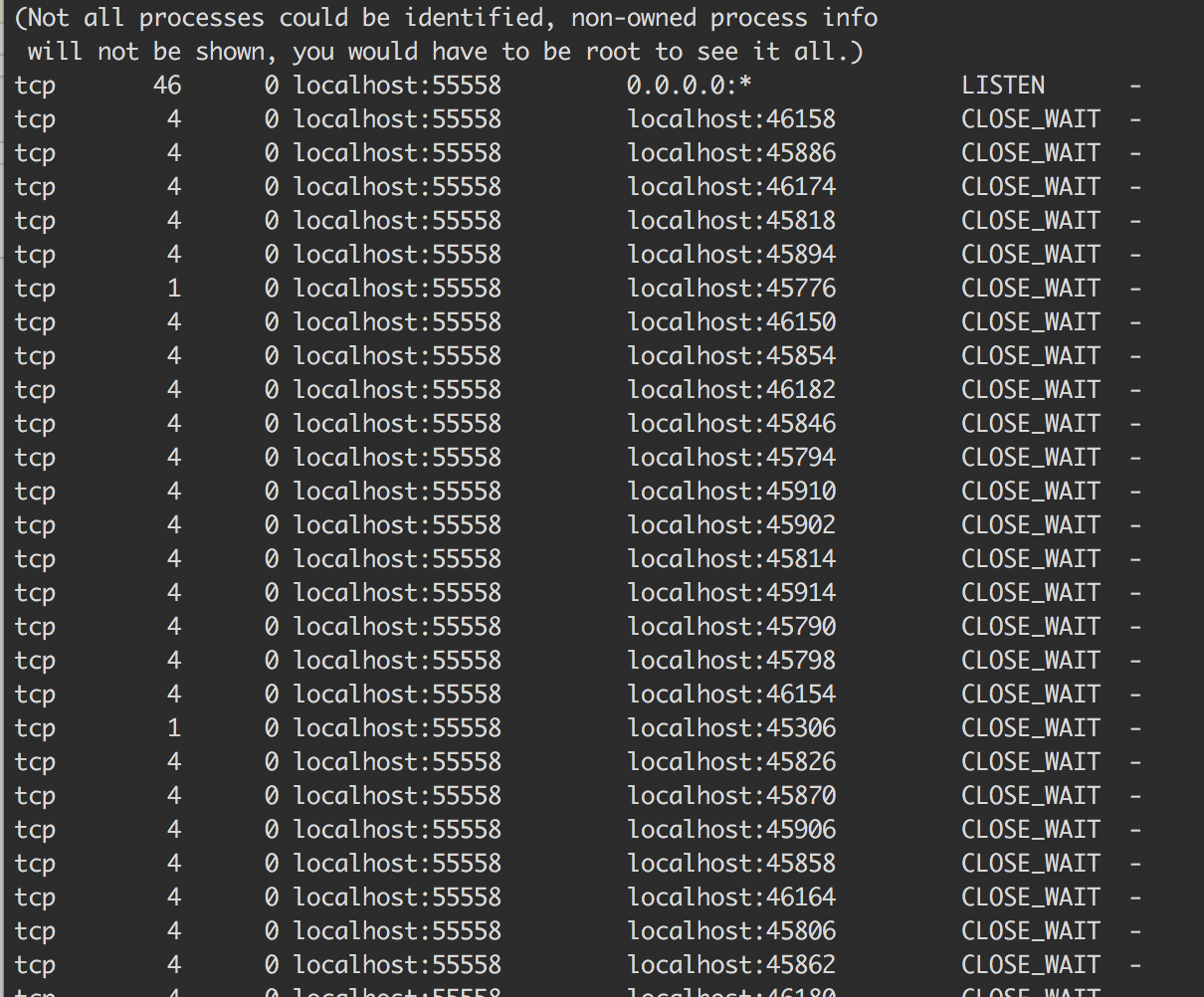
any idea of that?
 fenjuly
All 23 comments
CLOSE_WAIT is a normal status.
I don't think your problem is related to local port. Make sure the background service of shadowsocks is not killed by your system, which is a common issue for Samsung devices.
 madeye
on 15 Oct 2017
madeye
on 15 Oct 2017
Do you install "Brevent(黑域)"? I've same issue here, also in Samsung note 8.
After the network lost connection, i have to force stop the ss, simple disconnect and re-connect in ss is useless. But if i change the local port in ss config and connect, without force stop the ss, network comes back to normal.
Now i uninstall brevent, and it seems that the ss work fine, but more observation is needed. So if you install brevent too, maybe you could try uninstall it.
 bronco
on 15 Oct 2017
bronco
on 15 Oct 2017
我就想问各位大侠敢不敢不说英文,直接中文OK? :)
 925001777
on 15 Oct 2017
925001777
on 15 Oct 2017
@bronco No, I havn't installed Brevent. Is there still no trouble with your ss after uninstalling the Brevent?
fenjuly
on 16 Oct 2017
@fenjuly Until now, seems everything works as expected. But even with Brevent installed, the network may works well for few days, so i could not confirm that the network issue is caused by Brevent.
Anyway, if you didn't installed Brevent, maybe it is your misconfiguration.
There are several items of setting you should config:
- Smart Manager-->Battery-->Unmonitored apps;
- Smart Manager-->App management-->Manage Autorun;
Besides, if you add ss into Security Folder/MyKnox, you need add the ss-secured(the ss in Security Folder) into white list as well.
bronco
on 16 Oct 2017
@bronco I checked my battery setting, and found that ss was monitored.
now, I add ss into unmonitored list. I will continue to observe the performance.
Thanks for your advice.
fenjuly
on 16 Oct 2017
might be relevant #1414
 HankAviator
on 16 Oct 2017
HankAviator
on 16 Oct 2017
@bronco Even I added ss into battert unmonitored list, the phone still lost network connection.
fenjuly
on 17 Oct 2017
@fenjuly Well, after i uninstalled the brevent, the ss works just fine. So maybe you could using logcat to get some log? Or uninstall and reinstall the ss?
Besides, Have you update the system to the latest version? I'm using QI9 now.
bronco
on 18 Oct 2017
Any solution? My Note8 can't use shadowsocks too. Shadowsocks will work normally for only several minutes after restarting phone each time. Then the network will broken. I have added ss to battery unmointored list and autorun list but there is no effect. In addition, my computer works well.
 TheCGDF
on 21 Oct 2017
TheCGDF
on 21 Oct 2017
alfter a few weeks's test, I found that there are two way to solve the "connection problem".
1.chage the local port (but after a while, ss would lost the connection again)
2.when lost network,
1)close the ss
2)then kill the ss in app manager
3)reopen the ss and try to reconnect(do not need to change local port)
alter these steps, I found ss would work normally for long time until I close it next time!
fenjuly
on 6 Nov 2017
@fenjuly I think you may submit this issue to Samsung. It looks they messed up the local sockets.
If possible, try any AOSP ROMs instead of Samsung's, since we never saw this kind of issue on an AOSP system.
madeye
on 6 Nov 2017
@fenjuly So sad that this problem is still exists in my note8😭, although it only appears in some specific conditions, which i have no clue at all. Force stop and re-connect can fix the problem.
In my former S7E, everything works fine. So this issue may relates to note8's ROM or the new Smart Manager. It's said that the new Android OREO will be published in early 2018 by Samsung, so good luck to all of us.
bronco
on 6 Nov 2017
So sad not to see the precise solution.
 Mugenxxx
on 15 Nov 2017
Mugenxxx
on 15 Nov 2017
Please try this APK: https://www.dropbox.com/s/yalz5oo0sdtp7v8/shadowsocks-nightly-4.4.0.apk
madeye
on 10 Dec 2017
@madeye I have tried this apk, but the bug was not fixed.
fenjuly
on 10 Dec 2017
Seems the new version(4.4.x) works great in my note8.
bronco
on 26 Dec 2017
I've met this problem with my note8 as well, it bothers me a lot and I'm going crazy……
 AltanW
on 6 Jan 2018
AltanW
on 6 Jan 2018
me too
 lifeva
on 26 Jan 2018
lifeva
on 26 Jan 2018
4.4.6still have this problem
lifeva
on 26 Jan 2018
@lifeva @AltanW @SoDa-GitHub @fenjuly
I also got this problem today , but I have a solution seems PRECISE :
SETTINGS -> GENERAL MANAGEMENT -> Reset -> Reset network settings
Take a deep breath , this is very important . Hands together , or be fail !
The Free World come back !!!
 evenardo
on 3 Feb 2018
evenardo
on 3 Feb 2018
i renamed the applicationId and package name("com.github.shadowsocks") and tested the new apk for about one week in my Samsung phone. the abnormal phenomena never appeared again even once.
i believe that Samsung's ROM is detecting app's name and doing some malicious activity.
so is MIUI.
TheCGDF
on 15 Nov 2018
I had a similar situation but with a few differences. If I set using the VPN for all connections the SS would work fine, but if not, the app would have the same problem as above.
I found an ez way to fix it. There's a system setting for VPN to make it ALWAYS open. I don't know its English name but it should be found in the VPN settings. The system had no reason to kill an always opening app, I think.
Samsung S8, HK version.
 guangmuzhu
on 26 Nov 2018
guangmuzhu
on 26 Nov 2018
Related issues
 mahdiG
·
4Comments
mahdiG
·
4Comments
 libook
·
4Comments
libook
·
4Comments
 Mygod
·
5Comments
Mygod
·
5Comments
 KlansyMsniv
·
3Comments
KlansyMsniv
·
3Comments
 jbxiaoyu
·
4Comments
jbxiaoyu
·
4Comments
Most helpful comment
alfter a few weeks's test, I found that there are two way to solve the "connection problem".
1.chage the local port (but after a while, ss would lost the connection again)
2.when lost network,
1)close the ss
2)then kill the ss in app manager
3)reopen the ss and try to reconnect(do not need to change local port)
alter these steps, I found ss would work normally for long time until I close it next time!