Sfdx-git-delta: sfdx sgd:source:delta --to --Dev --from --master --output . does not work
sfdx sgd:source:delta --to --Dev --from --master --output . the command does not work .
Can you tell me how to use to get the difference between 2 branches
 lcee-info
All 8 comments
Hi @lcee-info !
Thanks for your interest on the plug-in.
Have been following the steps in the readme in order to use the plug-in ?
How can we reproduce the issue on our side ? Please détail the steps, providing information on your own environment is helpful too (npm version, nose version, sfdx version, sgd version at least)
 scolladon
on 2 Jun 2021
scolladon
on 2 Jun 2021
Hi @scolladon,
I have followed the step in the readme, I can use
1.sfdx sgd:source:delta --to HEAD --from HEAD^ --output .
2.sfdx sgd:source:delta --to fbc3ade6 --from 61f235b1 --output .
With the 2 scripts, I can get the different infos in package.xml.
But I can not use the
3.sfdx sgd:source:delta --to --Dev --from --master --output . The branch name does not get any different infos back in package.xml
And Now I use the
sfdx sgd:source:delta --to HEAD --from 61f235b1 --output . Mix 1 and 2 script to solve my requirement. But every time I need to give the SHA number.
If the script sfdx sgd:source:delta --to --Dev --from --master --output . can work ,will be more convenient to solve my requirement.
And the environment info is:
npm -v 7.13.0
node -v v16.2.0
sfdx -v sfdx-cli/7.103.0 linux-x64 node-v16.2.0
I can get the sgd info , because I dont know how to get it with cmd
[root@slave ~]# sgd -v
-bash: sgd: command not found
[root@slave ~]# sgd:source:delta
-bash: sgd:source:delta: command not found
[root@slave ~]# sfdx-git-delta
-bash: sfdx-git-delta: command not found
[root@slave ~]# sfdx-git-delta -v
-bash: sfdx-git-delta: command not found
[root@slave ~]# sfdx delta
› Warning: delta is not a sfdx command.
That's all, I hope anything you can help me to solve my problem, thank you very much.
lcee-info
on 3 Jun 2021
Thanks for those information.
Could you try the following command :
sfdx sgd:source:delta -t Dev -f master
scolladon
on 3 Jun 2021
Hi @scolladon
It does not work with sfdx sgd:source:delta -t Dev -f master. You can see the screenshot

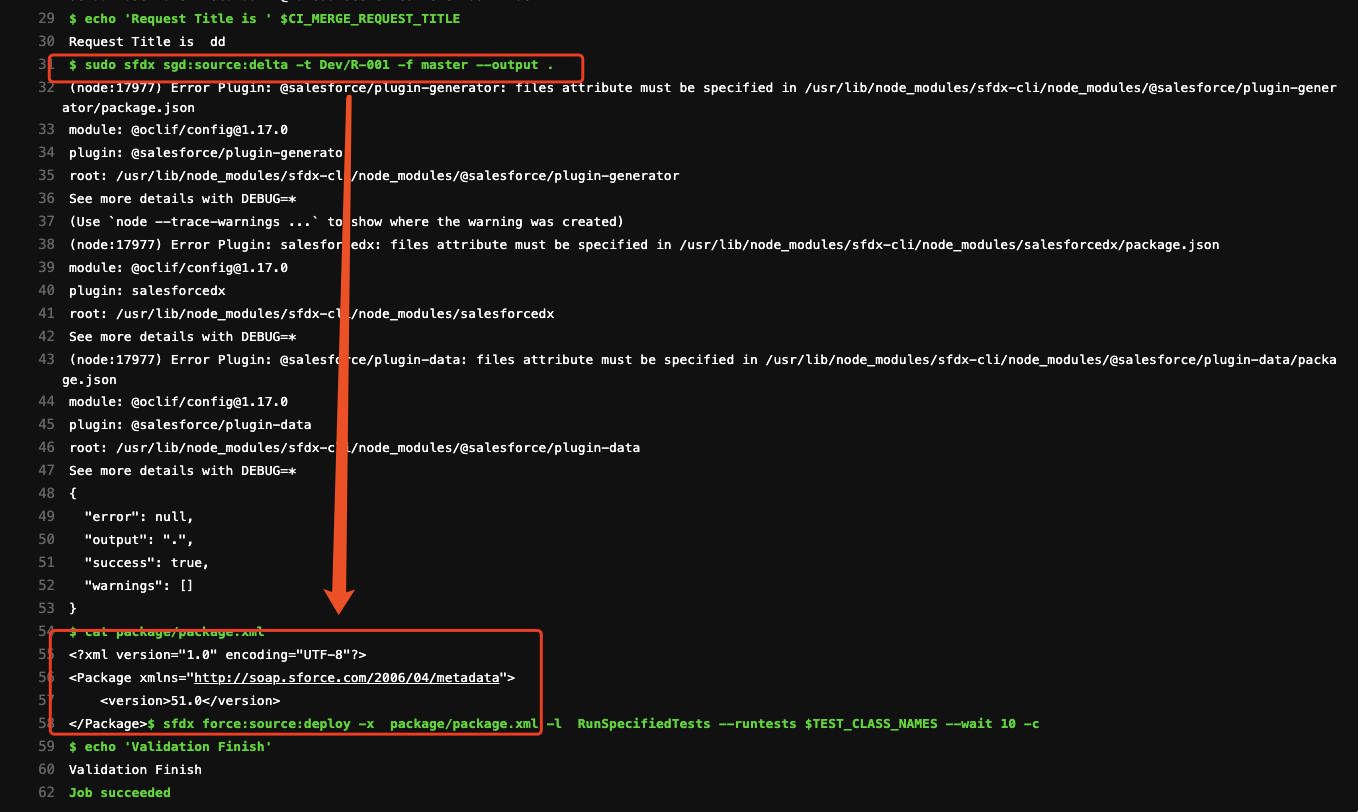
It worked with sfdx sgd:source:delta --to HEAD --from 61f235b1 --output . You can see the screenshot

lcee-info
on 3 Jun 2021
Ok, then could you try by escaping with double quote (") the parameter when they are git alias or branch name ?
sfdx sgd:source:delta -t "Dev/branch" -f "master"
Maybe the slash is not welcomed by the terminal you're using
scolladon
on 3 Jun 2021
@lcee-info any information about this issue ?
scolladon
on 14 Jun 2021
@lcee-info I've used SGD for a similar use-case in GitLab, so maybe this would help you:
Assuming that you're trying to run a delta between what's in the branch of the Merge Request, and the master branch, here are the commands I was using:
  script:
    - git fetch origin "+refs/heads/*:refs/remotes/origin/*"
    - export LAST_DEPLOYED_COMMIT=$(git show-ref -s master)
    - sfdx sgd:source:delta -t HEAD -f $LAST_DEPLOYED_COMMIT -r . -o .
The git fetch command is needed in GitLab in order to have access to any other branch than the one in the Merge Request.
Could you give it a try and let us know if it works better for you?
 mehdisfdc
on 25 Jun 2021
mehdisfdc
on 25 Jun 2021
@mehdisfdc @scolladon I was facing the same issue. This worked as a charm! Thanks a ton!
 VenkatAmiya
on 28 Jun 2021
VenkatAmiya
on 28 Jun 2021
Related issues
 arafesthain
·
9Comments
arafesthain
·
9Comments
 alexmodis
·
4Comments
alexmodis
·
4Comments
 nickytorstensson
·
6Comments
nickytorstensson
·
6Comments
 jjulicher
·
6Comments
alexmodis
·
8Comments
jjulicher
·
6Comments
alexmodis
·
8Comments
Most helpful comment
@lcee-info I've used SGD for a similar use-case in GitLab, so maybe this would help you:
Assuming that you're trying to run a delta between what's in the branch of the Merge Request, and the master branch, here are the commands I was using:
The git fetch command is needed in GitLab in order to have access to any other branch than the one in the Merge Request.
Could you give it a try and let us know if it works better for you?