Sfdx-git-delta: [ignore file doesn't work]
[x] does the current repository is fully deployable at the commit sha given to the from parameter of the command ?
## What is the problem
Unable to ignore a directory with sgd -i
What is parameter and their value you used
sfdx sgd:source:delta -d -t HEAD -f origin/develop -r /home/vsts/work/1/salesforce_repo -i /home/vsts/work/1/salesforce_repo/.forceignore -o output
the force ignore file :
/force-app/azurePipeline/*
What is the expected result
All files and dir in azure pipeline directory are ignored.
Here the directory structure :

What is the actual result
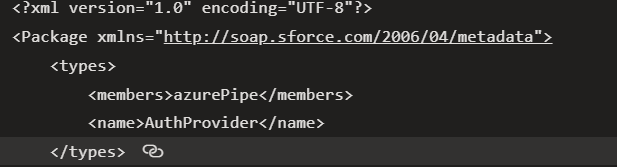
_(Write your answer here.)_
Steps to reproduce
- ignore a force-app subdirectory
- and see that output contains a file from the ignored dir
Execution context
Node version :
v14.15.1
Npm version :
6.14.8
SGD:
sfdx-git-delta 4.1.0

**Operating System:**
Linux Ubuntu 18.04
 alexmodis
All 8 comments
Hello @alexmodis
Thanks for this issue.
I'll take ownership of it and I'll do my best to find a suitable solution (maybe for christmas)
Seb
 scolladon
on 11 Dec 2020
scolladon
on 11 Dec 2020
New release v4.1.1 is available 🎉
scolladon
on 22 Dec 2020
@scolladon don't know if we can reopen this one ?
Same problem.
My forceignore :
# .forceignore v2
force-app/azurePipeline/*
force-app/recycledBin/*
force-app/installedPackages/*
And the generated package.xml:
    <types>
        <members>APXTConga4</members>
        <members>APXT_BPM</members>
        <members>EDQ</members>
        <members>SFKEYS</members>
        <members>SK</members>
        <members>limits</members>
        <members>ltngsharing</members>
        <members>sf_chttr_apps</members>
        <members>sf_com_apps</members>
        <members>sfadminapps</members>
        <members>sites_reporting</members>
        <name>InstalledPackage</name>
    </types>
SGD command:
sfdx sgd:source:delta -d -t HEAD -f 2020_GR1.0 -r /home/vsts/work/1/salesforce_repo -i /home/vsts/work/1/salesforce_repo/.forceignore -o output
alexmodis
on 22 Jan 2021
Hi @alexmodis !
Sure, let's reopen it.
Which version of sgd are you using ?
Seb
scolladon
on 22 Jan 2021
Hi there :)
sfdx-git-delta 4.2.0
alexmodis
on 22 Jan 2021
Hi @alexmodis,
I tried to reproduce locally with a similar use case and it seems I cannot reproduce it, everything is working fine on my side (v4.2.0).
Maybe changing the ignore file to something like that could solve your problem (even if the way you wrote it is fine and is working on my computer) ?
# .forceignore v2
**/force-app/azurePipeline
**/force-app/recycledBin
**/force-app/installedPackages
Or maybe the installedPackages is located under another folder (force-app/main/default perhaps) ?
My first thought was maybe an issue with path context of execution. So I tried multiple ways to call the command line (with relative path and with absolut path) and multiple way to write the ignore file, without reproducing and consistently having the right result.
Could you send me privately a reproduction step with a dummy repository created for the occasion please ?
Thanks for your help
Seb
scolladon
on 24 Jan 2021
Hi @scolladon,
look like a bad copy paste on my side for installedPackages... indeed the path was wrong :'(
As the others directories was working it was obviously this!! SORRY for this one..
Thanks
alexmodis
on 25 Jan 2021
@alexmodis
No problem at all !!
Thanks for your help on making this product better
Seb
scolladon
on 25 Jan 2021
Related issues
alexmodis
·
8Comments
 arafesthain
·
9Comments
arafesthain
·
9Comments
 welhorr
·
4Comments
arafesthain
·
9Comments
welhorr
·
4Comments
arafesthain
·
9Comments
 ashishshukla38
·
4Comments
ashishshukla38
·
4Comments
Most helpful comment
Hello @alexmodis
Thanks for this issue.
I'll take ownership of it and I'll do my best to find a suitable solution (maybe for christmas)
Seb