Seurat: Set the X axis for FeaturePlot
I am trying to use FeaturePlot to show the difference in a gene between a control and a mutant (in different plots). The problem is that the control X axis is from -50 to 50, and the mutant starts at -20. I would like to set the x axis value to make it comparable but xlim doesn't work. Is there a way to do this?
 lvila
lvila
All 12 comments
Would you mind posting the output tSNE plot for each FeaturePlot? Are these two separate tSNE embeddings?
 ShanSabri
on 28 Nov 2018
ShanSabri
on 28 Nov 2018
These are two separate tSNE plots featuring a gene. I am just showing the same gene on each one of them to compare them. Top is control and bottom is mutant. The x axis have different values that I haven't been able to change.
lvila
on 28 Nov 2018
But if they are two completely different embeddings then why would you want to extend out the x-axis? By default the full embedding is centered to the plot. Expanding the limits of the axis will not show additional data. To be clear, tSNE plots aren't easily interpretable in terms of the axes/units of the original, high-dimensional data. So I wouldn't try to interpret a tSNE plot quantitatively; t-SNE is just a visualization technique, nothing more.
ShanSabri
on 29 Nov 2018
Yes, but to show a control and a mutant and be comparable I would need to show that whatever population the control has at -50 is not in the mutant. The absence of that population is the reason why the mutant axis starts at -20. That's why I am trying to set the value of x and make it the same.
For example, I was able to do this with the TSNEPlot function:
TSNEPlot(ctrl.subset, do.return=TRUE) + xlim (c(-50, 50))
TSNEPlot(mut.subset, do.return=TRUE) + xlim (c(-50, 50))
I would need to show that whatever population the control has at -50 is not in the mutant.
tSNE is stochastic. If these are really two completely independent embeddings then there is no reason to assume that the same population found in both embeddings will lie in the same position. In fact, it is highly unlikely.
ShanSabri
on 29 Nov 2018
They are not completely independent. The original file is an aggregate file and I separated them with SubsetData. So the tSNE actually lines up.
lvila
on 29 Nov 2018
Have you tried coord_cartesian instead of xlim? It's similar, but operates differently so I think it'll work better. Also try FeatureHeatmap, setting the group.by argument to the metadata column differentiating between your mutants and controls.
 mojaveazure
on 29 Nov 2018
mojaveazure
on 29 Nov 2018
I think the problem is that FeaturePlot is not returning a ggplot2 so I can't use those arguments. For example, if I try:
FeaturePlot(object = mut.subset,
features.plot = "gene1",
cols.use = c("grey", "blue"), do.return = TRUE,
reduction.use = "tsne") + xlim (c(-50, 50))
It returns as NULL.
If I do it inside the FeaturePlot:
FeaturePlot(object = mut.subset,
features.plot = "gene1",
cols.use = c("grey", "blue"), do.return = TRUE,
reduction.use = "tsne", coord_cartesian(xlim = c(-50, 50)))
it throws an error:
Error in .subset2(x, name) :
wrong arguments for subsetting an environment
Trying the same thing using xlim as an argument to FeaturePlot:
FeaturePlot(object = mut.subset,
features.plot = "gene1",
cols.use = c("grey", "blue"), do.return = TRUE,
reduction.use = "tsne", xlim = c(-50, 50))
also throws an error:
Error in FeaturePlot(object = mut.subset, features.plot = "gene1", :
unused argument (xlim = c(-50, 50))
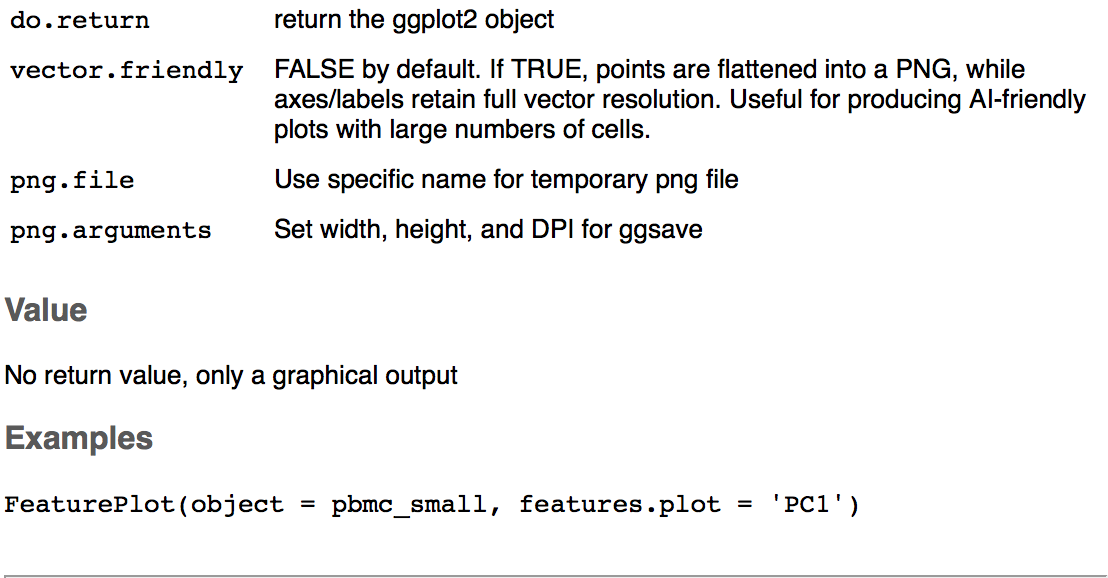
It's confusing because it says you can use the do.return argument but in value it says it's only a graphical output. I think this is why the arguments used to modify the ggplot2 that for example work with TSNEPlot, don't work with FeaturePlot.
lvila
on 29 Nov 2018
I looked at the source code for FeaturePlot and found that it doesn't actually return a ggplot2 object directly; instead it returns a _list_ of ggplot2 objects. The following code works as expected:
plist <- FeaturePlot(object = mut.subset,
features.plot = c("gene1", "gene2","gene3"),
cols.use = c("grey", "blue"), do.return = TRUE,
reduction.use = "tsne")
plist[[1]] + xlim(c(-50,50))
I know v3 is quite new but I'm having a similar problem with keeping axes fixed when splitting out and none of the above solutions worked. Any ideas?
 mjdapper
on 11 Apr 2019
mjdapper
on 11 Apr 2019
Hi,
One way to achieve this in v3 is as follows:
plots <- FeaturePlot(object = pbmc_small, features = rownames(pbmc_small)[1:6], combine = FALSE)
# replace arguments in xlim and ylim with the fixed limits you want
plots <- lapply(X = plots, FUN = function(p) p + xlim(c(0, 25)) + ylim(c(-25, 0)))
CombinePlots(plots = plots)
Alternative, we've found the patchwork package to be quite useful for this sort of thing too, although it's not on CRAN yet.
plots <- FeaturePlot(object = pbmc_small, features = rownames(pbmc_small)[1:6], combine = FALSE)
patchwork::wrap_plots(plots) * xlim(c(0, 50))
 andrewwbutler
on 16 Apr 2019
andrewwbutler
on 16 Apr 2019
Related issues
 kysbbubbu
·
3Comments
kysbbubbu
·
3Comments
 RuiyangLiu94
·
3Comments
RuiyangLiu94
·
3Comments
 htc502
·
3Comments
htc502
·
3Comments
 sarahwajid
·
3Comments
sarahwajid
·
3Comments
 milanmlft
·
3Comments
milanmlft
·
3Comments
Most helpful comment
Hi,
One way to achieve this in v3 is as follows:
Alternative, we've found the patchwork package to be quite useful for this sort of thing too, although it's not on CRAN yet.