Settings-view: Fetching featured packages failed / Searching for "..." failed
Hi,
I'm running Atom 1.7.2 on Windows 10.
At 'Install Packages' it immediately says Fetching featured packages failed. with error message The system cannot find the path specified.
Searching for a package results in the same. Also, the installed packages view shows "Loading packages..." for every category but it never finishes loading.
From the console I got:
Fetching local packages failed. Error: Fetching local packages failed.
at C:\Users\Steven\AppData\Local\atom\app-1.7.2\resources\app.asar\node_modules\settings-view\lib\package-manager.js:103:21
at exit (C:\Users\Steven\AppData\Local\atom\app-1.7.2\resources\app.asar\node_modules\settings-view\lib\package-manager.js:73:16)
at triggerExitCallback (C:\Users\Steven\AppData\Local\atom\app-1.7.2\resources\app.asar\src\buffered-process.js:215:47)
at C:\Users\Steven\AppData\Local\atom\app-1.7.2\resources\app.asar\src\buffered-process.js:229:18
at Socket.<anonymous> (C:\Users\Steven\AppData\Local\atom\app-1.7.2\resources\app.asar\src\buffered-process.js:100:18)
at emitOne (events.js:82:20)
at Socket.emit (events.js:169:7)
at Pipe._onclose (net.js:469:12)
I checked my COMSPEC variable but that seems okay.
Any idea?
Thanks!
 sbont
sbont
All 24 comments
I'm getting the same issue. I added a custom package (following the Atom tutorial on creating the sourcefetch package), and now the packages pane just perpetually loads every item in it:

I've manually removed sourcefetch from the config folder, but that didn't change anything.
Here is the console output:
/Applications/Atom.app/Contents/Resources/app.asar/node_modules/settings-view/lib/installed-packages-panel.js:330 Fetching local packages failed. Error: Fetching local packages failed.
    at /Applications/Atom.app/Contents/Resources/app.asar/node_modules/settings-view/lib/package-manager.js:103:21
    at exit (/Applications/Atom.app/Contents/Resources/app.asar/node_modules/settings-view/lib/package-manager.js:73:16)
    at triggerExitCallback (/Applications/Atom.app/Contents/Resources/app.asar/src/buffered-process.js:215:47)
    at /Applications/Atom.app/Contents/Resources/app.asar/src/buffered-process.js:229:18
    at Socket.<anonymous> (/Applications/Atom.app/Contents/Resources/app.asar/src/buffered-process.js:100:18)
    at emitOne (events.js:95:20)
    at Socket.emit (events.js:182:7)
    at Pipe._onclose (net.js:477:12)
And a screenshot:

 benvenker
on 31 Aug 2016
benvenker
on 31 Aug 2016
I had the same issue and it was a nasty thing to tackle.
For me it was, that I had GraphViz installed. This mangled with my PATH-Variable and put quotes around its portion of the path. This totally confused the script that is used by Atom (C:\Users\<username>\AppData\Local\atom\app-1.10.2\resources\app\apm\bin\apm.cmd) to look for packages and updates.
Maybe you have a similar issue.
 walter76
on 15 Sep 2016
walter76
on 15 Sep 2016
@sbont Can you post your PATH or confirm if something in that environment variable has quotes?
Nothing in there should and if it does and you have github desktop installed but not a git in your path we attempt to dynamically add git to the path however it failed if the path was malformed by having quotes. We've fixed this in an upcoming release but in the mean time removing quotes around the offending path solves it.
 damieng
on 15 Sep 2016
damieng
on 15 Sep 2016
Hi, I solved this issue by removing all double-quote from PATH variables.
C:\ (...) ;"C:\Program Files (x86)\NUnit 2.6.2\bin";C:\Program Files (...)
became
C:\ (...) ;C:\Program Files (x86)\NUnit 2.6.2\bin;C:\Program Files (...).
 kamihanran
on 23 Sep 2016
kamihanran
on 23 Sep 2016
I guess I should've clarified that this issue is occurring on Mac OS X v10.11.6. Some more info:
- On the Install menu, i see this under _Featured Themes_:

And when I open that file, this is what I see:
#!/bin/bash

set -e

initialCwd=`pwd -P`

apmPath=$0
builtin cd "`dirname "$apmPath"`"
binDir=`basename "$apmPath"`

# Detect node binary name
osName=`uname -s`
if [ "${osName:0:10}" == 'MINGW32_NT' ]; then
  nodeBin="node.exe"
else
  nodeBin="node"
fi

while [ -L "$binDir" ]
do
  binDir=`readlink "$binDir"`
  builtin cd "`dirname "$binDir"`"
  binDir=`basename "$binDir"`
done

binDir=`pwd -P`

maybe_node_gyp_path="$binDir"/../node_modules/.bin/node-gyp
if [ -e "$maybe_node_gyp_path" ]
then
  export npm_config_node_gyp="$maybe_node_gyp_path"
fi

builtin cd "$initialCwd"
"$binDir/$nodeBin" "$binDir/../lib/cli.js" "$@"
Beyond what I pasted in my previous comment, I don't have any other info that I'm aware of to provide, but I'm still experiencing the issue.
benvenker
on 28 Sep 2016
I also just tried a complete uninstall using AppCleaner and then a reinstall, and no change. It's even remembering all my previous configs.
benvenker
on 28 Sep 2016
UPDATE: I found https://github.com/atom/atom/issues/1874 and I can confirm that if I open from terminal things work normally. It's only if I open from Alfred/Spotlight that I have the issue.
benvenker
on 28 Sep 2016
i'm having this same issue. Console is reporting the following:
Fetching local packages failed. Error: Fetching local packages failed.
    at C:\Users\USER\AppData\Local\atom\app-1.9.9\resources\app.asar\node_modules\settings-view\lib\package-manager.js:103:21
    at exit (C:\Users\USER\AppData\Local\atom\app-1.9.9\resources\app.asar\node_modules\settings-view\lib\package-manager.js:73:16)
    at triggerExitCallback (C:\Users\USER\AppData\Local\atom\app-1.9.9\resources\app.asar\src\buffered-process.js:215:47)
    at C:\Users\USER\AppData\Local\atom\app-1.9.9\resources\app.asar\src\buffered-process.js:229:18
    at Socket.<anonymous> (C:\Users\USER\AppData\Local\atom\app-1.9.9\resources\app.asar\src\buffered-process.js:100:18)
    at emitOne (events.js:95:20)
    at Socket.emit (events.js:182:7)
    at Pipe._onclose (net.js:477:12)
i've confirmed that my Environment Variables have no quotes. This issue surfaced after a recent update and was not a problem prior.
Operating system: Window 8.1 Enterprise
System type: 64-bit Operating System, x64-based processor
Atom version: 1.9.9
 alittlerabbi
on 28 Sep 2016
alittlerabbi
on 28 Sep 2016
I'm experiencing this issue.
OS: Windows 10 Professional
System type: 64-bit Operating System, x64-based processor
Atom version: 1.10.2
C:\Program Files (x86)\Atom\resources\app.asar\node_modules\settings-view\lib\installed-packages-pa…:330 Fetching local packages failed. Error: Fetching local packages failed.
    at C:\Program Files (x86)\Atom\resources\app.asar\node_modules\settings-view\lib\package-manager.js:103:21
    at exit (C:\Program Files (x86)\Atom\resources\app.asar\node_modules\settings-view\lib\package-manager.js:73:16)
    at triggerExitCallback (C:\Program Files (x86)\Atom\resources\app.asar\src\buffered-process.js:215:47)
    at C:\Program Files (x86)\Atom\resources\app.asar\src\buffered-process.js:229:18
    at Socket.<anonymous> (C:\Program Files (x86)\Atom\resources\app.asar\src\buffered-process.js:100:18)
    at emitOne (events.js:95:20)
    at Socket.emit (events.js:182:7)
    at Pipe._onclose (net.js:477:12)(anonymous function) @ C:\Program Files (x86)\Atom\resources\app.asar\node_modules\settings-view\lib\installed-packages-pa…:330
C:\Program Files (x86)\Atom\resources\app.asar\node_modules\settings-view\lib\main.js:126 Fetching outdated packages and themes failed. Error: Fetching outdated packages and themes failed.
    at C:\Program Files (x86)\Atom\resources\app.asar\node_modules\settings-view\lib\package-manager.js:177:21
    at exit (C:\Program Files (x86)\Atom\resources\app.asar\node_modules\settings-view\lib\package-manager.js:73:16)
    at triggerExitCallback (C:\Program Files (x86)\Atom\resources\app.asar\src\buffered-process.js:215:47)
    at C:\Program Files (x86)\Atom\resources\app.asar\src\buffered-process.js:229:18
    at Socket.<anonymous> (C:\Program Files (x86)\Atom\resources\app.asar\src\buffered-process.js:100:18)
    at emitOne (events.js:95:20)
    at Socket.emit (events.js:182:7)
    at Pipe._onclose (net.js:477:12)
C:\Program Files (x86)\Atom\resources\app.asar\node_modules\settings-view\lib\installed-packages-pa…:331 Uncaught (in promise) TypeError: Cannot read property 'hide' of undefined
    at C:\Program Files (x86)\Atom\resources\app.asar\node_modules\settings-view\lib\installed-packages-panel.js:331:31
C:\Program Files (x86)\Atom\resources\app.asar\node_modules\settings-view\lib\package-manager.js:177 Uncaught (in promise) Error: Fetching outdated packages and themes failed.
    at C:\Program Files (x86)\Atom\resources\app.asar\node_modules\settings-view\lib\package-manager.js:177:21
    at exit (C:\Program Files (x86)\Atom\resources\app.asar\node_modules\settings-view\lib\package-manager.js:73:16)
    at triggerExitCallback (C:\Program Files (x86)\Atom\resources\app.asar\src\buffered-process.js:215:47)
    at C:\Program Files (x86)\Atom\resources\app.asar\src\buffered-process.js:229:18
    at Socket.<anonymous> (C:\Program Files (x86)\Atom\resources\app.asar\src\buffered-process.js:100:18)
    at emitOne (events.js:95:20)
    at Socket.emit (events.js:182:7)
    at Pipe._onclose (net.js:477:12)
I'm using the portable version.
 emileber
on 28 Sep 2016
emileber
on 28 Sep 2016
My path to apm was: C:\Program Files (x86)\Atom\resources\app\apm\bin and it worked since Atom ~1.7
I changed this path to: C:\PROGRA~2\Atom\resources\app\apm\bin and now it works...
emileber
on 28 Sep 2016
How did atom get installed into this path?
On Wed, Sep 28, 2016, 1:59 PM Emile Bergeron [email protected]
wrote:
My path to apm was: C:\Program Files (x86)Atom\resources\appapm\bin and
it worked since Atom ~1.7I changed this path to: C:\PROGRA~2Atom\resources\appapm\bin and now it
works...—
You are receiving this because you commented.
Reply to this email directly, view it on GitHub
https://github.com/atom/settings-view/issues/798#issuecomment-250297800,
or mute the thread
https://github.com/notifications/unsubscribe-auth/AAHQp7KbJU5no_uPhitzJTSNqyw1oh4Mks5qutUZgaJpZM4I0M14
.
damieng
on 28 Sep 2016
The Atom executable fails on windows 10 when the path to the install directory is too long. Despite the closed issue atom/atom#5109, I'm still unable to install Atom through the installer, so I used the portable version and dumped it besides my other app.
emileber
on 29 Sep 2016
If you are using apm from the windows console, try running it from git shell for windows.
 catawbasam
on 20 Oct 2016
catawbasam
on 20 Oct 2016
Workaround Windows Only [Version 10]

If anyone is getting the above error \Microsoft was unexpected at this time. and failing to load packages / themes under settings, try the solution below, this worked for me
- Go to C:\Users\%USERNAME%AppData\Local\atom\app-1.11.2\resources\appapm\bin
- Edit apm.cmd
- Move the lines in red box after parenthesis as in screenshot below

 PrajeeshE
on 21 Oct 2016
PrajeeshE
on 21 Oct 2016
This happens if your PATH environment variables contains a " around any of
the entries. Windows normally uses " around paths with spaces but it
should not be like this in PATH.
There is a workaround for this in the next version of apm.
On Fri, Oct 21, 2016 at 6:48 AM Prajeesh [email protected] wrote:
_Workaround Windows Only [Version 10]_
[image: 2016-10-21_1856]
https://cloud.githubusercontent.com/assets/13434074/19599972/9cb238a6-97c0-11e6-9bd5-786c531e58a4.png
If anyone is getting the above error _\Microsoft was unexpected at this
time._ and failing to load packages / themes under settings, try the
solution below, this worked for me
- Go to
C:\Users\%USERNAME%AppData\Local\atom\app-1.11.2\resources\appapm\bin- Edit _apm.cmd_
- Move the lines in red box after parenthesis as in screenshot below
[image: 2016-10-21_1914]
https://cloud.githubusercontent.com/assets/13434074/19600474/d3c21a12-97c2-11e6-88cc-8f8a0e5bc232.png—
You are receiving this because you commented.
Reply to this email directly, view it on GitHub
https://github.com/atom/settings-view/issues/798#issuecomment-255381579,
or mute the thread
https://github.com/notifications/unsubscribe-auth/AAHQpws87fhehcGryLi8VHpVv4UmMdtHks5q2MKYgaJpZM4I0M14
.
damieng
on 25 Oct 2016
Hi, guys. I have same problem with my atom editor & i fixed it myself. Now its working well. If anyone still facing such type of problem then must tell me, i really fix that issue.
 optmsshiv
on 1 Feb 2017
optmsshiv
on 1 Feb 2017
@PrajeeshE your solution worked for me using W7 and atom v 1.14.1
thanks!
 thalemn
on 10 Feb 2017
thalemn
on 10 Feb 2017
Haven't had this issue anymore lately.
Using 1.14.1 without any problems now.
Thanks for the hints & fixes!
sbont
on 13 Feb 2017
Had this issue this morning, after trying to get a more technical fix to work I gave up, re-ran my install.exe. Problem solved.
 OvertCoffee
on 8 Mar 2017
OvertCoffee
on 8 Mar 2017
This is ridiculous. Is there a fix for this or not?
 chuckboycejr
on 26 Dec 2017
chuckboycejr
on 26 Dec 2017
If you read the thread you will see it was caused by incorrect path
variables that we worked around about a year ago. If you are having an
problem please create a new issue with the appropriate details.
On Tue, Dec 26, 2017, 9:53 AM chuckboycejr notifications@github.com wrote:
This is ridiculous. Is there a fix for this or not?
—
You are receiving this because you commented.
Reply to this email directly, view it on GitHub
https://github.com/atom/settings-view/issues/798#issuecomment-353994772,
or mute the thread
https://github.com/notifications/unsubscribe-auth/AAHQpwVISGZBzjCxIW79wulnPzKWVI5Wks5tETKLgaJpZM4I0M14
.
damieng
on 26 Dec 2017
Can any help Me with this problam
Operator :Windos-7. 64bit
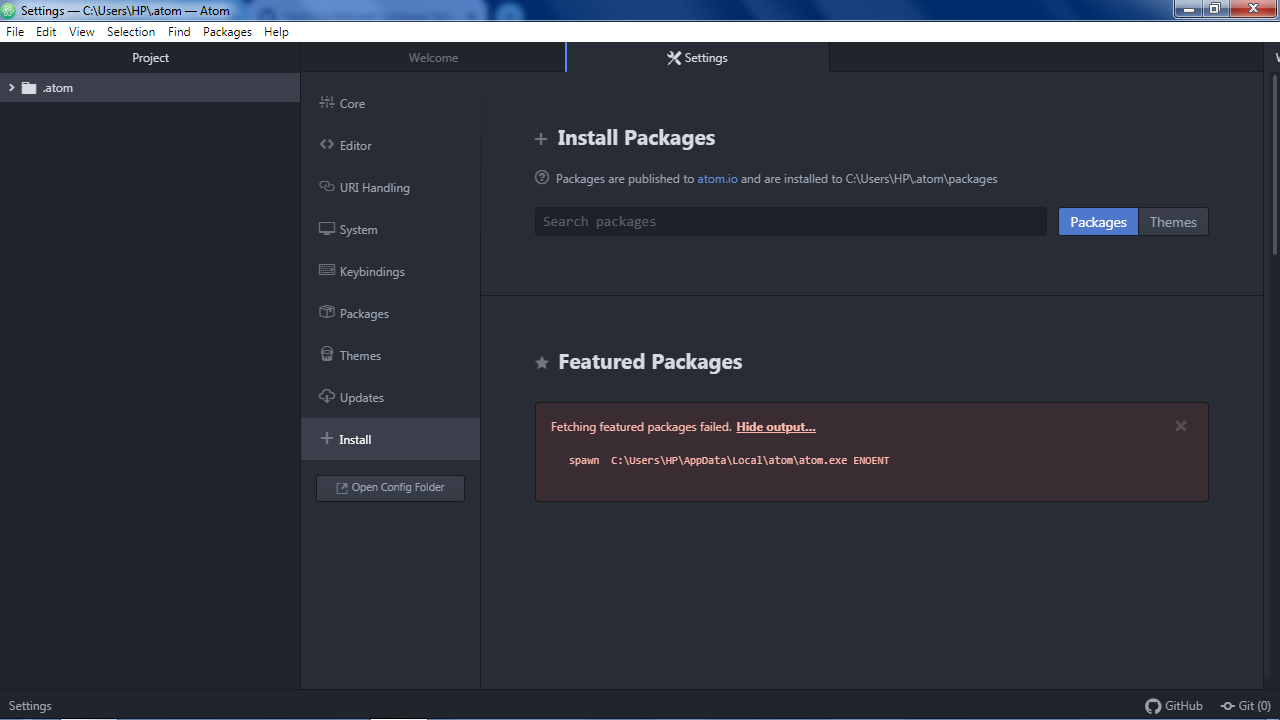
And This Is The Path It Shows
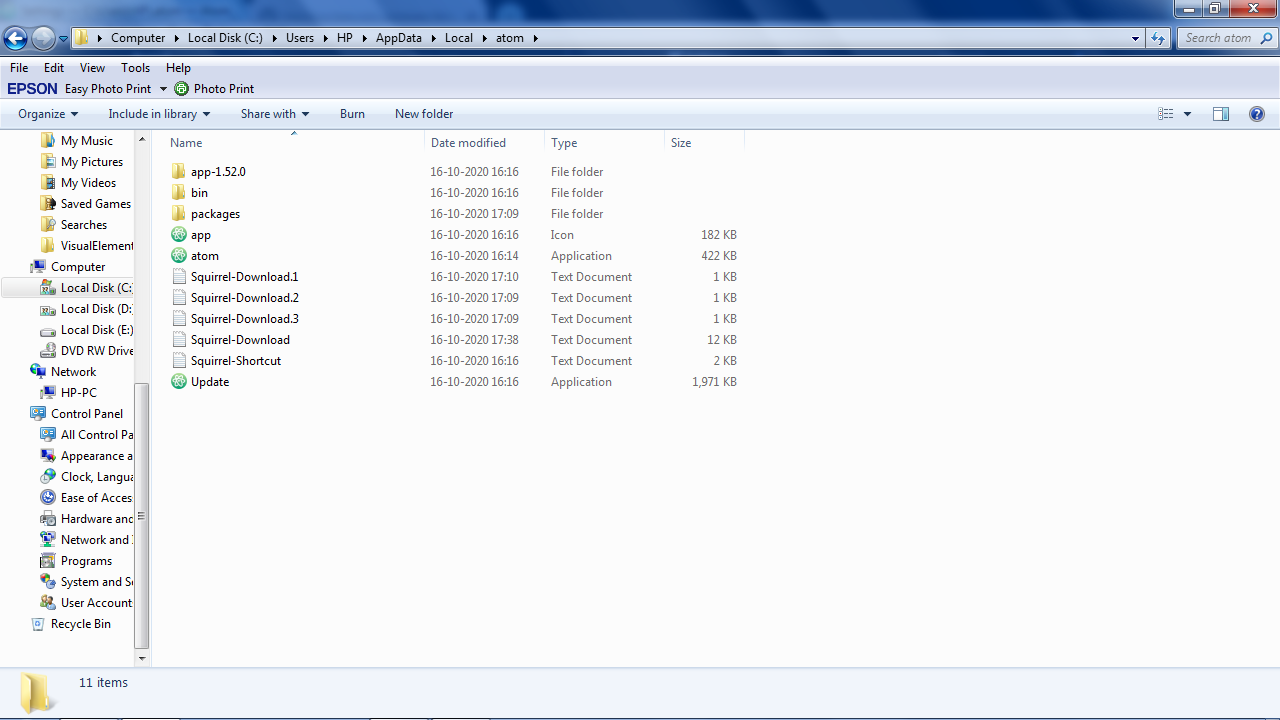
Same With Themes!
 Daksh235
on 16 Oct 2020
Daksh235
on 16 Oct 2020
Please help!!
Daksh235
on 16 Oct 2020
@Daksh235 you should open a new issus, this one was closed 3 years ago.
emileber
on 16 Oct 2020
Related issues
 kevinsawicki
·
4Comments
kevinsawicki
·
4Comments
 icetee
·
9Comments
icetee
·
9Comments
 Ben3eeE
·
4Comments
Ben3eeE
·
4Comments
 colin3dmax
·
7Comments
colin3dmax
·
7Comments
 jlangvand
·
12Comments
jlangvand
·
12Comments
Most helpful comment
Hi, I solved this issue by removing all double-quote from PATH variables.
C:\ (...) ;"C:\Program Files (x86)\NUnit 2.6.2\bin";C:\Program Files (...)became
C:\ (...) ;C:\Program Files (x86)\NUnit 2.6.2\bin;C:\Program Files (...).