Serving: Memory leak when reloading model config
Bug Report
Memory leak when reloading model config
System information
OS Platform and Distribution: ubuntu:18.04
TensorFlow Serving installed from: binary
TensorFlow Serving version: 2.1.0
Bug produced using TFS docker image: tensorflow/serving:2.1.0-gpu
Describe the Problem
Using the grpc model management endpoints to load and unload models, specifically calling the function ReloadConfigRequest, we've loaded 22 copies of the same model each with size 208MiB and proceeded to unload them.
When all the models were loaded docker stats showed ~10GiB in memory usage. We expected it to return close to the base memory usage when we unloaded them all.
But after unloading them, we still saw a usage of 8.153GiB. No additional changes have been made to the TFS code.
Exact Steps to Reproduce
- Pull Docker image
sudo docker pull tensorflow/serving:2.1.0-gpu - Run Docker image
sudo docker run -it --rm -v "/local/models:/models" -e MODEL_NAME=model_name tensorflow/serving:2.1.0-gpu - Have a separate window with tensorflow_serving_api==2.1.0 (binary)
- Add python client side grpc code to tensorflow_serving (shown below)
- Load model 22 (different copies of the same model) times using python client script
- Record memory usage
- Unload all models
- Record memory usage
Source code / logs
Server side logs
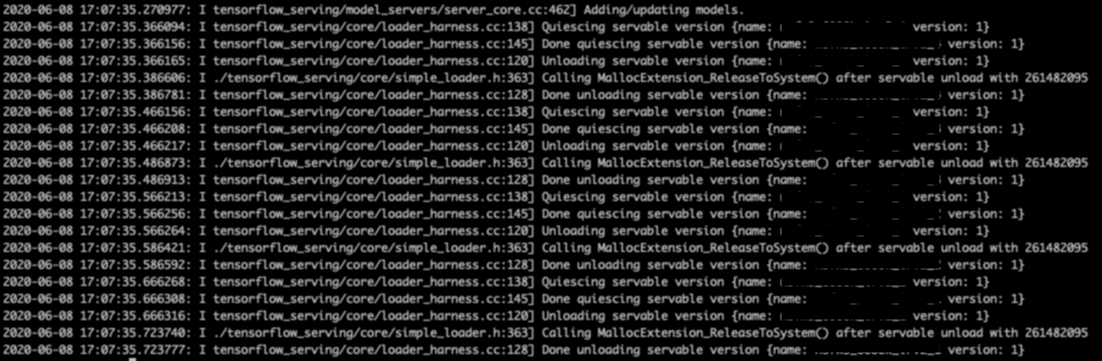
Grpc Client Side Code
import grpc
from tensorflow_serving.apis import model_service_pb2_grpc
from tensorflow_serving.config import model_server_config_pb2
from tensorflow_serving.apis import model_management_pb2

server_address = "0.0.0.0:1234" # Replace with address of your server

def handle_reload_config_request(stub):
    model_server_config = model_server_config_pb2.ModelServerConfig()
    request = model_management_pb2.ReloadConfigRequest()
    config_list = model_server_config_pb2.ModelConfigList()

    model_server_config.model_config_list.CopyFrom(config_list)
    request.config.CopyFrom(model_server_config)

    response = stub.HandleReloadConfigRequest(request)

    print("Response: %s" % response)


def run():
    with grpc.insecure_channel(server_address) as channel:
    stub = model_service_pb2_grpc.ModelServiceStub(channel)
    print("-------------Handle Reload Config Request--------------")
    handle_reload_config_request(stub)


if __name__ == '__main__':
    run()
 thomasdhc
All 18 comments
I cannot reproduce the issue following the steps. Attach the server side log I saw, which seems different comparing to the screen shot you provided.
Server side log:
2020-06-14 18:57:14.959220: I tensorflow_serving/model_servers/server_core.cc:464] Adding/updating models.
2020-06-14 18:57:15.040068: I tensorflow_serving/core/loader_harness.cc:138] Quiescing servable version {name: model version: 1538687196}
2020-06-14 18:57:15.040165: I tensorflow_serving/core/loader_harness.cc:145] Done quiescing servable version {name: model version: 1538687196}
2020-06-14 18:57:15.040186: I tensorflow_serving/core/loader_harness.cc:120] Unloading servable version {name: model version: 1538687196}
2020-06-14 18:57:15.058401: I ./tensorflow_serving/core/simple_loader.h:363] Calling MallocExtension_ReleaseToSystem() after servable unload with 123534814
2020-06-14 18:57:15.058440: I tensorflow_serving/core/loader_harness.cc:128] Done unloading servable version {name: model version: 1538687196}
2020-06-14 19:04:48.305008: I tensorflow_serving/model_servers/server_core.cc:464] Adding/updating models.
2020-06-14 19:04:57.627177: I tensorflow_serving/model_servers/server_core.cc:464] Adding/updating models.
2020-06-14 19:04:59.583243: I tensorflow_serving/model_servers/server_core.cc:464] Adding/updating models.
2020-06-14 19:05:01.173922: I tensorflow_serving/model_servers/server_core.cc:464] Adding/updating models.
2020-06-14 19:05:02.433362: I tensorflow_serving/model_servers/server_core.cc:464] Adding/updating models.
2020-06-14 19:05:03.683767: I tensorflow_serving/model_servers/server_core.cc:464] Adding/updating models.
2020-06-14 19:05:04.872638: I tensorflow_serving/model_servers/server_core.cc:464] Adding/updating models.
...
Could you also confirm if you have seen the similar issue for CPU models?
 shadowdragon89
on 14 Jun 2020
shadowdragon89
on 14 Jun 2020
We will take a look ASAP!
On Sun, Jun 14, 2020, 12:38 PM chaox notifications@github.com wrote:
I cannot reproduce the issue following the steps. Attach the server side
log I saw, which seems different comparing to the screen shot you provided.Server side log:
2020-06-14 18:57:14.959220: I
tensorflow_serving/model_servers/server_core.cc:464] Adding/updating models.
2020-06-14 18:57:15.040068: I
tensorflow_serving/core/loader_harness.cc:138] Quiescing servable version
{name: model version: 1538687196}
2020-06-14 18:57:15.040165: I
tensorflow_serving/core/loader_harness.cc:145] Done quiescing servable
version {name: model version: 1538687196}
2020-06-14 18:57:15.040186: I
tensorflow_serving/core/loader_harness.cc:120] Unloading servable version
{name: model version: 1538687196}
2020-06-14 18:57:15.058401: I
./tensorflow_serving/core/simple_loader.h:363] Calling
MallocExtension_ReleaseToSystem() after servable unload with 123534814
2020-06-14 18:57:15.058440: I
tensorflow_serving/core/loader_harness.cc:128] Done unloading servable
version {name: model version: 1538687196}
2020-06-14 19:04:48.305008: I
tensorflow_serving/model_servers/server_core.cc:464] Adding/updating models.
2020-06-14 19:04:57.627177: I
tensorflow_serving/model_servers/server_core.cc:464] Adding/updating models.
2020-06-14 19:04:59.583243: I
tensorflow_serving/model_servers/server_core.cc:464] Adding/updating models.
2020-06-14 19:05:01.173922: I
tensorflow_serving/model_servers/server_core.cc:464] Adding/updating models.
2020-06-14 19:05:02.433362: I
tensorflow_serving/model_servers/server_core.cc:464] Adding/updating models.
2020-06-14 19:05:03.683767: I
tensorflow_serving/model_servers/server_core.cc:464] Adding/updating models.
2020-06-14 19:05:04.872638: I
tensorflow_serving/model_servers/server_core.cc:464] Adding/updating models.
...Could you also confirm if you have seen the similar issue for CPU models?
—
You are receiving this because you are subscribed to this thread.
Reply to this email directly, view it on GitHub
https://github.com/tensorflow/serving/issues/1664#issuecomment-643812280,
or unsubscribe
https://github.com/notifications/unsubscribe-auth/AGJLNXPZWB3P6P2RGVJXNGTRWURL5ANCNFSM4NYVOLMQ
.
 maxockner1
on 14 Jun 2020
maxockner1
on 14 Jun 2020
Hey @shadowdragon89 ,
We've reproduced the bug using a model provided by Tensorflow. Please find the reproduction steps below.
1. Download and copy models then start TFS
TFS starts with one model loaded:
export BASE_PATH=~/tensorflow-serving-issue-1664 ;
mkdir -p  $BASE_PATH ;
cd $BASE_PATH
curl -O https://s3-us-west-2.amazonaws.com/aws-tf-serving-ei-example/inception.zip
unzip inception.zip

cd SERVING_INCEPTION
mv SERVING_INCEPTION SERVING_INCEPTION_0
cp -R SERVING_INCEPTION_0 SERVING_INCEPTION_1
cp -R SERVING_INCEPTION_0 SERVING_INCEPTION_2
cp -R SERVING_INCEPTION_0 SERVING_INCEPTION_3
cp -R SERVING_INCEPTION_0 SERVING_INCEPTION_4
cp -R SERVING_INCEPTION_0 SERVING_INCEPTION_5
cp -R SERVING_INCEPTION_0 SERVING_INCEPTION_6
cp -R SERVING_INCEPTION_0 SERVING_INCEPTION_7
cp -R SERVING_INCEPTION_0 SERVING_INCEPTION_8
cp -R SERVING_INCEPTION_0 SERVING_INCEPTION_9
cp -R SERVING_INCEPTION_0 SERVING_INCEPTION_10
sudo docker run -it --rm -v "${BASE_PATH}/SERVING_INCEPTION:/models" -e MODEL_NAME="SERVING_INCEPTION_0" tensorflow/serving:2.1.0-gpu
2. Client side python script
Exec into the TFS docker to setup client side code:
sudo docker exec -it <TFS_DOCKER_ID> bash
# Install python and tensorflow_serving_api
>> apt update
>> apt upgrade
>> apt install python2.7 python-pip
>> pip install --upgrade pip
>> pip install tensorflow_serving_api==2.1.0
Add following code to tfs_grpc_client.py:
import argparse
import grpc
from tensorflow_serving.apis import model_service_pb2_grpc
from tensorflow_serving.config import model_server_config_pb2
from tensorflow_serving.apis import model_management_pb2

server_address = "0.0.0.0:8500"

def handle_reload_config_request(stub, load_model):
    model_server_config = model_server_config_pb2.ModelServerConfig()
    request = model_management_pb2.ReloadConfigRequest()
    config_list = model_server_config_pb2.ModelConfigList()

    model_name = "SERVING_INCEPTION_"
    base_path = "/models/SERVING_INCEPTION_"
    model_platform = "tensorflow"

    if (load_model=='True'):
        for x in xrange(1,11):
            new_config = config_list.config.add()
            new_config.name = model_name + str(x)
            new_config.base_path = base_path + str(x)
            new_config.model_platform = model_platform

    model_server_config.model_config_list.CopyFrom(config_list)
    request.config.CopyFrom(model_server_config)

    response = stub.HandleReloadConfigRequest(request)

    print("Response: %s" % response)


def run(args):
    with grpc.insecure_channel(server_address) as channel:
    stub = model_service_pb2_grpc.ModelServiceStub(channel)
    print("-------------Handle Reload Config Request--------------")
    handle_reload_config_request(stub, args.load_model)


if __name__ == '__main__':
    parser = argparse.ArgumentParser()
    parser.add_argument("--load_model", type=str)
    args = parser.parse_args()
    run(args)
3. Load, unload and check memory usage
# Inside the TFS Docker
>> python tfs_grpc_client.py --load_model=True
# On a seperate terminal
sudo docker stats <TFS_DOCKER_ID> // Check memory usage when all models are loaded
# Inside the TFS Docker
>> python tfs_grpc_client.py --load_model=False
# On a seperate terminal
sudo docker stats <TFD_DOCKER_ID> // Check memory usage when all models are unloaded
4. Results we see
All models loaded:

All models unloaded:

thomasdhc
on 16 Jun 2020
Hey @shadowdragon89 ,
We've reproduced the bug using a model provided by Tensorflow. Please find the reproduction steps below.
1. Download and copy models then start TFS
TFS starts with one model loaded:export BASE_PATH=~/tensorflow-serving-issue-1664 ; mkdir -p $BASE_PATH ; cd $BASE_PATH curl -O https://s3-us-west-2.amazonaws.com/aws-tf-serving-ei-example/inception.zip unzip inception.zip cd SERVING_INCEPTION mv SERVING_INCEPTION SERVING_INCEPTION_0 cp -R SERVING_INCEPTION_0 SERVING_INCEPTION_1 cp -R SERVING_INCEPTION_0 SERVING_INCEPTION_2 cp -R SERVING_INCEPTION_0 SERVING_INCEPTION_3 cp -R SERVING_INCEPTION_0 SERVING_INCEPTION_4 cp -R SERVING_INCEPTION_0 SERVING_INCEPTION_5 cp -R SERVING_INCEPTION_0 SERVING_INCEPTION_6 cp -R SERVING_INCEPTION_0 SERVING_INCEPTION_7 cp -R SERVING_INCEPTION_0 SERVING_INCEPTION_8 cp -R SERVING_INCEPTION_0 SERVING_INCEPTION_9 cp -R SERVING_INCEPTION_0 SERVING_INCEPTION_10 sudo docker run -it --rm -v "${BASE_PATH}/SERVING_INCEPTION:/models" -e MODEL_NAME="SERVING_INCEPTION_0" tensorflow/serving:2.1.0-gpu2. Client side python script
Exec into the TFS docker to setup client side code:sudo docker exec -it <TFS_DOCKER_ID> bash # Install python and tensorflow_serving_api >> apt update >> apt upgrade >> apt install python2.7 python-pip >> pip install --upgrade pip >> pip install tensorflow_serving_api==2.1.0Add following code to tfs_grpc_client.py:
import argparse
import grpc
from tensorflow_serving.apis import model_service_pb2_grpc
from tensorflow_serving.config import model_server_config_pb2
from tensorflow_serving.apis import model_management_pb2

server_address = "0.0.0.0:8500"

def handle_reload_config_request(stub, load_model):
    model_server_config = model_server_config_pb2.ModelServerConfig()
    request = model_management_pb2.ReloadConfigRequest()
    config_list = model_server_config_pb2.ModelConfigList()

    model_name = "SERVING_INCEPTION_"
    base_path = "/models/SERVING_INCEPTION_"
    model_platform = "tensorflow"

    if (load_model=='True'):
        for x in xrange(1,11):
            new_config = config_list.config.add()
            new_config.name = model_name + str(x)
            new_config.base_path = base_path + str(x)
            new_config.model_platform = model_platform

    model_server_config.model_config_list.CopyFrom(config_list)
    request.config.CopyFrom(model_server_config)

    response = stub.HandleReloadConfigRequest(request)

    print("Response: %s" % response)


def run(args):
    with grpc.insecure_channel(server_address) as channel:
  stub = model_service_pb2_grpc.ModelServiceStub(channel)
  print("-------------Handle Reload Config Request--------------")
  handle_reload_config_request(stub, args.load_model)


if __name__ == '__main__':
    parser = argparse.ArgumentParser()
    parser.add_argument("--load_model", type=str)
    args = parser.parse_args()
    run(args)
3. Load, unload and check memory usage
# Inside the TFS Docker
>> python tfs_grpc_client.py --load_model=True
# On a seperate terminal
sudo docker stats <TFS_DOCKER_ID> // Check memory usage when all models are loaded
# Inside the TFS Docker
>> python tfs_grpc_client.py --load_model=False
# On a seperate terminal
sudo docker stats <TFD_DOCKER_ID> // Check memory usage when all models are unloaded
4. Results we see
All models loaded:
All models unloaded:
I had reproduced the steps you provided. Yes, it has a memory leak if we load and unload multiple times. Might be TensorFlow-serving architecture was defined for creating and destroying instances. Considering the current build I would say it will be better if you create your own docker on top of TensorFlow-serving.
 ratansingh98
on 17 Jun 2020
ratansingh98
on 17 Jun 2020
Ok, what is your proposed solution? If the TensorFlow-serving architecture has a memory leak, how would building a docker on top of it find and deallocate the memory?
thomasdhc
on 17 Jun 2020
Instead of unloading your model, you can destroy your docker container. And by creating your own docker on top reproduce step 2 for each run. And for step 3, you can call your container and even specify parameter through docker image CLI.
ratansingh98
on 17 Jun 2020
Does this reproduce with any model?
 mihaimaruseac
on 17 Jun 2020
mihaimaruseac
on 17 Jun 2020
Hi @mihaimaruseac,
Yes, we were able to reproduce this with our own models as well as models provided by Tensorflow.
thomasdhc
on 18 Jun 2020
Thanks @thomasdhc! I can reproduce the problem with the updated steps. I am looking into the issue.
shadowdragon89
on 30 Jun 2020
Hi @thomasdhc,
It looks to me the issue seems to be caused by some memory cache behavior from docker. When I tried to load and unload the model multiple times, the reported memory usage does not increase continuously.
More specifically, you could try to limit the docker memory by '-m 2GB' when starting the server, the models could be load and unload many times without problem.
shadowdragon89
on 4 Jul 2020
@shadowdragon89 @mihaimaruseac I'm currently working on a feature that will use TFS to load/unload models continuously, so TFS would have to behave correctly (it's gonna go into production, so reliability is an important factor). Any idea if there's an ETA on this fix?
@shadowdragon89 are you saying that setting a memory limit for the docker container is gonna make TFS work as expected? Is this a workaround?
I haven't had contact with this bug yet, nor did I try to reproduce it, I just noticed the ticket for now.
 RobertLucian
on 6 Jul 2020
RobertLucian
on 6 Jul 2020
Hey @shadowdragon89,
Thanks for the response.
I have a couple of questions. What were the steps you took to test that the memory usage does not increase continuously?
Did you load and unload the same one model? If you were testing with multiple models, did you load them all at once or one at a time?
In my test, the memory usage does seem to grow.
Test 1
For example, here is an extension of the reproduction steps I provided. I also limited docker memory with -m 2GB.
>> python tfs_grpc_client.py --load_model=True
>> python tfs_grpc_client.py --load_model=False
>> python tfs_grpc_client.py --load_model=True
When I unload all models and reload them back, I get an error and the docker terminates. Here's the log:
2020-07-06 18:01:37.138433: I external/org_tensorflow/tensorflow/cc/saved_model/loader.cc:203] Restoring SavedModel bundle.
2020-07-06 18:01:37.467862: W external/org_tensorflow/tensorflow/core/framework/op_kernel.cc:1655] OP_REQUIRES failed at save_restore_v2_ops.cc:184 : Invalid argument: /models/SERVING_INCEPTION_6/1/variables/variables.data-00000-of-00001; Bad address
2020-07-06 18:01:37.474814: I external/org_tensorflow/tensorflow/cc/saved_model/loader.cc:333] SavedModel load for tags { serve }; Status: fail: Invalid argument: /models/SERVING_INCEPTION_6/1/variables/variables.data-00000-of-00001; Bad address
     [[{{node save_1/RestoreV2}}]]. Took 430188 microseconds.
Test 2
I load and unload SERVING_INCEPTION_0 continuously.
These are the memory usage I've recoded:
- Loaded one model: 327.7MiB
- Unload model: 248.2MiB
- Load same model back: 394MiB
- Unload model: 391.2MiB
- Load same model back: 497.2MiB
- Unload model: 496.6MiB
- Load same model back: 602.3MiB
- Unload model: 602.5MiB
- Load same model back: 708.6MiB
- Unload model: 667.4MiB
- Load same model back: 709.2MiB
- Unload model: 709.2MiB
- Load same model back: 809.2MiB
thomasdhc
on 6 Jul 2020
faced with the same issue on version 1.15
 Windfarer
on 20 Aug 2020
Windfarer
on 20 Aug 2020
you could try to use jemalloc as LD_PRELOAD to replace the original malloc, this method may resolve the problem
Windfarer
on 20 Aug 2020
@Windfarer Are you saying this resolved the issue for you?
maxockner1
on 28 Aug 2020
@thomasdhc I load and unload the same model continuously. I saw the memory usage increase at the beginning, but become stable after a while. Does the suggestion with different malloc method works for you?
shadowdragon89
on 16 Oct 2020
@shadowdragon89 @thomasdhc I confirm this as well - been working with TFS for the past week and I can say that loading/unloading a model continuously (a couple of thousand times over the course of say half an hour) leads to an increase in the memory usage for a while and then it stabilizes. Haven't tried this over the course of weeks though.
RobertLucian
on 17 Oct 2020
Using jemalloc as LD_PRELOAD did help resolve the issue for this test.
thomasdhc
on 17 Oct 2020
Related issues
 jluite
·
4Comments
jluite
·
4Comments
 daikankan
·
4Comments
daikankan
·
4Comments
 marcoadurno
·
3Comments
marcoadurno
·
3Comments
 akkiagrawal94
·
3Comments
akkiagrawal94
·
3Comments
 johnsrude
·
4Comments
johnsrude
·
4Comments
Most helpful comment
Thanks @thomasdhc! I can reproduce the problem with the updated steps. I am looking into the issue.