Serving: Compiling 1.8.0 version with GPU support based on nvidia/cuda:9.0-cudnn7-devel-ubuntu16.04
Hi, I use this Dockerfile
# https://github.com/tensorflow/serving/blob/master/tensorflow_serving/tools/docker/Dockerfile.devel-gpu

FROM nvidia/cuda:9.0-cudnn7-devel-ubuntu16.04

RUN apt-get update && apt-get install -y \
        automake \
        bash-completion \
        build-essential \
        curl \
        git \
        g++ \
        libfreetype6-dev \
        libpng12-dev \
        libtool \
        libzmq3-dev \
        mlocate \
        pkg-config \
        python-dev \
        python-numpy \
        python-pip \
        software-properties-common \
        swig \
        unzip \
        zip \
        zlib1g-dev \
        libcurl3-dev \
        openjdk-8-jdk\
        openjdk-8-jre-headless \
        wget \
    && apt-get clean \
    && rm -rf /var/lib/apt/lists/*

# Set up grpc
RUN pip install mock grpcio

# Bazel
# required by TensorFlow
# sudo apt-get install pkg-config zip g++ zlib1g-dev unzip python
# https://github.com/bazelbuild/bazel/releases/
ENV BAZEL_VERSION=0.14.1
RUN wget https://github.com/bazelbuild/bazel/releases/download/$BAZEL_VERSION/bazel_$BAZEL_VERSION-linux-x86_64.deb \
        && dpkg -i bazel_$BAZEL_VERSION-linux-x86_64.deb \
        && rm      bazel_$BAZEL_VERSION-linux-x86_64.deb


# Build TensorFlow with the CUDA configuration
ENV CI_BUILD_PYTHON python
ENV LD_LIBRARY_PATH /usr/local/cuda/extras/CUPTI/lib64:$LD_LIBRARY_PATH
ENV TF_NEED_CUDA 1
ENV TF_CUDA_COMPUTE_CAPABILITIES=3.0,3.5,5.2,6.0,6.1,7.0
ENV TF_CUDA_VERSION=9.0
ENV TF_CUDNN_VERSION=7

# Fix paths so that CUDNN can be found: https://github.com/tensorflow/tensorflow/issues/8264

WORKDIR /
RUN mkdir /usr/lib/x86_64-linux-gnu/include/ && \
  ln -s /usr/lib/x86_64-linux-gnu/include/cudnn.h /usr/lib/x86_64-linux-gnu/include/cudnn.h && \
  ln -s /usr/include/cudnn.h /usr/local/cuda/include/cudnn.h && \
  ln -s /usr/lib/x86_64-linux-gnu/libcudnn.so /usr/local/cuda/lib64/libcudnn.so && \
  ln -s /usr/lib/x86_64-linux-gnu/libcudnn.so.$TF_CUDNN_VERSION /usr/local/cuda/lib64/libcudnn.so.$TF_CUDNN_VERSION


# Fix paths so that NCCL can be found
# https://github.com/tensorflow/serving/issues/327
ENV TF_NCCL_VERSION=2.2.12
RUN echo "deb http://developer.download.nvidia.com/compute/machine-learning/repos/ubuntu1604/x86_64 /" > /etc/apt/sources.list.d/nvidia-ml.list
RUN apt-get update && apt-get install -y --no-install-recommends \
        libnccl2=${TF_NCCL_VERSION}-1+cuda${TF_CUDA_VERSION} \
        libnccl-dev=${TF_NCCL_VERSION}-1+cuda${TF_CUDA_VERSION} \
    && apt-get clean \
    && rm -rf /var/lib/apt/lists/*

ENV NCCL_INSTALL_PATH=/usr/lib/nccl/
WORKDIR /
RUN mkdir /usr/lib/nccl && \
  mkdir /usr/lib/nccl/include/ && \
  mkdir /usr/lib/nccl/lib/ && \
  ln -s /usr/include/nccl.h /usr/lib/nccl/include/nccl.h && \
  ln -s /usr/lib/x86_64-linux-gnu/libnccl.so /usr/lib/nccl/lib/libnccl.so && \
  ln -s /usr/lib/x86_64-linux-gnu/libnccl.so.2 /usr/lib/nccl/lib/libnccl.so.2 && \
  ln -s /usr/lib/x86_64-linux-gnu/libnccl.so.$TF_NCCL_VERSION /usr/lib/nccl/lib/libnccl.so.$TF_NCCL_VERSION


# Download, build, and install TensorFlow Serving
ARG TF_SERVING_VERSION=1.8.0
WORKDIR /tensorflow-serving

RUN apt-get update && apt-get install -y --no-install-recommends \
       libevent-dev \
    && apt-get clean \
    && rm -rf /var/lib/apt/lists/*

RUN git clone --recurse-submodules https://github.com/tensorflow/serving \
    && cd serving \
    && git checkout $TF_SERVING_VERSION \
    && bazel build --jobs 16 -c opt --config=cuda -k --verbose_failures \
        --crosstool_top=@local_config_cuda//crosstool:toolchain \
        tensorflow_serving/model_servers:tensorflow_model_server \
    && cp bazel-bin/tensorflow_serving/model_servers/tensorflow_model_server /usr/local/bin/ \
    && bazel clean --expunge \
    && cd / && rm -rf /tensorflow-serving
and I hit this error:
[4,514 / 4,517] Compiling external/org_tensorflow/tensorflow/core/kernels/tile_functor_gpu.cu.cc; 505s local
ERROR: /tensorflow-serving/serving/tensorflow_serving/model_servers/BUILD:270:1: Couldn't build file tensorflow_serving/model_servers/tensorflow_model_server: Linking of rule '//tensorflow_serving/model_servers:tensorflow_model_server' failed (Exit 1): crosstool_wrapper_driver_is_not_gcc failed: error executing command
  (cd /root/.cache/bazel/_bazel_root/86e62be83a53cf1af5b8032777534537/execroot/tf_serving && \
  exec env - \
    LD_LIBRARY_PATH=/usr/local/cuda/extras/CUPTI/lib64:/usr/local/nvidia/lib:/usr/local/nvidia/lib64 \
    PATH=/usr/local/nvidia/bin:/usr/local/cuda/bin:/usr/local/sbin:/usr/local/bin:/usr/sbin:/usr/bin:/sbin:/bin \
    PWD=/proc/self/cwd \
    PYTHON_BIN_PATH=/usr/bin/python \
  external/local_config_cuda/crosstool/clang/bin/crosstool_wrapper_driver_is_not_gcc -o bazel-out/k8-opt/bin/tensorflow_serving/model_servers/tensorflow_model_server '-Wl,-rpath,$ORIGIN/../../_solib_local/_U@local_Uconfig_Ucuda_S_Scuda_Ccusolver___Uexternal_Slocal_Uconfig_Ucuda_Scuda_Scuda_Slib' '-Wl,-rpath,$ORIGIN/../../_solib_local/_U@local_Uconfig_Unccl_S_S_Cnccl___Uexternal_Slocal_Uconfig_Unccl_Snccl_Slib' '-Wl,-rpath,$ORIGIN/../../_solib_local/_U@local_Uconfig_Ucuda_S_Scuda_Ccublas___Uexternal_Slocal_Uconfig_Ucuda_Scuda_Scuda_Slib' '-Wl,-rpath,$ORIGIN/../../_solib_local/_U@local_Uconfig_Ucuda_S_Scuda_Ccuda_Udriver___Uexternal_Slocal_Uconfig_Ucuda_Scuda_Scuda_Slib' '-Wl,-rpath,$ORIGIN/../../_solib_local/_U@local_Uconfig_Ucuda_S_Scuda_Ccudnn___Uexternal_Slocal_Uconfig_Ucuda_Scuda_Scuda_Slib' '-Wl,-rpath,$ORIGIN/../../_solib_local/_U@local_Uconfig_Ucuda_S_Scuda_Ccufft___Uexternal_Slocal_Uconfig_Ucuda_Scuda_Scuda_Slib' '-Wl,-rpath,$ORIGIN/../../_solib_local/_U@local_Uconfig_Ucuda_S_Scuda_Ccurand___Uexternal_Slocal_Uconfig_Ucuda_Scuda_Scuda_Slib' '-Wl,-rpath,$ORIGIN/../../_solib_local/_U@local_Uconfig_Ucuda_S_Scuda_Ccudart___Uexternal_Slocal_Uconfig_Ucuda_Scuda_Scuda_Slib' -Lbazel-out/k8-opt/bin/_solib_local/_U@local_Uconfig_Ucuda_S_Scuda_Ccusolver___Uexternal_Slocal_Uconfig_Ucuda_Scuda_Scuda_Slib -Lbazel-out/k8-opt/bin/_solib_local/_U@local_Uconfig_Unccl_S_S_Cnccl___Uexternal_Slocal_Uconfig_Unccl_Snccl_Slib -Lbazel-out/k8-opt/bin/_solib_local/_U@local_Uconfig_Ucuda_S_Scuda_Ccublas___Uexternal_Slocal_Uconfig_Ucuda_Scuda_Scuda_Slib -Lbazel-out/k8-opt/bin/_solib_local/_U@local_Uconfig_Ucuda_S_Scuda_Ccuda_Udriver___Uexternal_Slocal_Uconfig_Ucuda_Scuda_Scuda_Slib -Lbazel-out/k8-opt/bin/_solib_local/_U@local_Uconfig_Ucuda_S_Scuda_Ccudnn___Uexternal_Slocal_Uconfig_Ucuda_Scuda_Scuda_Slib -Lbazel-out/k8-opt/bin/_solib_local/_U@local_Uconfig_Ucuda_S_Scuda_Ccufft___Uexternal_Slocal_Uconfig_Ucuda_Scuda_Scuda_Slib -Lbazel-out/k8-opt/bin/_solib_local/_U@local_Uconfig_Ucuda_S_Scuda_Ccurand___Uexternal_Slocal_Uconfig_Ucuda_Scuda_Scuda_Slib -Lbazel-out/k8-opt/bin/_solib_local/_U@local_Uconfig_Ucuda_S_Scuda_Ccudart___Uexternal_Slocal_Uconfig_Ucuda_Scuda_Scuda_Slib -pthread -pthread -pthread -pthread -pthread -pthread -pthread -pthread -pthread -pthread -pthread -pthread -pthread -pthread -pthread -pthread -pthread -pthread -pthread -pthread -pthread -pthread -pthread -pthread -pthread -pthread -pthread -pthread -pthread -pthread -pthread -pthread -pthread -pthread -pthread -pthread -pthread -pthread -pthread -pthread -pthread -pthread -pthread -pthread -pthread -Wl,-z,notext -Wl,-z,muldefs -Wl,-z,notext -Wl,-z,notext -Wl,-z,notext -Wl,-z,notext -Wl,-z,notext -Wl,-z,notext -Wl,-z,notext -Wl,-z,notext -Wl,-z,notext -Wl,-z,notext -Wl,-z,notext -Wl,-z,notext -Wl,-z,notext -Wl,-z,notext -Wl,-z,notext -Wl,-z,notext -Wl,-z,notext -Wl,-z,notext -Wl,-z,notext -pthread -Wl,-rpath,../local_config_cuda/cuda/lib64 -Wl,-rpath,../local_config_cuda/cuda/extras/CUPTI/lib64 -Wl,-no-as-needed -B/usr/bin/ -pie -Wl,-z,relro,-z,now -no-canonical-prefixes -pass-exit-codes '-Wl,--build-id=md5' '-Wl,--hash-style=gnu' -Wl,--gc-sections -Wl,@bazel-out/k8-opt/bin/tensorflow_serving/model_servers/tensorflow_model_server-2.params)
/usr/bin/ld: bazel-out/k8-opt/genfiles/external/com_github_libevent_libevent/libevent/lib/libevent.a(buffer.o): relocation R_X86_64_32 against `.rodata' can not be used when making a shared object; recompile with -fPIC
bazel-out/k8-opt/genfiles/external/com_github_libevent_libevent/libevent/lib/libevent.a: error adding symbols: Bad value
collect2: error: ld returned 1 exit status
Target //tensorflow_serving/model_servers:tensorflow_model_server failed to build
INFO: Elapsed time: 1579.845s, Critical Path: 603.27s
INFO: 3721 processes, local.
FAILED: Build did NOT complete successfully
FAILED: Build did NOT complete successfully
I tried to add --copt="-fPIC" to the bazel command as recommended, to no success.
I tried to apt install libevent-dev beforehand, to no success.
Any ideas?
 frallain
All 34 comments
Is it possible to compile tf-serving against the system libevent lib? because /usr/lib/x86_64-linux-gnu/libevent.so is present in the container.
frallain
on 19 Jun 2018
I'm having the same issue on Ubuntu 16.04 outside of docker
 OmriShiv
on 19 Jun 2018
OmriShiv
on 19 Jun 2018
I just tried with the template at https://github.com/tensorflow/serving/blob/master/tensorflow_serving/tools/docker/Dockerfile.devel-gpu , by changing TF_SERVING_VERSION_GIT_BRANCH to r1.8.
I had to install nvcc before the # Fix paths so that NCCL can be found part.
ENV TF_NCCL_VERSION=2.2.12
RUN echo "deb http://developer.download.nvidia.com/compute/machine-learning/repos/ubuntu1604/x86_64 /" > /etc/apt/sources.list.d/nvidia-ml.list
RUN apt-get update && apt-get install -y --no-install-recommends \
        libnccl2=${TF_NCCL_VERSION}-1+cuda${TF_CUDA_VERSION} \
        libnccl-dev=${TF_NCCL_VERSION}-1+cuda${TF_CUDA_VERSION} \
    && apt-get clean \
    && rm -rf /var/lib/apt/lists/*
To eventually hit the same error:
NFO: Analysed target //tensorflow_serving/model_servers:tensorflow_model_server (125 packages loaded).
INFO: Found 1 target...
ERROR: /tensorflow-serving/tensorflow_serving/model_servers/BUILD:270:1: Linking of rule '//tensorflow_serving/model_servers:tensorflow_model_server' failed (Exit 1)
/usr/bin/ld: bazel-out/k8-opt/genfiles/external/com_github_libevent_libevent/libevent/lib/libevent.a(buffer.o): relocation R_X86_64_32 against `.rodata' can not be used when making a shared object; recompile with -fPIC
bazel-out/k8-opt/genfiles/external/com_github_libevent_libevent/libevent/lib/libevent.a: error adding symbols: Bad value
collect2: error: ld returned 1 exit status
Target //tensorflow_serving/model_servers:tensorflow_model_server failed to build
Use --verbose_failures to see the command lines of failed build steps.
INFO: Elapsed time: 1411.856s, Critical Path: 696.51s
FAILED: Build did NOT complete successfully
+ 1 Same error un 18.04 LTS
 hienduyph
on 20 Jun 2018
hienduyph
on 20 Jun 2018
I eventually got it working by modifying serving/third_party/libevent.BUILD
with these changes:
 lib_files = [
-    "libevent/lib/libevent.a",
+    "libevent/lib/libevent.so",
     "libevent/lib/libevent_core.a",
     "libevent/lib/libevent_extra.a",
-    "libevent/lib/libevent_pthreads.a",
+    "libevent/lib/libevent_pthreads.so",
 ]

genrule(
    name = "libevent-srcs",
    outs = include_files + lib_files,
    cmd = "\n".join([
        "export INSTALL_DIR=$$(pwd)/$(@D)/libevent",
        "export TMP_DIR=$$(mktemp -d -t libevent.XXXXX)",
        "mkdir -p $$TMP_DIR",
         "cp -R $$(pwd)/external/com_github_libevent_libevent/* $$TMP_DIR",
         "cd $$TMP_DIR",
         "./autogen.sh",
-        "./configure --prefix=$$INSTALL_DIR --enable-shared=no --disable-openssl",
+        "./configure --prefix=$$INSTALL_DIR --disable-openssl",
         "make install",
         "rm -rf $$TMP_DIR",
     ]),

 cc_library(
     name = "libevent",
     srcs = [
-        "libevent/lib/libevent.a",
-        "libevent/lib/libevent_pthreads.a",
+        "libevent/lib/libevent.so",
+        "libevent/lib/libevent_pthreads.so",
     ],
     hdrs = include_files,
     linkopts = ["-lpthread"],
    includes = ["libevent/include"],
    linkstatic = 1,
)
And then after compilation has ended:
cp /root/.cache/bazel/_bazel_root/64b3ff9b6976aaa0c1b20ff9a9038d9e/execroot/tf_serving/bazel-out/k8-opt/genfiles/external/com_github_libevent_libevent/libevent/lib/libevent-2.1.so.6.0.2 /usr/lib/x86_64-linux-gnu/
cp /root/.cache/bazel/_bazel_root/64b3ff9b6976aaa0c1b20ff9a9038d9e/execroot/tf_serving/bazel-out/k8-opt/genfiles/external/com_github_libevent_libevent/libevent/lib/libevent_pthreads-2.1.so.6 /usr/lib/x86_64-linux-gnu/
ldconfig
cp bazel-bin/tensorflow_serving/model_servers/tensorflow_model_server /usr/local/bin/ \
bazel clean --expunge \
Did you remove the --copt="-fPIC"? I just tried again and am seeing another error:
/usr/bin/ld: bazel-out/k8-opt/bin/external/com_google_absl/absl/time/libtime.a(duration.o): undefined reference to symbol 'floor@@GLIBC_2.2.5'
OmriShiv
on 20 Jun 2018
@OmriShiv Yes :
# Download, build, and install TensorFlow Serving
ARG TF_SERVING_VERSION=1.8.0
WORKDIR /tensorflow-serving

RUN git clone --recurse-submodules https://github.com/tensorflow/serving \
    && cd serving \
    && git checkout $TF_SERVING_VERSION \
    && rm third_party/libevent.BUILD

COPY libevent.BUILD /tensorflow-serving/serving/third_party/libevent.BUILD

WORKDIR /tensorflow-serving/serving
RUN bazel build -c opt --config=cuda -k --verbose_failures \
        --crosstool_top=@local_config_cuda//crosstool:toolchain \
        tensorflow_serving/model_servers:tensorflow_model_server

RUN libevent_so_path=$(dirname $(find /root/.cache/bazel/_bazel_root/ -iname "libevent-2.1.so.6.0.2")) \
    && cp -r $libevent_so_path/* /usr/lib/ \
    && ldconfig \
    && cp bazel-bin/tensorflow_serving/model_servers/tensorflow_model_server /usr/local/bin/ \
    && bazel clean --expunge \
&& cd / && rm -rf /tensorflow-serving
Thanks @frallain It worked!
hienduyph
on 25 Jun 2018
A little more futzing around and mine compiled as well. Thanks!
OmriShiv
on 25 Jun 2018
@frallain I get error after I run
bazel build -c opt --config=cuda -k --verbose_failures \
--crosstool_top=@local_config_cuda//crosstool:toolchain \
tensorflow_serving/model_servers:tensorflow_model_server.
Target //tensorflow_serving/model_servers:tensorflow_model_server failed to build
I modefied the serving/third_party/libevent.BUILD as you did.
 CLIsVeryOK
on 26 Jun 2018
CLIsVeryOK
on 26 Jun 2018
@CLIsVeryOK Could you print the full error message?
hienduyph
on 26 Jun 2018
@hienduyph only one line error message
external/org_tensorflow/tensorflow/core/kernels/cwise_ops.h(199): warning: __device__ annotation on a defaulted function("scalar_right") is ignored
external/org_tensorflow/tensorflow/core/kernels/cwise_ops.h(169): warning: __host__ annotation on a defaulted function("scalar_left") is ignored
external/org_tensorflow/tensorflow/core/kernels/cwise_ops.h(169): warning: __device__ annotation on a defaulted function("scalar_left") is ignored
external/org_tensorflow/tensorflow/core/kernels/cwise_ops.h(199): warning: __host__ annotation on a defaulted function("scalar_right") is ignored
external/org_tensorflow/tensorflow/core/kernels/cwise_ops.h(199): warning: __device__ annotation on a defaulted function("scalar_right") is ignored
external/org_tensorflow/tensorflow/core/kernels/cwise_ops.h(169): warning: __host__ annotation on a defaulted function("scalar_left") is ignored
external/org_tensorflow/tensorflow/core/kernels/cwise_ops.h(169): warning: __device__ annotation on a defaulted function("scalar_left") is ignored
external/org_tensorflow/tensorflow/core/kernels/cwise_ops.h(199): warning: __host__ annotation on a defaulted function("scalar_right") is ignored
external/org_tensorflow/tensorflow/core/kernels/cwise_ops.h(199): warning: __device__ annotation on a defaulted function("scalar_right") is ignored
Target //tensorflow_serving/model_servers:tensorflow_model_server failed to build
INFO: Elapsed time: 597.625s, Critical Path: 315.84s
INFO: 3923 processes, local.
FAILED: Build did NOT complete successfully
CLIsVeryOK
on 26 Jun 2018
@CLIsVeryOK It's weird, all of this logs are warning! Did you miss something?
hienduyph
on 26 Jun 2018
@hienduyph here is my steps
1.git clone --recursive https://github.com/tensorflow/serving.git
2.cd serving
3.git clone https://github.com/tensorflow/tensorflow.git
4.change tools/bazel.rc <@org_tensorflow//third_party/gpus/crosstool>
to
<@local_config_cuda//crosstool:toolchain>
5.cd tensorflow
./configure
cd ..
6.bazel build -c opt --config=cuda tensorflow_serving/...
after 6th step, the fPIC problem exit,
- modifying serving/third_party/libevent.BUILD as @frallain
- bazel build -c opt --config=cuda -k --verbose_failures
--crosstool_top=@local_config_cuda//crosstool:toolchain
tensorflow_serving/model_servers:tensorflow_model_server.
the result is:
Target //tensorflow_serving/model_servers:tensorflow_model_server failed to build
CLIsVeryOK
on 26 Jun 2018
@CLIsVeryOK Is your g++ version is 4.8 and bazel version is 0.11 ?
hienduyph
on 27 Jun 2018
@hienduyph no,g++&gcc 5.4.0 + bazel 0.14.1 + cuda9.0 + cuDNN7.0 + tensorflow 1.9.0 + tensorflow serving 1.8.0
CLIsVeryOK
on 27 Jun 2018
@CLIsVeryOK It seems that tensorflow serving has some problem with bazel > 0.11.
You could try bazel 0.11
hienduyph
on 27 Jun 2018
Hey folks, there's an updated dockerfile.devel-gpu that works for building the latest.
 gautamvasudevan
on 28 Jun 2018
gautamvasudevan
on 28 Jun 2018
@gautamvasudevan thanks for your suggestion, I am trying this docker. The docker has been build successfully, but when I build the model using:
bazel build -c opt //tensorflow_serving/example:mnist_saved_model
it starts to fetching: http://github/tensorflow/archive/024aecf414941e11eb643e29ceed3e1c47a115ad.tar.gz
but it seems that due to the network of China, this file can not be download.
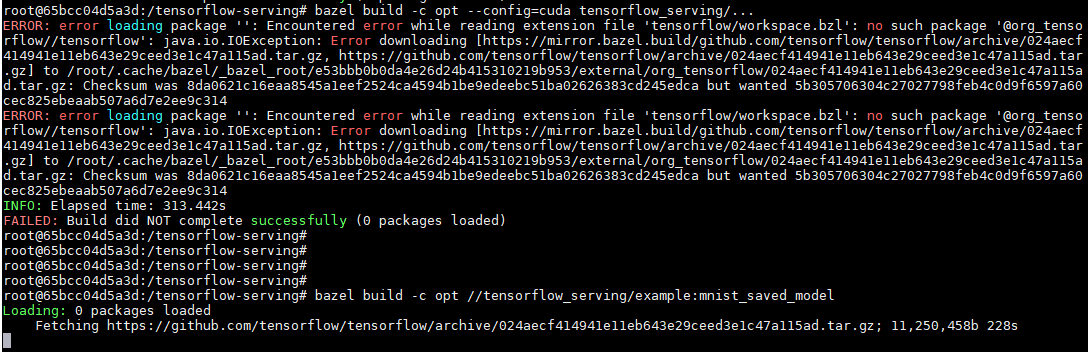
I find the code in file: "serving/WORKSPACE, line 13-17"
tensorflow_http_archive(
name = "org_tensorflow",
sha256 = "5b305706304c27027798feb4c0d9f6597a60cec825ebeaab507a6d7e2ee9c314",
git_commit = "024aecf414941e11eb643e29ceed3e1c47a115ad",
)
how can I modify it to change the download link to local because I have download the file from my windows and copy to my linux system.
Best~
CLIsVeryOK
on 28 Jun 2018
@hienduyph thanks, I'll try it.
CLIsVeryOK
on 28 Jun 2018
@hienduyph thanks for your relevant suggestion, after near two weeks effort, finally I get it work. Here I shared my steps, hope any one who are make tf serving can has a shortcut.
here is the final result form >nvidia-smi (notice all command is start with > in my comment)
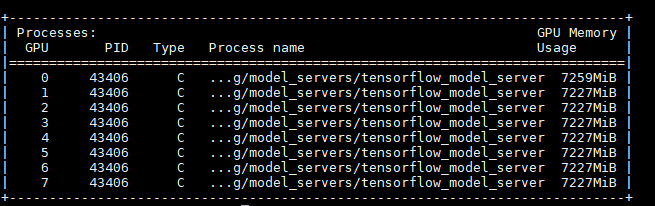
step1:> git clone https://github.com/tensorflow/serving.git
step 2:>sudo nvidia-docker build --pull -t $USER/tensorflow-serving-devel -f serving/tensorflow_serving/tools/docker/Dockerfile.devel-gpu . (if you do not has a nvidia-docker, install first, you can google it)
step 3: after 2, you have build an docker image taged by USER/tensorflow-serving-devel, then you should run the image in your nvidia docker.
sudo nvidia-docker run --name=tensorflow_container_GPU -p9000:9000 -it $USER/tensorflow-serving-devel
step 4: switch to docker environment, you may use >sudo nvidia-docker start or >sudo nvidia-docker attach (*is the docker ID which can be seen using > sudo docker ps -a
The switch to your docker environment:
like root@65bcc04d5614:/
step 5: in your docker, if everything goes well, there should be a serving direcory or tensorflow-serving directory which contains the tensorflow serving files.
cd tensorflow-serving (in my environment)
check if there is tensorflow directory, old version < tf serving1.5 may have been cloned tensorflow together with tf serving, here I used tf serving 1.7. so I manually cloned tf to folder tensorflow-serving
git clone https://github.com/tensorflow/tensorflow
cd tensorflow
./configure here you may have several choose as you want, remember to use python 2., here I used python2.7. python3.x seems not work.
cd ..
bazel build -c opt --config=cuda tensorflow_serving/... this need almost an hour
if every thing work, you will have
bazel-bin/tensorflow_serving/model_servers/tensorflow_model_server in you tensorflow-serving folderhere is all of the configuration of tf serving with GPU in nvidia-docker
then start serving your model
//train you model
bazel-bin/tensorflow_serving/example/mnist_saved_model /tmp/mnist_model
//serving your model
bazel-bin/tensorflow_serving/model_servers/tensorflow_model_server --port=9000 --model_name=mnist --model_base_path=/tmp/mnist_model/ &> mnist_log &
open another terminal, or in your host computer
run >
python tensorflow_serving/example/mnist_client.py --num_tests=1000 --server=localhost:9000
or bazel * as https://www.tensorflow.org/serving/serving_basic
you will has output like this
Extracting /tmp/train-images-idx3-ubyte.gz
Extracting /tmp/train-labels-idx1-ubyte.gz
Extracting /tmp/t10k-images-idx3-ubyte.gz
Extracting /tmp/t10k-labels-idx1-ubyte.gz
........................................................................................................................................................................................................................................................................................................................................................................................................................................................................................................................................................................................................................................................................................................................................................................................................................................................................................................................................................................................................................................
Inference error rate: 10.4%
best, and hope it work for you.
CLIsVeryOK
on 28 Jun 2018
@OmriShiv, I have the same problem, how do you solve libtime.a link error you have mentioned before.
 yuandaxing
on 1 Jul 2018
yuandaxing
on 1 Jul 2018
@yuandaxing if memory serves me, I manually compiled the google absl library and retried building it. Can you post what combination of steps you've tried?
OmriShiv
on 1 Jul 2018
hi @frallain .
I have followed your suggestion by modifying serving/third_party/libevent.BUILD, but it still didn't work with the same error:
/usr/bin/ld: bazel-out/k8-opt/genfiles/external/com_github_libevent_libevent/libevent/lib/libevent.a(buffer.o): relocation R_X86_64_32 against `.rodata' can not be used when making a shared object; recompile with -fPIC
bazel-out/k8-opt/genfiles/external/com_github_libevent_libevent/libevent/lib/libevent.a: error adding symbols: Bad value
collect2: error: ld returned 1 exit status
Target //tensorflow_serving/model_servers:tensorflow_model_server failed to build
Use --verbose_failures to see the command lines of failed build steps.
INFO: Elapsed time: 390.602s, Critical Path: 309.62s
INFO: 1864 processes, local.
FAILED: Build did NOT complete successfully
Actually there was nothing happened while build CPU version with serving/third_party/libevent.BUILD un-modified. But when I compiling GPU version, error came even after I modified serving/third_party/libevent.BUILD.
 elvys-zhang
on 11 Jul 2018
elvys-zhang
on 11 Jul 2018
It seems that the commit 45e2ca2 has already solved this problem by adding -fPIC flags.
So, I just update to the lastest code of branch r1.8, and follow the Dockerfile to compile .
Everthing works fine.
genrule(
    name = "libevent-srcs",
    outs = include_files + lib_files,
    cmd = "\n".join([
        "export INSTALL_DIR=$$(pwd)/$(@D)/libevent",
        "export TMP_DIR=$$(mktemp -d -t libevent.XXXXX)",
        "mkdir -p $$TMP_DIR",
        "cp -R $$(pwd)/external/com_github_libevent_libevent/* $$TMP_DIR",
        "cd $$TMP_DIR",
        "./autogen.sh",
-        "./configure --prefix=$$INSTALL_DIR --enable-shared=no --disable-openssl",
+        "./configure --prefix=$$INSTALL_DIR CFLAGS=-fPIC CXXFLAGS=-fPIC --enable-shared=no --disable-openssl",
        "make install",
        "rm -rf $$TMP_DIR",
    ]),
)
 huache
on 11 Jul 2018
huache
on 11 Jul 2018
You can also save some time building the image by grabbing it from Docker Hub using latest-devel-gpu.
gautamvasudevan
on 11 Jul 2018
Comment https://github.com/tensorflow/serving/issues/952#issuecomment-400896233 does not seem to work at this point:
git clone https://github.com/tensorflow/serving.git
...
sudo nvidia-docker build --pull -t $USER/tensorflow-serving-devel -f serving/tensorflow_serving/tools/docker/Dockerfile.devel-gpu .
...
Extracting Bazel installation...
ERROR: /root/.cache/bazel/_bazel_root/e53bbb0b0da4e26d24b415310219b953/external/org_tensorflow/third_party/gpus/cuda_configure.bzl:117:1: file '@bazel_tools//tools/cpp:windows_cc_configure.bzl' does not contain symbol 'setup_vc_env_vars'
ERROR: error loading package '': Extension file 'third_party/gpus/cuda_configure.bzl' has errors
ERROR: error loading package '': Extension file 'third_party/gpus/cuda_configure.bzl' has errors
INFO: Elapsed time: 22.379s
FAILED: Build did NOT complete successfully (0 packages loaded)
The command '/bin/sh -c bazel build -c opt --color=yes --curses=yes --config=cuda     --output_filter=DONT_MATCH_ANYTHING     ${TF_SERVING_BUILD_OPTIONS}     tensorflow_serving/model_servers:tensorflow_model_server &&     cp bazel-bin/tensorflow_serving/model_servers/tensorflow_model_server /usr/local/bin/ &&     bazel clean --expunge --color=yes' returned a non-zero code: 1
 rdwrt
on 13 Jul 2018
rdwrt
on 13 Jul 2018
@gautamvasudevan -- maybe I had some wrong versions, but for some reason the gpu Dockerfile and the corresponding Docker instance on the offical docker hub contains hard-coded cuda stubs. These are not automatically overwritten when running nvidia-docker.
I figured this out when comparing jorge-mf Dockerfile with the official tensorflow-serving Dockerfile for r1.9. see also https://github.com/tensorflow/tensorflow/issues/19840
Could there be a way to create one without these stubs so you can just download and run the mnist example on GPU as per the tensorflow documentation?
A complication in checking this is that the installation actually finishes correctly and builds the server if you leave the stubs in, the resulting build just doesn't use the GPU when called.
rdwrt
on 26 Jul 2018
Thanks @rdwrt - this was a bug introduced and has since been fixed. I believe the latest images should have that resolved.
gautamvasudevan
on 26 Jul 2018
The error I previously mentioned in https://github.com/tensorflow/serving/issues/952#issuecomment-404839812 is back in r1.10
ERROR: /root/.cache/bazel/_bazel_root/e53bbb0b0da4e26d24b415310219b953/external/org_tensorflow/third_party/gpus/cuda_configure.bzl:117:1: file '@bazel_tools//tools/cpp:windows_cc_configure.bzl' does not contain
(this seems to be related to using a pre-0.15.0 bazel version)
rdwrt
on 1 Aug 2018
@rdwrt - can you file a new issue detailing what you did to recreate the error?
gautamvasudevan
on 1 Aug 2018
Well I can tell you how to compile tf-serving r1.10 successfully for nvidia-docker:
wget https://raw.githubusercontent.com/tensorflow/serving/r1.10/tensorflow_serving/tools/docker/Dockerfile.devel-gpu
sed 's/=master/=r1.10/; s/0.11.1/0.15.0/; /stubs/d; ' Dockerfile.devel-gpu > Dockerfile
nvidia-docker build -t tensorflow-serving-r1-10-gpu-devel
rdwrt
on 1 Aug 2018
rdwrt
on 1 Aug 2018
@OmriShiv I also ignored the error 'floor@@GLIBC_2.2.5' by using
bazel build -c opt --config=cuda tensorflow_serving/model_servers/...
rather than
bazel build -c opt --config=cuda tensorflow_serving/...
since i just want model_server to run my serving
CLIsVeryOK
on 10 Aug 2018
Related issues
 TonyChouZJU
·
4Comments
TonyChouZJU
·
4Comments
 atwj
·
4Comments
atwj
·
4Comments
 abcfy2
·
4Comments
OmriShiv
·
3Comments
abcfy2
·
4Comments
OmriShiv
·
3Comments
 sandipmgiri
·
3Comments
sandipmgiri
·
3Comments
Most helpful comment
@hienduyph thanks for your relevant suggestion, after near two weeks effort, finally I get it work. Here I shared my steps, hope any one who are make tf serving can has a shortcut.

here is the final result form >nvidia-smi (notice all command is start with > in my comment)
step1:> git clone https://github.com/tensorflow/serving.git
step 2:>sudo nvidia-docker build --pull -t $USER/tensorflow-serving-devel -f serving/tensorflow_serving/tools/docker/Dockerfile.devel-gpu . (if you do not has a nvidia-docker, install first, you can google it)
step 3: after 2, you have build an docker image taged by USER/tensorflow-serving-devel, then you should run the image in your nvidia docker.
then start serving your model
//train you model
best, and hope it work for you.