Service-fabric: EventStore Events has No Items to Display and Indicates an Error Message
A new service fabric cluster (v6.4.622.9590) was deployed in Azure using the page here to add the relevant section to the ARM template. Deployment was successful and the cluster is healthy. The service fabric:/System/EventStoreService is ready and healthy.
Error message in UI:
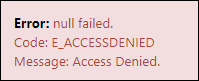
Error: null failed.
Code: E_ACCESSDENIED
Message: Access Denied.
Everything else in the UI is accessible and works. What could be causing the error?
 brianstringfellow
All 34 comments
@srrengar
 raunakpandya
on 14 Jan 2019
raunakpandya
on 14 Jan 2019
@brianstringfellow, can you please try hitting the UI from a different fresh browser window and select the cert when prompted? and then let me know if the issue is still persistent?. Also, is this happening with all new clusters you tried to create or only with this instance?. EventStore service is served through the same gateway as other system services, so it is a bit weird to get E_ACCESSDENIED.
 ibabou
on 15 Jan 2019
ibabou
on 15 Jan 2019
Hi @ibabou - the problems persists. I have tried both Chrome and Edge. The problem occurs with any new cluster based on the ARM template used for deployment. Does the EventStore use a particular port? We have our NSGs locked down based upon the published service fabric cluster needs and the needs of our applications.
brianstringfellow
on 16 Jan 2019
The https port that EventStore service will be listening on is dynamic. but, the request goes first through the gateway (19080). and then if all nodes can talk to each others within the range of ports specified for all applications, gateway on one node should be able to talk to the primary of EventStore service if it is running on a different one ?.
ibabou
on 16 Jan 2019
Are there any logs anywhere that I can view to perhaps get a hint at what may be wrong?
I've looked at the primary node's event logs and application insights. I have the WadCfg setup for the standard service fabric listeners.
brianstringfellow
on 17 Jan 2019
I am observing the same behaviour on my cluster.
Perhaps the issue is that i am using Azure AD to authenticate to cluster (instead of certificate). Does EventStore support Azure AD authentication?
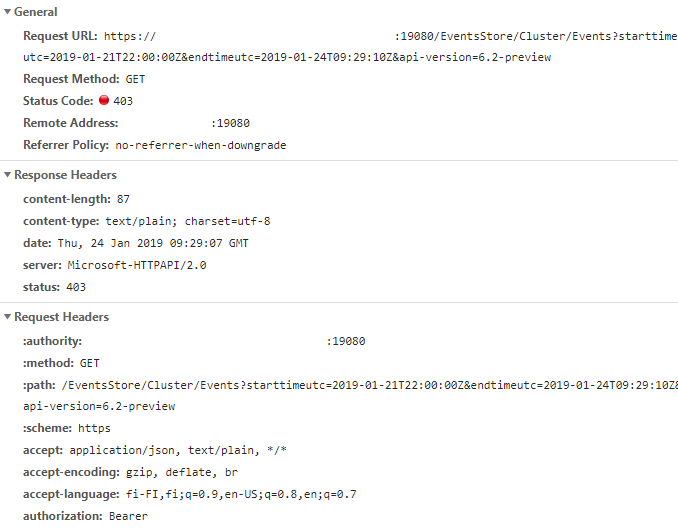
 juho-hanhimaki
on 24 Jan 2019
juho-hanhimaki
on 24 Jan 2019
Still seeing this same issue on my cluster:
{
"Error": {
"Code": "E_ACCESSDENIED",
"Message": "Access Denied."
}
}
I am wondering if the root cause of this has something do with same error message i get with BackupRestoreService on the same cluster:
https://github.com/MicrosoftDocs/azure-docs/issues/23747
juho-hanhimaki
on 31 Jan 2019
Hi @juho-hanhimaki , Currently the service requires a X.509 security to be used for authentication. and yes it has been architected similar to the backup restore service by having its own http/https endpoint, so it requires a Cert for a secured cluster.
ibabou
on 31 Jan 2019
@ibabou
Just to make sure we don't have misunderstanding here my cluster is secured with certificate.
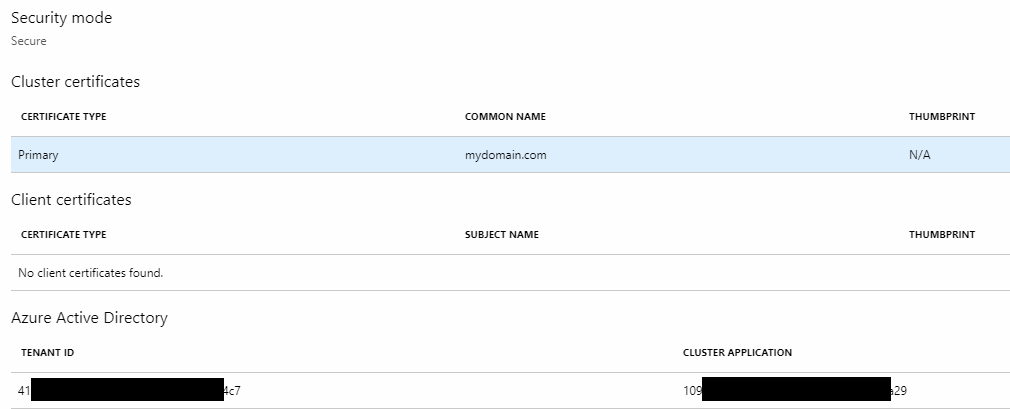
I tried my cluster with pure X.509 authentication earlier today. I my test i just removed the "azureActiveDirectory" configuration node from my ARM template and deployed the change. Yet I think I encountered the exact same problem. But I would have to double check as honestly I've been trying many different things here in hope to solve the issues.
Either way I don't fully understand how the method of authentication would have effect because either way the cluster is secured with a certificate and even AAD secured cluster can be connected to using the cluster certificate if I am not mistaken.
But if you indeed are correct about the authentication method being the root cause it should be documented clearly because many of the customers will opt in to use AAD authentication and assume it should work just as well as certificate based authentication. Finding out stuff like this the hard way is waste of time for the customers.
juho-hanhimaki
on 31 Jan 2019
Just spun up a new cluster but removed the AD authentication part. Still see the same error message when trying to view events.
juho-hanhimaki
on 31 Jan 2019
Hi @juho-hanhimaki, is there any specific NSG rules you've ? EventStore service uses a port from applications ports pool for its https server. and any gateway that receives the request should be able to talk to the primary of EventStore service to process it. If not, and this is just a regular new SFRP cluster, please open a ticket to customer support (who can help creating an incident) so we can look into the cluster configuration.
Other couple of questions, do you see the EventStore service healthy ? Were you able to figure out the reason of not being able to reach BackupRestore service you mentioned above ?
Thanks!
ibabou
on 31 Jan 2019
@brianstringfellow , so did you use a template similar to this when creating the cluster:
https://github.com/Azure-Samples/service-fabric-cluster-templates/blob/master/5-VM-Windows-1-NodeTypes-Secure-NSG/azuredeploy.json
Or did you add the NSG rules later ?
because as you can see in this sample template, the applications ports range is opened between the vms:
{
"name": "allowSvcFabApplication",
"properties": {
"access": "Allow",
"destinationAddressPrefix": "",
"destinationPortRange": "[concat(variables('nt0applicationStartPort'), '-', variables('nt0applicationEndPort'))]",
"direction": "Inbound",
"priority": 3940,
"protocol": "",
"sourceAddressPrefix": "",
"sourcePortRange": "",
"description": "allow fabric application ports within the vnet"
}
},
ibabou
on 1 Feb 2019
@ibabou I was finally able to figure out what is causing the issue. It seems the EventStore and BackupRestoreService both can't be reached when cluster certificate is bound by common name.
That is too bad because using common name to bind the certificate is considered a best practice:
https://docs.microsoft.com/en-us/azure/service-fabric/service-fabric-best-practices-security#secure-a-service-fabric-cluster-certificate-by-common-name
https://docs.microsoft.com/fi-fi/azure/service-fabric/service-fabric-production-readiness-checklist
Hopefully something can be done to work around this issue?
Here are the specific changes I made to fix the issue:
Before:
    "virtualMachineProfile": {
     ...
                "certificate": {
                  "commonNames": [
                    "[parameters('certificateCommonName')]"
                  ],
                  "x509StoreName": "[variables('certificateStoreName')]"
                }

  "type": "Microsoft.ServiceFabric/clusters",
   ...
    "certificateCommonNames": {
      "commonNames": [
        {
          "certificateCommonName": "[parameters('certificateCommonName')]",
          "certificateIssuerThumbprint": ""
        }
      ],
      "x509StoreName": "[variables('certificateStoreName')]"
    }
After:
    "virtualMachineProfile": {
     ...
                "certificate": {
                  "thumbprint": "<mythumbrint>",
                  "x509StoreName": "[variables('certificateStoreName')]"
                }

  "type": "Microsoft.ServiceFabric/clusters",
   ...
    "certificate": {
      "thumbprint": "<mythumbrint>",
      "x509StoreName": "[variables('certificateStoreName')]"
    },
Thanks @juho-hanhimaki for looking more into this. I'll look into the issue and see when we can get it working for common names.
ibabou
on 1 Feb 2019
Hi @juho-hanhimaki , can you please share the resourceGroup/region/cluster where you deployed the cluster with the common names configuration ? and if you can, please share as well the deployment correlation id ?
Thanks,
Ibrahim
ibabou
on 1 Feb 2019
The scenario described by @juho-hanhimaki is exactly what I have encountered. I have an old cluster that uses a certificate thumbprint and I was able to get EventStore to work there. On a new cluster that uses the certificate common name, that's where I see this problem.
brianstringfellow
on 1 Feb 2019
@ibabou I just emailed you the cluster details.
juho-hanhimaki
on 1 Feb 2019
As discussed offline on email thread, this is happening as certificateIssuerThumbprint is left empty. Please configure this with appropriate value and this will start accepting requests.
 hrushib
on 1 Feb 2019
hrushib
on 1 Feb 2019
Hi @ibabou, is the issue really closed? As I understand from the following Microsoft page, the cluster services should work with common name and certificateIssuerThumbprint is blank. The same was pointed out by juho-hanhimaki above.
{
    "apiVersion": "2018-02-01",
    "type": "Microsoft.ServiceFabric/clusters",
    "name": "[parameters('clusterName')]",
    "location": "[parameters('clusterLocation')]",
    "dependsOn": [
        "[concat('Microsoft.Storage/storageAccounts/', variables('supportLogStorageAccountName'))]"
    ],
    "properties": {
        "addonFeatures": [
            "DnsService",
            "RepairManager"
        ],
        "certificateCommonNames": {
            "commonNames": [
                {
                    "certificateCommonName": "[parameters('certificateCommonName')]",
                    "certificateIssuerThumbprint": ""
                }
            ],
            "x509StoreName": "[parameters('certificateStoreValue')]"
        },
    ...
Yep, I am not fully happy with this either. There exists no good reason to require certificateIssuerThumbprint for a certificate that is totally valid and issued by trusted root CA.
Cluster also doesn't require it. It's only EventStore and BackupRestoreService that do.
Managing IssuerThumbprints is unnecessary burden as it's totally normal that the Issuer might change when certificates are renewed/new certificates are bought.
juho-hanhimaki
on 1 Feb 2019
Some additional context to what was promised from the common name feature:
You simply add a new certificate with the same common name to your KeyValue and VM Scale Set, and then update your VM Scale set to use our algorithm and deploy the updated certificate; NO Thumbprint changes!!!
So the intent was to free the cluster owners from the need to manage any thumbprints.
juho-hanhimaki
on 1 Feb 2019
@brianstringfellow and @juho-hanhimaki and @MicahMcKittrick-MSFT
I've taken ownership of this, and this is a doc issue.
I will fix our documentation to always reflects declaring an issuer thumbprint, as it is a best practice to do.
 aljo-microsoft
on 1 Feb 2019
aljo-microsoft
on 1 Feb 2019
I can't believe you would recommend using issuer thumbprint when service fabric team has announced in blog post that thumbprints are basically evil. If other customers feel the same way, please let your opinion be known.
Please reconsider.
juho-hanhimaki
on 1 Feb 2019
@brianstringfellow @juho-hanhimaki are your certificates trusted? Are your clusters working fine otherwise? Thanks.
 dragav
on 1 Feb 2019
dragav
on 1 Feb 2019
@dragav Yes trusted (AddTrust External CA Root) and working fine except for the inability to connect to BackupRestoreService and EventStore.
juho-hanhimaki
on 1 Feb 2019
@dragav Yes, trusted (Trusted Secure Certificate Authority 5) and working fine with services, aside from EventStore.
brianstringfellow
on 1 Feb 2019
This is what @hrushib said in our email conversation regarding "certificateIssuerThumbprint" parameter:
BRS uses this value explicitly to validate incoming certificate
So if that statement is accurate at least there should be a clear understanding of why the cluster works but BackupRestoreService (and EventStore) don't.
The empty certificateIssuerThumbprint has been discussed previously here:
https://github.com/MicrosoftDocs/azure-docs/issues/16440#issuecomment-428687793
juho-hanhimaki
on 1 Feb 2019
@brianstringfellow @juho-hanhimaki thank you both for the prompt confirmation. We support specifying intermediate thumbprints as a means to strengthen the certificate validation, and also for situations where the root is not trusted (it's pinning the issuer vs pinning the leaf's thumbprint). As of the current release, issuer pinning is not required although recommended. We will follow up internally to clear up this discrepancy.
Thanks for your patience and support.
dragav
on 1 Feb 2019
@juho-hanhimaki
I wrote our team blog posting you referenced related to common name. It is recommended that you pin your issuer thumbprint, and I will update our documentation on this shortly.
aljo-microsoft
on 1 Feb 2019
Does this mean that we should populate the common name AND the thumbprint in the template?
 cwe1ss
on 19 Feb 2019
cwe1ss
on 19 Feb 2019
Same issue here - actually migrated from thumbprint to Common Name as per best practice and experience the same problem re thumbprint and cert based authentication.
Can we get an indication on when this will be resolved as it is impacting on our ability to monitor environments
 rdunne76
on 11 Mar 2019
rdunne76
on 11 Mar 2019
A fix has been checked in, and is making its way to the upcoming releases. I don't have an ETA for when this will roll out. For the time being, please pin the issuer thumbprints to work around this issue.
I'd like to reiterate that declaring issuer thumbprints is definitely safer than simply relying on a trusted root. All expected issuers of a given PKI should be declared (the field takes a list of comma-separated values) to prevent outages following a rollover.
dragav
on 11 Mar 2019
This may be related to Azure/service-fabric-issues#1553.
 lanfeust69
on 18 Jul 2019
lanfeust69
on 18 Jul 2019
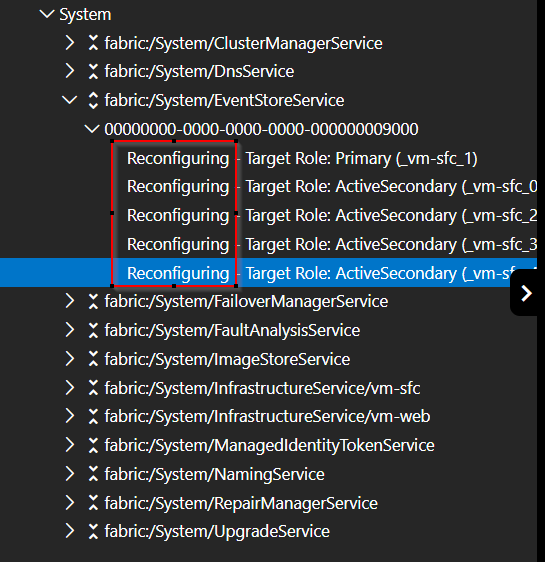
We just had this issue as well after changing the cert from thumbprint to common name, our cluster version was 8.0 CU1, issue still there, i contacted MS and they helped me, it is fixed now, the only thing you have to do is to restart the primary EventStoreService the primary will flip over to another node, reboot this one as well, do this till the primary role is back to a node you just rebooted.
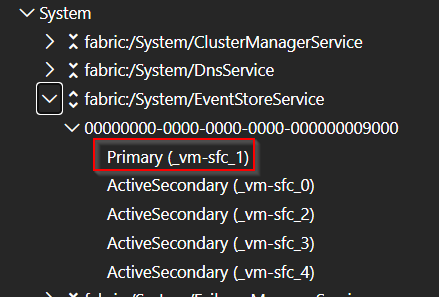
you will see quickly reconfiguring and after this the events are all visible again!
 BaMi83
on 15 Jun 2021
BaMi83
on 15 Jun 2021
Related issues
 muradkhateeb78
·
3Comments
muradkhateeb78
·
3Comments
 nikulk
·
7Comments
nikulk
·
7Comments
 vany0114
·
5Comments
vany0114
·
5Comments
 sistoimenov
·
7Comments
sistoimenov
·
7Comments
 SergiiKliebanov
·
8Comments
SergiiKliebanov
·
8Comments
Most helpful comment
I can't believe you would recommend using issuer thumbprint when service fabric team has announced in blog post that thumbprints are basically evil. If other customers feel the same way, please let your opinion be known.
https://blogs.msdn.microsoft.com/azureservicefabric/2018/04/27/secrets-management-through-certificate-common-names/
Please reconsider.