Service-fabric: Unable to use feature 'default literal' (c# 7.1)
Visual Studio (15.7.2) compile successfully, but msbuild fails
Web1.csproj (LangVersion is 7.1)
[Route("api/[controller]")]
public class ValuesController : Controller
{
    private readonly MyService myService;
    public ValuesController()
    {
        myService = new MyService();
    }
    // GET api/values/5
    [HttpGet("{id}")]
    public int Get(int id)
    {
        return myService.GetDefaultValue();
    }
}
services.csproj (LangVersion is 7.1)
public class MyService
{
    public int GetDefaultValue()
    {
        int value = default;
        return value;
    }
}
msbuild output:
"C:\Temp\testSF\testSF\testSF.sfproj" (Package target) (1) ->
"C:\Temp\testSF\Web1\Web1.csproj" (default target) (2:5) ->
"C:\Temp\testSF\services\services.csproj" (default target) (3:6) ->
(CoreCompile target) ->
MyService.cs(9,25): error CS8107: Feature 'default literal' is not available in C# 7.0. Please use language version 7.1 or greater. [C:\Temp\testSF\services\services.csproj]
added
It is possible to use 'default' in the Web1.csproj, but not in the services.csproj
 vshaukun
All 13 comments
- go to gulp folder and run npm i
- run gulp build
vshaukun
on 25 May 2018
What version of msbuild are you running? the one included in VS?
 aL3891
on 28 May 2018
aL3891
on 28 May 2018
Yes, included in VS
vshaukun
on 28 May 2018
I had the same problem a while back and was able to solve it by editing the .sfproj and packages.config-files in the Service Fabric project.
Per default, the older Msbuild 1.6.2 is required, which doesn't support C# 7.1, but if you change this everywhere to Msbuild 1.6.6, the C# 7.1 features should work.
packages.config:
<?xml version="1.0" encoding="utf-8"?>
<packages>
  <package id="Microsoft.VisualStudio.Azure.Fabric.MSBuild" version="1.6.6" targetFramework="net461" />
</packages>
.sfproj (also do a replace of "1.6.2" with "1.6.6"):
...
<SupportedMSBuildNuGetPackageVersion>1.6.6</SupportedMSBuildNuGetPackageVersion>
...
 jtapolczai
on 26 Jun 2018
jtapolczai
on 26 Jun 2018
I am also experiencing something similar to this problem myself.
I am able to build and deploy the solutions locally in Visual Studio, however on my VSTS Build Agent (which should be using exactly the same version of Visual Studio) I get the error above.
Relatively interestingly I don't get this on the Build Solution Step, only on the Build *.sfproj step after it. Below are screen shots of my build step. I have done what was suggested by @jtapolczai but that hasn't helped.
Has anyone else had a similar problem?
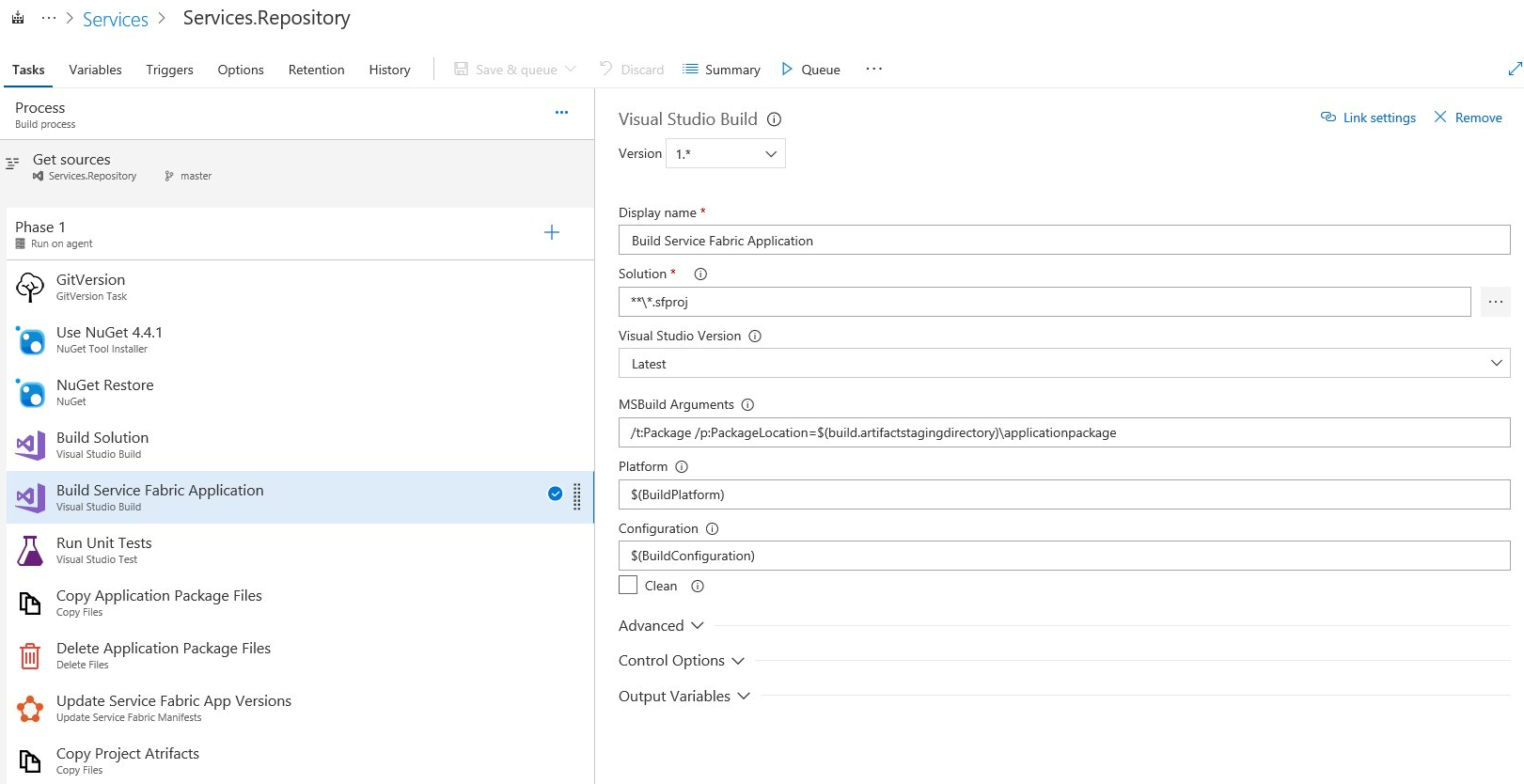
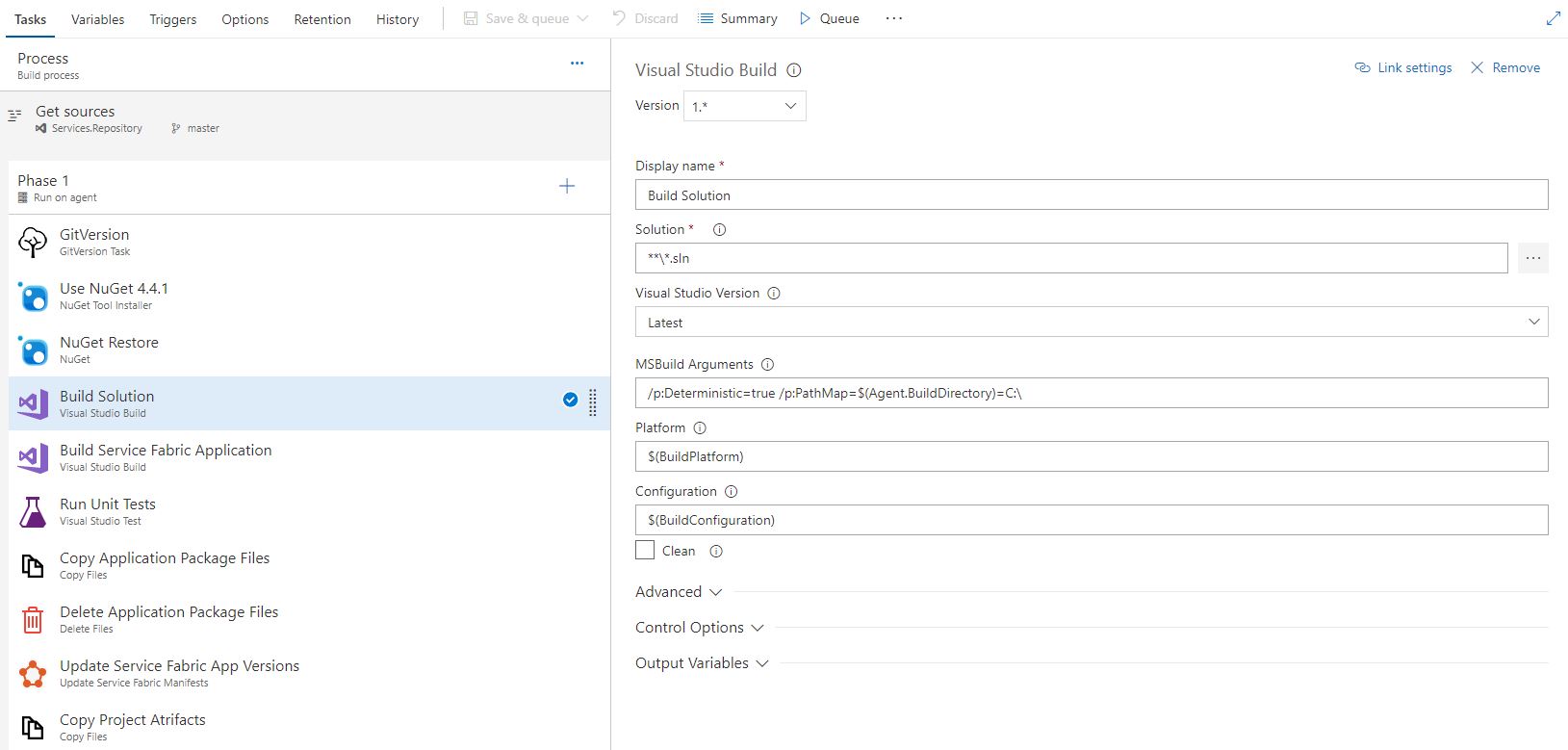
 JamiePed
on 6 Jul 2018
JamiePed
on 6 Jul 2018
Hello,
I have the exact same issue as @JamiePed
If I open the solution and manually package the application using Visual Studio 2017 on the build agent, it works.
But, through VSTS task, it fail.
My packages.config target MSBuild 1.6.7 :
<package id="Microsoft.VisualStudio.Azure.Fabric.MSBuild" version="1.6.7" targetFramework="net471" />
The temporary workaround is ... to not use C# 7.1 features 😞
 nicolas-garcia
on 26 Jul 2018
nicolas-garcia
on 26 Jul 2018
This can be solved by checking these nodes in project files.
<TargetFrameworkVersion>v4.7.1</TargetFrameworkVersion>
<LangVersion>7.3</LangVersion>
<TargetFramework>netstandard2.0</TargetFramework>
These properties should be compatible to use C# 7.1 features.
@JamiePed check your erroring project has the lang version specified. And <LangVersion> should be in the first/main <PropertyGroup> of the project file. Otherwise it will not get from the VSTS build flow but in the Visual Studio.
 vitalsap
on 6 Mar 2019
vitalsap
on 6 Mar 2019
I ran into this issue when targeting a *.proj. The issue was on VSTS Platform type. It use to build with the type set to "any cpu", and now if you are targeting a *.proj file you must specify "AnyCPU" (no whitespaces)
 kensaccord
on 2 Apr 2019
kensaccord
on 2 Apr 2019
You only need to add the <LangVersion>7.3</LangVersion> tag the projects that fails and everything will work.
 cosminsandu25
on 3 Jun 2019
cosminsandu25
on 3 Jun 2019
Here try this => int value = default(value);
public class MyService
{
    public int GetDefaultValue()
    {
        int value = default(value);
        return value;
    }
}
 demonguru18
on 1 Jul 2019
demonguru18
on 1 Jul 2019
Why does this not work like in VS where the maximum version is taken by default?
 KSemenenko
on 25 Jul 2019
KSemenenko
on 25 Jul 2019
have the problem yesterday in VS 2017, only resolved it by moving to VS 2019...
 dbr123
on 27 Sep 2019
dbr123
on 27 Sep 2019
I think I found a solution for msbuild, and I see that @kensaccord mentioned the same fix, above. I had the same issue as @JamiePed and @nicolas-garcia, except that the DevOps build task was giving me an error about C# 8, like this: "Error CS8370: Feature '[X]' is not available in C# 7.3. Please use language version 8.0 or greater." Per this Azure DevOps page on the Visual Studio Build task:
Platform: If you are targeting an MSBuild project (.*proj) file instead of a solution, specify AnyCPU (no whitespace).
So, in the Visual Studio Build task configuration, I changed the Platform setting from "$(BuildPlatform)" to "AnyCPU", and the build succeeded. (The default value was "Any CPU".)
By the way, for those not using Azure DevOps (or if you want to test locally with msbuild), that setting corresponds with the /p:platform="AnyCPU" parameter in msbuild.exe.
 SamHard
on 6 Nov 2019
SamHard
on 6 Nov 2019
Related issues
 lucasmaj
·
6Comments
lucasmaj
·
6Comments
 muradkhateeb78
·
3Comments
muradkhateeb78
·
3Comments
 SergiiKliebanov
·
8Comments
SergiiKliebanov
·
8Comments
 dagirard
·
6Comments
dagirard
·
6Comments
 spottedmahn
·
8Comments
spottedmahn
·
8Comments
Most helpful comment
You only need to add the
<LangVersion>7.3</LangVersion>tag the projects that fails and everything will work.