Serverless: Dependency Broken (2-thenable) - 404
❗️ NOTE FROM MAINTAINERS ❗️
It's an issue on npm registry side, where for requests which include the accept: application/vnd.npm.install-v1+json header a 404 response is returned
Following returns 200
curl -i https://registry.npmjs.org/2-thenable
Following 404
curl -i -H "accept: application/vnd.npm.install-v1+json" https://registry.npmjs.org/2-thenable
I was informed that __issue is already fixed on npm side__. Still it may might take a couple of hours to propagate across all nodes and CDN layer.
Hello there!
I'm getting 404 err when installing serverless with: npm install serverless, check this out:

Is someone facing the same problem?
 lfreneda
All 54 comments
@lfreneda it looks as some npm registry issue on your side.
2-theable@^1.0.0 is on npm: https://www.npmjs.com/package/2-thenable (published year ago)
 medikoo
on 11 Feb 2020
medikoo
on 11 Feb 2020
Yes, we are having this issue using AWS CodeBuild, however, it works fine on our local network PC's.

 mjbrowning1
on 11 Feb 2020
mjbrowning1
on 11 Feb 2020
@mjbrowning1 we are having this issue on GitHub Actions and Codeship :(
lfreneda
on 11 Feb 2020
There's probably some npm registry caching/mirroring issue in AWS CodeBuild
medikoo
on 11 Feb 2020
@medikoo Not sure :(
lfreneda
on 11 Feb 2020
We were having this issue when fetching 2-thenable with npm 5.3.0. After upgrading to npm 6.13.7 we are no longer having this issue.
0 info it worked if it ends with ok
1 verbose cli [ '/usr/local/Cellar/node/8.6.0/bin/node',
1 verbose cli   '/usr/local/bin/npm',
1 verbose cli   'install',
1 verbose cli   '-g',
1 verbose cli   '2-thenable' ]
2 info using [email protected]
3 info using [email protected]
4 verbose npm-session 15d57cc6ecde698a
5 silly install loadCurrentTree
6 silly install readGlobalPackageData
7 http fetch GET 404 https://registry.npmjs.org/2-thenable 88ms
8 silly fetchPackageMetaData error for 2-thenable@latest 404 Not Found: 2-thenable@latest
9 verbose stack Error: 404 Not Found: 2-thenable@latest
9 verbose stack     at fetch.then.res (/usr/local/lib/node_modules/npm/node_modules/pacote/lib/fetchers/registry/fetch.js:41:19)
9 verbose stack     at runCallback (timers.js:781:20)
9 verbose stack     at tryOnImmediate (timers.js:743:5)
9 verbose stack     at processImmediate [as _immediateCallback] (timers.js:714:5)
9 verbose stack From previous event:
9 verbose stack     at regFetch (/usr/local/lib/node_modules/npm/node_modules/pacote/lib/fetchers/registry/fetch.js:35:6)
9 verbose stack     at fetchPackument (/usr/local/lib/node_modules/npm/node_modules/pacote/lib/fetchers/registry/manifest.js:80:10)
9 verbose stack     at getManifest (/usr/local/lib/node_modules/npm/node_modules/pacote/lib/fetchers/registry/manifest.js:37:10)
9 verbose stack     at manifest (/usr/local/lib/node_modules/npm/node_modules/pacote/lib/fetchers/registry/manifest.js:24:10)
9 verbose stack     at Object.manifest (/usr/local/lib/node_modules/npm/node_modules/pacote/lib/fetchers/registry/index.js:12:12)
9 verbose stack     at Object.Fetcher#manifest [as manifest] (/usr/local/lib/node_modules/npm/node_modules/pacote/node_modules/protoduck/node_modules/genfun/lib/genfun.js:15:38)
9 verbose stack     at manifest (/usr/local/lib/node_modules/npm/node_modules/pacote/lib/fetch.js:16:18)
9 verbose stack     at pinflight (/usr/local/lib/node_modules/npm/node_modules/pacote/manifest.js:24:12)
9 verbose stack     at /usr/local/lib/node_modules/npm/node_modules/promise-inflight/inflight.js:29:24
9 verbose stack From previous event:
9 verbose stack     at _inflight (/usr/local/lib/node_modules/npm/node_modules/promise-inflight/inflight.js:28:25)
9 verbose stack     at /usr/local/lib/node_modules/npm/node_modules/promise-inflight/inflight.js:22:14
9 verbose stack     at runCallback (timers.js:781:20)
9 verbose stack     at tryOnImmediate (timers.js:743:5)
9 verbose stack     at processImmediate [as _immediateCallback] (timers.js:714:5)
9 verbose stack From previous event:
9 verbose stack     at inflight (/usr/local/lib/node_modules/npm/node_modules/promise-inflight/inflight.js:14:40)
9 verbose stack     at Object.manifest (/usr/local/lib/node_modules/npm/node_modules/pacote/manifest.js:22:10)
9 verbose stack     at fetchPackageMetadata (/usr/local/lib/node_modules/npm/lib/fetch-package-metadata.js:58:10)
9 verbose stack     at limited (/usr/local/lib/node_modules/npm/node_modules/call-limit/call-limit.js:29:10)
9 verbose stack     at fs.stat (/usr/local/lib/node_modules/npm/lib/install/deps.js:208:20)
9 verbose stack     at /usr/local/lib/node_modules/npm/node_modules/graceful-fs/polyfills.js:284:29
9 verbose stack     at FSReqWrap.oncomplete (fs.js:153:21)
 wSnarski
on 11 Feb 2020
wSnarski
on 11 Feb 2020
We are also having the same issue with CodeBuild.
Updated NPM version to 6.13.7, but still didn't seem to fix it for us.
We would appreciate any help!
1 | [Container] 2020/02/11 22:37:38 Waiting for agent ping
2 | [Container] 2020/02/11 22:37:40 Waiting for DOWNLOAD_SOURCE
3 | [Container] 2020/02/11 22:37:40 Phase is DOWNLOAD_SOURCE
4 | [Container] 2020/02/11 22:37:40 CODEBUILD_SRC_DIR=/codebuild/output/src401425153/src
5 | [Container] 2020/02/11 22:37:40 YAML location is /codebuild/output/src401425153/src/buildspec.yml
6 | [Container] 2020/02/11 22:37:40 Processing environment variables
7 | [Container] 2020/02/11 22:37:40 Moving to directory /codebuild/output/src401425153/src
8 | [Container] 2020/02/11 22:37:40 Registering with agent
9 | [Container] 2020/02/11 22:37:40 Phases found in YAML: 4
10 | [Container] 2020/02/11 22:37:40 BUILD: 3 commands
11 | [Container] 2020/02/11 22:37:40 POST_BUILD: 1 commands
12 | [Container] 2020/02/11 22:37:40 INSTALL: 2 commands
13 | [Container] 2020/02/11 22:37:40 PRE_BUILD: 2 commands
14 | [Container] 2020/02/11 22:37:40 Phase complete: DOWNLOAD_SOURCE State: SUCCEEDED
15 | [Container] 2020/02/11 22:37:40 Phase context status code: Message:
16 | [Container] 2020/02/11 22:37:41 Entering phase INSTALL
17 | [Container] 2020/02/11 22:37:41 Running command echo Installing Serverless...
18 | Installing Serverless...
19 |
20 | [Container] 2020/02/11 22:37:41 Running command npm install -g serverless
21 | npm ERR! code E404
22 | npm ERR! 404 Not Found: 2-thenable@^1.0.0
23 |
24 | npm ERR! A complete log of this run can be found in:
25 | npm ERR! /root/.npm/_logs/2020-02-11T22_37_46_374Z-debug.log
26 |
27 | [Container] 2020/02/11 22:37:46 Command did not exit successfully npm install -g serverless exit status 1
28 | [Container] 2020/02/11 22:37:46 Phase complete: INSTALL State: FAILED
29 | [Container] 2020/02/11 22:37:46 Phase context status code: COMMAND_EXECUTION_ERROR Message: Error while executing command: npm install -g serverless. Reason: exit status 1
30
 a428tm
on 11 Feb 2020
a428tm
on 11 Feb 2020
Having the same issue but not in CodeBuild. This is in AWS however.
yarn install v1.21.1
[1/4] Resolving packages...
error Couldn't find package "2-thenable@^1.0.0" required by "stream-promise@^3.2.0" on the "npm" registry.
info Visit https://yarnpkg.com/en/docs/cli/install for documentation about this command.
The command '/bin/sh -c yarn' returned a non-zero code: 1
error Command failed with exit code 1.
info Visit https://yarnpkg.com/en/docs/cli/run for documentation about this command.
ERROR: Job failed: exit code 1
 brentstrong
on 11 Feb 2020
brentstrong
on 11 Feb 2020
Please report to AWS support, that there's some issue with npm registry mirror on their side.
Point that 2-thenable@^1.0.0 is available in npm registry:
medikoo
on 11 Feb 2020
I'm seeing this from 2 different machines, my local MacBook and a linux box at home:
➜  /tmp mkdir x
➜  /tmp cd x
➜  x yarn init
yarn init v1.21.1
...
success Saved package.json
✨  Done in 2.15s.
➜  x yarn add 2-thenable
yarn add v1.21.1
info No lockfile found.
[1/4] 🔍  Resolving packages...
error An unexpected error occurred: "https://registry.yarnpkg.com/2-thenable: Not found".
info If you think this is a bug, please open a bug report with the information provided in "/private/tmp/x/yarn-error.log".
info Visit https://yarnpkg.com/en/docs/cli/add for documentation about this command.
curl https://registry.yarnpkg.com/2-thenable works fine on both machines.
npm also works fine
Not really a serverless issue, but worth knowing.
 cwalv
on 11 Feb 2020
cwalv
on 11 Feb 2020
Just tried to install npm on mongoDb boilerplate and got error message//
npm ERR! 404 Not Found: 2-thenable@^1.0.0
 motts1
on 11 Feb 2020
motts1
on 11 Feb 2020
Same problem here, local machine, using yarn 1.22...
The problem started happening today
 FCMHUB
on 11 Feb 2020
FCMHUB
on 11 Feb 2020
Just got this problem on a alpine linux running a CI pipeline @ gitlab, using yarn.
 eduardotkoller
on 11 Feb 2020
eduardotkoller
on 11 Feb 2020
I've send also support ticket to npm (maybe it's related to some updates to registry on their side, which started to propagate now)
medikoo
on 11 Feb 2020
Please report to AWS support, that there's some issue with npm registry mirror on their side.
Point that2-thenable@^1.0.0is available in npm registry:
Copied and pasted your comment and submitted to AWS support.
Hopefully this works :/
a428tm
on 11 Feb 2020
Newer npm versions are working fine.
Just updated my projects to npm 6.13.7 and it worked!
 gbobr
on 12 Feb 2020
gbobr
on 12 Feb 2020
changing the registry on yarn with
yarn config set registry https://registry.npmjs.org/
didn't fix it either.
 vlaadbrain
on 12 Feb 2020
vlaadbrain
on 12 Feb 2020
ran
npm install npm@latest -g
and then npm i
and it works
motts1
on 12 Feb 2020
Capturing the request from yarn vs curl, I tracked down the difference to the Accept header. This works:
fetch('https://registry.yarnpkg.com/2-thenable', { headers: [['Accept', '*/*']] })
This 404s:
fetch('https://registry.yarnpkg.com/2-thenable', { headers: [['Accept', 'application/vnd.npm.install-v1+json; q=1.0, application/json; q=0.8, */*']] })
cwalv
on 12 Feb 2020
 dbjorge
on 12 Feb 2020
dbjorge
on 12 Feb 2020
I started to observe this locally. It's evident npm registry issue.
When registry query is issued with accept: application/vnd.npm.install-v1+json header, then it returns 404 (this header is often used to minimize the payload as returned from registry)
Following returns 200
curl -i https://registry.npmjs.org/2-thenable
Following 404
curl -i -H "accept: application/vnd.npm.install-v1+json" https://registry.npmjs.org/2-thenable
I have opened an npm support issue for that (but still there's no answer).
It may help if you open other request on npm support to increase awareness of a problem
medikoo
on 12 Feb 2020
We're having this issue with AWS Codebuild. But it sounds to me like others are having it outside of AWS, correct?
 uclaeamsavino
on 12 Feb 2020
uclaeamsavino
on 12 Feb 2020
We're having this issue with AWS Codebuild. But it sounds to me like others are having it outside of AWS, correct?
Yes, it's npm registry issue. See: https://github.com/serverless/serverless/issues/7321#issuecomment-584937164
medikoo
on 12 Feb 2020
Cheers @motts1 solution worked for me, was able to install on Node 8.10 after updating npm
 jch254
on 12 Feb 2020
jch254
on 12 Feb 2020
I just upgraded our AWS codebuild from the standard 1.0 image to standard 3.0 and the problem went away. I figured that might have a newer version of npm.
Edit: I also had to upgrade our C# lambda build project from windows-base:1.0 to windows-base:2.0.
Edit edit: well now that broke our C# lambdas, I guess I'll wait for the npm fix
uclaeamsavino
on 12 Feb 2020
Response from npm:
thank you for reporting this, we've identified the issue and have rolled out a fix, though this might take a couple of hours to propagate across all our nodes and CDN layer.
medikoo
on 12 Feb 2020
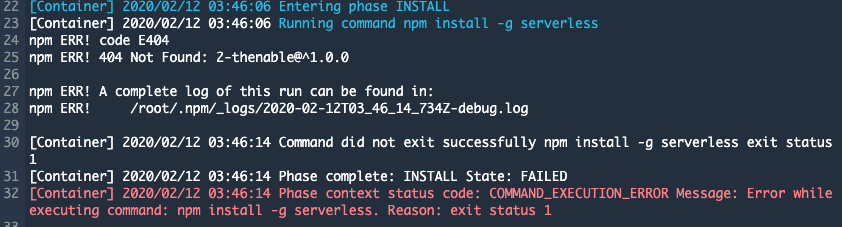
Still same
 sofyan48
on 12 Feb 2020
sofyan48
on 12 Feb 2020
same for me
AWS codebuild
 Ali-Dalal
on 12 Feb 2020
Ali-Dalal
on 12 Feb 2020
same for me
AWS codebuild
problem fixed by updating codebuild env to use aws/codebuild/standard:3.0
Ali-Dalal
on 12 Feb 2020
I am experiencing this issue on a Bitbucket pipeline build. npm install serverless -g runs fine locally.
UPDATE: upgrading the pipeline image to node:12 fixed this issue.
image: node:12
pipelines:
 SeanoNET
on 12 Feb 2020
SeanoNET
on 12 Feb 2020
I am not sure if this will apply to anyone, but our issue was node version.
To fix that, I updated the buildspec.yml file.
Added/updated section is shown below -
version: 0.2

phases:
  install:
    runtime-versions: #ADDED TO FIX THE ISSUE
      nodejs: 10.x #ADDED TO FIX THE ISSUE
    commands:
      - echo Installing Serverless... # this is for us to know where the issue happens
      - npm install npm@latest -g #ADDED TO FIX THE ISSUE
      - npm install -g serverless # this will install serverless in the container globally
  pre_build:
    commands:
      - echo Installing source NPM dependencies...
      - npm install
  build:
    commands:
      - echo Deployment started on `date`
      - echo Deploying with Serverless Framework
      - sls deploy -v -s $ENV_NAME # pick stage from the env variable that we defined in the codebuild
  post_build:
    commands:
      - echo Deployment completed on `date` # if execution reaches here, we can be sure that the deployment was successful
Grabbing directly from Github works in CodeBuild:
- npm install --verbose -g git+https://github.com/medikoo/2-thenable.git
Also, updating npm fixed it in CodeBuild standard / nodejs:8 runtime
version: 0.2

phases:
  install:
    runtime-versions:
      nodejs: 8
  build:
    commands:
      - npm install -g npm # Update npm
      - npm install -g 2-thenable
 shariqmus
on 12 Feb 2020
shariqmus
on 12 Feb 2020
Grabbing directly from Github works in CodeBuild:
- npm install --verbose -g git+https://github.com/medikoo/2-thenable.gitAlso, updating npm fixed it in CodeBuild standard / nodejs:8 runtime
version: 0.2

phases:
  install:
    runtime-versions:
      nodejs: 8
  build:
    commands:
      - npm install -g npm # Update npm
      - npm install -g 2-thenable
Thanks Shariq :)
a428tm
on 12 Feb 2020
Still getting this 7 hours on from the comment, how long might it take to propogate?
 ed-sparkes
on 12 Feb 2020
ed-sparkes
on 12 Feb 2020
Do use local npm of node js like ./node_modules/.bin/npm i and it will solve your problem
 sanjay-zymr
on 12 Feb 2020
sanjay-zymr
on 12 Feb 2020
i update npm to latest to solve
sofyan48
on 12 Feb 2020
I had issues on build containers and locally on macOS.
I found changing the yarn registry worked:
yarn config set registry https://yarn.npmjs.org
Edit: I also use nodejs 10.x because packages like the serverless-image-handler don't support 12.x yet
 ganey
on 12 Feb 2020
ganey
on 12 Feb 2020
i update npm to latest to solve

 ViniciusFXavier
on 12 Feb 2020
ViniciusFXavier
on 12 Feb 2020
Still an issue for us. Nodejs 10.x
Edit: fixed for us!
 pz325
on 12 Feb 2020
pz325
on 12 Feb 2020
Grabbing directly from Github works in CodeBuild:
- npm install --verbose -g git+https://github.com/medikoo/2-thenable.gitAlso, updating npm fixed it in CodeBuild standard / nodejs:8 runtime
version: 0.2

phases:
  install:
    runtime-versions:
      nodejs: 8
  build:
    commands:
      - npm install -g npm # Update npm
      - npm install -g 2-thenable
Working here, thanks!
 vinemarques
on 12 Feb 2020
vinemarques
on 12 Feb 2020
Hi all - I work at @npm and we're very sorry about the 404's you are experiencing.
We have identified the issue on our end and rolled out the fix. Unfortunately, its going take some time to propagate through all our nodes in our CDN layer.
You can follow along for progress via the incident on our status page
Also, you if you have other packages affected then please feel free to contact our support team directly.
 nomadtechie
on 12 Feb 2020
nomadtechie
on 12 Feb 2020
Thanks @nomadtechie , Must be a bit of a headache there at @npm for you
 davidwilde
on 12 Feb 2020
davidwilde
on 12 Feb 2020
I still get this error

Yarn Version : 1.22
Node Version : 12
This is started from yesterday evening..
 arafatheds
on 12 Feb 2020
arafatheds
on 12 Feb 2020
@nomadtechie thanks a lot for the update. It's still happening for this package using yarn.
 tr4g
on 12 Feb 2020
tr4g
on 12 Feb 2020
I had issues on build containers and locally on macOS.
I found changing the yarn registry worked:
yarn config set registry https://yarn.npmjs.orgEdit: I also use nodejs 10.x because packages like the serverless-image-handler don't support 12.x yet
This worked for me. But can someone explain why this works?
 mnguyen96
on 12 Feb 2020
mnguyen96
on 12 Feb 2020
The funny part is that when I change the .npmrc registry value I did successfully download packages but getting this when running yarn sls version
; ~/.npmrc
registry=https://yarn.npmjs.org
Error: Cannot find module './test'
    at Function.Module._resolveFilename (internal/modules/cjs/loader.js:581:15)
    at Function.Module._load (internal/modules/cjs/loader.js:507:25)
    at Module.require (internal/modules/cjs/loader.js:637:17)
    at require (internal/modules/cjs/helpers.js:22:18)
    at Object.<anonymous> (/home/john/lorem/node_modules/@serverless/lib/plugin.js:28:18)
    at Module._compile (internal/modules/cjs/loader.js:689:30)
    at Object.Module._extensions..js (internal/modules/cjs/loader.js:700:10)
    at Module.load (internal/modules/cjs/loader.js:599:32)
    at tryModuleLoad (internal/modules/cjs/loader.js:538:12)
    at Function.Module._load (internal/modules/cjs/loader.js:530:3)
    at Module.require (internal/modules/cjs/loader.js:637:17)
    at require (internal/modules/cjs/helpers.js:22:18)
    at Object.<anonymous> (/home/john/lorem/node_modules/@serverless/index.js:6:18)
    at Module._compile (internal/modules/cjs/loader.js:689:30)
    at Object.Module._extensions..js (internal/modules/cjs/loader.js:700:10)
    at Module.load (internal/modules/cjs/loader.js:599:32)
    at tryModuleLoad (internal/modules/cjs/loader.js:538:12)
    at Function.Module._load (internal/modules/cjs/loader.js:530:3)
    at Module.require (internal/modules/cjs/loader.js:637:17)
    at require (internal/modules/cjs/helpers.js:22:18)
    at Object.<anonymous> (/home/john/lorem/node_modules/serverless/lib/classes/CLI.js:5:24)
    at Module._compile (internal/modules/cjs/loader.js:689:30)
    at Object.Module._extensions..js (internal/modules/cjs/loader.js:700:10)
    at Module.load (internal/modules/cjs/loader.js:599:32)
    at tryModuleLoad (internal/modules/cjs/loader.js:538:12)
    at Function.Module._load (internal/modules/cjs/loader.js:530:3)
    at Module.require (internal/modules/cjs/loader.js:637:17)
    at require (internal/modules/cjs/helpers.js:22:18)
    at Object.<anonymous> (/home/john/lorem/node_modules/serverless/lib/Serverless.js:9:13)
    at Module._compile (internal/modules/cjs/loader.js:689:30)
    at Object.Module._extensions..js (internal/modules/cjs/loader.js:700:10)
    at Module.load (internal/modules/cjs/loader.js:599:32)
    at tryModuleLoad (internal/modules/cjs/loader.js:538:12)
    at Function.Module._load (internal/modules/cjs/loader.js:530:3)
    at Module.require (internal/modules/cjs/loader.js:637:17)
    at require (internal/modules/cjs/helpers.js:22:18)
    at Object.<anonymous> (/home/john/lorem/node_modules/serverless/lib/utils/autocomplete.js:3:20)
    at Module._compile (internal/modules/cjs/loader.js:689:30)
    at Object.Module._extensions..js (internal/modules/cjs/loader.js:700:10)
    at Module.load (internal/modules/cjs/loader.js:599:32)
    at tryModuleLoad (internal/modules/cjs/loader.js:538:12)
    at Function.Module._load (internal/modules/cjs/loader.js:530:3)
    at Module.require (internal/modules/cjs/loader.js:637:17)
    at require (internal/modules/cjs/helpers.js:22:18)
    at Object.<anonymous> (/home/john/lorem/node_modules/serverless/bin/serverless.js:35:22)
    at Module._compile (internal/modules/cjs/loader.js:689:30)
    at Object.Module._extensions..js (internal/modules/cjs/loader.js:700:10)
    at Module.load (internal/modules/cjs/loader.js:599:32)
    at tryModuleLoad (internal/modules/cjs/loader.js:538:12)
    at Function.Module._load (internal/modules/cjs/loader.js:530:3)
    at Function.Module.runMain (internal/modules/cjs/loader.js:742:12)
    at startup (internal/bootstrap/node.js:283:19)
    at bootstrapNodeJSCore (internal/bootstrap/node.js:743:3)
error Command failed with exit code 1.
info Visit https://yarnpkg.com/en/docs/cli/run for documentation about this command.
 BerkhanBerkdemir
on 12 Feb 2020
BerkhanBerkdemir
on 12 Feb 2020
Some of the packages known to be affected are: 3d-view, error-ex ,42-cent-base, 8base-cli.
Interesting - it seems to happen to packages that start with a number.
uclaeamsavino
on 12 Feb 2020
@arafatheds Are you using a package registry other than NPM (e.g. Github)? If yes, then the the following might help (it's fixed the issue for me):
- Update '.npmrc' file and change
registry=https://npm.pkg.github.com/OWNERto@OWNER:registry=https://npm.pkg.github.com - Delete 'package-lock.json' file and 'node_modules' folder
- Run
npm install
 ten-alk
on 12 Feb 2020
ten-alk
on 12 Feb 2020
The funny part is that when I change the
.npmrcregistry value I did successfully download packages but getting this when runningyarn sls version...
I think the issue has been solved. I no longer need to have .npmrc file which states the registry, and the issue I was having is not related to this issue.
Thanks.
BerkhanBerkdemir
on 12 Feb 2020
It seems to be working now on AWS Codebuild.
uclaeamsavino
on 12 Feb 2020
It works for me now. Anyone still gets 404 error for following?
curl -i -H "accept: application/vnd.npm.install-v1+json" https://registry.npmjs.org/2-thenable
This error is fixed for us.
 trentgerman
on 12 Feb 2020
trentgerman
on 12 Feb 2020
Its works for me without doing any changes.. Thanks everyone for your support
arafatheds
on 12 Feb 2020
seems like npm fixed the issue.
Thanks everyone :dancing_women:
lfreneda
on 13 Feb 2020
Related issues
 kennu
·
48Comments
kennu
·
48Comments
 enriquemanuel
·
72Comments
enriquemanuel
·
72Comments
 aliatsis
·
47Comments
aliatsis
·
47Comments
 matheusvellone
·
44Comments
matheusvellone
·
44Comments
 jordanmack
·
60Comments
jordanmack
·
60Comments
Most helpful comment
Hi all - I work at @npm and we're very sorry about the
404's you are experiencing.We have identified the issue on our end and rolled out the fix. Unfortunately, its going take some time to propagate through all our nodes in our CDN layer.
You can follow along for progress via the incident on our status page
Also, you if you have other packages affected then please feel free to contact our support team directly.