Serverless-webpack: Dependencies without versions are added and yarn doesn't like it
This is a Bug Report
Description
For bug reports:
- What went wrong?
Packaging the function is generating apackage.jsonwith a module that has no version specified
What did you expect should have happened?
Not sure why this module was added to the list (it's not in my original package) but if it has to be added, then a version should be specified. Also this is causing an issue usingyarnbecause it's not matching the lockfileWhat was the config you used?
  webpack:
    packager: yarn
    webpackConfig: './webpack/config.${env:WEBPACK_CONFIG_TYPE, self:custom.defaultConfigType}.js'
    includeModules:
      forceInclude:
        - pg
package.json:
  ...
  "dependencies": {
    "apollo-server-lambda": "^1.3.6",
    "apollo-tracing": "^0.1.4",
    "aws-lambda": "^0.1.2",
    "friendly-errors-webpack-plugin": "^1.7.0",
    "graphql": "^0.13.2",
    "graphql-import": "^0.6.0",
    "graphql-playground-middleware-lambda": "^1.7.0",
    "graphql-tools": "^3.0.2",
    "jsonwebtoken": "^8.2.1",
    "lodash": "^4.17.10",
    "pg": "^7.4.3",
    "sequelize": "^4.37.10",
    "serverless-webpack": "^5.1.5",
    "uuid": "^3.2.1",
    "webpack": "^4.11.0",
    "webpack-merge": "^4.1.2",
    "webpack-node-externals": "^1.7.2"
  },
  ...
- What stacktrace or error message from your provider did you see?
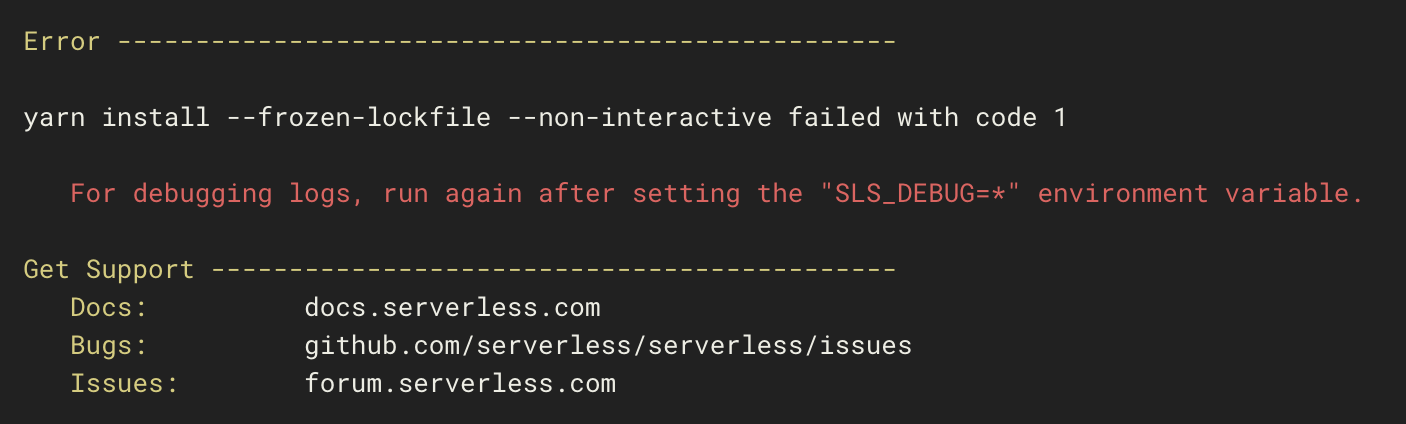
Actual error while packaging:
Generated dependencies:
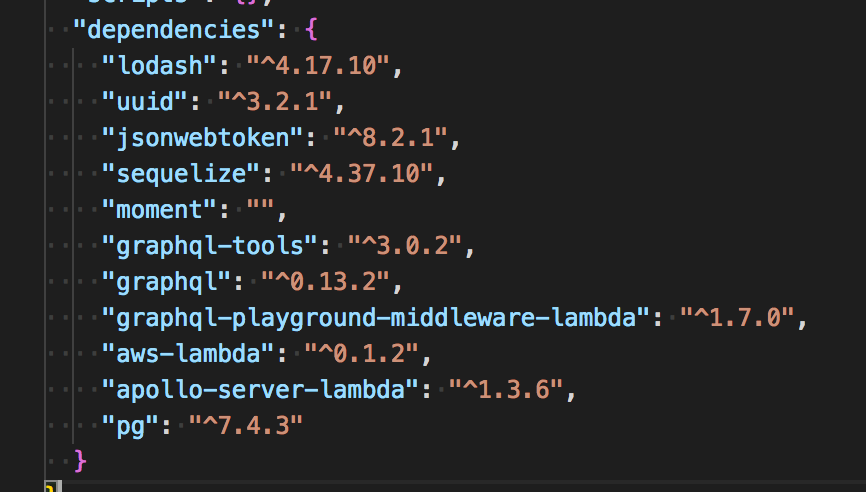
Note: See how moment has been added without any version
Additional Data
- Serverless-Webpack Version you're using:
5.1.5 - Webpack version you're using:
4.11.1 - Serverless Framework Version you're using:
1.27.3 - Operating System:
OSX(Docker) - Stack Trace (if available):
 Maxwell2022
All 7 comments
Update: This was happening to me because I was using moment but actually did not installed it explicitly.
Not sure if this should still be considered as a bug or not. The error message should be more explicit maybe.
Maxwell2022
on 21 Jun 2018
Hi @Maxwell2022
Not sure if this should still be considered as a bug or not. The error message should be more explicit maybe.
I remember that I added a warning output for that case together with the packaging ... message. Can you check if that was shown, something like Could not determine version ...?
However, your case is special, as you actually used moment, but did not have it in your package.json. It is debatable if this case should lead to an error instead. Having it installed with no version instead feels wrong to me.
 HyperBrain
on 21 Jun 2018
HyperBrain
on 21 Jun 2018
Correct, there is a warning displayed, I didn't see it. It was in between messages of the same color:
Serverless: Fetch dependency graph from /root/app/package.json
Serverless: WARNING: Could not determine version of module moment
Serverless: Adding explicit peers for dependency graphql-tools
Serverless: Adding explicit peers for dependency graphql-playground-middleware-lambda
Yes, I feel like this should thrown some kind of error and not even try to package anything. The actual error that is thrown is from yarn and is not really explicit.
Maxwell2022
on 26 Jun 2018
Throwing an error or not at this point is debatable. On one hand it is ok to throw an error for the setup you used, but the same condition is expected in another case: If you bundle a dependency with nodeextermal's whitelist, all its dependencies will become first-level dependencies. In this case some of them might not be detectable.
In general, we could maybe support some --warning-as-error switch that would turn warnings into errors on demand. Then it is easier to just enable it on the build server or when needed. What do you think?
HyperBrain
on 28 Jun 2018
@Maxwell2022 Any thoughts on my last comment?
HyperBrain
on 7 Jul 2018
Not really sure about this. I think the main is issue is adding the module without a version, or simply adding the module all together. The second issue for me was that there is not difference in the color message between a Warning and an Info message, that's why I missed it.
Maxwell2022
on 9 Jul 2018
@HyperBrain I think the best course of action would be to change the colours for warning/info messages.
 hassankhan
on 26 Apr 2019
hassankhan
on 26 Apr 2019
Related issues
 rvaidya
·
4Comments
rvaidya
·
4Comments
 jaydp17
·
4Comments
jaydp17
·
4Comments
 jonni-larjomaa
·
3Comments
jonni-larjomaa
·
3Comments
 bitttttten
·
4Comments
bitttttten
·
4Comments
 aaronjensen
·
5Comments
aaronjensen
·
5Comments
Most helpful comment
Not really sure about this. I think the main is issue is adding the module without a version, or simply adding the module all together. The second issue for me was that there is not difference in the color message between a Warning and an Info message, that's why I missed it.