Serverless-stack-com: Comments: Code Splitting in Create React App
 jayair
All 30 comments
Ok, while this is very useful, it really assumes all components to be found exactly in the same folder, right? (at least the main ones, you can then compose your views from there), but how do you then those components have sub routes, or the different routes in a component lead to async load components in different folders? (first thing on the top of my mind would be to pass path as a prop)
 qborreda
on 23 May 2017
qborreda
on 23 May 2017
const { default: component } = await import(``../containers/${componentName}``);
How is this possible? Dynamic import.
 minhna
on 23 May 2017
minhna
on 23 May 2017
@qborreda Yeah, it does assume that. But I'm pushing an update soon that fixes this.
@minhna Yeah it is a dynamic import that's available in the new CRA.
jayair
on 23 May 2017
@qborreda Updated the chapter with a more generic way to do the imports and it also allows us to control the chunks that are generated - 3cf522260e1133c3055862b2a3a6e03afe511d07
jayair
on 23 May 2017
@jayair I'm using meteor 1.5 rc6 and it doesn't work. Do you have any idea? Thanks for your help.
minhna
on 24 May 2017
@minhna This is for Create React App and it's using Webpack 2 internally. I'm not sure how it works in other places.
jayair
on 24 May 2017
There's one more issue: asyncComponent() is called in a rendering function so anytime it executes, a completely new component class is created. This will destroy all state of components below.
 gaearon
on 26 May 2017
gaearon
on 26 May 2017
It seems like you could make <AsyncRoute> instead of asyncComponent. <AsyncRoute> could take getComponent as a prop and do the same setState thing, rendering Route when the component in the state is ready. Since <AsyncRoute> is a regular component that's the same every time, it wouldn't have this issue.
gaearon
on 26 May 2017
Hmm. Now that I think of it I guess it's not a bug issue because the prop is only used once. But it's still unfortunate the class is generated on every top level render. So AsyncRoute as a component would work better.
gaearon
on 26 May 2017
@gaearon That's a good point. It doesn't make sense that asyncComponent runs every time. Let me play around with turning it into a component.
jayair
on 26 May 2017
Updated with fix. Now asyncComponent is only run once as opposed to every time - d0fe33f0828285396a0ec128a9bc8b041ac704e8
For folks looking for an explanation; React Router will create a new instance of the component if an inline function is passed into the component prop as opposed to simply updating the existing component. To avoid this, we run the asyncComponent once at the top and pass in the resulting component to the routes.
jayair
on 30 May 2017
This was the first chapter that gave me a problem - saying "unexpected token" on the import statements in Routes.js.
 chrisbro
on 3 Jun 2017
chrisbro
on 3 Jun 2017
@chrisbro We use the dynamic import() in this chapter and that's available in the new Create React App. Can I see your package.json?
jayair
on 5 Jun 2017
@jayair Sure thing. Here you go! Of note: I started creating this with node 4.8.3, and during troubleshooting this realized how far behind that was and upgraded to 8.0.0 with the same behavior. I suspect that the detection of an old version of node gave me an old version of something here? Some dependencies stripped out to simplify things.
{
  "name": "test",
  "version": "0.1.0",
  "private": true,
  "dependencies": {
    "react": "^15.5.4",
    "react-bootstrap": "^0.31.0",
    "react-router-dom": "^4.1.1",
    "react-textarea-autosize": "^5.0.6"
  },
  "devDependencies": {
    "react-addons-test-utils": "^15.5.1",
    "react-dom": "^15.5.4",
    "react-scripts": "0.9.5",
    "react-test-renderer": "^15.5.4"
  },
  "scripts": {
    "start": "react-scripts start",
    "build": "react-scripts build",
    "test": "react-scripts test --env=jsdom",
    "predeploy": "npm run build",
    "eject": "react-scripts eject"
  }
}
@chrisbro Yeah the Create React App's react-scripts is out of date for you. Here is the one that we have in the tutorial - https://github.com/AnomalyInnovations/serverless-stack-demo-client/blob/code-splitting-in-create-react-app/package.json#L14
Upgrading is pretty simple, here are the instructions - https://github.com/facebookincubator/create-react-app/releases/tag/v1.0.0
jayair
on 6 Jun 2017
@jayair Upgraded and confirmed that was the problem. Thank you!
chrisbro
on 7 Jun 2017
Can you please help me understand? Why after splitting the code the main.js size decreased to 1.2kb and 0.chunk.js size increased to 21kb?
Before:
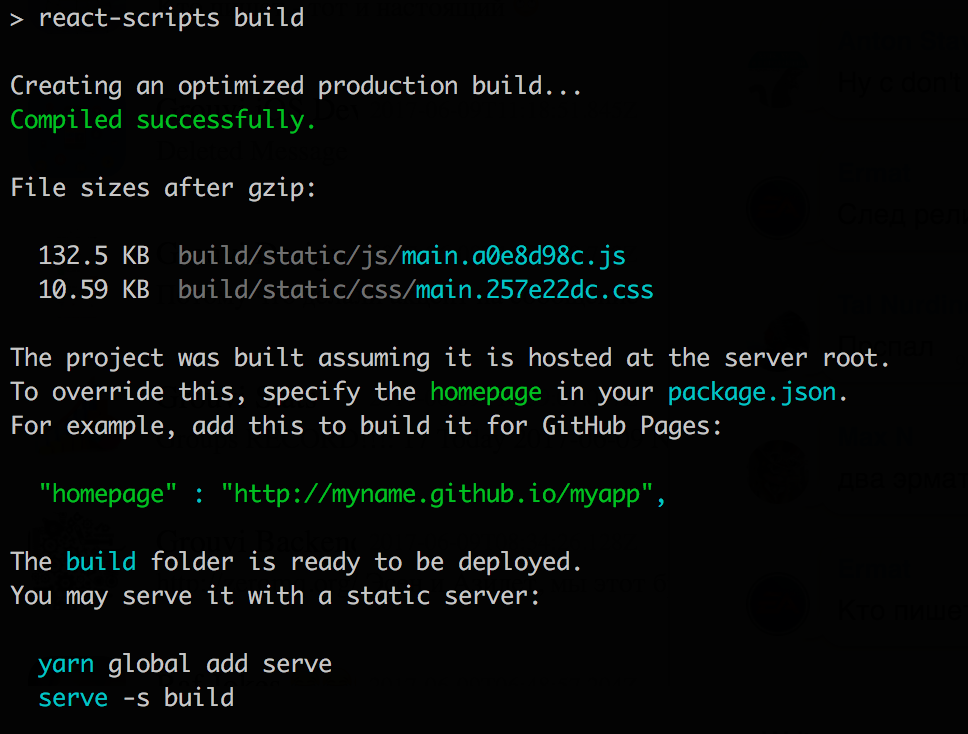
after:
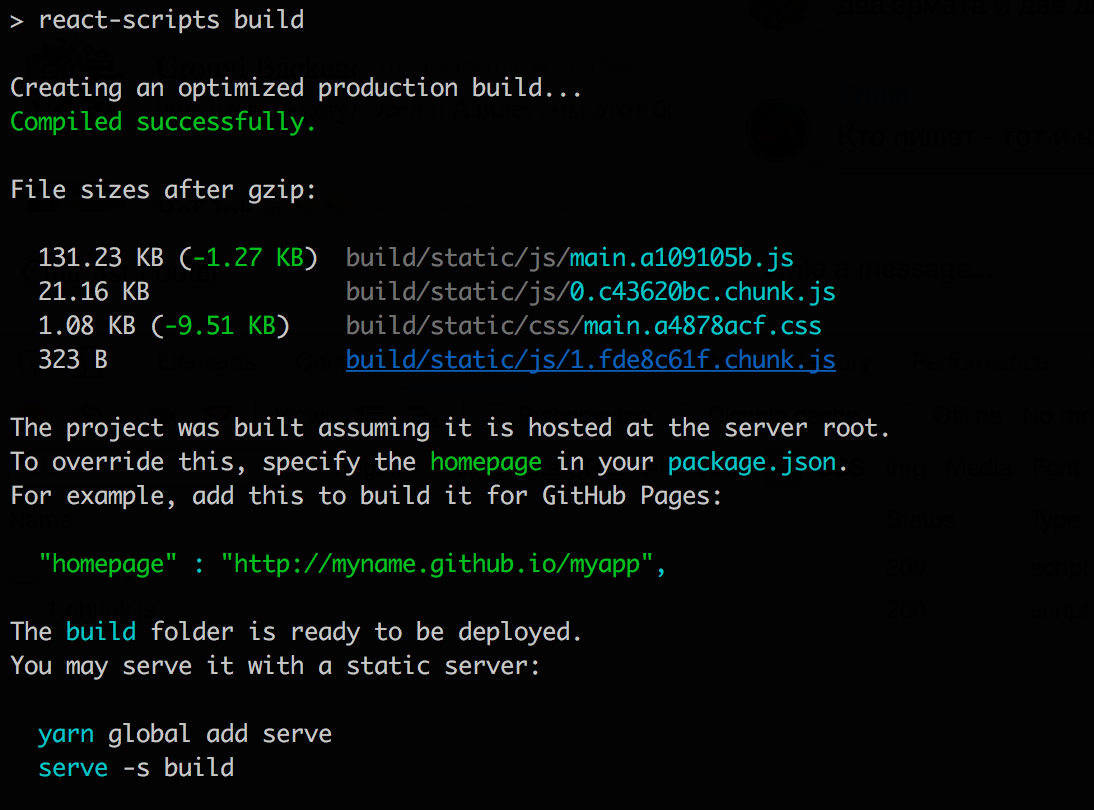
 tmedetbekov
on 13 Jun 2017
tmedetbekov
on 13 Jun 2017
@tmedetbekov I'm not sure what your code is like, so I can't give you an exact answer for your case. But AFAIK when you are code splitting, each chunk is bundled with it's dependencies. So it is possible that chunk 0 is including a dependency that it needs and maybe that dependency is also needed in the main chunk. Hence, the size of main didn't reduce all that much.
jayair
on 13 Jun 2017
seems these lines are faulty:
const AsyncHome = Loadable({
  loader: () => import('./containers/Home'),
  LoadingComponent: MyLoadingComponent
});
LoadingComponent:
shouldnt that be
loading:
 origicom
on 12 Aug 2017
origicom
on 12 Aug 2017
@origicom Yeah it looks like react-loadable has been updated.
Just made the change - https://github.com/AnomalyInnovations/serverless-stack-com/commit/02b273342cad736f43ba3349dfda2baa11007589. Thanks!
jayair
on 12 Aug 2017
Great article; thanks for detailing the 'why' in some of the decisions. I immediately added an AsyncComponent in three of my apps. I wondering though how to descriptively name the chunks to correspond to the component or file name. Any thoughts?
 rtmalone
on 30 Aug 2017
rtmalone
on 30 Aug 2017
@rtmalone I haven't tried this but I think you are looking for the webpackChunkName option - https://webpack.js.org/api/module-methods/#import-.
jayair
on 30 Aug 2017
How do you handle the case where we have redux store and when reducers have child reducers.?
 simvisfear
on 4 Sep 2017
simvisfear
on 4 Sep 2017
@simvisfear I'm not sure what you mean specifically (with respect to code splitting) but the dynamic import works similarly to a regular import.
jayair
on 4 Sep 2017
Thank you very much for this. I am looking for a way to preload some routes (without react-loadable).
Right now I simply call
componenDidMount(){
          import("./containers/Login");
}
which seems to do the trick
 bestwestern
on 18 Oct 2017
bestwestern
on 18 Oct 2017
Hi there, I'm pretty new to react and am not using redux. I have implemented code splitting with an async component as described in this chapter and it works great. However, I call child component instance methods from parent components (e.g., childComponentRef.triggerABC()). I'm not sure the proper way to do this with the AsyncComponent as a proxy, but I would like to share what I have done.
First, I save a ref of the child component: <C {...this.props} /> becomes <C {...this.props} ref={c => c && (this.c = c)} />
Second, I return a Proxy: return AsyncComponent; becomes
    return new Proxy(AsyncComponent, {
        construct: (target, argumentsList, newTarget) => {
            return new Proxy(new target(...argumentsList), {
                get: (target, property, receiver) => {
                    const p = target[property];
                    if (p === undefined && target.c) {
                        return target.c[property];
                    } else {
                        return p;
                    }
                }
            });
        },
    });
Please let me know how I might improve on this (or simplify it), and feel free to share.
 jayenashar
on 18 Dec 2017
jayenashar
on 18 Dec 2017
@jayenashar I have not had a chance to try out the pattern of calling instance methods for async components. Hopefully, somebody else that comes across this has some ideas.
jayair
on 21 Dec 2017
@jayair the proxy got too complicated when i realised i needed to apply this for functions. i got it working, but threw it out. instead i use innerRef a la styled-components. Separate to that, I saw a warning when calling this.setState if the component unmounts while importing. I also opted not to use async/await as it added to the bundle size. I provide my modified functions below:
        componentDidMount() {
            this._isMounted = true;
            importComponent().then(({default: component}) => this._isMounted && this.setState({component}));
        }

        render() {
            const Component = this.state.component;
            const {innerRef, ...props} = this.props;
            return Component ? <Component {...props} ref={component => innerRef && innerRef(component)}/> : null;
        }

        componentWillUnmount() {
            this._isMounted = false;
        }
@jayenashar That makes sense. Thanks for adding the context.
jayair
on 27 Dec 2017
This issue was moved to https://discourse.serverless-stack.com/t/comments-code-splitting-in-create-react-app/98
jayair
on 9 May 2018
Related issues
 quantuminformation
·
6Comments
jayair
·
9Comments
jayair
·
11Comments
quantuminformation
·
6Comments
jayair
·
9Comments
jayair
·
11Comments
 hollygirouard
·
5Comments
jayair
·
14Comments
hollygirouard
·
5Comments
jayair
·
14Comments
Most helpful comment
@minhna This is for Create React App and it's using Webpack 2 internally. I'm not sure how it works in other places.