Serverless-stack-com: Comments: Call the Create API
Link to chapter - http://serverless-stack.com/chapters/call-the-create-api.html
 jayair
All 58 comments
In the NewNote.js edit for handleSubmit, the path should be "/" instead of "/notes" since, when you create the back end the full path will be
Alternatively, you could be more specific in the config.js portion of this page to specify what you mean by YOUR_API_GATEWAY_URL
 nerdguru
on 19 Apr 2017
nerdguru
on 19 Apr 2017
Just make
apiGateway: {
    URL: 'https://ngh4urud.execute-api.eu-west-1.amazonaws.com/prod',
  },
But I now have Cors issue where it seems its not enabled.
Fetch API cannot load https://ngh4urud.execute-api.eu-west-1.amazonaws.com/prod/notes. No 'Access-Control-Allow-Origin' header is present on the requested resource. Origin 'http://localhost:3000' is therefore not allowed access. The response had HTTP status code 502. If an opaque response serves your needs, set the request's mode to 'no-cors' to fetch the resource with CORS disabled.
 PatrykTies
on 29 Apr 2017
PatrykTies
on 29 Apr 2017
@nerdguru added some context to it - 49da60e3aacf20bcede1b1f03433122783b312b2
@PatrykTies you can check your serverless.yml to see if you've enabled CORS there - https://github.com/AnomalyInnovations/serverless-stack-demo-api/blob/master/serverless.yml#L43
jayair
on 29 Apr 2017
After taking it so far, all I when I try to submit the note is an alert that says "failed to fetch". I also had a problem with the curl in this chapter: http://serverless-stack.com/chapters/deploy-the-apis.html but I wasn't able to resolve it. The error there was "Internal Server Error"... Can you give me a pointer where I should start looking for more information on the problems?
 frittate
on 24 May 2017
frittate
on 24 May 2017
@frittate I think you should debug the Create API. Here is a way to debug it and view and logs - https://github.com/AnomalyInnovations/serverless-stack-com/issues/28#issuecomment-297097300
Let me know if that makes sense.
jayair
on 24 May 2017
Hello again.
When trying to do the deployment (serverless deploy) I got the following response:
Serverless: Packing external modules: babel-runtime@^6.23.0, uuid@^3.0.1
Serverless: Packaging service...
Serverless: Uploading CloudFormation file to S3...
Serverless: Uploading artifacts...
Serverless: Uploading service .zip file to S3 (1.03 MB)...
Serverless: Updating Stack...
Serverless: Checking Stack update progress...
CloudFormation - UPDATE_IN_PROGRESS - AWS::CloudFormation::Stack - notes-app-api-prod
CloudFormation - CREATE_IN_PROGRESS - AWS::Logs::LogGroup - DeleteLogGroup
CloudFormation - CREATE_IN_PROGRESS - AWS::Lambda::Permission - 2Underscorewk567VfjNLambdaPermissionApiGateway
CloudFormation - CREATE_IN_PROGRESS - AWS::Logs::LogGroup - UpdateLogGroup
CloudFormation - CREATE_IN_PROGRESS - AWS::IAM::Role - IamRoleLambdaExecution
CloudFormation - CREATE_IN_PROGRESS - AWS::Logs::LogGroup - ListLogGroup
CloudFormation - CREATE_IN_PROGRESS - AWS::Logs::LogGroup - GetLogGroup
CloudFormation - CREATE_IN_PROGRESS - AWS::Logs::LogGroup - CreateLogGroup
CloudFormation - CREATE_IN_PROGRESS - AWS::ApiGateway::RestApi - ApiGatewayRestApi
CloudFormation - CREATE_FAILED - AWS::Lambda::Permission - 2Underscorewk567VfjNLambdaPermissionApiGateway
CloudFormation - CREATE_IN_PROGRESS - AWS::Logs::LogGroup - DeleteLogGroup
CloudFormation - CREATE_COMPLETE - AWS::Logs::LogGroup - DeleteLogGroup
CloudFormation - CREATE_IN_PROGRESS - AWS::IAM::Role - IamRoleLambdaExecution
CloudFormation - CREATE_IN_PROGRESS - AWS::Logs::LogGroup - ListLogGroup
CloudFormation - CREATE_IN_PROGRESS - AWS::Logs::LogGroup - GetLogGroup
CloudFormation - CREATE_IN_PROGRESS - AWS::Logs::LogGroup - UpdateLogGroup
CloudFormation - CREATE_FAILED - AWS::Logs::LogGroup - CreateLogGroup
CloudFormation - CREATE_COMPLETE - AWS::Logs::LogGroup - ListLogGroup
CloudFormation - CREATE_FAILED - AWS::Logs::LogGroup - GetLogGroup
CloudFormation - CREATE_FAILED - AWS::IAM::Role - IamRoleLambdaExecution
CloudFormation - CREATE_FAILED - AWS::ApiGateway::RestApi - ApiGatewayRestApi
CloudFormation - CREATE_FAILED - AWS::Logs::LogGroup - UpdateLogGroup
CloudFormation - UPDATE_ROLLBACK_IN_PROGRESS - AWS::CloudFormation::Stack - notes-app-api-prod
CloudFormation - UPDATE_ROLLBACK_COMPLETE_CLEANUP_IN_PROGRESS - AWS::CloudFormation::Stack - notes-app-api-prod
CloudFormation - DELETE_IN_PROGRESS - AWS::Logs::LogGroup - GetLogGroup
CloudFormation - DELETE_IN_PROGRESS - AWS::Logs::LogGroup - ListLogGroup
CloudFormation - DELETE_IN_PROGRESS - AWS::ApiGateway::RestApi - ApiGatewayRestApi
CloudFormation - DELETE_IN_PROGRESS - AWS::Logs::LogGroup - DeleteLogGroup
CloudFormation - DELETE_COMPLETE - AWS::Lambda::Permission - 2Underscorewk567VfjNLambdaPermissionApiGateway
CloudFormation - DELETE_IN_PROGRESS - AWS::Logs::LogGroup - UpdateLogGroup
CloudFormation - DELETE_IN_PROGRESS - AWS::IAM::Role - IamRoleLambdaExecution
CloudFormation - DELETE_IN_PROGRESS - AWS::Logs::LogGroup - CreateLogGroup
CloudFormation - DELETE_COMPLETE - AWS::Logs::LogGroup - GetLogGroup
CloudFormation - DELETE_COMPLETE - AWS::Logs::LogGroup - DeleteLogGroup
CloudFormation - DELETE_COMPLETE - AWS::Logs::LogGroup - ListLogGroup
CloudFormation - DELETE_COMPLETE - AWS::Logs::LogGroup - UpdateLogGroup
CloudFormation - DELETE_COMPLETE - AWS::ApiGateway::RestApi - ApiGatewayRestApi
CloudFormation - DELETE_COMPLETE - AWS::Logs::LogGroup - CreateLogGroup
CloudFormation - DELETE_COMPLETE - AWS::IAM::Role - IamRoleLambdaExecution
CloudFormation - UPDATE_ROLLBACK_COMPLETE - AWS::CloudFormation::Stack - notes-app-api-prod
Serverless: Deployment failed!

  Serverless Error ---------------------------------------

     An error occurred while provisioning your stack: 2Underscorewk567VfjNLambdaPermissionApiGateway
     - Unable to parse HTTP response content.

  Get Support --------------------------------------------
     Docs:          docs.serverless.com
     Bugs:          github.com/serverless/serverless/issues
     Forums:        forum.serverless.com
     Chat:          gitter.im/serverless/serverless

  Your Environment Information -----------------------------
     OS:                 darwin
     Node Version:       6.9.4
     Serverless Version: 1.13.2
This is my serverless.yml file:
service: notes-app-api

plugins:
  - serverless-webpack

custom:
  webpackIncludeModules: true

provider:
  name: aws
  runtime: nodejs6.10
  stage: prod
  region: us-east-2

  # 'iamRoleStatement' defines the permission policy for the Lambda function.
  # In this case Lambda functions are granted with permissions to access DynamoDB.
  iamRoleStatements:
    - Effect: Allow
      Action:
        - dynamodb:DescribeTable
        - dynamodb:Query
        - dynamodb:Scan
        - dynamodb:GetItem
        - dynamodb:PutItem
        - dynamodb:UpdateItem
        - dynamodb:DeleteItem
      Resource: "arn:aws:dynamodb:us-east-2:*:*"

functions:
  # Defines an HTTP API endpoint that calls the main function in create.js
  # - path: url path is /notes
  # - method: POST request
  # - cors: enabled CORS (Cross-Origin Resource Sharing) for browser cross
  #     domain api call
  # - authorizer: authenticate the api via Cognito User Pool. Update the 'arn'
  #     with your own User Pool ARN
  create:
    handler: create.main
    events:
      - http:
          path: notes
          method: post
          cors: true
          authorizer:
            arn: aws:cognito-idp:us-east-2:311966611455:userpool/us-east-2_wk567VfjN

  get:
    # Defines an HTTP API endpoint that calls the main function in get.js
    # - path: url path is /notes/{id}
    # - method: GET request
    handler: get.main
    events:
      - http:
          path: notes/{id}
          method: get
          cors: true
          authorizer:
            arn: aws:cognito-idp:us-east-2:311966611455:userpool/us-east-2_wk567VfjN

  list:
    # Defines an HTTP API endpoint that calls the main function in list.js
    # - path: url path is /notes
    # - method: GET request
    handler: list.main
    events:
      - http:
          path: notes
          method: get
          cors: true
          authorizer:
            arn: aws:cognito-idp:us-east-2:311966611455:userpool/us-east-2_wk567VfjN

  update:
    # Defines an HTTP API endpoint that calls the main function in update.js
    # - path: url path is /notes/{id}
    # - method: PUT request
    handler: update.main
    events:
      - http:
          path: notes/{id}
          method: put
          cors: true
          authorizer:
            arn: aws:cognito-idp:us-east-2:311966611455:userpool/us-east-2_wk567VfjN
  delete:
    # Defines an HTTP API endpoint that calls the main function in delete.js
    # - path: url path is /notes/{id}
    # - method: DELETE request
    handler: delete.main
    events:
      - http:
          path: notes/{id}
          method: delete
          cors: true
          authorizer:
            arn: aws:cognito-idp:us-east-2:311966611455:userpool/us-east-2_wk567VfjN
I have checked everything and I do not know where the error is. Can someone help me?
Thank you very much!
 martinsaporiti
on 30 May 2017
martinsaporiti
on 30 May 2017
@martinsaporiti, the authorizer arn should start with arn: it should look something like
          authorizer:
            arn: arn:aws:cognito-idp:us-east-2:311966611455:userpool/us-east-2_wk567VfjN
 fwang
on 30 May 2017
fwang
on 30 May 2017
You are me hero @fwang!
Thaks!!!
Serverless: Stack update finished...
Service Information
service: notes-app-api
stage: prod
region: us-east-2
api keys:
  None
endpoints:
  POST - https://omc6734xf9.execute-api.us-east-2.amazonaws.com/prod/notes
  GET - https://omc6734xf9.execute-api.us-east-2.amazonaws.com/prod/notes/{id}
  GET - https://omc6734xf9.execute-api.us-east-2.amazonaws.com/prod/notes
  PUT - https://omc6734xf9.execute-api.us-east-2.amazonaws.com/prod/notes/{id}
  DELETE - https://omc6734xf9.execute-api.us-east-2.amazonaws.com/prod/notes/{id}
functions:
  create: notes-app-api-prod-create
  get: notes-app-api-prod-get
  list: notes-app-api-prod-list
  update: notes-app-api-prod-update
  delete: notes-app-api-prod-delete

Stack Outputs
DeleteLambdaFunctionQualifiedArn: arn:aws:lambda:us-east-2:311966611455:function:notes-app-api-prod-delete:1
CreateLambdaFunctionQualifiedArn: arn:aws:lambda:us-east-2:311966611455:function:notes-app-api-prod-create:1
GetLambdaFunctionQualifiedArn: arn:aws:lambda:us-east-2:311966611455:function:notes-app-api-prod-get:1
UpdateLambdaFunctionQualifiedArn: arn:aws:lambda:us-east-2:311966611455:function:notes-app-api-prod-update:1
ListLambdaFunctionQualifiedArn: arn:aws:lambda:us-east-2:311966611455:function:notes-app-api-prod-list:1
ServiceEndpoint: https://omc6734xf9.execute-api.us-east-2.amazonaws.com/prod
ServerlessDeploymentBucketName: notes-app-api-prod-serverlessdeploymentbucket-k0qhmr6n8ar1

Serverless: Removing old service versions...
What does this line check for?
body = (body) ? JSON.stringify(body) : body;
 ghost
on 3 Jul 2017
ghost
on 3 Jul 2017
@petrovm We are checking if the body is passed in to the call. If it is then we JSON encode it and make a request with it.
jayair
on 3 Jul 2017
Hi, I was one of the unlucky ones who had to upgrade my API in the middle of the tutorial to use IAM to authenticate, instead of the arn. I looked at the changelog and did a new serverless deploy with the updated create/delete/get/list.js files + serverless.yml.
I am able to test the api with the apig-test command from the terminal and get a 200 response:
Authenticating with User Pool
Getting temporary credentials
Making API request
{ status: 200,
  statusText: 'OK',
  data:
   { userId: 'us-east-1:7d88cdb0-5140-422f-9859-1d9afac66456',
     noteId: 'f2d07fc0-70ed-11e7-9cfd-8d2f175b56c4',
     content: 'hello world',
     attachment: 'hello.jpg',
     createdAt: 1500955294140 } }
But when I try to create a note from my /notes/new page, I get the following error:
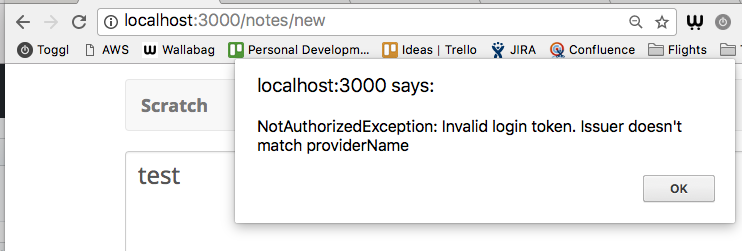
I've made sure to update the IAM policy to reflect the changes in the "create an identity pool" doc: https://github.com/AnomalyInnovations/serverless-stack-com/commit/717fcd89f33c6d7dd5ee5c2c2b5560136b115331#diff-8bccc23bba3c2ea21eb1a1cbea8b2ff3R80
Is there something I'm missing? Any help is very much appreciated :)
 d3sandoval
on 25 Jul 2017
d3sandoval
on 25 Jul 2017
@frittate - I am also getting an 'unable to fetch' error - what did you do to resolve your issue?
Update: I changed the URL in my config to /prod instead of /prod/ and this has issued a different error message, saying "Error: {status:false}
My repo is here: https://github.com/mikhaelbendavid/serverlessblog
Update - I updated the IAM role permissions to allow for put request to dynamo db requests! It works!
 mikhael28
on 25 Jul 2017
mikhael28
on 25 Jul 2017
Nevermind, I forgot a closing "}" in this line: https://github.com/AnomalyInnovations/serverless-stack-demo-client/blob/call-the-create-api/src/libs/awsLib.js#L51
Also noticed that the compiler does not like sigV4Client.js since "Line 220 exceeds the maximum line length of 100":

This can be fixed by simply breaking the line:
// If there is no body remove the content-type header
// so it is not included in SigV4 calculation
@d3sandoval Thats interesting. Can I see what version Create React App are you using? create-react-app --version
jayair
on 25 Jul 2017
Hi all,
I'm getting things not imported - which libs are to be imported in awsLib.js?
./src/libs/awsLib.js
  Line 6:   'getAwsCredentials' is not defined  no-undef
  Line 10:  'AWS' is not defined                no-undef
  Line 11:  'AWS' is not defined                no-undef
  Line 12:  'AWS' is not defined                no-undef
 anguaji
on 2 Aug 2017
anguaji
on 2 Aug 2017
@anguaji Hmm it looks like you might have missed a step from the previous chapter? We install and import the AWS SDK in src/awsLib.js.
jayair
on 3 Aug 2017
Hi - I am receiving a 403 cors issue and cors is turned off. What could be the problem?
Fetch API cannot load https://*******.execute-api.us-west-2.amazonaws.com/prod/inventory. No 'Access-Control-Allow-Origin' header is present on the requested resource. Origin 'http://localhost:3000' is therefore not allowed access. The response had HTTP status code 403. If an opaque response serves your needs, set the request's mode to 'no-cors' to fetch the resource with CORS disabled.
 copperspeed
on 3 Aug 2017
copperspeed
on 3 Aug 2017
@jayair thanks! I'd missed the definition between two hunks of code :)) thanks!
anguaji
on 3 Aug 2017
@copperspeed Can you check the CloudWatch logs to see if you are getting anything there?
jayair
on 3 Aug 2017
I'm having the same CORS problem here, and my serverless.yml is the same of this https://github.com/AnomalyInnovations/serverless-stack-demo-api/blob/251d1defa682c70c7af770ba386b2069ef3eefda/serverless.yml#L42
 ramonpm
on 11 Aug 2017
ramonpm
on 11 Aug 2017
@ramonpm Does calling the Create API directly work for you (like in this chapter - http://serverless-stack.com/chapters/test-the-apis.html)?
jayair
on 11 Aug 2017
Yes @jayair, it works for me when I call it directly.
2017-08-11 14:10 GMT-03:00 Jay V notifications@github.com:
@ramonpm https://github.com/ramonpm Does calling the Create API
directly work for you (like in this chapter - http://serverless-stack.com/
chapters/test-the-apis.html)?—
You are receiving this because you were mentioned.
Reply to this email directly, view it on GitHub
https://github.com/AnomalyInnovations/serverless-stack-com/issues/48#issuecomment-321868080,
or mute the thread
https://github.com/notifications/unsubscribe-auth/AAM6dIIK9us52eK8h8HTwlNgsz-wI2jfks5sXIrxgaJpZM4M4OK7
.
--
Ramon de Paula Marques
ramonpm
on 11 Aug 2017
@ramonpm The other thing to check would be if you are returning the proper headers like so - https://github.com/AnomalyInnovations/serverless-stack-demo-api/blob/master/libs/response-lib.js#L13.
jayair
on 11 Aug 2017
@jayair, thanks for your reply.
Unfortunately my response-lib.js is exactly the same as well...
ramonpm
on 11 Aug 2017
@ramonpm Can I see a screenshot of the error that you are seeing in the browser console?
jayair
on 13 Aug 2017
I'm having the same issue too. Screenshot attached:

 jonsaw
on 13 Aug 2017
jonsaw
on 13 Aug 2017
@jonsaw Can you check the CloudWatch logs for the create notes Lambda?
jayair
on 13 Aug 2017
@jayair no logs from yesterday and today.

jonsaw
on 14 Aug 2017
@jonsaw Can I see your serverless.yml? And the IAM role attached to the Cognito Identity Pool? Here are some instructions on how to look it up - https://github.com/AnomalyInnovations/serverless-stack-com/issues/112#issuecomment-317204545.
jayair
on 14 Aug 2017
serverless.yml
service: notes-api

# Use serverless-webpack plugin to transpile ES6/ES7
plugins:
  - serverless-webpack

# Enable auto-packing of external modules
custom:
  webpackIncludeModules: true

provider:
  name: aws
  runtime: nodejs6.10
  stage: prod
  region: ap-southeast-1

  iamRoleStatements:
    - Effect: Allow
      Action:
        - dynamodb:DescribeTable
        - dynamodb:Query
        - dynamodb:Scan
        - dynamodb:GetItem
        - dynamodb:PutItem
        - dynamodb:UpdateItem
        - dynamodb:DeleteItem
      Resource: "arn:aws:dynamodb:ap-southeast-1:*:*"

functions:
  create:
    handler: create.main
    events:
      - http:
          path: notes
          method: post
          cors: true
          authorizer: aws_iam
  get:
    handler: get.main
    events:
      - http:
          path: notes/{id}
          method: get
          cors: true
          authorizer: aws_iam
  list:
    handler: list.main
    events:
      - http:
          path: notes
          method: get
          cors: true
          authorizer: aws_iam
  update:
    handler: update.main
    events:
      - http:
          path: notes/{id}
          method: put
          cors: true
          authorizer: aws_iam
  delete:
    handler: delete.main
    events:
      - http:
          path: notes/{id}
          method: delete
          cors: true
          authorizer: aws_iam
Cognito Identity Pool IAM role:
{
  "Version": "2012-10-17",
  "Statement": [
    {
      "Effect": "Allow",
      "Action": [
        "mobileanalytics:PutEvents",
        "cognito-sync:*",
        "cognito-identity:*"
      ],
      "Resource": [
        "*"
      ]
    },
    {
      "Effect": "Allow",
      "Action": [
        "s3:*"
      ],
      "Resource": [
        "arn:aws:s3:::elasticbeanstalk-ap-southeast-1-999999999999/${cognito-identity.amazonaws.com:sub}*"
      ]
    },
    {
      "Effect": "Allow",
      "Action": [
        "execute-api:Invoke"
      ],
      "Resource": [
        "arn:aws:execute-api:ap-southeast-1:*:xxxxxxxxxx/*"
      ]
    }
  ]
}
Thanks for the quick response @jayair .
jonsaw
on 14 Aug 2017
@jonsaw All this looks good. And I'm assuming you got through the Test the APIs chapter?
If so, then can you host your backend code so I can take a look?
jayair
on 14 Aug 2017
Yes, got OK for the test APIs chapter.
Sure, backed code hosted here.
jonsaw
on 15 Aug 2017
@jonsaw Just tried your backend with my react app and the CORS part worked. Of course the request itself failed because I don't have your DB.

Can you host your frontend code as well and I'll take a look?
jayair
on 15 Aug 2017
@jayair I'll post it. But in the meantime, I was looking at the console and I noticed I got the following response headers:
content-length:358
content-type:application/json
date:Wed, 16 Aug 2017 00:05:04 GMT
status:403
via:1.1 f8f44b9f631a9dc3326cc7f64bcd4863.cloudfront.net (CloudFront)
x-amz-cf-id:CMEkFLWhGjdjYzTH3CLkgDdmsJjoURPbHh1o2NB2yThH0z_oLRzyjw==
x-amzn-errortype:IncompleteSignatureException
x-amzn-requestid:8e228d97-8216-11e7-b477-3b952b608cf8
x-cache:Error from cloudfront
@jonsaw Yeah that's a good clue. It seems like the signature for the request was not calculated properly. Let's take a look at the frontend.
jayair
on 16 Aug 2017
Hey guys,
Great tutorial! I'm running into an ERR_NAME_NOT_RESOLVED error when initiating the invokeApig call to create a new note. Screenshot here

Any ideas would be helpful! Thanks
 dailenspencer
on 24 Aug 2017
dailenspencer
on 24 Aug 2017
@dailenspencer That sounds like you are not able to hit that URL from your local machine. Did the step where you tested the APIs work for you?
jayair
on 24 Aug 2017
@jayair Thanks for the quick response. Just got back to my keyboard. Here is a screenshot of the test - you will see the data comes back empty; Not sure why this is.

Update: seemed to narrow down the issue. The above terminal command was executing my list.js lambda function for some reason, hence the empty array returned. Inside my serverless.yml I had the following
list:
    # Defines an HTTP API endpoint that calls the main function in list.js
    # - path: url path is /notes
    # - method: GET request
    handler: list.main
    events:
      - http:
          path: notes
          method: post
          cors: true
          authorizer: aws_iam
the method property was set to post which made it identical to the create method. My lambda ended up being confused and called the list.js function instead of the create.js function.
dailenspencer
on 24 Aug 2017
@dailenspencer I just noticed in your original screenshot that you are trying to connect to the API endpoint that we have in the tutorial. Replace that with the one you are using in the apig-test command and give it a try.
jayair
on 24 Aug 2017
@jayair Right. Solved that one as well - forgot to mention it on here. All is working well! Thanks for the assistance. Next step is to implement this functionality(Lambda and CognitoUserPool authentication) in Unity/C# app :)
dailenspencer
on 24 Aug 2017
@jayair, published my frontend code here.
I've also cloned the frontend from this repository but with the config set to my servers. I am getting the same 403 error.
Fetch API cannot load https://xxxxxxxxxx.execute-api.ap-southeast-1.amazonaws.com/prod/notes. No 'Access-Control-Allow-Origin' header is present on the requested resource. Origin 'http://web.mhub.local:3002' is therefore not allowed access. The response had HTTP status code 403. If an opaque response serves your needs, set the request's mode to 'no-cors' to fetch the resource with CORS disabled.
With the following body.
{"message":"'ap-southeast-1/execute-api/aws4_request' not a valid key=value pair (missing equal-sign) in Authorization header: 'AWS4-HMAC-SHA256 Credential=AXXXXXXXXXXXXXXXXXXX/20170825/ ap-southeast-1/execute-api/aws4_request, SignedHeaders=accept;content-type;host;x-amz-date, Signature=xxxxxxxxxxxxxxxxxxxxxxxxxxxxxxxxxxxxxxxxxxxxxxxxxxxxxxxxxxxxxxx'."}
Got it to work! There was a space in one of my configs which caused the authorization header to mess up.
{"message":"'ap-southeast-1/execute-api/aws4_request' not a valid key=value pair (missing equal-sign) in Authorization header: 'AWS4-HMAC-SHA256 Credential=AXXXXXXXXXXXXXXXXXXX/20170825/ ap-southeast-1/execute-api/aws4_request, SignedHeaders=accept;content-type;host;x-amz-date, Signature=xxxxxxxxxxxxxxxxxxxxxxxxxxxxxxxxxxxxxxxxxxxxxxxxxxxxxxxxxxxxxxx'."}
                                                                                                                                                                                          ^ " " SPACE!!
@jonsaw Just to make sure other people find this and understand it; which config had the extra space?
jayair
on 26 Aug 2017
@jayair sure thing!
export default {
  apiGateway: {
    URL: 'https://xxxxxxxxxx.execute-api.ap-southeast-1.amazonaws.com/prod',
    REGION: ' ap-southeast-1',
          // ^ " " extra space
  },
  cognito: {
    USER_POOL_ID : 'ap-northeast-xxxxxxxxxxx',
    APP_CLIENT_ID : 'xxxxxxxxxxxxxxxxxxxxxxxxx',
    REGION: 'ap-northeast-1',
    IDENTITY_POOL_ID: 'ap-northeast-1:xxxxxxx-xxxx-xxxx-xxxx-xxxxxxx',
  },
  MAX_ATTACHMENT_SIZE: 5000000,
};
@jonsaw Ah makes sense. Thanks for posting it.
jayair
on 27 Aug 2017
For future readers... I also had the "Failed to fetch" CORS issue. It seems like this can be caused by any issue with the inputs provided to sigV4Client or a misconfigured Serverless deployments. sigV4Client is a bit tricky b/c it will always sign your requests with the information you provide it, even if that is the wrong information. I was able to debug my situation by returning to the "Test the APIs" chapter, which I had skipped over in haste, and by investigating the logs for my create lambda function. I ultimately found two issues... (1) In my serverless "iamRoleStatemements" block of the serverless.yml file I forgot to change the Resource ARN to point at the correct region, in my case "us-west-2." and (2) In my React config I specified a URL ending in "/prod/notes" rather than just "/prod." So needless to say, this particular error is a bit annoying because it can span your frontend and backend code as it did in my case.
 tmaxxman
on 16 Oct 2017
tmaxxman
on 16 Oct 2017
@tmaxxman Thanks for sharing your debugging details. It'll be pretty helpful.
jayair
on 17 Oct 2017
I was getting a 403 error on the OPTIONS request. Everything seemed configured properly, and running the apig-test command in Test the APIs chapter was fine. Turns out I had a spurious single quote in config.js:
  apiGateway: {
    URL: "https://7tsfnkxjl3.execute-api.us-west-2.amazonaws.com/prod'",
    REGION: "us-west-2"
  },
Note the extra ' at the end of the /prod' in the URL. Hope this helps someone else.
 tauren
on 5 Nov 2017
tauren
on 5 Nov 2017
running into some issues calling apis from react app, any ideas ? when i use the test.. I get following response:
Authenticating with User Pool
Getting temporary credentials
Making API request
{ status: 403,
  statusText: 'Forbidden',
  data: { Message: 'User: arn:aws:sts::xxxx:assumed-role/Cognito_notesidentitypoolAuth_Role/CognitoIdentityCredentials is not authorized to perform: execute-api:Invoke on resource: arn:aws:execute-api:us-east-1:********9445:xxxx/prod/POST/notes' } }
 walshe
on 22 Jan 2018
walshe
on 22 Jan 2018
strangely when the UI hits the list function, it actually reaches the function but get a 500 inside due to a pretty empty event.requestContext.identity:
cognitoidentity id is
{"cognitoIdentityPoolId":null,"accountId":null,"cognitoIdentityId":null,"caller":null,"sourceIp":"xx.xxx.xxx","accessKey":null,"cognitoAuthenticationType":null,"cognitoAuthenticationProvider":null,"userArn":null,"userAgent":"Mozilla/5.0 (Macintosh; Intel Mac OS X 10_11_1) AppleWebKit/537.36 (KHTML, like Gecko) Chrome/63.0.3239.108 Safari/537.36","user":null}
followed this to resolve my issue - https://serverless-stack.com/chapters/debugging-serverless-api-issues.html
turns out of course that the original api prefix that I had specified in the role policy was now wrong because a new 'serverless deploy' had deployed apis to new url prefix
walshe
on 23 Jan 2018
Upon attempting to log in, I was getting the following error:
TypeError: __WEBPACK_IMPORTED_MODULE_0_aws_sdk_global__["util"].crypto.lib.randomBytes is not a function. (In '__WEBPACK_IMPORTED_MODULE_0_aws_sdk_global__["util"].crypto.lib.randomBytes(128)', '__WEBPACK_IMPORTED_MODULE_0_aws_sdk_global__["util"].crypto.lib.randomBytes' is undefined)
I'm running AWS SDK version 2.188
Downgrading to version 2.177 fixes the problem.
 zipper1972
on 4 Feb 2018
zipper1972
on 4 Feb 2018
@zipper1972 Thanks for reporting. Some other folks had run into this issue as well. Something was off on the AWS SDK end.
jayair
on 5 Feb 2018

I got this issues man
 mochfauz
on 29 Mar 2018
mochfauz
on 29 Mar 2018
@mbahfauz Have you solved this already? I see some of your other comments about other issues.
jayair
on 31 Mar 2018
Whenever I call this API or try to create a note, I get the following error. Any advice or pointers? Thank you! I'm pretty sure I set all the cors to be true on my serverless.yml file. I also read through all the comments above but none of the solutions seemed to work for me. The status code is 401.

 ringoyip0901
on 5 May 2018
ringoyip0901
on 5 May 2018
@ringoyip0901 Did this chapter work for you - https://serverless-stack.com/chapters/test-the-apis.html?
If it did then we might have to look at the logs to see what is going on.
jayair
on 8 May 2018
This issue was moved to https://discourse.serverless-stack.com/t/comments-call-the-create-api/124
jayair
on 9 May 2018
Related issues
 quantuminformation
·
6Comments
jayair
·
20Comments
jayair
·
4Comments
jayair
·
15Comments
jayair
·
21Comments
quantuminformation
·
6Comments
jayair
·
20Comments
jayair
·
4Comments
jayair
·
15Comments
jayair
·
21Comments
Most helpful comment
followed this to resolve my issue - https://serverless-stack.com/chapters/debugging-serverless-api-issues.html
turns out of course that the original api prefix that I had specified in the role policy was now wrong because a new 'serverless deploy' had deployed apis to new url prefix