Serverless-stack-com: Comments: Login with AWS Cognito
Link to chapter - http://serverless-stack.com/chapters/login-with-aws-cognito.html
 jayair
All 39 comments
I would love it if you added a chapter on logging in with facebook account. Do you guys know of any good tuts that would help walk us through this?
 auz1111
on 2 Jun 2017
auz1111
on 2 Jun 2017
@auz1111 Yeah it has been on our list.
For the tutorial, I'd have to look for one. You need to use Cognito Federated Identities instead of the User Pool to manage your user accounts.
jayair
on 3 Jun 2017
I'm starting to look into this also. It seems that there is a mapping ability to map the different federated identities together but I'm not exactly sure yet how to do this in a way that makes sense.
 rogueturnip
on 8 Jun 2017
rogueturnip
on 8 Jun 2017
@rogueturnip Yeah it is quite confusing to wrap your head around the set up. But that is how it is supposed to work. Federated identities pulls all your different identity sources together to give you a consolidated view of all your users, regardless of where they are coming from.
jayair
on 8 Jun 2017
If I'm understanding it correctly it seems you login the first time and that caches the credentials. Then when a login is done using something like facebook you would do a credentials.get to see if there are existing credentials and then when you do the Login Map you would send in both. Am I following the flow right or completely off base? I can't find an example so I'm piecing together things from the AWS docs.
rogueturnip
on 8 Jun 2017
Hmm I'm not completely sure if I follow the flow you are talking about. It is a bit complicated and not super well documented.
jayair
on 9 Jun 2017
It's possible I"m messing up what I think the process is. No where is this documented very well.
rogueturnip
on 9 Jun 2017
Getting "Error: Network Failure" out of the AWS xhr.js at this point. Have verified the correct username & password, they work from the console with aws cognito-idep admin-initiate-auth. Have verified the right user pool & client IDs in config.js. Not sure what to look at next...
 ghost
on 11 Jul 2017
ghost
on 11 Jul 2017
Figured it out. NoScript stepped in to block amazonaws.com. That'd do it.
ghost
on 11 Jul 2017
+1 for Federated Identities chapter.
 exbarboss
on 22 Aug 2017
exbarboss
on 22 Aug 2017
Great tutorial! I've been through all the content and now building my app by customising the code produced in this tutorial. I just have question on how we can dynamically configure the app to use specific config.js file for different stages. I'm using the created config.js in this tutorial for production environment. Config.js should be different on dev or test environment like the user pool & app client id. It should be somewhere in build time, right?
Thanks in advance!
 triunm
on 18 Oct 2017
triunm
on 18 Oct 2017
@triunm I was planning on writing on this but a simple way to handle this is as follows.
In your config.js use something like this:
const dev = {
  apiGateway: {
    REGION: 'us-east-1',
    URL: 'https://12345678.execute-api.us-east-1.amazonaws.com/staging',
  },
  cognito: {
    REGION: 'us-east-1',
    USER_POOL_ID : 'us-east-1_123456678',
    APP_CLIENT_ID : '4xxxxxxxxxxxxxxxxxxxx',
    IDENTITY_POOL_ID: 'us-east-1:12345678-1234-1233-9387-1234567890123',
  }
};

const prod = {
  apiGateway: {
    REGION: 'us-east-1',
    URL: 'https://567890.execute-api.us-east-1.amazonaws.com/prod',
  },
  cognito: {
    REGION: 'us-east-1',
    USER_POOL_ID : 'us-east-1_4444444',
    APP_CLIENT_ID : '5xxxxxxxxxxxxxxxxxx',
    IDENTITY_POOL_ID: 'us-east-1:456789-1234-1234-4567-123456789',
  }
};

const config = process.env.REACT_APP_STAGE === 'production'
  ? prod
  : dev;

export default {
  ...config
};
And in your package.json set your scripts as:
  "scripts": {
    "start": "REACT_APP_STAGE=dev react-scripts start",
    "build": "REACT_APP_STAGE=production react-scripts build"
  }
You can extend this idea to have other environments. This is based on the idea of custom environment variables in Create React App.
jayair
on 19 Oct 2017
I'm leaving this comment just because I had a hard time finding out what was a problem when I faced 502 error(cors problem).
In that case, there are three possible options.
Firstly, you can look at '/libs/response-lib.js' and check whether the function contains 'Access-Control-Allow-Origin' header or not.
Secondly, you may have miss indented serverless.yml.
Or lastly, you may have forgotten deploying your functions as I did ...
I could see my notes after deploying the functions.
If you have same issue like me, you can re-deploy your functions and it might help you get out of trouble.
 leejh3224
on 28 Nov 2017
leejh3224
on 28 Nov 2017
@leejh3224 Thanks for leaving your comment here.
jayair
on 28 Nov 2017
Hi,
I have reached a point in the splendid tutorial where a first time app-client user should login in for the first time, having his email already verified.
The login function from the Login.js is executed and comes back with a new challenge 'NEW_PASSWORD_REQUIRED'.
The tutorial says nothing about this and assumes the login succeeds?
So I added a function newPasswordRequired: function(userAttributes, requiredAttributes)
but i can not get that to work. How should i proceed?
Is the tutorial somewhat outdated regarding this feature? The Login.js in the tutorial does not have the newPasswordRequired method nor are there any problems mentioned at the end of the chapter.
Thnx,
Oscar Henneken
 ohenneken
on 14 Dec 2017
ohenneken
on 14 Dec 2017
@ohenneken Hmm you shouldn't need to do this. If you've followed this chapter - https://serverless-stack.com/chapters/create-a-cognito-test-user.html
Then you user should be able to login without having to set a new password.
jayair
on 15 Dec 2017
Hi Jay,
Thnx for responding!
I am impressed with the amount of information yet clarity you guys have
composed these tutorials, it helps a lot!
I followed the chapter, but i guess something went wrong in the part where
i had to do:
aws cognito-idp admin-confirm-sign-up \
--region us-east-1 \
--user-pool-id YOUR_USER_POOL_ID \
--username [email protected]
I started on a windows computer behind a proxy and had problems, Then
switched to a MacBook Pro where i had problems installing pip. So somewhere
in that hussle i must have missed i made a mistake.
I can continue with the tutorials because the signup works fine so i can
create and authenticated end users.
I receive an error with the list.js component (error 500, status: false), i
have yet to find out why, but i learned enough already to keep digging into
aws and serverless framework for new applications.
Kind regards,
Oscar Henneken
ohenneken
on 15 Dec 2017
With cognito how would you setup up the ability to reset ones password if the user forgot the password or even within the app?
-Michael
 mdhendri
on 23 Dec 2017
mdhendri
on 23 Dec 2017
Hi Jay,
Merry X-mas!
I worked through the tutorial but i did not get a "create" call to work
decently on the server.
I only got the "create" for the notes-scratch application to work via the
serveless invoke local, but never via the apig test. That returns an
500, Internal Server Error
If the serverless invoke local is capable of creating an item in the
DynamoDb on the server, apparently all the building blovks are there, so
why wouldn't this work on the server itself?
I also created another request call "create_favorite", to create a favorite.
I deployed it apparently correctly, but it states:
app.js:100242 Uncaught (in promise) TypeError: Failed to execute 'fetch' on
'Window': Request with GET/HEAD method cannot have body.
serverless.yml maps it to a "POST", like so
create_favorite:
handler: create_favorite.main
events:
- http:
path: favorites
method: post
cors: true
authorizer: aws_iam
What could it be?
Kind regards,
Oscar Henneken
ohenneken
on 24 Dec 2017
@mdhendri It is a few extra steps but it is fairly straightforward. Cognito will send a code to the user and they can reset their password with the code and their new password. I might write a chapter on this at some point, but here is the sample code from the Cogntio JS SDK docs - https://github.com/aws/amazon-cognito-identity-js
cognitoUser.forgotPassword({
    onSuccess: function (data) {
        // successfully initiated reset password request
        console.log('CodeDeliveryData from forgotPassword: ' + data);
    },
    onFailure: function(err) {
        alert(err);
    },
    //Optional automatic callback
    inputVerificationCode: function(data) {
        console.log('Code sent to: ' + data);
        var verificationCode = prompt('Please input verification code ' ,'');
        var newPassword = prompt('Enter new password ' ,'');
        cognitoUser.confirmPassword(verificationCode, newPassword, {
            onSuccess() {
                console.log('Password confirmed!');
            },
            onFailure(err) {
                console.log('Password not confirmed!');
            }
        });
    }
});
@ohenneken I'm not entirely sure based on what is happening here but a good place to start would be by checking the logs for API Gateway and Lambda. We have a chapter on this here - https://serverless-stack.com/chapters/api-gateway-and-lambda-logs.html
jayair
on 27 Dec 2017
Hi Jay,
Thnx for responding.
I have these logs up and running, and i have been nspecting them, but there
is no clear indication why some rest-calls do not work correctly.
There is one 'get' call i cannot get to work, while other work fine and i
cannot not get any create (or POST) call to work via the deployed api.
I can however run code that creates entries programmatically, using the
DynamoDb API from aws-sdk.
I used that to populate the tables, doing:
var docClient = new AWS.DynamoDB.DocumentClient();
var params = {
TableName: "policy_statements",
Item: {
"label": statement.label,
"Name": statement.Name,
"parentObject": statement.parentObject,
"policy": statement.policy,
"AuthoritativeSourceReference":
statement.AuthoritativeSourceReference,
"Description": statement.Description
}
};
docClient.put(params, function(err, data) {
So the tables are ok and i can put data in the tables, but when i try to
call the deployed API via the application, this does not work.
Regards,
Oscar Henneken
ohenneken
on 27 Dec 2017
@ohenneken You should be able to inspect the Lambda logs to see why they are failing. What do the logs for the failed ones say?
jayair
on 27 Dec 2017
Hi Jay,
Well one error, for a create_favorite call gives this errors back on the
client:
app.js:118495 Uncaught (in promise) TypeError: Failed to execute 'fetch' on
'Window': Request with GET/HEAD method cannot have body.
at _callee3$ (
http://localhost:8080/app.js?40601732f7eafe02cf81:118495:20)
at tryCatch (http://localhost:8080/app.js?40601732f7eafe02cf81:98834:40)
at Generator.invoke [as _invoke] (
http://localhost:8080/app.js?40601732f7eafe02cf81:99068:22)
at Generator.prototype.(anonymous function) [as next] (
http://localhost:8080/app.js?40601732f7eafe02cf81:98886:21)
at step (http://localhost:8080/app.js?40601732f7eafe02cf81:23870:30)
at http://localhost:8080/app.js?40601732f7eafe02cf81:23881:13
at
app.js:115097 Error: User:
arn:aws:sts::891130555436:assumed-role/Cognito_bwisenotesappAuth_Role/CognitoIdentityCredentials
is not authorized to perform: dynamodb:PutItem on resource:
arn:aws:dynamodb:us-east-2:891130555436:table/create_favorite
at Request.extractError (app.js:14915)
at Request.callListeners (app.js:17842)
at Request.emit (app.js:17814)
at Request.emit (app.js:16471)
at Request.transition (app.js:15810)
at AcceptorStateMachine.runTo (app.js:21186)
at app.js:21198
at Request.
at Request.
at Request.callListeners (app.js:17852)
I suppose there is something not ok with the IAM roles & policies?
For example: the role for the error above was set like so:
{
"Version": "2012-10-17",
"Statement": [
{
"Effect": "Allow",
"Action": [
"mobileanalytics:PutEvents",
"cognito-sync:",
"cognito-identity:"
],
"Resource": [
""
]
},
{
"Effect": "Allow",
"Action": [
"s3:"
],
"Resource": [
"arn:aws:s3:::bwise-notes/${cognito-identity.amazonaws.com:
sub}"
]
},
{
"Effect": "Allow",
"Action": [
"execute-api:Invoke"
],
"Resource": [
"arn:aws:execute-api:us-east-1::61u3er5pth/"
]
},
{
"Action": [
"dynamodb:DescribeTable",
"dynamodb:Query",
"dynamodb:Scan",
"dynamodb:GetItem",
"dynamodb:PutItem",
"dynamodb:UpdateItem",
"dynamodb:DeleteItem"
],
"Resource":
["arn:aws:dynamodb:us-east-1::","arn:aws:dynamodb:us-east-1:"],
"Effect": "Allow"
},
{
"Effect": "Allow",
"Action": [
"dynamodb:DescribeTable",
"dynamodb:Query",
"dynamodb:Scan",
"dynamodb:GetItem",
"dynamodb:PutItem",
"dynamodb:UpdateItem",
"dynamodb:DeleteItem"
],
"Resource": [
"arn:aws:dynamodb:us-east-2:891130555436:table/regulators",
"arn:aws:dynamodb:us-east-2:891130555436:table/regulation_changes",
"arn:aws:dynamodb:us-east-2:891130555436:table/policy_statements",
"arn:aws:dynamodb:us-east-2:891130555436:table/policies",
"arn:aws:dynamodb:us-east-2:891130555436:table/favorites",
"arn:aws:dynamodb:us-east-2:891130555436:."
],
"Condition": {
"ForAllValues:StringEquals": {
"dynamodb:LeadingKeys": [
"${www.amazon.com:user_id}"
]
}
}
}
]
}
I tried to set these very liberal though, but the AWS documentation is
overwhelming at that point i think and not clear enough.
Met vriendelijke groet,
Oscar Henneken
ohenneken
on 28 Dec 2017
@ohenneken The permissions for DynamoDB are set in the serverless.yml here https://github.com/AnomalyInnovations/serverless-stack-demo-api/blob/master/serverless.yml#L21
I'm not sure what your set up is and how it relates to the tutorial though.
jayair
on 30 Dec 2017
Hi Jay,
Yeah forget it, i learnt a lot and have acquired some basis to decide later on to start using Aws and serverless. Surely stuff will work in the end.
Thnx for your answers!
Regards,
Oscar
ohenneken
on 30 Dec 2017
hey guys, looking for some advice if you got any..
So this cognito stuff is really great, especially for managing users but also for using their authentication to get temporary user credentials in order to access secured api gateways.
I have a slightly different situation but wondering if I could somehow stay close to the same pattern/principles you guys are using.
So here is my situation.. (by the way, BigCommerce does not support OpenID Connect OIDC)
- A user logs into their BigCommerce store and installs my app (my app is the react app with serverless backend).
- when user clicks my app from inside BigCommerce, then bigcommerce forwards the user to my app via Auth Callback URL .. which is a serverless function I created. e.g. https://xxx.execute-api.us-east-1.amazonaws.com/prod/bc/oauth
- In here I use a bigcommerce module to authorize the data sent to it from BigCommerce
    import {
    success,
    failure
    } from "./libs/response-lib";

    const BigCommerce = require('node-bigcommerce');

    const bigCommerce = new BigCommerce({
    logLevel: 'info',
    clientId: 'xxxx',
    secret: 'yyyy',
    callback: 'https://xxxxx.execute-api.us-east-1.amazonaws.com/prod/bc/oauth',
    responseType: 'json',
    apiVersion: 'v3' // Default is v2
    });

    export async function oauth(event, context, callback) {

    bigCommerce.authorize(JSON.stringify(event.queryStringParameters))
        .then(data => {

            console.log('Authorized! ' + JSON.stringify(data));

           // TODO what should I do here

            callback(null, {
                statusCode: 302,
                headers: {
                    Location: 'https://myreactapp.com',
                },
            })


        }).catch(error => {
            callback(null, failure(error));

        });

}
So above you can see the point at which I know the bigcommerce user is valid. The data I receive from bigcommerce is something like this: {"context":"stores/2345","code":"gpkof3rb4vo1ck0picwqjkeeeeett","scope":"store_v2_default"}.
So here is where I am at a crossroads and wondering what to do. Basically I ideally want to do something that allows me to hook into the same pattern as the tutorial and use cognito if possible.
For instance at the 'TODO' section above should I try to create (first time somehow) or retrieve a cognito user (every subsequent time) and get a token for that user using currentUser.getSession(..).getIdToken().getJwtToken() ? and then forward that token to some route in my react app e.g. myreactapp.com/bc/loginSuccess so that I can continue development just like the vein of the tutorial . When I create the cognito user I would perhaps give it some attribute that associates it with the BigCommerce user account e.g. the store id above
One other nice reason to use the cognito pool pattern is this:
While users will usually log in via the BigCommerce site and get forwarded to my app (at least once anyway for the first time), I will also want to give my users a direct login to my app. This access can only be given after they have first authenticated via BigCommerce at least once (obviously since otherwise we would have no bigcommerce data to connect them to). So if I could use the cognito pattern that I described above then this could all work really nicely.. i.e. at the time I create the cognito user (inside bigCommerce.authorize()..) above, cognito would sent the conformation email to the user with something like this: 'You logged into the app via BigCommerce but we have also created a username/password for direct access to the app, click here to confirm etc'
so anyway, curious if theres a better way or if such an approach is totally crackers..
 walshe
on 21 Jan 2018
walshe
on 21 Jan 2018
@walshe Yeah this isn't straightforward but here is how I would do it. I haven't tried it but theoretically it should work.
Create/Auth the user using the Admin Cognito APIs (https://docs.aws.amazon.com/cognito-user-identity-pools/latest/APIReference/API_AdminCreateUser.html). This needs to be done in your serverless backend and not in the client since you don't want to expose the Admin APIs publicly. These calls need to return the JWT token.
Store the JWT token and handle sessions in the React app yourself instead of relying on the Cognito JS SDK.
So effectively, you are going to do the login and signup portions on your own in the serverless backend.
jayair
on 23 Jan 2018
thanks @jayair , actually I was thinking more since and thing I could further simplify:
so when BigCommerce forwards to my /bc/oauth and when bigCommerce.authorize(JSON.stringify(event.queryStringParameters)) succeeds, I do the following:
- I check if cognito user exists, if not , I create the new cognito user there with an attribute connecting user to the bigcommerce store (in the meantime an email gets sent to the new app user with login/password etc).
- Next I just forward user to the login form of the app (with a message saying check your email for password etc)
if on the other hand this is a second/subsequent time the user has authenticated with bigcommerce, then in this case (in my oauth method) the cognito user will be found and here I just forward them to the react app (without the message). If there is already a session still valid in the app then the user would go straight to the home page of app etc. If not then they are presented with the login form of the app
So in this approach the react app works exactly like it does in the tutorial, still uses the cognito js sdk and iam authorizer etc, saving me lots of work
thoughts ?
walshe
on 23 Jan 2018
@walshe Yeah this would be a lot simpler than handling the sessions yourself.
jayair
on 23 Jan 2018
@jayair one other question.
There will be an admin (maybe more than one) user for the react app.
I have a requirement that this admin once logged in to be able to 'log in as' another user. I guess I could pass the id or something of the 'other' cognito user as an extra 'asUserId' param to each api call and then on the server side check that the caller is ADMIN and the existence of the extra userID param and then run business logic using the userId param - but is there a better way of doing this ?
walshe
on 23 Jan 2018
@walshe I don't think there is a built-in way to do this with Cognito (I'm not entirely sure though). So you'd probably have to come up with a solution that works for you.
jayair
on 25 Jan 2018
@jayair thanks
walshe
on 25 Jan 2018
re my comment above..
It turns out that BigCommerce doesnt want a user to have to login to the app a second time once validated by the oauth callback.. (i.e. when they click my app link from inside bigcommerce)
So, in my oauth serverless callback, if I create the Cognito user, (and save some info in a db table connecting the user to a bigcommerce store etc) is it possible for me to get credentials for that new user and just forward these credentials to the react app.
I could add a special hook in the app to accept the credentials which would allow it to make api gateway calls that are locked down with the iam_authorizer. This would avoid the user having to explicitly log into the app if they come from BigCommerce, while still allowing them to use the apps login form for direct access outside of BigCommerce. @jayair
walshe
on 26 Jan 2018
@jayair have you used the withAuthenticator HOC that comes with aws-amplify-react? Is that a good way to use for Auth?
 sunkay
on 3 Apr 2018
sunkay
on 3 Apr 2018
@sunkay I had a brief look at it. Just didn't find enough examples on it and so I decided to stick with the simple methods that they have. I like the current setup since it's pretty flexible and you could swap it out for a different auth provider. I would need to play around with a sample app to see it in detail.
jayair
on 3 Apr 2018
Hey thanks for the tutorial. It has been informative and inspiring. Maybe too inspiring (lol) because I tried to integrate it with a gatsbyjs generated frontend and ran into a problem that doesn't have a lot of documentation online.
I have a login page with cognito and aws amplify set up but when I click the 'sign in' button I get:
_this3 is not defined
or
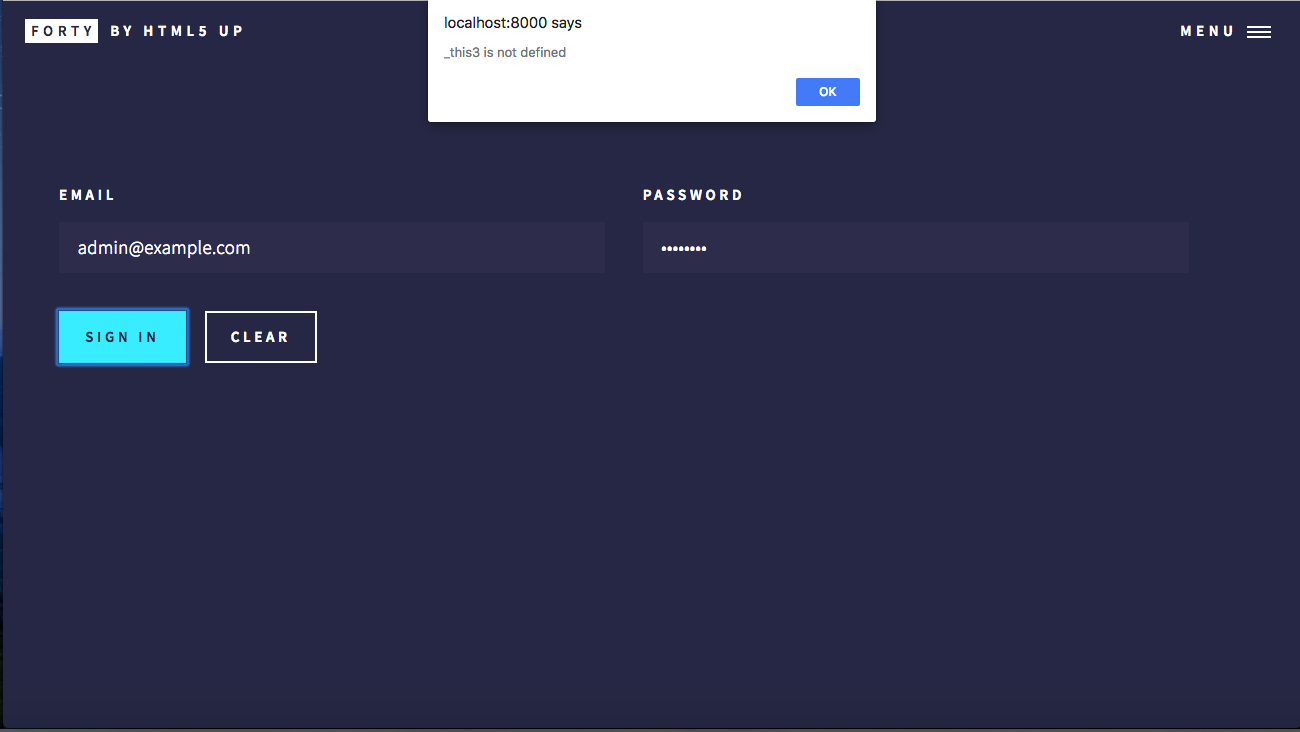
That is the only thing it is returning. There is no console output server-side or client-side. This may be the wrong place to ask this question but I can't find a workable solution anywhere else. Does anyone here know how to resolve this error?
Thanks in advance.
 smokeyblues
on 4 May 2018
smokeyblues
on 4 May 2018
@smokeyblues Can you boil it down to the line that is throwing the error?
jayair
on 8 May 2018
This issue was moved to https://discourse.serverless-stack.com/t/comments-login-with-aws-cognito/129
jayair
on 9 May 2018
Related issues
 Abdizriel
·
13Comments
jayair
·
3Comments
Abdizriel
·
13Comments
jayair
·
3Comments
 quantuminformation
·
12Comments
quantuminformation
·
12Comments
 enBonnet
·
9Comments
jayair
·
21Comments
enBonnet
·
9Comments
jayair
·
21Comments
Most helpful comment
@triunm I was planning on writing on this but a simple way to handle this is as follows.
In your
config.jsuse something like this:And in your
package.jsonset your scripts as:You can extend this idea to have other environments. This is based on the idea of custom environment variables in Create React App.