Serverless-stack-com: Comments: Add a Create Note API
Link to chapter - http://serverless-stack.com/chapters/add-a-create-note-api.html
 jayair
All 162 comments
The runtime line in the serverless.yml file should read:
runtime: nodejs6.10
Looks like you updated it for the prior page for Serverless 1.10's support of AWS/Node6 but missed this one. Minor thing but thought you'd want to know.
 nerdguru
on 10 Apr 2017
nerdguru
on 10 Apr 2017
Oh yeah you're right. Just fixed it - 87587868b0829ded83cfde2a00e7a5af8f441518
jayair
on 10 Apr 2017
When testing the code, I'm getting a 500 response. How do I troubleshoot this?
The only thing I've done differently is change all instances of us-east-1 to us-east-2 to match values I see in my pool id, pool arn, identity pool id, etc. Seemed like the right thing to do.
 geirman
on 15 Apr 2017
geirman
on 15 Apr 2017
@geirman that would be a DynamoDB related error. Can you try printing out the error object in this line - https://github.com/AnomalyInnovations/serverless-stack-com/blame/master/_chapters/add-a-create-note-api.md#L56
That should give you a clue.
jayair
on 15 Apr 2017
Thanks, that helped. My problem was naming one of the keys notesId instead of noteId
ValidationException: One or more parameter values were invalid: Missing the key notesId in the item
geirman
on 15 Apr 2017
Hello,
When I run the command : serverless webpack invoke --function create --path event.json
I have this :
{ statusCode: 500,
  headers:
   { 'Access-Control-Allow-Origin': '*',
     'Access-Control-Allow-Credentials': true },
  body: '{"status":false}' }
content of DynamoDB object :
      Config {
        credentials: null,
        credentialProvider: [Object],
        region: 'eu-west-2',
        logger: null,
        apiVersions: {},
        apiVersion: null,
        endpoint: 'dynamodb.eu-west-2.amazonaws.com',
        httpOptions: [Object],
        maxRetries: undefined,
        maxRedirects: 10,
        paramValidation: true,
        sslEnabled: true,
        s3ForcePathStyle: false,
        s3BucketEndpoint: false,
        s3DisableBodySigning: true,
        computeChecksums: true,
        convertResponseTypes: true,
        correctClockSkew: false,
        customUserAgent: null,
        dynamoDbCrc32: true,
        systemClockOffset: 0,
        signatureVersion: 'v4',
        signatureCache: true,
        retryDelayOptions: {},
        useAccelerateEndpoint: false },
     isGlobalEndpoint: false,
     endpoint:
      Endpoint {
        protocol: 'https:',
        host: 'dynamodb.eu-west-2.amazonaws.com',
        port: 443,
        hostname: 'dynamodb.eu-west-2.amazonaws.com',
        pathname: '/',
        path: '/',
        href: 'https://dynamodb.eu-west-2.amazonaws.com/' },
     _clientId: 1 },
  attrValue: 'S8' }
And the error is :
 CredentialsError: Missing credentials in config
    at ClientRequest.<anonymous> (/Users/flocve/Sites/labs/notes-app-api/node_modules/aws-sdk/lib/http/node.js:83:34)
    at ClientRequest.g (events.js:291:16)
    at emitNone (events.js:86:13)
    at ClientRequest.emit (events.js:185:7)
    at Socket.emitTimeout (_http_client.js:620:10)
    at Socket.g (events.js:291:16)
    at emitNone (events.js:86:13)
    at Socket.emit (events.js:185:7)
    at Socket._onTimeout (net.js:339:8)
    at ontimeout (timers.js:365:14)
    at tryOnTimeout (timers.js:237:5)
    at Timer.listOnTimeout (timers.js:207:5)
  message: 'Missing credentials in config',
  code: 'CredentialsError',
  time: 2017-04-17T10:06:21.387Z,
  retryable: true,
  originalError:
   { message: 'Could not load credentials from any providers',
     code: 'CredentialsError',
     time: 2017-04-17T10:06:21.387Z,
     retryable: true,
     originalError:
      { message: 'Connection timed out after 1000ms',
        code: 'TimeoutError',
        time: 2017-04-17T10:06:21.386Z,
        retryable: true } } }
I Follow the tutorial (2 times :) ), but impossible to understand what is my problem.
I used the region eu-west-2 instead of us-east-1.
Did I forget something ?
 flocve
on 17 Apr 2017
flocve
on 17 Apr 2017
@flocve Could you double check if these two files exist ~/.aws/config and ~/.aws/credentials
~/.aws/config should look like
[default]
region = eu-west-2
~/.aws/credentials should look like
[default]
aws_access_key_id = AKIXXXXGMPQAP123XXXX
aws_secret_access_key = JOsGrXxxXl8o8bXxXxbOf1RoDw2guXXxxXXxx123
 fwang
on 18 Apr 2017
fwang
on 18 Apr 2017
Hello,
Following these steps, I have been getting an error on LAMBDA_PROXY function of api gateway.
the response on request also includes the:
   statusCode: 200,
    headers: {
      'Access-Control-Allow-Origin': '*',
      'Access-Control-Allow-Credentials': true,
    },
    body: ....
and if a error (500) occur, the status code is 200.
 eliocapelati
on 23 Apr 2017
eliocapelati
on 23 Apr 2017
@eliocapelati can you show me the full response that you are seeing?
jayair
on 23 Apr 2017
Here a 404 error... I just changed the 500 to 404...

Update 1
Here the code of response-lib...

Update 2
And here my function (Ok, this is the get... but the same symptom at all):

eliocapelati
on 23 Apr 2017
@eliocapelati I'm a bit confused here. According to your code you are throwing the 404 error. That is how it should work right? There is no problem then right?
jayair
on 24 Apr 2017
I'm getting:
{ ResourceNotFoundException: Requested resource not found
    at Request.extractError (/Users/dei/Dev-exploration/serverless-stack/notes-app-api/node_modules/aws-sdk/lib/protocol/json.js:48:27)
    at Request.callListeners (/Users/dei/Dev-exploration/serverless-stack/notes-app-api/node_modules/aws-sdk/lib/sequential_executor.js:105:20)
    at Request.emit (/Users/dei/Dev-exploration/serverless-stack/notes-app-api/node_modules/aws-sdk/lib/sequential_executor.js:77:10)
    at Request.emit (/Users/dei/Dev-exploration/serverless-stack/notes-app-api/node_modules/aws-sdk/lib/request.js:673:14)
    at Request.transition (/Users/dei/Dev-exploration/serverless-stack/notes-app-api/node_modules/aws-sdk/lib/request.js:22:10)
    at AcceptorStateMachine.runTo (/Users/dei/Dev-exploration/serverless-stack/notes-app-api/node_modules/aws-sdk/lib/state_machine.js:14:12)
    at /Users/dei/Dev-exploration/serverless-stack/notes-app-api/node_modules/aws-sdk/lib/state_machine.js:26:10
    at Request.<anonymous> (/Users/dei/Dev-exploration/serverless-stack/notes-app-api/node_modules/aws-sdk/lib/request.js:38:9)
    at Request.<anonymous> (/Users/dei/Dev-exploration/serverless-stack/notes-app-api/node_modules/aws-sdk/lib/request.js:675:12)
    at Request.callListeners (/Users/dei/Dev-exploration/serverless-stack/notes-app-api/node_modules/aws-sdk/lib/sequential_executor.js:115:18)
    at Request.emit (/Users/dei/Dev-exploration/serverless-stack/notes-app-api/node_modules/aws-sdk/lib/sequential_executor.js:77:10)
    at Request.emit (/Users/dei/Dev-exploration/serverless-stack/notes-app-api/node_modules/aws-sdk/lib/request.js:673:14)
    at Request.transition (/Users/dei/Dev-exploration/serverless-stack/notes-app-api/node_modules/aws-sdk/lib/request.js:22:10)
    at AcceptorStateMachine.runTo (/Users/dei/Dev-exploration/serverless-stack/notes-app-api/node_modules/aws-sdk/lib/state_machine.js:14:12)
    at /Users/dei/Dev-exploration/serverless-stack/notes-app-api/node_modules/aws-sdk/lib/state_machine.js:26:10
    at Request.<anonymous> (/Users/dei/Dev-exploration/serverless-stack/notes-app-api/node_modules/aws-sdk/lib/request.js:38:9)
    at Request.<anonymous> (/Users/dei/Dev-exploration/serverless-stack/notes-app-api/node_modules/aws-sdk/lib/request.js:675:12)
    at Request.callListeners (/Users/dei/Dev-exploration/serverless-stack/notes-app-api/node_modules/aws-sdk/lib/sequential_executor.js:115:18)
    at callNextListener (/Users/dei/Dev-exploration/serverless-stack/notes-app-api/node_modules/aws-sdk/lib/sequential_executor.js:95:12)
    at IncomingMessage.onEnd (/Users/dei/Dev-exploration/serverless-stack/notes-app-api/node_modules/aws-sdk/lib/event_listeners.js:254:11)
    at emitNone (events.js:91:20)
    at IncomingMessage.emit (events.js:185:7)
  message: 'Requested resource not found',
  code: 'ResourceNotFoundException',
  time: 2017-05-10T12:45:43.839Z,
  requestId: '9AD2PP6137PVQV7O652HGL5JE3VV4KQNSO5AEMVJF66Q9ASUAAJG',
  statusCode: 400,
  retryable: false,
  retryDelay: 15.609907065688 }
It's not clear to me which resource isn't found.
 deivers
on 10 May 2017
deivers
on 10 May 2017
Same problem here @deivers
 vfonsecapv
on 11 May 2017
vfonsecapv
on 11 May 2017
@deivers @vfonsecapv when are you seeing this error?
jayair
on 11 May 2017
$ serverless webpack invoke --function create --path event.json
Serverless: Bundling with Webpack...
Time: 679ms
     Asset     Size  Chunks             Chunk Names
 create.js  4.17 kB       0  [emitted]  create
handler.js  2.28 kB       1  [emitted]  handler
Serverless: Run function create...

  Type Error ---------------------------------------------

     Cannot read property 'handler' of undefined
I'm getting the error above when trying to run the test, not sure where to proceed from here.
Update: OK, my bad, turns out 'functions' isn't aligned correctly and was tabbed, making it a property of provider. Untabbed it and works perfectly!
 ryanjcruz
on 13 May 2017
ryanjcruz
on 13 May 2017
@ryanjcruz Glad you figured it out. Just noticed somebody else is having a similar issue as well.
jayair
on 14 May 2017
serverless webpack invoke --function create --path event.json
Serverless: Bundling with Webpack...
Time: 1287ms
Asset Size Chunks Chunk Names
create.js 6.35 kB 0 [emitted] create
handler.js 2.28 kB 1 [emitted] handler
Serverless: Run function create...
{ statusCode: 500,
headers:
{ 'Access-Control-Allow-Origin': '*',
'Access-Control-Allow-Credentials': true },
body: '{"status":false}' }
When I invoke the create function I got the above error, I did everything as mentioned in the tutorial, I couldn't able to trace the error, kindly help me to resolve the issue.
If I change the callback function to ES6 promise then I got the 500 error response before that I got 200 response...
UPDATE: I wrongly passed the arguments name in the dynamodb-lib.js, it works fine now.
 manoaj
on 21 May 2017
manoaj
on 21 May 2017
When running serverless webpack invoke --function create --path event.json, I get the following:
Unexpected token import
 go4cas
on 21 May 2017
go4cas
on 21 May 2017
Okay, I fixed this with:
npm install --save-dev babel-preset-es2015
And then, changed .babelrc file:
{
  "plugins": ["transform-runtime"],
  "presets": ["react-app","es2015"]
}
Hi, everyone. I need your help, please!!!
When I running _serverless webpack invoke --function create --path event.json_ the result is this:
    **import _JSON$stringify from 'babel-runtime/core-js/json/stringify';**
    ^^^^^^
SyntaxError: Unexpected token import
    at Object.exports.runInThisContext (vm.js:76:16)
    at Module._compile (module.js:542:28)
    at Object.Module._extensions..js (module.js:579:10)
    at Module.load (module.js:487:32)
    at tryModuleLoad (module.js:446:12)
    at Function.Module._load (module.js:438:3)
    at Module.require (module.js:497:17)
    at require (internal/module.js:20:19)
    at ServerlessWebpack.loadHandler (/Users/sapo/Development/notes/notes-app-api/node_modules/serverless-webpack/lib/run.js:21:20)
    at ServerlessWebpack.run (/Users/sapo/Development/notes/notes-app-api/node_modules/serverless-webpack/lib/run.js:61:26)
    at ServerlessWebpack.tryCatcher (/Users/sapo/Development/notes/notes-app-api/node_modules/bluebird/js/release/util.js:16:23)
    at Promise._settlePromiseFromHandler (/Users/sapo/Development/notes/notes-app-api/node_modules/bluebird/js/release/promise.js:512:31)
    at Promise._settlePromise (/Users/sapo/Development/notes/notes-app-api/node_modules/bluebird/js/release/promise.js:569:18)
    at Promise._settlePromise0 (/Users/sapo/Development/notes/notes-app-api/node_modules/bluebird/js/release/promise.js:614:10)
    at Promise._settlePromises (/Users/sapo/Development/notes/notes-app-api/node_modules/bluebird/js/release/promise.js:693:18)
    at Promise._fulfill (/Users/sapo/Development/notes/notes-app-api/node_modules/bluebird/js/release/promise.js:638:18)
    at Promise._resolveCallback (/Users/sapo/Development/notes/notes-app-api/node_modules/bluebird/js/release/promise.js:432:57)
    at Promise._settlePromiseFromHandler (/Users/sapo/Development/notes/notes-app-api/node_modules/bluebird/js/release/promise.js:524:17)
    at Promise._settlePromise (/Users/sapo/Development/notes/notes-app-api/node_modules/bluebird/js/release/promise.js:569:18)
    at Promise._settlePromise0 (/Users/sapo/Development/notes/notes-app-api/node_modules/bluebird/js/release/promise.js:614:10)
    at Promise._settlePromises (/Users/sapo/Development/notes/notes-app-api/node_modules/bluebird/js/release/promise.js:693:18)
    at Promise._fulfill (/Users/sapo/Development/notes/notes-app-api/node_modules/bluebird/js/release/promise.js:638:18)
From previous event:
    at PluginManager.invoke (/usr/local/lib/node_modules/serverless/lib/classes/PluginManager.js:234:22)
    at PluginManager.run (/usr/local/lib/node_modules/serverless/lib/classes/PluginManager.js:253:17)
    at variables.populateService.then (/usr/local/lib/node_modules/serverless/lib/Serverless.js:96:33)
From previous event:
    at Serverless.run (/usr/local/lib/node_modules/serverless/lib/Serverless.js:87:74)
    at serverless.init.then (/usr/local/lib/node_modules/serverless/bin/serverless:23:50)

  Your Environment Information -----------------------------
     OS:                 darwin
     Node Version:       6.9.4
     Serverless Version: 1.13.2
Thanks!!!
 martinsaporiti
on 21 May 2017
martinsaporiti
on 21 May 2017
@go4cas That's weird, the react-app preset should handle that already. Can I see your package.json just to make sure things are okay?
jayair
on 21 May 2017
@martinsaporiti this looks like the same issue as @go4cas. Let me check what is going on.
jayair
on 21 May 2017
@martinsaporiti @go4cas You guys are right, there is an issue with the new react-app preset. I just updated the chapter with the proper presets - https://github.com/AnomalyInnovations/serverless-stack-com/commit/201c8818686650b67008d108b0aef047d8a59cec
jayair
on 21 May 2017
Thanks @jayair and @go4cas ! Now work perfectly:
{ statusCode: 200,
  headers:
   { 'Access-Control-Allow-Origin': '*',
     'Access-Control-Allow-Credentials': true },
  body: '{"userId":"USER-SUB-1234","noteId":"b605af70-3e93-11e7-8117-312305557adf","content":"hello world","attachment":"hello.jpg","createdAt":1495418979303}' }
I will continue with the tutorial. It's very useful.
Thanks again!
martinsaporiti
on 22 May 2017
@jayair I'm running into the same problem as @deivers and @vfonsecapv when I run the test with event.json. I do have multiple profiles and I'm not using the default profile in this case. I'm using us-west-2 and I believe I already changed that everywhere in the code. Any clue how I can debug?
 oliv9286
on 2 Jun 2017
oliv9286
on 2 Jun 2017
nevermind, I figured it out. If you're not using your default profile then in your create.js you need to do
const credentials = new AWS.SharedIniFileCredentials({profile: 'profile_name'});
AWS.config.credentials = credentials;
oliv9286
on 2 Jun 2017
@oliv9286 Thanks for reporting back. Are you setting this in the top of your create.js?
jayair
on 3 Jun 2017
I also get the same error as @deivers and @vfonsecapv .
When I run
./node_modules/serverless/bin/serverless webpack invoke --function create --path event.json
I get
Serverless: Run function create...
{ ResourceNotFoundException: Requested resource not found
    at Request.extractError (/home/tjones/note-app-api/node_modules/aws-sdk/lib/protocol/json.js:48:27)
    at Request.callListeners (/home/tjones/note-app-api/node_modules/aws-sdk/lib/sequential_executor.js:105:20)
    at Request.emit (/home/tjones/note-app-api/node_modules/aws-sdk/lib/sequential_executor.js:77:10)
    at Request.emit (/home/tjones/note-app-api/node_modules/aws-sdk/lib/request.js:682:14)
    at Request.transition (/home/tjones/note-app-api/node_modules/aws-sdk/lib/request.js:22:10)
    at AcceptorStateMachine.runTo (/home/tjones/note-app-api/node_modules/aws-sdk/lib/state_machine.js:14:12)
    at /home/tjones/note-app-api/node_modules/aws-sdk/lib/state_machine.js:26:10
    at Request.<anonymous> (/home/tjones/note-app-api/node_modules/aws-sdk/lib/request.js:38:9)
    at Request.<anonymous> (/home/tjones/note-app-api/node_modules/aws-sdk/lib/request.js:684:12)
    at Request.callListeners (/home/tjones/note-app-api/node_modules/aws-sdk/lib/sequential_executor.js:115:18)
    at Request.emit (/home/tjones/note-app-api/node_modules/aws-sdk/lib/sequential_executor.js:77:10)
    at Request.emit (/home/tjones/note-app-api/node_modules/aws-sdk/lib/request.js:682:14)
    at Request.transition (/home/tjones/note-app-api/node_modules/aws-sdk/lib/request.js:22:10)
    at AcceptorStateMachine.runTo (/home/tjones/note-app-api/node_modules/aws-sdk/lib/state_machine.js:14:12)
    at /home/tjones/note-app-api/node_modules/aws-sdk/lib/state_machine.js:26:10
    at Request.<anonymous> (/home/tjones/note-app-api/node_modules/aws-sdk/lib/request.js:38:9)
    at Request.<anonymous> (/home/tjones/note-app-api/node_modules/aws-sdk/lib/request.js:684:12)
    at Request.callListeners (/home/tjones/note-app-api/node_modules/aws-sdk/lib/sequential_executor.js:115:18)
    at callNextListener (/home/tjones/note-app-api/node_modules/aws-sdk/lib/sequential_executor.js:95:12)
    at IncomingMessage.onEnd (/home/tjones/note-app-api/node_modules/aws-sdk/lib/event_listeners.js:256:13)
    at emitNone (events.js:91:20)
    at IncomingMessage.emit (events.js:185:7)
  message: 'Requested resource not found',
  code: 'ResourceNotFoundException',
Note that I didnt install the serverless module as global.
I do not have multiple profiles as @oliv9286 did.
 tobyjo
on 5 Jun 2017
tobyjo
on 5 Jun 2017
@tobyjo can I take a look at your serverless.yml?
fwang
on 7 Jun 2017
@fwang Sure, please find attached.
serverless.zip
tobyjo
on 8 Jun 2017
@tobyjo I've had the same issue as you and my problem was that my DynamoDB table wasn't created when I thought I did. I would double-check in your AWS Console and see if your notes table was created.
 kevinnguy
on 10 Jun 2017
kevinnguy
on 10 Jun 2017
@tobyjo A side note about your serverless.yml, this is not related to the error you are seeing. The authorizer arn in your serverless.yml should start with "arn:aws:cognito-idp:" and look something like " arn:aws:cognito-idp:us-east-1:232771856781:userpool/us-east-1_YExxXXxxx". You can get the User Pool arn from this chapter:
http://serverless-stack.com/chapters/create-a-cognito-user-pool.html
Back to the issue you were seeing, try @kevinnguy's suggestion.
fwang
on 10 Jun 2017
@kevinnguy @fwang Thanks both. Have been distracted currently with other work but as soon as I get back to this I will let you know the results. Thanks again.
tobyjo
on 16 Jun 2017
Any reason why I am receiving the error below?
serverless webpack invoke -f create -p mocks/create-event.json
/mnt/c/Users/cgrecea/AppData/Roaming/npm/node_modules/serverless/node_modules/bluebird/js/release/async.js:48
        fn = function () { throw arg; };
                           ^

ServerlessError: In the command you just typed, the "webpack" is valid but "invoke" is not.  Enter "serverless help" to see the actions for this context.
    at new ServerlessError (/mnt/c/Users/cgrecea/AppData/Roaming/npm/node_modules/serverless/lib/ServerlessError.js:17:11)
 copperspeed
on 23 Jun 2017
copperspeed
on 23 Jun 2017
@copperspeed Can you make sure you've added serverless-webpack to your project? We do this in the Install Babel and Webpack step of this chapter http://serverless-stack.com/chapters/add-support-for-es6-es7-javascript.html.
jayair
on 23 Jun 2017
@jayair yes, I have serverless-webpack installed.
devDependencies": {
    "aws-sdk": "^2.72.0",
    "babel-core": "^6.25.0",
    "babel-loader": "^7.0.0",
    "babel-plugin-transform-runtime": "^6.23.0",
    "babel-preset-es2015": "^6.24.1",
    "babel-preset-stage-3": "^6.24.1",
    "glob": "^7.1.2",
    "serverless-webpack": "^1.0.0-rc.4",
    "webpack": "^2.6.1",
    "webpack-node-externals": "^1.6.0"
  },
  "dependencies": {
    "babel-runtime": "^6.23.0",
    "uuid": "^3.1.0"
  }
Ok, my issue was do to forgetting to install Serverless. Duh!!! lol
copperspeed
on 24 Jun 2017
This weekend I got through the whole example without any problems, today I get the error:
ERROR in Entry module not found: Error: Can't resolve 'babel' in 'C:projects\happyToHelpbackend'
BREAKING CHANGE: It's no longer allowed to omit the '-loader' suffix when using loaders.
You need to specify 'babel-loader' instead of 'babel',
see https://webpack.js.org/guides/migrating/#automatic-loader-module-name-extension-removed
When executing:
serverless webpack invoke --function create --path mocks/create-event.json
I fixed this by going to webpack.config.js and changing from:
loaders: ['babel'],
To:
loaders: ['babel-loader'],
And now it works.
 RobbingDaHood
on 4 Jul 2017
RobbingDaHood
on 4 Jul 2017
@RobbingDaHood Thanks for letting us know. I'll take a look into whats going on. Can you share your package.json? I'd like to see which version is giving this error.
jayair
on 4 Jul 2017
@jayair Sorry, I should have thought of that.
After I experienced this, then I saw the "Serverless ES7 Service"-page: http://serverless-stack.com/chapters/serverless-es7-service.html
So I permanently deleted everything and started over. It was so early in the development I had not put anything on Git yet, so I cannot find it in version control either.
When I used Serverless ES7 Service I did not need to make the change the "babel"-part to "babel-loader".
RobbingDaHood
on 5 Jul 2017
@RobbingDaHood Hmm interesting. I'll see if I can replicate the issue.
jayair
on 5 Jul 2017
Hi there,
I'm having similar issues as @martinsaporiti and @go4cas with babel. I have tried all the recommendations here to try to fix this error:
$ serverless webpack invoke --function create --path mocks/create-event.json
Serverless: WARNING: Plugin ServerlessWebpack uses deprecated hook before:deploy:createDeploymentArtifacts
Serverless: WARNING: Plugin ServerlessWebpack uses deprecated hook after:deploy:createDeploymentArtifacts
Serverless: Bundling with Webpack...
Time: 46ms
     Asset     Size  Chunks             Chunk Names
 create.js  3.27 kB       0  [emitted]  create
handler.js  1.93 kB       1  [emitted]  handler
Serverless: Run function create...

  Syntax Error -------------------------------------------

  Unexpected token import

     For debugging logs, run again after setting the "SLS_DEBUG=*" environment variable.

  Stack Trace --------------------------------------------

SyntaxError: Unexpected token import
/Users/admin/projects/notes-app-api/.webpack/create.js:47
        import uuid from 'uuid';
        ^^^^^^
SyntaxError: Unexpected token import
    at Object.exports.runInThisContext (vm.js:78:16)
    at Module._compile (module.js:543:28)
    at Object.Module._extensions..js (module.js:580:10)
    at Module.load (module.js:488:32)
    at tryModuleLoad (module.js:447:12)
    at Function.Module._load (module.js:439:3)
    at Module.require (module.js:498:17)
    at require (internal/module.js:20:19)
    at ServerlessWebpack.loadHandler (/Users/admin/projects/notes-app-api/node_modules/serverless-webpack/lib/run.js:21:20)
    at ServerlessWebpack.run (/Users/admin/projects/notes-app-api/node_modules/serverless-webpack/lib/run.js:61:26)
    at ServerlessWebpack.tryCatcher (/Users/admin/projects/notes-app-api/node_modules/bluebird/js/release/util.js:16:23)
    at Promise._settlePromiseFromHandler (/Users/admin/projects/notes-app-api/node_modules/bluebird/js/release/promise.js:512:31)
    at Promise._settlePromise (/Users/admin/projects/notes-app-api/node_modules/bluebird/js/release/promise.js:569:18)
    at Promise._settlePromise0 (/Users/admin/projects/notes-app-api/node_modules/bluebird/js/release/promise.js:614:10)
    at Promise._settlePromises (/Users/admin/projects/notes-app-api/node_modules/bluebird/js/release/promise.js:693:18)
    at Promise._fulfill (/Users/admin/projects/notes-app-api/node_modules/bluebird/js/release/promise.js:638:18)
    at Promise._resolveCallback (/Users/admin/projects/notes-app-api/node_modules/bluebird/js/release/promise.js:432:57)
    at Promise._settlePromiseFromHandler (/Users/admin/projects/notes-app-api/node_modules/bluebird/js/release/promise.js:524:17)
    at Promise._settlePromise (/Users/admin/projects/notes-app-api/node_modules/bluebird/js/release/promise.js:569:18)
    at Promise._settlePromise0 (/Users/admin/projects/notes-app-api/node_modules/bluebird/js/release/promise.js:614:10)
    at Promise._settlePromises (/Users/admin/projects/notes-app-api/node_modules/bluebird/js/release/promise.js:693:18)
    at Promise._fulfill (/Users/admin/projects/notes-app-api/node_modules/bluebird/js/release/promise.js:638:18)
    at /Users/admin/projects/notes-app-api/node_modules/bluebird/js/release/nodeback.js:42:21
    at Compiler.<anonymous> (/Users/admin/projects/notes-app-api/node_modules/serverless-webpack/node_modules/webpack/lib/Compiler.js:194:14)
    at Compiler.emitRecords (/Users/admin/projects/notes-app-api/node_modules/serverless-webpack/node_modules/webpack/lib/Compiler.js:282:37)
    at Compiler.<anonymous> (/Users/admin/projects/notes-app-api/node_modules/serverless-webpack/node_modules/webpack/lib/Compiler.js:187:11)
    at /Users/admin/projects/notes-app-api/node_modules/serverless-webpack/node_modules/webpack/lib/Compiler.js:275:11
    at Compiler.applyPluginsAsync (/Users/admin/projects/notes-app-api/node_modules/tapable/lib/Tapable.js:60:69)
    at Compiler.afterEmit (/Users/admin/projects/notes-app-api/node_modules/serverless-webpack/node_modules/webpack/lib/Compiler.js:272:8)
    at Compiler.<anonymous> (/Users/admin/projects/notes-app-api/node_modules/serverless-webpack/node_modules/webpack/lib/Compiler.js:267:14)
    at /Users/admin/projects/notes-app-api/node_modules/async/lib/async.js:52:16
    at done (/Users/admin/projects/notes-app-api/node_modules/async/lib/async.js:246:17)
    at /Users/admin/projects/notes-app-api/node_modules/async/lib/async.js:44:16
    at /Users/admin/projects/notes-app-api/node_modules/graceful-fs/graceful-fs.js:43:10
    at /usr/local/lib/node_modules/serverless/node_modules/graceful-fs/graceful-fs.js:43:10
    at FSReqWrap.oncomplete (fs.js:112:15)
From previous event:
    at PluginManager.invoke (/usr/local/lib/node_modules/serverless/lib/classes/PluginManager.js:217:22)
    at PluginManager.run (/usr/local/lib/node_modules/serverless/lib/classes/PluginManager.js:236:17)
    at variables.populateService.then (/usr/local/lib/node_modules/serverless/lib/Serverless.js:107:33)
    at runCallback (timers.js:651:20)
    at tryOnImmediate (timers.js:624:5)
    at processImmediate [as _immediateCallback] (timers.js:596:5)
From previous event:
    at Serverless.run (/usr/local/lib/node_modules/serverless/lib/Serverless.js:94:74)
    at serverless.init.then (/usr/local/lib/node_modules/serverless/bin/serverless:30:50)

  Get Support --------------------------------------------
     Docs:          docs.serverless.com
     Bugs:          github.com/serverless/serverless/issues
     Forums:        forum.serverless.com
     Chat:          gitter.im/serverless/serverless

  Your Environment Information -----------------------------
     OS:                     darwin
     Node Version:           7.4.0
     Serverless Version:     1.16.1
My .babelrc:
{
  "plugins": ["transform-runtime"],
  "presets": ["es2015", "stage-3"]
}
My webpack.config.js (I've also tried using loader: 'babel-loader' instead of the loaders array in the module rules:
var glob = require('glob');
var path = require('path');
var nodeExternals = require('webpack-node-externals');

// Required for Create React App Babel transform
process.env.NODE_ENV = 'production';

module.exports = {
    // Use all js files in project root (except
    // the webpack config) as an entry
    entry: globEntries('!(webpack.config).js'),
    target: 'node',
    // Since 'aws-sdk' is not compatible with webpack,
    // we exclude all node dependencies
    externals: [nodeExternals()],
    // Run babel on all .js files and skip those in node_modules
    module: {
        rules: [{
            test: /\.js$/,
            loaders: ['babel-loader'],
            include: __dirname,
            exclude: /node_modules/,
        }]
    },
    // We are going to create multiple APIs in this guide, and we are
    // going to create a js file to for each, we need this output block
    output: {
        libraryTarget: 'commonjs',
        path: path.join(__dirname, '.webpack'),
        filename: '[name].js'
    },
};

function globEntries(globPath) {
    var files = glob.sync(globPath);
    var entries = {};

    for (var i = 0; i < files.length; i++) {
        var entry = files[i];
        entries[path.basename(entry, path.extname(entry))] = './' + entry;
    }

    return entries;
}
My package.json:
{
  "name": "notes-app-api",
  "version": "1.0.0",
  "description": "",
  "main": "handler.js",
  "scripts": {
    "test": "echo \"Error: no test specified\" && exit 1"
  },
  "keywords": [],
  "author": "",
  "license": "ISC",
  "devDependencies": {
    "aws-sdk": "^2.80.0",
    "babel-core": "^6.25.0",
    "babel-loader": "^7.1.1",
    "babel-plugin-transform-runtime": "^6.23.0",
    "babel-preset-es2015": "^6.24.1",
    "babel-preset-stage-3": "^6.24.1",
    "glob": "^7.1.2",
    "serverless-webpack": "^1.0.0-rc.4",
    "webpack": "^3.1.0",
    "webpack-node-externals": "^1.6.0"
  },
  "dependencies": {
    "babel-runtime": "^6.23.0",
    "uuid": "^3.1.0"
  }
}
I have been following the steps from the beginning but took a break a few weeks ago before coming back to test my create.js file. Could something have changed in the upstream repositories since then?
Thanks in advance for any help
 d3sandoval
on 9 Jul 2017
d3sandoval
on 9 Jul 2017
@d3sandoval That sounds like the serverless-webpack plugin did not do it's job. I'm just comparing your package.json to the one from this chapter and it seems like your serverless-webpack plugin is out of date. We did make some updates recently so that could be a reason why the one you have is old.
Try updating it and let me know if that fixes it.
jayair
on 9 Jul 2017
That seemed to work! But now I'm getting the 500 error:
$ serverless webpack invoke --function create --path mocks/create-event.json
Serverless: WARNING: Plugin ServerlessWebpack uses deprecated hook before:deploy:createDeploymentArtifacts
Serverless: WARNING: Plugin ServerlessWebpack uses deprecated hook after:deploy:createDeploymentArtifacts
Serverless: Bundling with Webpack...
Time: 328ms
     Asset     Size  Chunks             Chunk Names
 create.js  5.19 kB       0  [emitted]  create
handler.js  3.02 kB       1  [emitted]  handler
   [0] ./create.js 1.77 kB {0} [built]
   [1] external "uuid" 42 bytes {0} [not cacheable]
   [2] external "aws-sdk" 42 bytes {0} [not cacheable]
   [3] ./handler.js 463 bytes {1} [built]
Serverless: Run function create...
{ statusCode: 500,
  headers:
   { 'Access-Control-Allow-Origin': '*',
     'Access-Control-Allow-Credentials': true },
  body: '{"status":false}' }
Good call on updating to the latest. Not sure why npm update wouldn't have caught that.
d3sandoval
on 9 Jul 2017
@d3sandoval Try debugging it using these steps - http://serverless-stack.com/chapters/add-a-create-note-api.html#common-issues
jayair
on 9 Jul 2017
@jayair good call :) Typing is hard! Turns out nodeId =/= noteId. I'm getting the 200 response now!
d3sandoval
on 9 Jul 2017
I just have a question about CORS. Why do the headers "Access-Control-Allow-Origin" and the others need to be defined in both the YML and the Success method? Shouldn't setting CORs to true in the YML take care of the pre-flight?
 peterschwarz21
on 20 Jul 2017
peterschwarz21
on 20 Jul 2017
@peterschwarz21 That's a good question. By setting the cors: true we are telling API Gateway to respond to the OPTIONS preflight request for our API. And in the tutorial we want to control the headers that we are sending in our Lambda (we are using lambda-proxy integration). So we need to specify the Access-Control- headers ourselves. Here is some info on this - https://serverless.com/framework/docs/providers/aws/events/apigateway/#enabling-cors
jayair
on 20 Jul 2017
Thanks for the quick reply! I think I got it now. You da best!
peterschwarz21
on 20 Jul 2017
Love the tutorial so far! I have an issue here though, it's right at the point in the tutorial where you ask us to invoke the create function and check for 200/500 for the first time.
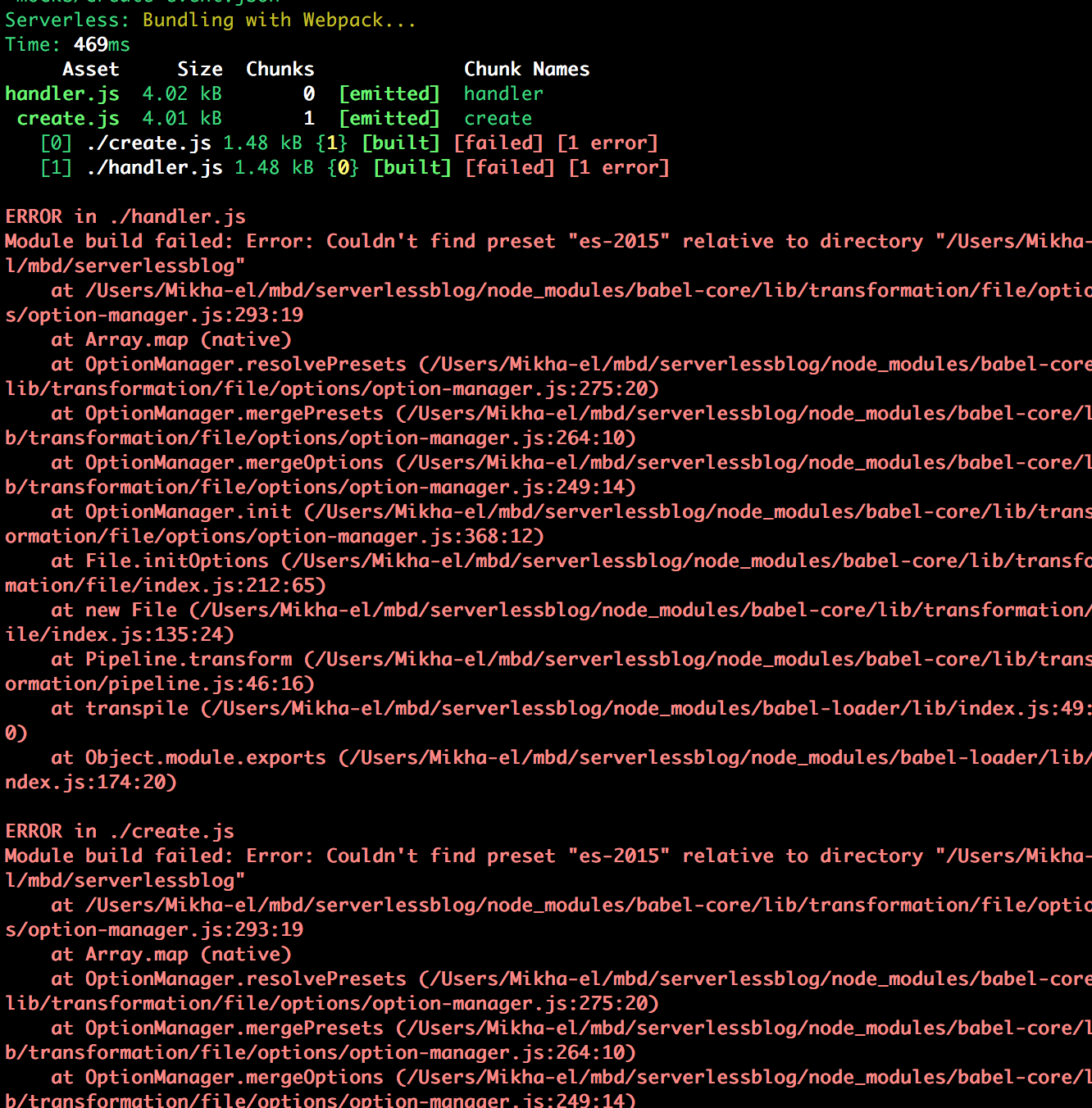
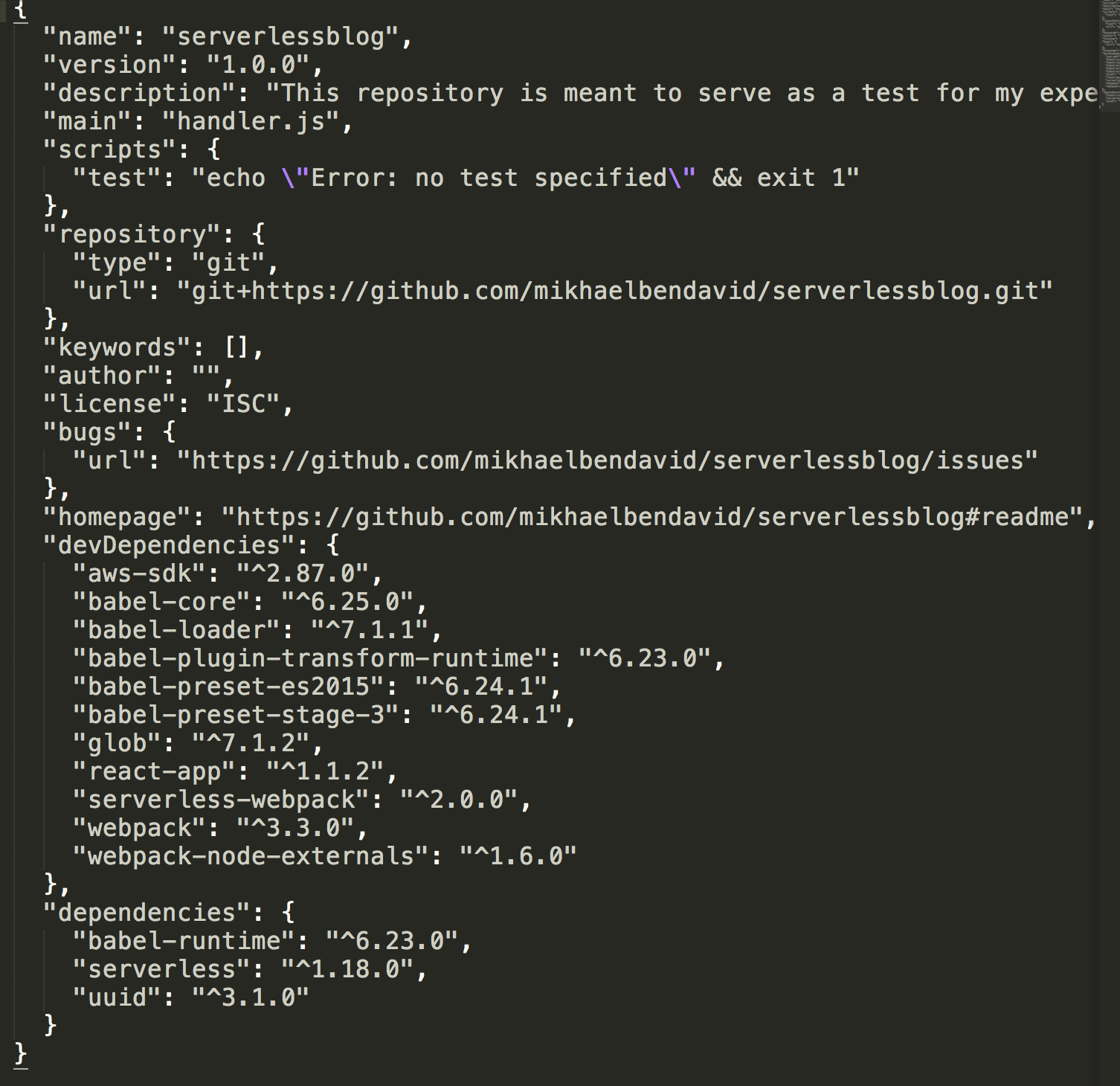
Getting an error saying the module build 'failed', 'Couldn't find preset es-2015" relative to directory. My package.json seems to be fully up to date, here it is below:
 mikhael28
on 20 Jul 2017
mikhael28
on 20 Jul 2017
Nevermind, fixed it: In the babelrc file, I had to change the preset name from just 'es-2015' as the tutorial stated, to the full npm name 'babel-preset-2015'.
mikhael28
on 21 Jul 2017
@mikhaelbendavid That's really weird. The .babelrc is supposed to use es2015 as the preset. https://babeljs.io/docs/plugins/preset-es2015/#usage-via-babelrc-recommended-
Can I see your full .babelrc?
jayair
on 21 Jul 2017
I believe there is a typo in the following sentence from this page: "We are going to expand more on where this id in the coming chapters when we set up our Cognito Identity Pool."
 bharloe
on 21 Jul 2017
bharloe
on 21 Jul 2017
@bharloe Thank you!
jayair
on 21 Jul 2017
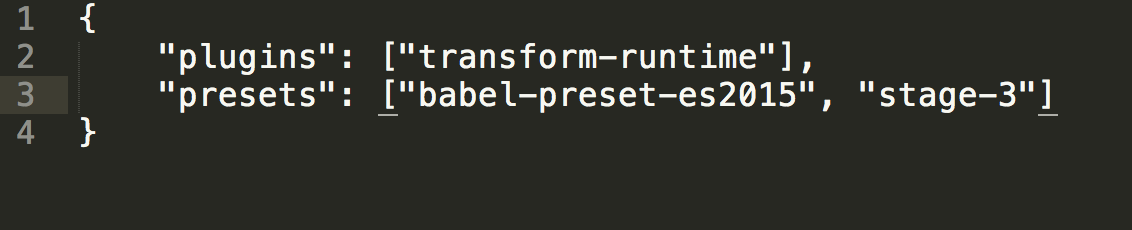
Jayair - here is my .babelrc - I'm still getting a 500 error code, so need to troubleshoot to get the 200 before I move on.
mikhael28
on 21 Jul 2017
@mikhaelbendavid Hmm just read your previous comment again. The preset is es2015 not es-2015. Not sure if that is the issue.
jayair
on 21 Jul 2017
Modified the preset to just be 'es2015', not full babel-preset-2015. Webpack is still working, but still getting 500 error - haven't refactored the code yet, no sense in moving on until then.
Here's the repo I'm using to track progress:
https://github.com/mikhaelbendavid/serverlessblog
mikhael28
on 21 Jul 2017
@mikhaelbendavid I ran your code and it works for me. If you edit your error response to look like this it will record the error for you:
//Return status code 500 on error
    if (error) {
        const response = {
            statusCode: 500,
            headers: headers,
            body: JSON.stringify({status:false}),
            error: error
        };
        callback(null, response);
        return;
I'm guessing you're getting a 500 because it is not connecting to the dynamo db database. If that's the case there's 2 things to check. Make sure you have configured your code to be in the same region as your dynamo db database at the top of create.js. If that is set, then make sure you have the dynamodb database itself configured properly and that all the items match exactly what you have in the code. Keep in mind it is case sensitive, so if you have 'userId' in the params object, but in your database it is 'userid', you will get a 500 error.
bharloe
on 21 Jul 2017
@bharloe - You are exactly correct! The names of the userId and noteId were 'userid' and 'notesid' - sloppiness on my part. I just got a 200 code!
mikhael28
on 21 Jul 2017
@bharloe Great work! Thanks for helping out!
jayair
on 21 Jul 2017
My pleasure
bharloe
on 21 Jul 2017
@oliv9286
If you're not using your default profile then in your create.js you need to do
const credentials = new AWS.SharedIniFileCredentials({profile: 'profile_name'}); AWS.config.credentials = credentials;
I ran into the same issue and used AWS.SharedIniFileCredentials as well.
Be aware that this works when testing the API locally, but will result in a 500 response with a credential error in the logs when you deploy that code to Lambda because your local credential file is not going to be available on Lambda.
I have not found a workaround for using the non-default profile of a multiple profile configuration that will work for both local and deployed code (other than manually modifying my ~/.aws/credentails file to use a single profile, or commenting out the above code before deployment).
Note: I do have my profile attribute set in the provider block of the serverless.yml file. This solves the profile issue for deploying code, but has no effect when testing locally.
 jcowley
on 25 Jul 2017
jcowley
on 25 Jul 2017
Silly mistake on my part: I was getting the ResourceNotFoundException: Requested resource not found error. Something no one mentioned in this thread was to check that TableName in the create.js params was the same as your dynamoDB table.
 johnkorzhuk
on 29 Jul 2017
johnkorzhuk
on 29 Jul 2017
Suggestion: Make it explicit that create.js should be placed in the root directory.
 etsung
on 30 Jul 2017
etsung
on 30 Jul 2017
@etsung Good point, I'll add a note.
jayair
on 31 Jul 2017
What are the other authorisations available for lambda functions other than Cognito pool and IAM?
 yashg5
on 4 Aug 2017
yashg5
on 4 Aug 2017
@jcowley I was having a resource not found 500 response because I was not on the North Virginian region. I would take a look at your dynamoDB table and your user pools to make sure that they are hosted in the same region.
 vanshcsingh
on 4 Aug 2017
vanshcsingh
on 4 Aug 2017
@VSingh98: Thanks, but I think mine was a different issue. As I mentioned above, the 500 error I was seeing was due to trying to use AWS.SharedIniFileCredentials, which won't work when running code on Lambda. Different issue.
jcowley
on 4 Aug 2017
@oliv9286 and anyone else trying to use an AWS profile other than default when testing locally with serverless webpack invoke.
Found the solution here!!. You add the following to your serverless.yml file (this is in addition to adding profile: your-profile-name, which only helps for deployment):
provider:
  environment:
    AWS_PROFILE: your-profile-name
This ensures that the AWS_PROFILE environment variable is picked when invoking locally.
This was driving me nuts! I'm using this for a personal project and my local testing kept running against my production AWS work account! Not good.
jcowley
on 6 Aug 2017
@yashg5 You can add a custom authorizer (your own login system) or social logins but they are tied into IAM.
jayair
on 7 Aug 2017
@jcowley Good find. I ran into that as well recently. We'll add a note to the tutorial about it.
jayair
on 7 Aug 2017
I'm not sure if it is me. I did initially get status 500 but after 16 hours or so I now got status 200 and I'm able to see an item in dynamodb. It is really weird.
 hmartus
on 15 Sep 2017
hmartus
on 15 Sep 2017
@hmartus That's really strange. Is this on a completely new AWS account?
jayair
on 15 Sep 2017
I get the 500 when invoking locally, maybe I should have moved this issue here:
https://github.com/AnomalyInnovations/serverless-stack-demo-api/issues/5
 quantuminformation
on 22 Sep 2017
quantuminformation
on 22 Sep 2017
Still stuck on the SyntaxError: Unexpected token import error... Not sure what it could be, I've updated everything. It honestly doesn't even look like serverless ran at all, it just spits out this error:
(function (exports, require, module, __filename, __dirname) { import uuid from "uuid";
                                                              ^^^^^^

SyntaxError: Unexpected token import
    at createScript (vm.js:56:10)
    at Object.runInThisContext (vm.js:97:10)
    at Module._compile (module.js:542:28)
    at Object.Module._extensions..js (module.js:579:10)
    at Module.load (module.js:487:32)
    at tryModuleLoad (module.js:446:12)
    at Function.Module._load (module.js:438:3)
    at Module.require (module.js:497:17)
    at require (internal/module.js:20:19)
    at AwsInvokeLocal.invokeLocalNodeJs (C:\Users\kalab\AppData\Roaming\npm\node_modules\serverless\lib\plugins\aws\invo
keLocal\index.js:251:33)
    at AwsInvokeLocal.invokeLocal (C:\Users\kalab\AppData\Roaming\npm\node_modules\serverless\lib\plugins\aws\invokeLoca
l\index.js:125:19)
    at AwsInvokeLocal.tryCatcher (C:\Users\kalab\AppData\Roaming\npm\node_modules\serverless\node_modules\bluebird\js\re
lease\util.js:16:23)
    at Promise._settlePromiseFromHandler (C:\Users\kalab\AppData\Roaming\npm\node_modules\serverless\node_modules\bluebi
rd\js\release\promise.js:512:31)
    at Promise._settlePromise (C:\Users\kalab\AppData\Roaming\npm\node_modules\serverless\node_modules\bluebird\js\relea
se\promise.js:569:18)
    at Promise._settlePromise0 (C:\Users\kalab\AppData\Roaming\npm\node_modules\serverless\node_modules\bluebird\js\rele
ase\promise.js:614:10)
    at Promise._settlePromises (C:\Users\kalab\AppData\Roaming\npm\node_modules\serverless\node_modules\bluebird\js\rele
ase\promise.js:693:18)
    at Async._drainQueue (C:\Users\kalab\AppData\Roaming\npm\node_modules\serverless\node_modules\bluebird\js\release\as
ync.js:133:16)
    at Async._drainQueues (C:\Users\kalab\AppData\Roaming\npm\node_modules\serverless\node_modules\bluebird\js\release\a
sync.js:143:10)
    at Immediate.Async.drainQueues (C:\Users\kalab\AppData\Roaming\npm\node_modules\serverless\node_modules\bluebird\js\
release\async.js:17:14)
    at runCallback (timers.js:672:20)
    at tryOnImmediate (timers.js:645:5)
    at processImmediate [as _immediateCallback] (timers.js:617:5)
.babelrc file:
{
    "plugins": ["transform-runtime"],
    "presets": ["es2015", "react-app"]
}
package.json file:
{
  "name": "notes-app-api",
  "version": "1.0.0",
  "description": "",
  "main": "handler.js",
  "scripts": {
    "test": "echo \"Error: no test specified\" && exit 1"
  },
  "keywords": [],
  "author": "",
  "license": "ISC",
  "devDependencies": {
    "aws-sdk": "^2.131.0",
    "babel-core": "^6.26.0",
    "babel-loader": "^7.1.2",
    "babel-plugin-transform-runtime": "^6.23.0",
    "babel-preset-es2015": "^6.24.1",
    "babel-preset-stage-3": "^6.24.1",
    "serverless-webpack": "^3.1.2",
    "webpack": "^3.8.1",
    "webpack-node-externals": "^1.6.0"
  },
  "dependencies": {
    "babel-cli": "^6.26.0",
    "babel-preset-node6": "^11.0.0",
    "babel-runtime": "^6.26.0",
    "uuid": "^3.1.0"
  }
}
Any ideas? Thanks!
 Kalaborative
on 18 Oct 2017
Kalaborative
on 18 Oct 2017
First off, thanks so much for the amazing tutorial. SOOO helpful. Really a great intro to this set of technologies. I used to teach web dev online, and I am really impressed by how well you guys have put this together.
I'm running into a weird/problematic error in an app that uses an API modeled directly off of this one. This is the first chapter suggesting the pattern that is breaking in my app, so I figured I'd bring the bug up here and see if you guys have any thoughts.
The bug (laid out in significantly more detail in this Stack Overflow post) is that the Cognito Identity ID associated with a pair of login creds I and some fellow developers are using changes! So two devs on two different local servers can log in as the same user, and the event.requestContext.identity.cognitoIdentityId value that hits the lambda is different between them.
This means that we can't look up records by that ID. Is this expected behavior?! Do you have a suggestion for getting around it? I don't see username or anything else reliably unique/consistent coming in as part of the event context!
Thanks!
 sashafklein
on 19 Oct 2017
sashafklein
on 19 Oct 2017
@sashafklein This should not really happen. One way to check what is going on is to look up the users you have in your User Pool and the Identity Pool. And use the login credentials to see which User Pool user is being picked up. At the same time use the event.requestContext.identity.cognitoIdentityId to look up Identity Pool user that it is picking up.
Also, I'd be curious to hear what https://stackoverflow.com/users/3330296/rachit-dhall has to say about your issue on Stack Overflow.
jayair
on 19 Oct 2017
Thanks @jayair! I'll be sure to update you if/when I hear back. It is weird. There are only 4 users in my user pool, and the creds connecting each local developer to the right user/identity pools are identical, because the file with the creds is checked into source control. That's also how I'm accessing the cognitoIdentityId, so it looks like I'm not grabbing the wrong attribute. May have something to do with different devs in different countries? I'll update this thread.
sashafklein
on 23 Oct 2017
I am one of the people getting a 500. I have debugged the issue and found that if I change the parameter noteId to noteID the issue goes away. Since the source for the "noteId" version is the canonical stuff in https://serverless-stack.com/chapters/add-a-create-note-api.html, this is a mite confusing.
console.log on the error showed:
ValidationException: One or more parameter values were invalid: Missing the key noteID in the item
Any ideas would be welcome.
 lucasgonze
on 24 Oct 2017
lucasgonze
on 24 Oct 2017
Found it - the field was mistyped in DynamoDB as noteID rather than noteID.
lucasgonze
on 24 Oct 2017
@lucasgonze Ah yeah, that is an annoying issue.
jayair
on 25 Oct 2017
For anyone experiencing a persistent 500 error, the issue may be with how you are using your promise library. In the code in this chapter, the promise method is invoked on DynamoDB as we are returning the action, like so:
export function call(action, params){
  const dynamoDB = new AWS.DynamoDB.DocumentClient();
  return dynamoDB[action].promise();
}
In my environment, this throws a 500. If, on the other hand, I do not invoke the promise method it returns a 200:
export function call(action, params){
    const dynamoDB = new AWS.DynamoDB.DocumentClient();
    return dynamoDB[action].promise;
}
I hope this helps!
 leonardreidy
on 29 Oct 2017
leonardreidy
on 29 Oct 2017
@leonardreidy That's interesting. I'm not sure what is different in your environment but the docs have it as promise() - http://docs.aws.amazon.com/AWSJavaScriptSDK/latest/AWS/Request.html#promise-property
jayair
on 29 Oct 2017
Hi,
I used this guide before to create the note app and it all worked pretty easily. Now I am trying to use this guide to make a different app, the main difference is the DynamoBD table has a lot more items than the notes one had. But no matter how much I try I cannot get it to work it keeps coming up with this issue. (I am on the "Add a Create Note API" part):
Serverless: Bundling with Webpack...
Time: 967ms
    Asset     Size  Chunks             Chunk Names
create.js  5.53 kB       0  [emitted]  create
   [0] ./create.js 2.69 kB {0} [built]
   [1] external "babel-runtime/core-js/json/stringify" 42 bytes {0} [not cacheable]
   [2] external "uuid" 42 bytes {0} [not cacheable]
   [3] external "aws-sdk" 42 bytes {0} [not cacheable]
{
    "statusCode": 500,
    "headers": {
        "Access-Control-Allow-Origin": "*",
        "Access-Control-Allow-Credentials": true
    },
    "body": "{\"status\":false}"
}
I am using the same AWS account details and IAM user, but I created new ones of all the other elements, like the table, bucket, cognito user pool and test user
My package.json is as follows:
{
  "name": "target-conferences-api",
  "version": "1.0.0",
  "description": "",
  "main": "handler.js",
  "scripts": {
    "test": "echo \"Error: no test specified\" && exit 1"
  },
  "keywords": [],
  "author": "",
  "license": "ISC",
  "devDependencies": {
    "aws-sdk": "^2.141.0",
    "babel-core": "^6.26.0",
    "babel-loader": "^7.1.2",
    "babel-plugin-transform-runtime": "^6.23.0",
    "babel-preset-es2015": "^6.24.1",
    "babel-preset-stage-3": "^6.24.1",
    "serverless-webpack": "^3.1.2",
    "webpack": "^3.8.1",
    "webpack-node-externals": "^1.6.0"
  },
  "dependencies": {
    "babel-runtime": "^6.26.0",
    "uuid": "^3.1.0"
  }
}
Also after running the $ serverless invoke local --function create --path mocks/create-event.json command I see it created a .webpack folder with a service folder inside that and a create.js file in the service folder. This did not happen when I used the guide for the notes app it was just an empty .webpack folder. Not sure if that helps at all.
I have tried a lot of things I have seen on this feed already but cannot seem to solve the issue.
Hopefully I can get some help here.
Thanks!
 roxy-target
on 30 Oct 2017
roxy-target
on 30 Oct 2017
@Kalaborative I'm assuming you are doing a local invoke when getting the error:
$ AWS_PROFILE=aws_profile_name sls invoke local --function create --path mocks/create-event.json
I get the same error for the above but...
$ AWS_PROFILE=aws_profile_name sls webpack invoke --function create --path mocks/create-event.json
This works fine for me when not invoking locally. I was hoping that the issue was the AWS_PROFILE not being used but I've ruled that out. I'm puzzling this out still because it bothers me but since it works when run remotely, I'm moving on for now.
 mcgarrah
on 30 Oct 2017
mcgarrah
on 30 Oct 2017
@roxy-target If you try to debug the error using these instructions (https://serverless-stack.com/chapters/add-a-create-note-api.html#common-issues) what do you see?
jayair
on 30 Oct 2017
@mcgarrah So sls web pack invoke works for you but sls invoke local does not?
jayair
on 30 Oct 2017
@jayair Yes but I've since found an issue with my iam permissions that might be part of the issue. I'll retest and report back. I'm building all the resources from the serverless.yml file including the policies and roles.
mcgarrah
on 30 Oct 2017
First off, awesome tutorial... learning tons.
My initial local invoke generated a 500 error. I have since fixed with key/column name confusion with my DynamoDB table. I made the columns UserId and NoteId and the create.js was doing something different.
So now my local invoke generates a 200 error, but I still get the webpack errors.
[11:18:23]dcharling@us-c02tf23vg8wn:~/Personal/dev/scratch> serverless invoke local --function create --path mocks/create-event.json
Serverless: Bundling with Webpack...
Time: 562ms
          Asset  Size  Chunks             Chunk Names
notes/create.js  5 kB       0  [emitted]  notes/create
   [0] ./notes/create.js 2.16 kB {0} [built]
   [1] external "babel-runtime/core-js/json/stringify" 42 bytes {0} [not cacheable]
   [2] external "uuid" 42 bytes {0} [not cacheable]
   [3] external "aws-sdk" 42 bytes {0} [not cacheable]
{
    "statusCode": 200,
    "headers": {
        "Access-Control-Allow-Origin": "*",
        "Access-Control-Allow-Credentials": true
    },
    "body": "{\"UserId\":\"USER-SUB-1234\",\"NoteId\":\"4c9bd830-bf20-11e7-b335-6763de65e582\",\"content\":\"hello world\",\"attachment\":\"hello.jpg\",\"createdAt\":1509553110323}"
}
 dougharling
on 1 Nov 2017
dougharling
on 1 Nov 2017
@dougharling I think this looks okay. These are just debug messages the serverless-webpack plugin is generating. As long as the response is 200 we should be good.
jayair
on 1 Nov 2017
How do I get user's attributes from event.requestContext.identity.cognitoIdentityId?
 fcostarodrigo
on 27 Nov 2017
fcostarodrigo
on 27 Nov 2017
@fcostarodrigo This is a bit trickier but here is roughly how to do it:
event.requestContext.identity.cognitoAuthenticationProvider gives you a string that looks like this cognito-idp.us-east-1.amazonaws.com/us-east-1_Jw5lUuxG2,cognito-idp.us-east-1.amazonaws.com/us-east-1_Jw5lUuabc:CognitoSignIn:5f24cbc9-aaaa-bbbb-cccc-eafaeced45ff
Where us-east-1_Jw5lUuabc is the User Pool Id and 5f24cbc9-aaaa-bbbb-cccc-eafaeced45ff is the User Pool User Id. You can use these two to get the user:
import AWS from 'aws-sdk';

this.client = new AWS.CognitoIdentityServiceProvider();
const user = this.client.adminGetUser({
  UserPoolId: userPoolId,
  Username: userPoolUserId,
}).promise();
And with the user object you can use user.UserAttributes to get the attributes you need.
jayair
on 28 Nov 2017
I keep getting this no matter what I do, any help would be greatly appreciated...
Johnny-B:notes-app-api johnblakley$ serverless invoke local --function create --path mocks/create-event.json
Serverless: Bundling with Webpack...
Time: 716ms
    Asset     Size  Chunks             Chunk Names
create.js  5.02 kB       0  [emitted]  create
   [0] ./create.js 2.18 kB {0} [built]
   [1] external "babel-runtime/core-js/json/stringify" 42 bytes {0} [not cacheable]
   [2] external "uuid" 42 bytes {0} [not cacheable]
   [3] external "aws-sdk" 42 bytes {0} [not cacheable]
{
    "statusCode": 500,
    "headers": {
        "Access-Control-Allow-Origin": "*",
        "Access-Control-Allow-Credentials": true
    },
    "body": "{\"status\":false}",
    "error": {
        "message": "Missing credentials in config",
        "code": "CredentialsError",
        "time": "2017-12-02T13:58:44.259Z",
        "retryable": true,
        "originalError": {
            "message": "Could not load credentials from any providers",
            "code": "CredentialsError",
            "time": "2017-12-02T13:58:44.259Z",
            "retryable": true,
            "originalError": {
                "message": "Connection timed out after 1000ms",
                "code": "TimeoutError",
                "time": "2017-12-02T13:58:44.258Z",
                "retryable": true
            }
        }
    }
}
Johnny-B:notes-app-api johnblakley$ AWS_PROFILE=aws_profile_name sls webpack invoke --function create --path mocks/create-event.json

  Serverless Error ---------------------------------------

  Serverless command "webpack invoke" not found

  Run "serverless help" for a list of all available commands.

  Get Support --------------------------------------------
     Docs:          docs.serverless.com
     Bugs:          github.com/serverless/serverless/issues
     Forums:        forum.serverless.com
     Chat:          gitter.im/serverless/serverless

  Your Environment Information -----------------------------
     OS:                     darwin
     Node Version:           8.9.1
     Serverless Version:     1.24.1
 inventanew
on 2 Dec 2017
inventanew
on 2 Dec 2017
@inventanew It seems like an issue with your credentials. Can you make sure you've configured your CLI - https://serverless-stack.com/chapters/configure-the-aws-cli.html?
And check your ~/.aws/credentials to see if the info is in there.
jayair
on 2 Dec 2017
thanks Jayair, I cannot believe I could miss something so simple, I switched the key secret from the key itself, man I feel dumb
inventanew
on 3 Dec 2017
@inventanew No worries. Thanks for reporting back.
jayair
on 4 Dec 2017
Does anyone have any insight in regards to getting past this error?
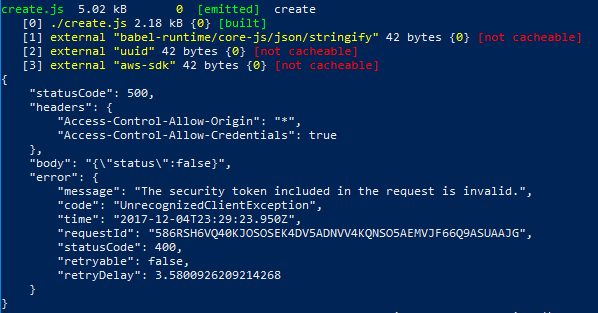
FIXED
hadn't set up my access key/secret access key correctly
 svj13
on 5 Dec 2017
svj13
on 5 Dec 2017
When calling create after refactoring, this code block causes an issue
try {
    await dynamoDbLib.call("put", params);
    callback(null, success(params.Item));
  }
'Await is a reserved word'. Assuming this is because the dynamo-dblib doesn't have async on the function?
 nicksmithr
on 9 Dec 2017
nicksmithr
on 9 Dec 2017
@nicksmithr Hmm we set this up in this chapter - https://serverless-stack.com/chapters/add-support-for-es6-es7-javascript.html
Can you double check if you completed that step?
jayair
on 11 Dec 2017
@nicksmithr Did you put the keyword async in the beginning of the function? You are only allowed to use await in async functions.
fcostarodrigo
on 11 Dec 2017
@jayair @fcostarodrigo Ah yes, I didn't have ES7 configured. Thanks both!
nicksmithr
on 11 Dec 2017
In the top section ("Add the Function"), I wonder if the two appearances of JSON.stringify are superfluous? When I run the code exactly as written in the tutorial, I get extra escapes:
{
    "statusCode": 200,
    "headers": {
        "Access-Control-Allow-Origin": "*",
        "Access-Control-Allow-Credentials": true
    },
    "body": "{\"userId\":\"USER_SUB-1234\",\"noteId\":\"15e55280-df69-11e7-b24c-29b4f0f7fc22\",\"content\":\"hello world\",\"attachment\":\"hello.jpg\",\"createdAt\":1513102809000}"
}
These only appear in local though. After the deploy to AWS the extra escapes aren't there.
In fact, I had thought (a little too cleverly) to remove the extra escapes by removing the JSON.stringify(), which works perfectly in local, but doing that yields a 502 error after Amazon deploy.
 SpencerGreene
on 12 Dec 2017
SpencerGreene
on 12 Dec 2017
@SpencerGreene What is returned on AWS is the body portion as a JSON string. That is why it is encoded and why it appears double encoded on local.
It looks a bit confusing on local because it is mocking the response you would normally get on AWS.
jayair
on 15 Dec 2017
nice..
just wondering if you guys had any thoughts on automated unit tests ?
 walshe
on 17 Jan 2018
walshe
on 17 Jan 2018
@walshe We created a starter project with support for unit tests - https://serverless-stack.com/chapters/serverless-nodejs-starter.html. I'm not sure if that is what you are looking for.
jayair
on 19 Jan 2018
ah.. super, hadnt got to the bottom of the page yet
@jayair so one would basically use that template for each new serverless microservice ?
walshe
on 19 Jan 2018
@walshe Yeah that's what we use for our projects as well.
jayair
on 19 Jan 2018
Anyone know what is going on here? I just got done working out a 500 error and now this is popping up,
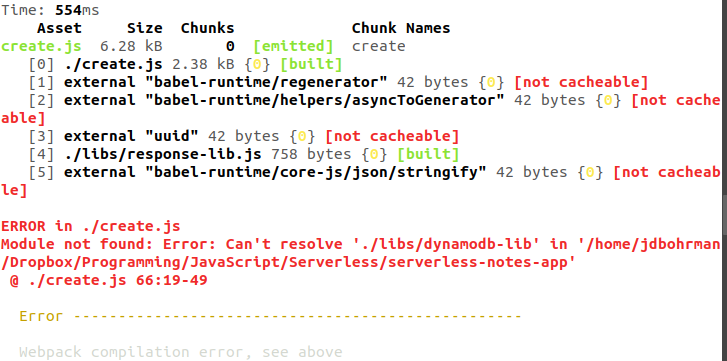
 jdbohrman
on 3 Feb 2018
jdbohrman
on 3 Feb 2018
@jdbohrman It seems like a path issue or the dynamodb-lib.js was not added in properly. Can you confirm there is a libs/ directory off root of your project?
jayair
on 5 Feb 2018
I don't understand why you need to enable CORS both in the config file and in the code headers. Why won't once be enough?
 Vadorequest
on 14 Feb 2018
Vadorequest
on 14 Feb 2018
Cannot read property 'events' of null
I'm getting the above error when attempting to run serverless invoke local --function create --path mocks/create-event.json
import uuid from "uuid";
import AWS from "aws-sdk";

AWS.config.update({ region: "ap-southeast-2" });
const dynamoDb = new AWS.DynamoDB.DocumentClient();

export function main(event, context, callback) {
 // request body is passed in as a JSON encoded string using 'event.body'
    const data = JSON.parse(event.body);

    const params = {
        TableName: "notes",
         // 'Item' contains the attributes of the item to be created
         // - 'userId': user identities are federated through the
         // Cognito Identity Pool, we will use the identity id
         // as the user id of the authenticated user
         // - 'noteId': a unique uuid
         // - 'content': parsed from request body
         // - 'attachment': parsed from request body
         // - 'createdAt': current Unix timestamp
         Item: {
             userId: event.requestContext.identity.cognitoIdentityId,
             notesId: uuid.v1(),
             content: data.content,
             attachment: data.attachment,
             createdAt: new Date().getTime()
         }
    };

    dynamoDb.put(params,(error,data) => {
        // Set response headers to enable Cross Origin Resource Sharing
        const headers = {
            "Access-Control-Allow-Origin": "**",
            "Access-Control-Allow-Credentials": true
        };

        // return status code 500 on error
        if (error) {
            const response = {
                statusCode: 500,
                headers: headers,
                body: JSON.stringify({status:false})
            };
            callback(null,response);
            return;
        }
    // return status code 200 and the newly created item
    const response = {
        statusCode: 200,
        headers: headers,
        body: JSON.stringify(params.Item)
    };
    callback(null,response);

    });
}
{
    "body": "{\"content\":\"hello world\",\"attachment\":\"hello.jpg\"}",
    "requestContext": {
        "identity": {
            "cognitoIdentityId": "USER-SUB-1234"
        }
    }
}
 ReedME
on 16 Feb 2018
ReedME
on 16 Feb 2018
@Vadorequest The one in the config is to enable it CORS. But what you decide to send in the headers is in the code.
jayair
on 17 Feb 2018
@ReedME Hmm that looks okay. Which version of Serverless are you using?
jayair
on 17 Feb 2018
@jayair Serverless version 1.26.0
ReedME
on 17 Feb 2018
@ReedME Can I try out your repo to test this?
jayair
on 17 Feb 2018
ReedME
on 17 Feb 2018
@ReedME Your serverless.yml is not properly formatted. Make sure it looks like this - https://github.com/AnomalyInnovations/serverless-stack-demo-api/blob/add-a-create-note-api/serverless.yml
jayair
on 18 Feb 2018
Thank you so much for creating this tutorial! As a student, this provides me with a great introduction to creating Web Apps. I ran into the following error, and have been stumped for a while when I try to run serverless invoke local --function create --path mocks/create-event.json:
Serverless: Bundling with Webpack...
Time: 359ms
    Asset  Size  Chunks             Chunk Names
create.js  5 kB       0  [emitted]  create
   [0] ./create.js 2.16 kB {0} [built]
   [1] external "babel-runtime/core-js/json/stringify" 42 bytes {0} [not cacheable]
   [2] external "uuid" 42 bytes {0} [not cacheable]
   [3] external "aws-sdk" 42 bytes {0} [not cacheable]
{
    "statusCode": 500,
    "headers": {
        "Access-Control-Allow-Origin": "*",
        "Access-Control-Allow-Credentials": true
    },
    "body": "{\"status\":false}"
}
I have imported uuid and aws-sdk in create.js, as well as have them inside my package.json devDependencies.
And I also have set up AWS CLI (at least to my knowledge):

(key values have been "whited-out" for security purposes)

Thank you so much for the help!
 PopBot
on 19 Feb 2018
PopBot
on 19 Feb 2018
@PopBot You need to display error messages in order to debug further. You can do this by adding
console.log(variableYouWannaLog)
In your case, you return status: false, before returning this, log the error, likely e. This will help you figure out what's wrong.
Have you installed the packages added in package.json? run npm install to make sure
Vadorequest
on 19 Feb 2018
Here is my error. I've set up the aws configuration. The body is actually posting to the db. Not sure why the authentication error.
I manually added a directory .aws/config and .aws/credentials as they never showed up after the initial aws configure command. Any help much appreciated.
Serverless: Bundling with Webpack...
Time: 343ms
Built at: 2018-2-26 17:38:39
    Asset      Size  Chunks             Chunk Names
create.js  1.51 KiB       0  [emitted]  create
Entrypoint create = create.js
   [0] external "aws-sdk" 42 bytes {0} [built]
   [1] external "uuid" 42 bytes {0} [built]
   [2] external "babel-runtime/core-js/json/stringify" 42 bytes {0} [built]
   [3] ./create.js 2.05 KiB {0} [built]

WARNING in configuration
The 'mode' option has not been set. Set 'mode' option to 'development' or 'production' to enable defaults for this environment.
params:  { TableName: 'notes',
  Item:
   { userId: 'USER-SUB-1234',
     noteId: '8e1ea2f0-1b56-11e8-a9f2-11680d2c2ad9',
     content: 'hello world',
     attachment: 'hello.jpg',
     createdAt: 1519691920031 } }
error:  { Error: connect EHOSTUNREACH 169.254.169.254:80
    at Object.exports._errnoException (util.js:1024:11)
    at exports._exceptionWithHostPort (util.js:1047:20)
    at TCPConnectWrap.afterConnect [as oncomplete] (net.js:1150:14)
  message: 'Missing credentials in config',
  code: 'CredentialsError',
  errno: 'EHOSTUNREACH',
  syscall: 'connect',
  address: '169.254.169.254',
  port: 80,
  time: 2018-02-27T00:38:43.112Z,
  originalError:
   { message: 'Could not load credentials from any providers',
     code: 'CredentialsError',
     errno: 'EHOSTUNREACH',
     syscall: 'connect',
     address: '169.254.169.254',
     port: 80,
     time: 2018-02-27T00:38:43.112Z,
     originalError:
      { code: 'EHOSTUNREACH',
        errno: 'EHOSTUNREACH',
        syscall: 'connect',
        address: '169.254.169.254',
        port: 80,
        message: 'connect EHOSTUNREACH 169.254.169.254:80' } } }
{
    "statusCode": 500,
    "headers": {
        "Access-Control-Allow-Origin": "*",
        "Access-Control-Allow-Credentials": true
    },
    "body": "{\"status\":false}"
}
 F-Adam-B
on 27 Feb 2018
F-Adam-B
on 27 Feb 2018
Hi, Please, someone, help me. I don't like to stuck with this error
{ NetworkingError: Invalid character in header content ["Authorization"]
    at validateHeader (_http_outgoing.js:506:11)
    at ClientRequest.setHeader (_http_outgoing.js:510:3)
    at new ClientRequest (_http_client.js:173:14)
    at Object.request (https.js:241:10)
    at Object.request (C:\Users\Sina\AppData\Roaming\npm\node_modules\serverless\node_modules\agent-base\patch-core.js:52:20)
    at features.constructor.handleRequest (E:\node\notes-app\node_modules\aws-sdk\lib\http\node.js:42:23)
    at executeSend (E:\node\notes-app\node_modules\aws-sdk\lib\event_listeners.js:304:29)
    at Request.SEND (E:\node\notes-app\node_modules\aws-sdk\lib\event_listeners.js:318:9)
    at Request.callListeners (E:\node\notes-app\node_modules\aws-sdk\lib\sequential_executor.js:101:18)
    at Request.emit (E:\node\notes-app\node_modules\aws-sdk\lib\sequential_executor.js:77:10)
    at Request.emit (E:\node\notes-app\node_modules\aws-sdk\lib\request.js:683:14)
    at Request.transition (E:\node\notes-app\node_modules\aws-sdk\lib\request.js:22:10)
    at AcceptorStateMachine.runTo (E:\node\notes-app\node_modules\aws-sdk\lib\state_machine.js:14:12)
    at E:\node\notes-app\node_modules\aws-sdk\lib\state_machine.js:26:10
    at Request.<anonymous> (E:\node\notes-app\node_modules\aws-sdk\lib\request.js:38:9)
    at Request.<anonymous> (E:\node\notes-app\node_modules\aws-sdk\lib\request.js:685:12)
    at Request.callListeners (E:\node\notes-app\node_modules\aws-sdk\lib\sequential_executor.js:115:18)
    at callNextListener (E:\node\notes-app\node_modules\aws-sdk\lib\sequential_executor.js:95:12)
    at E:\node\notes-app\node_modules\aws-sdk\lib\event_listeners.js:220:9
    at finish (E:\node\notes-app\node_modules\aws-sdk\lib\config.js:320:7)
    at E:\node\notes-app\node_modules\aws-sdk\lib\config.js:338:9
    at SharedIniFileCredentials.get (E:\node\notes-app\node_modules\aws-sdk\lib\credentials.js:126:7)
    at getAsyncCredentials (E:\node\notes-app\node_modules\aws-sdk\lib\config.js:332:24)
    at Config.getCredentials (E:\node\notes-app\node_modules\aws-sdk\lib\config.js:352:9)
    at Request.SIGN (E:\node\notes-app\node_modules\aws-sdk\lib\event_listeners.js:192:22)
    at Request.callListeners (E:\node\notes-app\node_modules\aws-sdk\lib\sequential_executor.js:101:18)
    at Request.emit (E:\node\notes-app\node_modules\aws-sdk\lib\sequential_executor.js:77:10)
    at Request.emit (E:\node\notes-app\node_modules\aws-sdk\lib\request.js:683:14)
    at Request.transition (E:\node\notes-app\node_modules\aws-sdk\lib\request.js:22:10)
    at AcceptorStateMachine.runTo (E:\node\notes-app\node_modules\aws-sdk\lib\state_machine.js:14:12)
    at E:\node\notes-app\node_modules\aws-sdk\lib\state_machine.js:26:10
    at Request.<anonymous> (E:\node\notes-app\node_modules\aws-sdk\lib\request.js:38:9)
    at Request.<anonymous> (E:\node\notes-app\node_modules\aws-sdk\lib\request.js:685:12)
    at Request.callListeners (E:\node\notes-app\node_modules\aws-sdk\lib\sequential_executor.js:115:18)
    at Timeout.callNextListener [as _onTimeout] (E:\node\notes-app\node_modules\aws-sdk\lib\sequential_executor.js:95:12)
    at ontimeout (timers.js:478:11)
    at tryOnTimeout (timers.js:302:5)
    at Timer.listOnTimeout (timers.js:262:5)
  message: 'Invalid character in header content ["Authorization"]',
  code: 'NetworkingError',
  region: 'eu-west-1',
  hostname: 'dynamodb.eu-west-1.amazonaws.com',
  retryable: true,
  time: 2018-02-28T17:36:49.058Z }
{
    "statusCode": 500,
    "header": {
        "Access-Control-Allow-Origin": "*",
        "Access-Control-Allow-Credentials": true
    },
    "body": "{\"status\":false}"
}
 Dorostkar
on 28 Feb 2018
Dorostkar
on 28 Feb 2018
Just a quick question.
Can I add a identifier in my event.requestContext.identity json like,
event.requestContext.identity.orgId
For e.g event.requestContext.identity.orgId should return me say 'ORG001'
I'll be using orgId inside my application to use it as a primary partition key for my multi-tenant application. The noteId will be my sort key and perhaps I'll be adding Index for 'userId'.
Thanks,
Bharat Chand
 19bharatvikram
on 28 Feb 2018
19bharatvikram
on 28 Feb 2018
@Dorostkar What command are you running that shows this error?
jayair
on 1 Mar 2018
@19bharatvikram I don't think you can use it directly. You can store the mapping on your end. Or you can use something like https://docs.aws.amazon.com/cognito/latest/developerguide/cognito-sync.html
jayair
on 1 Mar 2018
@jayair
Found a way to set orgid(companyId) as custom attribute for cognito user and then using existing Cognito User Pool as the authorizer:
get:
# Defines an HTTP API endpoint that calls the main function in get.js
# - path: url path is /notes/{id}
# - method: GET request
handler: get.main
events:
- http:
path: notes/{id}
method: GET
integration: lambda
authorizer:
arn: arn:aws:cognito-idp:ap-south-1:xxxx:userpool/ap-south-1_xxxxxxxx
claims:
- email
- family_name
- custom:orgid
https://serverless.com/framework/docs/providers/aws/events/apigateway/
https://maketips.net/tip/175/include-custom-attributes-in-cognito-claims
So that I can get orgid in requestContext like below
event.requestContext.authorizer.claims.family_name
or,
event.requestContext.authorizer.claims['custom:orgid']
But now not able to call lambda through API Gateway. As for API gateway the Auth: AWS_IAM has changed to Auth: 1_hfxxr2Gx due to whichAPI authorization fails.
please suggest if there will be code change for making API call.
Thanks,
19bharatvikram
on 2 Mar 2018
@jayair, fortunately, I have solved the issue. The problem was bcz of the AWS credential that I configured in the serverless framework and it was for different IAM.
Dorostkar
on 2 Mar 2018
@19bharatvikram Yeah so with this approach the authorizer is directly Cognito User Pool. We have an older version of the tutorial that used this approach. To call the API you can refer to this - https://59caadbd424ef20abdc342b4--serverless-stack.netlify.com/chapters/call-the-create-api.html
jayair
on 5 Mar 2018
When I enter the command for the test into the CLI, nothing happens. It hesitates for a second and then gives me another command prompt. I'm not even sure what else to tell you...my test user is verified, my user pool seems to be configured correctly, all the code is identical to the tutorial. I don't have multiple profiles. Help!
 sarahbohr
on 15 Mar 2018
sarahbohr
on 15 Mar 2018
@sarahbattey Which command is this?
jayair
on 15 Mar 2018
getting error Function "create" doesn't exist in this Service
serverless invoke local --function create --path mocks/createevent.json
  Serverless Error ---------------------------------------
  Function "create" doesn't exist in this Service

  Get Support --------------------------------------------
     Docs:          docs.serverless.com
     Bugs:          github.com/serverless/serverless/issues
     Forums:        forum.serverless.com
     Chat:          gitter.im/serverless/serverless

  Your Environment Information -----------------------------
     OS:                     win32
     Node Version:           9.4.0
     Serverless Version:     1.26.0
 nelsoftcom
on 15 Mar 2018
nelsoftcom
on 15 Mar 2018
@jayair $ serverless invoke local --function create --path mocks/create-event.json
sarahbohr
on 15 Mar 2018
@sarahbattey Which version of Serverless are you using?
@nelsoftcom This seems like an issue with your serverless.yml. Make sure it is indented exactly like the one in the tutorial - https://github.com/AnomalyInnovations/serverless-stack-demo-api/blob/add-a-create-note-api/serverless.yml
jayair
on 15 Mar 2018
@jayair I have copied the serverless.yml from the link and changed to us-east-2.
I'm still getting the same above error.
thank you :)
nelsoftcom
on 15 Mar 2018
@nelsoftcom Can I see your serverless.yml? And I'm assuming you have a file createevent.json as opposed to create-event.json.
jayair
on 15 Mar 2018
@jayair Yes I was wrong with the file name - i have changed that to create-event.json.
using this command now.
serverless invoke local --function create --path mocks/create-event.json
Please see my file. thanks
service: mynotes-app-api
# Use serverless-webpack plugin to transpile ES6/ES7
plugins:
- serverless-webpack
# Enable auto-packing of external modules
custom:
webpackIncludeModules: true

provider:
  name: aws
  runtime: nodejs6.10
  stage: prod
  region: us-east-2

# 'iamRoleStatement' defines the permission policy for the Lambdafunction.
# In this case Lambda functions are granted with permissions to access DynamoDB.
iamRoleStatements:
- Effect: Allow
Action:
- dynamodb:DescribeTable
- dynamodb:Query
- dynamodb:Scan
- dynamodb:GetItem
- dynamodb:PutItem
- dynamodb:UpdateItem
- dynamodb:DeleteItem
Resource: "arn:aws:dynamodb:us-east-2:*:*"
functions:
# Defines an HTTP API endpoint that calls the main function in create.js
# - path: url path is /notes
# - method: POST request
# - cors: enabled CORS (Cross-Origin Resource Sharing) for browser cross
# domain api call
# - authorizer: authenticate using the AWS IAM role
create:
  handler: create.main
  events:
  - http:
      path: mynotes
      method: post
      cors: true
      authorizer: aws_iam
@nelsoftcom I'm not sure if you didn't paste it properly but it needs to be indented exactly like this https://github.com/AnomalyInnovations/serverless-stack-demo-api/blob/master/serverless.yml
jayair
on 15 Mar 2018
@jayair I'm running 1.26.1
sarahbohr
on 15 Mar 2018
@jayair Thank you. Passed that level - yes indent was the issue. Now I', getting status code 500
serverless invoke local --function create --path mocks/create-event.json
Serverless: Bundling with Webpack...
Time: 1307ms
    Asset     Size  Chunks             Chunk Names
create.js  6.75 kB       0  [emitted]  create
   [0] ./create.js 2.38 kB {0} [built]
   [1] external "babel-runtime/regenerator" 42 bytes {0} [not cacheable]
   [2] external "babel-runtime/helpers/asyncToGenerator" 42 bytes {0} [not cacheable]
   [3] external "uuid" 42 bytes {0} [not cacheable]
   [4] ./libs/dynamodb-lib.js 483 bytes {0} [built]
   [5] external "aws-sdk" 42 bytes {0} [not cacheable]
   [6] ./libs/response-lib.js 719 bytes {0} [built]
   [7] external "babel-runtime/core-js/json/stringify" 42 bytes {0} [not cacheable]
{
    "statusCode": 500,
    "headers": {
        "Access-Control-Allow-Origin": "*",
        "Access-Control-Allow-Credentials": true
    },
    "body": "{\"status\":false}"
}
@nelsoftcom This is pretty common and we have a little note at the bottom of the chapter for it - https://serverless-stack.com/chapters/add-a-create-note-api.html#common-issues
@sarahbattey That looks okay. I'm not entirely sure what the issue is. Can you share your directory structure and show me where you are running your command from?
jayair
on 15 Mar 2018
@jayair thank you :) create-event and get-event works. thanks for the help.
nelsoftcom
on 16 Mar 2018
@jayair here's a screenshot of my file structure and my serverless.yml too, just in case. I can't thank you enough for your help!

Edit: ...and a shot of my cli:
sarahbohr
on 16 Mar 2018
@sarahbattey Yeah the structure is a bit weird. Compare it to the one we have in the tutorial - https://github.com/AnomalyInnovations/serverless-stack-demo-api.
And you run your serverless commands at the level where your serverless.yml is.
jayair
on 16 Mar 2018
@jayair Wow...I have NO idea what happened there. I'm going to restart. This will be my third start (the first try was due to Route 53 and not you)...I'm doing this to get more familiar with AWS and React so every error and every weird thing is a learning experience! Thanks again for everything you've done!
sarahbohr
on 17 Mar 2018
Can you comment on why the functions are async? I would think the simpler approach would be to make calls synchronous unless there is a need for async calls. I'm asking because I wanted to try and reuse some of the basic CRUD functions but am having problems with the async sub functions.
 curtisolson
on 3 Apr 2018
curtisolson
on 3 Apr 2018
@curtisolson I'm not sure if there are synchronous versions of the DynamoDB calls but if there are, then you could use them and not have the Lambda function be async.
jayair
on 3 Apr 2018
I'm running $ serverless invoke local --function create --path mocks/create-event.json
My return is:
{
    "statusCode": 500,
    "headers": {
        "Access-Control-Allow-Origin": "*",
        "Access-Control-Allow-Credentials": true
    },
    "body": "{\"status\":false}"
}
It appears to be a permissions/IAM issue:
AccessDeniedException: User: arn:aws:iam::123186399999:user/
I don't want to go in and just start changing permissions. I feel like I'm missing some fundamental lesson or item that I should know before moving on.
Any help would be very much appreciated.
 TinCharMan
on 18 Apr 2018
TinCharMan
on 18 Apr 2018
@TinCharMan This permission is coming from your serverless.yml. Make sure your iamRoleStatements looks exactly like this - https://github.com/AnomalyInnovations/serverless-stack-demo-api/blob/master/serverless.yml#L23. Including the indentation.
jayair
on 20 Apr 2018
Based on @oliv9286 's comment, I used the following to set non-default credentials.
diff --git a/libs/dynamodb-lib.js b/libs/dynamodb-lib.js
index f08b4d8..de2b4f0 100644
--- a/libs/dynamodb-lib.js
+++ b/libs/dynamodb-lib.js
@@ -1,6 +1,7 @@
 import AWS from "aws-sdk";

-AWS.config.update({ region: "us-east-1" });
+const credentials = new AWS.SharedIniFileCredentials({profile: 'personal'});
+AWS.config.update({ region: "us-east-1", credentials: credentials });

 export function call(action, params) {
   const dynamoDb = new AWS.DynamoDB.DocumentClient();
 ahammond
on 1 May 2018
ahammond
on 1 May 2018
@ahammond So this would work when invoking locally but when you deploy the Lambda function won't be able to find the personal credentials (AFAIK). We cover this in the tutorial, you can use this command to invoke locally with non-default credentials.
$ AWS_PROFILE=myProfile serverless invoke local --function create --path mocks/create-event.json
Did that not work for you?
jayair
on 2 May 2018
Thank you @jayair . Worked!
TinCharMan
on 6 May 2018
@F-Adam-B Is the issue resolved for you? I'm facing the same problem..
 abhisheksett
on 9 May 2018
abhisheksett
on 9 May 2018
@abhisheksett What's the issue?
jayair
on 9 May 2018
I was facing the same issue mentioned by @F-Adam-B , saying
error:  { Error: connect EHOSTUNREACH 169.254.169.254:80
    at Object.exports._errnoException (util.js:1024:11)
    at exports._exceptionWithHostPort (util.js:1047:20)
    at TCPConnectWrap.afterConnect [as oncomplete] (net.js:1150:14)
  message: 'Missing credentials in config',
That got resolved by exporting AWS_ACCESS_KEY_ID and AWS_SECRET_ACCESS_KEY. Now I'm getting following error:
{ ResourceNotFoundException: Requested resource not found
    at Request.extractError (/Users/absett/Documents/Work/aws/serverless-stack-demo-api/node_modules/aws-sdk/lib/protocol/json.js:48:27)
    at Request.callListeners (/Users/absett/Documents/Work/aws/serverless-stack-demo-api/node_modules/aws-sdk/lib/sequential_executor.js:105:20)
    at Request.emit (/Users/absett/Documents/Work/aws/serverless-stack-demo-api/node_modules/aws-sdk/lib/sequential_executor.js:77:10)
    at Request.emit (/Users/absett/Documents/Work/aws/serverless-stack-demo-api/node_modules/aws-sdk/lib/request.js:683:14)
    at Request.transition (/Users/absett/Documents/Work/aws/serverless-stack-demo-api/node_modules/aws-sdk/lib/request.js:22:10)
    at AcceptorStateMachine.runTo (/Users/absett/Documents/Work/aws/serverless-stack-demo-api/node_modules/aws-sdk/lib/state_machine.js:14:12)
    at /Users/absett/Documents/Work/aws/serverless-stack-demo-api/node_modules/aws-sdk/lib/state_machine.js:26:10
    at Request.<anonymous> (/Users/absett/Documents/Work/aws/serverless-stack-demo-api/node_modules/aws-sdk/lib/request.js:38:9)
    at Request.<anonymous> (/Users/absett/Documents/Work/aws/serverless-stack-demo-api/node_modules/aws-sdk/lib/request.js:685:12)
    at Request.callListeners (/Users/absett/Documents/Work/aws/serverless-stack-demo-api/node_modules/aws-sdk/lib/sequential_executor.js:115:18)
    at Request.emit (/Users/absett/Documents/Work/aws/serverless-stack-demo-api/node_modules/aws-sdk/lib/sequential_executor.js:77:10)
    at Request.emit (/Users/absett/Documents/Work/aws/serverless-stack-demo-api/node_modules/aws-sdk/lib/request.js:683:14)
    at Request.transition (/Users/absett/Documents/Work/aws/serverless-stack-demo-api/node_modules/aws-sdk/lib/request.js:22:10)
    at AcceptorStateMachine.runTo (/Users/absett/Documents/Work/aws/serverless-stack-demo-api/node_modules/aws-sdk/lib/state_machine.js:14:12)
    at /Users/absett/Documents/Work/aws/serverless-stack-demo-api/node_modules/aws-sdk/lib/state_machine.js:26:10
    at Request.<anonymous> (/Users/absett/Documents/Work/aws/serverless-stack-demo-api/node_modules/aws-sdk/lib/request.js:38:9)
    at Request.<anonymous> (/Users/absett/Documents/Work/aws/serverless-stack-demo-api/node_modules/aws-sdk/lib/request.js:685:12)
    at Request.callListeners (/Users/absett/Documents/Work/aws/serverless-stack-demo-api/node_modules/aws-sdk/lib/sequential_executor.js:115:18)
    at callNextListener (/Users/absett/Documents/Work/aws/serverless-stack-demo-api/node_modules/aws-sdk/lib/sequential_executor.js:95:12)
    at IncomingMessage.onEnd (/Users/absett/Documents/Work/aws/serverless-stack-demo-api/node_modules/aws-sdk/lib/event_listeners.js:269:13)
    at IncomingMessage.emit (events.js:164:20)
    at endReadableNT (_stream_readable.js:1054:12)
    at _combinedTickCallback (internal/process/next_tick.js:138:11)
    at process._tickDomainCallback (internal/process/next_tick.js:218:9)
  message: 'Requested resource not found',
  code: 'ResourceNotFoundException',
  time: 2018-05-09T15:12:35.034Z,
  requestId: 'JP1ST06JJK9ICKBCU0LIRTGE1NVV4KQNSO5AEMVJF66Q9ASUAAJG',
  statusCode: 400,
  retryable: false,
  retryDelay: 26.28053621862381 }
{
    "statusCode": 500,
    "headers": {
        "Access-Control-Allow-Origin": "*",
        "Access-Control-Allow-Credentials": true
    },
    "body": "{\"status\":false}"
}
Am I missing any configuration?
abhisheksett
on 9 May 2018
@abhisheksett When are you seeing this error?
jayair
on 9 May 2018
I'm getting this error when I'm trying to create a note by following command:
serverless invoke local --function create --path mocks/create-event.json
abhisheksett
on 9 May 2018
@abhisheksett This seems like it is complaining about not finding your DynamoDB table. Can I see your create.js?
jayair
on 9 May 2018
This issue was moved to https://discourse.serverless-stack.com/t/comments-add-a-create-note-api/125
jayair
on 9 May 2018
@jayair,
I just started my serverless framework tutorial and found this very useful so far. Thanks a bunch!
I'm running into this issue when I run:
serverless invoke local --function create --path mocks/create-event.json
Serverless: DOTENV: Loading environment variables from .env:
Syntax Error -------------------------------------------
SyntaxError: Unexpected end of JSON input
at JSON.parse (
at Object.parseJC [as parse] (/Users/tonyliu/.npm-global/lib/node_modules/serverless/node_modules/json-cycle/cycle.js:136:28)
at parse (/Users/tonyliu/.npm-global/lib/node_modules/serverless/lib/utils/fs/parse.js:22:15)
at /Users/tonyliu/.npm-global/lib/node_modules/serverless/lib/utils/fs/readFile.js:7:58
For debugging logs, run again after setting the "SLS_DEBUG=*" environment variable.
Get Support --------------------------------------------
Docs: docs.serverless.com
Bugs: github.com/serverless/serverless/issues
Issues: forum.serverless.com
Your Environment Information ---------------------------
Operating System: darwin
Node Version: 12.16.3
Framework Version: 1.71.3
Plugin Version: 3.6.12
SDK Version: 2.3.1
Components Version: 2.30.12
 tliut
on 30 May 2020
tliut
on 30 May 2020
Please post this over on our forums!
jayair
on 30 May 2020
I'm unable to post on the forums as a new user for now so that's why I posted here....
tliut
on 30 May 2020
Weird. I think it just got caught by the spam detection. I think I allowed it. Can you post in there now?
jayair
on 14 Jun 2020
{
    "statusCode": 500,
    "headers": {
        "Access-Control-Allow-Origin": "*",
        "Access-Control-Allow-Credentials": true
    },
    "body": "{\"status\":false}"
}
I had this error. It was because I forgot to create the table in DynamoDB
 mmjosedaniel
on 7 Jul 2020
mmjosedaniel
on 7 Jul 2020
Related issues
 hollygirouard
·
5Comments
jayair
·
20Comments
hollygirouard
·
5Comments
jayair
·
20Comments
 Abdizriel
·
13Comments
jayair
·
21Comments
jayair
·
4Comments
Abdizriel
·
13Comments
jayair
·
21Comments
jayair
·
4Comments
Most helpful comment
@tobyjo I've had the same issue as you and my problem was that my DynamoDB table wasn't created when I thought I did. I would double-check in your AWS Console and see if your
notestable was created.