Serverless-python-requirements: Unable to get good binding path
Hi,
I have a serverless project that uses a couple of python libs. One of them is gdal.
My requirment.txt looks like this
numpy
xarray
boto3
gdal
and part of my serverless.yml looks like this

When I have dockerizePip: true or dockerizePip: no linux deploying with sls deploy I get below error
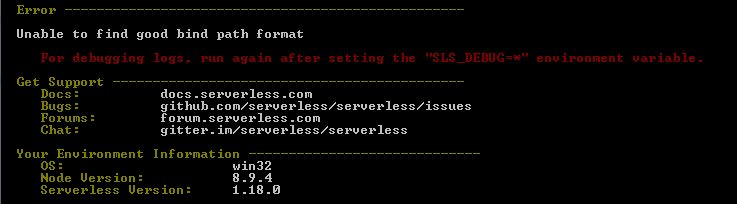
If I set dockerizePip: false and do 'sls deploy' I get below error

If I remove gdal from the requiment.txt and set dockerizePip: false and do 'sls deploy' it works fine but the function will not have gdal on AWS.
This is in packages.json "serverless-python-requirements": "^4.1.1"
I have docker installed on windows.

 jfaraklit
All 20 comments
@kichik any thoughts?
jfaraklit
on 4 Sep 2018
With dockerizePip: true can you run the following and attach the full output?
set SLS_DEBUG=*
sls package
If you're on MinGW this might work better:
SLS_DEBUG=* sls package
Also, can you include the mount table of your Docker machine? I think docker-machine ssh mount should print it out.
 kichik
on 5 Sep 2018
kichik
on 5 Sep 2018
Here the logs, as requested. I added a console.log on docker.js to see how the path coming in.

and the docker mountable
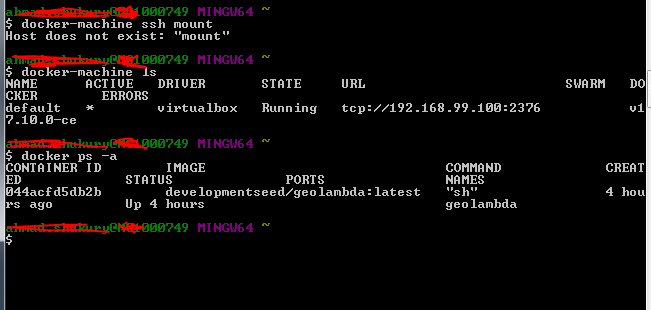
Should there be any image in docker? that might be missing somehow?
Have you ever tried adding GDAL to any serverless project?
jfaraklit
on 5 Sep 2018
The log command you added is helpful but not enough. With SLS_DEBUG=* it prints both the path it tries and the result from Docker. It's hard to tell what's going on without the result.
As for the mounts, try docker-machine ssh default mount. Basically I'm trying to SSH into the Docker machine and see where your Windows drive is mounted. That should tell us which of the bind paths should have worked.
kichik
on 5 Sep 2018
docker-machine ssh default mount:

I will add more trace from sls deploy
jfaraklit
on 5 Sep 2018
No need. I can already see what's wrong. Your docker-machine doesn't have your entire drive shared. It only has C:\Users but your code is in C:\Ottawa. Try moving your code to your documents folder, or having docker-machine share your entire drive.
kichik
on 5 Sep 2018
Some progress but getting this after sls deploy

when trying to docker run lambci/lambda I get this

Any thoughts what could cause this?
jfaraklit
on 5 Sep 2018
Seems like you haven't defined runtime: python
kichik
on 5 Sep 2018
Ok. Sorry that I was away for a few days and getting back on this project. After runtime to yml. I now get

I have python and docker in my env. path.
jfaraklit
on 13 Sep 2018
Ok. So I had pythonBin: C:\python\Scripts\ in my yml and removed it.
After removing I don't get the above error but the process keeps running without any error

So far 20 minutes and nothing. My docker looks like this while it is running:

jfaraklit
on 13 Sep 2018
Try docker exec d95b28f48cc6 ps aux -Hw to see what it's doing.
kichik
on 13 Sep 2018
docker exec d95b28f48cc6 ps aux -Hw

jfaraklit
on 13 Sep 2018
It's just installing. Looks like you might have a lot of requirements...
kichik
on 13 Sep 2018
Yeah. I have these four in my requirment.txt
numpy
xarray
boto3
gdal
and 35 minutes so far and counting.
I will watch it and see where it goes. Thanks a lot for the help.
jfaraklit
on 13 Sep 2018
It never ends. Even after removing all packges from requirment.txt still taking forever.
jfaraklit
on 13 Sep 2018
Now cleaning the requirement and re-installing can install everything but GDAL. This is the error:
Command "python setup.py egg_info" failed with error code 1 in /tmp/pip-install-fhp9sy94/gdal/
jfaraklit
on 13 Sep 2018
I'm not surprised by GDAL.. I haven't tried getting any GIS(that isn't pure python) stuff working with lambda because I honestly don't expect it to work with out significant effort. Here's a couple things that would be needed for it to work:
- build time dependencies available in the docker container - doable via a custom docker image or dockerfile to do this
- the runtime dependencies(eg:
libgdal.so) need to be in the service zip - there is no mechanism to do this yet. you could try to manually grab the right one and put it in your service, but you'll probably still have to do some hacks to get it to actually load since you can't changeLD_LIBRARY_PATHeffectively
 dschep
on 13 Sep 2018
dschep
on 13 Sep 2018
Yeah. One issue after another. Looking into this option to see.
https://github.com/joshtkehoe/lambda-python-gdal
jfaraklit
on 13 Sep 2018
I don't know if this would be worth anything to you guys, but I found a workaround that was a little bit elaborate and it works in my particular case (django + postgis, gdal).
1) Set dockerizePip: true
2) create a docker file off lambci/lambda:build-python3.6 and reference that image in your serverless pythonRequirements config via the dockerImage attribute. To find the name, do a docker-compose build and look up the name with docker images.
3) Add the build steps for GDAL on Amazon Linux to your Dockerfile; similar to here. This gets the gdal/geos/proj C deps built and creates .so files that will be available under /tmp/app/local/lib that are built for the correct architecture.
4) This was my hack: Add a vendor: ./serverless-vendor setting to the pythonRequirements section in serverless.yml .. this will copy your local folder called serverless-vendor into the sitepackages directory so its available at runtime and thus can be linked to.
5) docker-compose run --rm [your docker image name] bash into your docker image and copy the /tmp/app/local/lib/ files into the ./serverless-vendor/[your name] folder we referenced earlier.
6) In my django settings, I was able to point geodjango to the GDAL .so file by setting the GDAL_LIBRARY_PATH in Django's settings.py. I'd wager theres some similar way to point gdal to the so file - it would be a matter of looking at what geo django does under the hood with this variable.
Also worth noting - read carefully:
- I'm a noob with serverless and was suprised to see it upload the file which was 65mb.
- It was annoying getting the path to the
serverless-vendorfolder - I ended up importing some pip dep and going..from there to find the folder that had thelibgdal.sofile. - CAVEAT: I haven't been able to test this 100% because I haven't been able to get a postgis server up and running yet, but Django was able to get past the GDAL load step that was holding me back before, so I figured it must have worked. I know the files get to the lambda function which should be good enough.
Hope this is useful to anyone. Experience with serverless+python so far hasn't been for the faint of heart :)
 dev360
on 3 Oct 2018
dev360
on 3 Oct 2018
For anyone coming from the internet looking to get GDAL working with Serverless, you should know that I went through hell and back trying to get it to work messing around with Docker containers and using @dev360's outline as a rough guide.
However, there's a much easier way now that AWS Lambda supports layers. Simply use one of the prebuilt layers made by https://github.com/developmentseed/geolambda at runtime to provide all of GDAL's dependencies. For your dev environment, specify one of the images from that project that contain Python. The plugin will use the image to create a container to compile the module bindings within at build time, and serverless deploy will link the preexisting layer to your lambda so that the bindings can seamlessly load the GDAL library binaries from the layer's filesystem at runtime. It Just Works™️.
Here's what my serverless.yml looks like:
provider:
  name: aws
  runtime: python3.6  # Must match the Python version used by the image you select below
  region: us-east-1  # Must match the layer since layers are scoped to regions

functions:
  gdal:
    handler: gdal.main
    layers:
      - arn:aws:lambda:us-east-1:552188055668:layer:geolambda:1

custom:
  pythonRequirements:
    dockerizePip: true
    dockerImage: developmentseed/geolambda:1.1.0-python36
 earksiinni
on 16 Jul 2019
earksiinni
on 16 Jul 2019
Related issues
 brettdh
·
5Comments
brettdh
·
5Comments
 amadensor
·
3Comments
amadensor
·
3Comments
 sepulworld
·
5Comments
sepulworld
·
5Comments
 amitm02
·
5Comments
amitm02
·
6Comments
amitm02
·
5Comments
amitm02
·
6Comments