Serverless-offline: Serverless-Webpack watching for changes not working
Bug Report
Current Behavior
If you change the code, webpack reloads but the changes are not reflected without restarting the process.
Expected behavior/code
Changing the code should reflect the changes without having to restart the server. Downgrading to serverless-offline to 5.12.1 works.
Environment
serverlessversion: 1.67.0serverless-offlineversion: 6.0.0node.jsversion: v12.7.0OS: macOS 10.15.3
 thomaschaaf
All 41 comments
Same here, only that I cannot downgrade because I use Lambda.invoke implemented on v6.
Try setting the config bellow, it will work because for each time it calls the process it reloads the files from file system, when using InProcessRunner it caches the import value from handlerPath and keeps it in memory
custom:
  serverless-offline:
    useChildProcesses: true
 onhate
on 22 Mar 2020
onhate
on 22 Mar 2020
@onhate thanks for providing that workaround! This makes the run time a bit slower and you don't get logs :(
I found #864 and there the author actually says it's intentional behavior :(
thomaschaaf
on 22 Mar 2020
Can you try a tool like nodemon?
 dherault
on 24 Mar 2020
dherault
on 24 Mar 2020
@dherault nodemon does not work because.. even a very small application takes 11 seconds to start. This makes serverless-offline useless for me :( Please readd hot loading this breaks serverless development for me and many others - also not having nodemon was one of the features in the old readme...
thomaschaaf
on 27 Mar 2020
I'll have to check my setup, but serverless-webpack is rebuilding for changes with me
 dl748
on 30 Mar 2020
dl748
on 30 Mar 2020
@dherault I think this is related to https://github.com/dherault/serverless-offline/issues/864
 luanmuniz
on 30 Mar 2020
luanmuniz
on 30 Mar 2020
Also finding the [email protected] is breaking hot reload. Reverting back to 5.12.0 makes hot reload work again.
Here is my other related plugin versions:
"serverless-webpack": "5.3.1",
"webpack": "4.42.1",
 jacklp
on 31 Mar 2020
jacklp
on 31 Mar 2020
We implemented this as a stop gap until hot reloading is implemented properly:
https://gist.github.com/cchamplin/c55778d4a70854a5d72bab2a8c4450fe
It seems to work ok for us using serverless-bundle, theoretically it should work for serverless-webpack as well.
Instructions:
- Place contents in plugins/offline-invalidate
- Add to serverless.yml plugins section:
plugins:
- serverless-offline
- ./plugins/offline-invalidate
 cchamplin
on 31 Mar 2020
cchamplin
on 31 Mar 2020
@cchamplin now that you have mastered the plugin, could you offer this technical solution as a PR and an option?
dherault
on 1 Apr 2020
custom:
  serverless-offline:
    useChildProcesses: true
That worked for me thanks!
 kevinlbatchelor
on 17 Apr 2020
kevinlbatchelor
on 17 Apr 2020
We implemented this as a stop gap until hot reloading is implemented properly:
https://gist.github.com/cchamplin/c55778d4a70854a5d72bab2a8c4450feIt seems to work ok for us using serverless-bundle, theoretically it should work for serverless-webpack as well.
Instructions:
- Place contents in plugins/offline-invalidate
- Add to serverless.yml plugins section:
plugins:
  - serverless-offline
  - ./plugins/offline-invalidate
Unfortunately, this doesn't seem to work with web sockets when running with [email protected] and [email protected]. It is catching the changes for http handlers, but not web socket handlers.
Not related to your workaround, but in general, it seems like hot reloading isn't working for web socket handlers in [email protected] or 5.12.0 either.
 jscottarmstrong
on 21 Apr 2020
jscottarmstrong
on 21 Apr 2020
@cchamplin @dherault Would love to see the hot reloading workaround go into this repo, please let us know when it has been merged and we will make the upgrade to the latest version.
jacklp
on 21 Apr 2020
I'm also experiencing this issue.
Reverted back to "serverless-offline": "^5.12.0" solve the issue for me.
Following this and looking forward to a patch release.
 nicolaaretini
on 25 May 2020
nicolaaretini
on 25 May 2020
Still waiting for the fix, I don't understand why it' taking so much time to be solved, it's a major regression...
 monisnap-julien
on 11 Jun 2020
monisnap-julien
on 11 Jun 2020
We are using npm-watch. We have our lambdas separated by service in folders so watch config looks like this in package.json
javascript
"scripts": {
"dev": "npm-watch dev:serverless",
"dev:serverless": "sls offline start"
},
"watch": {
"dev:serverless": {
"patterns": [
"*Lambda/**"
],
"extensions": "js",
"quiet": true
}
},
"devDependencies": {
"npm-watch": "^0.6.0",
"serverless-dotenv-plugin": "^2.4.2",
"serverless-offline": "^6.4.0"
}
 matt-peck-masheen
on 15 Jun 2020
matt-peck-masheen
on 15 Jun 2020
We are using npm-watch. We have our lambdas separated by service in folders so watch config looks like this in package.json
"scripts": { "dev": "npm-watch dev:serverless", "dev:serverless": "sls offline start" }, "watch": { "dev:serverless": { "patterns": [ "*Lambda/**" ], "extensions": "js", "quiet": true } }, "devDependencies": { "npm-watch": "^0.6.0", "serverless-dotenv-plugin": "^2.4.2", "serverless-offline": "^6.4.0" }
Yes I confirm this works. It also has an advantage that you can specify the directory or files to watch. Because I was using globbing to add files dynamically at runtime, Webpack was not aware of file changes. By the way, Webpack has ignore settings but you can not specify what to watch.
 ergousha
on 18 Jun 2020
ergousha
on 18 Jun 2020
Waiting for a fix...
 Dajust
on 7 Jul 2020
Dajust
on 7 Jul 2020
Any update here?
 JacksonGariety
on 12 Jul 2020
JacksonGariety
on 12 Jul 2020
Added a fix that will remove the module from the "require" cache, before retrying the handler. The drawback is any "global" variables would be reset as well, but I see that as a plus as we shouldn't be using global variables. If you want caching turned on add the following to your configuration.
custom:
serverless-offline:
allowCache: true
or
"custom": {
"serverless-offline": {
"allowCache": true
}
}
I set it to default to not cache, as this is generally a development tool.
dl748
on 20 Jul 2020
Same here, only that I cannot downgrade because I use Lambda.invoke implemented on v6.
Try setting the config bellow, it will work because for each time it calls the process it reloads the files from file system, when using InProcessRunner it caches the import value from handlerPath and keeps it in memory
custom:
  serverless-offline:
    useChildProcesses: true
useChildProcess messes up the source-maps
1039
 sajithneyo
on 21 Jul 2020
sajithneyo
on 21 Jul 2020
Added a fix that will remove the module from the "require" cache, before retrying the handler. The drawback is any "global" variables would be reset as well, but I see that as a plus as we shouldn't be using global variables. If you want caching turned on add the following to your configuration.
custom:
  serverless-offline:
    allowCache: true
or
"custom": {
  "serverless-offline": {
     "allowCache": true
  }
}
I set it to default to not cache, as this is generally a development tool.
Has this PR been merged yet?
Dajust
on 23 Jul 2020
the issue still shows the PR in an open state
dl748
on 23 Jul 2020
The solution I found is,
    serverless-offline:
        useChildProcesses: true
and for the source-map issue comes with useChildProcesses (#1039), using 'https://www.npmjs.com/package/source-map-support'
sajithneyo
on 1 Aug 2020
- Without
useChildProcesses: true
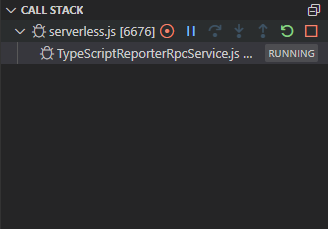
(Task manager without useChildProcesses: true)

- With
useChildProcesses: true

(Task manager with useChildProcesses: true)
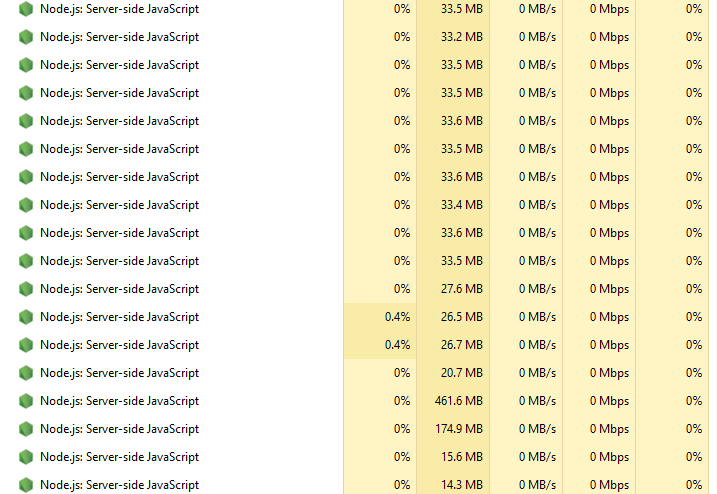
Every time I invoke my API, a childProcessHelper is created and the debugger is attached. So after sometime debugger freezes (sls-offline server freezes). I think this is the issue authors are trying to solve. Hot reloading without memory leaks. useChildProcesses does leak memory and debugger works hard by always keeping attaching to every childProcess. This behavior only happens when debugging though. I haven't noticed any sls-offline freezes when running without debugging. (But still, node tasks are created in task manager).
Without debugger, I ran API calls until memory is fully used. But the server won't get freeze. Some node tasks are killed or paused by the OS to make room for the new child processes. But in debugging, the debugger gets exhausted by getting attached to every child process and freezes.
@dherault any comment on this?
sajithneyo
on 4 Aug 2020
I have the same issue with child processes which is why i made a fix for non child processes. I have a project where after about an hour I have over 2000 child processes. Ctrl-C-ing the serverless window takes 30-40 seconds to close, and while its running, other processes lock up if i don't renice before i start.
Before the fix, I would turn child processes off when not working serverless (the backend), and when i was actively changing code, i'd turn it on, so hot loading would work. Without child processes, i've run the server for days without needing a restart.
dl748
on 4 Aug 2020
@dl748
const exit = () => process.exit(0);

const delayExit = () =>
  setTimeout(() => {
    if (process.env.IS_OFFLINE) {
      exit();
    }
  }, 1000);
we place exit() just before returning the results
it autokills your process when you use useChildProcesses
not ideal but fine for us :) (we have one main function)
 eltonio450
on 14 Aug 2020
eltonio450
on 14 Aug 2020
Probably not a good idea, at least in AWS that'll keep the container up 1 second longer and potentially cause a more expensive charge. You should wrapper the timeout in the IF statement instead of the other way around
dl748
on 14 Aug 2020
We use async handlers, so it's not a problem for us, but if you use sync handlers, switching the if and the setTimeout is indeed much better :)
eltonio450
on 15 Aug 2020
We use async handlers, so it's not a problem for us, but if you use sync handlers, switching the if and the setTimeout is indeed much better :)
I too use async handlers. But it won't kill created child processes.
sajithneyo
on 15 Aug 2020
Fix was merged, and released as v6.7.0, update and see if it works for you
[EDIT] Verified that it was working within my projects as well
dl748
on 27 Aug 2020
@dl748 it partially solves the issue since this fix can't be used with persistent variables (used by AWS modules and required for persistent connections cf https://docs.atlas.mongodb.com/best-practices-connecting-to-aws-lambda/ and other performance optimisations).
What we need is:
- to run each lambda call in the same process without clearing persistent variables
- when, and only when, the source code changes, then stop the running process and start a new one with the new source code and everything cleared
Don't you agree ?
 jer-sen
on 4 Sep 2020
jer-sen
on 4 Sep 2020
Just wanted to share my feedback as I've also been trying to find the best workaround to this issue. Unfortunately #1050 has not been a viable solution for me. The function I'm testing with a fairly standard graphql handler implemented with apollo-server.
Configurations Tested
v6.7.0 - Default Settings
Response: 502 Bad Gateway
offline: POST /local-development/graphql (λ: graphql)
offline: Failure: Query was defined in resolvers, but it's not an object
Error: Query was defined in resolvers, but it's not an object
v6.7.0 - useWorkerThreads: true
Response: intermittent no response
offline: POST /local-development/graphql (λ: graphql)
TypeError: Cannot read property 'defineService' of undefined
    at Object.<anonymous> (/Users/kelchm/Development/SomeProject/server-api/node_modules/aws-sdk/clients/sts.js:7:19)
    at Module._compile (internal/modules/cjs/loader.js:1137:30)
    at Object.Module._extensions..js (internal/modules/cjs/loader.js:1157:10)
    at Module.load (internal/modules/cjs/loader.js:985:32)
    at Function.Module._load (internal/modules/cjs/loader.js:878:14)
    at Module.require (internal/modules/cjs/loader.js:1025:19)
    at require (internal/modules/cjs/helpers.js:72:18)
    at Object.<anonymous> (/Users/kelchm/Development/SomeProject/server-api/node_modules/aws-sdk/lib/credentials/temporary_credentials.js:2:11)
    at Module._compile (internal/modules/cjs/loader.js:1137:30)
    at Object.Module._extensions..js (internal/modules/cjs/loader.js:1157:10)
(node:55438) UnhandledPromiseRejectionWarning: TypeError: Cannot read property 'defineService' of undefined
    at Object.<anonymous> (/Users/kelchm/Development/SomeProject/server-api/node_modules/aws-sdk/clients/sts.js:7:19)
    at Module._compile (internal/modules/cjs/loader.js:1137:30)
    at Object.Module._extensions..js (internal/modules/cjs/loader.js:1157:10)
    at Module.load (internal/modules/cjs/loader.js:985:32)
    at Function.Module._load (internal/modules/cjs/loader.js:878:14)
    at Module.require (internal/modules/cjs/loader.js:1025:19)
    at require (internal/modules/cjs/helpers.js:72:18)
    at Object.<anonymous> (/Users/kelchm/Development/SomeProject/server-api/node_modules/aws-sdk/lib/credentials/temporary_credentials.js:2:11)
    at Module._compile (internal/modules/cjs/loader.js:1137:30)
    at Object.Module._extensions..js (internal/modules/cjs/loader.js:1157:10)
(node:55438) UnhandledPromiseRejectionWarning: Unhandled promise rejection. This error originated either by throwing inside of an async function without a catch block, or by rejecting a promise which was not handled with .catch(). To terminate the node process on unhandled promise rejection, use the CLI flag `--unhandled-rejections=strict` (see https://nodejs.org/api/cli.html#cli_unhandled_rejections_mode). (rejection id: 1)
(node:55438) [DEP0018] DeprecationWarning: Unhandled promise rejections are deprecated. In the future, promise rejections that are not handled will terminate the Node.js process with a non-zero exit code.
v6.7.0 - allowCache: true
Response: 200 OK -- works as expected
This configuration works, but as expected live reload is not actually working.
Summary
It seems like the following issues are all related to the changes in #1050 and setting allowCache: false as the default:
- #1083
- #1081
- #1080
- #1075
 kelchm
on 4 Sep 2020
kelchm
on 4 Sep 2020
I took a shot at an alternative solution in #1090.
Someone mentioned in another thread that setting the idle timeout low (say 5s) was a viable workaround. This gave me the idea to simply trigger the lambda cleanup in response to the serverless-webpack compile.
This does require you to use worker threads, but I haven't seen any downsides to doing so thus far.
Definitely still a work in progress, but please share your feedback if you give it a try.
kelchm
on 5 Sep 2020
@dl748 it partially solves the issue since this fix can't be used with persistent variables (used by AWS modules and required for persistent connections cf https://docs.atlas.mongodb.com/best-practices-connecting-to-aws-lambda/ and other performance optimisations).
What we need is:
- to run each lambda call in the same process without clearing persistent variables
- when, and only when, the source code changes, then stop the running process and start a new one with the new source code and everything cleared
Don't you agree ?
No
I took a shot at an alternative solution in #1090.
Someone mentioned in another thread that setting the idle timeout low (say 5s) was a viable workaround. This gave me the idea to simply trigger the lambda cleanup in response to the
serverless-webpackcompile.This does require you to use worker threads, but I haven't seen any downsides to doing so thus far.
Definitely still a work in progress, but please share your feedback if you give it a try.
Nice idea, unfortunately, the problem is bigger than just webpack, and i don't think adding specific code code for supporting a specific plugin is the correct solution.
dl748
on 5 Sep 2020
Nice idea, unfortunately, the problem is bigger than just webpack, and i don't think adding specific code code for supporting a specific plugin is the correct solution.
The only thing specific to serverless-webpack is the name of the hook. The cleanup function itself could be reused to support any other plugins as well via their own specific hooks. I agree it's not the most elegant approach, but it is simple and extensible.
I also tend to agree with @jer-sen that reloading should be triggered only by an actual change to the code.
The current solution with allowCache: false is simply broken for many projects that use common libraries like the aws-sdk. I don't think it's reasonable for serverless-offline to have a default configuration that is incompatible with a large subset of projects.
kelchm
on 5 Sep 2020
Nice idea, unfortunately, the problem is bigger than just webpack, and i don't think adding specific code code for supporting a specific plugin is the correct solution.
The only thing specific to
serverless-webpackis the name of the hook. Thecleanupfunction itself could be reused to support any other plugins as well via their own specific hooks. I agree it's not the most elegant approach, but it is simple and extensible.I also tend to agree with @jer-sen that reloading should be triggered only by an actual change to the code.
The current solution with
allowCache: falseis simply broken for many projects that use common libraries like theaws-sdk. I don't think it's reasonable forserverless-offlineto have a default configuration that is incompatible with a large subset of projects.
Since there is no universal method for serverless plugins to notify other plugins of content changes, this still breaks non serverless-webpack for hot reloading. A solution for only one plugin is not really a solution at all, in fact, this "code" would be better in serverless-webpack, and not in serverless-offline.
dl748
on 5 Sep 2020
Since there is no universal method for serverless plugins to notify other plugins of content changes, this still breaks non serverless-webpack for hot reloading. A solution for only one plugin is not really a solution at all, in fact, this "code" would be better in serverless-webpack, and not in serverless-offline.
@dl748 While it would be nice, is a universal method supported by serverless itself actually needed? Part of the problem here is that there's simply no way to trigger the desired behavior (cleaning up the lambda functions) from another plugin.
I've created a POC (#1093) that exposes the ability to trigger the lambda cleanup as an entrypoint command. While this won't (currently) work out of the box, support could certainly be added in other plugins like serverless-webpack. In the meantime things can be wired together with a simple custom plugin (example linked in the PR).
kelchm
on 6 Sep 2020
I tried the hook way first, I didn't like it due to the fact that its a lot of work for a plugin writer to do, to find the hook and then call it. Its closely linked to commands and is not suppose to have arguments. So I opted to go a different way so not to break existing functionality. So I have a proof of concept that works, but its not "standard" for serverless plugins.
So what I did was hijack the PluginManager and add a new variable .events in the ServerlessOffline constructor, and bound the contentChanges event to a function in class (similar to hooks)
    if( typeof this.#serverless.pluginManager.events === 'undefined' ) {
      this.#serverless.pluginManager.events = new EventEmitter()
    }
    this.#serverless.pluginManager.events.on('contentChanges', this._changesContent.bind(this))
then I created a standard async function to handle it
  async _changesContent({files}) {
    if( Array.isArray(files) ) {
      for (const file of files) {
        clearModule(file)
      }
    }
  }
Now that its all set up... in the serverless-webpack https://github.com/serverless-heaven/serverless-webpack/blob/ebe825ee24890ae3bf9c896258daa715528e1e74/lib/wpwatch.js#L113
          currentCompileWatch = BbPromise.resolve(this.serverless.pluginManager.spawn('webpack:compile:watch'))
          .then(
            () => {
              if( this.serverless.pluginManager.events ) {
                this.serverless.pluginManager.events.emit('contentChanges', {
                  files: Object.keys(stats.compilation.assets).map((v) => {
                    return path.resolve(stats.compilation.outputOptions.path, v)
                  })
                })
              }
            }
          )
          .then(
            () => this.serverless.cli.log('Watching for changes...')
          );
Now any plugin that makes changes to files just signals the contentChanges event on the PluginManager and passes an object with { files: [] } array.
This is just a work in progress/concept, and I welcome any discussion. There is A LOT of work that can be done here though, but i'd like it to be as extensible as possible. I'd like to update PluginManager to support this but getting any PR's accepted into serverless is like pulling teeth.
The nice thing about this is that now ANY other plugin can register events (custom) and provide a layer of inter plugin communication.
That would at least run my clearModule function only on serverless-webpack compiles
dl748
on 6 Sep 2020
@dl748 While it would be nice, is a universal method supported by
serverlessitself actually needed? Part of the problem here is that there's simply no way to trigger the desired behavior (cleaning up the lambda functions) from another plugin.
I believe it should. A interplugin communication layer should be created in the PluginManager for ALL plugins.
dl748
on 6 Sep 2020
Back to 5.12.0 it is then.
 james-gardner
on 18 Sep 2020
james-gardner
on 18 Sep 2020
Linking to PR #1093 in case it fixes this hot-reload issue, in combination with the newest version 6.9.0 and allowCache: true
 dgurns
on 29 Apr 2021
dgurns
on 29 Apr 2021
Related issues
 anishkny
·
21Comments
anishkny
·
21Comments
 awhitford
·
21Comments
awhitford
·
21Comments
 andreme
·
16Comments
andreme
·
16Comments
 johncmckim
·
16Comments
dherault
·
24Comments
johncmckim
·
16Comments
dherault
·
24Comments
Most helpful comment
Same here, only that I cannot downgrade because I use Lambda.invoke implemented on v6.
Try setting the config bellow, it will work because for each time it calls the process it reloads the files from file system, when using InProcessRunner it caches the import value from handlerPath and keeps it in memory