Serverless-offline: Lambda code not updating / kept as cache
Bug Report
Current Behavior
When changing the code, I get the compiling message:
Serverless: Compiling with Typescript...
Serverless: Typescript compiled.
When I check inside the .build folder, the code is updated. But the server use the previous code. As if it was cached.
Sample Code
- file: serverless.yml
service: codefi-api
provider:
  name: aws
  runtime: nodejs12.x
  stage: dev
  region: us-east-1

custom:
  serverless-offline:
    port: 3030
    printOutput: true

functions:
  api-handler:
    handler: api/index.handler
    events:
      - http:
          path: api/{proxy+}
          method: ANY

plugins:
  - serverless-dotenv-plugin
  - serverless-plugin-typescript
  - serverless-offline
- file: handler.js
export const handler = async (event: object) => {
  return {
    statusCode: 200,
    body: JSON.stringify({ event, env: process.env }, null, 2),
  };
};
Expected behavior/code
Environment
serverlessversion: 1.60.5serverless-offline6.0.0-alpha.59node.jsv13.5.0OS: macOS catalina
Possible Solution
In InProcessRunner, line 42, you import the handler.
( https://github.com/dherault/serverless-offline/blob/master/src/lambda/handler-runner/in-process-runner/InProcessRunner.js )
const { [this.#handlerName]: handler } = await import(this.#handlerPath)
This is transpiled into this :
  const {
    [_classPrivateFieldLooseBase(this, _handlerName)[_handlerName]]: handler,
  } = await Promise.resolve().then(() =>
    _interopRequireWildcard(
      require(`${
        _classPrivateFieldLooseBase(this, _handlerPath)[_handlerPath]
      }`),
    ),
  )
The require cache is used. If you add this line :
delete require.cache[
  require.resolve(
    _classPrivateFieldLooseBase(this, _handlerPath)[_handlerPath],
)]
The cache is invalidated and for the next reload, the new code will run.
In the non transpiled code, you need to add (line 41):
delete require.cache[require.resolve(this.#handlerPath)]
 fabien-h
All 52 comments
To reproduce:
git clone [email protected]:dherault/serverless-offline.git
cd examples/tools/serverless-plugin-typescript
npm i
sls offline
Then
curl http://localhost:3000/dev/hello
=> {"hello":"serverless-plugin-typescript!"}
Then change the response
body: stringify({ hello: 'hello not reloaded' }),
and
curl http://localhost:3000/dev/hello
=> {"hello":"serverless-plugin-typescript!"}
The response is not updated.
fabien-h
on 8 Jan 2020
I made a PR for this issue: https://github.com/dherault/serverless-offline/pull/866
I have no idea if there are side effects. Plus, we should probably have a flag to disable it.
fabien-h
on 8 Jan 2020
hey @fabien-h thanks for opening this issue. I added some comments in your PR. we are working on a solution to this problem. stay tuned!
to expand a little bit more: the reloading in v5 has 2 sides, it's convenient, but it causes memory leaks. so which one do you choose? therefore in v6 we'll put hot-reloading behind a flag, probably with an additional warning, because the memory leaks will remain. a non-memory-leak version can be accomplished with worker-threads, although those are only available in node.js v11.7+. the other downside is that debugging is not yet supported by node.js itself, although ndb is capable of doing so. in the meantime you can use tools like nodemon, we have some examples in the examples folder.
_update: I'll leave your issue open as a reminder._
 dnalborczyk
on 9 Jan 2020
dnalborczyk
on 9 Jan 2020
Ok that’s an unfortunate side effect.
What about using decache ? https://www.npmjs.com/package/decache
Instead of just dereferencing the module from the cache object, it will remove all the related files. Should fix the memory leak.
fabien-h
on 9 Jan 2020
@fabien-h https://github.com/dherault/serverless-offline/issues/793#issuecomment-527426496 https://github.com/dherault/serverless-offline/issues/793#issuecomment-527456361
dnalborczyk
on 9 Jan 2020
Same issue here, with the aws-nodejs-ecma-script template. I can see in .webpack/ that the code is updated, but the running server doesn't reflect the code update.
 ffxsam
on 20 Jan 2020
ffxsam
on 20 Jan 2020
I'm having a similar issue.
Re-running sls offline seems to pickup all changes... but watch is not.
 iDVB
on 5 Feb 2020
iDVB
on 5 Feb 2020
I am having similar issue as well, serving html through express-proxy on the same port seems to keep some sort of cache
 wickstargazer
on 17 Mar 2020
wickstargazer
on 17 Mar 2020
+1 !
Same here with webpack, used to work like a charm prior to v6.
Say it compile, watched, but not affected on the call.
... :(
(edit) : Tried to understand a bit more... Still no solution on March 19th ?
It is a HUGE regression.
serverless-offline is used to develop, and back and fork backend-frontend code.
It does not matter if there is sometimes memory leaks, I prefer restart serveless-offline sometimes when it hangs instead of restart it every time I change a semicolon in my code...
My 2 cents...
 ecappa
on 19 Mar 2020
ecappa
on 19 Mar 2020
I am new to serverless-offline and when building a quick console.log refresh, confirmed this exists.
downgrading
"serverless-offline": "^6.0.0",
to
"serverless-offline": "^5.12.1",
Seems to fixed it. So if development is your concern, this can be a quick fix.
 IsaaX
on 20 Mar 2020
IsaaX
on 20 Mar 2020
Thanks @IsaaX. Same issue here. This fixed it.
I appreciate all the stuff about memory leaks etc, but agree with @ecappa. I have used serverless v3 for nearly 2 years day-in day-out without issue. Can't live without hot reload.
Started a new project on serverless-offline v6 after using serverless-offline v3 previously. The other big breaking changes between v5 and v6:
- "port" parameter changed to "httpPort"
- Includes the APIGW stage in the path. (Must call eg http://localhost:3000/dev/users instead of http://localhost/users.) Which might be appropriate as it matches prod, but it's still a breaking change worthy of note.
Much easier to stick with v5 for now.
 jamesoflol
on 22 Mar 2020
jamesoflol
on 22 Mar 2020
@IsaaX weird, I'm using serverless-offline v5 but I'm not getting the ability to hot reload.
 lucasklaassen
on 23 Mar 2020
lucasklaassen
on 23 Mar 2020
@IsaaX weird, I'm using serverless-offline v5 but I'm not getting the ability to hot reload.
Do you use serverless-webpack or someting similar ?
ecappa
on 23 Mar 2020
@ecappa I'm not:
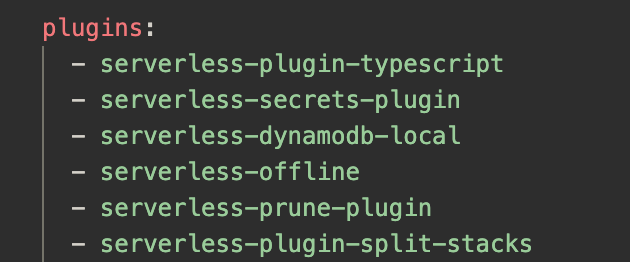
lucasklaassen
on 23 Mar 2020
In my opinion, we should consider to path this up. Remember that this is a development tool, the priority is to help development.
I've searched the issues and the Memory Leak as pointed in https://github.com/dherault/serverless-offline/pull/866 and looks like a problem a lot smaller than a broken functionality. It seems that we are talking thousands of requests for the memory leak starts to be something that will get in the way of development.
What is worse for the development cycle? To lose hours because your code doesn't update and you are trying several changes, but in the end, is just a cache problem, or need to restart the server after a few thousands of requests?
We can path this and stick with (IMHO) the smallest problem and fix that later. It seems that this will take a lot more time to solve than anticipated.
Obs: I've downgraded my package to v5 for the reasons I've pointed above.
 luanmuniz
on 25 Mar 2020
luanmuniz
on 25 Mar 2020
@ecappa I'm not:
@lucasklaassen : perhaps this is not the place for this kind of discussion, and I am not very familiar with serverless-plugin-typescript but it seems that there is a --watch mode with this plugin.
ecappa
on 25 Mar 2020
Appreciate your help!
On Tue., Mar. 24, 2020, 5:59 p.m. Eric Cappannelli, <
[email protected]> wrote:
@ecappa https://github.com/ecappa I'm not:
[image: Screen Shot 2020-03-23 at 9 45 22 AM]
https://user-images.githubusercontent.com/6452107/77340824-13970480-6ceb-11ea-93c7-45a01e208fed.png@lucasklaassen https://github.com/lucasklaassen : perhaps this is not
the place for this kind of discussion, and I am not very familiar with
serverless-plugin-typescript but it seems that there is a --watch mode with
this plugin.—
You are receiving this because you were mentioned.
Reply to this email directly, view it on GitHub
https://github.com/dherault/serverless-offline/issues/864#issuecomment-603581944,
or unsubscribe
https://github.com/notifications/unsubscribe-auth/ABRHHC7IHIM26KLYLIAYQQTRJFJQ5ANCNFSM4KD5DJFQ
.
lucasklaassen
on 25 Mar 2020
Same problem over here using serverless-plugin-typescript and even KingDarBoja version. I've downgrade the plugin to @^5.12.1 to get it working, but that shouldn't be the solution, I want to use the latest release aka @^6.1.2.
 walterdl
on 30 Mar 2020
walterdl
on 30 Mar 2020
Going to chime in here and say that the only plugin I have enabled is serverless-offline. Running some functions in Node, and my changes are not showing up unless I restart the serverless runtime. Hoping there is a solution for this soon.
 AustinGil
on 31 Mar 2020
AustinGil
on 31 Mar 2020
@dherault @dnalborczyk Any thoughts on this?
luanmuniz
on 31 Mar 2020
We implemented this as a stop gap until hot reloading is implemented properly:
https://gist.github.com/cchamplin/c55778d4a70854a5d72bab2a8c4450fe
It seems to work ok for us using serverless-bundle, theoretically it should work for serverless-webpack as well.
Instructions:
- Place contents in plugins/offline-invalidate
- Add to serverless.yml plugins section:
plugins:
  - serverless-offline
  - ./plugins/offline-invalidate
 cchamplin
on 31 Mar 2020
cchamplin
on 31 Mar 2020
Been able to get around this as well with Nodemon. Here's more or less what it looks like:
// package.json
{
  "scripts": {
    "watch": "nodemon --exec npm run dev",
    "dev": "serverless offline start",
  },
  "dependencies": {
    "serverless": "^1.66.0",
  },
  "devDependencies": {
    "nodemon": "^2.0.2",
  }
}
I agree with everyone here. As a development tool, I do not care if there is a memory leak, what I care about is that I don't have to restart services after each code change.
nodemon is way too slow.
I'm forced to use version 6 because I need httpApi support, and am now regretting the decision to switch to httpApi because of this.
 mtkopone
on 7 Apr 2020
mtkopone
on 7 Apr 2020
same problem here!
 xgiovio
on 9 Apr 2020
xgiovio
on 9 Apr 2020
any news on official fixes?
xgiovio
on 9 Apr 2020
If I could help, I would... but I don't have enough knowledge of this tech.
@dherault : is it possible to just had a flag somewhere to allow file watch and hot reload, even if there is memory leaks side effects ? - the flag could be at off by default, and everyone take the responsability to switch it on ?
ecappa
on 9 Apr 2020
for the time being, I've followed @cchamplin fix,
Be careful to place contents in .serverless_plugins/offline-invalidate/index.js
and add to serverless.yml plugins section this way :
plugins:
  - serverless-offline
  - offline-invalidate
it works quite well with serverless-webpack until there's a fix.
 tsnobip
on 10 Apr 2020
tsnobip
on 10 Apr 2020
@tsnobip where I have to place .serverles_plugins directory?
no matter where I put this I get:
Unhandled rejection Error: Cannot find module './serverless-offline/dist/lambda/
handler-runner/index'
 crsepulv
on 13 Apr 2020
crsepulv
on 13 Apr 2020
Place it in your top folder where you have your serverless.yml
tsnobip
on 13 Apr 2020
@tsnobip thax.. I was using serverless-offline 5.8.0 and there is no dist folder.
I updated to latest serverles and latest serverless-offline version now it's working. Regards.
crsepulv
on 13 Apr 2020
Picked serverless-offline for my development environment because its hot-reloading functionality allows very simple and convenient setup using tsc watch functionality (no Webpack) and I loved it.
And I have to agree with other comments, memory leak in a tool that is used only for local development is only a small inconvenience (hadn't even notice it) compared to missing hot-reload. Hopefully sticking with 5.x will work before this is solved.
 durchanek
on 21 Apr 2020
durchanek
on 21 Apr 2020
I disagree with the sentiments that serverless-offline should just be considered a development tool. We use serverless-offline in pipelines to run a certain level of integration tests without the full baggage of provisioned infrastructure. It's really useful for feature branch tests which in turn helps with a trunk based development approach and CI/CD.
Maybe I'm asking for the moon on a stick but I'd like to see both features:
- no memory leaks
- hot reload
Ideally the two features will not be mutually exclusive, but if I have to choose between the two, it would be nice to have a flag.
 lqueryvg
on 23 Apr 2020
lqueryvg
on 23 Apr 2020
@dnalborczyk I would be happy to work on a PR to back to the previous (leaking) behavior behind a flag, which would certainly solve a lot of people's issues until we get a more robust solution. Please let me know if you would take it if I did it.
 francisu
on 23 Apr 2020
francisu
on 23 Apr 2020
@francisu Absolutely! If you need help feel free to ask, I will be glad to help you!
 nathanagez
on 25 Apr 2020
nathanagez
on 25 Apr 2020
i'm using typescript without webpack and get 'hot-reloading' by doing the following:
1) terminal with sls offline
2) another terminal with yarn tsc -w
edit:
also found v6 of serverless-offline had broken this i.e. my OP was against v5
 harryhazza77
on 29 Apr 2020
harryhazza77
on 29 Apr 2020
Firstly thanks everyone for the plugin, it's really useful - though this is causing some pain. While I could get the offline-invalidate plugin to load (confirmed with console.log) it made no difference to hot reload for me.
For now I've had to go back to v5 of the plugin as the development cycle is about 8 seconds to see any change implemented which feels like it's getting in the way.
@francisu did you make any headway with your PR?
Thanks
 acuthbert
on 1 May 2020
acuthbert
on 1 May 2020
Who is using NestJS with this plugin ?
Because the cache will only refresh the handler file not all the dist folder.
nathanagez
on 2 May 2020
+1 for this issue, I'd also really like to be able to use hot reload via a flag.
 amiklosi
on 4 May 2020
amiklosi
on 4 May 2020
@francisu welcome back ! Please do so if you will, we are in dire need of such a PR.
 dherault
on 5 May 2020
dherault
on 5 May 2020
--useChildProcesses fixed it for me.
sls offline start --disableCookieValidation --httpPort 3010 --lambdaPort 4010 --useChildProcesses
 tomer183
on 12 May 2020
tomer183
on 12 May 2020
I created a PR and put this option behind a flag: https://github.com/dherault/serverless-offline/pull/978
If @tomer183's solution don't create memory leaks, it's totally better !
nathanagez
on 12 May 2020
--useChildProcesses also leaks memory, it seems
 polson
on 14 May 2020
polson
on 14 May 2020
--useChildProcesses also leaks memory, it seems
do you have any reference to the memory leaks??
tomer183
on 17 May 2020
Yes pls merge that PR if it fixes hotreloading. I mean v5 is still working niceley, but would like to switch to v6. Why do we care for that memory leak in the first place? This is a local development tool and not a production web server. Or is it leaking couple of GB per minute?
Keep it up 👍
 OG84
on 21 May 2020
OG84
on 21 May 2020
--useChildProcesses works for me but is it possible to use it with node inspector?
durchanek
on 21 May 2020
--useChildProcesses works for me but the disadvantage is that it cant help me keep the connection to my db, it creates new connection everytime my function is invoked so Im waiting #978 to be delivered soon 😬
 nguyenthetoan
on 11 Jun 2020
nguyenthetoan
on 11 Jun 2020
it creates new connection everytime my function is invoked so Im waiting #978 to be delivered soon
@nguyenthetoan
Out of scope for this thread but...
What kind of BD do you use ?
I spent several time to find a good solution for 'old-school' relational databases (MySQL), and it is very picky to setup. You have to create and kill at every handler your connection.
I finally used a very nice library : https://github.com/jeremydaly/serverless-mysql
ecappa
on 11 Jun 2020
it creates new connection everytime my function is invoked so Im waiting #978 to be delivered soon
@nguyenthetoan
Out of scope for this thread but...
What kind of BD do you use ?
I spent several time to find a good solution for 'old-school' relational databases (MySQL), and it is very picky to setup. You have to create and kill at every handler your connection.
I finally used a very nice library : https://github.com/jeremydaly/serverless-mysql
thanks for your suggest, I'm now using postgres, I have a database wrapper so hopefully I can implement the create and kill
if (this.connectionManager.has(CONNECTION_NAME)) {
  // reuse
  connection = await this.connectionManager.get(CONNECTION_NAME)
   if (!connection.isConnected) {
      connection = await connection.connect()
    } else {
      // todo: kill connection
    }
} else {
  // create new connection
}
--useChildProcesses fixed it for me.
sls offline start --disableCookieValidation --httpPort 3010 --lambdaPort 4010 --useChildProcesses
😢 For some reason, the endpoint doesn't respond. It just holds the connection and never closes it. The browser/curl is just waiting.
✅ In the terminal logs, I can see the response that should have been sent to the browser and it is updating whenever I update the code.
edit: might be related https://github.com/dherault/serverless-offline/issues/977
This helped a lot!
https://github.com/dherault/serverless-offline/issues/864#issuecomment-606818289
https://github.com/dherault/serverless-offline/issues/864#issuecomment-612064875
Thanks for saving my weekend!
 heygambo
on 27 Jun 2020
heygambo
on 27 Jun 2020
Same problem here
I tried @cchamplin solution but it didn't work
I tried nodemon but it's to slow.
useChildProcesses works but unfortunately I can't ignore the memory leak because we're running multiple instances of serverless-offline in containers and because of that the leak is much bigger.
Do you guys know other workarounds for hot reload?
 netochaves
on 23 Jul 2020
netochaves
on 23 Jul 2020
Hi @cchamplin ,
I tried your solution but no luck. Which version of serverless package does it support?
Thanks
 cjnoname
on 14 Aug 2020
cjnoname
on 14 Aug 2020
🦗 🦗 🦗
 joekendal
on 29 Aug 2020
joekendal
on 29 Aug 2020
Related issues
 parthpatwala
·
18Comments
dherault
·
24Comments
parthpatwala
·
18Comments
dherault
·
24Comments
 thomaschaaf
·
41Comments
thomaschaaf
·
41Comments
 nirmalgoswami
·
28Comments
nirmalgoswami
·
28Comments
 jesucarr
·
22Comments
jesucarr
·
22Comments
Most helpful comment
--useChildProcesses fixed it for me.
sls offline start --disableCookieValidation --httpPort 3010 --lambdaPort 4010 --useChildProcesses