Serverless-offline: Continuous increase in memory
I'm not sure if this is a real issue, or if it's just me interpreting the numbers wrong. But while searching for a memory issue with our application, I created a simple serverless application:
const fs = require("fs");

exports.handler = (event, context, callback) => {
    const memoryUsage = process.memoryUsage();
    fs.appendFileSync("heapUsed.txt", memoryUsage.heapUsed + "\r\n");

    callback(null, "Success");
};
When I run this with serverless-offline and check the file afterwards, I can see the memory increases. I sent 32641 requests and this is the graph of the memory:

To compare, I created a simple Express application that doesn't use serverless-offline:
const express = require('express')
const fs = require("fs");

const app = express();
const port = 3000

app.use((req, res, next) => {
    const memoryUsage = process.memoryUsage();
    fs.appendFileSync("heapUsed.txt", memoryUsage.heapUsed + "\r\n");
    next();
});

app.get('/', (req, res) => res.send('Hello World!'))

app.listen(port, () => console.log(`Example app listening on port ${port}!`))
This gives me the following graph, after 46374 requests (more requests because of faster responses):
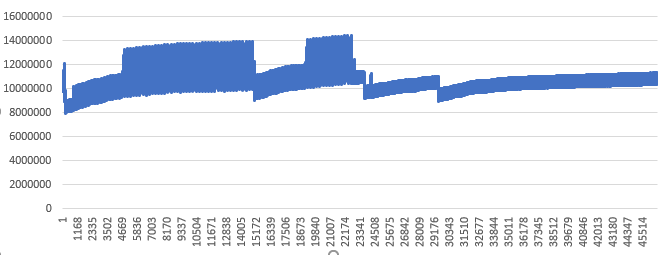
I this an issue with serverless-offline? Or am I looking at this the wrong way?
 petermorlion
All 15 comments
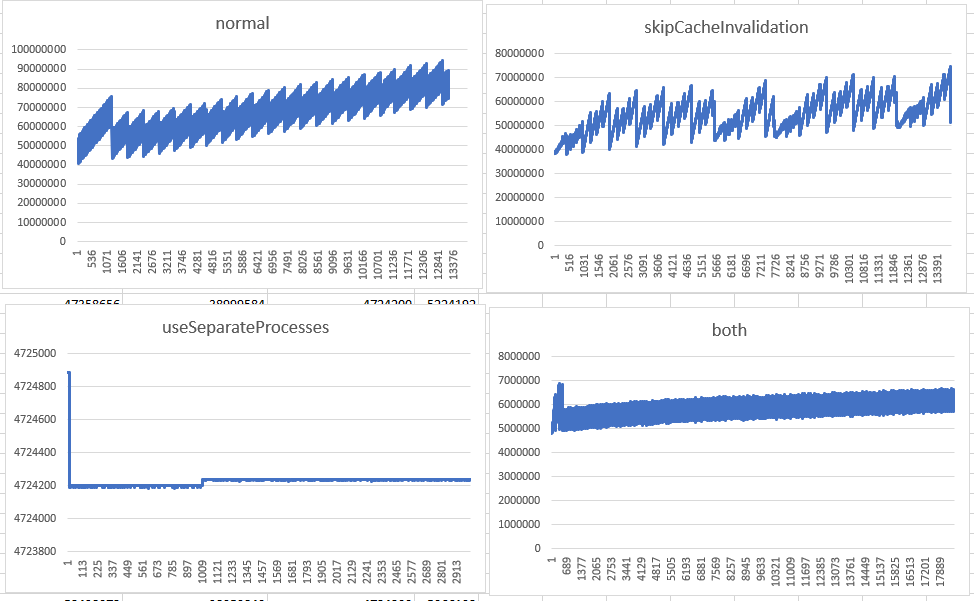
Great work @petermorlion, can you do the same with the skipCacheInvalidation option or/and the useSeparateProcesses ?
 dherault
on 8 Jan 2019
dherault
on 8 Jan 2019
Not sure what to make of it. useSeparateProcess seems to help, but severly limits the amount of requests we can make.
petermorlion
on 8 Jan 2019
Facing the same issue over here.
I definitely agree with @petermorlion useSeparateProcess seems to help.
But I'd ideally not want to use useSeparateProcess as it doesn't allow debugging code using the --inspect flag (more info here → https://github.com/dherault/serverless-offline/issues/508)
 jaydp17
on 8 Jan 2019
jaydp17
on 8 Jan 2019
Hopefully the increase in memory takes a lot of iterations/requests to happen.
dherault
on 9 Jan 2019
@dherault it starts from the 1st request and increases significantly over every subsequent request.
If I get some time tonight, I'll create a simple repo that reproduces the issue.
jaydp17
on 9 Jan 2019
@petermorlion by any chance are you using serverless-webpack as well?
Because while creating a really minimal repo for this, I found that the memory does increase but very slowly with just serverless-offlne (@dherault you're right).
But it grows really fast when using serverless-webpack.
BTW, here's the example repo https://github.com/jaydp17/serverless-memory-leak
^ this repo also has a webpack branch, where you can clearly see that the memory jumps on every invocation.
jaydp17
on 9 Jan 2019
Also @dherault regarding the smaller leak in serverless-offline, I think it's because of this.requests in (https://github.com/dherault/serverless-offline/blob/master/src/index.js#L218), we're not clearing the keys in this.requests, that object just keeps on increasing over time.
jaydp17
on 9 Jan 2019
I also found that require.cache is not cleaned properly because of https://github.com/nodejs/node/issues/8443

I tried cleaning it manually, and it seems to fix the memory leak, here's a PR with the fix.
jaydp17
on 13 Jan 2019
This issue should be resolved in v3.33.0.
@petermorlion Do you still get an leak ?
dherault
on 14 Jan 2019
It definitely looks better:

It seems to go up slightly. I'm not sure what you want to do with this issue then.
petermorlion
on 7 Feb 2019
You're right there is still a leak but it's okay for this issue to be resolved :)
dherault
on 8 Feb 2019
When I start the app of serverless using sls offline plugin, I found one request will create some node process, when I request more and more, node process will be more and more. And it will run out the memory of my computer. Andone can help me?
Thank you.
 Chris0121
on 2 May 2021
Chris0121
on 2 May 2021
When I start the app of serverless using sls offline plugin, I found one request will create some node process, when I request more and more, node process will be more and more. And it will run out the memory of my computer. Andone can help me?
Thank you.
When I delete one configuration of serverless plugin. It will no increase.
useChildProcesses: true
Is that the feature of sls offline? When we set parameters "useChildProcesses" to "true". It can not reclaim memory when the request finished.
Chris0121
on 2 May 2021
Someone has found this issue. But nobody fix it.
https://github.com/dherault/serverless-offline/issues/1105
Chris0121
on 2 May 2021
@Chris0121 I have the solution to this bug, I will create a PR for this
 EduardMcfly
on 28 May 2021
EduardMcfly
on 28 May 2021
Related issues
 ktwbc
·
4Comments
ktwbc
·
4Comments
 Dong9769
·
4Comments
Dong9769
·
4Comments
 aldofunes
·
3Comments
aldofunes
·
3Comments
 adambiggs
·
4Comments
adambiggs
·
4Comments
 stonebraker
·
3Comments
stonebraker
·
3Comments
Most helpful comment
This issue should be resolved in v3.33.0.
@petermorlion Do you still get an leak ?