Serverless-next.js: Static Pages in S3 not in static-pages/ folder
I am attempting to deploy my application using serverless-nextjs and have run into issues. Here are the steps i am taking:
Add a serverless.yml file to existing nextjs project and added this code
myNextApplication:
component: "@sls-next/[email protected]" # it is recommended you pin the latest stable version of serverless-next.js
Run
serverlessin the console to deploy.
After serverless is finished deploying with no errors, it provides you with a cloud front url. Unfortunately, when i open it up i get a simple "This site can't be reached".
Taking a deeper look in the AWS console and looking into the s3 bucket that was created on deployment, i noticed that the static-pages folder did not exist, but rather each static html page was called static-pages/pagename.html
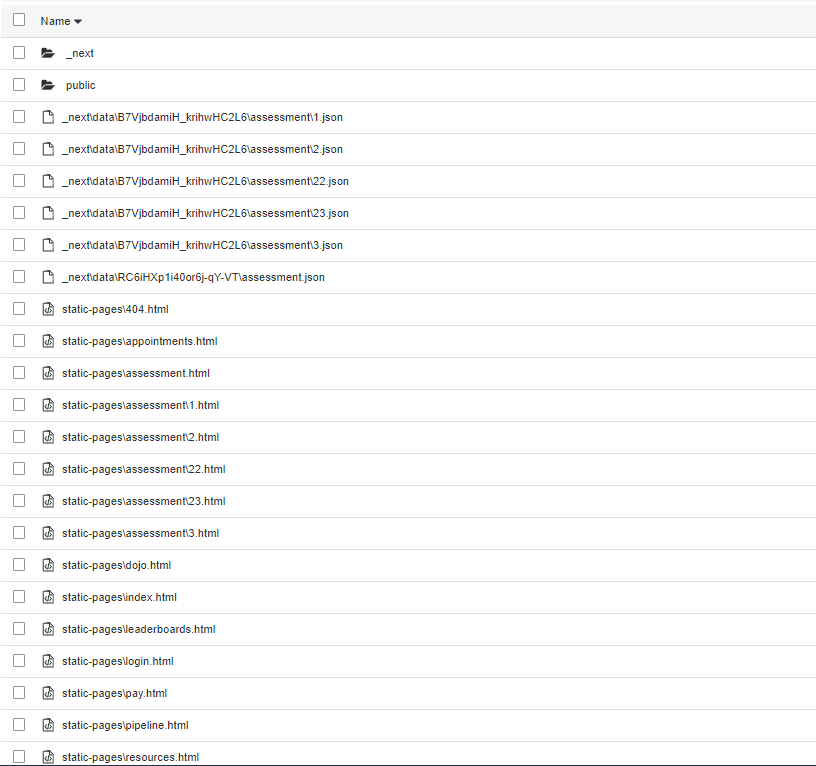
Any ideas why this could be happening?? I did some testing just to see if i could get it to at least work by manually adding a static-pages folder and adding the static html pages inside that folder. That seemed to at least get the pages to display properly, but when i wanted to make an update to some of the pages, i ran serverless and would not update anything inside the static-pages folder.
 Bryceacampbell
All 2 comments
I believe this is fixed in the latest alpha (.6) Could you try using that?
 danielcondemarin
on 20 Aug 2020
danielcondemarin
on 20 Aug 2020
I believe this is fixed in the latest alpha (.6) Could you try using that?
Ok that seemed to work. I cleared everything out in the S3 bucket, updated my serverless.yml, and ran serverless and everything is working as it should. Thanks for your speedy help!
Bryceacampbell
on 20 Aug 2020
Related issues
 Meemaw
·
23Comments
Meemaw
·
23Comments
 romainquellec
·
19Comments
romainquellec
·
19Comments
 oste
·
19Comments
oste
·
19Comments
 medv
·
15Comments
medv
·
15Comments
 asterikx
·
42Comments
asterikx
·
42Comments
Most helpful comment
Ok that seemed to work. I cleared everything out in the S3 bucket, updated my serverless.yml, and ran
serverlessand everything is working as it should. Thanks for your speedy help!