Serverless-next.js: RequestEntityTooLargeException: Request must be smaller than 69905067 bytes for the CreateFunction operation
Hey daniel,
I finally had some time to check the latest code against my large next.js project and I am get this error;
error:
RequestEntityTooLargeException: Request must be smaller than 69905067 bytes for the CreateFunction operation
at Object.extractError (C:Users\james.serverless\components\registry\npm\[email protected]\node_modules\serverless-next.js\node_modules\aws-sdk\lib\protocol\json.js:51:27)
at Request.extractError (C:Users\james.serverless\components\registry\npm\[email protected]\node_modules\serverless-next.js\node_modules\aws-sdk\lib\protocol\rest_json.js:55:8)
at Request.callListeners (C:Users\james.serverless\components\registry\npm\[email protected]\node_modules\serverless-next.js\node_modules\aws-sdk\lib\sequential_executor.js:106:20)
at Request.emit (C:Users\james.serverless\components\registry\npm\[email protected]\node_modules\serverless-next.js\node_modules\aws-sdk\lib\sequential_executor.js:78:10)
at Request.emit (C:Users\james.serverless\components\registry\npm\[email protected]\node_modules\serverless-next.js\node_modules\aws-sdk\lib\request.js:683:14)
at Request.transition (C:Users\james.serverless\components\registry\npm\[email protected]\node_modules\serverless-next.js\node_modules\aws-sdk\lib\request.js:22:10)
at AcceptorStateMachine.runTo (C:Users\james.serverless\components\registry\npm\[email protected]\node_modules\serverless-next.js\node_modules\aws-sdk\lib\state_machine.js:14:12)
at C:Users\james.serverless\components\registry\npm\serverless-next.[email protected]\node_modules\serverless-next.js\node_modules\aws-sdk\lib\state_machine.js:26:10
at Request.
at Request.
message: 'Request must be smaller than 69905067 bytes for the CreateFunction operation',
code: 'RequestEntityTooLargeException',
time: 2019-11-12T14:54:17.708Z,
requestId: '84af6699-36b9-4a2b-ab1c-88c468b47d19',
statusCode: 413,
retryable: false,
retryDelay: 86.11399872761147
}
135s » nextApp » RequestEntityTooLargeException: Request must be smaller than 69905067 bytes for the CreateFunction operation
 jschimmoeller
All 82 comments
I am slightly terrified of my Next.js app growing to the point where it exceeds the max direct upload size. I bought this theme and rolled it out to serverless as my first test of serverless and got a similar error.
Perhaps we can have a flag that enables deployment using the s3 zip method which has a higher size?
https://hackernoon.com/exploring-the-aws-lambda-deployment-limits-9a8384b0bec3
 nodabladam
on 13 Nov 2019
nodabladam
on 13 Nov 2019
@jschimmoeller could you provide what is inside your .serverless_nextjs directory including sizes please?
 danielcondemarin
on 13 Nov 2019
danielcondemarin
on 13 Nov 2019
@danielcondemarin ok as you will know there are 2 directories in this folder.
api-lambda - pages/api - i have 52 items with the average size 6.9MB

default-lambda - pages - i have 23 items with the average size 8.2MB

also if i zip up these directories the sizes are
api-lambda 50 mb
default-lambda 41mb


jschimmoeller
on 13 Nov 2019
There is a lot of duplication across all page bundles when building using the next serverless target. There should be a way to output the common chunks across page bundles in a separate file which would greatly reduce the lambda artifact size. That would involve going deep into the webpack config that next implements for the serverless target though.
Happy to listen to any other suggestions like @jschimmoeller ’s
danielcondemarin
on 13 Nov 2019
Related side note...I noticed an issue open that next.js serverless doesn't enable treeshaking:
https://github.com/zeit/next.js/issues/8956
Seems strange to me given all the focus and performance improvements lately Next seems to be putting into serverless but perhaps it is true? Would something like this have any positive effect?
https://www.npmjs.com/package/serverless-plugin-optimize
nodabladam
on 13 Nov 2019
Would something like this have any positive effect?
https://www.npmjs.com/package/serverless-plugin-optimize
Tried this plugin, didn't help
 hnprashanth
on 23 Nov 2019
hnprashanth
on 23 Nov 2019
If you put this in your webpack config, it might help as a workaround until treeshaking is fixed in Next.js serverless (https://github.com/zeit/next.js/issues/8956)
config.optimization.minimize = true;
(Note that this might increase build time so you would want to make this only happen during production build...probably using using phases.)
 Enalmada
on 24 Nov 2019
Enalmada
on 24 Nov 2019
If anybody is facing this issue has opted out of Automatic Static Optimisation in _app.js and if your app has few pages which can be statically rendered, then try removing the getInitialProps from _app.js and place it in the pages which needs the SSR. This will decrease the bundle size.
 vishwasnavadak
on 26 Nov 2019
vishwasnavadak
on 26 Nov 2019
If anybody is facing this issue has opted out of Automatic Static Optimisation in
_app.jsand if your app has few pages which can be statically rendered, then try removing thegetInitialPropsfrom _app.js and place it in the pages which needs the SSR. This will decrease the bundle size.
Great advice! With the next component you can have an indefinite number of static pages as they’re stored in S3. On the other hand, SSR pages are zipped up and used in lambda@edge so the lambda artifact size limit applies there.
danielcondemarin
on 26 Nov 2019
thanks for the recommendation; i did try both and each still failed.
- config.optimization.minimize = true; was able to build it via next (which took a very long time 15 plus minutes) however when I ran it via "serverless" i get the following error:
`
C:Users\james\projects\new-refiner>serverless
error:
Error: Command failed with exit code 1 (Unknown system error -1): node_modules/.bin/next build
at makeError (C:Users\james.serverless\components\registry\npm\[email protected]\node_modules\serverless-next.js\node_modules\execa\lib\error.js:59:11)
at handlePromise (C:Users\james.serverless\components\registry\npm\[email protected]\node_modules\serverless-next.js\node_modules\execaindex.js:112:26)
at processTicksAndRejections (internal/process/task_queues.js:85:5) {
command: 'node_modules/.bin/next build',
exitCode: 1,
exitCodeName: 'Unknown system error -1',
stdout: 'Creating an optimized production build...',
stderr: 'events.js:180\r\n' +
" throw er; // Unhandled 'error' event\r\n" +
' ^\r\n' +
'\r\n' +
'Error: write UNKNOWN\r\n' +
' at ChildProcess.target._send (internal/child_process.js:806:20)\r\n' +
' at ChildProcess.target.send (internal/child_process.js:676:19)\r\n' +
' at ChildProcessWorker.send (C:\Users\james\projects\new-refiner\node_modules\jest-worker\build\workers\ChildProcessWorker.js:286:17)\r\n' +
' at WorkerPool.send (C:\Users\james\projects\new-refiner\node_modules\jest-worker\build\WorkerPool.js:32:34)\r\n' +
' at Farm._process (C:\Users\james\projects\new-refiner\node_modules\jest-worker\build\Farm.js:129:10)\r\n' +
' at onEnd (C:\Users\james\projects\new-refiner\node_modules\jest-worker\build\Farm.js:122:12)\r\n' +
' at ChildProcessWorker._onProcessEnd (C:\Users\james\projects\new-refiner\node_modules\jest-worker\build\workers\ChildProcessWorker.js:280:14)\r\n' +
' at ChildProcessWorker.onMessage (C:\Users\james\projects\new-refiner\node_modules\jest-worker\build\workers\ChildProcessWorker.js:220:14)\r\n' +
' at ChildProcess.emit (events.js:203:13)\r\n' +
' at emit (internal/child_process.js:876:12)\r\n' +
"Emitted 'error' event at:\r\n" +
' at internal/child_process.js:810:39\r\n' +
' at processTicksAndRejections (internal/process/task_queues.js:75:11) {\r\n' +
" errno: 'UNKNOWN',\r\n" +
" code: 'UNKNOWN',\r\n" +
" syscall: 'write'\r\n" +
'}',
all: 'Creating an optimized production build...\n' +
'events.js:180\r\n' +
" throw er; // Unhandled 'error' event\r\n" +
' ^\r\n' +
'\r\n' +
'Error: write UNKNOWN\r\n' +
' at ChildProcess.target._send (internal/child_process.js:806:20)\r\n' +
' at ChildProcess.target.send (internal/child_process.js:676:19)\r\n' +
' at ChildProcessWorker.send (C:\Users\james\projects\new-refiner\node_modules\jest-worker\build\workers\ChildProcessWorker.js:286:17)\r\n' +
' at WorkerPool.send (C:\Users\james\projects\new-refiner\node_modules\jest-worker\build\WorkerPool.js:32:34)\r\n' +
' at Farm._process (C:\Users\james\projects\new-refiner\node_modules\jest-worker\build\Farm.js:129:10)\r\n' +
' at onEnd (C:\Users\james\projects\new-refiner\node_modules\jest-worker\build\Farm.js:122:12)\r\n' +
' at ChildProcessWorker._onProcessEnd (C:\Users\james\projects\new-refiner\node_modules\jest-worker\build\workers\ChildProcessWorker.js:280:14)\r\n' +
' at ChildProcessWorker.onMessage (C:\Users\james\projects\new-refiner\node_modules\jest-worker\build\workers\ChildProcessWorker.js:220:14)\r\n' +
' at ChildProcess.emit (events.js:203:13)\r\n' +
' at emit (internal/child_process.js:876:12)\r\n' +
"Emitted 'error' event at:\r\n" +
' at internal/child_process.js:810:39\r\n' +
' at processTicksAndRejections (internal/process/task_queues.js:75:11) {\r\n' +
" errno: 'UNKNOWN',\r\n" +
" code: 'UNKNOWN',\r\n" +
" syscall: 'write'\r\n" +
'}',
failed: true,
timedOut: false,
isCanceled: false,
killed: false,
signal: undefined
}
491s » nextApp » Error: Command failed with exit code 1 (Unknown system error -1): node_modules/.bin/next build
`
- since the optimization was causing an issue, I commented it out and removed from _app.js the getInitialProps method; it failed with the following error:
`
C:Users\james\projects\new-refiner>serverless
error:
RequestEntityTooLargeException: Request must be smaller than 69905067 bytes for the CreateFunction operation
at Object.extractError (C:Users\james.serverless\components\registry\npm\[email protected]\node_modules\serverless-next.js\node_modules\aws-sdk\lib\protocol\json.js:51:27)
at Request.extractError (C:Users\james.serverless\components\registry\npm\[email protected]\node_modules\serverless-next.js\node_modules\aws-sdk\lib\protocol\rest_json.js:55:8)
at Request.callListeners (C:Users\james.serverless\components\registry\npm\[email protected]\node_modules\serverless-next.js\node_modules\aws-sdk\lib\sequential_executor.js:106:20)
at Request.emit (C:Users\james.serverless\components\registry\npm\[email protected]\node_modules\serverless-next.js\node_modules\aws-sdk\lib\sequential_executor.js:78:10)
at Request.emit (C:Users\james.serverless\components\registry\npm\[email protected]\node_modules\serverless-next.js\node_modules\aws-sdk\lib\request.js:683:14)
at Request.transition (C:Users\james.serverless\components\registry\npm\[email protected]\node_modules\serverless-next.js\node_modules\aws-sdk\lib\request.js:22:10)
at AcceptorStateMachine.runTo (C:Users\james.serverless\components\registry\npm\[email protected]\node_modules\serverless-next.js\node_modules\aws-sdk\lib\state_machine.js:14:12)
at C:Users\james.serverless\components\registry\npm\serverless-next.[email protected]\node_modules\serverless-next.js\node_modules\aws-sdk\lib\state_machine.js:26:10
at Request.
at Request.
message: 'Request must be smaller than 69905067 bytes for the CreateFunction operation',
code: 'RequestEntityTooLargeException',
time: 2019-12-02T14:41:00.854Z,
requestId: '9b4fb4c9-df53-4ab8-acd9-9b15fefe597e',
statusCode: 413,
retryable: false,
retryDelay: 13.134552790061571
}
94s » nextApp » RequestEntityTooLargeException: Request must be smaller than 69905067 bytes for the CreateFunction operation
C:Users\james\projects\new-refiner>
`
jschimmoeller
on 2 Dec 2019
I have tried modifying webpack config to,
config.optimization.splitChunks.cacheGroups = { }
and this worked,
But what i want config is
config.optimization.splitChunks.cacheGroups = {
vendor: {
name: "vendor",
test: /[\\/]node_modules[\\/](react|react-dom|my-package)[\\/]/,
chunks: "all",
enforce: true,
},
};
this starts to gives error RequestEntityTooLargeException.
 kartikag01
on 30 Apr 2020
kartikag01
on 30 Apr 2020
FYI - Next.js recently added a new build target called "serverless trace". I haven't had time to look into it properly but looks like it would solve this issue. https://github.com/zeit/next.js/pull/8246
If someone has time to do some initial investigations that would be much appreciated 🙏
danielcondemarin
on 2 May 2020
I do think that serverless trace could make all serverless-next pages load faster because everything would be so much smaller
https://github.com/zeit/next.js/issues/8956#issuecomment-570434649
Enalmada
on 3 May 2020
I do think that serverless trace could make all serverless-next pages load faster because everything would be so much smaller
zeit/next.js#8956 (comment)
I am very keen on getting this working. It would not just solve this particular issue with the size of the deployment artefact but also speed up deployments considerably. In terms of page load I don't think there will be much (if any) improvements as this only affects server side artefact size.
@Enalmada Have you tried using the serverless trace with this project? It may give us a rough idea of what needs to be done to support it.
danielcondemarin
on 3 May 2020
So I've been doing a bit of investigation around this already.
The serverless-trace target does not transpile node_modules via webpack like theserverless target does. This is what leads to smaller page bundles which is great.
What this means is this project has to zip up the node_modules and upload that to Lambda@Edge. The good news is that's exactly what @now/next already does here so we could replicate it. Also, we can use https://github.com/zeit/node-file-trace to track exactly which node_modules need zipping up!
danielcondemarin
on 3 May 2020
I tried passing serverless-trace but quickly realized the errors were just a bit beyond my ability. In terms of performance I was thinking of cold starts...that server side artifact being smaller might help with that.
Enalmada
on 3 May 2020
I have got a working proof of concept using the approach I mentioned in my comment above. This is what Zeit NOW uses in their stack as well so I'm considering making experimental-serverless-trace the default target. Watch this space I should have something ready for testing soon.
danielcondemarin
on 3 May 2020
I also got this error when I tried to deploy ~4000 pages website into AWS Lambda:
error:
{ RequestEntityTooLargeException: Request must be smaller than 69905067 bytes for the UpdateFunctionCode operation
at Object.extractError (/home/mertyildiran/.serverless/components/registry/npm/[email protected]/node_modules/aws-sdk/lib/protocol/json.js:51:27)
at Request.extractError (/home/mertyildiran/.serverless/components/registry/npm/[email protected]/node_modules/aws-sdk/lib/protocol/rest_json.js:55:8)
at Request.callListeners (/home/mertyildiran/.serverless/components/registry/npm/[email protected]/node_modules/aws-sdk/lib/sequential_executor.js:106:20)
at Request.emit (/home/mertyildiran/.serverless/components/registry/npm/[email protected]/node_modules/aws-sdk/lib/sequential_executor.js:78:10)
at Request.emit (/home/mertyildiran/.serverless/components/registry/npm/[email protected]/node_modules/aws-sdk/lib/request.js:683:14)
at Request.transition (/home/mertyildiran/.serverless/components/registry/npm/[email protected]/node_modules/aws-sdk/lib/request.js:22:10)
at AcceptorStateMachine.runTo (/home/mertyildiran/.serverless/components/registry/npm/[email protected]/node_modules/aws-sdk/lib/state_machine.js:14:12)
at /home/mertyildiran/.serverless/components/registry/npm/[email protected]/node_modules/aws-sdk/lib/state_machine.js:26:10
at Request.<anonymous> (/home/mertyildiran/.serverless/components/registry/npm/[email protected]/node_modules/aws-sdk/lib/request.js:38:9)
at Request.<anonymous> (/home/mertyildiran/.serverless/components/registry/npm/[email protected]/node_modules/aws-sdk/lib/request.js:685:12)
message:
'Request must be smaller than 69905067 bytes for the UpdateFunctionCode operation',
code: 'RequestEntityTooLargeException',
time: 2020-05-07T05:24:59.307Z,
requestId: 'dc34cd8b-1215-4f50-a55f-61ce277c4af1',
statusCode: 413,
retryable: false,
retryDelay: 74.52977207528329 }
There are actually 30 - 40 serverless functions in our application. By page, I mean the different pages created by dynamic routes which only contiant getStaticProps and getStaticPaths. When I tried ~500 pages it didn't exceed this limit. But when I tried ~4000 pages it exceeded the limit. Clearly the function size is increasing by the dynamic page count which should not happen.
 mertyildiran
on 7 May 2020
mertyildiran
on 7 May 2020
There are actually 30 - 40 serverless functions in our application. By page, I mean the different pages created by dynamic routes which only contiant getStaticProps and getStaticPaths. When I tried ~500 pages it didn't exceed this limit. But when I tried ~4000 pages it exceeded the limit. Clearly the function size is increasing by the dynamic page count which should not happen.
The function size will increase depending on how many server side rendered pages you have. Unfortunately next's serverless target doesn't dedup common dependencies across page bundles, which is why they've introduced a new target, the serverless-trace which I will be adding pretty soon to the project. It still outputs page bundles but common dependencies in the node_modules are marked as externals in webpack, so there is no duplication.
danielcondemarin
on 7 May 2020
@danielcondemarin OK, let me rephrase what I said:
With serverless function, I mean: pages/post/[id].js
and with page, I mean:
/post/1.html
/post/2.html
...
/post/3999.html
/post/4000.html
If there are 500 posts in the database, I can deploy the website successfully. But if there are 4000 posts in the database then I get RequestEntityTooLargeException and deployment fails.
So I don't see any relation between node_modules or webpack and the number of posts in my database. I mean how does it create duplicate dependencies for /post/1.html and /post/2.html?
mertyildiran
on 7 May 2020
@mertyildiran I understand now. They're all prerendered static pages. They should not end up in the lambda@edge artefact.
Could you check your .serverless_nextjs/default-lambda folder. It shouldn't have html pages in it. Same goes for .serverless_nextjs/api-lambda
danielcondemarin
on 7 May 2020
@danielcondemarin there are no HTML files but in .serverless_nextjs/default-lambda there are tons of prerendered JSON files. I think they don't suppose to be there?
mertyildiran
on 7 May 2020
@danielcondemarin I think we should add a control like !isJSONPage to here. Let me do that, I'm preparing another PR.
mertyildiran
on 7 May 2020
@danielcondemarin there are no HTML files but in
.serverless_nextjs/default-lambdathere are tons of prerendered JSON files. I think they don't suppose to be there?
Good catch! You're right they shouldn't be there.
This only became an issue after getStaticProps was introduced.
danielcondemarin
on 7 May 2020
Hi folks 👋
Some good news, I've managed to get the new serverless-trace target working on serverless-next.js! It means node_modules are not bundled anymore within the page bundles generated by next build. Instead node_modules are treated as externals (in webpack) therefore the page bundles don't contain duplicated dependencies code.
There are still some optimisations I could make, like compressing the node_modules, same to what Now does.
However I am hoping with the current implementation it's good enough and solve this issue altogether.
Ideally this will be tested with a large app. could I have some volunteers please?
It is currently released in [email protected]. All you'd need to do is make sure you are targeting experimental-serverless-trace in your next.config.js:
module.exports = {
  target: "experimental-serverless-trace",
  ...
}
# serverless.yml
yourApp:
  component:  [email protected]
  ...
Don't be put off by the target being "experimental". This is actually what Now uses under the hood for serverless deployments. I've pretty much replicated the same the now-next builder does.
Reference PR: https://github.com/danielcondemarin/serverless-next.js/pull/405
danielcondemarin
on 17 May 2020
@danielcondemarin Thank you for this awesome feature! I've tested [email protected] with a large(ish) application and the default lambda size went from 23.1 MB down to 4.0 MB. However, I had to do some minor tweaks to get it working.
PS.: I'm not sure if I should open separate issues, so I'll just report the said tweaks below.
1. next.config.js is not normalized
There is a new function called isServerlessTraceTarget that checks if we are using experimental-serverless-trace. However, one can also export a function from next.config.js (see docs) and we are not considering this scenario. To get it working, I've patched the function to return true, but ideally we should normalize the config import, like Next.js does here.
2. Next config dir is being used as the base path for "@zeit/node-file-trace"
The Next.js application I'm working on is part of a monorepo. Its dependencies (node_modules) are not located on ${nextConfigDir}, but on the repository root. Since the base param is being set to ${nextConfigDir} here and here, @zeit/node-file-trace was ignoring all my dependencies :(. ~Since I'm triggering my deploys from the repo root, I've removed the base param and used the default process.cwd(), but I don't know if this is the best approach to fix this case.~ EDIT: I think this is a problem with @zeit/node-file-trace and should be fixed there. I'm going to send a PR.
3. Wrong API Lambda referenced on CloudFront distribution
I don't think this one is related to #405, but probably to #282. When I tried to deploy my app for the first time, the component threw an error saying that "Setting custom cache behaviour for api/ route "api" is not supported". I had to change my CloudFront config on serverless.yml from api to api/* and then the app was deployed successfully. However, my CloudFront distribution was now pointing the api/* path to the default Lambda instead of the API Lambda 🤔. I think it is happening because the default Lambda CloudFront config overwrites it here. I'm not sure how I'm supposed to configure the API's CloudFront distribution now, but I need to forward some headers (Authorization, Accept, etc) to the API handlers. Any tips here?
 thiagozf
on 18 May 2020
thiagozf
on 18 May 2020
@thiagozf Great write up! Thanks a lot for feeding back your findings!
- next.config.js is not normalized
There is a new function called isServerlessTraceTarget that checks if we are using experimental-serverless-trace. However, one can also export a function from next.config.js (see docs) and we are not considering this scenario. To get it working, I've patched the function to return true, but ideally we should normalize the config import, like Next.js does here.
Good catch! That should be an easy fix, although I'm more inclined to go for a solution where serverless-next.js deals with the target so users don't even need to specify it. The now-next builder implements that here so we could do the same.
- Next config dir is being used as the base path for "@zeit/node-file-trace"
I could change it to process.cwd() I think that should cover all cases (i.e. being in a monorepo or not).
- Wrong API Lambda referenced on CloudFront distribution
Yeah that sounds like an issue introduced in https://github.com/danielcondemarin/serverless-next.js/pull/282. @stan-sack may be able to help with this?
danielcondemarin
on 18 May 2020
Agree, it is better if we don't need to specify it.
Initially, I thought that changing it to
process.cwd()would be enough to fix it too, but there is a "problem": chunks are going to be copied to.serverless_nextjs/<lambda>/[packages/<package>/].next/serverless(instead of.serverless_nextjs/<lambda>/.next/serverless) and the Next build references them with something like../serverless/<chunk>, because it uses the config dir as the base path 🤦. I have not found a good solution for this.

(app-admin is my Next app package)
thiagozf
on 18 May 2020
- Initially, I thought that changing it to
process.cwd()would be enough to fix it too, but there is a "problem": chunks are going to be copied to.serverless_nextjs/<lambda>/[packages/<package>/].next/serverless(instead of.serverless_nextjs/<lambda>/.next/serverless) and the Next build references them with something like../serverless/<chunk>, because it uses the config dir as the base path 🤦. I have not found a good solution for this.
(app-adminis my Next app package)
path.relative should help here. Something along the lines of:
// dotNextDirectory: packages/app-admin/.next
// filePath: packages/app-admin/.next/serverless/xyz.js

const dst = path.relative(dotNextDirectory, filePath);

// dst: serverless/xyz.js

fse.copy(
   filePath,
   join(this.outputDir, DEFAULT_LAMBDA_CODE_DIR, dst)
);
I ran into this issue this morning. I updated the project as Daniel mentioned with latest alpha version but something else is failing now.
The deployment seems to work fine, but when I check the actual webapp I get a 503 error. This is what I'm getting in CloudWatch:
{
    "errorType": "Error",
    "errorMessage": "Cannot find module 'next/dist/next-server/server/render'",
    "code": "MODULE_NOT_FOUND",
    "stack": [
        "Error: Cannot find module 'next/dist/next-server/server/render'",
        "    at Function.Module._resolveFilename (internal/modules/cjs/loader.js:636:15)",
        "    at Function.Module._load (internal/modules/cjs/loader.js:562:25)",
        "    at Module.require (internal/modules/cjs/loader.js:692:17)",
        "    at require (internal/modules/cjs/helpers.js:25:18)",
        "    at Object.KK5V (/var/task/pages/index.js:1178:18)",
        "    at __webpack_require__ (/var/task/pages/index.js:23:31)",
        "    at Module.MzBc (/var/task/pages/index.js:1406:28)",
        "    at __webpack_require__ (/var/task/pages/index.js:23:31)",
        "    at /var/task/pages/index.js:91:18",
        "    at Object.<anonymous> (/var/task/pages/index.js:94:10)"
    ]
}
I'm little bit lost after this last error. I'm using:
- React v16.13.1
- Next.js v9.4.0
- serverless-next.js v1.12.0-alpha.4
- custom serverless Component in order to have multiple instance environment
I had to opt-out Automatic Static Optimization because of the redux wrapper the app needs, so I can't try to do a workaround for removing the getInitialProps from my _app for now. I'll check other possible workarounds I saw here meanwhile.
Thanks.
 Belco90
on 19 May 2020
Belco90
on 19 May 2020
Additionally, I can see this warning in the console only when installing last serverless-next.js alpha:
@sls-next/[email protected] requires a peer of next-aws-cloudfront@file:../cloudfront-lambda@edge-compat but none is installed. You must install peer dependencies yourself.
Belco90
on 19 May 2020
@thiagozf I've just pushed a fix that should solve the issue you were seeing in your monorepo setup. Could you test using @[email protected] please?
I've also published a fix for the CloudFront config. issues you were seeing. credits to @stan-sack for this!
@Belco90 I suspect the new release may also fix the issue you encountered (Cannot find module 'next/..). I've also pushed a fix for the misleading peer dep warning 👍
danielcondemarin
on 19 May 2020
@danielcondemarin Thanks, amazing work! I'll try to check it at some point this week.
Belco90
on 20 May 2020
I tried [email protected] and got Cannot find module XXX as @Belco90 did
It seems that we need to bundle node_modules to S3?
@danielcondemarin Any quick workaround for this issue?
 kenberkeley
on 24 May 2020
kenberkeley
on 24 May 2020
I added my "copy node_modules" logic next to
And ... it took forever to deploy... Because... all the files were uploaded one by one instead of zip 😂😂😂
I realised this because AWS sent me an email:

kenberkeley
on 25 May 2020
Update: the Lambda@Edge will be deployed to N. Virginia (us-east-1) so that we can upload zip there.
kenberkeley
on 25 May 2020
I tried
[email protected]and gotCannot find module XXXas @Belco90 didIt seems that we need to bundle
node_modulesto S3?@danielcondemarin Any quick workaround for this issue?
@kenberkeley That's exactly what serverless-next.js does. It finds what's actually required by the pages to server side render and copies those dependencies into the lambda artefact. You don't need to manually zip & upload node_modules.
Could you expand which node_module is missing and how is being used?
danielcondemarin
on 25 May 2020
@danielcondemarin All, including the very basic react...
There is only next-aws-cloudfront in the node_modules...
kenberkeley
on 25 May 2020
What's your serverless.yml like? Make sure you specify the alpha version for this to work:
# serverless.ml
component: [email protected]
...
Yes, I did that.
my-app:
  component: [email protected]
  inputs:
    domain: ['www', 'domain.com']
And just one more check, did you specify experimental-serverless-trace in your next.config.js ?
// next.config.js
module.exports = {
  target: "experimental-serverless-trace"
}
I'm hoping to make this automatically handled by the component but for now you need to specify it.
danielcondemarin
on 25 May 2020
@danielcondemarin
Yes, I did that as well...
kenberkeley
on 25 May 2020
@danielcondemarin
Yes, I did that as well...
I'll take a look later but with that configuration I would expect it to copy the node_modules. Also, if you could provide a simple repro that would be great 🙏
danielcondemarin
on 25 May 2020
By the way, I am using Yarn workspace (monorepo)...
kenberkeley
on 25 May 2020
@danielcondemarin Thanks for your contribution mate! I've ran into the request issue in my project when I added 1 too many pages.
Your method seems to work, I get a clean upload however I seem to be getting weird rendering issues, it looks like the SSR version goes up clean without any issue (disabling javascript shows the page rendering correctly) then as soon as the injected javascript is executed on the client everything turns to shit (pardon the language).
Could this be ordering of modules that are being loaded, or is it something similar to what other people are experiencing here with the node_modules not being uploaded?
 cuckoointernet
on 25 May 2020
cuckoointernet
on 25 May 2020
I'd appreciate if
@danielcondemarin Thanks for your contribution mate! I've ran into the request issue in my project when I added 1 too many pages.
Your method seems to work, I get a clean upload however I seem to be getting weird rendering issues, it looks like the SSR version goes up clean without any issue (disabling javascript shows the page rendering correctly) then as soon as the injected javascript is executed on the client everything turns to shit (pardon the language).
Could this be ordering of modules that are being loaded, or is it something similar to what other people are experiencing here with the node_modules not being uploaded?
I need more information to give you an answer. If you provide a simple reproduction of the problem in a repo I will be able to easily replicate and fix it. Some of these issues require a lot of context to be debugged, e.g. deploying in a monorepo or not, next.config being used etc.
The more info I get when you find an issue the sooner I can fix it and we can get this feature out of alpha and put onto stable 🙏
PS. That's meant for everyone reporting issues and not just @cuckoointernet btw 🙂
danielcondemarin
on 25 May 2020
Yeah totally, I'll get something up for you this afternoon.
cuckoointernet
on 25 May 2020
Thanks, @danielcondemarin that you consider for experimental-serverless-trace support.
I'm getting a couple of issues
503 ERRORfor myindexroute which is anSSRenabled page. However, it works perfectly foroptimizedroute which is anSSGpage.- Lambda not generated for dynamic Catch all routes (
products/[...magento_route].jsx)
Below I'm sharing details of the configuration and generated files. I'm not sure how to deal with node_modules, checked s3 bucket. node_modules are not there.
Here is my yml file
myapp:
  component: [email protected]
  inputs:
    name: myapp-pwa-prod
    memory: 512
    bucketName: myapp-pwa-prod
```javascript
target: 'experimental-serverless-trace'
This is my applications routes (pages)
├── _app.jsx
├── _document.jsx
├── index.jsx ======> SSR
├── optimized.jsx ======> SSG
└── products
├── [...magento_route].jsx ======> Dynamic:Empty
└── index.jsx ======> NonDynamic:Empty
This is the generated files by `[email protected]`
└── default-lambda
├── index.js
├── manifest.json
├── node_modules
│ └── next-aws-cloudfront
│ └── index.js
├── pages
│ ├── _error.js
│ ├── index.js
│ ├── optimized.js
│ └── products
└── prerender-manifest.json
Genarated `manifest.json`
```json
{
    "pages": {
        "ssr": {
            "dynamic": {},
            "nonDynamic": {
                "/_error": "pages/_error.js",
                "/index": "pages/index.js",
                "/optimized": "pages/optimized.js",
                "/": "pages/index.js",
                "/_app": "pages/_app.js",
                "/_document": "pages/_document.js"
            }
        },
        "html": {
            "dynamic": {
                "/products/:magento_route*": {
                    "file": "pages/products/[...magento_route].html",
                    "regex": "^\\/products(?:\\/((?:[^\\/#\\?]+?)(?:\\/(?:[^\\/#\\?]+?))*))?[\\/#\\?]?$"
                }
            },
            "nonDynamic": {
                "/products": "pages/products.html",
                "/404": "pages/404.html"
            }
        }
    },
    "publicFiles": {...}
}
Genarated prerender-manifest.json
{
    "version": 2,
    "routes": {
        "/optimized": {
            "initialRevalidateSeconds": false,
            "srcRoute": null,
            "dataRoute": "/_next/data/q_9DzZBBBUtp7GgQICQaU/optimized.json"
        }
    },
    "dynamicRoutes": {},
    "preview": {...}
}
 krish-dev
on 26 May 2020
krish-dev
on 26 May 2020
@danielcondemarin Thanks for your contribution mate! I've ran into the request issue in my project when I added 1 too many pages.
Your method seems to work, I get a clean upload however I seem to be getting weird rendering issues, it looks like the SSR version goes up clean without any issue (disabling javascript shows the page rendering correctly) then as soon as the injected javascript is executed on the client everything turns to shit (pardon the language).
Could this be ordering of modules that are being loaded, or is it something similar to what other people are experiencing here with the node_modules not being uploaded?
Sorry I didn't come through with an example, I figured out the issue when I was creating the sample. Basically, if you use a headless cms such as contentful or prismic, make sure you load as staticProps over initialProps, the changeover of this within next happened during development so wasn't picked up till now. Still have some investigation to get to the bottom of why this was happening exactly, but more than likely due to unintended side-effects from 9.2->9.4 so absolutely nothing to do with what you have done here @danielcondemarin . Again, thanks for this change, our deployments now take 63seconds and the bloat that existed there previously doesn't exist anymore :) 👍
cuckoointernet
on 26 May 2020
@danielcondemarin adding more observations to my previous comment.
Also, I have a few Dynamic imports with no SSR, which generates some chunks in case of the target as experimental-serverless-trace. I found these file inside ./next/serverless directory. which is also not uploaded to AWS. shared the tree below for ref.
.
├── 7.7b867ad9435063b171d7.js =====> chunk file
├── 8.27fb944afb2b87d03e83.js =====> chunk file
├── 9.b7b016a1635f6fea509f.js =====> chunk file
├── init-server.js
├── on-error-server.js
├── pages
│   ├── 404.html
│   ├── _error.js
│   ├── index.js
│   ├── optimized.html
│   ├── optimized.js
│   ├── optimized.json
│   ├── products
│   │   └── [...magento_route].html
│   └── products.html
└── pages-manifest.json
Probably got the catch. Please ref to In this section of lambda-at-edge package
if (nextConfig.target === "experimental-serverless-trace") { return true;}
not all the cases next.config.js returns simple json. NextJS allows to write custom webpack configuration in this file. As my case this returns function. Because I have complex setup like this.
/* eslint-disable import/no-extraneous-dependencies */
/**
 * =============================================================================
 * @file next.config.js
 * @author Krishnendu Sekhar Das | Tech Lead, Indus Net Technologies Pvt. Ltd.
 * @description NextJS custom webpack configuration
 * =============================================================================
 */
const dotenv = require('dotenv').config({ path: `./environments/${process.env.BUILD_ENV ? process.env.BUILD_ENV : 'dev'}.env` });
const withSass = require('@zeit/next-sass');
const withOffline = require('next-offline');
const withPlugins = require('next-compose-plugins');


let nextConfig = {};
let serverlessConfig = {};

/**
 * ------------------------------------
 * NextJS additional configuration
 * ------------------------------------
 * - Environment Veriables.
 */
const customConfig = {
    env: {
        ...dotenv.parsed,
    },
    webpack: (config) => {
        config.module.rules.push({
            test: /\.(graphql|gql)$/,
            exclude: /node_modules/,
            loader: 'graphql-tag/loader',
        });
        return config;
    },
};

/**
 * ------------------------------------
 * next-offline WorkBox configuration
 * ------------------------------------
 * - This configuartion is for service worker.
 */
const workBoxConfig = {
    workboxOpts: {
        skipWaiting: true,
        clientsClaim: true,
        runtimeCaching: [{
            urlPattern: /^https?.*/,
            handler: 'NetworkFirst',
            options: {
                cacheName: 'https-calls',
                networkTimeoutSeconds: 15,
                expiration: {
                    maxEntries: 150,
                    maxAgeSeconds: 30 * 24 * 60 * 60, // 1 month
                },
                cacheableResponse: {
                    statuses: [0, 200],
                },
            },
        }],
    },
};

/**
 * ------------------------------------
 * While target serverless
 * ------------------------------------
 * This setup fire at the time of Now/AWS deployment.
 * This configuration requires for PWA on now.
 */

if (process.env.DEPLOYMENT_TARGET && process.env.DEPLOYMENT_TARGET === 'serverless') {
    serverlessConfig = {
        target: 'experimental-serverless-trace',
        transformManifest: (manifest) => ['/'].concat(manifest),
    };
    // eslint-disable-next-line dot-notation
    workBoxConfig.workboxOpts['swDest'] = 'static/service-worker.js';
}

nextConfig = { ...serverlessConfig, ...customConfig, ...workBoxConfig };

module.exports = withPlugins([
    [withOffline],
    [withSass],
], nextConfig);;
Probably got the catch. Please ref to In this section of
lambda-at-edgepackageif (nextConfig.target === "experimental-serverless-trace") { return true;}not all the cases
next.config.jsreturns simplejson. NextJS allows to write custom webpack configuration in this file. As my case this returns function. Because I have complex setup like this.
Solution:
I might be wrong, But let me know what do you think about this.
I check the code of now-next package. They are not checking which target has been set by the user because now 2.0 is for serverless only. They simply set target = 'experimental-serverless-trace' by checking ExperimentalTraceVersion = "9.0.4-canary.1";
serverless-next.js is also for serverless. We can simply use the target as experimental-serverless-trace default. Because our primary concern is to reduce the size of lambda. As this latest work not stable now. We might need backward compatibility of this package, We can simply introduce a configuration in the input level. experimental-serverless-trace: true like this.
serverless.yml
yml:serverless.yml
myapp:
  component: "/.../serverless-next.js/packages/serverless-component"
  inputs:
    name: myapp
    memory: 512
    experimental-serverless-trace: false
krish-dev
on 27 May 2020
path.relativeshould help here. Something along the lines of:// dotNextDirectory: packages/app-admin/.next // filePath: packages/app-admin/.next/serverless/xyz.js const dst = path.relative(dotNextDirectory, filePath); // dst: serverless/xyz.js fse.copy( filePath, join(this.outputDir, DEFAULT_LAMBDA_CODE_DIR, dst) );
@danielcondemarin Sorry for the late reply. Sadly, I don't think path.relative works for my use case because it will resolve to something like ../../node_modules, while the files should be placed into ./node_modules. To solve this, we probably need to identify if the file belongs to a module and, if so, arbitrarily copy it into ./node_modules. @zeit/node-file-trace doesn't output this info as far as I know. Maybe we need to search the file path for node_modules? @kenberkeley problem reported here is probably related.
thiagozf
on 27 May 2020
Hi folks,
Here is an update:
I've just published 1.12.0-alpha.7 which now handles the build target automatically for users. You don't need a next.config.js anymore to specify the build target. To opt into experimental-serverless-trace you just need to:
# serverless.yml
component: [email protected]
inputs:
 useServerlessTraceTarget: true
I've updated the main README with some details.
Next up I'll be looking at the issue that @krish-dev reported, thanks for all the detail!
@thiagozf @kenberkeley Do you mind providing a repro for the monorepo related issue you're seeing?
Thanks all 🙏
danielcondemarin
on 31 May 2020
Thanks @danielcondemarin for this wonderful update. This is what I exactly mentioned in my last comment. Please ignore my previous comments as those are not relevant anymore more as you did the fix into [email protected] version.
I'm encountered with another Internal server error issue if we use dynamic import from next/dynamic which is generates some chunks. If we are opt-out for dynamic import, it worked like a champ. Possibly there have some path related issues between Lambda pages & chunks.
Here is the Cloud watch log.
{
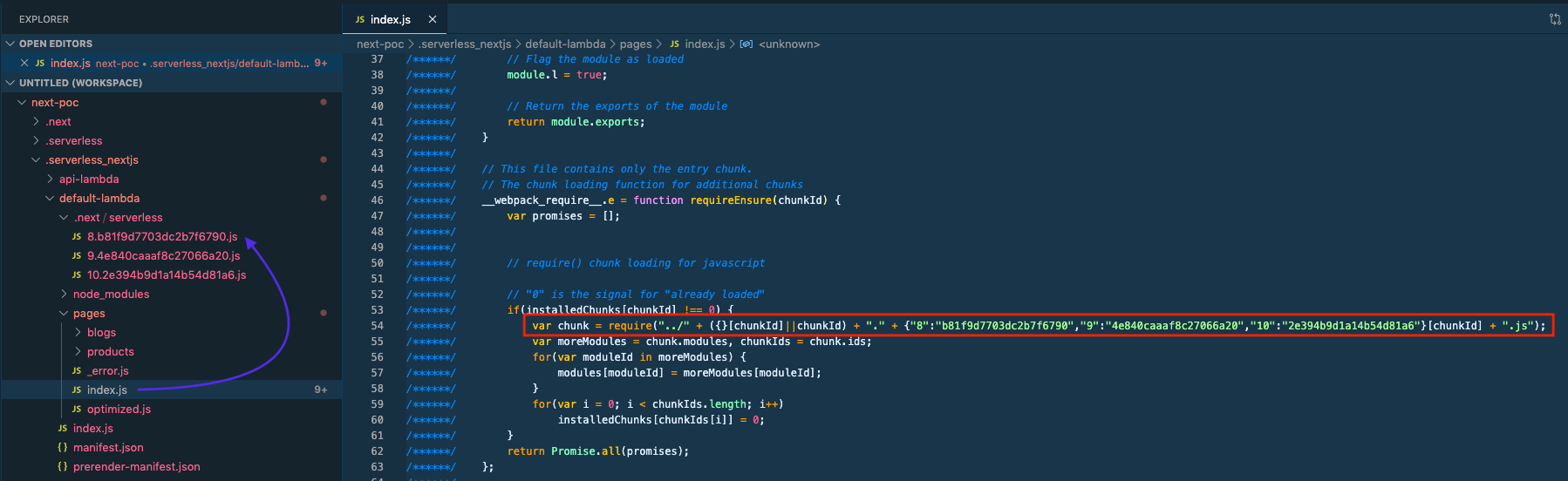
Error: Cannot find module '../8.b81f9d7703dc2b7f6790.js' at Function.Module._resolveFilename (internal/modules/cjs/loader.js:636:15) at Function.Module._load (internal/modules/cjs/loader.js:562:25) at Module.require (internal/modules/cjs/loader.js:692:17) at require (internal/modules/cjs/helpers.js:25:18) at Function.requireEnsure [as e] ... )
code: 'MODULE_NOT_FOUND' }
Attached a screenshot,
I'm not sure about it, I'm doing more analysis on that. I will come up with more details.
krish-dev
on 1 Jun 2020
Hi folks,
Here is an update:
I've just published
1.12.0-alpha.7which now handles the build target automatically for users. You don't need anext.config.jsanymore to specify the build target. To opt intoexperimental-serverless-traceyou just need to:# serverless.yml component: [email protected] inputs: useServerlessTraceTarget: trueI've updated the main README with some details.
Next up I'll be looking at the issue that @krish-dev reported, thanks for all the detail!
@thiagozf @kenberkeley Do you mind providing a repro for the monorepo related issue you're seeing?
Thanks all
@danielcondemarin Here it is: https://github.com/thiagozf/sls-trace-monorepo.
thiagozf
on 2 Jun 2020
Thanks @danielcondemarin for this wonderful update. This is what I exactly mentioned in my last comment. Please ignore my previous comments as those are not relevant anymore more as you did the fix into
[email protected]version.I'm encountered with another
Internal server errorissue if we use dynamic import fromnext/dynamicwhich is generates some chunks. If we are opt-out for dynamic import, it worked like a champ. Possibly there have some path related issues between Lambda pages & chunks.
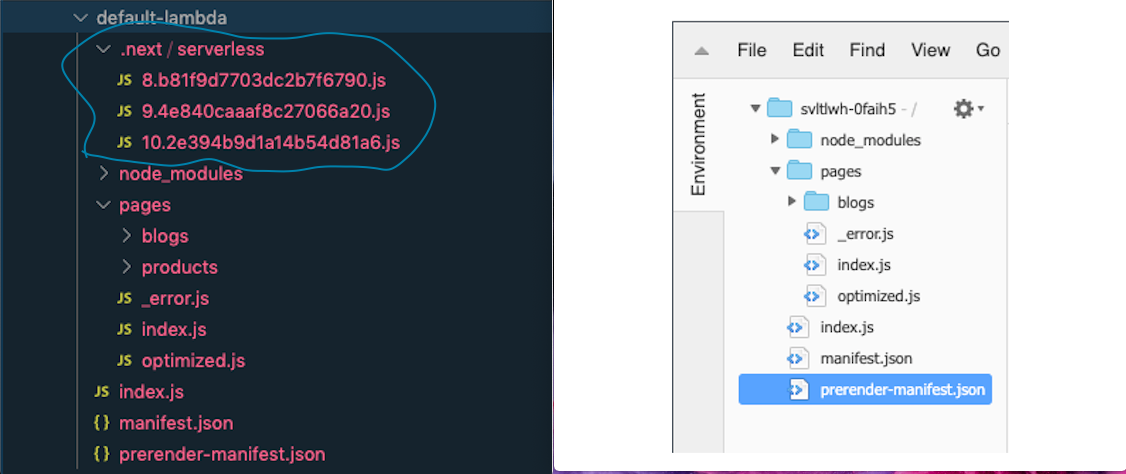
Finally, I got the catch. While using next/dynamic, it generates some chunks.
Point 1
The chunks directly get copied from .next/serverless dir to .serverless_nextjs/default-lambda/.next/serverless. In this line you only exclude pages from copy to default-lambda. You should exclude the chunk as well. The chunks should be copied separately as you did the same for pages. chunks should be at the same level as like pages, manifest.json, node_modules.
Point 2
Currently, chunks are under .serverless_nextjs/default-lambda/.next/serverless, as it is under .next, probably this reason serverless framework excludes .next from the lambda bundle and it not being uploaded to AWS. Hopefully will automatically get a fix as finally, our chunks will be directly under .serverless_nextjs/default-lambda (root level).
krish-dev
on 2 Jun 2020
@danielcondemarin @krish-dev: when the serverless target is used, Next.js build guarantees that there will be no dynamic chunks. They use this plugin to bundle them into the parent chunk (page). However, using experimental-serverless-trace target, this doesn't happen. Is this correct? Can someone create a minimal repro and deploy with Vercel to see what happens? Just by reading the code, my guess is that they currently have the same problem (lol)
thiagozf
on 2 Jun 2020
@danielcondemarin @krish-dev: when the
serverlesstarget is used, Next.js build guarantees that there will be no dynamic chunks. They use this plugin to bundle them into the parent chunk (page). However, usingexperimental-serverless-tracetarget, this doesn't happen. Is this correct? Can someone create a minimal repro and deploy with Vercel to see what happens?
Exactly. Only experimental-serverless-trace will generate chunks into separate file.
Solution is pretty much simple, node-file-trace returns all file list which needs to include into lambda bundle and chunks are available into that list. Only we need copy these file to root directory of default-lambda package (not within .next dir
krish-dev
on 3 Jun 2020
Hi @danielcondemarin
I did some modification and its works for me. Please :pray: review the PR and let me know, what do you think.
krish-dev
on 3 Jun 2020
sorry @thiagozf I didn't notice you already created PR for the same fix.
krish-dev
on 3 Jun 2020
@danielcondemarin I've submitted PR #425 that should fix both chunks and monorepo issues by using .next/serverless as the base path when calculating the file destination. All my apps are running fine with the new target now :fire::rocket:
@krish-dev Hey! I think we were working at the same thing at the same time.
thiagozf
on 3 Jun 2020
@thiagozf @krish-dev Thank you both for the amazing contributions to this issue.
I've now merged & published https://github.com/danielcondemarin/serverless-next.js/pull/425 in 1.12.0-alpha.8. If you are both happy with this release I'll be closing this issue and getting this stuff into stable ASAP 🚀
Thanks 🙏
danielcondemarin
on 3 Jun 2020
Thanks, @danielcondemarin for the new release. Works like a champ 👍 . great work @thiagozf 🙌
krish-dev
on 4 Jun 2020
I just want to mention one observation. the deployment time highly increased. Previously my total lambda bundle size was around 50 MB (using [email protected]) and static assets nearly 4.3 MB. Total deployment time was near about 4 min (including build time). However, currently, the total lambda bundle down to 17 MB (using traced enabled) and static assets are the same as previously. But now its takes around 25 min to deploy. Noticed its takes a long time to upload not for build generation. @thiagozf what's your observation? 👀
krish-dev
on 4 Jun 2020
Hey @krish-dev, sorry to hear that. My build time in a large(ish) app has increased some seconds, but the deploys are faster. Has this started after #425? By build generation, you mean the Serverless Component build or the Next.js build? Can you deploy your app with the serverless --debug and confirm if "Packaging lambda code from ..." or "Uploading <your lambda name> lambda code."are the steps taking a long time? Or is it before? Does the .serverless_nextjs folder size changes when you build with 1.12.0-alpha.7 and 1.12.0-alpha.8? My patch happens before the upload and, if your final bundle size is smaller, I don't see a reason for the deploy time increase.
thiagozf
on 4 Jun 2020
It seems that 1.12.0-alpha.8 is yet to support monorepo (I am using Yarn workspace). The workaround is nohoist all npm packages...
It would be great if we can use serverless-plugin-monorepo.
But anyway, thanks everyone's efforts!
kenberkeley
on 7 Jun 2020
@kenberkeley Do you have a minimum repro? I was able to get it working in a monorepo setup.
thiagozf
on 7 Jun 2020
 kenberkeley
on 8 Jun 2020
kenberkeley
on 8 Jun 2020
@kenberkeley This is happening because the component uses process.cwd() as the base path for node-file-trace and any files/folders above the base are ignored in the listing and analysis.
@danielcondemarin Can we have the base path for node-file-trace as a component input, which defaults to process.cwd()? Another alternative is to symlink node_modules, but I think this is out of the scope for the component and could be done with a custom build script.
thiagozf
on 8 Jun 2020
Hey @krish-dev, sorry to hear that. My build time in a large(ish) app has increased some seconds, but the deploys are faster. Has this started after #425? By build generation, you mean the Serverless Component build or the Next.js build? Can you deploy your app with the
serverless --debugand confirm if"Packaging lambda code from ..."or"Uploading <your lambda name> lambda code."are the steps taking a long time? Or is it before? Does the.serverless_nextjsfolder size changes when you build with1.12.0-alpha.7and1.12.0-alpha.8? My patch happens before the upload and, if your final bundle size is smaller, I don't see a reason for the deploy time increase.
Hey @thiagozf sorry for the delayed response. it's working perfectly, probably that day I had the internet connectivity issue, tested full process with BitBucket Pipeline and it increased few second only which is expected.
krish-dev
on 9 Jun 2020
@danielcondemarin Can we have the base path for node-file-trace as a component input, which defaults to process.cwd()? Another alternative is to symlink node_modules, but I think this is out of the scope for the component and could be done with a custom build script.
Could we not follow symlinks to solve this instead? Similar to what now-next does - https://github.com/vercel/vercel/blob/master/packages/now-next/src/utils.ts#L521.
danielcondemarin
on 14 Jun 2020
@kenberkeley I had a look at your repo.zip example and an option could be to move "deploy": "serverless" from the client/ package.json to the monorepo root. You would need to do this in combination with nextConfigDir: packages/client documented in the inputs.
danielcondemarin
on 4 Jul 2020
@danielcondemarin 🙏🙏🙏
kenberkeley
on 5 Jul 2020
@danielcondemarin I am having this similar issue with mono repo so I also tried to deploy from the root. However I get this error at the end:
Error: Source and destination must not be the same.
    at /root/.serverless/components/registry/npm/@sls-next/[email protected]/node_modules/fs-extra/lib/util/stat.js:39:17
    at cb (util.js:207:31)
    at processTicksAndRejections (internal/process/task_queues.js:84:21)
Our serverless.yml looks like:
the-project-name:
  component: '@sls-next/[email protected]'
  inputs:
    bucketName: the-bucket-name
    memory: 1024
    nextConfigDir: './apps/web'
    nextStaticDir: './apps/web/public'
    timeout: 30
    runtime: 'nodejs12.x'
    useServerlessTraceTarget: true
I also tried to understand what the destination looked like and it was:
BigIntStats {

dev: 16777220n,

mode: 33188n,

nlink: 1n,

uid: 501n,

gid: 20n,

rdev: 0n,

blksize: 4096n,

ino: 8690198267n,

size: 1002828n,

blocks: 1960n,

atimeMs: 1595479257372n,

mtimeMs: 1595479159278n,

ctimeMs: 1595479159278n,

birthtimeMs: 1595479159272n,

atimeNs: 1595479257372092099n,

mtimeNs: 1595479159278799714n,

ctimeNs: 1595479159278799714n,

birthtimeNs: 1595479159272092562n,

atime: 2020-07-23T04:40:57.372Z,

mtime: 2020-07-23T04:39:19.278Z,

ctime: 2020-07-23T04:39:19.278Z,

birthtime: 2020-07-23T04:39:19.272Z

}
Could you please help to understand what's happening here?
 jaypeng2015
on 23 Jul 2020
jaypeng2015
on 23 Jul 2020
@jaypeng2015 there is a separate thread on this: https://github.com/serverless-nextjs/serverless-next.js/issues/461#issuecomment-672580379, I posted my findings. For me it was because it was somehow trying to copy my ts/tsx files from src and pages into the Lambda handler folder (but it shouldn't be copied). Because it had ../../ the src and dest ended up the same, which is what this error message was. My quick workaround was to manually add a check to build.js (compiled from https://github.com/serverless-nextjs/serverless-next.js/blob/d0a630035cab10e6ff70c5706f16c8564227630c/packages/libs/lambda-at-edge/src/build.ts#L112-L116) to skip filepaths except those with node_modules in the path.
 dphang
on 12 Aug 2020
dphang
on 12 Aug 2020
I am trying out useServerlessTraceTarget and getting AccessDenied loading pages:
<Error>
<Code>AccessDenied</Code>
<Message>Access Denied</Message>
<RequestId>0371982A2F36F582</RequestId>
<HostId>RPip2l7OlJ9D8yDzjgCv+MLpmGdXJgIlXAKXaNvNdlFQwXUl4PO0YChUF5braxImlj+MZk142Sk=</HostId>
</Error>
Is there something obvious I might have done wrong or could try?
nodabladam
on 12 Aug 2020
In my example, I've found out the reason was because of yarn workspace.
- apps
- web
- src
- next.config.js
- .serverless_nextjs
- web
- packages
- foo
- index.js
- foo
If the package is in root node_modules and is required in /apps/web, nodeFileTrace can find it then copyLambdaHandlerDependencies will copy it into /apps/web.
However if the package is a local private package, for example, /packages/foo, then the src and dest in copyLambdaHandlerDependencies function will be the same and then throw that error.
const dst = normalizeNodeModules(
          path.relative(this.serverlessDir, resolvedFilePath)
);
This piece of code returns '../../../../packages/foo/index.js', and then join with
join(this.outputDir, handlerDirectory, dst)
It becomes apps/web/.serverless_nextjs/default-lambda/../../../../packages/foo/index.js, which is packages/foo/index.js itself.
So the root reason it that normalizeNodeModules function only handles the files under a node_modules folder, but in this case, it cannot handle the packages in a yarn workspace.
jaypeng2015
on 13 Aug 2020
For me it's the package.json file in the source root folder.
I have been able to deploy by using following steps;
- set inputs.build.enabled = true in serverless.yml
- build
- deploy (fails)
- disable build in serverless.yml
- deploy again (works now)
I can't do this in CI/CD but at least this workaround helps me with urgent deployment needs for the time being. Not sure if it's creating other issues though.
 zoozalp
on 18 Aug 2020
zoozalp
on 18 Aug 2020
For me it's the package.json file in the source root folder.
I have been able to deploy by using following steps;
- set inputs.build.enabled = true in serverless.yml
- build
- deploy (fails)
- disable build in serverless.yml
- deploy again (works now)
I can't do this in CI/CD but at least this workaround helps me with urgent deployment needs for the time being. Not sure if it's creating other issues though.
Using @sls-next/[email protected] with [email protected] by the way.
zoozalp
on 18 Aug 2020
I solved it by adding following to my CI/CD pipeline.
FILE=~/.serverless/components/registry/npm/@sls-next/[email protected]/node_modules/@sls-next/lambda-at-edge/dist/build.js
if [[ -f "$FILE" ]]; then
  sed -i.bak 's/return !reasons\[file\] || reasons\[file\]\.type !== "initial";/return \(!reasons\[file\] \|\| reasons\[file\]\.type !== "initial"\) \&\& file != "package.json";/' $FILE
fi
@danielcondemarin I've updated next.config.js like you said
const withCSS = require('@zeit/next-css');

module.exports = withCSS({
  webpack: function (config) {
    config.module.rules.push({
      test: /\.(eot|woff|woff2|ttf|svg|png|jpg|gif)$/,
      use: {
        loader: 'url-loader',
        options: {
          limit: 100000,
          name: '[name].[ext]'
        }
      }
    });
    return config;
  },
  target: 'experimental-serverless-trace'
});
fe:
  component: [email protected]
However I still get error like title when run command $ serverless.
 lioaslan
on 30 Oct 2020
lioaslan
on 30 Oct 2020
Related issues
 romainquellec
·
19Comments
romainquellec
·
19Comments
 tyler-ground
·
15Comments
tyler-ground
·
15Comments
 muthuridennis
·
17Comments
muthuridennis
·
17Comments
 damo78
·
27Comments
romainquellec
·
19Comments
damo78
·
27Comments
romainquellec
·
19Comments
Most helpful comment
Hi folks 👋
Some good news, I've managed to get the new
serverless-tracetarget working on serverless-next.js! It means node_modules are not bundled anymore within the page bundles generated bynext build. Insteadnode_modulesare treated as externals (in webpack) therefore the page bundles don't contain duplicated dependencies code.There are still some optimisations I could make, like compressing the node_modules, same to what Now does.
However I am hoping with the current implementation it's good enough and solve this issue altogether.
Ideally this will be tested with a large app. could I have some volunteers please?
It is currently released in
[email protected]. All you'd need to do is make sure you are targetingexperimental-serverless-tracein yournext.config.js:Don't be put off by the target being "experimental". This is actually what Now uses under the hood for serverless deployments. I've pretty much replicated the same the
now-nextbuilder does.Reference PR: https://github.com/danielcondemarin/serverless-next.js/pull/405