Serverless-express: Images not served properly
I'm using app.use('/static', express.static(ENV.STATIC_DIR)) to serve PNG and ICO files.
The files are served but not displayed, seems to have the correct Content-Type but are blank (black rectangle).
The "Response" tab in the Chrome Network view shows binary text (usually this is blank for correctly served images), so I'm guessing there's an encoding issue but I haven't experienced this before with Express.
 richburdon
All 14 comments
Hi @richburdon there are many issues documenting how to serve binary. It mainly boils down to 2 things:
- Ensure your content-type is defined in the third parameter of the main function
awsServerlessExpress.createServer(app, null, ['image/png']) - Ensure the content type is listed in the API Gateway configuration (or simply / to handle all content types) https://github.com/awslabs/aws-serverless-express/blob/master/example/simple-proxy-api.yaml#L99
 brettstack
on 16 Oct 2017
brettstack
on 16 Oct 2017
Hi @brettstack, thanks for your response.
1. Yes I'm doing that.
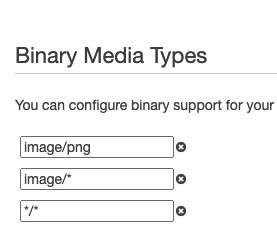
2. I'm using serverless.yml so this doesn't make sense to me. However, I have tried adding */* and image/*, image/png in the the "Binary Support" tab of the API Gateway console. This doesn't seem to make any difference.
NOTE: the IMG response shows up with the right content-type and the x-amzn-remapped-content-length header matches the original field's size in bytes, but the content-length is wrong (bigger) so my guess is an encoding issue?
~~~
accept-ranges:bytes
cache-control:public, max-age=0
content-length:34072
content-type:image/png
date:Tue, 31 Oct 2017 22:30:35 GMT
etag:W/"63d0-4977387000"
last-modified:Tue, 01 Jan 1980 00:00:00 GMT
status:200
via:1.1 3d183dc06807f77c9361cf878faaed82.cloudfront.net (CloudFront)
x-amz-cf-id:N-gdc_PIRPhlwKqkrhB25kOKn76UCIBRFxZ_lWBzNJy_r6gp0Tm72g==
x-amzn-remapped-connection:close
x-amzn-remapped-content-length:25552
x-amzn-remapped-date:Tue, 31 Oct 2017 22:30:35 GMT
x-amzn-requestid:1d3c6c47-be8b-11e7-96af-3158705a2175
x-amzn-trace-id:sampled=0;root=1-59f8f98b-cbabf43f2ebb85cb37d69014
x-cache:Miss from cloudfront
x-powered-by:Express
~
NOTE: If I request the resource via postman explicitly setting the "Accept" header to "image/png" then the correct response is received.
I.e., the following returns the correct data:
~~~
curl -X GET https://www.example.com/static/img/logo.png -H 'accept: image/png' -H 'cache-control: no-cache'
~
But, this returns what I think is base64 encoded data:
~~~
curl -X GET https://www.example.com/static/img/logo.png -H 'cache-control: no-cache'
~
I have tried adding "binary support" in the API gateway console (the browser (chrome) sends the appropriate accept header image/webp,image/apng,image/*,*/* but not explicitly image/png. In fact, if the header doesn't exactly START with image/png, then the wrong encoding is used.
Changing the "integration request" config for my /img/ path doesn't help either.
(BTW, I spent a couple of hours trying to debug this with an AWS specialist -- who was really helpful -- but we can't figure out why the Accept header isn't respected.)
richburdon
on 31 Oct 2017
I had a similar problem, where the content-length returned was longer than it should have been. @brettstack's solution worked for me, except I was using zip files (application/zip).
In my case, the binary mime types passed into the awsServerlessExpress.createServer function had to exactly match the ones defined in the AWS API Gateway console under 'Binary Support'.
I was passing in multiple mime types to the createServer function, but only had application/zip defined in the API gateway Binary Support section and it wasn't working. When I only passed in application/zip and also only had that under binary support, then it worked.
 omurphy27
on 9 Nov 2017
omurphy27
on 9 Nov 2017
@richburdon try adding "image/*" to your binary types array in createServer.
brettstack
on 10 Nov 2017
Hi @brettstack I've tried that and it doesn't make any difference.
~~~~
const binaryMimeTypes = [
'image/*',
'image/jpeg',
'image/png',
'image/svg+xml',
];
let server = awsServerlessExpress.createServer(app, null, binaryMimeTypes);
~~~~
I've also set the binary type specifically in the API gateway, and tried configuring the serverles serverless-apigw-binary plugin (which also correctly sets the API gateway binary support).
I'm now serving the assets from S3 instead.
Again setting the 'accept: image/png' header explicitly works, but I can't do this in an img tag, which adds more types to the accept header (seems that an exact match is required).
richburdon
on 10 Nov 2017
I'll look into this. S3 is the best way to serve static assets.
On Fri, Nov 10, 2017, 8:42 AM Rich Burdon notifications@github.com wrote:
Hi @brettstack https://github.com/brettstack I've tried that and it
doesn't make any difference.const binaryMimeTypes = [
'image/*',
'image/jpeg',
'image/png',
'image/svg+xml',
];let server = awsServerlessExpress.createServer(app, null, binaryMimeTypes);
I've also set the binary type specifically in the API gateway, and tried
configuring the serverles serverless-apigw-binary plugin (which also
correctly sets the API gateway binary support).I'm now serving the assets from S3 instead.
Again setting the 'accept: image/png' header explicitly works, but I can't
do this in an img tag, which adds more types to the accept header (seems
that an exact match is required).—
You are receiving this because you were mentioned.Reply to this email directly, view it on GitHub
https://github.com/awslabs/aws-serverless-express/issues/104#issuecomment-343523949,
or mute the thread
https://github.com/notifications/unsubscribe-auth/ABy6l_n_rzf-ghV_H57hKwPuzKDbkn_3ks5s1H0PgaJpZM4P5c-V
.
brettstack
on 10 Nov 2017
Thanks Brett, yes I agree re S3, just puzzling.
On Fri, Nov 10, 2017 at 11:48 AM Brett Andrews notifications@github.com
wrote:
I'll look into this. S3 is the best way to serve static assets.
On Fri, Nov 10, 2017, 8:42 AM Rich Burdon notifications@github.com
wrote:Hi @brettstack https://github.com/brettstack I've tried that and it
doesn't make any difference.const binaryMimeTypes = [
'image/*',
'image/jpeg',
'image/png',
'image/svg+xml',
];let server = awsServerlessExpress.createServer(app, null,
binaryMimeTypes);I've also set the binary type specifically in the API gateway, and tried
configuring the serverles serverless-apigw-binary plugin (which also
correctly sets the API gateway binary support).I'm now serving the assets from S3 instead.
Again setting the 'accept: image/png' header explicitly works, but I
can't
do this in an img tag, which adds more types to the accept header (seems
that an exact match is required).—
You are receiving this because you were mentioned.Reply to this email directly, view it on GitHub
<
https://github.com/awslabs/aws-serverless-express/issues/104#issuecomment-343523949
,
or mute the thread
<
https://github.com/notifications/unsubscribe-auth/ABy6l_n_rzf-ghV_H57hKwPuzKDbkn_3ks5s1H0PgaJpZM4P5c-V.
—
You are receiving this because you were mentioned.
Reply to this email directly, view it on GitHub
https://github.com/awslabs/aws-serverless-express/issues/104#issuecomment-343525281,
or mute the thread
https://github.com/notifications/unsubscribe-auth/ADXDG4xPX-6zKSrN-RVa7yU-NHMDlV_Cks5s1H4_gaJpZM4P5c-V
.
richburdon
on 10 Nov 2017
I am having the same issue with png having the wrong content length, and (I think) wrong encoding. I am using aws-serverless-express 3.0.2, express 4.16.2, and serverless.
I have tried ..
const server = awsServerlessExpress.createServer(app, null, ['image/png']);
and have put */* in the API Gateway Binary Support Binary media types
Response headers - API Gateway fronted Lambda/Express app
accept-ranges:bytes
cache-control:public, max-age=0
content-length:51977
content-type:image/png
date:Fri, 01 Dec 2017 04:28:34 GMT
etag:W/"6ddb-160104c73b0"
last-modified:Fri, 01 Dec 2017 04:18:54 GMT
status:200
via:1.1 bdf69c9338fccde2f01f587a28200671.cloudfront.net (CloudFront)
x-amz-cf-id:B7oHN1Yvv4-qp2tOBUHDgjJzQKFA0kBozLoCCmjYdrNHPt08CieIuQ==
x-amzn-remapped-connection:close
x-amzn-remapped-content-length:28123
x-amzn-remapped-date:Fri, 01 Dec 2017 04:28:34 GMT
x-amzn-requestid:1802487b-d650-11e7-aac1-df5f6064ba25
x-amzn-trace-id:sampled=0;root=1-5a20da72-14e2367a9bd25bcdf20a571c
x-cache:Miss from cloudfront
x-powered-by:Express
chrome preview tab
aVZCT1J3MEtHZ29BQUFBTlNVaEVVZ0FBQUh...
chrome response tab
iVBORw0KGgoAAAANSUhEUgAAAHwAAAfeCAMAAAAN...
Same png on S3 backed CloudFront (working fine, but can't use it easily because my assets are referenced with relative paths in js and css files bundled by webpack and served by Express.)
Response headers
accept-ranges:bytes
age:23786
content-length:28123
content-type:image/png
date:Thu, 30 Nov 2017 22:00:17 GMT
etag:"9c74e172f87984c48ddf5c8108cabe67"
last-modified:Thu, 30 Nov 2017 21:51:36 GMT
server:AmazonS3
status:200
via:1.1 5ecfd97124a5b15f1245ab731d34efe7.cloudfront.net (CloudFront)
x-amz-cf-id:vk3sdR45v-T6L1nEziN3dcZmNGmE2K5JKL0L7CJCXsOHhaziIOckwA==
x-amz-meta-cb-modifiedtime:Thu, 30 Nov 2017 17:32:59 GMT
x-cache:Hit from cloudfront
chrome preview tab
chrome response tab
?PNG


IHDR|Þ
³ªçPLTEýýýõõõùùúòòó ...
Notice how the the chrome response tab contents in the API Gateway/Lambda/Express example (not working)
is the same as the the chrome preview tab contents in the S3 backed example (working).
I swear this worked 24 hours ago, and without having to specify ['image/png'] in the createServer call, or anything in the API Gateway Binary media types.
 mhanney
on 1 Dec 2017
mhanney
on 1 Dec 2017
I just redeployed my Express app (using serverless) 10 minutes after making the post above and it is working!
Response headers - API Gateway fronted Lambda/Express app (Working!)
accept-ranges:bytes
cache-control:public, max-age=0
content-length:28123
content-type:image/png
date:Fri, 01 Dec 2017 05:22:28 GMT
etag:W/"6ddb-160108127e0"
last-modified:Fri, 01 Dec 2017 05:16:28 GMT
status:200
via:1.1 f1836a6a7245cc3f6e190d259a0d9273.cloudfront.net (CloudFront)
x-amz-cf-id:JSI02VfrmPhwTQencPMI-lMuO9OwlmW_1yLRoHmTLHBzJG_iXk4Cfw==
x-amzn-remapped-connection:close
x-amzn-remapped-content-length:28123
x-amzn-remapped-date:Fri, 01 Dec 2017 05:22:28 GMT
x-amzn-requestid:9fa8ae0e-d657-11e7-93d7-890477579a7f
x-amzn-trace-id:sampled=0;root=1-5a20e714-d432afd7e2f4f7315a7d9a61
x-cache:Miss from cloudfront
x-powered-by:Express
chrome preview tab
chrome response tab
PNG
IHDR|Þ
³ªçPLTEýýýõõõùùúòòó ...
@mhanney I'm not exactly sure how you fixed this thing. I'm facing exactly the same issue: if the request has Accept: image/png I get the correct binary response, otherwise just some garbage base64... But browsers don't specify image/png, just image/*.. What should I do here?
 enapupe
on 25 Jul 2018
enapupe
on 25 Jul 2018
You can configure API Gateway and aws-serverless-express to serve binary on image/*
brettstack
on 26 Jul 2018
Oh okay, I guess I was testing it wrong because I was opening it directly on the browser in a way it didn't send the correct Accept headers, what a mess.
Thanks Brett
enapupe
on 26 Jul 2018
EDIT:
*/* on api gateway side, and on aws-serverless-express did the trick
Did the trick.
I'm having the same issue,
I've followed all of the steps i could find.
The code dose works with serverless-offline
example link:
https://fo1kcsjku4.execute-api.eu-central-1.amazonaws.com/dev/static/media/foundit.5284f9f8.png
Real resource


Ideas? :)
 Bnaya
on 25 Mar 2019
Bnaya
on 25 Mar 2019
Does not works in my part :
const binaryMimeTypes = [
        'application/pdf',
        'application/zip',
        'multipart/form-data',
        'image/png',
];

const server = awsServerlessExpress.createServer(app, null, binaryMimeTypes);
const img = // buffer

res.writeHead(200, {
     'Content-Type'      : 'image/png',
     'Content-Length'    : Buffer.byteLength(img),
});
res.end(img, 'binary');
This is the response headers :
content-type | image/png
-- | --
content-length | 12832
date | Thu, 12 Nov 2020 17:19:56 GMT
x-amzn-requestid | 748f1270-858c-490f-b8c3-6b027b851f38
referrer-policy | no-referrer
x-dns-prefetch-control | off
x-permitted-cross-domain-policies | none
x-xss-protection | 0
access-control-allow-origin | *
expect-ct | max-age=0
strict-transport-security | max-age=15552000; includeSubDomains
x-frame-options | SAMEORIGIN
x-amzn-remapped-content-length | 9623
content-security-policy | default-src 'self';base-uri 'self';block-all-mixed-content;font-src 'self' https: data:;frame-ancestors 'self';img-src 'self' data:;object-src 'none';script-src 'self';script-src-attr 'none';style-src 'self' https: 'unsafe-inline';upgrade-insecure-requests
x-amzn-remapped-connection | close
x-download-options | noopen
x-amz-apigw-id | V549XGDsjoEFZoA=
x-content-type-options | nosniff
x-amzn-trace-id | Root=1-5fad6ebb-7ae0055e3e7ade66785664b9;Sampled=0
x-amzn-remapped-date | Thu, 12 Nov 2020 17:19:56 GMT
x-cache | Miss from cloudfront
via | 1.1 f41c2361062c4fc74c645f4e4fddd2de.cloudfront.net (CloudFront)
x-amz-cf-pop | CDG3-C2
x-amz-cf-id | Ta3zu9RRoDRL5Cfyi0wtrzrgk_fv3DbVRZDEMUa2v24DQrApH5K3cw==
And the image is still in base64 and not show correctly in insomnia/postman with or without Accept : image/png header.
EDIT : If the route finish corectly with the extension, the image is served properly by api-gateway. (In my tests I made the png on /logo, with /logo.png, it works fine)
Another thing in my WTFAWSDO
 throrin19
on 12 Nov 2020
throrin19
on 12 Nov 2020
Related issues
 shelooks16
·
9Comments
shelooks16
·
9Comments
 denneulin
·
8Comments
denneulin
·
8Comments
 Muthuveerappanv
·
6Comments
Muthuveerappanv
·
6Comments
 janaz
·
8Comments
janaz
·
8Comments
 sclark39
·
7Comments
sclark39
·
7Comments
Most helpful comment
Hi @brettstack, thanks for your response.
1. Yes I'm doing that.
2. I'm using
serverless.ymlso this doesn't make sense to me. However, I have tried adding*/*andimage/*,image/pngin the the "Binary Support" tab of the API Gateway console. This doesn't seem to make any difference.NOTE: the IMG response shows up with the right
content-typeand thex-amzn-remapped-content-lengthheader matches the original field's size in bytes, but thecontent-lengthis wrong (bigger) so my guess is an encoding issue?~~~accept-ranges:bytes
cache-control:public, max-age=0
content-length:34072
content-type:image/png
date:Tue, 31 Oct 2017 22:30:35 GMT
etag:W/"63d0-4977387000"
last-modified:Tue, 01 Jan 1980 00:00:00 GMT
status:200
via:1.1 3d183dc06807f77c9361cf878faaed82.cloudfront.net (CloudFront)
x-amz-cf-id:N-gdc_PIRPhlwKqkrhB25kOKn76UCIBRFxZ_lWBzNJy_r6gp0Tm72g==
x-amzn-remapped-connection:close
x-amzn-remapped-content-length:25552
x-amzn-remapped-date:Tue, 31 Oct 2017 22:30:35 GMT
x-amzn-requestid:1d3c6c47-be8b-11e7-96af-3158705a2175
x-amzn-trace-id:sampled=0;root=1-59f8f98b-cbabf43f2ebb85cb37d69014
x-cache:Miss from cloudfront
x-powered-by:Express
~
NOTE: If I request the resource via postman explicitly setting the "Accept" header to "image/png" then the correct response is received.
I.e., the following returns the correct data:
~~~curl -X GET https://www.example.com/static/img/logo.png -H 'accept: image/png' -H 'cache-control: no-cache'
~
But, this returns what I think is base64 encoded data:
~~~curl -X GET https://www.example.com/static/img/logo.png -H 'cache-control: no-cache'
~
I have tried adding "binary support" in the API gateway console (the browser (chrome) sends the appropriate
acceptheaderimage/webp,image/apng,image/*,*/*but not explicitlyimage/png. In fact, if the header doesn't exactly START withimage/png, then the wrong encoding is used.Changing the "integration request" config for my
/img/path doesn't help either.(BTW, I spent a couple of hours trying to debug this with an AWS specialist -- who was really helpful -- but we can't figure out why the Accept header isn't respected.)