Serverless-chrome: Reliability on lambda
First of all, thanks @adieuadieu for your work on this project. It's been really helpful to me!
I'm opening this ticket in hopes that we can have some discussion around the reliability of launching & connecting to chrome on lambda. I'm working with the latest packages from the develop branch, so I realize/acknowledge that there may be bugs.
Really what I'm hoping to figure out is if the problems I'm having are specific to me, or if there are general problems that are known and need work. If we can identify what those problems are, perhaps we, the community, can help!
I can get real specific and share application code & backtraces, but before we get to that, perhaps we can establish if this behavior is common. If I'm the only one experiencing these problems, then this ticket should be handled differently (as a cry for help!).
- The first few invocations of my function typically work as expected (hurray!).
- If I invoke the function multiple times in a row (quickly), the service begins to fail with
ECONNREFUSED. Here's an example from the log:
https://gist.github.com/benjaminwood/21dbdb95cbd140dae67460f200cbf7ec
It is common that after it fails like this, all additional invocations fail the same way until a new container is spun up (with time or by deploying new code). It appears that a chrome process is running, but it may be hung/frozen.
For your reference, my function cleans up after itself like this:
await CDP.Close({id: client.target.id})
await client.close()
I'm not killing the chrome process, but I am closing the tab and the connection (client). I believe this is the correct thing to do, but feel free to give input, I'd appreciate it!
So, is this happening to anyone else? I did try running some of the examples here in the repo and ran into the same problems. So at first review, it appears at though the problem is not 100% specific to my situation.
 benjaminwood
All 70 comments
Hi @benjaminwood Thank you for your detailed Issue. I don't think this is unique to you. What you're experiencing has been brought up/experienced by some other people as well (including me). It appears to happen both on the current master branch, and the develop branch. It's somehow something to do with the interaction between Lambda and Headless Chrome.
_Sometimes_, depending on what I'm doing with Chrome during my invocation, 1 in 5 invocations will fail. Investigating further, during the failed invocation, Chrome appears to have been zombied. I've had some success in the past preventing this issue by being very meticulous about closing all the Tabs (in Chrome) that I opened, properly closing the CDP websocket connection and otherwise cleaning up. For example, I'm currently running a modified version of the PrintToPDF example handler in production and it doesn't appear to have this issue (though the service's load is not particularly high).
Some next steps/solutions to address the issue:
- Figure out exactly what the cause is and if it's avoidable.
- A lame solution could be to spawn and kill Chrome on each invocation. That costs about 500-600ms each time when you've set the function's memory to 1024 MB or higher.
- Another possible solution is to compile a new version of Chrome for Lambda—that's something I need to do anyway and we might hope it makes this problem disappear (and doesn't introduce any new issues!)
- Engage with the Chromium guys on the headless-dev group about why Chrome might be zombie-ing.
- Better detection that Chrome has crashed/zombied and try to re-spawn Chrome so that the invocation is still successful. Not exactly a solution but more of a work-around—last-resort option in case the issue is related to some unfixable interplay between Lambda and Chrome.
Most likely getting this resolved will require some combination of all-of-the-above and possibly more. I definitely welcome help from the community.
 adieuadieu
on 15 Jul 2017
adieuadieu
on 15 Jul 2017
Thanks for following up @adieuadieu. I agree that the first step is to establish a pattern that causes it to fail. I've been able to get it to fail pretty consistently calling the function multiple times in a row. I'll do some more tests next week and will report back here.
I'm hoping to use headless chrome on lambda for a production application, so figuring this out is important to me and I'm happy to help however I can!
benjaminwood
on 15 Jul 2017
I can echo this issue, and will start another discussion on headless-dev tomorrow morning.
This morning I spent some time playing around with Headless Chrome target APIs, hoping that maybe tab management was the issue. Doesn't seem to be the case, as we can see at https://github.com/momer/chrome-headless-lambda-rl/blob/no-zombielord/src/requestLogger.ts
:(
Hopefully this or next week I'll have some time to do some profiling on the lambda container (if that's possible?) to further dig in.
 momer
on 20 Jul 2017
momer
on 20 Jul 2017
Thank you @momer @benjaminwood. This is definitely something that needs to be addressed. I'll be looking into it as well. I'll build a new headless chrome binary and see what difference that makes next.
adieuadieu
on 22 Jul 2017
* UPDATE: The below code does not resolve the ECONNREFUSED exception. *
I have been experiencing the same issue and may have found a fix for my instance.
As @momer suspected the issue I found was with the tab management.
I am using a modified version of the ./src/handlers/captureScreenshot.js handler and the following looks like it has resolved my issue:
captureScreenshot.js - Line 18
// create a new tab for each request, rather than relying on the blank tab existing
// const [tab] = await Cdp.List();
const tab = await Cdp.New();
const client = await Cdp({ host: '127.0.0.1', target: tab });
//...
await Cdp.Close({id: client.target.id});
await client.close();
The issue for me was Cdp.List() returns an array of available tabs, however, I was closing the tab before returning.
On the first call to the lambda function, a new chrome instance is spawned.
Cdp.List() returns is a single blank tab which is opened by default.
However, at the end I was closing the tab with await Cdp.Close({id: client.target.id})
On quick successive calls, lambda will return the same function instance.
This means the previously spawned chrome will be used.
Cdp.List() will now return an empty array, as I had closed the only tab in the last request.
Hence, tab was undefined causing an error.
From some quick testing, this has solved the issue for me.
 mkeftz
on 24 Jul 2017
mkeftz
on 24 Jul 2017
Hey @mkeftz thanks for adding to the conversation!
When you said the tab was undefined, causing an error, would you see the error in lambda's log? Was it the same error mentioned in my post above (ECONNREFUSED)?
For what it's worth, I've been handling tabs like this, and I've still encountered reliability problems.
const tabs = await CDP.List()
const blankTab = tabs.find(t => t.url === 'about:blank')
const target = blankTab || await CDP.New()
const client = await CDP({ target })
//... do stuff
await CDP.Close({id: client.target.id})
await client.close()
Does anyone see a flaw here? The closing of the tab and client connection happen when a promise is resolved once my work with chrome is complete.
benjaminwood
on 25 Jul 2017
@benjaminwood @mkeftz I'll try that out, and definitely thanks for sharing!
@benjaminwood CDP.Close doesn't immediately occur - the callback fires before Chrome closes it (https://github.com/cyrus-and/chrome-remote-interface#cdpcloseoptions-callback).
I'd been digging through CDP source, and am inclined to believe that we should avoid using the blank tab, as @mkeftz called out.
Brb, gonna give it a shot.
momer
on 25 Jul 2017
@mkeftz @benjaminwood no dice; I handled the tabs exactly as you'd pasted @mkeftz, but the requests still fail on the 5th successive request.
@mkeftz Are you saying that your lambda is successfully returning many consecutive requests (i.e. reload the endpoint ~10 times in a row, quickly)?
momer
on 25 Jul 2017
@benjaminwood @momer unfortunately you are correct and my tab handling code does not resolve the ECONNREFUSED exception.
Unfortunately my code gets called by another process which makes testing a little harder, so I may not have tested with 5 consecutive requests.
Retesting now I am getting the exact same results, i.e. after exactly 5 successive calls I am getting the ECONNREFUSED exception.
Also, this exception is thrown by the call to await Cdp.New().
I have added a try catch around this call and on exception I kill and re-spawn chrome.
However, this then works for another 4 successive calls and throws the same ECONNREFUSED exception, at a different point in my code.
mkeftz
on 25 Jul 2017
Hi @mkeftz @momer @benjaminwood thank you for exchanging your discoveries here and helping each other out!
I have a temporary work-around you might try. It's not ideal (read: pretty lame), but it does seem to keep the ECONNREFUSED from occurring. The work around is to kill chrome at the end of each lambda invocation. The drawback is that each time you invoke the function you'll have to wait for Chrome to launch (500~1000ms at 1536MB).
For example, with the serverless-plugin-chrome package:
export default async (
event,
context,
callback,
chromeInstance
): Promise<void> => {
const client = await CDP({ target })
//do stuff with chrome.
callback(null, { hi: 'okay' })
await client.close()
await chromeInstance.kill() // <----------- KILLKILLKILL
}
This only works with the develop branch. It's the strategy we're using with chromeless and it works quite well in this case.
adieuadieu
on 26 Jul 2017
Alternatively, this is the solution I found yesterday, with the same effect, sans the plugin dependency. https://github.com/momer/chrome-headless-lambda-rl/blob/actually-running/src/requestLogger.ts
momer
on 27 Jul 2017
The extra half second isn't the end of the world, but how do we ensure that another invocation is not using the chrome process at the time that it is killed? Do we ensure that a unique chrome process is started per invocation?
benjaminwood
on 27 Jul 2017
That was my concern too, and I'm yet to do additional testing.
momer
on 27 Jul 2017
Yeah, I'm pretty sure they'll step on each other as the launcher is written today. @adieuadieu can you confirm?
benjaminwood
on 27 Jul 2017
@momer @benjaminwood As far as I'm aware, invocations are completely independent. One lambda per invocation. So if you have two concurrent Lambda invocations, two lambdas are spun up independently of each other—so you can't ever have any overlap. The lambda container is only reused once an invocation has completed.
adieuadieu
on 27 Jul 2017
Just a silly idea - would it be possible to stop and then immediately start chrome again at the end of a request? That way you wouldn't have to wait for chrome to start up at the next request.
This would be a benefit if you could return early from the lambda function so chrome could restart after the request has already been returned.
 sorenbs
on 27 Jul 2017
sorenbs
on 27 Jul 2017
@sorenbs That's a good idea! It's kind of obvious now that you've mentioned it 😆 . I'll give it a try.
It may or may not work reliably, though. My best guess at why Chrome is crashing is that something is going wrong with how lambda thaws a container during reuse. Something in Lambda-land is causing Chrome to crash in between invocations. So if we kill then spawn again at the end of an invocation, it's still possible for that _something_ to crash Chrome in-between invocations.
Another tradeoff would be that, the Lambda callback() waits for the event loop to clear before returning/responding from the invocation. So you'd still have the time spent waiting for Chrome. It's possible to change this behaviour with context.callbackWaitsForEmptyEventLoop() but then you loose logging output. Anything that happens after callback() wouldn't end up in CloudWatch—at least not automatically.
adieuadieu
on 27 Jul 2017
@adieuadieu We have business support with AWS and might be able to bring this to the attention of the lambda team. Have you already been in contact with them? If not it might be worth a try. Maybe you can write up a short super technical primer on what you think the issue is, then I can open a ticket with them.
sorenbs
on 27 Jul 2017
@sorenbs no I haven't contacted them. My assumption is that they'd say, in friendlier terms, "Userland. Not our problem." I agree, worth a try. Perhaps they might be able to point us in the right direction. I'll follow up with a minimal test case we can open a ticket with.
adieuadieu
on 27 Jul 2017
@adieuadieu, thanks a lot for your work, have you tried to contact them? I got to this problem today, have to kill and start it again on next invocation. Maybe it's only way now.
 quangbuule
on 2 Aug 2017
quangbuule
on 2 Aug 2017
@quangbuule no I haven't yet directly contacted AWS about it. I feel like before I do, I need to put together a very succinct test case and I just haven't had the time to do that yet.
adieuadieu
on 3 Aug 2017
@adieuadieu I have a test repo that can reliably reproduce the issue. Poking around to see if I can get anywhere with a solution.
 neekolas
on 9 Aug 2017
neekolas
on 9 Aug 2017
I found a clue. I grabbed the stack trace from the error logs in /tmp after my Chrome instance failed on invocation #5. This is what was in there:
Error Logs: [0808/235047.147606:WARNING:resource_bundle.cc(353)] locale_file_path.empty() for locale
[0808/235047.193280:WARNING:histograms.cc(40)] Started multiple compositor clients (Browser, Renderer) in one process. Some metrics will be disabled.
[0808/235047.936655:INFO:CONSOLE(0)] "-webkit-gradient is deprecated. Please use linear-gradient or radial-gradient instead.", source: (0)
[0808/235047.936714:INFO:CONSOLE(0)] "-webkit-linear-gradient is deprecated. Please use linear-gradient instead.", source: (0)
[0808/235049.242581:INFO:CONSOLE(7)] "[object Object]", source: http://www.i.cdn.cnn.com/.a/2.32.1/js/cnn-header-second.min.js (7)
[0808/235049.793491:INFO:CONSOLE(7)] "[object Object]", source: http://www.i.cdn.cnn.com/.a/2.32.1/js/cnn-header-second.min.js (7)
[0808/235054.132031:WARNING:sandbox_ipc_linux.cc(88)] poll: Operation not permitted
[0808/235054.573999:INFO:CONSOLE(0)] "-webkit-gradient is deprecated. Please use linear-gradient or radial-gradient instead.", source: (0)
[0808/235054.574069:INFO:CONSOLE(0)] "-webkit-linear-gradient is deprecated. Please use linear-gradient instead.", source: (0)
[0808/235055.773651:INFO:CONSOLE(7)] "[object Object]", source: http://www.i.cdn.cnn.com/.a/2.32.1/js/cnn-header-second.min.js (7)
[0808/235056.454512:INFO:CONSOLE(7)] "[object Object]", source: http://www.i.cdn.cnn.com/.a/2.32.1/js/cnn-header-second.min.js (7)
[0808/235059.541074:WARNING:sandbox_ipc_linux.cc(88)] poll: Operation not permitted
[0808/235059.918215:INFO:CONSOLE(0)] "-webkit-gradient is deprecated. Please use linear-gradient or radial-gradient instead.", source: (0)
[0808/235059.918239:INFO:CONSOLE(0)] "-webkit-linear-gradient is deprecated. Please use linear-gradient instead.", source: (0)
[0808/235100.712880:INFO:CONSOLE(7)] "[object Object]", source: http://www.i.cdn.cnn.com/.a/2.32.1/js/cnn-header-second.min.js (7)
[0808/235101.374252:INFO:CONSOLE(7)] "[object Object]", source: http://www.i.cdn.cnn.com/.a/2.32.1/js/cnn-header-second.min.js (7)
[0808/235104.333693:WARNING:sandbox_ipc_linux.cc(88)] poll: Operation not permitted
[0808/235104.673008:WARNING:ipc_message_attachment_set.cc(49)] MessageAttachmentSet destroyed with unconsumed attachments: 0/1
[0808/235104.739100:INFO:CONSOLE(0)] "-webkit-gradient is deprecated. Please use linear-gradient or radial-gradient instead.", source: (0)
[0808/235104.739143:INFO:CONSOLE(0)] "-webkit-linear-gradient is deprecated. Please use linear-gradient instead.", source: (0)
[0808/235105.536970:INFO:CONSOLE(7)] "[object Object]", source: http://www.i.cdn.cnn.com/.a/2.32.1/js/cnn-header-second.min.js (7)
[0808/235106.233138:INFO:CONSOLE(7)] "[object Object]", source: http://www.i.cdn.cnn.com/.a/2.32.1/js/cnn-header-second.min.js (7)
[0808/235108.784579:WARNING:sandbox_ipc_linux.cc(88)] poll: Operation not permitted
[0808/235108.784636:FATAL:sandbox_ipc_linux.cc(90)] poll(2) failing. SandboxIPCHandler aborting.
#0 0x00000140d027 base::debug::StackTrace::StackTrace()
#1 0x00000141de0d logging::LogMessage::~LogMessage()
#2 0x0000009de9e6 content::SandboxIPCHandler::Run()
#3 0x000001458ec5 base::SimpleThread::ThreadMain()
#4 0x0000014552d3 base::(anonymous namespace)::ThreadFunc()
#5 0x7f88e4552dc5 start_thread
#6 0x7f88e257ac9d __clone
Received signal 6
#0 0x00000140d027 base::debug::StackTrace::StackTrace()
#1 0x00000140cb9f base::debug::(anonymous namespace)::StackDumpSignalHandler()
#2 0x7f88e455a100 <unknown>
#3 0x7f88e24b95f7 __GI_raise
#4 0x7f88e24bace8 __GI_abort
#5 0x00000140bce2 base::debug::BreakDebugger()
#6 0x00000141e160 logging::LogMessage::~LogMessage()
#7 0x0000009de9e6 content::SandboxIPCHandler::Run()
#8 0x000001458ec5 base::SimpleThread::ThreadMain()
#9 0x0000014552d3 base::(anonymous namespace)::ThreadFunc()
#10 0x7f88e4552dc5 start_thread
#11 0x7f88e257ac9d __clone
r8: 00007f88dbb52a0b r9: 00007f88e25d2a40 r10: 0000000000000008 r11: 0000000000000206
r12: 00007f88e2d92980 r13: 00007f88dbb52cd0 r14: 0000000000000060 r15: 00007f88dbb52cc8
di: 000000000000000c si: 000000000000000d bp: 0000000003d511f5 bx: 00007f88dbb52870
dx: 0000000000000006 ax: 0000000000000000 cx: 00007f88e24b95f7 sp: 00007f88dbb526d8
ip: 00007f88e24b95f7 efl: 0000000000000206 cgf: 0000000000000033 erf: 0000000000000000
trp: 0000000000000000 msk: 0000000000000000 cr2: 0000000000000000
[end of stack trace]
Calling _exit(1). Core file will not be generated.
Relevant code: https://github.com/neekolas/chromeless-testbed/blob/b41150a61a8a71297a2f182da22976f921149b0a/src/index.js
neekolas
on 9 Aug 2017
I'm about ready to throw in the towel on getting Chrome to play nice with the Linux Kernel Freezer Subsystem on Lambda.
I do at least have one thing to show for it: a new headless_shell build based on the latest Chrome Master code. I've tested it against the Alexa Top 500 websites and it works at least as well as previous builds, and might produce better screenshots/crash less since it includes a number of additional font-related dependencies. It also now supports connecting to the remote debugger via fd socket, which I'm not sure was available in the previous build. YMMV.
https://github.com/neekolas/chromeless-testbed/releases/tag/0.0.1
/cc @adieuadieu
neekolas
on 13 Aug 2017
The work around is to kill chrome at the end of each lambda invocation.
In my case, when using the spawned chrome approach, the first 4 executions works but the 5th fail, then the following 4 executions will work, but the 5th will fail again and so on.
Killing the chrome as @adieuadieu suggested solves the issue for me.
@neekolas I experienced the same problem with your chrome version.
I have tested it using a similar implementation like aws-lambda-headless-chrome
 ppcano
on 14 Aug 2017
ppcano
on 14 Aug 2017
@ppcano To clarify. I'm throwing in the towel because I couldn't fix the crashing-on-the-5th-invocation issue either. The build I put together has some other benefits, but is not a fix for this problem.
neekolas
on 14 Aug 2017
@neekolas thank you for your effort. The other benefits were definitely productive, despite not being able to resolve the 5th-time-crash issue! Aside from that, I wonder what, if any, performance implications the fd-socket feature has in the Lambda context.
adieuadieu
on 17 Aug 2017
@neekolas actually.. I'm looking through your chromeless-testbed repo and can't find how you correctly installed msttcorefonts, what you changed to lower the NSS version, and what you did to make the zygote issues go away? Would you mind sharing this know-how?
adieuadieu
on 17 Aug 2017
So, to install the missing deps I did this first:
sudo touch /etc/yum.repos.d/google-chrome.repo
sudo echo -e "[google-chrome]\nname=google-chrome\nbaseurl=http://dl.google.com/linux/chrome/rpm/stable/\$basearch\nenabled=1\ngpgcheck=1\ngpgkey=https://dl-ssl.google.com/linux/linux_signing_key.pub" >> /etc/yum.repos.d/google-chrome.repo
sudo touch /etc/yum.repos.d/centos.repo
sudo echo -e "[CentOS-base]\nname=CentOS-6 - Base\nmirrorlist=http://mirrorlist.centos.org/?release=6&arch=x86_64&repo=os\ngpgcheck=1\ngpgkey=http://mirror.centos.org/centos/RPM-GPG-KEY-CentOS-6\n\n" >> /etc/yum.repos.d/centos.repo
sudo echo -e "#released updates\n[CentOS-updates]\nname=CentOS-6 - Updates\nmirrorlist=http://mirrorlist.centos.org/?release=6&arch=x86_64&repo=updates\ngpgcheck=1\ngpgkey=http://mirror.centos.org/centos/RPM-GPG-KEY-CentOS-6\n\n" >> /etc/yum.repos.d/centos.repo
sudo echo -e "#additional packages that may be useful\n[CentOS-extras]\nname=CentOS-6 - Extras\nmirrorlist=http://mirrorlist.centos.org/?release=6&arch=x86_64&repo=extras\ngpgcheck=1\ngpgkey=http://mirror.centos.org/centos/RPM-GPG-KEY-CentOS-6\n" >> /etc/yum.repos.d/centos.repo
which adds the Google Chrome yum repos. For the nsttcorefonts, I followed the install instructions here (which Google recommends on the Chromium site): http://www.fedorafaq.org/#installfonts.
Installing the core fonts is what made the zygote issues go away. The issue with libnss is related to this change in Chromium: https://chromium.googlesource.com/chromium/src/+/b52a2dfadb3158e39a3848d3631a2deffd4b2ac8
neekolas
on 19 Aug 2017
Thank you so much for your effort and sharing what you've learnt, @neekolas!
adieuadieu
on 23 Aug 2017
@neekolas Are you still "towel thrown in?" I have been having a play with this on the python side and needless to say, more than frustrated. The runtime for Lambda is quite opaque... if you haven't figured this out, I am "throwing in" for now too.
 MichaelMartinez
on 29 Aug 2017
MichaelMartinez
on 29 Aug 2017
@adieuadieu @neekolas not sure if you're still interested in this, but I've found the portion in the Chrome source code that's causing the 'fatal exception at each 5th invocation'
Snippet:
if (failed_polls++ == 3) {

  LOG(FATAL) << "poll(2) failing. SandboxIPCHandler aborting.";
    return;
  }
Each time the invocation does succeed, you'll end up seeing a message: poll: Operation not permitted (1). Every time this is encounted, failed_polls is increased until it is deemed fatal.
Now the root question imho becomes: what does poll: Operation not permitted (1) do?. Is it trying to poll a file on the local filesystem (which is /tmp on lambda) but not having enough privileges to do so?
Going to investigate further.
 gebrits
on 31 Oct 2017
gebrits
on 31 Oct 2017
@gebrits, thanks for working on this! Excited to hear of what your investigation yields.
benjaminwood
on 31 Oct 2017
Did some digging to find what's causing the poll warning but no luck. Simply not up to speed enough on C to know where to start.
However, I managed to get a hackish version working simply by making sure failed_polls never reaches 3. This can have all kinds of side-effects (again I don't know what the polling warnings are all about) but the resulting build seems to run stable for me on Lambda
before building, running this inside chromium/src did the trick:
sed -i -e 's/PLOG(WARNING) << "poll";/PLOG(WARNING) << "poll"; failed_polls = 0;/g' content/browser/sandbox_ipc_linux.cc
NOTE: Still getting the following warnings:
poll: Operation not permitted (1). This was the warning that eventually crashed Chrome after 4 times. The crash as discussed is taken care of but the warnings are still there. (from second invocation onward)resource_bundle.cc(577) - locale resources are not loaded(from first invocation onward)Fontconfig warning: "/etc/fonts/conf.d/45-latin.conf", line 39: Having multiple <family> in <alias> isn't supported and may not work as expected(on first invocation / Chrome startup) - Related to fonts clearly.Failed to load /tmp/libosmesa.so: /tmp/libosmesa.so: cannot open shared object file: No such file or directory(on first invocation / Chrome startup). Shouldn't be needed when using '--disable-gpu'. Indeed, not seeing any errors.
gebrits
on 3 Nov 2017
Hello. Wanted to bring my input to this great discussion. My usecase is somewhat like executing pretty different scenarios in headless chrome, in parallel. This requires an isolated environment with blank user data every time, so I don't see a way to reuse the same instance of chrome (I can't afford cookies to be reused or anything like that), need a blank sandbox.
I figured the only way is to always kill chrome and then start again on next scenario. Since using Chromeless, it promised to kill it (just like mentioned above), but when Lambdas come in pretty fast (200ms between runs in the same AWS container), I managed to get ECONNREFUSED/ECONNRESET It does get killed, but with delay (anyway kill() is a system call and I can't supposedly trust its dead exactly in that millisecond).
Again, this looks fine with lower load on Lambda container.
Tried doing process.kill(pid, 'SIGKILL') - nothing.
What saved me is respawning chrome each time with random port. Along with https://github.com/graphcool/chromeless/pull/268
it gave me what I needed. I dont' depend on previous Chrom clean up and I don't really care which port actually worked, as long as it worked out.
1) Are they any other ways to get chrome "cleaned up" in terms of user data without restart?
2) What do you think about the random-port solution?
 klichukb
on 5 Nov 2017
klichukb
on 5 Nov 2017
@klichukb If you're okay with using puppeteer you would want to watch: https://github.com/GoogleChrome/puppeteer/issues/85
gebrits
on 5 Nov 2017
Hey guys, there are some explanations about SandboxIPCHandler here.
We also managed to make it work by commenting the if (failed_polls) block. Some details here and updated build instructions here. Have fun! 😄
 inca
on 6 Nov 2017
inca
on 6 Nov 2017
Worth mentioning: we use a bunch of CDP commands to clear various storages between invocations (Storage.clearDataForOrigin, Network.clearBrowserCache, Network.clearBrowserCookies, etc.) and /json/new + /json/close/${target.id} to open and close tabs. So far no memory leaks found with this approach.
inca
on 6 Nov 2017
@inca thanks for the heads up. Commenting out and building is unfortunate but may be the way to go.
momer
on 6 Nov 2017
@inca
Worth mentioning: we use a bunch of CDP commands to clear various storages between invocations
Presumably that's to have pristine contexts in a multi-tenant environment correct?
I guess what I'm asking is: the above wouldn't be needed solely for the purposes of keeping memory down. Or are you seeing memory leaks without doing the above?
gebrits
on 8 Nov 2017
@gebrits Yes, that's for clean sessions between invocations. I still suspect that session data will keep consuming more memory and/or user data dir storage (which is also kinda limited in Lambda, 500MB for /tmp) — especially if you visit random websites — but I have no real proof that this can cause leaks.
The only memory leaks ever encountered were with the kill-respawn approach: headless_shell process remains zombied after SIGTERM and doesn't free some of its memory. I don't know much about specifics, only that around 60th invocation on a single container Chrome refuses to start completely. We also tried shutting down the container with process.exit(1) in main process, but this doesn't help reclaiming memory and getting rid of zombies.
Wonder if others have had better success with this approach. From what I can tell this is not fixable in userland — but I'm interested if anyone has more news on this.
Also, we're opening new tab on every invocation simply because previous one might have crashed in previous invocation. Besides, connecting to a fresh target each time simply "feels right", but again, I have no proof that reusing a single tab might cause issues in different usage scenarios.
inca
on 9 Nov 2017
Thank you @gebrits for your time and help!
Latest prerelease 1.0.0-7 includes a binary with the hack/tweak/"fix" suggested by @gebrits. The binary ships with @serverless-chrome/[email protected].
adieuadieu
on 13 Nov 2017
Quick follow-up:
I did some limited testing with the serverless-framework/aws example's screenshot handler using Chromium 62.0.3202.94 (stable) loading this Github page. 1000 sequential invocations and 0 errors/faults.

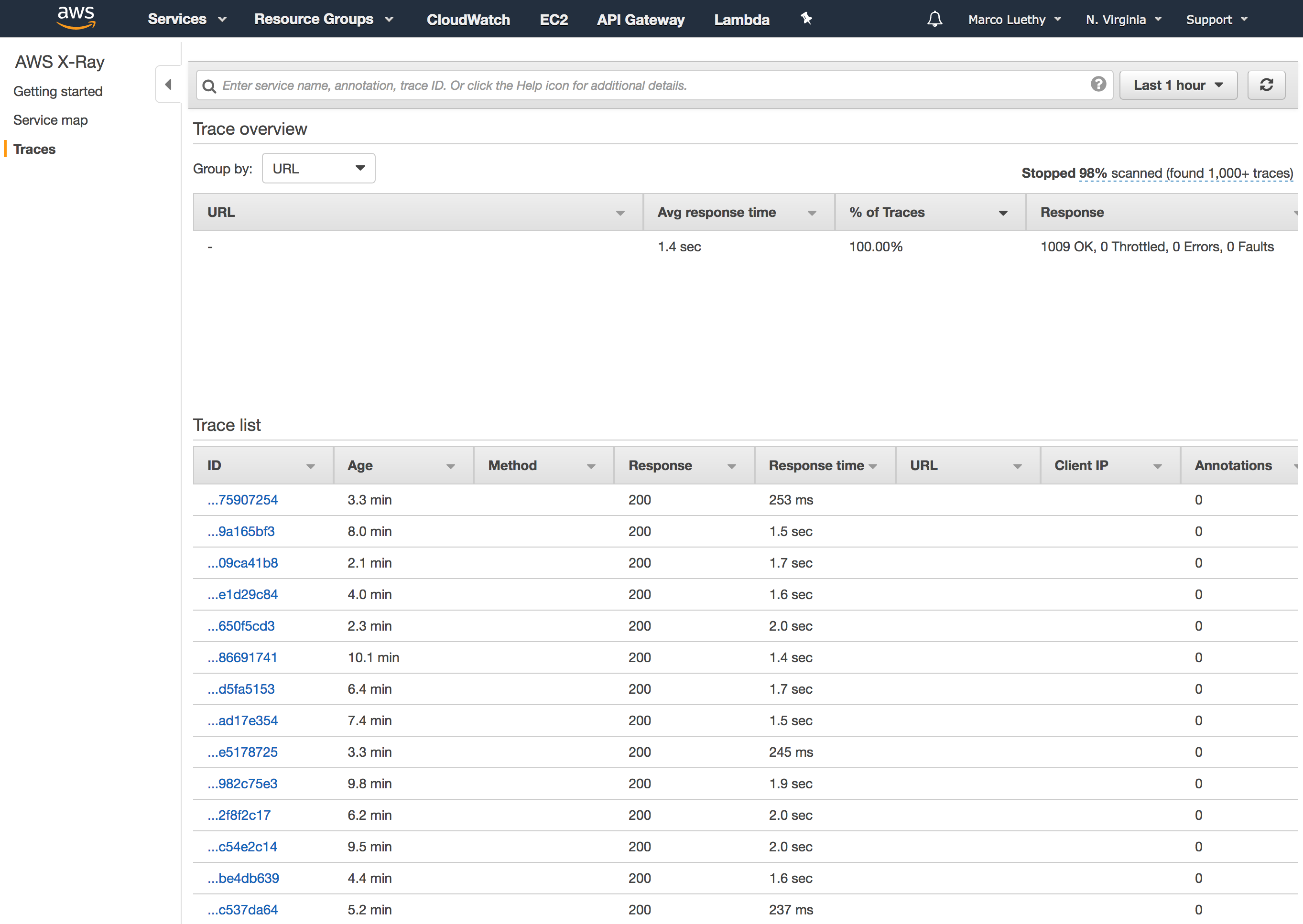
Thanks again everyone who spent time debugging/investigating this Issue. 🙇
adieuadieu
on 18 Nov 2017
Thanks @adieuadieu for making this publicly available! Can confirm completely that it's been smooth sailing since the last '5th invocation hurdle' was taken.
Completely at a tangent: may I ask what you're using to make that great 'performance flow figure'?
gebrits
on 18 Nov 2017
@gebrits
Completely at a tangent: may I ask what you're using to make that great 'performance flow figure'?
It's a screenshot of the "service map" chart produced by X-Ray in the AWS X-Ray Console.
adieuadieu
on 18 Nov 2017
@adieuadieu Where is the source for the altered Chromium?
momer
on 21 Nov 2017
We tried using the latest versions ("1.0.0-7" and "1.0.0-28/29" which has 62.0.3202.94), with Chromeless, and we're still seeing this error. But perhaps I am missing something.
Our debugging suggested that the test for whether headless chrome is already running (which it shouldn't ever be at AWS Lambda invocation/boot?!) is to try to connect to port 9222, our claim is that infrequently this test passes (node is able to connect to 9222) _before_ chrome has been started. But then shortly after it can't connect to 9222 - since it's not our Chrome and whatever it was is now closed. A delay (before doing anything) after invocation of 5ms means it passes every time (no more ERRCONN).
To me this suggests it's a virtualization issue on Lambda (that it's taking up a new invocation before the cleanup has completed e.g. somehow the port is still accessible from a previous invocation of Lambda). But perhaps I am misunderstanding the intended behavior/some subtlety here.
crosslink: https://github.com/graphcool/chromeless/issues/247
 hayd
on 22 Nov 2017
hayd
on 22 Nov 2017
The thing is that AWS lambda is run in a container, that is not guaranteed to be clean everytime you run Lambda. If runs are often, sequential, AWS may reuse the container. So any side effects you do while running Lambda is your responsibility to clean up (writes to /tmp volume, threads and processes).
https://aws.amazon.com/blogs/compute/container-reuse-in-lambda/
So we either kill Chrome every time manually and deal with the result during the next invocation, or dont kill and hope it's still there (container reused) on the next invocation, for us to use. Btw, any chrome process running, will be frozen between invocations and revived again for next ones.
klichukb
on 22 Nov 2017
@klichukb 😮 So that is the "zombie" state Chrome above? Our logs suggest we're never actually reusing these successfully. This could be because Chromeless actually kills the Chrome process as part of its cleanup (maybe doesn't finished executing on the previous run, BUT does finish, and kill Chrome!, upon "thaw").
hayd
on 22 Nov 2017
@hayd Probably, I'm not sure if this is exactly what the term refers to, but indeed its a chrome, that didn't get killed. The thread above should have some fixes about reusing, I currently customized launching chrome, so that it picks random port every time, not 9222, does not conflict, and I let zombies die whenever they want (but still ASAP to free up container memory).
klichukb
on 22 Nov 2017
The only memory leaks ever encountered were with the kill-respawn approach:
headless_shellprocess remains zombied after SIGTERM and doesn't free some of its memory. I don't know much about specifics, only that around 60th invocation on a single container Chrome refuses to start completely. We also tried shutting down the container withprocess.exit(1)in main process, but this doesn't help reclaiming memory and getting rid of zombies.
This is the same experience I had. I could do the kill-respawn cycle around 125 times before it stopped working completely. ps would show a whole bunch of zombie proceses. process.exit() would start a new "container", and ps would show nothing else, but it would still fail to start any new Chrome instance.
Just starting a single Chrome instance and keeping it running works well for me (using the build from aws-lambda-chrome). I just create a new chrome-remote-interface connection and new tab on every request. I've been able to do 2000+ requests in a single instance without any errors using this approach.
 rkistner
on 23 Nov 2017
rkistner
on 23 Nov 2017
@rkistner
Your way sounds promising, do you have any sample code I can refer to though?
That would help a lot.
 gazcn007
on 5 Dec 2017
gazcn007
on 5 Dec 2017
@klichukb
How do you set random ports though, I tried by randomizing port number, but seems like there is lots of dependencies that have defaults for this port number. I don't think there is a unified dependency injection / config file for to sync this port number on each chrome instance invoke.
gazcn007
on 5 Dec 2017
@gazcn007 I can't share all my code yet, but the important bits are here (in TypeScript): https://gist.github.com/rkistner/c695c64ec573581b47e349e8bbe98d86
On port randomization: I've found this typically works for a couple of requests, but actually just hides bigger issues. Firstly it just hides the fact that the old Chrome is still running with an open connection. It is better to handle this by waiting until Chrome is "killed" and the connection closed, and then you can re-use port 9222 again. But then you still have the issue of zombie processes eventually breaking the entire container.
rkistner
on 5 Dec 2017
@rkistner Thanks Ralf, this helps a lot 👍
gazcn007
on 5 Dec 2017
I am using the latest version of serverless-chrome and I am still getting this issue:
2017-12-10T00:07:21.935Z    17787344-dd3e-11e7-a30a-258c4639eef7    Error capturing screenshot for https://github.com/adieuadieu/serverless-chrome { Error: connect ECONNREFUSED 127.0.0.1:9222
at Object.exports._errnoException (util.js:1018:11)
at exports._exceptionWithHostPort (util.js:1041:20)
at TCPConnectWrap.afterConnect [as oncomplete] (net.js:1086:14)
code: 'ECONNREFUSED',
errno: 'ECONNREFUSED',
syscall: 'connect',
address: '127.0.0.1',
port: 9222 }


2017-12-10T00:07:21.940Z    17787344-dd3e-11e7-a30a-258c4639eef7
{
    "errorMessage": "connect ECONNREFUSED 127.0.0.1:9222",
    "errorType": "Error",
    "stackTrace": [
        "Object.exports._errnoException (util.js:1018:11)",
        "exports._exceptionWithHostPort (util.js:1041:20)",
        "TCPConnectWrap.afterConnect [as oncomplete] (net.js:1086:14)"
    ]
}
Any clues? The only way I am able to "fix" this is by running serverless deploy -v, then my lambda works properly for a single request, only to return the same error on the next try.
As for what my lambda does, it's a slightly modified screenshot capturing example. Fails here:
import Cdp from 'chrome-remote-interface';
import sleep from '../utils/sleep';

export default async function captureScreenshotOfUrl (url) {
  const LOAD_TIMEOUT = process.env.PAGE_LOAD_TIMEOUT || 1000 * 60;

  let result;
  let loaded = false;

  const loading = async (startTime = Date.now()) => {
    if (!loaded && Date.now() - startTime < LOAD_TIMEOUT) {
      await sleep(100);
      await loading(startTime);
    }
  };

  const [tab] = await Cdp.List();
  const client = await Cdp({ host: '127.0.0.1', target: tab }); // THIS BIT FAILS

  const {
    Network, Page, Runtime, Emulation,
  } = client;

  Page.loadEventFired(() => {
    loaded = true;
  });

  try {
    await Promise.all([Network.enable(), Page.enable()]);
    await Emulation.setDeviceMetricsOverride({
      mobile: false,
      deviceScaleFactor: 0,
      scale: 1,
      fitWindow: false,
      width: 1280,
      height: 0,
    });
    await Page.navigate({ url });
    await Page.loadEventFired();
    await loading();

    const { result: { value: { height } } } = await Runtime.evaluate({
      expression: `(
        () => ({ height: document.body.scrollHeight })
      )();
      `,
      returnByValue: true,
    });

    await Emulation.setDeviceMetricsOverride({
      mobile: false,
      deviceScaleFactor: 0,
      scale: 1,
      fitWindow: false,
      width: 1280,
      height,
    });

    const screenshot = await Page.captureScreenshot({ format: 'png' });

    result = screenshot.data;
  } catch (error) {
    console.error(error);
  }

  await client.close();

  return result;
}
Any suggestions as to what to try are more than welcome, thanks, and thank you for this awesome package!
 OriginalEXE
on 10 Dec 2017
OriginalEXE
on 10 Dec 2017
I have managed to fix it, huge thanks to @rkistner for inspiration.
Here is my code for anybody that needs it, it's a simple example of the Lambda function that takes url via POST request and generates a screenshot: https://github.com/CodeShots/Code-to-Screenshot/blob/develop/src/handlers/screenshot.js
OriginalEXE
on 11 Dec 2017
@adieuadieu
I spent couple of hours on this setting up chromeless. its clear that chrome is not being terminated properly when the lambda container is frozen,
I've been able to get very stable results just by waiting for the port to free up after terminating chrome.
https://gist.github.com/orporan/84d8260530f89c74a8048e52f7016717
I've tried bunch of other ways to terminate the process and wait for it to free up the port, but this is the only thing that worked.
If anyone wants to point me to how to add this the package I'd be more than happy to do so.
 orporan
on 29 Dec 2017
orporan
on 29 Dec 2017
I am using the latest version 1.0.0.34 and got this error, sometimes after spawning new headless Chrome on AWS Lambda, we got this errors:
2018-01-23T04:30:46.009Z    @serverless-chrome/lambda: Spawning headless shell
2018-01-23T04:30:46.021Z            @serverless-chrome/lambda: ChromeLauncher No debugging port found on port 9222, launching a new Chrome.
2018-01-23T04:30:46.049Z    @serverless-chrome/lambda: Launcher Chrome running with pid 13 on port 9222.
2018-01-23T04:30:46.050Z    @serverless-chrome/lambda: Waiting for Chrome 0
2018-01-23T04:30:46.557Z    @serverless-chrome/lambda: Waiting for Chrome 1
2018-01-23T04:30:46.565Z    @serverless-chrome/lambda: Started Chrome
2018-01-23T04:30:46.566Z    @serverless-chrome/lambda: It took 557ms to spawn chrome.
2018-01-23T04:30:56.750Z            (node:1) UnhandledPromiseRejectionWarning: Unhandled promise rejection (rejection id: 1): Error: socket hang up
END RequestId: 2d503be3-fff6-11e7-b7aa-23030585cee8
The error was:
Error: socket hang up
Does anyone know how to fix this? We tried to chrome.kill() for each request but it still doesn't resolve the problem
Thanks a lot :)
 nmqanh
on 23 Jan 2018
nmqanh
on 23 Jan 2018
@orporan thanks for the idea - it's pragmatic, but still an ugly hack that this kind of approach needs to be used :)
We have 2 use-cases of setting page contents and saving a PDF: "transactional" PDF - i.e. one every couple of minutes, or generating batches of ~300 PDFs. First one is fine, but second breaks quite fast.
Ideally, we would somehow keep the Chrome process open and reused for the whole batch (even though code is individually invoked for each PDF), but if we don't explicitly close the browser, we get a timeout error after first ~20. If we try to close Chrome after each PDF, it makes everything slower and less effective, but gets us to 50+ - before we bump into a hanged process.
Does anyone have a recommendation on what is the current best approach for something similar to this? Should we give up from Lambda for such a use case for now? Thanks!
 leobudima
on 11 Mar 2018
leobudima
on 11 Mar 2018
I imagine generating 300+ PDFs will likely take longer than the max runtime
of a Lambda? Doesn't sound like a very happy match to me.
On Sun, Mar 11, 2018 at 1:05 AM, Leo Budima notifications@github.com
wrote:
@orporan https://github.com/orporan thanks for the idea - it's
pragmatic, but still an ugly hack that this kind of approach needs to be
used :)We have 2 use-cases of setting page contents and saving a PDF:
"transactional" PDF - i.e. one every couple of minutes, or generating
batches of ~300 PDFs. First one is fine, but second breaks quite fast.Ideally, we would somehow keep the Chrome process open and reused for the
whole batch (even though code is individually invoked for each PDF), but if
we don't explicitly close the browser, we get a timeout error after first
~20. If we try to close Chrome after each PDF, it makes everything slower
and less effective, but gets us to 50+ - before we bump into a hanged
process.Does anyone have a recommendation on what is the current best approach for
something similar to this? Should we give up from Lambda for such a use
case for now? Thanks!—
You are receiving this because you were mentioned.
Reply to this email directly, view it on GitHub
https://github.com/adieuadieu/serverless-chrome/issues/41#issuecomment-372077544,
or mute the thread
https://github.com/notifications/unsubscribe-auth/AAYAK5GI3Etbafh_LIB4PQiE3zDPF7X1ks5tdGo4gaJpZM4OYa-l
.
gebrits
on 12 Mar 2018
@leobudima Why not do this on 300 lambdas in parallel?
To optimise cost you could do batches on 10 on 30 parallel lambdas.
Either approach will ensure that you avoid any Lambda imposed limits and return the result quicker to your user :-)
sorenbs
on 12 Mar 2018
@sorenbs, @gebrits thanks for your comments and I apologize for a relatively non-specific and open-ended question.
We did try, as multiple people suggested in different issues, treating each PDF as a separate call to Lambda (browser.close(), explicitly killing the process etc), and that got us further than when trying to reuse the Chrome process, but after a bit we get into issues with same Lambda container being reused between calls and Chrome process being stuck, zombie processes piling up, memory increasing steadily etc - basically all the issues people are mentioning in this thread and others. So I was wondering if anyone had a similar use-case and managed to do something to make it work reliably. I've looked at and tried @rkistner, @OriginalEXE and @orporan 's suggestions before posting, but no luck :/
To summarize:
- we process the batch sequentially, invoking a Lambda function that takes the params, generates a PDF and uploads to S3 let's say 300 times
- trying to reuse the Chrome process between calls - i.e. not calling
browser.close()- timeout and socket errors after ~20 runs - trying to call
browser.close()- zombie processes piling up, hanged process after ~50+ when same container gets reused by Lambda, and steadily increasing memory. Tried process.exit(), but that fails with "Process exited before completing request." and no promise getting resolved on HTTP call to API Gateway that triggers Lambda
Thanks for any help, I'm hoping any suggestions could help others with a similar idea of using Chrome on Lambda in a "batch" manner, rather than one-off, "transactional" calls.
leobudima
on 13 Mar 2018
@leobudima My fix was accepted by the maintainer, so there is no need to add it yourself anymore (and there is no need to call anyone's work ugly). I know I might be stating the obvious but I would look into clearing the zombie processes.
I would also try to increase the memory limit of the Lambda to the maximum allowed, just to see if it makes things better. keep in mind the more memory you allocate, your lambda get more CPU time.
orporan
on 13 Mar 2018
@orporan - I'm truly sorry if I worded things in a way that made it sound like I was calling your work ugly! That wasn't my intention by far - I greatly appreciate anyone's work on OS code and I did value your idea and implementation - I just thought that it's rather unfortunate such an indirect approach needs to be used, which is not your fault (or anyone's here for that matter, I believe) at all. Apologies again, I definitely could have done a better job wording my comment :/
Thanks a lot for your further comments, I'll try to see what can be done about the defunct child processes. Memory is currently set up to 1.5GB, so I'm assuming this isn't a bottleneck.
leobudima
on 14 Mar 2018
@leobudima no worries. I agree with you this is unfortunate. I wonder if we could get in touch with someone at AWS to give guidance on this. Did you try contacting AWS support? its probably not something they officially support. maybe you could get them to make an exception since its in their best to make this use case possible.
orporan
on 14 Mar 2018
@orporan if you are open to investing some time into figuring this out together with AWS, then I can probably put you in touch with the right people on the Lambda team. Would you be open to that?
sorenbs
on 15 Mar 2018
Late arrival to this discussion but I'm observing some odd behavior.
I have a Lambda function, which takes about 60 seconds to run.
If I have two calls to the Lambda function, one coming in around 2 seconds after the first one starts, then the second version of Puppeteer that I am connecting to the instance of serverless chrome appears to take control of it, leaving the last one with no connection.
I thought Lambda functions were independent but apparently not, at least when it is instantiating an instance of Chrome like this. I can check for a pre-existing instance, I guess, and use that. But then what happens to the instance of Chrome when the first one finishes?
 tomgallagher
on 13 Apr 2018
tomgallagher
on 13 Apr 2018
I thought Lambda functions were independent but apparently not, at least when it is instantiating an instance of Chrome like this. I can check for a pre-existing instance, I guess, and use that. But then what happens to the instance of Chrome when the first one finishes?
Two lambda calls running concurrently will always be in two separate processes. The same process can only be used if the calls are sequential. I suspect there is some other issue here.
rkistner
on 13 Apr 2018
So the container will instantiate a new version of serverless chrome on each function invocation? How does that work with the single port number?
tomgallagher
on 13 Apr 2018
Related issues
adieuadieu
·
11Comments
 teledyn
·
7Comments
teledyn
·
7Comments
 Huljo
·
6Comments
Huljo
·
6Comments
 emilburzo
·
5Comments
emilburzo
·
5Comments
 alekseykulikov
·
4Comments
alekseykulikov
·
4Comments
Most helpful comment
@adieuadieu @neekolas not sure if you're still interested in this, but I've found the portion in the Chrome source code that's causing the 'fatal exception at each 5th invocation'
https://chromium.googlesource.com/chromium/src/+/998e890d117912669e3d31ff21b465ee3684966c/content/browser/renderer_host/sandbox_ipc_linux.cc#92
Snippet:
Each time the invocation does succeed, you'll end up seeing a message:
poll: Operation not permitted (1). Every time this is encounted,failed_pollsis increased until it is deemed fatal.Now the root question imho becomes: what does
poll: Operation not permitted (1)do?. Is it trying to poll a file on the local filesystem (which is/tmpon lambda) but not having enough privileges to do so?Going to investigate further.