Server: [20.0.2RC1] db:add-missing-primary-keys is not defined
How to use GitHub
- Please use the 👍 reaction to show that you are affected by the same issue.
- Please don't comment if you have no relevant information to add. It's just extra noise for everyone subscribed to this issue.
- Subscribe to receive notifications on status change and new comments.
Steps to reproduce
- Upgrade NC from 20.0.1 to 20.0.2RC1
- Run
occ db:add-missing-primary-keys - Watch admin panel telling you:
> The database is missing some primary keys. Due to the fact that adding primary keys on big tables could take some time they were not added automatically. By running "occ db:add-missing-primary-keys" those missing primary keys could be added manually while the instance keeps running.
Expected behaviour
The suggested command can be executed.
Actual behaviour
The suggested command cannot be executed:
  Command "db:add-missing-primary-keys" is not defined.

  Did you mean one of these?
      db:add-missing-columns
      db:add-missing-indices
      db:convert-filecache-bigint
      db:convert-mysql-charset
      db:convert-type
Server configuration
Operating system: Debian Bullseye
Web server: 2.4.46
Database: 10.3.24
PHP version: 7.4.11
Nextcloud version: 20.0.2RC1
Updated from an older Nextcloud/ownCloud or fresh install: Upgrade from 20.0.1
Where did you install Nextcloud from: https://download.nextcloud.com/server/releases/
Signing status:
Signing status
No errors have been found.
List of activated apps:
App list
Enabled:
  - accessibility: 1.6.0
  - activity: 2.13.3
  - apporder: 0.11.0
  - calendar: 2.1.2
  - cloud_federation_api: 1.3.0
  - contacts: 3.4.1
  - dashboard: 7.0.0
  - dav: 1.16.1
  - federatedfilesharing: 1.10.1
  - files: 1.15.0
  - files_rightclick: 0.17.0
  - files_trashbin: 1.10.1
  - files_versions: 1.13.0
  - impersonate: 1.7.0
  - logreader: 2.5.0
  - lookup_server_connector: 1.8.0
  - nextcloud_announcements: 1.9.0
  - notes: 4.0.0
  - notifications: 2.8.0
  - oauth2: 1.8.0
  - photos: 1.2.0
  - previewgenerator: 3.0.1
  - provisioning_api: 1.10.0
  - ransomware_protection: 1.8.0
  - settings: 1.2.0
  - spreed: 10.0.1
  - survey_client: 1.8.0
  - tasks: 0.13.6
  - twofactor_backupcodes: 1.9.0
  - updatenotification: 1.10.0
  - viewer: 1.4.0
  - workflowengine: 2.2.0
Disabled:
  - admin_audit
  - comments
  - contactsinteraction
  - encryption
  - federation
  - files_external
  - files_pdfviewer
  - files_sharing
  - files_videoplayer
  - firstrunwizard
  - password_policy
  - privacy
  - recommendations
  - serverinfo
  - sharebymail
  - support
  - systemtags
  - text
  - theming
  - user_ldap
  - user_status
  - weather_status
Nextcloud configuration:
Config report
{
    "system": {
        "passwordsalt": "***REMOVED SENSITIVE VALUE***",
        "secret": "***REMOVED SENSITIVE VALUE***",
        "trusted_domains": [
            "localhost",
            "micha.gnoedi.org"
        ],
        "datadirectory": "***REMOVED SENSITIVE VALUE***",
        "dbtype": "mysql",
        "version": "20.0.2.0",
        "memcache.local": "\\OC\\Memcache\\APCu",
        "filelocking.enabled": true,
        "memcache.locking": "\\OC\\Memcache\\Redis",
        "redis": {
            "host": "***REMOVED SENSITIVE VALUE***",
            "port": 0
        },
        "dbname": "***REMOVED SENSITIVE VALUE***",
        "dbhost": "***REMOVED SENSITIVE VALUE***",
        "dbtableprefix": "oc_",
        "dbuser": "***REMOVED SENSITIVE VALUE***",
        "dbpassword": "***REMOVED SENSITIVE VALUE***",
        "installed": true,
        "instanceid": "***REMOVED SENSITIVE VALUE***",
        "loglevel": 2,
        "logtimezone": "Europe\/Berlin",
        "filesystem_check_changes": 0,
        "hashingThreads": 4,
        "hashingMemoryCost": 16384,
        "hashingTimeCost": 3,
        "trashbin_retention_obligation": "disabled",
        "versions_retention_obligation": "disabled",
        "skeletondirectory": "",
        "maintenance": false,
        "overwrite.cli.url": "https:\/\/micha.gnoedi.org\/nextcloud",
        "htaccess.RewriteBase": "\/nextcloud",
        "mail_smtpmode": "smtp",
        "mail_smtpauthtype": "LOGIN",
        "mail_smtpsecure": "ssl",
        "mail_from_address": "***REMOVED SENSITIVE VALUE***",
        "mail_domain": "***REMOVED SENSITIVE VALUE***",
        "mail_smtpauth": 1,
        "mail_smtphost": "***REMOVED SENSITIVE VALUE***",
        "mail_smtpport": "465",
        "mail_smtpname": "***REMOVED SENSITIVE VALUE***",
        "mail_smtppassword": "***REMOVED SENSITIVE VALUE***",
        "theme": "",
        "knowledgebaseenabled": false,
        "mysql.utf8mb4": true,
        "updater.release.channel": "beta",
        "tempdirectory": "\/mnt\/sda\/ncdata\/tmp",
        "preview_max_x": 2048,
        "preview_max_y": 2048,
        "jpeg_quality": 60,
        "app_install_overwrite": [
            "apporder",
            "calendar",
            "impersonate",
            "ransomware_protection",
            "contacts",
            "spreed"
        ],
        "updater.secret": "***REMOVED SENSITIVE VALUE***"
    }
}
Are you using external storage, if yes which one: none
Are you using encryption: no
Are you using an external user-backend, if yes which one: none
Logs
None
 MichaIng
All 25 comments
It is strange, since https://github.com/nextcloud/server/blob/master/core/Command/Db/AddMissingPrimaryKeys.php does exist and content looks fine.
Ah, I think it needs to be registered here like the others, will run a local test and in case open a PR: https://github.com/nextcloud/server/blob/master/core/register_command.php#L102-L103
MichaIng
on 12 Nov 2020
Works great:
Check primary keys.
Adding primary key to the federated_reshares table, this can take some time...
federated_reshares table updated successfully.
Adding primary key to the systemtag_object_mapping table, this can take some time...
systemtag_object_mapping table updated successfully.
Adding primary key to the comments_read_markers table, this can take some time...
comments_read_markers table updated successfully.
Adding primary key to the collres_resources table, this can take some time...
collres_resources table updated successfully.
Adding primary key to the collres_accesscache table, this can take some time...
collres_accesscache table updated successfully.
Adding primary key to the filecache_extended table, this can take some time...
filecache_extended table updated successfully.
Fixed with: #24085
MichaIng
on 13 Nov 2020
Thanks to Michalng and AlexG-78
I wrote a summary for Newbies like me :).
- Move to the directory where you installed nextcloud e.g. /var/www/html/nextcloud/core/
- Open the file: register_command.php
Check if line 104 equals:
$application->add(new OCCoreCommandDbAddMissingPrimaryKeys(OC::$server->getDatabaseConnection(),OC::$server->getEventDispatcher()));
If not add this line. - Move to nextcloud installation directory var/www/html/nextcloud/
- Run the following command to add the missing keys: sudo -u www-data php occ db:add-missing-primary-keys
 aska-GitHub
on 19 Nov 2020
aska-GitHub
on 19 Nov 2020
Or upgrade to v20.0.2 which has the issue solved 😃.
MichaIng
on 19 Nov 2020
Good evening my nexcloud instance is running on an asustor NAS
I can't find the command to set up primary keys
I have modified the register_command.php file
my installation at the following path
volume1 / web / nexcloud-php
How to do ?
thank you
 Arnaud031
on 19 Nov 2020
Arnaud031
on 19 Nov 2020
Guys, please do not manually edit the file (anymore), also the hint on the admin panel does not mean that you instance is broken or similar, or that you "need" to do anything. Instead, it is an additional check (+new command) which has been added to allow admins further enhance their instance. I added the command manually to the registration file for testing reasons only, to check whether this is really everything that needs to be done to make it working.
Now: Please update to Nextcloud v20.0.2 which has the fix, so no need to manually mess with files 🙂. v20.0.1 btw does not have the command at all, as well no related admin panel warning.
@Arnaud031
If you updated your instance to v20.0.2 and hopefully did not actually edit the "correct" file there, you should be able to do:
sudo -u www-data php /volume1/web/nextcloud-php/occ db:add-missing-primary-keys
- In case replace
www-datawith the user that actually runs your webserver. - Verify the (absolute) path to your Nextcloud instance, e.g. that it is not located within
/mntor/media.
MichaIng
on 19 Nov 2020
thank you for your reply
I am a novice, I have updated to 20.0.2
I tested your order in but it does not work
the instance being hosted on an asustor nas I have the impression that the operation is different from a classic linux server
if the error does not cause an operating problem I leave it like this because my skills are very limited
and i don't want to disturb you
Thank you again for your help
Arnaud031
on 19 Nov 2020
I tested your order in but it does not work
What is the error message you receive?
MichaIng
on 20 Nov 2020
Hi all, I am getting my heart out to use the occ command in centos, to correct those primary keys missing. Maybe I am just stupid, but on everything that I try, I always get: "command not found".
Any help is really appreciated.
Thanks in advance.
 TheMguyMUC
on 20 Nov 2020
TheMguyMUC
on 20 Nov 2020
Please use the documentation to find out about how to use Nextcloud features: https://docs.nextcloud.com/server/latest/admin_manual/configuration_server/occ_command.html
It contains an example that matches mine above and further explanation.
If you still need help, ask on the forum: https://help.nextcloud.com/
This GitHub issue was about solving a bug, not about admin panel warning in general and especially not about the question how occ needs to be called. Note that GitHub in general is used by Nextcloud as a development platform, not a support forum 😉.
MichaIng
on 20 Nov 2020
Please use the documentation to find out about how to use Nextcloud features: https://docs.nextcloud.com/server/latest/admin_manual/configuration_server/occ_command.html
It contains an example that matches mine above and further explanation.If you still need help, ask on the forum: https://help.nextcloud.com/
This GitHub issue was about solving a bug, not about admin panel warning in general and especially not about the question how
occneeds to be called. Note that GitHub in general is used by Nextcloud as a development platform, not a support forum 😉.
Wow, very helpful and kind of you. First of all, I have the same problem described here, second of all do you really think that i did not read the documentation(rhetoric question, I did and didn't help), 3. Look up at the first comment(did you read in my comment something about "admin panel warning in general" or about GitHub being a support forum?):
"Watch admin panel telling you:
The database is missing some primary keys. Due to the fact that adding primary keys on big tables could take some time they were not added automatically. By running "occ db:add-missing-primary-keys" those missing primary keys could be added manually while the instance keeps running."
Thank you 😉.
TheMguyMUC
on 20 Nov 2020
Sorry if that did sound (i.e. read) rude, it was not meant to be, I just want to prevent this issue becoming something it is not meant to be and redirecting you (and everyone else who lands here) to the right location.
You did not understand the bug I faced and fixed:
- The bug was not the admin panel warning or that the
occcould not have been found, but a missing registration of theocccommands internal options / sub-commands, that was only present in the release candidate, not in any stable Nextcloud release. So it is in fact not possible that someone still has "the same problem described here" 😉. - Your issue is that you do not find the location of your
occcommand and that is not an issue of Nextcloud, not even the Nextcloud docs, but either of missing docs of your specific appliance/implementation of that you did not document yourself how/where you installed Nextcloud to (no offence, as this happens to me all the time 😄). Theocccommand is located in the root your Nextcloud install directory. Since it is usually and reasonably not part of the systemsPATH, you can only call it by using the full file path and likely by invoking it via PHP CLI command (usually simplyphp), and you must call it as the very same user that runs your webserver and PHP. So the example above and the one from the documentation should tell you everything that is relevant, of course the actual file path and the user need to be replaced with the ones matching your setup. Otherwise someone needs to investigate your case more deeply, e.g.find / -name occto search the system for the file as a start, but that is a support request that you should ask for on the forum: https://help.nextcloud.com/
You can ping me there @MichaIng and I'm glad to help you, but a not related (!) GitHub bug report is simply not the right place.
MichaIng
on 20 Nov 2020
Привет всем, я получаю мое сердце, чтобы использовать команду occ в centos, чтобы исправить эти первичные ключи отсутствуют. Может быть, я просто глуп, но на все, что я пытаюсь, я всегда получаю: "команда не найдена".
Любая помощь действительно ценится.
Заранее спасибо.
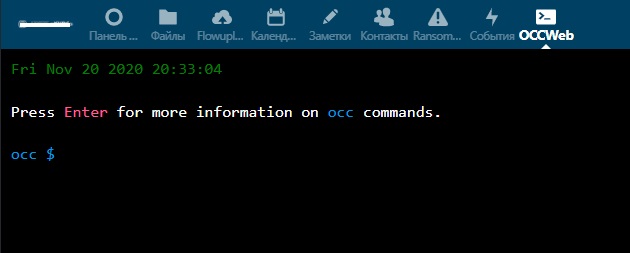
Hi! I suggest installing the occ web app from the Next cloud store. After installation, run it through the Next cloud interface and run the db:add-missing-primary-keys command. You can also try running the command in the terminal: sudo -u apache php ac db: add-missing-primary-key
 RuTactics
on 20 Nov 2020
RuTactics
on 20 Nov 2020
Sorry if that did sound (i.e. read) rude, it was not meant to be, I just want to prevent this issue becoming something it is not meant to be and redirecting you (and everyone else who lands here) to the right location.
You did not understand the bug I faced and fixed:
- The bug was not the admin panel warning or that the
occcould not have been found, but a missing registration of theocccommands internal options / sub-commands, that was only present in the release candidate, not in any stable Nextcloud release. So it is in fact not possible that someone still has "the same problem described here" 😉.- Your issue is that you do not find the location of your
occcommand and that is not an issue of Nextcloud, not even the Nextcloud docs, but either of missing docs of your specific appliance/implementation of that you did not document yourself how/where you installed Nextcloud to (no offence, as this happens to me all the time 😄). Theocccommand is located in the root your Nextcloud install directory. Since it is usually and reasonably not part of the systemsPATH, you can only call it by using the full file path and likely by invoking it via PHP CLI command (usually simplyphp), and you must call it as the very same user that runs your webserver and PHP. So the example above and the one from the documentation should tell you everything that is relevant, of course the actual file path and the user need to be replaced with the ones matching your setup. Otherwise someone needs to investigate your case more deeply, e.g.find / -name occto search the system for the file as a start, but that is a support request that you should ask for on the forum: https://help.nextcloud.com/
You can ping me there @MichaIng and I'm glad to help you, but a not related (!) GitHub bug report is simply not the right place.
Hi Michalng, thanks for the reply. I know, the problem was in the register_command.php without the command being registered. My occ was in the right place, just that I couldn't run the command(still don't know the reason 😄 ). I posted here after many hours of research without result, as my last resort. I did solve the problem tho directly from phpMyAdmin. If someone needs it, here it is:
alter table TABLE_NAME add columnidint(10) unsigned primary key AUTO_INCREMENT;
Sorry for the confusion, I understand you perfectly.
Have a nice one.
TheMguyMUC
on 20 Nov 2020
Привет всем, я получаю мое сердце, чтобы использовать команду occ в centos, чтобы исправить эти первичные ключи отсутствуют. Может быть, я просто глуп, но на все, что я пытаюсь, я всегда получаю: "команда не найдена".
Любая помощь действительно ценится.
Заранее спасибо.Hi! I suggest installing the occ web app from the Next cloud store. After installation, run it through the Next cloud interface and run the db:add-missing-primary-keys command. You can also try running the command in the terminal: sudo -u apache php ac db: add-missing-primary-key
Hi,
Thanks for the tip.
TheMguyMUC
on 20 Nov 2020
Then I probably misunderstand you, as you pasted the error message
"command not found"
which matches the shell error when not using the correct file path:
2020-11-20 19:23:28 root@micha:~# occ
bash: occ: command not found
However, glad that you solved it meanwhile. The occ web app is indeed a nice one to avoid all the occ invoke issues and especially enable it for users of hosting providers which do not necessarily have PHP CLI or any shell access.
MichaIng
on 20 Nov 2020
Then I probably misunderstand you, as you pasted the error message
"command not found"
which matches the shell error when not using the correct file path:
2020-11-20 19:23:28 root@micha:~# occ
bash: occ: command not found
However, glad that you solved it meanwhile. The occ web app is indeed a nice one to avoid all the occ invoke issues and especially enable it for users of hosting providers which do not necessarily have PHP CLI or any shell access.
Sorry again for that. The occ app, unfortunately is deprecated. It could have been a very nice tool.
TheMguyMUC
on 20 Nov 2020
Or upgrade to v20.0.2 which has the issue solved 😃.
Hi @MichaIng ,
sadly it did not solve the issue...
After updating today to 20.0.2 I get the Security & setup warnings in /settings/admin/overview
here are some warnings regarding your setup.
The database is missing some primary keys. Due to the fact that adding primary keys on big tables could take some time they were not added automatically. By running “occ db:add-missing-primary-keys” those missing primary keys could be added manually while the instance keeps running.
Missing primary key on table “oc_federated_reshares”.
Missing primary key on table “oc_systemtag_object_mapping”.
Missing primary key on table “oc_comments_read_markers”.
Missing primary key on table “oc_collres_resources”.
Missing primary key on table “oc_collres_accesscache”.
Missing primary key on table “oc_filecache_extended”.
I’m running Nextcloud on a Pine64 Rockpro together with OpenMediaVault 5 (NGINX / Debian based).
Nextcloud 20.0.1 was running without any warmings or security issues
Greetings, Hemertje
 hemertje
on 23 Nov 2020
hemertje
on 23 Nov 2020
@hemertje please read my comment above carefully and simply follow the instructions given in the admin panel.
MichaIng
on 23 Nov 2020
thx for pointing me
hemertje@NAS-rockpro64:/var/www/nextcloud$ sudo -u www-data php occ db:add-missing-primary-keys
Check primary keys.
Adding primary key to the federated_reshares table, this can take some time...
federated_reshares table updated successfully.
Adding primary key to the systemtag_object_mapping table, this can take some time...
systemtag_object_mapping table updated successfully.
Adding primary key to the comments_read_markers table, this can take some time...
comments_read_markers table updated successfully.
Adding primary key to the collres_resources table, this can take some time...
collres_resources table updated successfully.
Adding primary key to the collres_accesscache table, this can take some time...
collres_accesscache table updated successfully.
Adding primary key to the filecache_extended table, this can take some time...
filecache_extended table updated successfully.
hemertje@NAS-rockpro64:/var/www/nextcloud$
Another prove that the command now does exactly what it should:
- The 6 tables from the admin panel warning are updated.
- The warning should hence be gone now 🙂.
MichaIng
on 23 Nov 2020
Yes, All checks passed.
But from the point of view of the enduser...
Why not below the warning a shortcut/link that runs the
'sudo -u nextcloud-user php occ db:add-missing-primary-keys'
command?
The nextcloud-user to use is known within the system.
Endusers doesn't have to visit the help pages and forums...
Just a thought!
Greetings...
hemertje
on 24 Nov 2020
Your exact example would fail if:
sudois not installed or not available for the user (not in PATH) or it is not permitted to use it in this way. Others might want/need to usesuor login with the "nextcloud-user" for an interactive session.- I think most container appliances like Docker, Snap would not work with this.
- In case of shared hostings, there might be not even any console access, or no PHP CLI access.
- PHP CLI is not installed, or multiple versions are and
phpmight be linked to a wrong version that is not supported yet or anymore by Nextcloud, or has required modules not installed/enabled or falsely configured. - You are not currently inside of the Nextcloud install directory.
I'm not sure if it's possible to cover all cases correctly by Nextcloud scripts themselves (i.e. print the complete correct command and where to enter it), and if not, it's probably best to leave this minimal (indeed incomplete), but 100% correct, way it is now. Probably those admin panel warnings could contain a short "read more" linkt to the documentation about how to call occ.
But that is all not related to this bug report/issue but an own topic that affects all the other existing similar warnings that exist for years. So I suggest to open an own issue or pull request either here to adjust the admin panel warnings or at the documentation repo to address this.
MichaIng
on 24 Nov 2020
I think most container appliances like Docker, Snap would not work with this.
It works in my docker setup liker this:
docker exec -it -u www-data XXXXXXXXXXXXX php occ db:add-missing-primary-keys
am "XXXXXXXXXXXXX" must replaced by the container id yyou can find in "docker ps"
 mr-gosh
on 30 Nov 2020
mr-gosh
on 30 Nov 2020
If you installed with Snap, Maybe you can try sudo /snap/bin/nextcloud.occ db:add-missing-primary-keys
 chinasb
on 2 Dec 2020
chinasb
on 2 Dec 2020
Related issues
 arno01
·
3Comments
arno01
·
3Comments
 blackcrack
·
3Comments
blackcrack
·
3Comments
 georgehrke
·
3Comments
georgehrke
·
3Comments
 ghost
·
3Comments
ghost
·
3Comments
 dl5rcw
·
3Comments
dl5rcw
·
3Comments
Most helpful comment
It is strange, since https://github.com/nextcloud/server/blob/master/core/Command/Db/AddMissingPrimaryKeys.php does exist and content looks fine.
Ah, I think it needs to be registered here like the others, will run a local test and in case open a PR: https://github.com/nextcloud/server/blob/master/core/register_command.php#L102-L103