Server: No Restore button in Deleted Shares
Steps to reproduce
- A shares to B the folder "Test"
- B click unshare "Test", so "Test" is in Deleted shares
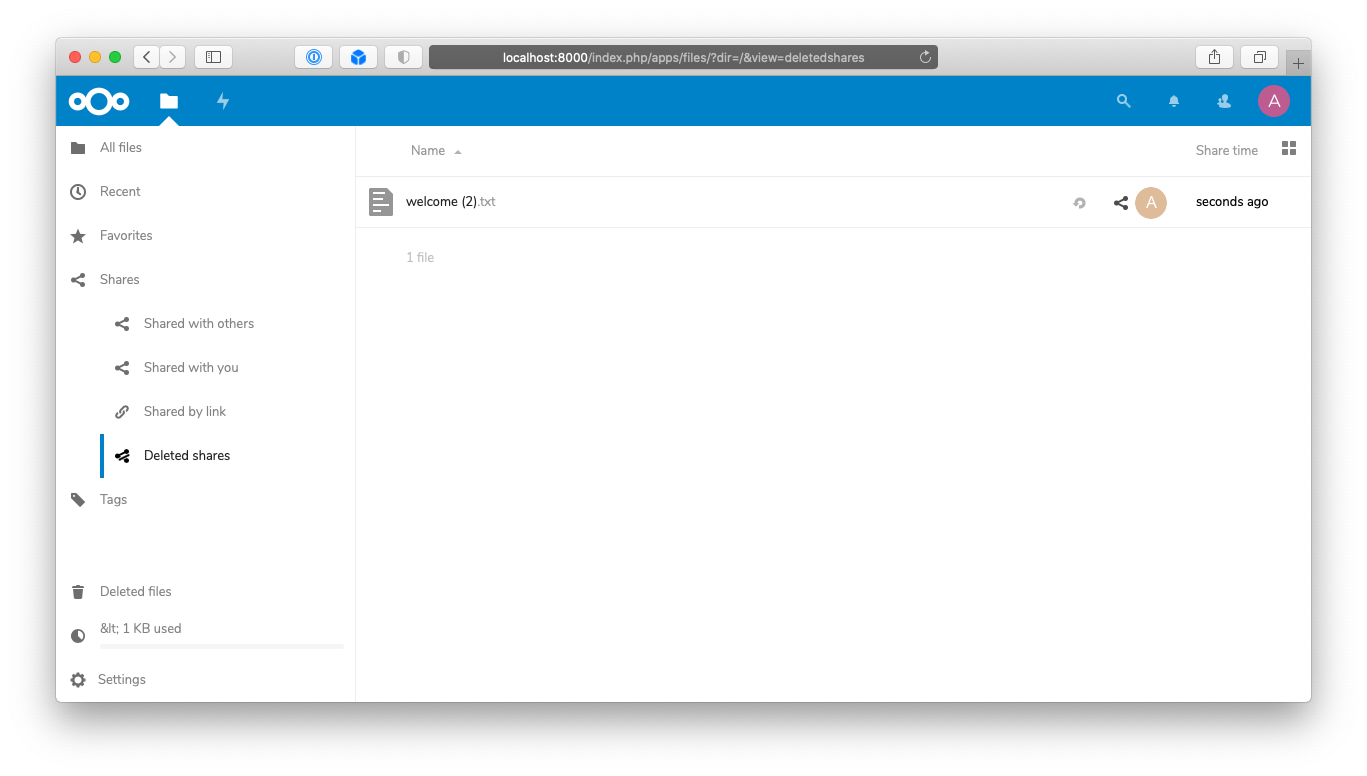
- B goes to Deleted shares : no button to restore the folder "Test"

Expected behaviour
It should be possible to restore folder
Actual behaviour
No button to do it
Server configuration
Operating system:
Ubuntu 18.04
Web server:
Nginx
Database:
MariaDB
PHP version:
7.2
Nextcloud version: (see Nextcloud admin page)
Nextcloud 19.0.3
Updated from an older Nextcloud/ownCloud or fresh install:
Where did you install Nextcloud from:
Signing status:
Signing status
No errors have been found.
List of activated apps:
App list
Enabled:
  - accessibility: 1.5.0
  - activity: 2.12.0
  - calendar: 2.0.4
  - cloud_federation_api: 1.2.0
  - comments: 1.9.0
  - contacts: 3.4.0
  - contactsinteraction: 1.0.0
  - dav: 1.15.0
  - deck: 1.1.0
  - federatedfilesharing: 1.9.0
  - federation: 1.9.0
  - files: 1.14.0
  - files_pdfviewer: 1.8.0
  - files_rightclick: 0.16.0
  - files_sharing: 1.11.0
  - files_trashbin: 1.9.0
  - files_versions: 1.12.0
  - files_videoplayer: 1.8.0
  - firstrunwizard: 2.8.0
  - guests: 1.5.0
  - impersonate: 1.6.1
  - logreader: 2.4.0
  - lookup_server_connector: 1.7.0
  - nextcloud_announcements: 1.8.0
  - notifications: 2.7.0
  - oauth2: 1.7.0
  - onlyoffice: 6.0.2
  - password_policy: 1.9.1
  - photos: 1.1.0
  - privacy: 1.3.0
  - provisioning_api: 1.9.0
  - recommendations: 0.7.0
  - serverinfo: 1.9.0
  - settings: 1.1.0
  - sharebymail: 1.9.0
  - spreed: 9.0.4
  - support: 1.2.1
  - systemtags: 1.9.0
  - text: 3.0.1
  - theming: 1.10.0
  - twofactor_backupcodes: 1.8.0
  - updatenotification: 1.9.0
  - viewer: 1.3.0
  - workflowengine: 2.1.0
Disabled:
  - admin_audit
  - caniupdate
  - encryption
  - files_external
  - sharerenamer
  - survey_client
  - user_ldap
Nextcloud configuration:
Config report
{
    "system": {
        "passwordsalt": "***REMOVED SENSITIVE VALUE***",
        "secret": "***REMOVED SENSITIVE VALUE***",
        "trusted_domains": [
            "localhost",
            "nuage.grap.coop"
        ],
        "datadirectory": "***REMOVED SENSITIVE VALUE***",
        "overwrite.cli.url": "nuage.grap.coop",
        "dbtype": "mysql",
        "version": "19.0.3.1",
        "dbname": "***REMOVED SENSITIVE VALUE***",
        "dbhost": "***REMOVED SENSITIVE VALUE***",
        "dbport": "",
        "dbtableprefix": "oc_",
        "dbuser": "***REMOVED SENSITIVE VALUE***",
        "dbpassword": "***REMOVED SENSITIVE VALUE***",
        "installed": true,
        "instanceid": "***REMOVED SENSITIVE VALUE***",
        "activity_expire_days": 14,
        "auth.bruteforce.protection.enabled": true,
        "blacklisted_files": [
            ".htaccess",
            "Thumbs.db",
            "thumbs.db"
        ],
        "cron_log": true,
        "enable_previews": true,
        "enabledPreviewProviders": [
            "OC\\Preview\\PNG",
            "OC\\Preview\\JPEG",
            "OC\\Preview\\GIF",
            "OC\\Preview\\BMP",
            "OC\\Preview\\XBitmap",
            "OC\\Preview\\Movie",
            "OC\\Preview\\PDF",
            "OC\\Preview\\MP3",
            "OC\\Preview\\TXT",
            "OC\\Preview\\MarkDown"
        ],
        "filesystem_check_changes": 0,
        "filelocking.enabled": "true",
        "htaccess.RewriteBase": "\/",
        "integrity.check.disabled": false,
        "knowledgebaseenabled": false,
        "logfile": "\/var\/nc_data\/nextcloud.log",
        "loglevel": 0,
        "logtimezone": "Europe\/Berlin",
        "log_rotate_size": 104857600,
        "maintenance": false,
        "memcache.local": "\\OC\\Memcache\\APCu",
        "memcache.locking": "\\OC\\Memcache\\Redis",
        "overwriteprotocol": "https",
        "preview_max_x": 1024,
        "preview_max_y": 768,
        "preview_max_scale_factor": 1,
        "redis": {
            "host": "***REMOVED SENSITIVE VALUE***",
            "port": 0,
            "timeout": 0
        },
        "quota_include_external_storage": false,
        "share_folder": "\/Partag\u00e9s avec toi",
        "skeletondirectory": "",
        "theme": "",
        "trashbin_retention_obligation": "auto, 7",
        "updater.release.channel": "stable",
        "onlyoffice": {
            "verify_peer_off": true
        },
        "default_language": "fr",
        "default_locale": "fr",
        "mail_from_address": "***REMOVED SENSITIVE VALUE***",
        "mail_smtpmode": "smtp",
        "mail_smtpauthtype": "LOGIN",
        "mail_domain": "***REMOVED SENSITIVE VALUE***",
        "mail_smtpsecure": "ssl",
        "mail_smtpauth": "1",
        "mail_smtphost": "***REMOVED SENSITIVE VALUE***",
        "mail_smtpport": "465",
        "mail_smtpname": "***REMOVED SENSITIVE VALUE***",
        "mail_smtppassword": "***REMOVED SENSITIVE VALUE***",
        "data-fingerprint": "b2dec10f73397562e346b466c90d6e9d",
        "sentry.dsn": "http:\/\/[email protected]:9000\/7",
        "sentry.minimum.log.level": 3,
        "sentry.public-dsn": "http:\/\/[email protected]:9000\/7",
        "app_install_overwrite": [
            "spreed",
            "caniupdate"
        ],
        "mysql.utf8mb4": true,
        "updater.secret": "***REMOVED SENSITIVE VALUE***"
    }
}
Client configuration
Browser:
Firefox and Chromium
Operating system:
Ubuntu
 quentinDupont
All 21 comments
Does anybody have a workaround apart from resharing for this? This is quite critical if a user accidentially removes himself from a share.
 smirta
on 7 Oct 2020
smirta
on 7 Oct 2020
Does anybody have a workaround apart from resharing for this? This is quite critical if a user accidentially removes himself from a share.
In my case, I can't afford to remove the share and redo it because it would mean that it will impact 100 accounts, then they will have to search for the shared folder in "Shared with you". I don't want to spend the next few weeks explaining this to users :frowning:
quentinDupont
on 7 Oct 2020
Does anybody have a workaround apart from resharing for this? This is quite critical if a user accidentially removes himself from a share.
In my case, I can't afford to remove the share and redo it because it would mean that it will impact 100 accounts, then they will have to search for the shared folder in "Shared with you". I don't want to spend the next few weeks explaining this to users frowning
Same here, that's why I'm asking. You didn't find a way around it yet, too?
smirta
on 7 Oct 2020
It should be a post request to /ocs/v2.php/apps/files_sharing/api/v1/deletedshares/\
smirta
on 7 Oct 2020
@rullzer @skjnldsv Wasn't this fixed in some of the last major versions?
 MorrisJobke
on 7 Oct 2020
MorrisJobke
on 7 Oct 2020
I don't see any action appearing on master, so doesn't look fixed.
For group shares: as far as I can see in the "oc_share" table a deleted group share has "permissions=0" in oc_share. If I set the permissions back to the one of the parent group share, the entry in question appears again in the file list.
For direct user shares, the entry disappears from the database so there is no way to restore it directly.
Maybe user shares should also stay in the database with "permisisons=0" ? But then there is no way to directly restore to the original permissions.
Another alternative would be to use the "accepted" field and set it to another value, for example 2 instead of 1.
 PVince81
on 7 Oct 2020
PVince81
on 7 Oct 2020
For group shares: as far as I can see in the "oc_share" table a deleted group share has "permissions=0" in oc_share. If I set the permissions back to the one of the parent group share, the entry in question appears again in the file list.
I can confirm this. Setting permissions back to 15 for the affected user solves this.
smirta
on 7 Oct 2020
I don't see any action appearing on master, so doesn't look fixed.
Okay - then we only talked about adding this, but it didn't managed to get into a release. We had already some discussion about how to solve this. Maybe @schiessle remembers it, because I can't find it here on GitHub. 🙈
MorrisJobke
on 7 Oct 2020
Yeah there was just discussion.
For groupshares it should :tm: work.
For user shares there is still work to be done.
 rullzer
on 8 Oct 2020
rullzer
on 8 Oct 2020
Yeah there was just discussion.
For groupshares it should tm work.
For user shares there is still work to be done.
Sorry for my english, what does it mean "tm work" ?
quentinDupont
on 9 Oct 2020
Sorry for my english, what does it mean "tm work" ?
Group shares are working like this right now, because in this approach the users that reject the share are added as separate DB entries to know which users of the group still have the share and which not. For user shares the whole implementation works differently because there each user has it's share without this list of users that rejected it, because in this case it is just deleted.
MorrisJobke
on 9 Oct 2020
Sorry for my english, what does it mean "tm work" ?
Group shares are working like this right now, because in this approach the users that reject the share are added as separate DB entries to know which users of the group still have the share and which not. For user shares the whole implementation works differently because there each user has it's share without this list of users that rejected it, because in this case it is just deleted.
I think the restore button for group shares is good enough. Just in case this would speed-up fixing it.
smirta
on 12 Oct 2020
I think the restore button for group shares is good enough. Just in case this would speed-up fixing it.
The restore button for group shares is there already. It is only not implemented for user shares.
MorrisJobke
on 12 Oct 2020
I think the restore button for group shares is good enough. Just in case this would speed-up fixing it.
The restore button for group shares is there already. It is only not implemented for user shares.
My 1st example was not precise enough but actually, it's a group share deleted that I can't restore because there is no button.
quentinDupont
on 13 Oct 2020
I think the restore button for group shares is good enough. Just in case this would speed-up fixing it.
The restore button for group shares is there already. It is only not implemented for user shares.
No, it's not there for shares shared with a group. Did you mean shares from the group folder app? We do not use it.
smirta
on 14 Oct 2020
I can reproduce and will look into it.
MorrisJobke
on 14 Oct 2020
I just looked into it and the feature was there but got lost. So this is a regression.
- missing in stable16, 17, 18 and master
- there in stable15:
MorrisJobke
on 14 Oct 2020
Regression from #19698 (0731981bbf048ad11f9be8a9fc1ea3294615a16a to be specific)
MorrisJobke
on 14 Oct 2020
I debugged a bit and found out that the reason is that in many places we used the jQuery selector a.name, also in the part that injects the actions. So when the default actions is disabled, the "a" element becomes a "p", so the selector would need to be p.name...
Since this might touch many places, even apps, we might want to keep the "a" element there and cancel the click programmatically for the default action.
PVince81
on 14 Oct 2020
Since this might touch many places, even apps, we might want to keep the "a" element there and cancel the click programmatically for the default action.
Shouldn't the preventDefault() already help with the browser behavior and then we just don't trigger any action on click?
MorrisJobke
on 14 Oct 2020
Fix is here https://github.com/nextcloud/server/pull/23630
PVince81
on 22 Oct 2020
Related issues
MorrisJobke
·
3Comments
 e-alfred
·
3Comments
e-alfred
·
3Comments
 georgehrke
·
3Comments
georgehrke
·
3Comments
 jancborchardt
·
3Comments
jancborchardt
·
3Comments
 ghost
·
3Comments
ghost
·
3Comments
Most helpful comment
I debugged a bit and found out that the reason is that in many places we used the jQuery selector
a.name, also in the part that injects the actions. So when the default actions is disabled, the "a" element becomes a "p", so the selector would need to bep.name...Since this might touch many places, even apps, we might want to keep the "a" element there and cancel the click programmatically for the default action.