Server: Memory Leak in lib/private/Preview/Generator.php -> generatePreviews
How to use GitHub
- Please use the 👍 reaction to show that you are affected by the same issue.
- Please don't comment if you have no relevant information to add. It's just extra noise for everyone subscribed to this issue.
- Subscribe to receive notifications on status change and new comments.
Steps to reproduce
- Cause generatePreviews to be executed many times from the same script (like running the previewgenerator app) with no existing previews - problem only occurs if a preview hasn't already been generated
- Watch memory disappear until memory limit is reached (regardless of what the limit is set at - tried up to an 8gb memory limit)
Expected behaviour
You shouldn't run out of memory
Actual behaviour
You run out of memory
Investigation Already Completed
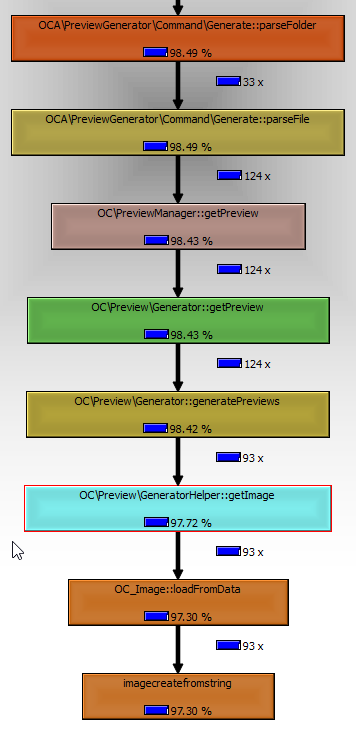
- modified previewgenerator generate-all command to dump memory profile with php_memory_profiler
- determined that imagecreatefromstring being called from OC_Image::loadFromData was causing the memory issues (over 97% of memory used by imagecreatefromstring (see image below)
- traced call chain in nextcloud to the call loading $maxPreviewImage in the generatePreviews function
- modified generatePreviews to check if $maxPreviewImage is !== null prior to return, and if it is to call imagedestroy($maxPreviewImage->resource())
                if($maxPreviewImage !== null){
                        imagedestroy($maxPreviewImage->resource());
                }

                return $preview;
- problem went away - went from an OOM condition after 5-30 images to hundreds of previews being generated and memory consumption staying manageable
Is this the best solution? 🤷 does it work for this problem? It appears so.
It seems there may be a memory leak in the underlying php imagecreatefromstring function but this work-around allows things to function as expected, at least for me. I usually do most of my coding these days in python and go, so I may not be the best person to submit a PR for this.
Server configuration
Operating system:
Official nextcloud docker image
Web server: apache - built into docker image base with all optional packages installed per nextcloud docker documentation
Database: mysql
PHP version: 7.4.8
Nextcloud version: 19.0.1
Updated from an older Nextcloud/ownCloud or fresh install: updated from 19.0.0 where issue was also observed
Where did you install Nextcloud from: dockerhub + addition of extra packages
 elijahnyp
All 8 comments
The fix also solves my OOM issues with preview:generate-all. Thanks!
 rusitschka
on 25 Jul 2020
rusitschka
on 25 Jul 2020
Thanks for digging :+1: I guess that was fun :sunglasses:
Is this the best solution?
It makes sense. Could you try $maxPreviewImage = null (after foreach, before the return)? It should do roughly the same. I'm a bit unsure about imagedestroy($maxPreviewImage->resource()) because it leaves the $maxPreviewImage in a weird state as the used resource is destroyed but the wrapper object is still there. I would expect $maxPreviewImage = null to have the same effect.
 kesselb
on 25 Jul 2020
kesselb
on 25 Jul 2020
Thanks for digging 👍 I guess that was fun 😎
Is this the best solution?
It makes sense. Could you try
$maxPreviewImage = null(after foreach, before the return)? It should do roughly the same. I'm a bit unsure aboutimagedestroy($maxPreviewImage->resource())because it leaves the $maxPreviewImage in a weird state as the used resource is destroyed but the wrapper object is still there. I would expect$maxPreviewImage = nullto have the same effect.
That doesn't fix the issue. I see the memory leak again with $maxPreviewImage = null.
rusitschka
on 25 Jul 2020
I believe the issue is related to memory not being cleared by the garbage collector from the imagecreatefromstring call. The variables are all falling out of scope, so garbage collection should be clearing them. However, this isn't happening. Setting $maxPreviewImage = null just queues the variable up for garbage collection, which is what isn't working in the first place. the imagedestroy function appears to be specifically designed to clear all memory associated with an image independent of the garbage collection process. Some of the very old comments on the documentation appear to indicate that this is just the way PHP image processing is designed. The only way to be sure you've cleared the memory associated with an image is to use imagedestroy.
elijahnyp
on 25 Jul 2020
Thanks for digging 👍 I guess that was fun 😎
Is this the best solution?
It makes sense. Could you try
$maxPreviewImage = null(after foreach, before the return)? It should do roughly the same. I'm a bit unsure aboutimagedestroy($maxPreviewImage->resource())because it leaves the $maxPreviewImage in a weird state as the used resource is destroyed but the wrapper object is still there. I would expect$maxPreviewImage = nullto have the same effect.
the $maxPreviewImage variable is local to the function and isn't returned. In theory, it should only exist in the scope of the function call. Once the function returns, it's reference count should drops to zero, same as setting it to null or calling unset on it.
Once at zero, garbage collection should free the memory. However, I suspect there's a reference being maintained to the image in the PHP image processing libraries which is preventing the memory from being cleared by the garbage collector.
If it helps, I can put together a PR for this, just let me know what's going to be most efficient.
elijahnyp
on 25 Jul 2020
If it helps, I can put together a PR for this, just let me know what's going to be most efficient.
Thanks :+1: Please create a pull request.
        if ($maxPreviewImage instanceof IImage) {
            $maxPreviewImage->destroy();
        }
        $maxPreviewImage = null;
Here's what I would do.
I think we can use the destory method as imagedestroy is used internally.
Once at zero, garbage collection should free the memory. However, I suspect there's a reference being maintained to the image in the PHP image processing libraries which is preventing the memory from being cleared by the garbage collector.
I guess that is the reference.
kesselb
on 25 Jul 2020
If it helps, I can put together a PR for this, just let me know what's going to be most efficient.
Thanks 👍 Please create a pull request.
      if ($maxPreviewImage instanceof IImage) {
          $maxPreviewImage->destroy();
      }
      $maxPreviewImage = null;
Here's what I would do.
I think we can use the destory method as
imagedestroyis used internally.Once at zero, garbage collection should free the memory. However, I suspect there's a reference being maintained to the image in the PHP image processing libraries which is preventing the memory from being cleared by the garbage collector.
I guess that is the reference.
Looks great - I'll test this approach and put a PR together
elijahnyp
on 25 Jul 2020
The fix also solves my OOM issues with preview:generate-all. Thanks!
patched generatePreview. now preview preview:generate-all is not dying cuz of oom anymore. Hoping for this to be fixed in 19.0.2 =)
 MarcoR83
on 26 Jul 2020
MarcoR83
on 26 Jul 2020
Related issues
 MorrisJobke
·
3Comments
MorrisJobke
·
3Comments
 Django-BOfH
·
3Comments
Django-BOfH
·
3Comments
 ChristophWurst
·
3Comments
ChristophWurst
·
3Comments
 georgehrke
·
3Comments
georgehrke
·
3Comments
 rullzer
·
3Comments
rullzer
·
3Comments
Most helpful comment
patched generatePreview. now preview preview:generate-all is not dying cuz of oom anymore. Hoping for this to be fixed in 19.0.2 =)