Server: Breadcrumb ellipsizes early in Brave browser
Steps to reproduce
Opening:
Home -> Folder1 -> Folder2
will sometimes look like this (good UI):

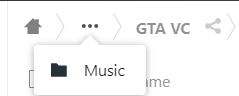
and at other times, like this (bad UI):

Clicking the three dots only shows the preceeding folder, thus requiring an extra click to go back one level.
Expected behaviour
I dont want the three dot to be displayed when browsing through my NC, it makes navigating unnecessarily longer and serves zero purpose. At all times, the navigation bar should look like the 1st picture.
Server configuration
NC 18.0.4
 pilsnerbeer
All 11 comments
cc @nextcloud/designers
 kesselb
on 6 Jun 2020
kesselb
on 6 Jun 2020
At all times, the navigation bar should look like the 1st picture.
It should look like in the 1st picture as long as there is enough free horizontal space available. Unfortunately one cannot see on this screenshot the browser size. Can you please post another screenshot where the full browser is visible @pilsnerbeer ?
 stefan-niedermann
on 6 Jun 2020
stefan-niedermann
on 6 Jun 2020
plenty of space in my browser I think

pilsnerbeer
on 6 Jun 2020
I would consider this as a bug, yes. In my setup (Firefox LTS) this does not happen. Can you share more details about your environment? (Browser, Browser-Version, Operating System etc)
stefan-niedermann
on 6 Jun 2020
I just found out that I dont have that problem on Firefox either. I use Brave browser, I disabled all plugins and shields that I use and the problem is still there. (Brave version 1.9.76 Chromium: 81.0.4044.138 (Official Build) (64-bit)); So it does seem to be browser-related but I dont know what's causing it.
pilsnerbeer
on 6 Jun 2020
I occasionally have this problem on Firefox as well. This was one of the reasons why we created a Breadcrumbs component for the vue-components: https://nextcloud-vue-components.netlify.app/#/Components/Breadcrumbs
The new component shows the correct behaviour and will be used by the Files app at some point. It's just that no one stepped up to integrate the Breadcrumbs component yet.
 raimund-schluessler
on 6 Jun 2020
raimund-schluessler
on 6 Jun 2020
@pilsnerbeer since the issue appears in Brave for you, could you test if you can reproduce this in plain Chromium/Chrome?
 jancborchardt
on 7 Jun 2020
jancborchardt
on 7 Jun 2020
@jancborchardt weirdly, I can't reproduce it on Chromium. Only Brave seems to be affected.
pilsnerbeer
on 7 Jun 2020
I use Brave too and had this issue before, but i can't currently reproduce it.
I never had this issue in Chrome and pure Chromium
 JonathanTreffler
on 18 Jun 2020
JonathanTreffler
on 18 Jun 2020
@pilsnerbeer can you still reproduce this with Nextcloud 19, the current version? :)
jancborchardt
on 19 Jun 2020
Sorry - yes, the issue persists on NC19.
pilsnerbeer
on 21 Jun 2020
Related issues
 arno01
·
3Comments
arno01
·
3Comments
 juliushaertl
·
3Comments
juliushaertl
·
3Comments
 ChristophWurst
·
3Comments
ChristophWurst
·
3Comments
 williambargent
·
3Comments
williambargent
·
3Comments
 rullzer
·
3Comments
rullzer
·
3Comments
Most helpful comment
I occasionally have this problem on Firefox as well. This was one of the reasons why we created a Breadcrumbs component for the vue-components: https://nextcloud-vue-components.netlify.app/#/Components/Breadcrumbs
The new component shows the correct behaviour and will be used by the Files app at some point. It's just that no one stepped up to integrate the Breadcrumbs component yet.