Server: "Default quota" incorrectly displayed in administrator settings
Steps to reproduce
- Log in as an administrator.
- Select from the "Users" settings.
- Edit user settings.
- Change "Quota" to "Default quota".
- Save settings.
Expected behaviour
Correct display of the "Default quota".
Actual behaviour
The default limit is displayed as "0 B".

Nextcloud version: (see Nextcloud admin page)
19.0.0 RC2 and 18.0.4
 Valdnet
All 12 comments
The bug still hasn't been removed even though we already have Nextcloud 20.0.1.
@MorrisJobke Who to contact about correcting the code?
Valdnet
on 26 Oct 2020
cc @skjnldsv @juliushaertl @PVince81
 MorrisJobke
on 26 Oct 2020
MorrisJobke
on 26 Oct 2020
Confirmed still happening in NC 20.0.0.
I guess that maybe the value isn't properly evaluated in the users list.
 PVince81
on 27 Oct 2020
PVince81
on 27 Oct 2020
Right, and once I refresh the page it displays the actual default value in GB instead of just saying "Default quota".
And when I change the default quota on the left panel, it doesn't refresh every entry in the list.
PVince81
on 27 Oct 2020
Hmm there's a discrepancy in the data:
the server populates the "quota" value with the same like "total" when a default quota is set:
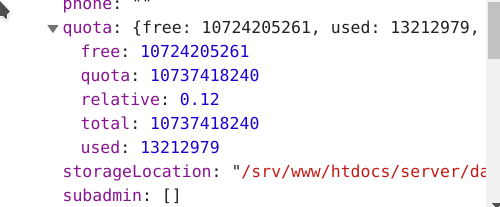
it's only when directly setting default quota that it becomes "default" locally. but upon next refresh, the server value will override it.
so will need to adjust the server to return the string "default" instead of a value
PVince81
on 27 Oct 2020
I decided to not bother with this a long time ago (nc14 I think?)
Default quota will apply the default quota, but not display it. It's been like that since a long time and it's the cleaner way imho. Let's not bother handling string and numbers, just display the actual value of what "default quota" is. This was also requested by users as otherwise you don't always know what it refers to.
 skjnldsv
on 27 Oct 2020
skjnldsv
on 27 Oct 2020
Regarding default quota there is also https://github.com/nextcloud/server/issues/11393 and https://github.com/nextcloud/server/pull/13909 where we tried to improve the default quota as well. It had some tricky side effects and for that reason wasn't continued.
MorrisJobke
on 27 Oct 2020
Also, remember this endpoint is also used by other apps/clients that might actually need the exact quota byte count. I would refrain from touching this.
skjnldsv
on 27 Oct 2020
Yeah, I'm also worried about API breakage...
So the quick fix is that after applying the default storage upon edit, the string will display the matching size value. And after refresh you'll see the same value. This way it looks consistent.
PVince81
on 27 Oct 2020
Also: when the default quota is "unlimited", the server returns "-3" for the quota (instead of "none") so "0 B" appears as well.
PVince81
on 27 Oct 2020
PR here: https://github.com/nextcloud/server/pull/23711
I also fixed the "-3" issue there in case of unlimited default quota.
PVince81
on 27 Oct 2020
@MorrisJobke @PVince81 @skjnldsv Thank you for your interest and the quick fix🥇.
Valdnet
on 27 Oct 2020
Related issues
 georgehrke
·
3Comments
georgehrke
·
3Comments
 dl5rcw
·
3Comments
dl5rcw
·
3Comments
 arno01
·
3Comments
arno01
·
3Comments
 brylie
·
3Comments
brylie
·
3Comments
 rullzer
·
3Comments
rullzer
·
3Comments
Most helpful comment
PR here: https://github.com/nextcloud/server/pull/23711
I also fixed the "-3" issue there in case of unlimited default quota.