Server: "Download picture" downloaded file has a wrong .vcf extension (Firefox only)
To Reproduce
Steps to reproduce the behavior:
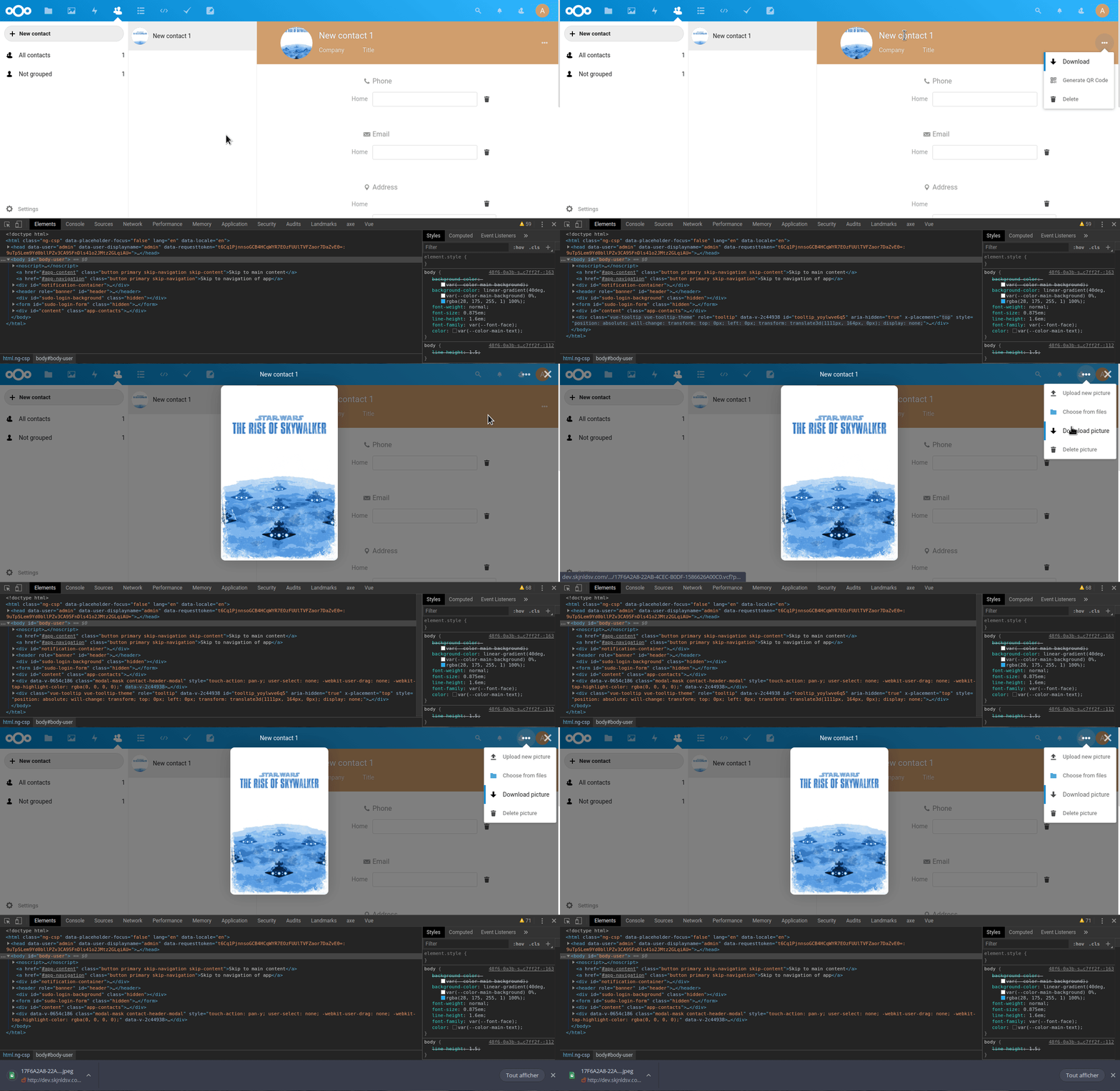
- Go to any contact
- Click on the avatar
- Open the 3-dot menu in the top right and click "Download picture"
- Open the downloaded file
Expected behavior
The picture is opened.
Actual behavior
Because the file is called Some ID.vcf, it is opened with the text editor and just shows jumbled characters.
Changing the extension to .jpg fixes the issue.
Happens with latest master and happened some weeks before too.
 jancborchardt
All 14 comments
I cannot reproduce. Works fine here.
https://github.com/nextcloud/contacts/blob/8762b46b3a61b903da026ab35dec45bbbc9379cd/src/components/ContactDetails/ContactDetailsAvatar.vue#L60
 skjnldsv
on 24 Mar 2020
skjnldsv
on 24 Mar 2020
skjnldsv
on 24 Mar 2020
Heh, indeed works with Chromium for me as well. Seems to be a Firefox issue as I can reproduce it on my personal instance, the company instance, as well as on local dev env.
jancborchardt
on 24 Mar 2020
Then it's an issue for server
https://github.com/nextcloud/server/blob/5bf3d1bb384da56adbf205752be8f840aac3b0c5/apps/dav/lib/CardDAV/ImageExportPlugin.php#L106
header('Content-Disposition: attachment; filename="'.$_SESSION['name'].'.txt"');
https://stackoverflow.com/questions/9246905/variable-php-download-header-file-name
skjnldsv
on 24 Mar 2020
@skjnldsv how should we move forward then – transfer the issue to server, loop someone else it, or anything else?
jancborchardt
on 2 Apr 2020
I guess adding the filename in the Content-Disposition header should work
skjnldsv
on 2 Apr 2020
@skjnldsv Hi , anyone working on this?
 deepankkartikey
on 8 Apr 2020
deepankkartikey
on 8 Apr 2020
Nope, go for it @deepank120896 :)
Welcome!
skjnldsv
on 8 Apr 2020
Is this resolved?
 sarkisben
on 11 Jul 2020
sarkisben
on 11 Jul 2020
Is this resolved?
If it would have been solved the issue ticket status would be "closed" 😉
 j-ed
on 11 Jul 2020
j-ed
on 11 Jul 2020
Alrighty, I would like to take a stab at it then.
sarkisben
on 11 Jul 2020
@sarkisben sure! :)
Feel free to dive into it!
We're available in the contacts public channel if you have questions https://cloud.nextcloud.com/call/wx2oqhpy
skjnldsv
on 14 Jul 2020
Is it preferred we save the photo as Some ID.png or can it just be ContactPhoto.png?
@skjnldsv
 jneplokh
on 21 Jul 2020
jneplokh
on 21 Jul 2020
Is it preferred we save the photo as
Some ID.pngor can it just beContactPhoto.png?
I would use the contact filename and use the correct extension (can be png, svg, jpeg... etc)
skjnldsv
on 22 Jul 2020
Related issues
 georgehrke
·
3Comments
georgehrke
·
3Comments
 ThomasLeister
·
3Comments
ThomasLeister
·
3Comments
 e-alfred
·
3Comments
e-alfred
·
3Comments
 brylie
·
3Comments
brylie
·
3Comments
 rullzer
·
3Comments
rullzer
·
3Comments