Server: Add confirm button in new link share pending expire/password menu

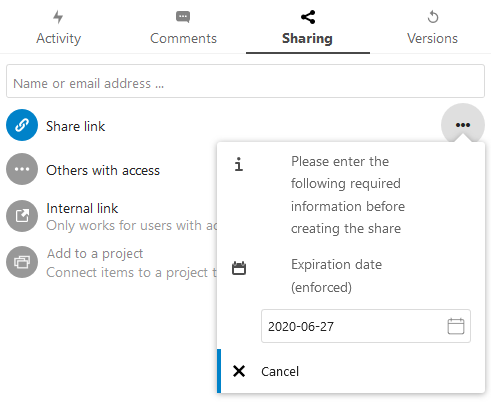
When there is a forced expiration date set and a link is shared, the user gets a dialog suggesting he has to enter required information. In the dialog there is only a cancel button, but no ok/accept button. it is counterintuitive to have to click outside the dialog to create the share. please add an ok/accept button (above the cancel button).
 Ethendrel
All 19 comments
cc @nextcloud/designers
 acsfer
on 19 Feb 2020
acsfer
on 19 Feb 2020
Yes, we should definitely have a confirmation button there, as it is not obvious at all that the share link will be created if you close the popover by clicking outside.
 juliushaertl
on 21 Feb 2020
juliushaertl
on 21 Feb 2020
@skjnldsv
juliushaertl
on 21 Feb 2020
Come on 😭
I put back the click outside to save because when we removed it we received lots of complaint ^^'
There is a cancel button for this exact purpose.
This will not be reverted. Clicking outside is saving.
 skjnldsv
on 27 Feb 2020
skjnldsv
on 27 Feb 2020
☹️ The assumption that everyone knows that clicking just somewhere else to save is questionable.
 kesselb
on 27 Feb 2020
kesselb
on 27 Feb 2020
@kesselb you can say the same on the other way around :p
cc @jancborchardt
skjnldsv
on 27 Feb 2020
Most obvious would be to have 2 buttons on the bottom: Cancel and Confirm, Confirm being the primary button.
Clicking outside to save as well is an ok addition, but should not be the _only_ way to save. :)
(Also, what is wrong with the text alignment in that screenshot?)
 jancborchardt
on 27 Feb 2020
jancborchardt
on 27 Feb 2020
Can we have an admin option to not force/show this popup? i.e. allow the old behavior that it blindly defaulted to the max date
My users aren't going to like this popup (actually did a rollback from 18.0.3 to 17.0.5 because of this). We just enforce an expiration so clients have to call if they're digging up an old link for some reason.
 krocheck
on 28 Mar 2020
krocheck
on 28 Mar 2020
@krocheck the popup was always there. It's not new.
The max date is still used by default.
skjnldsv
on 28 Mar 2020
@skjnldsv I don't know that I agree. In 17.0.5 when you click the + to create a link there is no popup. It simply creates the link with the defaults and you can click the copy link button immediately.
krocheck
on 28 Mar 2020
In 17.0.5 when you click the + to create a link there is no popup
Then it is an issue, that is supposed to be the difference between enforce and set default.
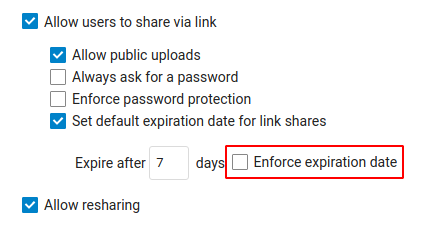
If it's enforced, then the popup will show as it's mandatory.
If not, then it should just create with defaults.
Can we have an admin option to not force/show this popup?
Anyway, to answer your question, no, we do not want to complicate things further.
Either the ux flow is discussed and we only allow the user to change the expiration after the creation, or we keep it as is. And as far as I know this was the decision taken :)
skjnldsv
on 28 Mar 2020
Negative. We have enforce checked and there is no popup in 17. It simply takes the max date as default, which has always been fine for us. I cannot think of any version historically (I think we deployed v11 originally) that has had a popup like what this issue is reviewing. That Enforce setting has been in place for us from go. Here's a screenshot of those settings in our deployment:
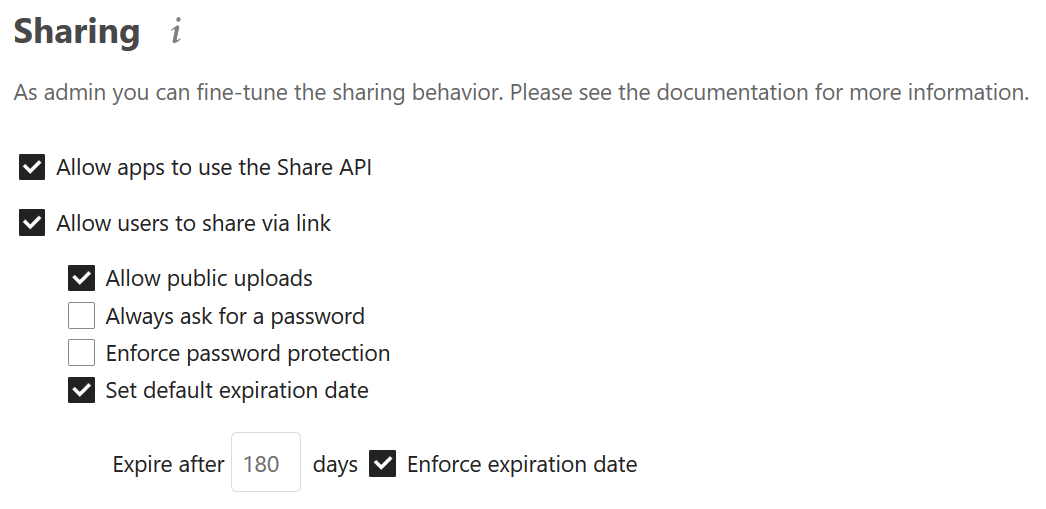
Correct me if I'm wrong, the purpose of "Enforce..." is to set a maximum number of days the link can be active AND make it so the expiration can't be turned off. For us its 180 days (~6 months). Its just a way to ensure that a link won't live on indefinitely. The product has a broad user base with different use cases, I get that. But from my perspective that checkbox wouldn't be the trigger for a popup, rather the "Set default expiration..." setting. The nature of there being a default should necessitate the popup.
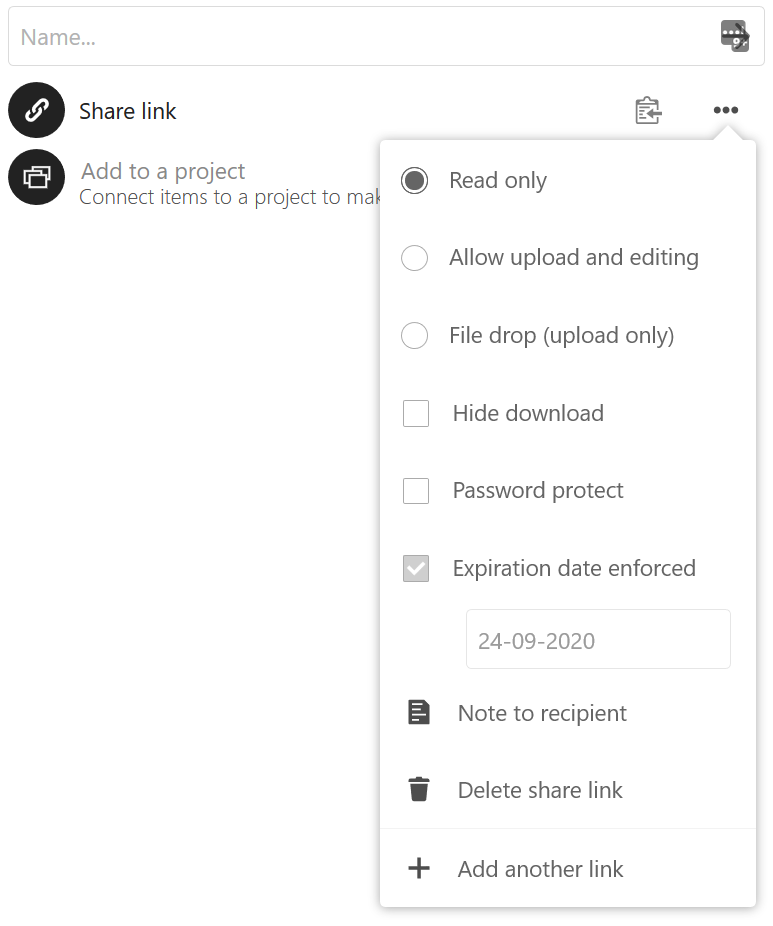
Like I said, I rolled back from 18 because the interface as noted originally seems to be broken. I agree that it is not intuitive with a cancel button present that clicking off is a 'save'. My users would prefer the behavior in 17, but I wouldn't mind if the full dropdown (for reference, a screenshot is below) were to "popup" after creation.
krocheck
on 28 Mar 2020
Negative. We have enforce checked and there is no popup in 17
Your screenshot doesn't show you have enforce checked :thinking:
For me it works just fine on 18. Just default set and not enforced.
The popup doesn't show, link is created right away :)
skjnldsv
on 28 Mar 2020
BAAAH ... took the screenshot at the wrong time. I was testing the behavior with those settings changed.
Screenshot is updated with the way we usually have the settings.
krocheck
on 28 Mar 2020
Then it's exactly the intended behavior :)
Enforce mean we always ask for the user input.
Sharing is already full of various configs, we'll not complicate it further.
skjnldsv
on 28 Mar 2020
I'm not seeing the need for this popup ... I'm going to cancel sharing a file because an expiration date is enforced? Nor am I seeing why a user input is required because enforce is checked. The default is populated anyway. But let's table my argument that the popup itself in this form isn't necessary.
That still doesn't change the original issue that there really should be an ok/confirm button in this popup if a cancel button is going to be present.
krocheck
on 28 Mar 2020
I'm not seeing the need for this popup ... I'm going to cancel sharing a file because an expiration date is enforced? Nor am I seeing why a user input is required because enforce is checked. The default is populated anyway. But let's table my argument that the popup itself in this form isn't necessary.
Security. It allows the user to set a password/expiredate BEFORE the share is created. Otherwise you can have a small delay where a share exists with the inproper date or no password
skjnldsv
on 28 Mar 2020
In my head I'm going ... "yeah, but". Different use cases at play and we don't enforce passwords (as seen earlier). Ok. Point taken on the need for the popup. Let's just get an OK button in there then ;)
krocheck
on 28 Mar 2020
I'm in a similar situation where we enforce expiration dates and have a default set. It's helpful to read through this issue to get an understanding of why it behaves this way, but I have one other suggestion in addition to adding a confirm button (yes we need that for our users, it is not intuitive to click outside). And besides all of the discussion here, the user manual needs to be updated to reflect this stuff (it is pretty barebones, I already created an issue there).
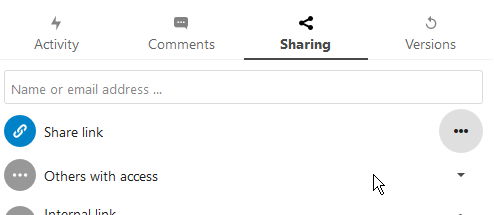
Anyway the other issue with this dialog is that if you're like me and for some reason like to click the menu button to close out of it (the 3 dots), it does not create the share and I'm left wondering what the dickens is going on with Nextcloud? It closes the dialog, but nothing else happens. So is it possible that collapsing the dialog by clicking the menu button also creates the link?
 linucksrox
on 29 May 2020
linucksrox
on 29 May 2020
Related issues
 arno01
·
3Comments
arno01
·
3Comments
 mfechner
·
3Comments
mfechner
·
3Comments
 mama21mama
·
3Comments
mama21mama
·
3Comments
 rullzer
·
3Comments
rullzer
·
3Comments
 ThomasLeister
·
3Comments
ThomasLeister
·
3Comments
Most helpful comment
In my head I'm going ... "yeah, but". Different use cases at play and we don't enforce passwords (as seen earlier). Ok. Point taken on the need for the popup. Let's just get an OK button in there then ;)