Server: Escaping of Ampersand "&" in translation strings broken
Steps to reproduce
- Open the security section in the settings and look at the headline of "Devices & sessions"
Expected behaviour
It should be Devices & sessions or Geräte & Sitzungen.
Actual behaviour
It is Devices & sessions or Geräte & Sitzungen.
I think this is caused by the replacement for escapeHTML as i have seen the same issue in my own app.
In NC 17 t('core', 'A&B'); returns "A&B", in NC 18 t('core', 'A&B'); returns "A&B"
Server configuration
Operating system: Ubuntu 18.04
Web server: Nginx
Database: MariaDB
PHP version: 7.3.13
Nextcloud version: 18.0.0 RC1
Updated from an older Nextcloud/ownCloud or fresh install: fresh install
Where did you install Nextcloud from: releases page on Github (also happens with official docker image nextcloud:18-beta-fpm)
Signing status:
Signing status
No errors have been found.
List of activated apps:
App list
Enabled:
  - accessibility: 1.4.0
  - activity: 2.11.0
  - cloud_federation_api: 1.1.0
  - comments: 1.8.0
  - dav: 1.14.0
  - federatedfilesharing: 1.8.0
  - federation: 1.8.0
  - files: 1.13.1
  - files_pdfviewer: 1.7.0
  - files_rightclick: 0.15.2
  - files_sharing: 1.10.1
  - files_trashbin: 1.8.0
  - files_versions: 1.11.0
  - files_videoplayer: 1.7.0
  - firstrunwizard: 2.7.0
  - logreader: 2.3.0
  - lookup_server_connector: 1.6.0
  - nextcloud_announcements: 1.7.0
  - notifications: 2.6.0
  - oauth2: 1.6.0
  - password_policy: 1.8.0
  - passwords: 2020.1.0-BUILD
  - photos: 1.0.0
  - privacy: 1.2.0
  - provisioning_api: 1.8.0
  - recommendations: 0.6.0
  - serverinfo: 1.8.0
  - settings: 1.0.0
  - sharebymail: 1.8.0
  - support: 1.1.0
  - survey_client: 1.6.0
  - systemtags: 1.8.0
  - text: 1.2.3
  - theming: 1.9.0
  - twofactor_backupcodes: 1.7.0
  - updatenotification: 1.8.0
  - viewer: 1.2.0
  - workflowengine: 2.0.0
Disabled:
  - admin_audit
  - encryption
  - files_external
  - user_ldap
Nextcloud configuration:
Config report
{
    "system": {
        "memcache.local": "\\OC\\Memcache\\APCu",
        "apps_paths": [
            {
                "path": "\/var\/www\/html\/apps",
                "url": "\/apps",
                "writable": false
            },
            {
                "path": "\/var\/www\/html\/custom_apps",
                "url": "\/custom_apps",
                "writable": true
            }
        ],
        "mail_smtpmode": "smtp",
        "mail_smtphost": "***REMOVED SENSITIVE VALUE***",
        "mail_smtpport": "1025",
        "mail_smtpsecure": "",
        "mail_smtpauth": false,
        "mail_smtpauthtype": "LOGIN",
        "mail_smtpname": "***REMOVED SENSITIVE VALUE***",
        "mail_smtppassword": "***REMOVED SENSITIVE VALUE***",
        "mail_from_address": "***REMOVED SENSITIVE VALUE***",
        "mail_domain": "***REMOVED SENSITIVE VALUE***",
        "passwordsalt": "***REMOVED SENSITIVE VALUE***",
        "secret": "***REMOVED SENSITIVE VALUE***",
        "trusted_domains": [
            "localhost",
            "passwords.local"
        ],
        "datadirectory": "***REMOVED SENSITIVE VALUE***",
        "dbtype": "mysql",
        "version": "18.0.0.8",
        "overwrite.cli.url": "https:\/\/localhost",
        "dbname": "***REMOVED SENSITIVE VALUE***",
        "dbhost": "***REMOVED SENSITIVE VALUE***",
        "dbport": "",
        "dbtableprefix": "oc_",
        "mysql.utf8mb4": true,
        "dbuser": "***REMOVED SENSITIVE VALUE***",
        "dbpassword": "***REMOVED SENSITIVE VALUE***",
        "installed": true,
        "instanceid": "***REMOVED SENSITIVE VALUE***",
        "loglevel": 0,
        "defaultapp": "passwords",
        "theme": "",
        "maintenance": false,
        "updater.release.channel": "beta"
    }
}
Are you using external storage, if yes which one: no
Are you using encryption: no
Are you using an external user-backend, if yes which one: no
Client configuration
Browser: Firefox 71
Operating system: Ubuntu 18.04
Logs
Web server error log
Web server error log
No errors
Nextcloud log (data/nextcloud.log)
Nextcloud log
No errors
Browser log
Browser log
no errors
 marius-wieschollek
All 10 comments
According to git bisect, #17123 is when the translate function started to return pre-escaped ampersand. Testing with Mozilla Firefox 72.0b11.
cc @rullzer, You tried to fix this with #17254, right?
I can also reproduce the issue with Chromium 79.0.3945.79 on master.
 gary-kim
on 5 Jan 2020
gary-kim
on 5 Jan 2020
Yeah seems to be broken by a recent upgrade of DOMPurify.
Discussed with @ChristophWurst. A posthook is probably easiest.
 rullzer
on 8 Jan 2020
rullzer
on 8 Jan 2020
Discussed with @ChristophWurst. A posthook is probably easiest.
https://github.com/cure53/DOMPurify/issues/379 not quite, apparently.
 ChristophWurst
on 8 Jan 2020
ChristophWurst
on 8 Jan 2020
Just seen this today on my NC v18.0.3:
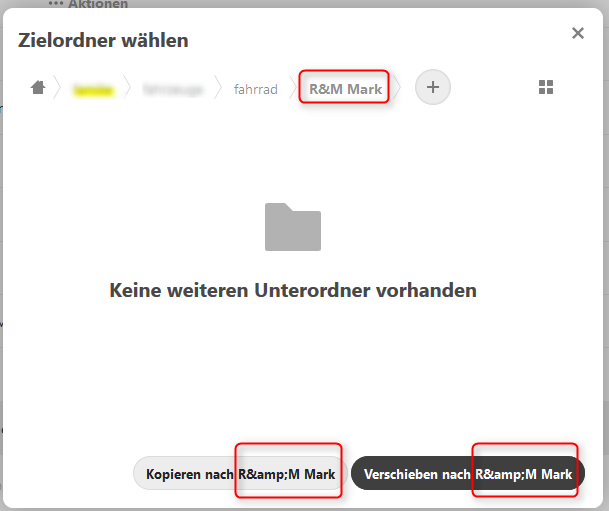
Is this also related to DOMPurify ?
 rakekniven
on 17 Apr 2020
rakekniven
on 17 Apr 2020
Im using Nextcloud 19.0.0 beta 1
and there is stil
Devices & sessions
Web, desktop and mobile clients currently logged in to your account.
 mrizvic
on 10 May 2020
mrizvic
on 10 May 2020
@mrizvic "Devices & sessions" would be good.
"Devices & sessions" is wrong. Can anybody check this with the latest beta?
Thank you.
Have you tried with beta 1 or RC1. v19.0.0RC1 is out since 7th of may.
rakekniven
on 11 May 2020
in 19.0.0 beta 7 it is wrong
in 19.0.0 RC1 it is wrong
 ghost
on 11 May 2020
ghost
on 11 May 2020
Hello @ChristophWurst ,
you linked a PR beginning of 2020.
Do you see any chance to get this being fixed for NC19?
Issue is not included in Milestone for NC19.
rakekniven
on 11 May 2020
@rakekniven GitHub Flavored Markdown swallowed the & when @mrizvic typed it. They meant to say that Devices & sessions is still there. (See https://github.com/nextcloud/server/issues/19337#issuecomment-626491571)
 strugee
on 11 May 2020
strugee
on 11 May 2020
Fix is coming to 18.0.5 and 19.0.1
 kesselb
on 15 Jun 2020
kesselb
on 15 Jun 2020
Related issues
 brylie
·
3Comments
brylie
·
3Comments
 j-ed
·
3Comments
j-ed
·
3Comments
 mama21mama
·
3Comments
mama21mama
·
3Comments
 ThomasLeister
·
3Comments
ThomasLeister
·
3Comments
 Django-BOfH
·
3Comments
Django-BOfH
·
3Comments
Most helpful comment
Fix is coming to 18.0.5 and 19.0.1