Server: UI Bug with Roboto Font for Linux User
Since I update to 17.0.1, the interface looks like every thing is in bold.
The issue come from the usage of Roboto in the default font :
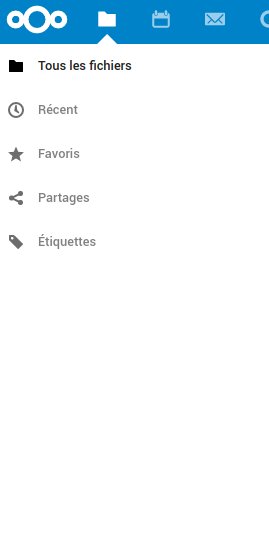
It was an issue github had. They fixed it by removing the Roboto from the default font-family. I can't found again the docs about it (i read something a few months about it). We can see in the stylesheet :
font-family: -apple-system,BlinkMacSystemFont,Segoe UI,Helvetica,Arial,sans-serif,Apple Color Emoji,Segoe UI Emoji;
What do you think about removing Roboto from the defaut font-family in the nextcloud stylesheets ?
Thank you,
 RobinDev
All 11 comments

Looks good with the Ubuntu font. I guess the font is there for android devices? Do you think we could move "Roboto" at the end? Is there any font from the list available on your linux? https://fonts.google.com/specimen/Roboto probably Roboto Light would work.
cc @nextcloud/designers :art:
 kesselb
on 20 Nov 2019
kesselb
on 20 Nov 2019
@brunob can you provide a pull request to remove roboto then? :)
 skjnldsv
on 20 Nov 2019
skjnldsv
on 20 Nov 2019
@skjnldsv sure, but as i said : "From my side, the font used is not Roboto, but Ubuntu bold."
sorry, I misread, do you have regular Ubuntu font installed as well?
Did you manually installed it?
skjnldsv
on 20 Nov 2019
No rush here, let's take the time to analyze the underlying problem:
- Why does the error appear? Do you have Roboto installed but only bold? What is your OS, does it happen in all browsers, etc?
- Could you find a link for the issue Github had? Cause Bootstrap still uses Roboto?
- We should not completely remove Roboto as it is a nice font. It will be used on Android devices for example. So if anything, moving it behind Cantarell and Ubuntu should work?
Edit: @kesselb we use Regular and Bold weights of fonts, "Light" is not legible enough.
 jancborchardt
on 20 Nov 2019
jancborchardt
on 20 Nov 2019
@brunob please don't hijack issues it's confusing :confused: From the initial report I would assume that the user has the roboto font available and the interface looks to bold. You're reporting an issue with the news app but with the ubuntu font. I would report that to https://github.com/nextcloud/news first but probably i'm too confused now.
kesselb
on 20 Nov 2019
- Why does the error appear? Do you have Roboto installed but only bold? What is your OS, does it happen in all browsers, etc?
I have Roboto installed and all the sub-Roboto fonts (Medium, Light, Regulard, Bold, Italic, etc.)
Could you find a link for the issue Github had? Cause Bootstrap still uses Roboto?
I can't find it again. May @mdo can tell us why Github stop use Roboto.
We should not completely remove Roboto as it is a nice font. It will be used on Android devices for example. So if anything, moving it behind Cantarell and Ubuntu should work?
Yes, if I move Roboto behind Cantarell, it fixes the problem for me.
RobinDev
on 22 Nov 2019
Would you mind to open a pull request and move roboto behind ubuntu? ;)
kesselb
on 31 Dec 2019
I can't reproduce this issue (Ubuntu with Firefox and Chrome) – can anyone else?
I'd prefer to keep it like it is, since if you have Roboto installed you get the better and more universal font displayed.
jancborchardt
on 1 Jan 2020
I'm able to reproduce this with Ubuntu (Firefox and Chrome).
sudo apt install fonts-roboto will install the font. Chromium needed a restart to pickup the font.
Screenshot: Roboto font

Screenshot: Ubuntu font
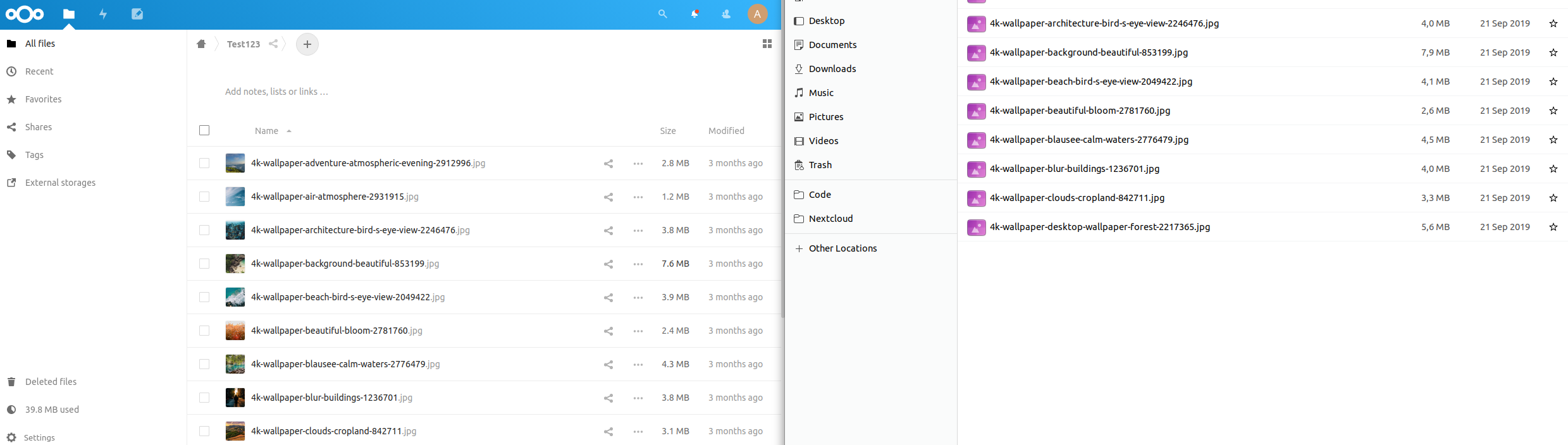
Roboto font should have less priority than Ubuntu font.
kesselb
on 1 Jan 2020
@kesselb the issue that @RobinDev reported is:
the interface looks like every thing is in bold.
Which is not visible in your first screenshot – everything looks absolutely fine, with only the current folder (in the breadcrumbs bar) in bold. :)
And regarding whether we prefer Roboto or Ubuntu, here’s my stance:
- The default Ubuntu install does not ship Roboto, so people will see the Nextcloud interface in Ubuntu font and all is fine.
- If you have Roboto installed you see the Nextcloud interface in Roboto – which is an objectively better interface font than the Ubuntu font.
So the way it is right now works very well.
jancborchardt
on 2 Jan 2020
I'm not able to reproduce the "bold" text either.
kesselb
on 2 Jan 2020
Related issues
 brylie
·
3Comments
brylie
·
3Comments
 j-ed
·
3Comments
j-ed
·
3Comments
 georgehrke
·
3Comments
georgehrke
·
3Comments
 blackcrack
·
3Comments
blackcrack
·
3Comments
 mama21mama
·
3Comments
mama21mama
·
3Comments