Server: Some files are not shown on publicly shared links
I want to share a folder with 237 files. If I am logged in, all the files are shown as expected in my NC account. Once I create a shared link, only 21 of the files are visible in browser, but if I select all the files, the correct number of files is shown.
Steps to reproduce
- Create a folder with a lot of files (>200)
- Share the folder by public link
- Check if all the files are shown after accessing the shared link
Expected behaviour
Show all the files via shared link like I see when I am logged in.
Actual behaviour
Only some of the files are shown in the browser, however by selecting all the items via the 'Select all' checkbox, the correct number of files is shown. If I have photos in the folder, I can go through all of them with the arrow keys, even if they are not shown in the file list.
Server configuration
Operating system: Ubuntu 16.04.6 LTS
Web server: nginx 1.17.3-8.6.0.4~xenial1
Database: mariadb 10.0.38-0ubuntu0.16.04.1
PHP version: 7.3.11-1+ubuntu16.04.1+deb.sury.org+1
Nextcloud version: (see Nextcloud admin page) 17.0.0
Updated from an older Nextcloud/ownCloud or fresh install: Updated from NC 16 via updater
Where did you install Nextcloud from: Built-in updater
Signing status:
Signing status
No errors have been found.
List of activated apps:
App list
Enabled:
  - activity: 2.10.1
  - admin_audit: 1.7.0
  - apporder: 0.8.0
  - bookmarks: 2.3.1
  - bruteforcesettings: 1.4.0
  - calendar: 1.7.1
  - cloud_federation_api: 1.0.0
  - contacts: 3.1.6
  - cospend: 0.1.5
  - dav: 1.13.0
  - event_update_notification: 1.0.0
  - federatedfilesharing: 1.7.0
  - files: 1.12.0
  - files_downloadactivity: 1.6.0
  - files_external: 1.8.0
  - files_pdfviewer: 1.6.0
  - files_rightclick: 0.15.1
  - files_sharing: 1.9.0
  - files_trashbin: 1.7.0
  - files_versions: 1.10.0
  - files_videoplayer: 1.6.0
  - firstrunwizard: 2.6.0
  - gallery: 18.4.0
  - logreader: 2.2.0
  - lookup_server_connector: 1.5.0
  - metadata: 0.10.0
  - notes: 3.0.3
  - notifications: 2.5.0
  - oauth2: 1.5.0
  - ocdownloader: 1.7.3
  - onlyoffice: 3.0.2
  - password_policy: 1.7.0
  - phonetrack: 0.5.10
  - previewgenerator: 2.1.0
  - printer: 0.0.1
  - privacy: 1.1.0
  - provisioning_api: 1.7.0
  - ransomware_protection: 1.5.0
  - serverinfo: 1.7.0
  - sharebymail: 1.7.0
  - sharerenamer: 2.7.2
  - spreed: 7.0.1
  - text: 1.0.2
  - theming: 1.8.0
  - twofactor_backupcodes: 1.6.0
  - twofactor_gateway: 0.14.1
  - twofactor_totp: 4.0.0
  - updatenotification: 1.7.0
  - uploaddetails: 0.1.2
  - viewer: 1.1.0
  - workflowengine: 1.7.0
Disabled:
  - accessibility
  - comments
  - encryption
  - federation
  - nextcloud_announcements
  - recommendations
  - support
  - survey_client
  - systemtags
  - user_ldap
Nextcloud configuration:
Config report
{
    "system": {
        "onlyoffice": {
            "verify_peer_off": true
        },
        "activity_expire_days": 14,
        "auth.bruteforce.protection.enabled": true,
        "blacklisted_files": [
            ".htaccess",
            "Thumbs.db",
            "thumbs.db"
        ],
        "instanceid": "***REMOVED SENSITIVE VALUE***",
        "passwordsalt": "***REMOVED SENSITIVE VALUE***",
        "secret": "***REMOVED SENSITIVE VALUE***",
        "trusted_domains": [
            "cloud.famszabo.com"
        ],
        "datadirectory": "***REMOVED SENSITIVE VALUE***",
        "overwrite.cli.url": "https:\/\/cloud.famszabo.com",
        "dbtype": "mysql",
        "version": "17.0.0.9",
        "dbname": "***REMOVED SENSITIVE VALUE***",
        "dbhost": "***REMOVED SENSITIVE VALUE***",
        "dbport": "",
        "dbtableprefix": "oc_",
        "dbuser": "***REMOVED SENSITIVE VALUE***",
        "dbpassword": "***REMOVED SENSITIVE VALUE***",
        "htaccess.RewriteBase": "\/",
        "overwriteprotocol": "https",
        "loglevel": 1,
        "logtimezone": "Europe\/Berlin",
        "logfile": "\/var\/www\/nextcloud_data\/nextcloud.log",
        "log_rotate_size": 104857600,
        "cron_log": true,
        "installed": true,
        "filesystem_check_changes": 0,
        "quota_include_external_storage": false,
        "knowledgebaseenabled": false,
        "memcache.local": "\\OC\\Memcache\\APCu",
        "filelocking.enabled": "true",
        "memcache.locking": "\\OC\\Memcache\\Redis",
        "redis": {
            "host": "***REMOVED SENSITIVE VALUE***",
            "port": 0,
            "timeout": 0
        },
        "maintenance": false,
        "theme": "",
        "integrity.check.disabled": false,
        "updater.release.channel": "stable",
        "enable_previews": true,
        "enabledPreviewProviders": [
            "OC\\Preview\\PNG",
            "OC\\Preview\\JPEG",
            "OC\\Preview\\GIF",
            "OC\\Preview\\BMP",
            "OC\\Preview\\XBitmap",
            "OC\\Preview\\Movie",
            "OC\\Preview\\PDF",
            "OC\\Preview\\MP3",
            "OC\\Preview\\TXT",
            "OC\\Preview\\MarkDown"
        ],
        "preview_max_x": 1024,
        "preview_max_y": 768,
        "preview_max_scale_factor": 1,
        "mail_smtpmode": "smtp",
        "mail_smtpauthtype": "LOGIN",
        "mail_from_address": "***REMOVED SENSITIVE VALUE***",
        "mail_domain": "***REMOVED SENSITIVE VALUE***",
        "mail_smtphost": "***REMOVED SENSITIVE VALUE***",
        "mail_smtpport": "587",
        "mail_smtpauth": 1,
        "mail_smtpname": "***REMOVED SENSITIVE VALUE***",
        "mail_smtppassword": "***REMOVED SENSITIVE VALUE***",
        "mysql.utf8mb4": true,
        "app_install_overwrite": [
            "calendar",
            "apporder"
        ],
        "ldapIgnoreNamingRules": false,
        "ldapProviderFactory": "OCA\\User_LDAP\\LDAPProviderFactory",
        "mail_sendmailmode": "smtp"
    }
}
Are you using external storage, if yes which one: sftp
Are you using encryption: no
Are you using an external user-backend, if yes which one: Webdav/Webcal
Client configuration
Browser: Brave/Firefox
Operating system: Ubuntu 18.04, WIndwos 7
Logs
Web server error log
Web server error log
2019/11/05 14:10:49 [warn] 20939#20939: *248970 an upstream response is buffered to a temporary file /var/lib/nginx/proxy/0/16/0000000160 while reading upstream, client: xxx.xxx.xxx.71, server: cloud.example.com, request: "GET /js/spreed/merged-public-share.js?v=b669751f-7 HTTP/1.1", upstre    am: "http://127.0.0.1:82/js/spreed/merged-public-share.js?v=b669751f-7", host: "cloud.example.com"

2019/11/05 14:10:50 [warn] 20940#20940: *248770 an upstream response is buffered to a temporary file /var/lib/nginx/proxy/1/16/0000000161 while reading upstream, client: xxx.xxx.xxx.95, server: cloud.example.com, request: "PROPFIND /public.php/webdav/ HTTP/1.1", upstream: "http://127.0.0.1:82/public.php/webdav/", host: "cloud.example.com"
Nextcloud log (data/nextcloud.log)
Nextcloud log
{"reqId":"rQsH0LihEBeIlJl7VIXf","level":1,"time":"2019-11-05T14:00:01+01:00","remoteAddr":"","u      ser":"--","app":"text","method":"","url":"--","message":"Removed 0 inactive sessions","userAgen      t":"--","version":"17.0.0.9"}

{"reqId":"CeL8KMC3IsvZ04VCPYEN","level":1,"time":"2019-11-05T14:05:02+01:00","remoteAddr":"","u      ser":"--","app":"text","method":"","url":"--","message":"Removed 0 inactive sessions","userAgen      t":"--","version":"17.0.0.9"}
Browser log
Browser log
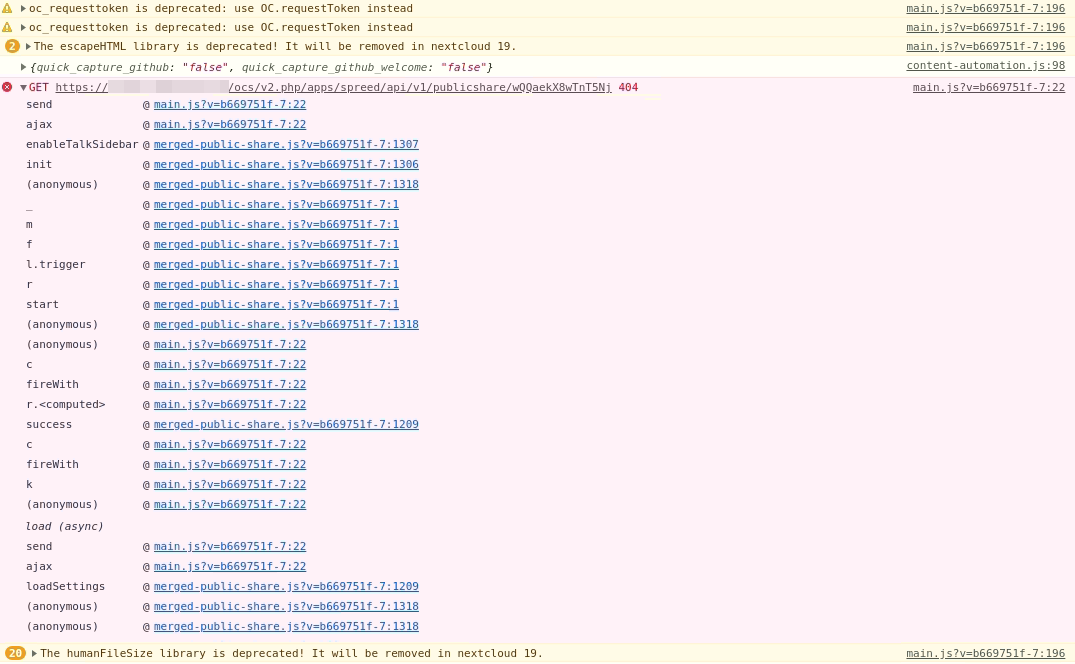
I have no experience how to get these logs. Could you please provide me step-by-step advice to get them? I'm using Brave, which is in principle like Chrome.
Further Information:
- My NC instance is behind a reverse proxy
- I am behind Cloudflare
- By toggleing list or miniature view, a different number of files is shown.
- The shown files are all from the beginning of the whole list (sorted alphabetically)
 tomynr1
All 9 comments
Could you please provide me step-by-step advice to get them?
Open your console, reload your page and/or do the action leading to this issue and copy/paste the log in this thread.
How to access your browser console (Click to expand)
Chrome
- Press either CTRL + SHIFT + J to open the “console” tab of the Developer Tools.
- Alternative method:
- Press either CTRL + SHIFT + I or F12 to open the Developer Tools.
- Click the “console” tab.
Safari
- Press CMD + ALT + I to open the Web Inspector.
- See Chrome’s step 2. (Chrome and Safari have pretty much identical dev tools.)
IE9
- Press F12 to open the developer tools.
- Click the “console” tab.
Firefox
- Press CTRL + SHIFT + K to open the Web console (COMMAND + SHIFT + K on Macs).
- or, if Firebug is installed (recommended):
- Press F12 to open Firebug.
- Click on the “console” tab.
Opera
- Press CTRL + SHIFT + I to open Dragonfly.
- Click on the “console” tab.
 kesselb
on 5 Nov 2019
kesselb
on 5 Nov 2019
tomynr1
on 5 Nov 2019
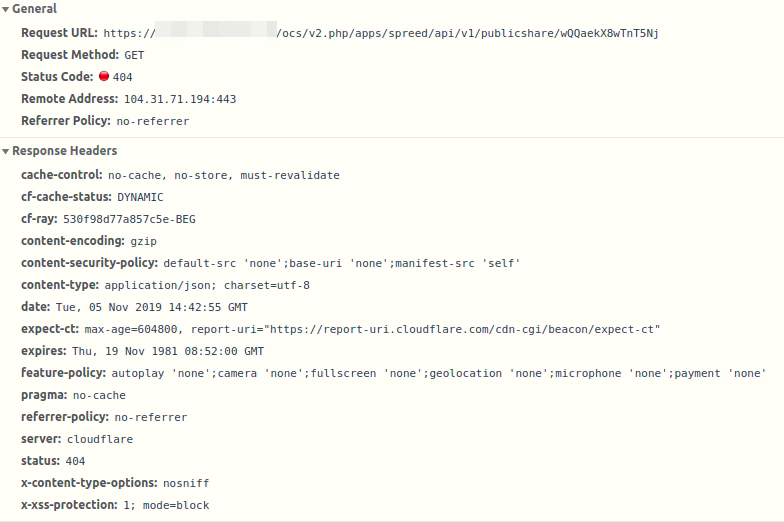
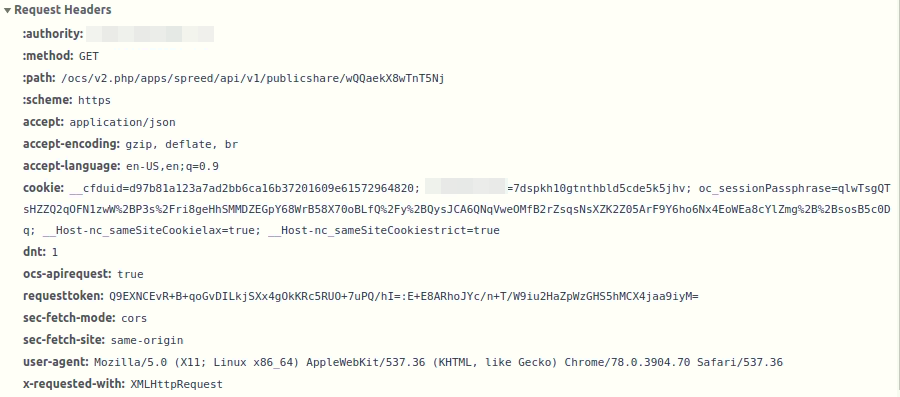
Some further info about the failing request:
tomynr1
on 5 Nov 2019
cc @nextcloud/talk
kesselb
on 5 Nov 2019
Try to deactivate spreed
 JSoko
on 6 Nov 2019
JSoko
on 6 Nov 2019
Thank you @JSoko.
Deactivating Talk is definitely a solution for me, as I don't use it every day.
Is there another way also for the heavy Talk users?
tomynr1
on 6 Nov 2019
I didn't proofed but I hope this pr will fix it:
https://github.com/nextcloud/spreed/pull/2340
JSoko
on 6 Nov 2019
Problem persists with NC 17.0.1 and Talk 7.0.1
JSoko
on 7 Nov 2019
kesselb
on 7 Nov 2019
Related issues
 georgehrke
·
3Comments
georgehrke
·
3Comments
 MorrisJobke
·
3Comments
MorrisJobke
·
3Comments
 juliushaertl
·
3Comments
juliushaertl
·
3Comments
 ThomasLeister
·
3Comments
ThomasLeister
·
3Comments
 Django-BOfH
·
3Comments
Django-BOfH
·
3Comments