Server: File name is omitted if it is a smartphone with NC17
After updating to Nextcloud 17.0.0, I accessed the NC with an iPhone web browser.
When I hold the iPhone vertically and look at the file list, the file name is omitted and the icon, file size, menu, and update date and time are displayed. The share icon is covered by the file size. Some browsers display some characters of the file extension by the Web browser. Of course I usually see it if I hold it horizontally.
If I use the iOS app of NC, it will display normally even if I have it vertically.
I think the display when the user holds the smartphone vertically can omit the file size and update date.
 Bables55
All 20 comments
Is it possible to add a screenshot to your report?
 kesselb
on 2 Oct 2019
kesselb
on 2 Oct 2019
Is it possible to add a screenshot to your report?
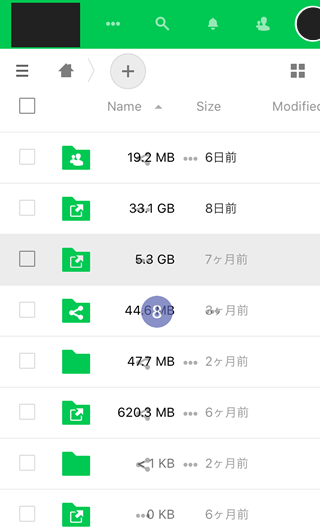
*I'm Japanese and the NC language is set to English, but the time display is Japanese.
Bables55
on 3 Oct 2019

Same with Nextcloud 17, Android 8 on an Samsung Galaxy S7, Newest Chrome
 Octopus2
on 3 Oct 2019
Octopus2
on 3 Oct 2019
same here - Nextcloud 17 with Android 7.1.1 on an MotoG4-Play. Chrome and Firefox.
 AndyFx12
on 3 Oct 2019
AndyFx12
on 3 Oct 2019
same thing....
 DmDS
on 4 Oct 2019
DmDS
on 4 Oct 2019
cc @nextcloud/designers
kesselb
on 4 Oct 2019
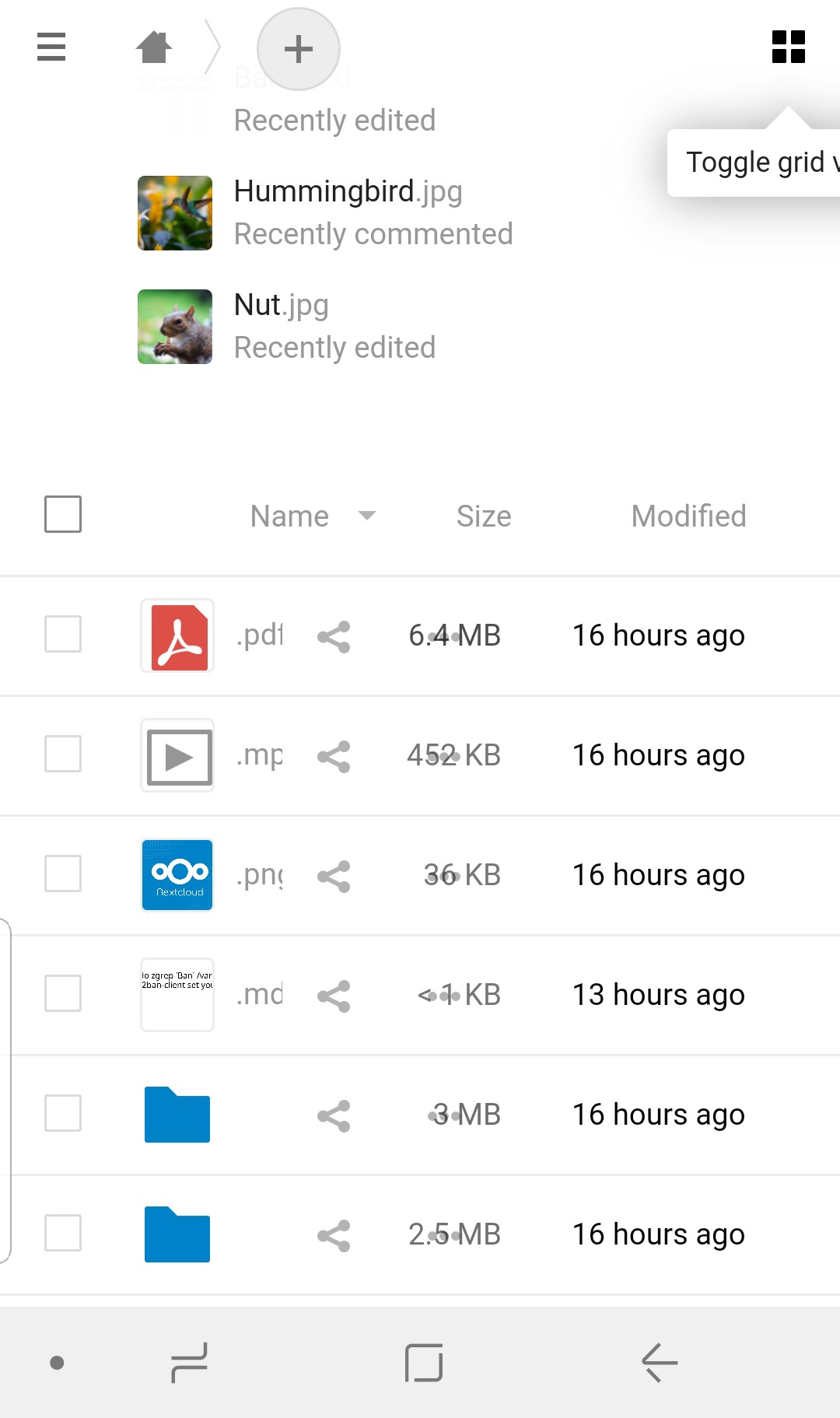
Also present on Android devices.
It makes it impossible to browse folders and files when the phone is in vertical position.
 elpraga
on 6 Oct 2019
elpraga
on 6 Oct 2019
it works in landscape mode, on my pcs and in grid mode. but both my phones (IphoneSE and Samsung S8) have this issue in portrait mode, which is the mode I use often. :(
It was working fine on 16.0.5. Updating to 17 broke it.
 justasomeone
on 6 Oct 2019
justasomeone
on 6 Oct 2019
this was suppose to be fixed with this PR: #17162
It looks good on the 18th version, but it still exist on the 17th one
 GretaD
on 8 Oct 2019
GretaD
on 8 Oct 2019
After consulting this with @jancborchardt looks like the problem is that the Size and Modified column is not suppose to be there at the first place on mobile view. This might be a regression of some other change. I am working to fix this.
GretaD
on 8 Oct 2019
Should this not be tested before a release?
 ghost
on 27 Oct 2019
ghost
on 27 Oct 2019
Pinned this issue a few days ago because I had in mind that a lot of people are going to report this. I don't know why someone unpinned it but given that we already had 4 more reports since then I'm pinning it again ;)
Nextcloud 17.0.1 (scheduled for 2019-11-07) will contain the fix: https://github.com/nextcloud/server/pull/17676
kesselb
on 27 Oct 2019
I don't know why someone unpinned it
I just tried, and it show a message when someone unpin a ticket :thinking:
But somehow, I cannot find the previous unpin message! (that time it was not me @kesselb :grin: )
 skjnldsv
on 27 Oct 2019
skjnldsv
on 27 Oct 2019
@weeman1337 unpinned this issue 19 days ago
;)
 jancborchardt
on 27 Oct 2019
jancborchardt
on 27 Oct 2019
Hmm. I'm sorry for using a bad phrase. What I wanted to say is: "I'm pinning it again because people are reporting this." :see_no_evil:
kesselb
on 27 Oct 2019
This is now fixed on 17 RC1! :smile:
ghost
on 31 Oct 2019
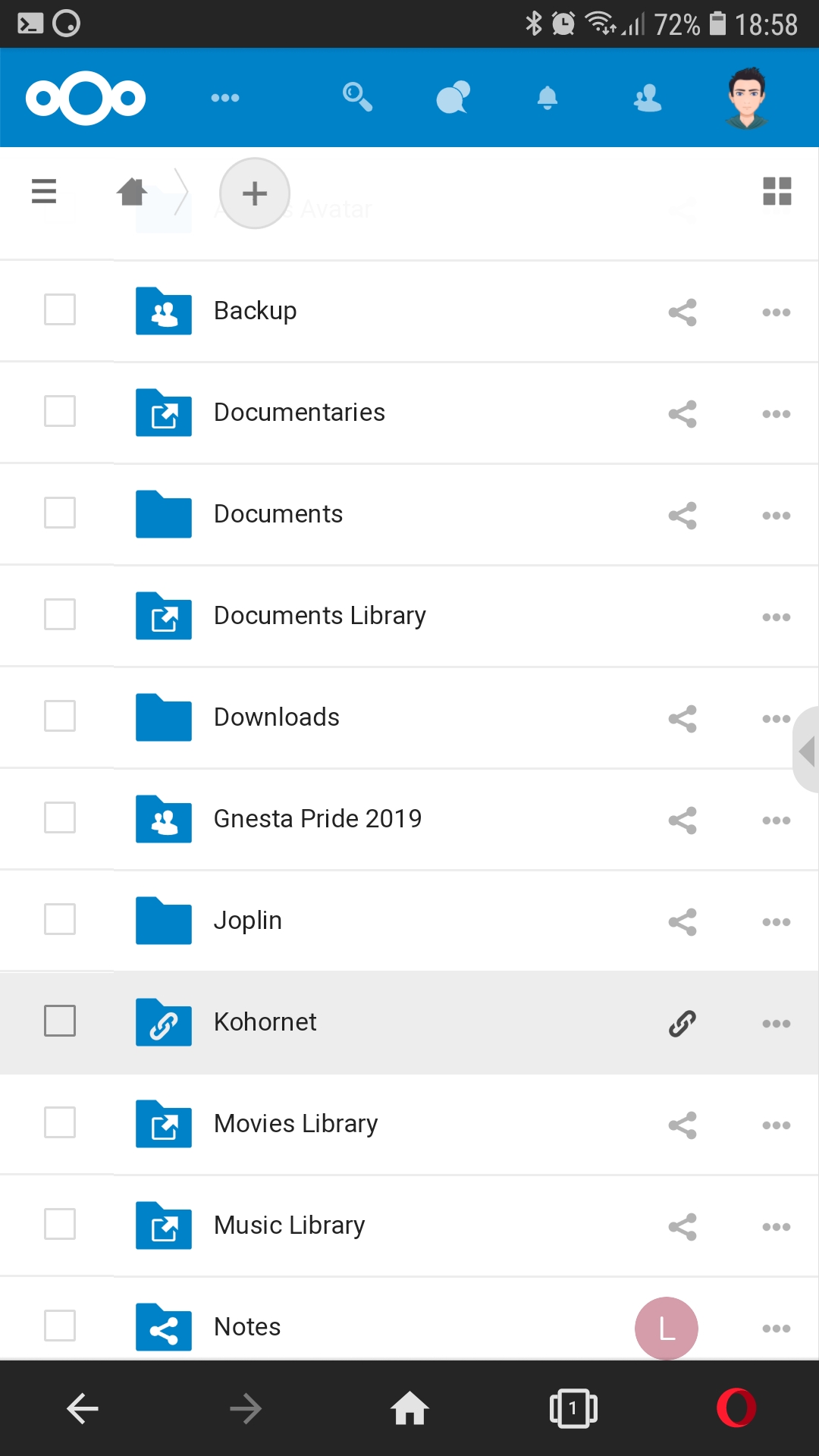
It is still present in NC17.0.1 RC1 on Chrome in Android mobile. Firefox for Android scales OK.
Another issue related to mobile screen is that in the contacts list I can only swipe sideways on the top of the screen, above the contacts names.
 rollanders
on 31 Oct 2019
rollanders
on 31 Oct 2019
Sorry. I only checked with Opera Mobile (which is based on Chrome). No scaling issue there either.
ghost
on 31 Oct 2019
Maybe a problem with caching. Now it works OK!
rollanders
on 31 Oct 2019
Thanks a lot for testing and confirming the fix everyone! :)
jancborchardt
on 4 Nov 2019
Related issues
 brylie
·
3Comments
brylie
·
3Comments
 dl5rcw
·
3Comments
dl5rcw
·
3Comments
 mfechner
·
3Comments
jancborchardt
·
3Comments
mfechner
·
3Comments
jancborchardt
·
3Comments
 mama21mama
·
3Comments
mama21mama
·
3Comments
Most helpful comment
Pinned this issue a few days ago because I had in mind that a lot of people are going to report this. I don't know why someone unpinned it but given that we already had 4 more reports since then I'm pinning it again ;)
Nextcloud 17.0.1 (scheduled for 2019-11-07) will contain the fix: https://github.com/nextcloud/server/pull/17676