I am running an on premise installation on a Ubuntu server (16.04) and i love Bitwarden.
But since version 1.31.x, CPU usage is much higher.
Every 10 seconds the load goes to 30-60% and drops back to 2-3%.
Before the update, the load was always around 3-6%. When I stop bitwarden, the load is gone.
When i go back to 1.30.4. usage is back to normal at 2-6%. After an update to the current version the utilization was increased again.
docker ps
```CONTAINER ID IMAGE COMMAND CREATED STATUS PORTS NAMES
e9b5e654ad59 bitwarden/nginx:1.32.0 "/entrypoint.sh" About an hour ago Up About an hour (healthy) 80/tcp, 0.0.0.0:80->8080/tcp, 0.0.0.0:443->8443/tcp bitwarden-nginx
600533dbd056 bitwarden/admin:1.32.0 "/entrypoint.sh" About an hour ago Up About an hour (healthy) 5000/tcp bitwarden-admin
656275fd091a bitwarden/mssql:1.32.0 "/entrypoint.sh" About an hour ago Up About an hour (healthy) 1433/tcp bitwarden-mssql
4c1d9945e270 bitwarden/icons:1.32.0 "/entrypoint.sh" About an hour ago Up About an hour (healthy) 5000/tcp bitwarden-icons
fd3b8ecca326 bitwarden/events:1.32.0 "/entrypoint.sh" About an hour ago Up About an hour (healthy) 5000/tcp bitwarden-events
ceedfb2b908c bitwarden/identity:1.32.0 "/entrypoint.sh" About an hour ago Up About an hour (healthy) 5000/tcp bitwarden-identity
940c466fc1f6 bitwarden/attachments:1.32.0 "/entrypoint.sh" About an hour ago Up About an hour (healthy) 5000/tcp bitwarden-attachments
2433eac5d39d bitwarden/api:1.32.0 "/entrypoint.sh" About an hour ago Up About an hour (healthy) 5000/tcp bitwarden-api
2a14bb210afd bitwarden/notifications:1.32.0 "/entrypoint.sh" About an hour ago Up About an hour (healthy) 5000/tcp bitwarden-notifications
95c830349604 bitwarden/web:2.12.0 "/entrypoint.sh" About an hour ago Up About an hour (healthy) 5000/tcp bitwarden-web
Docker stats
CONTAINER ID NAME CPU % MEM USAGE / LIMIT MEM % NET I/O BLOCK I/O PIDS
e9b5e654ad59 bitwarden-nginx 0.00% 17.9MiB / 7.474GiB 0.23% 1.65MB / 888kB 81.9kB / 119kB 5
600533dbd056 bitwarden-admin 0.16% 52.14MiB / 7.474GiB 0.68% 19.6kB / 6.9kB 35.2MB / 35.7MB 22
656275fd091a bitwarden-mssql 2.47% 722.9MiB / 7.474GiB 9.45% 868kB / 753kB 18MB / 29.8MB 155
4c1d9945e270 bitwarden-icons 0.14% 336.1MiB / 7.474GiB 4.39% 8.18MB / 1.74MB 60.1MB / 61.2MB 26
fd3b8ecca326 bitwarden-events 0.11% 42.4MiB / 7.474GiB 0.55% 9.19kB / 0B 59MB / 60.9MB 21
ceedfb2b908c bitwarden-identity 0.18% 45.54MiB / 7.474GiB 0.60% 32.4kB / 31.5kB 59.1MB / 60.3MB 19
940c466fc1f6 bitwarden-attachments 42.64% 19.83MiB / 7.474GiB 0.26% 9.67kB / 0B 4.1kB / 34.8MB 21
2433eac5d39d bitwarden-api 0.11% 65.17MiB / 7.474GiB 0.85% 506kB / 729kB 68.6MB / 70.2MB 22
2a14bb210afd bitwarden-notifications 0.34% 51.43MiB / 7.474GiB 0.67% 34.5kB / 12.8kB 26.3MB / 28.4MB 24
95c830349604 bitwarden-web 47.25% 26.33MiB / 7.474GiB 0.34% 13.8kB / 61.8kB 45.6MB / 47.8MB 20
```CONTAINER ID        NAME                      CPU %               MEM USAGE / LIMIT     MEM %               NET I/O             BLOCK I/O           PIDS
e9b5e654ad59        bitwarden-nginx           0.00%               17.9MiB / 7.474GiB    0.23%               1.65MB / 891kB      81.9kB / 119kB      5
600533dbd056        bitwarden-admin           0.12%               52.44MiB / 7.474GiB   0.69%               19.6kB / 6.9kB      35.2MB / 35.7MB     22
656275fd091a        bitwarden-mssql           44.99%              723.7MiB / 7.474GiB   9.46%               868kB / 753kB       18MB / 31.5MB       153
4c1d9945e270        bitwarden-icons           0.09%               336.1MiB / 7.474GiB   4.39%               8.18MB / 1.74MB     60.1MB / 61.2MB     26
fd3b8ecca326        bitwarden-events          0.13%               42.41MiB / 7.474GiB   0.55%               9.19kB / 0B         59MB / 60.9MB       22
ceedfb2b908c        bitwarden-identity        0.14%               45.55MiB / 7.474GiB   0.60%               32.4kB / 31.5kB     59.1MB / 60.3MB     21
940c466fc1f6        bitwarden-attachments     0.09%               19.83MiB / 7.474GiB   0.26%               9.67kB / 0B         4.1kB / 34.8MB      21
2433eac5d39d        bitwarden-api             0.21%               65.18MiB / 7.474GiB   0.85%               506kB / 729kB       68.6MB / 70.2MB     22
2a14bb210afd        bitwarden-notifications   0.18%               51.43MiB / 7.474GiB   0.67%               35.9kB / 14.2kB     26.3MB / 28.4MB     24
95c830349604        bitwarden-web             0.08%               26.33MiB / 7.474GiB   0.34%               13.8kB / 61.8kB     45.6MB / 47.8MB     20
Any hints?
Thx in advance
 mgl1
mgl1
All 9 comments
After i disabled the healthcheck on all docker containers, back to normal CPU usage (idle usage max. 5%)
 juliokele
on 15 Sep 2019
juliokele
on 15 Sep 2019
How did you do that? And is it save to disable healthcheck?
mgl1
on 15 Sep 2019
How did you do that? And is it save to disable healthcheck?
create "docker-compose.override" file:
/bwdata/docker/docker-compose.override.yml
version: '3'

services:
  mssql:
    healthcheck:
      disable: true

  web:
    healthcheck:
      disable: true

  attachments:
    healthcheck:
      disable: true

  api:
    healthcheck:
      disable: true

  identity:
    healthcheck:
      disable: true

  admin:
    healthcheck:
      disable: true

  icons:
    healthcheck:
      disable: true

  notifications:
    healthcheck:
      disable: true

  events:
    healthcheck:
      disable: true

  nginx:
    healthcheck:
      disable: true
rebuild the configurations:
./bitwarden.sh rebuild
start the containers:
./bitwarden.sh start
safe to disable?
before v1.31.0 healthchecks are not implemented:
compared: v1.30.4 and v1.31.0
juliokele
on 15 Sep 2019
Big thx @juliogit , all back to normal now. So healthcheck has a real impact to CPU load.
mgl1
on 15 Sep 2019
This seems like an issue with Docker. Our health checks only do a simple GET curl to an endpoint to make sure the service is responding.
 kspearrin
on 16 Sep 2019
kspearrin
on 16 Sep 2019
Running version 1.32. Disabling healthcheks did not solve the problem, mssql container still eats ~40-50% of CPU. Running on DigitalOcean 1 vCPU, 2 GB RAM instance.
 Spaider
on 26 Sep 2019
Spaider
on 26 Sep 2019
Same issue here, as explained in this thread.
As you can see on the following graph, nice increase in CPU usage, from 5% to 15%, after having upgraded from 1.30.1 to 1.31.1.
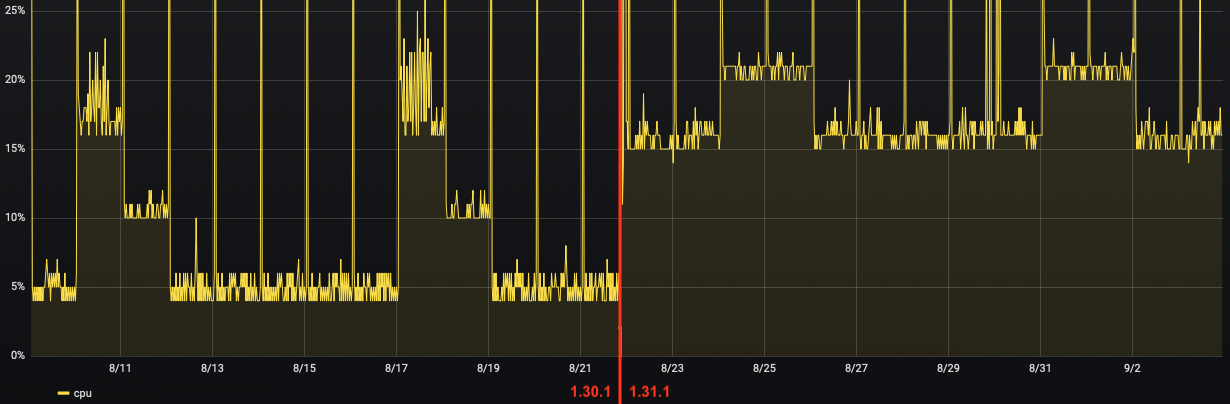
Disabling healthcheck, as per @juliogit's comment above, helped, back to previous behaviour, thx !
 Mart124
on 30 Sep 2019
Mart124
on 30 Sep 2019
Running version 1.32. Disabling healthcheks did not solve the problem,
mssqlcontainer still eats ~40-50% of CPU. Running on DigitalOcean 1 vCPU, 2 GB RAM instance.
Test an instance with more CPU (at least 2) and more RAM (at least 4 GB).
You should also test server 1.33.0, as starting with this version, mssql does not have access to public network anymore : in #495, I suspected this public network access to be the culprit of my CPU issues, which has then been properly disabled in https://github.com/bitwarden/server/issues/286#issuecomment-555915360.
Mart124
on 14 Mar 2020
I only started using Bitwarden after that healthcheck update, but I too recently noticed these bursts in CPU usage every few seconds and eventually tracked them down to Bitwarden. By disabling healthchecks as mentioned above (thanks @juliokele!), I was able to reduce average CPU usage by about 7-13%, similar to Mart124’s results. I actually noticed in htop (before the change) that those spikes in CPU usage seem to stem not from curl but from a process named “runc init” or something. Based on a quick Google search, that process seems to cause various issues in other cases as well, so the healthchecks/curl might just be triggering some sort of bad behaviour in that process.
Fancy Images
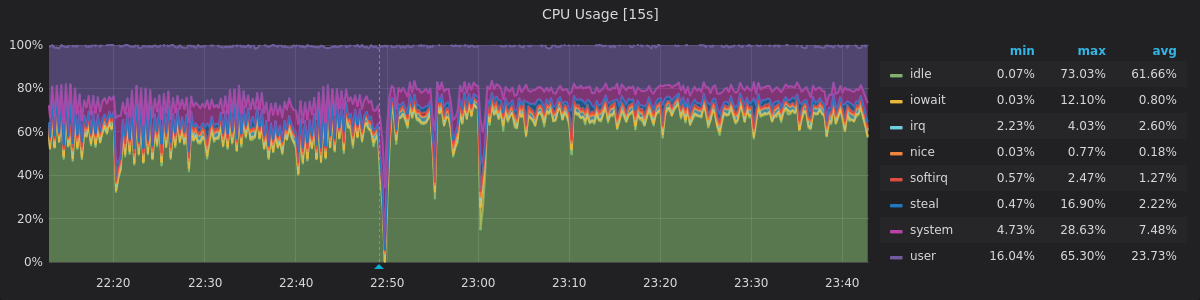
CPU Usage – This graph shows quite nicely how the CPU usage became not only lower, but also noticably more consistent (the fact that the increased CPU usage occurred in concentrated bursts rather than evenly actually caused issues in another application I’m running). The blue line is when I started the rebuild. There’s also a cronjob running at 23:00, but that has nothing to do with Bitwarden.
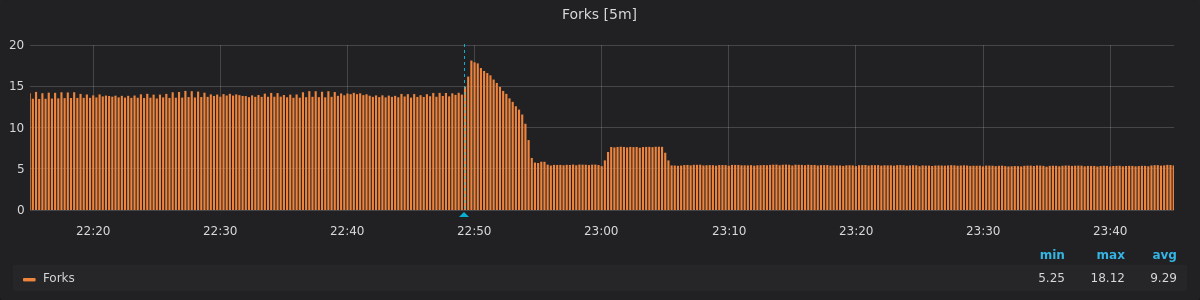
Perhaps not that interesting, but the change is also very pronounced when looking at forks, there’s a decrease by almost 2/3 here!
 J5lx
on 13 Apr 2020
J5lx
on 13 Apr 2020
Related issues
 Sx3
·
4Comments
Sx3
·
4Comments
 FoxBJK
·
3Comments
FoxBJK
·
3Comments
 mr-gosh
·
3Comments
mr-gosh
·
3Comments
 mjlm
·
6Comments
mjlm
·
6Comments
 pannal
·
5Comments
pannal
·
5Comments
Most helpful comment
create "docker-compose.override" file:
/bwdata/docker/docker-compose.override.yml
rebuild the configurations:
./bitwarden.sh rebuildstart the containers:
./bitwarden.sh startsafe to disable?
before v1.31.0 healthchecks are not implemented:
compared: v1.30.4 and v1.31.0