Server: Voice in Italian not centered in the button stores the credentials
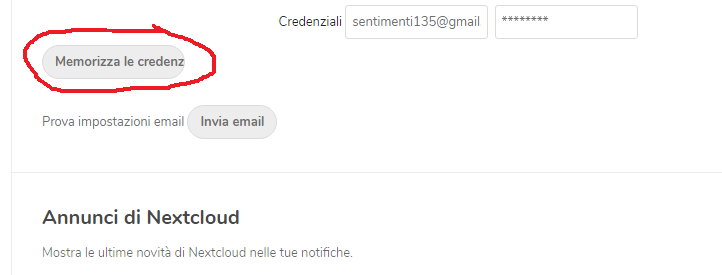
In version 16.0.4 localized in Italian, when you go to the setting menu -> basic setting -> mail server the voice saves credentials does not come out completely written in the button area can you fix it? I attach screenshot
 tigernero79
All 10 comments
cc @nextcloud/designers
 kesselb
on 27 Aug 2019
kesselb
on 27 Aug 2019
This problem happens in all the languages that have long words. @nextcloud/designers what do you propose, longer button, or this?

 GretaD
on 27 Aug 2019
GretaD
on 27 Aug 2019
Why were buttons constrain on width from the beginning? Also, using long strings on buttons is also something hard to understand why. Buttons should have a simple action related string like (in english) "OK", "Send", "Cancel", "Reset" etc. and have some explanation block that helps people understand what will this form/input/action will do.
 madalinignisca
on 27 Aug 2019
madalinignisca
on 27 Aug 2019
TBH I'm a fan of simple actions too. In this case - SAVE would be enough
GretaD
on 27 Aug 2019
Ok for save in italiano language for me
tigernero79
on 27 Aug 2019
Yep @GretaD, "Save" is enough in this case as a label. But also, there’s an issue in the CSS which limits the width:
settings/css/settings.scss line 1196 should not be only input, but input:not([type='button']) so the button is not restricted.
For the record though: Normally like in modals or other actions, short actions like "OK" and "Cancel" and "Save" are difficult to understand. Instead it should spell out what it relates to like "Move file" or "Delete folder" etc. Nothing is worse than a lot of text in a modal and having "OK" "Cancel", or even the dreaded:
Do you want to cancel the installation?
[ Cancel ] [ Abort ]
 jancborchardt
on 1 Sep 2019
jancborchardt
on 1 Sep 2019
Yep @GretaD, "Save" is enough in this case as a label. But also, there’s an issue in the CSS which limits the width:
settings/css/settings.scssline 1196 should not be onlyinput, butinput:not([type='button'])so the button is not restricted.
So, just for the record, should I go ahead and change the word into _save_, but also change the scss file, just in case if in some languages the word _save_ its still long?
For the record though: Normally like in modals or other actions, short actions like "OK" and "Cancel" and "Save" are difficult to understand. Instead it should spell out what it relates to like "Move file" or "Delete folder" etc. Nothing is worse than a lot of text in a modal and having "OK" "Cancel", or even the dreaded:
Do you want to cancel the installation?
[ Cancel ] [ Abort ]
This is evil :)
GretaD
on 2 Sep 2019
So, just for the record, should I go ahead and change the word into save, but also change the scss file, just in case if in some languages the word save its still long?
Yup, that sounds good! :) :+1:
jancborchardt
on 2 Sep 2019
Do you want to cancel the installation?
[ Cancel ] [ Abort ]
Could be better:
Do you want to cancel the installation?
[ No ] [ Yes ]
It's just about choosing the best words. You did remind me of some app.
madalinignisca
on 2 Sep 2019
The best option is:
Do you want to cancel the installation?
[ Resume ] [ Cancel installation ]
As said – descriptive labels. "Yes" and "No" necessitate reading the entire text of the modal, something which is rarely done and then misclicks happen.
jancborchardt
on 2 Sep 2019
Related issues
 arno01
·
3Comments
arno01
·
3Comments
 rullzer
·
3Comments
rullzer
·
3Comments
 mfechner
·
3Comments
mfechner
·
3Comments
 dl5rcw
·
3Comments
dl5rcw
·
3Comments
 MorrisJobke
·
3Comments
MorrisJobke
·
3Comments
Most helpful comment
Yup, that sounds good! :) :+1: