Server: Putting a file into a shared folder
Steps to reproduce
- Put a file/folder into a shared folder
The problem
I am convinced there should be a warning displayed whenever user puts a file or a folder inside a shared folder because it will be immediately shared with others (public). There could be user error where file is incorrectly moved for whatever reason into the shared folder and all sensitive files are exposed.

Picture: Moving a whole folder of sensitive files inside a shared folder, shares the folder recursively to the public.
The solution
is very simple, simply print a warning dialog whenever (picture) that occurs.
Nextcloud version: (see Nextcloud admin page)
15
 pilsnerbeer
All 6 comments
cc @nextcloud/designers @nextcloud/sharing
I think this is not a bug but an enhancement.
 kesselb
on 20 Aug 2019
kesselb
on 20 Aug 2019
The correct way to do this is not show a warning, but for every move there should be a confirmation saying:
Moved Sensitive files into Shared documents [ Undo ]
 jancborchardt
on 21 Aug 2019
jancborchardt
on 21 Aug 2019
I disagree, but it's still better than nothing. (See Google Drive for reference)
pilsnerbeer
on 21 Aug 2019
(See Google Drive for reference)
@pilsnerbeer could you share screenshots of the process of how Google Drive handles this? That would be very helpful. :) Maybe also Dropbox, if you have it at hand.
jancborchardt
on 21 Aug 2019
How would we know which files are sensitive?
 rullzer
on 21 Aug 2019
rullzer
on 21 Aug 2019
could you share screenshots of the process of how Google Drive handles this?
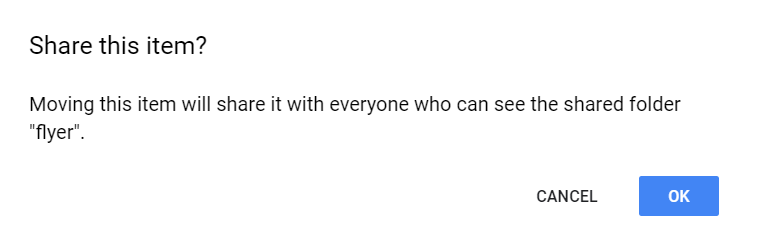
Here's how Drive handles it when you try to drop any file/folder inside a shared folder:
(this is a dialog)
How would we know which files are sensitive?
Perhaps I haven't explained well enough- all files/folders are treated as "sensitive" when it comes to putting them in a folder which would expose it to the public - for that reason, confirmation is required to proceed with sharing
pilsnerbeer
on 21 Aug 2019
Related issues
 juliushaertl
·
3Comments
jancborchardt
·
3Comments
juliushaertl
·
3Comments
jancborchardt
·
3Comments
 dl5rcw
·
3Comments
dl5rcw
·
3Comments
 j-ed
·
3Comments
j-ed
·
3Comments
 MorrisJobke
·
3Comments
MorrisJobke
·
3Comments
Most helpful comment
Here's how Drive handles it when you try to drop any file/folder inside a shared folder:

(this is a dialog)
Perhaps I haven't explained well enough- all files/folders are treated as "sensitive" when it comes to putting them in a folder which would expose it to the public - for that reason, confirmation is required to proceed with sharing