Server: The "view shares" screen is counter intuitive and could lead to unintentional data deletion.
Let's say that I have just installed nextcloud and shared 3 or 4 files from my uploaded collection. If I follow the workflow from the Nextcloud homepage of clicking on "Files" and then clicking on "Shares" - I am presented with a nice, neat, uniform list of file shares:
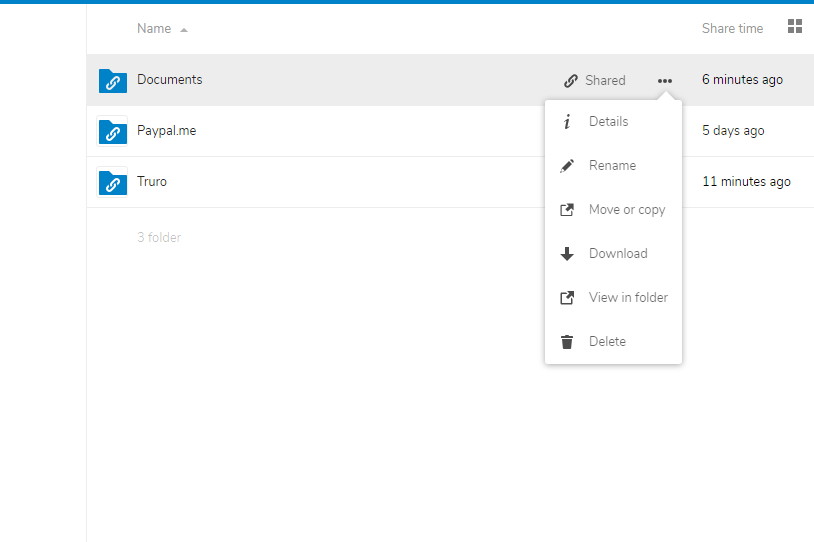
Particularly with only shared folders displayed on this screen, it appears to me as though all functions on this page pertain directly to the file shares. Therefore it seems as though the "delete" function here relates only to the share, and clicking it is going to delete the share.
In this case the delete button actually deletes the file, which is probably not what I want to do. I think that most users deleting an object from this screen will be thinking "delete the share", so in my opinion this UI is counter-intuitive and will probably lead to accidental data destruction.
I can foresee a case in which someone has accidentally emailed their boss an inflammatory document / image / etc, and just wants to unshare it - they go to the share screen in a panic and then just hit "delete" - boom!
 KimTheFirst
All 4 comments
@nextcloud/designers something to think about perhaps? I understand what the user means, perhaps when it is removing the share, the 'delete' text should say 'unshare' instead. I know that 'deleting' a share means unsharing it but that is of course only when it is a share that came from somebody else, so that is confusing...
 jospoortvliet
on 12 Aug 2019
jospoortvliet
on 12 Aug 2019
Good question. I can understand the confusion, but we're still listing files.
We could change the delete string to something like delete file ?
cc @jancborchardt
 skjnldsv
on 12 Aug 2019
skjnldsv
on 12 Aug 2019
We could change the delete string to something like
Delete file?
That seems like a good, minimal change! Also then of course Delete folder in case it’s a folder.
 jancborchardt
on 13 Aug 2019
skjnldsv
on 14 Aug 2019
jancborchardt
on 13 Aug 2019
skjnldsv
on 14 Aug 2019
Related issues
 ghost
·
3Comments
jancborchardt
·
3Comments
ghost
·
3Comments
jancborchardt
·
3Comments
 mama21mama
·
3Comments
mama21mama
·
3Comments
 MariusBluem
·
3Comments
MariusBluem
·
3Comments
 rullzer
·
3Comments
rullzer
·
3Comments
Most helpful comment
Good question. I can understand the confusion, but we're still listing files.
We could change the delete string to something like
delete file?cc @jancborchardt