Server: Audio Glitching Server 2.2/2.3 - late frames route
I'm seeing issues with audio when the CasparCG channel is set to 1080i50 and playing back videos that are 1080p25. Not all the time or on the same videos the audio will not play back correctly sounds kinda like it's skipping.
Setting the CasparCG channel to 1080p25 seems to resolve the issue.
Videos are played on channel 2 then routed to channel 1 which is played out on a DeckLink HD Extreme 3D
Anyone else experienced this?
 grahamspr86
All 26 comments
I'm seeing issues with audio when the CasparCG channel is set to 1080i50 and playing back videos that are 1080p25. Not all the time or on the same videos the audio will not play back correctly sounds kinda like it's skipping.
Setting the CasparCG channel to 1080p25 seems to resolve the issue.
Videos are played on channel 2 then routed to channel 1 which is played out on a DeckLink HD Extreme 3D
Anyone else experienced this?
Do you test with system audio consumer?
 ducthiem90
on 6 Aug 2019
ducthiem90
on 6 Aug 2019
Afraid I didn't think of giving that a try.
The issue wasn't complete gone when using 1080p25 it would still happen just very rarely.
When I get a bit of time I'll give it a try using the system audio consumer.
grahamspr86
on 7 Aug 2019
I've tested on a different machine and I'm seeing the same, can't be sure it's 100% identical but sounds similar.
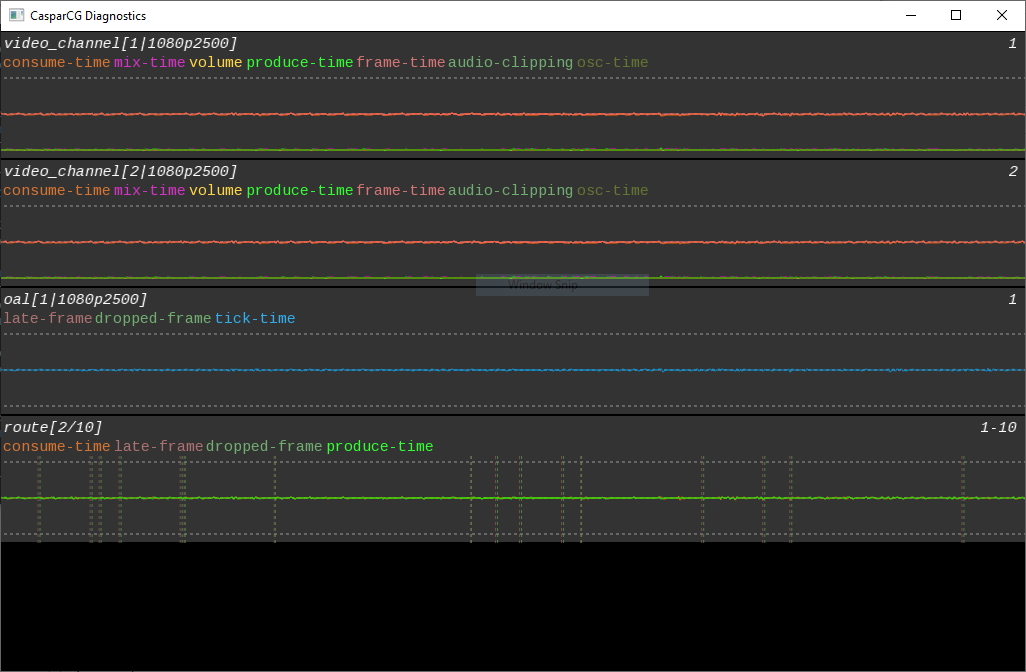
It seems to be caused by route PLAY 1-10 route://2-10
The route is causing dropped and late frames sitting doing nothing, if I play the video on channel 1 it plays fine.
I've tried versions between d442a8f84f68838f91c82f5f57c9634e84f7a23a and the release of 2.2 and they all have the same issue, switch back to 2.0 and the issue is gone.
grahamspr86
on 13 Aug 2019
PLAY 1-10 route://2-10
You can try: PLAY 1-10 route://2-10 BUFFER 2
ducthiem90
on 14 Aug 2019
PLAY 1-10 route://2-10
You can try: PLAY 1-10 route://2-10 BUFFER 2
That does seem to resolve it!
grahamspr86
on 14 Aug 2019
PLAY 1-10 route://2-10
You can try: PLAY 1-10 route://2-10 BUFFER 2
Is the BUFFER option also present in 2.1? I don't see any references to it in the code on that branch.
I do see there is a FRAMES_DELAY option in 2.1. Does that have a similar effect or is that purely for synchronization purposes?
 saltomodules
on 14 Aug 2019
saltomodules
on 14 Aug 2019
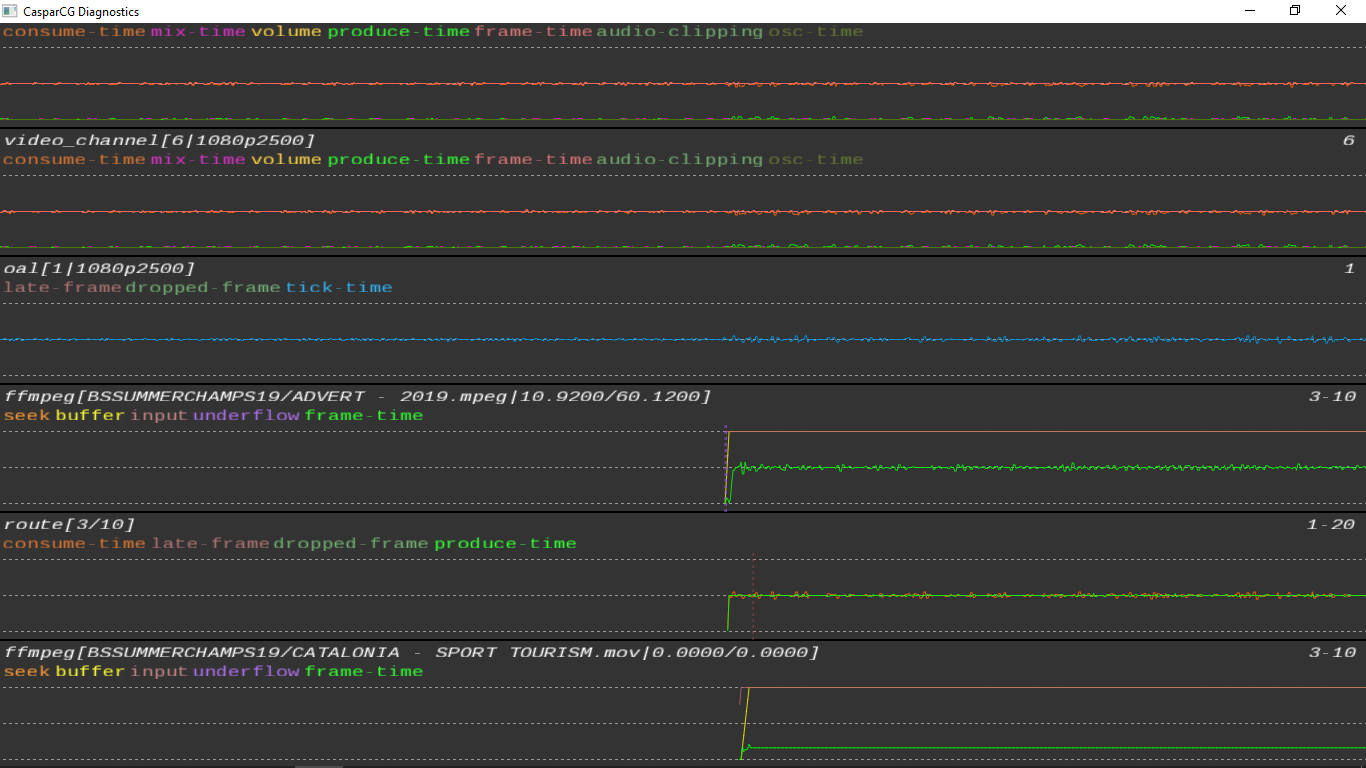
It's mostly solved with the buffer work around, I still get the odd late-frame just after initiating the route which causes a glitch in the audio.
grahamspr86
on 14 Aug 2019
It's mostly solved with the buffer work around, I still get the odd late-frame just after initiating the route which causes a glitch in the audio.
Because route doesn't wait first frame, I think it isn't problem
ducthiem90
on 15 Aug 2019
It's mostly solved with the buffer work around, I still get the odd late-frame just after initiating the route which causes a glitch in the audio.
Because route doesn't wait first frame, I think it isn't problem
It's not always the first frame but does happen fairly soon at the start. This never use to be an issue with 2.0 you could route smoothly without it dropping a frame.
Do you know the reason for now needing to add buffer to route?
grahamspr86
on 15 Aug 2019
It's mostly solved with the buffer work around, I still get the odd late-frame just after initiating the route which causes a glitch in the audio.
Because route doesn't wait first frame, I think it isn't problem
It's not always the first frame but does happen fairly soon at the start. This never use to be an issue with 2.0 you could route smoothly without it dropping a frame.
Do you know the reason for now needing to add buffer to route?
Because 2 channels don't use a clock together
ducthiem90
on 19 Aug 2019
Try to sync both channels with external reference signal to the decklink boards.
 premultiply
on 19 Aug 2019
premultiply
on 19 Aug 2019
Try to sync both channels with external reference signal to the decklink boards.
So a ref input on the deckling card used for output on channel 1 will sync all the channels to that?
grahamspr86
on 19 Aug 2019
As I understand it each channel is independent. So each channel needs an own genlocked decklink output device to stay in sync to each other.
But maybe I am wrong...
premultiply
on 19 Aug 2019
As I understand it each channel is independent. So each channel needs an own genlocked decklink output device to stay in sync to each other.
But maybe I am wrong...
In version 2.0 or 2.1, you can to use syncto consumer for that work. But on version 2.2, syncto consumer removed
ducthiem90
on 19 Aug 2019
PLAY 1-10 route://2-10
You can try: PLAY 1-10 route://2-10 BUFFER 2
Is the
BUFFERoption also present in 2.1? I don't see any references to it in the code on that branch.I do see there is a
FRAMES_DELAYoption in 2.1. Does that have a similar effect or is that purely for synchronization purposes?
No! BUFFER or FRAMES_DELAY don't use for synchronization purposes. You can use "sync-to" consumer for that in version 2.0 or 2.1
ducthiem90
on 19 Aug 2019
As I understand it each channel is independent. So each channel needs an own genlocked decklink output device to stay in sync to each other.
But maybe I am wrong...In version 2.0 or 2.1, you can to use syncto consumer for that work. But on version 2.2, syncto consumer removed
If we want to route video from one channel to another and avoid dropped/late frames both channels need to have a decklink consume which is genlocked when using 2.2?
grahamspr86
on 19 Aug 2019
As I understand it each channel is independent. So each channel needs an own genlocked decklink output device to stay in sync to each other.
But maybe I am wrong...In version 2.0 or 2.1, you can to use syncto consumer for that work. But on version 2.2, syncto consumer removed
If we want to route video from one channel to another and avoid dropped/late frames both channels need to have a decklink consume which is genlocked when using 2.2?
Yes, you can use decklink or bluefish consumer
ducthiem90
on 19 Aug 2019
As I understand it each channel is independent. So each channel needs an own genlocked decklink output device to stay in sync to each other.
But maybe I am wrong...In version 2.0 or 2.1, you can to use syncto consumer for that work. But on version 2.2, syncto consumer removed
If we want to route video from one channel to another and avoid dropped/late frames both channels need to have a decklink consume which is genlocked when using 2.2?
Yes, you can use decklink or bluefish consumer
Thanks, are we likely to see the SYNC TO Consumer back in 2.2/2.3? I see a reference to it here #721 and here #821
grahamspr86
on 19 Aug 2019
Thanks, are we likely to see the SYNC TO Consumer back in 2.2/2.3? I see a reference to it here #721 and here #821
I am not sure when it will be done
ducthiem90
on 19 Aug 2019
Thanks, are we likely to see the SYNC TO Consumer back in 2.2/2.3? I see a reference to it here #721 and here #821
I am not sure when it will be done
Thanks. I have a system with a duo 2 so could use that instead and genlock.
Do you think the original issue I had as described in my first post could be caused by the channels not being genlocked or am I dealing with two separate issues?
grahamspr86
on 19 Aug 2019
Using genlock on the Decklink Duo 2 did seem to help with this, each channel had a Decklink consumer.
I still seem to see the issue with the late frame shortly after a route has started which can be seen in my original example which seems to cause a glitch in the audio. https://github.com/CasparCG/server/issues/1226#issuecomment-521573561
grahamspr86
on 4 Mar 2020
What is your cpu load like when this is happening?
I am struggling to reproduce this on my system in both 1080i50 and 1080p25 running 2.2.0, and the only way I seem to be able to get it to have any late-frames is to almost starve it of cpu.
I also tried both with and without decklinks, using go1080p25 as the route source
 Julusian
on 9 Mar 2020
Julusian
on 9 Mar 2020
What is your cpu load like when this is happening?
I am struggling to reproduce this on my system in both 1080i50 and 1080p25 running 2.2.0, and the only way I seem to be able to get it to have any late-frames is to almost starve it of cpu.
I also tried both with and without decklinks, using go1080p25 as the route source
Can I get back to you on this around middle/end of April I have an event on then for two weeks and will be able to have a better look at it. I have a feeling the issue might have been down to GPU load, I swapped from a K2200 to an M4000 and I believe the constant late frames is now gone.
Other than the single late frame right at the start of the route e.g PLAY video on channel 2 and then route to channel 1, issued straight after each other
grahamspr86
on 9 Mar 2020
I have the same kind of issue with CasparCG 2.3. Even if I add buffer, I not only have audio glich at the beginning of the route, but sometimes (maybe every 1 minute). I also think that it happens when GPU use over that 75%.
 STL1811
on 30 Mar 2020
STL1811
on 30 Mar 2020
I have the same kind of issue with CasparCG 2.3. Even if I add buffer, I not only have audio glich at the beginning of the route, but sometimes (maybe every 1 minute). I also think that it happens when GPU use over that 75%.
Think it could be GPU releated I tried it on one system with a K2200 and saw around 70% usage. Tried it on another system with an M4000 only had about 30% usage and seemed fine on the system but audio was glitching on the K2200 system.
grahamspr86
on 30 Mar 2020
This should be resolved in 8998411317e8d80f6dd8c02e94158cbd954d1f50
Julusian
on 28 Apr 2020
Related issues
 jesperstarkar
·
51Comments
jesperstarkar
·
51Comments
 rrebuffo
·
25Comments
rrebuffo
·
25Comments
 Punkley
·
24Comments
premultiply
·
25Comments
Punkley
·
24Comments
premultiply
·
25Comments
 TomKaltz
·
75Comments
TomKaltz
·
75Comments
Most helpful comment
Because 2 channels don't use a clock together