Server: ✨ Nextcloud 16 (alpha 1) polishing review
As usual, we test the daily zip file to find details for polishing. :tada:
Anyone is welcome to take over issues and help out! :)
👩🏭 Installation
- [x] Database toggle is completely broken https://github.com/nextcloud/server/pull/14643
- [x] "Storage & database " has space at the end https://github.com/nextcloud/server/pull/14643
- [x] Database password visibility toggle not toggleable via space (works for admin password) https://github.com/nextcloud/server/pull/14833
- [ ] Highlight on "Finish setup" button is insufficient
🧙 First run wizard
- [ ] Improve layout & design of "Principles" (page 2): maybe move icons to left and show as list
- [ ] Improve layout & design of "Apps" (page 3): more zoomed app store screenshot so things are visible, reduce text
- [x] Settings section Mobile & desktop: Layout is broken, icon alignment in buttons https://github.com/nextcloud/firstrunwizard/pull/175
📁 Files
- [ ] Uploading a file, then changing to "Recent" and then changing to "All files" results in the cancel X of the upload progress to be next to the upload icon https://github.com/nextcloud/server/issues/15317
- [ ] When deleting a file, the upload progress bar appears on the top
- [x] Grid view: Share action needs to be put into menu
- [ ]
Grid view: Select should be put into menunot 16 - [x] Grid view: In deleted files, Restore button is glitched inside of name, should be in the menu (only in grid view) #14931
- [ ] Shares category: When going to details of a file, actions are duplicated
- [x] Deleted files: Thumbnails are low resolution https://github.com/nextcloud/server/pull/14719
- [x] Deleted files: action should say "Delete permanently" instead of just "Delete" https://github.com/nextcloud/server/pull/14721
- [X] Hovering filename in sidebar should show tooltip with full name (regression?)
- [ ] Tapping filename in sidebar should show tooltip too for mobile
- [ ] Highlight in sharing dialog (jQuery autocomplete) shouldn’t have the top and bottom border additionally
- [ ]
Titles of share pages are not specific https://github.com/nextcloud/server/issues/11506~~ to 17
🔮 Recommendations
- [x] On mobile, there should be max 3 rows of recommendations https://github.com/nextcloud/recommendations/issues/32 -> https://github.com/nextcloud/recommendations/pull/58
🖼 Viewer
- [x] Content should be displayed bigger (currently Gallery shows it as big as possible, and Viewer shows them a bit small) https://github.com/nextcloud/viewer/issues/21
- [x] Sometimes background flickers when changing images
- [x] Background tinting should be darker https://github.com/nextcloud/nextcloud-vue/pull/300
- [x] Control hiding needs a quick fade out animation
- [X] Viewer app needs to take precedence over Gallery slideshow, also on public share page https://github.com/nextcloud/viewer/issues/3
- [x] "Next" button shouldn’t be primary blue, takes too much attention from the images https://github.com/nextcloud/nextcloud-vue/issues/275
- [x] Next & Previous buttons should be further to the sides, to be flush with X exit icon and not take focus away from the content
- [x] Unicode characters (e.g. japanese) in filename not correctly displayed when going through slideshow
- [x]
Share and More icons should be on the right of the filename, not sticky to the X icon on the right - [x] Simplify error message to "Error loading filename.svg" https://github.com/nextcloud/viewer/pull/24
- [x] There’s a scrollbar on the right scrolling the content
⚡ Activity
- [x] File previews are too big, and filetype icons way too small. (Regression) https://github.com/nextcloud/activity/pull/353
- [x] Emptycontent icons and text should reflect the category https://github.com/nextcloud/activity/issues/322
🔎 Search
- [ ] In grid view, results from other folders overlap summary of current folder contents ("3 files match …")
- [ ] No grid view for search results from other folders.
🔔 Notifications
- [x]
Dismissing older notification also hides every newer notification (only until refresh) - [x]
Notifications window should have min-height (same as when it’s empty) - [x]
Needs short compress animation for dismissing for proper feedback
Moved to https://github.com/nextcloud/notifications/pull/300
⚙ Settings
- [ ] Text links not properly highlighted
- [ ] Checkboxes (e.g. in "Sharing" or "Activity" settings) not properly highlighted on tabbing through
- [ ] Personal info: Saving feedback needs to be faster
- [x] Personal info: Federation scope menu toggle not selectable via keyboard https://github.com/nextcloud/server/pull/14808
- [x] Accessibility: theme doesn’t change on tabbing to setting and activating it via space #14809
- [x] Admin overview: Update channel not reachable via keyboard, blue bar hover/focus feedback missing in entries https://github.com/nextcloud/server/pull/14809
- [ ] Support: Add section about copying system report
- [x] Security → Two-Factor Authentication: Hide whole block below "Enforce" checkbox until it’s checked https://github.com/nextcloud/server/pull/14713
🛠 Apps management
Loading takes long when network connection is slow. Should just already display local apps(to 17 requires major work)- [ ] Having detail sidebar open and scrolling all the way down in the app list moves the sidebar up
- [ ] Not possible to open sidebar via tabbing, only "Disable" (or "Download and enable") buttons are tabbable
- [ ] App bundles page shows "No apps found for your version" on the bottom (also in 15 stable)
👥 User management
- [ ] Feedback spinner should be on the button instead of on the left (where you don’t look when pressing the button)
- [x] After adding a user, focus should jump to "Username" field to add another user https://github.com/nextcloud/server/pull/14810
- [ ] When zoomed or adding more columns, select elements overlap
❓ Help
- [ ] Could use icons in the left navigation
- [ ] If zoomed in, menu should be hidden behind hamburger menu
🎨 Theming https://github.com/nextcloud/server/pull/14885
- [x] Light theming color:
- [x] On error pages like "File not found"
- [x] "Forgot password?" on log in is light, should be dark
- [x] App name in header has boxy background
- [x] 3 dot icon in share link header is white, should be black
- [x] First run wizard "next" icon should be dark because the primary color is light https://github.com/nextcloud/firstrunwizard/pull/182
- [x] Dark theme: "File not found" screen has dark icon, should be white
- [x] Basically all the content of the
.body-login-containershould always be white because the container background is dark (#body-login prule for footer overwrites this, should be more specific)
 jancborchardt
All 19 comments
⚡ Activity
- [x] File previews are too big, and filetype icons way too small. (Regression)
I noticed this too lately, however the activity app was not modified in a long time, so it seems some global CSS is causing this?
- [x] Emptycontent icons and text should reflect the category
See https://github.com/nextcloud/activity/issues/322#issuecomment-470431311 Maybe I can finish it in the contributor week.
:bell: Notifications
- [x] Dismissing older notification also hides every newer notification (only until refresh)
This should be fixed in master :thinking: But I will check again.
- [x] Notifications window should have min-height (same as when it’s empty)
okidoki
- [x] Needs short compress animation for dismissing for proper feedback
Can a designer do this or tell me how? I guess it goes here and fade is not enough? https://github.com/nextcloud/notifications/blob/master/src/components/notification.vue#L110
 nickvergessen
on 12 Mar 2019
nickvergessen
on 12 Mar 2019
- [x] Database toggle is completely broken
- [x] "Storage & database " has space at the end
 icewind1991
on 12 Mar 2019
icewind1991
on 12 Mar 2019
🔔 Notifications
Dismissing older notification also hides every newer notification (only until refresh)
This should be fixed in master 🤔 But I will check again.
:clap: finally, it will be fixed.
 Valdnet
on 12 Mar 2019
Valdnet
on 12 Mar 2019
Feedback from @karlitschek:
- [x] PDFs can't be opened (neither in the new viewer nor in the existing pdf viewer) -> https://github.com/nextcloud/files_pdfviewer/pull/124
- [x] the layout of the First Run Wizard is broken - next buttons are outside the wizard
- [x] There are some errors in the log by default. We should make sure that there is nothing in there in a plain setup.
- [ ] shouldn’t the new configuration profiles be in the clients page in the settings somewhere?
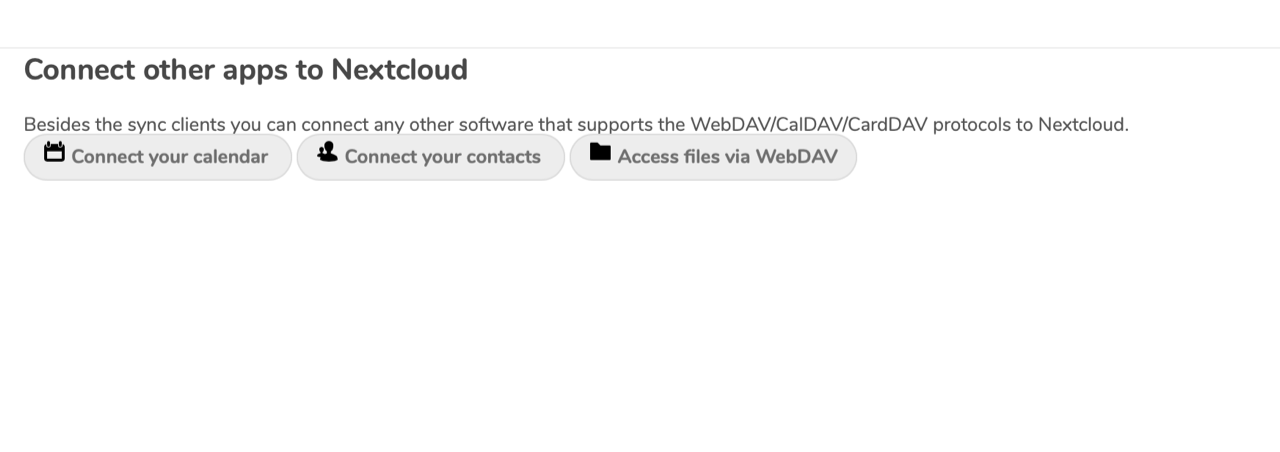
- [X] the layout/spacing on the Client page is broken. The icons in the buttons need alignment and a bit more space above the buttons.
 MorrisJobke
on 18 Mar 2019
MorrisJobke
on 18 Mar 2019
- [x] the layout of the First Run Wizard is broken - next buttons are outside the wizard
@jancborchardt I would say, that the buttons should be either right next to the image border or towards the display edges as we thought during the hackweek already.
MorrisJobke
on 18 Mar 2019
Right – the first run wizard is a bit different to the viewer. @skjnldsv how about for the "normal/medium" size (used by first run wizard) we put the controls closer to the modal, like it was before for the first run wizard?
jancborchardt
on 18 Mar 2019
Right – the first run wizard is a bit different to the viewer. @skjnldsv how about for the "normal/medium" size (used by first run wizard) we put the controls closer to the modal, like it was before for the first run wizard?
Sounds also good 👍
MorrisJobke
on 18 Mar 2019
@jancborchardt the firstrunwizard still uses the old primary layout.
I'll try to add something.
 skjnldsv
on 19 Mar 2019
skjnldsv
on 19 Mar 2019
Database password visibility toggle not toggleable via space (works for admin password)
This is caused by ReferenceError: zxcvbn is not defined. As far as I debugged, the strengthify lib does just add a new script tag to the head but doesn't wait for the script to actually load. Hence this might sometimes work, sometimes it will just fail. I'm a bit puzzled why this hasn't been reported earlier as I don't see anything changed for nc16.
 ChristophWurst
on 19 Mar 2019
ChristophWurst
on 19 Mar 2019
Our JS is noe bundled and therefor continues faster?
nickvergessen
on 19 Mar 2019
No, the setup and installation scripts are not bundled. I don't think the bundling makes a difference here.
ChristophWurst
on 19 Mar 2019
I get the exact same error on stable15.
ChristophWurst
on 19 Mar 2019
Above the file listing in 16 is a horizontal row of "recent files". Is there a way to hide this view for all users? I do not want recent files showing in the Files tab. I go to Activity for that.
 rcdailey
on 27 Mar 2019
rcdailey
on 27 Mar 2019
Above the file listing in 16 is a horizontal row of "recent files". Is there a way to hide this view for all users? I do not want recent files showing in the Files tab. I go to Activity for that.
disable the recommendations app
 rullzer
on 27 Mar 2019
rullzer
on 27 Mar 2019
php occ app:disable recommendations is your friend :)
ChristophWurst
on 27 Mar 2019
Thanks, I was assuming it would be a setting not an app. That fixed it.
Another issue I'm noticing is that the "Shares" view does not show a list of files with active public share links (list is empty). In version 15, this worked fine (I was previously running v15). When I click the share links in an incognito browser, however, I'm able to download the files.
So the files are still shared, but they don't show up in the Shares view. Is this a bug?
rcdailey
on 28 Mar 2019
something to add here: #15160
 violoncelloCH
on 18 Apr 2019
violoncelloCH
on 18 Apr 2019
- [ ] Uploading a file, then changing to "Recent" and then changing to "All files" results in the cancel X of the upload progress to be next to the upload icon
uploading is not needed... just switching to any different view than "All files" and then back to it triggers this X to appear
violoncelloCH
on 18 Apr 2019
Closing this in favor of the ✨ Nextcloud 17 polishing list! #16076 :)
If you find more issues, please open separate reports for them.
jancborchardt
on 28 Jun 2019
Related issues
 mfechner
·
3Comments
mfechner
·
3Comments
 georgehrke
·
3Comments
ChristophWurst
·
3Comments
georgehrke
·
3Comments
ChristophWurst
·
3Comments
 mama21mama
·
3Comments
mama21mama
·
3Comments
 brylie
·
3Comments
brylie
·
3Comments
Most helpful comment
Above the file listing in 16 is a horizontal row of "recent files". Is there a way to hide this view for all users? I do not want recent files showing in the Files tab. I go to Activity for that.