Server: Problem with email verification on self hosted mail server and others public hosted mailserver
Hi,
I tried to connect to my local server and other public servers. I used lets encrypt on my own system. Passwort is correct and I can send emails with e.g. Thunderbird.
My logs shows:
System.Net.Mail.SmtpException: Failure sending mail. ---> System.Security.Authentication.AuthenticationException: The remote certificate is invalid according to the validation procedure.
What is the problem? Did Bitwarden really have problems with lets encrypt?
Regards,
Oliver
 RedJohn14
All 39 comments
Maybe you need to add the Lets Encrypt CA to ./bwdata/ca-certificates?
 kspearrin
on 4 Mar 2019
kspearrin
on 4 Mar 2019
Hi,
I have already copy all Lets Encrypt CA to ./bwdata/ca-certificates everything from docker host plus lets encrypt CA. Any ideas? Please see also my post here:
https://community.bitwarden.com/t/bitwarden-e-mail-to-localhost-mailserver/4894
So I would like to use the external mail server but this server have lets encrypt and I have the error you see below here in the log file.
How did you solve this issue on your hosted Bitwarden?
Regards,
Oliver
RedJohn14
on 4 Mar 2019
Maybe you need to add the Lets Encrypt CA to ./bwdata/ca-certificates?
Any ideas what I can do? I would like to buy Premium Plan and Familie Plan for 5 Persons but only if I can use the mail function without problem. Many users have problems. What I can do? Its only a little thing maybe?
RedJohn14
on 4 Mar 2019
Can you ping your SMTP server from within the bitwarden-api container? Does another mail server, like Gmail or SendGrid work?
kspearrin
on 4 Mar 2019
Can you ping your SMTP server from within the bitwarden-api container? Does another mail server, like Gmail or SendGrid work?
- Yes I can ping my SMTP server from bitwarden-api container, also I can telnet the mailserver on port 25 and port 587. I tested the mail account via thunderbird and everything is working. If I use the mailserver in Bitwarden config I have the error message:
System.Net.Mail.SmtpException: Failure sending mail. ---> System.Security.Authentication.AuthenticationException: The remote certificate is invalid according to the validation procedure.
But why? Letencrypt is valid certification and no other programs have problems with it.
- Second strange thing is, i have another test installation scenario. From the docker container e.g. bitwarden-api I can ping the docker host ip. On the docker host is installed an postfix server which allows to relay from the Bitwarden container network. So I can send mails without any problem and everything work. BUT after I restarted the docker container or use the command ./bitwarden rebuild and ./bitwarden start, the IPs and the hole network from the docker containers are changed. (bevor rebuild or restart the container e.g. have 172.20.0.0/24 and after this the container have 172.21.0.0/24). Each reboot change the IPs from the container one IP range up but why?
I can see that the ./bitwarden start delete docker default_network card. I have also two docker network cards.
docker0, this network card have always the same static ip no changes after reboot, start or rebuild
br-29a2b1f877c5, this network card changed every reboot, start or rebuild, the network card have than another name e.g. br-xxxxx and other IPs / network. Every rebuild, reboot or start +1 the IP range from this network card. (I tested it several times).
My problem is that I can not allow relay the docker containers via postfix on docker host because IP is always changing.
Regards,
Oliver
RedJohn14
on 4 Mar 2019
I am thinking this has something to do with the broken SMTP library that we've been using. For whatever reason it doesn't like the Lets Encrypt CA cert. Our next version is using a newer SMTP library which might fix this.
kspearrin
on 5 Mar 2019
I am thinking this has something to do with the broken SMTP library that we've been using. For whatever reason it doesn't like the Lets Encrypt CA cert. Our next version is using a newer SMTP library which might fix this.
Okay and what is the workaround? At the moment I can't register users on my bitwarden installation. I would like to buy your premium package but not if simple SMTP send is not working...
I have read many users have problems with mailing can you give me a hotfix? Or what file I must change to get it on working until your next relase?!
What is about my 2. question, why are the IPs / hole IP range is changed after ./bitwarden stop and ./bitwarden start or ./bitwarden restart? If I can set this IPs fix I can relay mails via my own server without any problems. But at the moment every restart the IPs / hole IP range from docker containers are changed. So I can't relay over my local mail server after reboot because containers have new IPs that are not permitted to send via local mail server.
And one more question, I have seen that the timezone in docker containers are not right, how can I change it? Can I change it with docker-compose.override.yml? Which parameters? Maybe I can fix the IP problem also with the file docker-compose.override.yml but how?
Many Thanks!!
RedJohn14
on 5 Mar 2019
Is there a workaround now? I can't log in because of 2-factor email authentication.
 DevTek314
on 14 Mar 2019
DevTek314
on 14 Mar 2019
1.30.0 is now available with the new SMTP lib. Give it a try?
kspearrin
on 14 Mar 2019
Same problem with 1.30.0.
Error:
bitwarden-identity | info: Microsoft.AspNetCore.Hosting.Internal.WebHost[1]
bitwarden-identity |       Request starting HTTP/1.0 POST http://URL/connect/token application/x-www-form-urlencoded; charset=utf-8 232
bitwarden-identity | info: Microsoft.AspNetCore.Cors.Infrastructure.CorsService[4]
bitwarden-identity |       Policy execution successful.
bitwarden-identity | info: IdentityServer4.Hosting.IdentityServerMiddleware[0]
bitwarden-identity |       Invoking IdentityServer endpoint: IdentityServer4.Endpoints.TokenEndpoint for /connect/token
bitwarden-identity | crit: IdentityServer4.Hosting.IdentityServerMiddleware[0]
bitwarden-identity |       Unhandled exception: An error occurred while attempting to establish an SSL or TLS connection.
bitwarden-identity |
bitwarden-identity |       The SSL certificate presented by the server is not trusted by the system for one or more of the following reasons:
bitwarden-identity |       1. The server is using a self-signed certificate which cannot be verified.
bitwarden-identity |       2. The local system is missing a Root or Intermediate certificate needed to verify the server's certificate.
bitwarden-identity |       3. The certificate presented by the server is expired or invalid.
bitwarden-identity |
bitwarden-identity |       See https://github.com/jstedfast/MailKit/blob/master/FAQ.md#InvalidSslCertificate for possible solutions.
bitwarden-identity | MailKit.Security.SslHandshakeException: An error occurred while attempting to establish an SSL or TLS connection.
bitwarden-identity |
bitwarden-identity | The SSL certificate presented by the server is not trusted by the system for one or more of the following reasons:
bitwarden-identity | 1. The server is using a self-signed certificate which cannot be verified.
bitwarden-identity | 2. The local system is missing a Root or Intermediate certificate needed to verify the server's certificate.
bitwarden-identity | 3. The certificate presented by the server is expired or invalid.
bitwarden-identity |
bitwarden-identity | See https://github.com/jstedfast/MailKit/blob/master/FAQ.md#InvalidSslCertificate for possible solutions. ---> System.Security.Authentication.AuthenticationException: The remote certificate is invalid according to the validation procedure.
bitwarden-identity |    at System.Net.Security.SslState.StartSendAuthResetSignal(ProtocolToken message, AsyncProtocolRequest asyncRequest, ExceptionDispatchInfo exception)
bitwarden-identity |    at System.Net.Security.SslState.CheckCompletionBeforeNextReceive(ProtocolToken message, AsyncProtocolRequest asyncRequest)
bitwarden-identity |    at System.Net.Security.SslState.StartSendBlob(Byte[] incoming, Int32 count, AsyncProtocolRequest asyncRequest)
bitwarden-identity |    at System.Net.Security.SslState.ProcessReceivedBlob(Byte[] buffer, Int32 count, AsyncProtocolRequest asyncRequest)
bitwarden-identity |    at System.Net.Security.SslState.StartReadFrame(Byte[] buffer, Int32 readBytes, AsyncProtocolRequest asyncRequest)
bitwarden-identity |    at System.Net.Security.SslState.StartReceiveBlob(Byte[] buffer, AsyncProtocolRequest asyncRequest)
bitwarden-identity |    at System.Net.Security.SslState.CheckCompletionBeforeNextReceive(ProtocolToken message, AsyncProtocolRequest asyncRequest)
bitwarden-identity |    at System.Net.Security.SslState.StartSendBlob(Byte[] incoming, Int32 count, AsyncProtocolRequest asyncRequest)
bitwarden-identity |    at System.Net.Security.SslState.ProcessReceivedBlob(Byte[] buffer, Int32 count, AsyncProtocolRequest asyncRequest)
bitwarden-identity |    at System.Net.Security.SslState.StartReadFrame(Byte[] buffer, Int32 readBytes, AsyncProtocolRequest asyncRequest)
bitwarden-identity |    at System.Net.Security.SslState.StartReceiveBlob(Byte[] buffer, AsyncProtocolRequest asyncRequest)
bitwarden-identity |    at System.Net.Security.SslState.CheckCompletionBeforeNextReceive(ProtocolToken message, AsyncProtocolRequest asyncRequest)
bitwarden-identity |    at System.Net.Security.SslState.StartSendBlob(Byte[] incoming, Int32 count, AsyncProtocolRequest asyncRequest)
bitwarden-identity |    at System.Net.Security.SslState.ProcessReceivedBlob(Byte[] buffer, Int32 count, AsyncProtocolRequest asyncRequest)
bitwarden-identity |    at System.Net.Security.SslState.StartReadFrame(Byte[] buffer, Int32 readBytes, AsyncProtocolRequest asyncRequest)
bitwarden-identity |    at System.Net.Security.SslState.PartialFrameCallback(AsyncProtocolRequest asyncRequest)
bitwarden-identity | --- End of stack trace from previous location where exception was thrown ---
bitwarden-identity |    at System.Net.Security.SslState.ThrowIfExceptional()
bitwarden-identity |    at System.Net.Security.SslState.InternalEndProcessAuthentication(LazyAsyncResult lazyResult)
bitwarden-identity |    at System.Net.Security.SslState.EndProcessAuthentication(IAsyncResult result)
bitwarden-identity |    at System.Net.Security.SslStream.EndAuthenticateAsClient(IAsyncResult asyncResult)
bitwarden-identity |    at System.Net.Security.SslStream.<>c.<AuthenticateAsClientAsync>b__46_2(IAsyncResult iar)
bitwarden-identity |    at System.Threading.Tasks.TaskFactory`1.FromAsyncCoreLogic(IAsyncResult iar, Func`2 endFunction, Action`1 endAction, Task`1 promise, Boolean requiresSynchronization)
bitwarden-identity | --- End of stack trace from previous location where exception was thrown ---
bitwarden-identity |    at MailKit.Net.Smtp.SmtpClient.ConnectAsync(String host, Int32 port, SecureSocketOptions options, Boolean doAsync, CancellationToken cancellationToken)
bitwarden-identity |    --- End of inner exception stack trace ---
bitwarden-identity |    at MailKit.Net.Smtp.SmtpClient.ConnectAsync(String host, Int32 port, SecureSocketOptions options, Boolean doAsync, CancellationToken cancellationToken)
bitwarden-identity |    at Bit.Core.Services.MailKitSmtpMailDeliveryService.SendEmailAsync(MailMessage message) in /home/appveyor/projects/core/src/Core/Services/Implementations/MailKitSmtpMailDeliveryService.cs:line 74
bitwarden-identity |    at Bit.Core.Services.HandlebarsMailService.SendTwoFactorEmailAsync(String email, String token) in /home/appveyor/projects/core/src/Core/Services/Implementations/HandlebarsMailService.cs:line 110
bitwarden-identity |    at Bit.Core.Services.UserService.SendTwoFactorEmailAsync(User user) in /home/appveyor/projects/core/src/Core/Services/Implementations/UserService.cs:line 299
bitwarden-identity |    at Bit.Core.IdentityServer.ResourceOwnerPasswordValidator.BuildTwoFactorResultAsync(User user, Organization organization, ResourceOwnerPasswordValidationContext context) in /home/appveyor/projects/core/src/Core/IdentityServer/ResourceOwnerPasswordValidator.cs:line 203
bitwarden-identity |    at Bit.Core.IdentityServer.ResourceOwnerPasswordValidator.ValidateAsync(ResourceOwnerPasswordValidationContext context) in /home/appveyor/projects/core/src/Core/IdentityServer/ResourceOwnerPasswordValidator.cs:line 90
bitwarden-identity |    at IdentityServer4.Validation.TokenRequestValidator.ValidateResourceOwnerCredentialRequestAsync(NameValueCollection parameters)
bitwarden-identity |    at IdentityServer4.Validation.TokenRequestValidator.RunValidationAsync(Func`2 validationFunc, NameValueCollection parameters)
bitwarden-identity |    at IdentityServer4.Validation.TokenRequestValidator.ValidateRequestAsync(NameValueCollection parameters, ClientSecretValidationResult clientValidationResult)
bitwarden-identity |    at IdentityServer4.Endpoints.TokenEndpoint.ProcessTokenRequestAsync(HttpContext context)
bitwarden-identity |    at IdentityServer4.Endpoints.TokenEndpoint.ProcessAsync(HttpContext context)
bitwarden-identity |    at IdentityServer4.Hosting.IdentityServerMiddleware.Invoke(HttpContext context, IEndpointRouter router, IUserSession session, IEventService events)
bitwarden-identity | fail: Microsoft.AspNetCore.Server.Kestrel[13]
bitwarden-identity |       Connection id "0HLL8FJQQGDIC", Request id "0HLL8FJQQGDIC:00000001": An unhandled exception was thrown by the application.
bitwarden-identity | MailKit.Security.SslHandshakeException: An error occurred while attempting to establish an SSL or TLS connection.
bitwarden-identity |
bitwarden-identity | The SSL certificate presented by the server is not trusted by the system for one or more of the following reasons:
bitwarden-identity | 1. The server is using a self-signed certificate which cannot be verified.
bitwarden-identity | 2. The local system is missing a Root or Intermediate certificate needed to verify the server's certificate.
bitwarden-identity | 3. The certificate presented by the server is expired or invalid.
bitwarden-identity |
bitwarden-identity | See https://github.com/jstedfast/MailKit/blob/master/FAQ.md#InvalidSslCertificate for possible solutions. ---> System.Security.Authentication.AuthenticationException: The remote certificate is invalid according to the validation procedure.
bitwarden-identity |    at System.Net.Security.SslState.StartSendAuthResetSignal(ProtocolToken message, AsyncProtocolRequest asyncRequest, ExceptionDispatchInfo exception)
bitwarden-identity |    at System.Net.Security.SslState.CheckCompletionBeforeNextReceive(ProtocolToken message, AsyncProtocolRequest asyncRequest)
bitwarden-identity |    at System.Net.Security.SslState.StartSendBlob(Byte[] incoming, Int32 count, AsyncProtocolRequest asyncRequest)
bitwarden-identity |    at System.Net.Security.SslState.ProcessReceivedBlob(Byte[] buffer, Int32 count, AsyncProtocolRequest asyncRequest)
bitwarden-identity |    at System.Net.Security.SslState.StartReadFrame(Byte[] buffer, Int32 readBytes, AsyncProtocolRequest asyncRequest)
bitwarden-identity |    at System.Net.Security.SslState.StartReceiveBlob(Byte[] buffer, AsyncProtocolRequest asyncRequest)
bitwarden-identity |    at System.Net.Security.SslState.CheckCompletionBeforeNextReceive(ProtocolToken message, AsyncProtocolRequest asyncRequest)
bitwarden-identity |    at System.Net.Security.SslState.StartSendBlob(Byte[] incoming, Int32 count, AsyncProtocolRequest asyncRequest)
bitwarden-identity |    at System.Net.Security.SslState.ProcessReceivedBlob(Byte[] buffer, Int32 count, AsyncProtocolRequest asyncRequest)
bitwarden-identity |    at System.Net.Security.SslState.StartReadFrame(Byte[] buffer, Int32 readBytes, AsyncProtocolRequest asyncRequest)
bitwarden-identity |    at System.Net.Security.SslState.StartReceiveBlob(Byte[] buffer, AsyncProtocolRequest asyncRequest)
bitwarden-identity |    at System.Net.Security.SslState.CheckCompletionBeforeNextReceive(ProtocolToken message, AsyncProtocolRequest asyncRequest)
bitwarden-identity |    at System.Net.Security.SslState.StartSendBlob(Byte[] incoming, Int32 count, AsyncProtocolRequest asyncRequest)
bitwarden-identity |    at System.Net.Security.SslState.ProcessReceivedBlob(Byte[] buffer, Int32 count, AsyncProtocolRequest asyncRequest)
bitwarden-identity |    at System.Net.Security.SslState.StartReadFrame(Byte[] buffer, Int32 readBytes, AsyncProtocolRequest asyncRequest)
bitwarden-identity |    at System.Net.Security.SslState.PartialFrameCallback(AsyncProtocolRequest asyncRequest)
bitwarden-identity | --- End of stack trace from previous location where exception was thrown ---
bitwarden-identity |    at System.Net.Security.SslState.ThrowIfExceptional()
bitwarden-identity |    at System.Net.Security.SslState.InternalEndProcessAuthentication(LazyAsyncResult lazyResult)
bitwarden-identity |    at System.Net.Security.SslState.EndProcessAuthentication(IAsyncResult result)
bitwarden-identity |    at System.Net.Security.SslStream.EndAuthenticateAsClient(IAsyncResult asyncResult)
bitwarden-identity |    at System.Net.Security.SslStream.<>c.<AuthenticateAsClientAsync>b__46_2(IAsyncResult iar)
bitwarden-identity |    at System.Threading.Tasks.TaskFactory`1.FromAsyncCoreLogic(IAsyncResult iar, Func`2 endFunction, Action`1 endAction, Task`1 promise, Boolean requiresSynchronization)
bitwarden-identity | --- End of stack trace from previous location where exception was thrown ---
bitwarden-identity |    at MailKit.Net.Smtp.SmtpClient.ConnectAsync(String host, Int32 port, SecureSocketOptions options, Boolean doAsync, CancellationToken cancellationToken)
bitwarden-identity |    --- End of inner exception stack trace ---
bitwarden-identity |    at MailKit.Net.Smtp.SmtpClient.ConnectAsync(String host, Int32 port, SecureSocketOptions options, Boolean doAsync, CancellationToken cancellationToken)
bitwarden-identity |    at Bit.Core.Services.MailKitSmtpMailDeliveryService.SendEmailAsync(MailMessage message) in /home/appveyor/projects/core/src/Core/Services/Implementations/MailKitSmtpMailDeliveryService.cs:line 74
bitwarden-identity |    at Bit.Core.Services.HandlebarsMailService.SendTwoFactorEmailAsync(String email, String token) in /home/appveyor/projects/core/src/Core/Services/Implementations/HandlebarsMailService.cs:line 110
bitwarden-identity |    at Bit.Core.Services.UserService.SendTwoFactorEmailAsync(User user) in /home/appveyor/projects/core/src/Core/Services/Implementations/UserService.cs:line 299
bitwarden-identity |    at Bit.Core.IdentityServer.ResourceOwnerPasswordValidator.BuildTwoFactorResultAsync(User user, Organization organization, ResourceOwnerPasswordValidationContext context) in /home/appveyor/projects/core/src/Core/IdentityServer/ResourceOwnerPasswordValidator.cs:line 203
bitwarden-identity |    at Bit.Core.IdentityServer.ResourceOwnerPasswordValidator.ValidateAsync(ResourceOwnerPasswordValidationContext context) in /home/appveyor/projects/core/src/Core/IdentityServer/ResourceOwnerPasswordValidator.cs:line 90
bitwarden-identity |    at IdentityServer4.Validation.TokenRequestValidator.ValidateResourceOwnerCredentialRequestAsync(NameValueCollection parameters)
bitwarden-identity |    at IdentityServer4.Validation.TokenRequestValidator.RunValidationAsync(Func`2 validationFunc, NameValueCollection parameters)
bitwarden-identity |    at IdentityServer4.Validation.TokenRequestValidator.ValidateRequestAsync(NameValueCollection parameters, ClientSecretValidationResult clientValidationResult)
bitwarden-identity |    at IdentityServer4.Endpoints.TokenEndpoint.ProcessTokenRequestAsync(HttpContext context)
bitwarden-identity |    at IdentityServer4.Endpoints.TokenEndpoint.ProcessAsync(HttpContext context)
bitwarden-identity |    at IdentityServer4.Hosting.IdentityServerMiddleware.Invoke(HttpContext context, IEndpointRouter router, IUserSession session, IEventService events)
bitwarden-identity |    at IdentityServer4.Hosting.IdentityServerMiddleware.Invoke(HttpContext context, IEndpointRouter router, IUserSession session, IEventService events)
bitwarden-identity |    at Microsoft.AspNetCore.Authentication.AuthenticationMiddleware.Invoke(HttpContext context)
bitwarden-identity |    at Microsoft.AspNetCore.Cors.Infrastructure.CorsMiddleware.Invoke(HttpContext context)
bitwarden-identity |    at IdentityServer4.Hosting.BaseUrlMiddleware.Invoke(HttpContext context)
bitwarden-identity |    at Bit.Core.Utilities.CurrentContextMiddleware.Invoke(HttpContext httpContext, CurrentContext currentContext, GlobalSettings globalSettings) in /home/appveyor/projects/core/src/Core/Utilities/CurrentContextMiddleware.cs:line 18
bitwarden-identity |    at Bit.Core.Utilities.ServiceCollectionExtensions.<>c.<<UseDefaultMiddleware>b__10_0>d.MoveNext() in /home/appveyor/projects/core/src/Core/Utilities/ServiceCollectionExtensions.cs:line 383
bitwarden-identity | --- End of stack trace from previous location where exception was thrown ---
bitwarden-identity |    at Microsoft.AspNetCore.Server.Kestrel.Core.Internal.Http.HttpProtocol.ProcessRequests[TContext](IHttpApplication`1 application)
bitwarden-identity | info: Microsoft.AspNetCore.Hosting.Internal.WebHost[2]
bitwarden-identity |       Request finished in 96.5517ms 500
If you want to ignore the untrusted certificate failure and blindly trust the server (not recommended) you can now set the following in >= 1.30.0
in ./bwdata/env/global.override.env:
globalSettings__mail__smtp__trustServer=true
Then restart with ./bitwarden.sh restart
kspearrin
on 14 Mar 2019
With globalSettings__mail__smtp__trustServer=true does it work.
Thank you.
DevTek314
on 14 Mar 2019
Thanks for update this issue!
RedJohn14
on 14 Mar 2019
So I guess there is no way to avoid blindly trusting the server? Definiteley not a friend of that. I am having the same problem. I copied the ISRG Root X1 (current Let's Encrypt root cert) and DST Root X3 certs into bwdata/ca-certificates, but I don't think that is the problem as I start getting these messages on rebuild and update:
WARNING: Skipping duplicate certificate dst-root-x3.pem
WARNING: Skipping duplicate certificate dst-root-x3.pem
WARNING: Skipping duplicate certificate isrg-root-x1.pem
WARNING: Skipping duplicate certificate isrg-root-x1.pem
The certificate my SMTP server is using is valid of course (none of my applications are complaining and https://www.checktls.com/ shows no errors).
I am using wildcard certificates (with SAN), so maybe that's it?
 fanonwue
on 18 Mar 2019
fanonwue
on 18 Mar 2019
@ArisenDrake It seems to be a problem with the .NET Core runtime on Linux. Supposedly they have some fixes coming in v3 which we'll eventually upgrade to.
kspearrin
on 19 Mar 2019
Try to relay local. Local mail server will relay to your right mail server with letsencrypt ca.
RedJohn14
on 19 Mar 2019
Can confirm this on Ubuntu 18.04.2 clean install with just Bitwarden running on port 8443 using the LE option when setting it up (chaning ports in the config) - using SMPT2GO as a relay.
Don't have so much logs to speak about (none) since I don't have full access to the server.
 enoch85
on 20 Mar 2019
enoch85
on 20 Mar 2019
This is still broken:
~~~
2019-03-22 16:11:33.038 +00:00 [Error] Connection id ""0HLLES3K0RUF4"", Request id ""0HLLES3K0RUF4:00000001"": An unhandled exception was thrown by the application.
MailKit.Security.SslHandshakeException: An error occurred while attempting to establish an SSL or TLS connection.
One possibility is that you are trying to connect to a port which does not support SSL/TLS.
The other possibility is that the SSL certificate presented by the server is not trusted by the system for one or more of the following reasons:
- The server is using a self-signed certificate which cannot be verified.
- The local system is missing a Root or Intermediate certificate needed to verify the server's certificate.
- The certificate presented by the server is expired or invalid.
See https://github.com/jstedfast/MailKit/blob/master/FAQ.md#InvalidSslCertificate for possible solutions. ---> System.IO.IOException: The handshake failed due to an unexpected packet format.
at System.Net.Security.SslState.StartReadFrame(Byte[] buffer, Int32 readBytes, AsyncProtocolRequest asyncRequest)
at System.Net.Security.SslState.StartReceiveBlob(Byte[] buffer, AsyncProtocolRequest asyncRequest)
at System.Net.Security.SslState.CheckCompletionBeforeNextReceive(ProtocolToken message, AsyncProtocolRequest asyncRequest)
at System.Net.Security.SslState.StartSendBlob(Byte[] incoming, Int32 count, AsyncProtocolRequest asyncRequest)
at System.Net.Security.SslState.ForceAuthentication(Boolean receiveFirst, Byte[] buffer, AsyncProtocolRequest asyncRequest)
at System.Net.Security.SslState.ProcessAuthentication(LazyAsyncResult lazyResult)
at System.Net.Security.SslStream.BeginAuthenticateAsClient(SslClientAuthenticationOptions sslClientAuthenticationOptions, CancellationToken cancellationToken, AsyncCallback asyncCallback, Object asyncState)
at System.Net.Security.SslStream.BeginAuthenticateAsClient(String targetHost, X509CertificateCollection clientCertificates, SslProtocols enabledSslProtocols, Boolean checkCertificateRevocation, AsyncCallback asyncCallback, Object asyncState)
at System.Net.Security.SslStream.<>c.
at System.Threading.Tasks.TaskFactory1.FromAsyncImpl[TArg1,TArg2,TArg3](Func6 beginMethod, Func2 endFunction, Action1 endAction, TArg1 arg1, TArg2 arg2, TArg3 arg3, Object state, TaskCreationOptions creationOptions)
at System.Threading.Tasks.TaskFactory.FromAsyncTArg1,TArg2,TArg3
at System.Net.Security.SslStream.AuthenticateAsClientAsync(String targetHost, X509CertificateCollection clientCertificates, SslProtocols enabledSslProtocols, Boolean checkCertificateRevocation)
at MailKit.Net.Smtp.SmtpClient.ConnectAsync(String host, Int32 port, SecureSocketOptions options, Boolean doAsync, CancellationToken cancellationToken)
--- End of inner exception stack trace ---
at MailKit.Net.Smtp.SmtpClient.ConnectAsync(String host, Int32 port, SecureSocketOptions options, Boolean doAsync, CancellationToken cancellationToken)
at Bit.Core.Services.MailKitSmtpMailDeliveryService.SendEmailAsync(MailMessage message) in /home/appveyor/projects/core/src/Core/Services/Implementations/MailKitSmtpMailDeliveryService.cs:line 74
at Bit.Core.Services.HandlebarsMailService.SendPasswordlessSignInAsync(String returnUrl, String token, String email) in /home/appveyor/projects/core/src/Core/Services/Implementations/HandlebarsMailService.cs:line 218
at Bit.Core.Identity.PasswordlessSignInManager1.PasswordlessSignInAsync(String email, String returnUrl) in /home/appveyor/projects/core/src/Core/Identity/PasswordlessSignInManager.cs:line 41
at Bit.Admin.Controllers.LoginController.Index(LoginModel model) in /home/appveyor/projects/core/src/Admin/Controllers/LoginController.cs:line 41
at Microsoft.AspNetCore.Mvc.Internal.ActionMethodExecutor.TaskOfIActionResultExecutor.Execute(IActionResultTypeMapper mapper, ObjectMethodExecutor executor, Object controller, Object[] arguments)
at System.Threading.Tasks.ValueTask1.get_Result()
at Microsoft.AspNetCore.Mvc.Internal.ControllerActionInvoker.InvokeActionMethodAsync()
at Microsoft.AspNetCore.Mvc.Internal.ControllerActionInvoker.InvokeNextActionFilterAsync()
at Microsoft.AspNetCore.Mvc.Internal.ControllerActionInvoker.Rethrow(ActionExecutedContext context)
at Microsoft.AspNetCore.Mvc.Internal.ControllerActionInvoker.Next(State& next, Scope& scope, Object& state, Boolean& isCompleted)
at Microsoft.AspNetCore.Mvc.Internal.ControllerActionInvoker.InvokeInnerFilterAsync()
at Microsoft.AspNetCore.Mvc.Internal.ResourceInvoker.InvokeNextExceptionFilterAsync()
at Microsoft.AspNetCore.Mvc.Internal.ResourceInvoker.Rethrow(ExceptionContext context)
at Microsoft.AspNetCore.Mvc.Internal.ResourceInvoker.Next(State& next, Scope& scope, Object& state, Boolean& isCompleted)
at Microsoft.AspNetCore.Mvc.Internal.ResourceInvoker.InvokeNextResourceFilter()
at Microsoft.AspNetCore.Mvc.Internal.ResourceInvoker.Rethrow(ResourceExecutedContext context)
at Microsoft.AspNetCore.Mvc.Internal.ResourceInvoker.Next(State& next, Scope& scope, Object& state, Boolean& isCompleted)
at Microsoft.AspNetCore.Mvc.Internal.ResourceInvoker.InvokeFilterPipelineAsync()
at Microsoft.AspNetCore.Mvc.Internal.ResourceInvoker.InvokeAsync()
at Microsoft.AspNetCore.Builder.RouterMiddleware.Invoke(HttpContext httpContext)
at Microsoft.AspNetCore.StaticFiles.StaticFileMiddleware.Invoke(HttpContext context)
at Microsoft.AspNetCore.Authentication.AuthenticationMiddleware.Invoke(HttpContext context)
at Microsoft.AspNetCore.Builder.Extensions.UsePathBaseMiddleware.Invoke(HttpContext context)
at Microsoft.AspNetCore.Server.Kestrel.Core.Internal.Http.HttpProtocol.ProcessRequestsTContext
~~~
Blindly trusting any server is not a good solution, so if .NET Core 3 fixes this updating would be really nice.
//edit:
To clarify: I'm trying to send mail directly via Port 25 and SMTP+STARTTLS. There is no user for mail sending configured (and it is not required). Even globalSettings__mail__smtp__trustServer=true does not work. With 1.29.0, it was possible to send mail via SSTARTTLS over port 25 and a certificate signed by our own CA when the certificate was placed in the ca-certificates folder.
 edermi
on 22 Mar 2019
edermi
on 22 Mar 2019
I'm seeing the same thing, the strange thing is that this used to work. The recent update to 1.30.1 seems to have broken it. Unfortunately I don't know what the previous version was, but I believe 1.28.something.
 Lalufu
on 30 Mar 2019
Lalufu
on 30 Mar 2019
Tried again today, still doesn't work with 1.30.1:
~~~
2019-04-09 07:25:45.857 +00:00 [Error] Connection id ""0HLLSN6FAIGGS"", Request id ""0HLLSN6FAIGGS:00000001"": An unhandled exception was thrown by the application.
MailKit.Security.SslHandshakeException: An error occurred while attempting to establish an SSL or TLS connection.
One possibility is that you are trying to connect to a port which does not support SSL/TLS.
The other possibility is that the SSL certificate presented by the server is not trusted by the system for one or more of the following reasons:
- The server is using a self-signed certificate which cannot be verified.
- The local system is missing a Root or Intermediate certificate needed to verify the server's certificate.
- The certificate presented by the server is expired or invalid.
See https://github.com/jstedfast/MailKit/blob/master/FAQ.md#InvalidSslCertificate for possible solutions. ---> System.IO.IOException: The handshake failed due to an unexpected packet format.
at System.Net.Security.SslState.StartReadFrame(Byte[] buffer, Int32 readBytes, AsyncProtocolRequest asyncRequest)
at System.Net.Security.SslState.StartReceiveBlob(Byte[] buffer, AsyncProtocolRequest asyncRequest)
at System.Net.Security.SslState.CheckCompletionBeforeNextReceive(ProtocolToken message, AsyncProtocolRequest asyncRequest)
at System.Net.Security.SslState.StartSendBlob(Byte[] incoming, Int32 count, AsyncProtocolRequest asyncRequest)
at System.Net.Security.SslState.ForceAuthentication(Boolean receiveFirst, Byte[] buffer, AsyncProtocolRequest asyncRequest)
at System.Net.Security.SslState.ProcessAuthentication(LazyAsyncResult lazyResult)
at System.Net.Security.SslStream.BeginAuthenticateAsClient(SslClientAuthenticationOptions sslClientAuthenticationOptions, CancellationToken cancellationToken, AsyncCallback asyncCallback, Object asyncState)
at System.Net.Security.SslStream.BeginAuthenticateAsClient(String targetHost, X509CertificateCollection clientCertificates, SslProtocols enabledSslProtocols, Boolean checkCertificateRevocation, AsyncCallback asyncCallback, Object asyncState)
at System.Net.Security.SslStream.<>c.
at System.Threading.Tasks.TaskFactory1.FromAsyncImpl[TArg1,TArg2,TArg3](Func6 beginMethod, Func2 endFunction, Action1 endAction, TArg1 arg1, TArg2 arg2, TArg3 arg3, Object state, TaskCreationOptions creationOptions)
at System.Threading.Tasks.TaskFactory.FromAsyncTArg1,TArg2,TArg3
at System.Net.Security.SslStream.AuthenticateAsClientAsync(String targetHost, X509CertificateCollection clientCertificates, SslProtocols enabledSslProtocols, Boolean checkCertificateRevocation)
at MailKit.Net.Smtp.SmtpClient.ConnectAsync(String host, Int32 port, SecureSocketOptions options, Boolean doAsync, CancellationToken cancellationToken)
--- End of inner exception stack trace ---
at MailKit.Net.Smtp.SmtpClient.ConnectAsync(String host, Int32 port, SecureSocketOptions options, Boolean doAsync, CancellationToken cancellationToken)
at Bit.Core.Services.MailKitSmtpMailDeliveryService.SendEmailAsync(MailMessage message) in /home/appveyor/projects/server/src/Core/Services/Implementations/MailKitSmtpMailDeliveryService.cs:line 82
at Bit.Core.Services.HandlebarsMailService.SendPasswordlessSignInAsync(String returnUrl, String token, String email) in /home/appveyor/projects/server/src/Core/Services/Implementations/HandlebarsMailService.cs:line 218
at Bit.Core.Identity.PasswordlessSignInManager1.PasswordlessSignInAsync(String email, String returnUrl) in /home/appveyor/projects/server/src/Core/Identity/PasswordlessSignInManager.cs:line 41
at Bit.Admin.Controllers.LoginController.Index(LoginModel model) in /home/appveyor/projects/server/src/Admin/Controllers/LoginController.cs:line 41
at Microsoft.AspNetCore.Mvc.Internal.ActionMethodExecutor.TaskOfIActionResultExecutor.Execute(IActionResultTypeMapper mapper, ObjectMethodExecutor executor, Object controller, Object[] arguments)
at System.Threading.Tasks.ValueTask1.get_Result()
at Microsoft.AspNetCore.Mvc.Internal.ControllerActionInvoker.InvokeActionMethodAsync()
at Microsoft.AspNetCore.Mvc.Internal.ControllerActionInvoker.InvokeNextActionFilterAsync()
at Microsoft.AspNetCore.Mvc.Internal.ControllerActionInvoker.Rethrow(ActionExecutedContext context)
at Microsoft.AspNetCore.Mvc.Internal.ControllerActionInvoker.Next(State& next, Scope& scope, Object& state, Boolean& isCompleted)
at Microsoft.AspNetCore.Mvc.Internal.ControllerActionInvoker.InvokeInnerFilterAsync()
at Microsoft.AspNetCore.Mvc.Internal.ResourceInvoker.InvokeNextExceptionFilterAsync()
at Microsoft.AspNetCore.Mvc.Internal.ResourceInvoker.Rethrow(ExceptionContext context)
at Microsoft.AspNetCore.Mvc.Internal.ResourceInvoker.Next(State& next, Scope& scope, Object& state, Boolean& isCompleted)
at Microsoft.AspNetCore.Mvc.Internal.ResourceInvoker.InvokeNextResourceFilter()
at Microsoft.AspNetCore.Mvc.Internal.ResourceInvoker.Rethrow(ResourceExecutedContext context)
at Microsoft.AspNetCore.Mvc.Internal.ResourceInvoker.Next(State& next, Scope& scope, Object& state, Boolean& isCompleted)
at Microsoft.AspNetCore.Mvc.Internal.ResourceInvoker.InvokeFilterPipelineAsync()
at Microsoft.AspNetCore.Mvc.Internal.ResourceInvoker.InvokeAsync()
at Microsoft.AspNetCore.Builder.RouterMiddleware.Invoke(HttpContext httpContext)
at Microsoft.AspNetCore.StaticFiles.StaticFileMiddleware.Invoke(HttpContext context)
at Microsoft.AspNetCore.Authentication.AuthenticationMiddleware.Invoke(HttpContext context)
at Microsoft.AspNetCore.Builder.Extensions.UsePathBaseMiddleware.Invoke(HttpContext context)
at Microsoft.AspNetCore.Server.Kestrel.Core.Internal.Http.HttpProtocol.ProcessRequestsTContext
~~~
This is the configuration:
~
globalSettings__mail__smtp__host=mail.dummy.internal
globalSettings__mail__smtp__port=25
globalSettings__mail__smtp__ssl=false
globalSettings__mail__smtp__username=
globalSettings__mail__smtp__password=
globalSettings__disableUserRegistration=false
globalSettings__mail__smtp__useDefaultCredentials=false
~
The docker container, certificates and mail server are OK:
~~~
root@svpwsafe:~# docker container ls [54/1700]
CONTAINER ID IMAGE COMMAND CREATED STATUS PORTS NAMES
a9ddda5486c7 bitwarden/nginx:1.30.1 "/entrypoint.sh" 2 minutes ago Up 2 minutes 80/tcp, 0.0.0.0:80->8080/tcp, 0.0.0.0:443->8443/tcp bitwarden-nginx
4a890f6266df bitwarden/admin:1.30.1 "/entrypoint.sh" 2 minutes ago Up 2 minutes 5000/tcp bitwarden-admin
2763b428cab8 bitwarden/notifications:1.30.1 "/entrypoint.sh" 2 minutes ago Up 2 minutes 5000/tcp bitwarden-notifications
469d090261fe bitwarden/web:2.10.0 "/entrypoint.sh" 2 minutes ago Up 2 minutes 5000/tcp bitwarden-web
853d3262de2f bitwarden/attachments:1.30.1 "/entrypoint.sh" 2 minutes ago Up 2 minutes 5000/tcp bitwarden-attachments
f58d93c948c3 bitwarden/mssql:1.30.1 "/entrypoint.sh" 2 minutes ago Up 2 minutes 1433/tcp bitwarden-mssql
d184aa8a043f bitwarden/identity:1.30.1 "/entrypoint.sh" 2 minutes ago Up 2 minutes 5000/tcp bitwarden-identity
3800c494fea6 bitwarden/api:1.30.1 "/entrypoint.sh" 2 minutes ago Up 2 minutes 5000/tcp bitwarden-api
ddf5cfceb683 bitwarden/icons:1.30.1 "/entrypoint.sh" 2 minutes ago Up 2 minutes 5000/tcp bitwarden-icons
root@svpwsafe:~# docker exec -i -t 4a890f6266df /bin/bash
root@4a890f6266df:/app# openssl s_client -starttls smtp -connect mail.dummy.internal:25
CONNECTED(00000003)
depth=2 C = DE, O = Company, CN = My Root-CA I
verify return:1
depth=1 C = DE, DC = net, DC = company, O = Company, CN = My Issue-CA I
verify return:1
depth=0 C = DE, ST = Bavaria, L = Munich, O = Company, OU = IT, CN = mail.dummy.internal
verify return:1
Certificate chain
0 s:/C=DE/ST=Bavaria/L=Munich/O=Company/OU=IT/CN=mail.dummy.internal
i:/C=DE/DC=net/DC=company/O=Company/CN=My Issue-CA I
1 s:/C=DE/DC=net/DC=company/O=Company/CN=My Issue-CA I
i:/C=DE/O=Company/CN=My Root-CA I
Server certificate
-----BEGIN CERTIFICATE-----
...snipped...
-----END CERTIFICATE-----
subject=/C=DE/ST=Bavaria/L=Munich/O=Company/OU=IT/CN=mail.dummy.internal
issuer=/C=DE/DC=net/DC=company/O=Company/CN=My Issue-CA I
No client certificate CA names sent
Peer signing digest: SHA1
Server Temp Key: X25519, 253 bits
SSL handshake has read 5242 bytes and written 302 bytes
Verification: OK
New, TLSv1.2, Cipher is ECDHE-RSA-AES256-GCM-SHA384
Server public key is 2048 bit
Secure Renegotiation IS supported
Compression: NONE
Expansion: NONE
No ALPN negotiated
SSL-Session:
Protocol : TLSv1.2
Cipher : ECDHE-RSA-AES256-GCM-SHA384
Session-ID: 54110000C94418E342CCE88E8A8579C5268194BEDDB75091D3731341BAC2715C
Session-ID-ctx:
Master-Key: FCDA423E9646AF9827F8A71E9FEFAD9008BDC2AE68E6653A0C747DC92F880E98A1D380ED89EDBABEE4246C3C75D8D4B2
PSK identity: None
PSK identity hint: None
SRP username: None
Start Time: 1554795543
Timeout : 7200 (sec)
Verify return code: 0 (ok)
Extended master secret: yes
250 XRDST
~~~
I reckon that there is a issue with STARTTLS. I tried to look at a pcap of the container when sending a mail but instead of sending the starttls command and upgrading the connection to a secure one, suddenly weird data is sent. This would also explain the error message, "The handshake failed due to an unexpected packet format".
Disabling SSL works, but is obviously no solution. Disabling certificate validation also doesn't work (and would not be a solution either).
This setup worked in 1.29 and broke with 1.30 and it seems that there are also others having the same problems.
I would appreciate if you could take another look at the problem and reopen the issue.
If there is anything I can do to help you reproduce and debug this issue just get back to me.
edermi
on 9 Apr 2019
This is the configuration:
globalSettings__mail__smtp__port=25
globalSettings__mail__smtp__ssl=false
Disabling SSL works, but is obviously no solution.
I am confused. Your configuration is using port 25 with SSL disabled... ?
kspearrin
on 9 Apr 2019
Sorry, Copy & Paste error. It was enabled when I tried everything and crafted the log information. I disabled SSL afterwards so users are not interrupted. Seems like I copied the configuration with disabled SSL, sorry.
edermi
on 9 Apr 2019
So your config is...
globalSettings__mail__smtp__port=25
globalSettings__mail__smtp__ssl=true
?
kspearrin
on 10 Apr 2019
I've glanced at the BW code and at https://github.com/jstedfast/MailKit/blob/e9dee7febf94b1e75b0db070e02c9b61115a830f/MailKit/Net/Smtp/SmtpClient.cs a bit (I hope that's the right MailKit).
It seems to me (not being a C# programmer) that we're holding it wrong. SMTP has three basic modes:
- No encryption
- SMTPS (SMTP over an SSL channel)
- STARTTLS (SMTP over a clear channel which is upgraded to SSL inline)
SMTPS is very rare, if people talk about SMTP and SSL they almost always mean STARTTLS.
MailKit supports all of those, and which one it uses depends on a rather complicated decision tree based on the parameters passed into ConnectAsync. It looks at the port number and the third parameter, SecureSocketOptions.
BW just passes in a boolean (True or False) for SecureSocketOptions, and that does not do what one think it does, if I read the code correctly.
https://github.com/jstedfast/MailKit/blob/e9dee7febf94b1e75b0db070e02c9b61115a830f/MailKit/Net/Smtp/SmtpClient.cs#L872 is what's making the decision on whether to use plain SMTP, SMTPS or STARTTLS, and when SecureSocketOptions is a boolean we hit the default branch for both switch statements, and end up with STARTTLS disabled.
If BW wants to support only STARTTLS and not SMTPS then passing in SecureSocketOptions.StartTls instead of a boolean should work, and no new config options would be required. If BW wants to support both SMTPS and STARTTLS there needs to be a config option that will let users chose.
Lalufu
on 10 Apr 2019
So your config is...
globalSettings__mail__smtp__port=25
globalSettings__mail__smtp__ssl=true
?
Yes. This worked in previous versions with STARTTLS on port 25 and is as far as I know widely used. See the OpenSSL command provided that connects to port 25 and establishes a TLS connection afterwards.
Thanks @Lalufu for your answer, I think there are some misconceptions here regarding transport encryption and SMTP and your explanation is excellent and on point.
edermi
on 10 Apr 2019
Currently, we use the following logic:
if(!_globalSettings.Mail.Smtp.Ssl && _globalSettings.Mail.Smtp.Port == 25)
{
    await client.ConnectAsync(_globalSettings.Mail.Smtp.Host, _globalSettings.Mail.Smtp.Port,
        MailKit.Security.SecureSocketOptions.None);
}
else
{
    var useSsl = _globalSettings.Mail.Smtp.Port == 587 && !_globalSettings.Mail.Smtp.SslOverride ?
        false : _globalSettings.Mail.Smtp.Ssl;
    await client.ConnectAsync(_globalSettings.Mail.Smtp.Host, _globalSettings.Mail.Smtp.Port, useSsl);
}
- If you are using ssl=false and port=25, force no StartTLS and no SSL. This seems to be the problem here since you want to use StartTLS on port 25.
- If using port 587, force ssl=false unless you provide an undocumented varibable of sslOverride=true. This was added since the old System.Net.Mail client would require ssl=true when using StartTLS, which is technically incorrect, whereas the new MailKit library requires ssl=false when using StartTLS (correct). To not break backwards compat, we added this condition with the ability to override incase someone actually doesn't use StartTLS on port 587.
It seems we need to add some other override to allow a user to use StartTLS on port 25.
The correct configuration for you would be:
globalSettings__mail__smtp__port=25
globalSettings__mail__smtp__ssl=false
But we need to find a solution to overcome no. 1 logic hole.
kspearrin
on 10 Apr 2019
I added a possible fix in https://github.com/bitwarden/server/commit/5cc0b19da8d8a0524b0b0934c79fda98a09b3316 .
You can now provide globalSettings__mail__smtp__startTls=true to override the logic in condition no. 1.
So you would use:
globalSettings__mail__smtp__port=25
globalSettings__mail__smtp__ssl=false
globalSettings__mail__smtp__startTls=true
You can try this out in the dev tags on DockerHub if you like.
Edit ./bitwarden.sh and change the core version there to dev. Then update with ./bitwarden.sh update.
kspearrin
on 10 Apr 2019
I added a possible fix in 5cc0b19 .
You can now provide
globalSettings__mail__smtp__startTls=trueto override the logic in condition no. 1.So you would use:
globalSettings__mail__smtp__port=25
globalSettings__mail__smtp__ssl=false
globalSettings__mail__smtp__startTls=true
You can try this out in the dev tags on DockerHub if you like.
Edit
./bitwarden.shand change the core version there todev. Then update with./bitwarden.sh update.
Thanks, I'll test it within the next week.
edermi
on 10 Apr 2019
@kspearrin Your fix works, thanks a lot! I see the STARTTLS command in tshark and the rest of the connection runs encrypted with TLSv1.2. I received the mail for my admin login, so everything is fine.
It would be nice to have this in the stable branch and documented. Also, the admin page may also be extended by a flag indicating that STARTTLS is used:
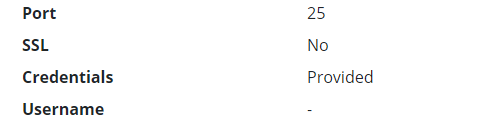
edermi
on 12 Apr 2019
globalSettings__mail__smtp__trustServer=true
This works well for my configuration. api and admin
- Server 1.31.1
- Web 2.11.0
- smtp server: lech.bitpalast.net:587 (Issuer: Let's Encrypt Authority X3)
- Docker version 17.05.0-ce, build 371caef-synology
- docker-compose version 1.14.0, build c7bdf9e
- on Synology DS918+
 winkler-winsen
on 16 Aug 2019
winkler-winsen
on 16 Aug 2019
above fix globalSettings__mail__smtp__trustServer=true doesn't seem to work for bitwarden/setup:1.32.0
are there any updates on this?
 retotrinkler
on 27 Sep 2019
retotrinkler
on 27 Sep 2019
above fix
globalSettings__mail__smtp__trustServer=truedoesn't seem to work forbitwarden/setup:1.32.0are there any updates on this?
Same here. No solution is known.
Could anyone help, please?
Thanks.
 tiagofreire-pt
on 5 Apr 2020
tiagofreire-pt
on 5 Apr 2020
Its already fixed with latest bitwarden version duebto newer dot net. At least for me with my LE cert.
 Commifreak
on 5 Apr 2020
Commifreak
on 5 Apr 2020
Its already fixed with latest bitwarden version duebto newer dot net. At least for me with my LE cert.
It seems not to, as I'm running Bitwarden 1.33.1.
tiagofreire-pt
on 5 Apr 2020
Since 1.33 its working with LE on my server. Without trustServer=true
Commifreak
on 5 Apr 2020
Since 1.33 its working with LE on my server. Without trustServer=true
This is my config:
globalSettings__mail__smtp__host=smtp.google.com
globalSettings__mail__smtp__port=587
globalSettings__mail__smtp__ssl=false
globalSettings__mail__smtp__startTls=true
[email protected]
globalSettings__mail__smtp__password=mypassword
And I have "less secure apps" turned "on", at google.
Thanks.
tiagofreire-pt
on 5 Apr 2020
@Commifreak Please post your config. It would be useful to others.
Thanks!
enoch85
on 5 Apr 2020
If it helps. Ill post it later this day.
But its the default one. I just added the trustServer attribute then and removed it again since bw is using latest dotnet.
Commifreak
on 6 Apr 2020
I'm facing this as well on 1.33.1 running in docker and I keep getting a handshake failure.
My mailserver is using a cert from my own CA and running on port 25 with STARTTLS.
I've added my CA cert to bwdata/ca-certificates and I can see that it get's picked up:
docker.io/bitwarden/setup:1.33.1
Updating certificates in /etc/ssl/certs...
1 added, 0 removed; done.
Running hooks in /etc/ca-certificates/update.d...
done.
I can also connect from within the API container just fine, so I'm pretty sure the CA cert was installed correctly and is trusted.
root@361ced3c6b8c:/app# openssl s_client -starttls smtp -crlf -connect mail.example.com:25
SSL handshake has read 1740 bytes and written 419 bytes
Verification: OK
...
    Verify return code: 0 (ok)
My config looks like:
globalSettings__mail__smtp__host=nuc01.home.lan
globalSettings__mail__smtp__port=25
globalSettings__mail__smtp__ssl=false
globalSettings__mail__smtp__startTls=true
It sends an email after I add globalSettings__mail__smtp__startTls=true, but I would like to avoid that.
 jakommo
on 12 Apr 2020
jakommo
on 12 Apr 2020
Related issues
 Sx3
·
4Comments
Sx3
·
4Comments
 ohthehugemanatee
·
3Comments
ohthehugemanatee
·
3Comments
 Pulsar
·
6Comments
Pulsar
·
6Comments
 chasgames
·
4Comments
chasgames
·
4Comments
 mjlm
·
6Comments
mjlm
·
6Comments
Most helpful comment
above fix
globalSettings__mail__smtp__trustServer=truedoesn't seem to work forbitwarden/setup:1.32.0are there any updates on this?