Server: No apps found for your version
Steps to reproduce
1.
2.
3.
Expected behaviour
Tell us what should happen
Actual behaviour
Tell us what happens instead
Server configuration
Operating system:
centos7.6
Web server:
nginx
Database:
mariadb
PHP version:
7.3
Nextcloud version: (see Nextcloud admin page)
15.0.4
Updated from an older Nextcloud/ownCloud or fresh install:
fresh install
Where did you install Nextcloud from:
official website, xx.tar.gz
Signing status:
Signing status
Login as admin user into your Nextcloud and access
http://example.com/index.php/settings/integrity/failed
paste the results here.
List of activated apps:
App list
If you have access to your command line run e.g.:
sudo -u www-data php occ app:list
from within your Nextcloud installation folder
Nextcloud configuration:
Config report
If you have access to your command line run e.g.:
sudo -u www-data php occ config:list system
from within your Nextcloud installation folder

or

Insert your config.php content here.
Make sure to remove all sensitive content such as passwords. (e.g. database password, passwordsalt, secret, smtp password, …)
Are you using external storage, if yes which one: local/smb/sftp/...
Are you using encryption: yes/no
Are you using an external user-backend, if yes which one: LDAP/ActiveDirectory/Webdav/...
LDAP configuration (delete this part if not used)
LDAP config
With access to your command line run e.g.:
sudo -u www-data php occ ldap:show-config
from within your Nextcloud installation folder

Without access to your command line download the data/owncloud.db to your local
computer or access your SQL server remotely and run the select query:
SELECT * FROM `oc_appconfig` WHERE `appid` = 'user_ldap';


Eventually replace sensitive data as the name/IP-address of your LDAP server or groups.
Client configuration
Browser:
Operating system:
Logs
Web server error log
Web server error log
Insert your webserver log here
Nextcloud log (data/nextcloud.log)
Nextcloud log
Insert your Nextcloud log here
Browser log
Browser log
Insert your browser log here, this could for example include:

a) The javascript console log
b) The network log
c) ...
 jearton
All 14 comments
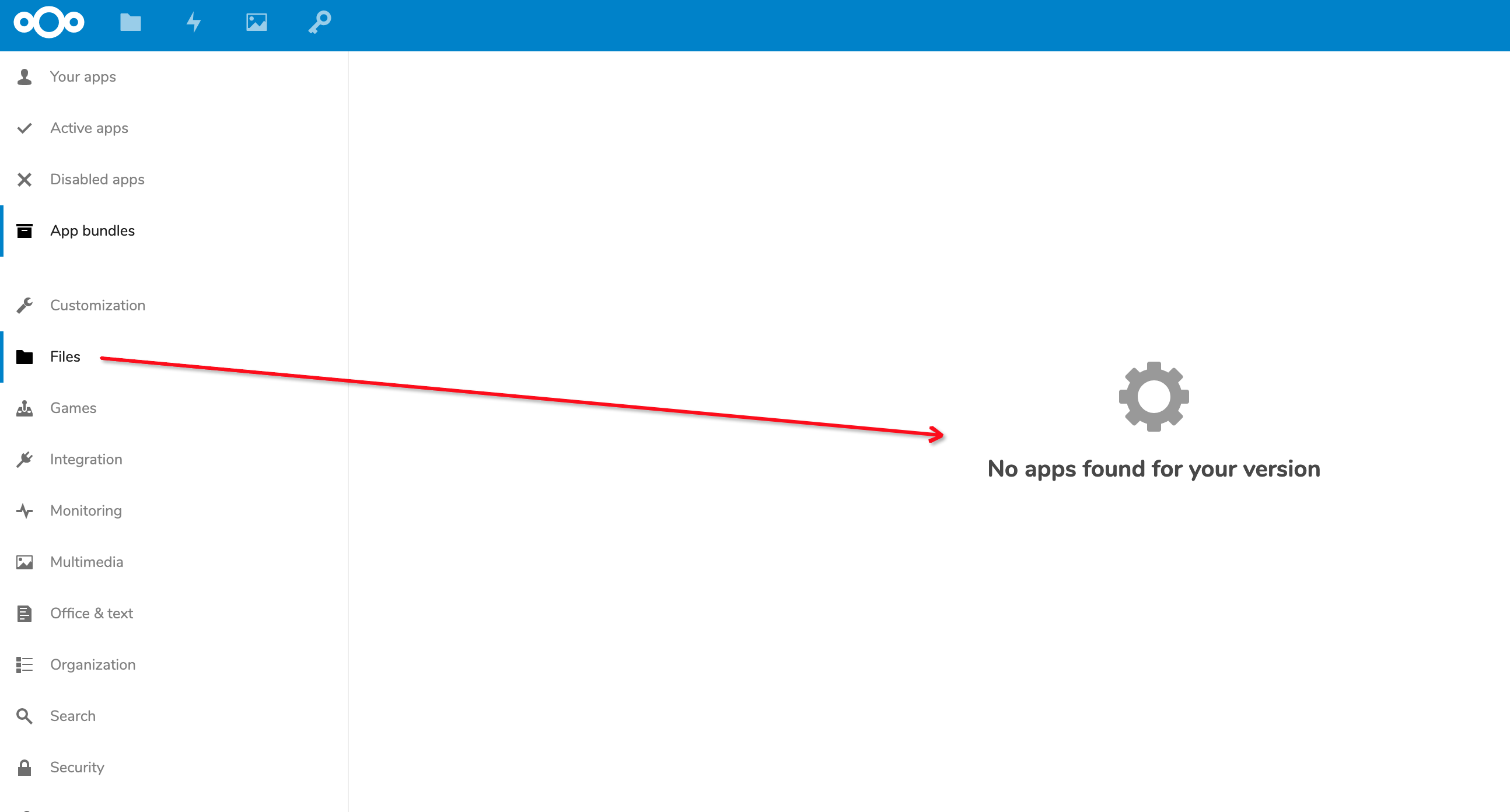
jearton
on 3 Mar 2019
I find the reason in debug logs. Then I find the hard codes. Could I customize it? Or customize the timeout params in the class Fetcher?

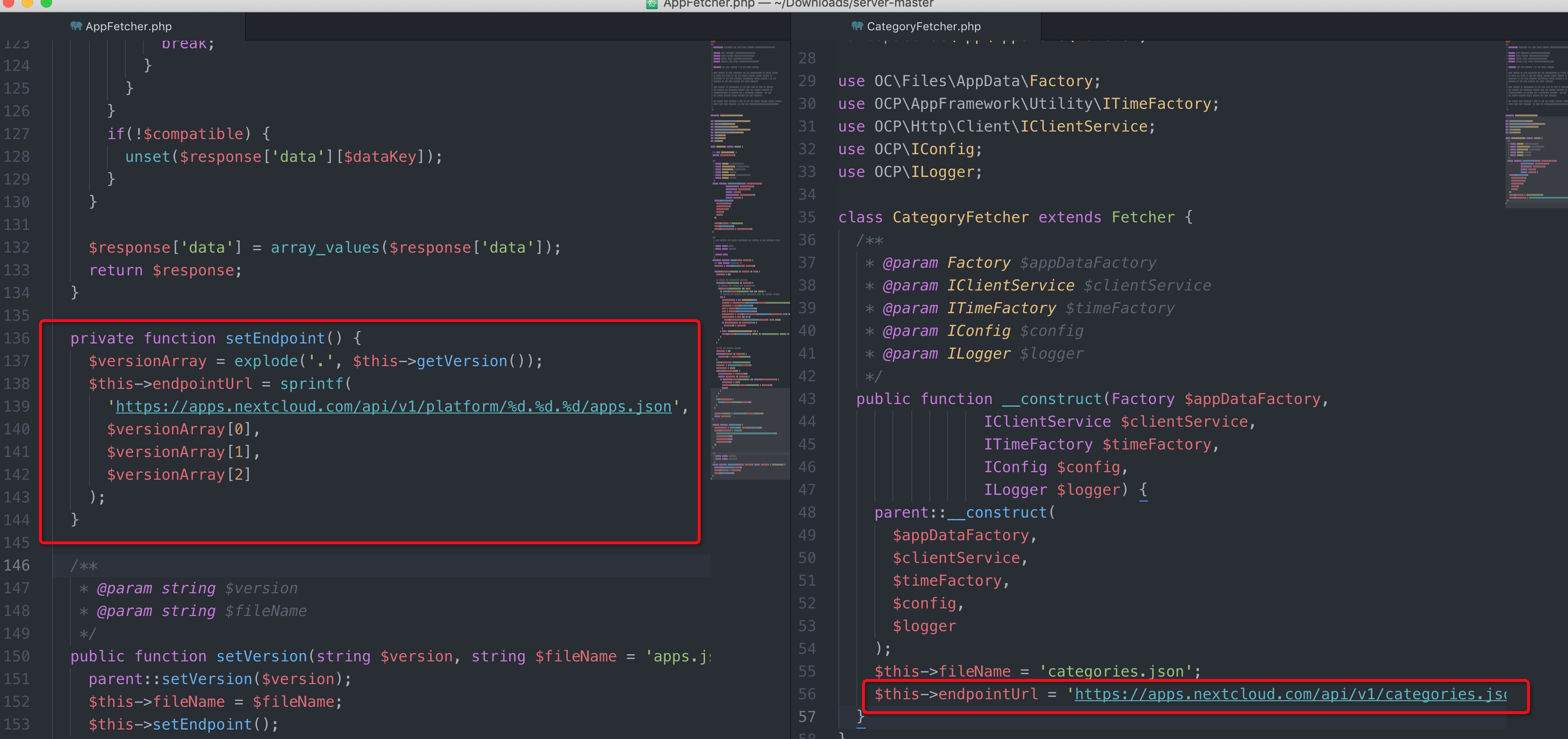
jearton
on 3 Mar 2019
I just changed the value of endpointUrl to my own proxy url, and then restart php-fpm service. It works! Never timeout!
jearton
on 3 Mar 2019
It's possible to define a proxy for outgoing connections.
 kesselb
on 3 Mar 2019
kesselb
on 3 Mar 2019
Hi, I've the same exact issue (No apps found for your version) but I don't have any proxy in my home.
It has direct connection to the internet.
Do you have any idea?
Thanks.
 esturniolo
on 12 Mar 2019
esturniolo
on 12 Mar 2019
Hi, I've the same exact issue (No apps found for your version) but I don't have any proxy in my home.
It has direct connection to the internet.
Do you have any idea?Thanks.
You can download the two files in my screenshot above into your local storage. And then modify the endpointUrl in the two class, directly to your local file . Restart, it should works. You can try it out.
jearton
on 18 Mar 2019
server/config/config.sample.php
Line 537 in 1cfa870
'proxy' => '',It's possible to define a proxy for outgoing connections.
I used my private nexus server to transfer this two files, cached ten days. I didn‘t want to configure a global proxy. If you could only configure these two urls, it would be fine.
jearton
on 18 Mar 2019
You can't install apps from the store without connectivity. Why adding more complexity here? Sure we could introduce some appstoreProxy. If you don't use the appstore than disable it (there is a option for it in config.php).
Please use this https://github.com/nextcloud/server/issues/new?labels=enhancement%2C+0.+Needs+triage&template=Feature_request.md to create a feature request and describe your case.
Closed this issue because it's not a bug.
kesselb
on 18 Mar 2019
followed this guide and apps show up
 sealionking
on 24 Apr 2019
sealionking
on 24 Apr 2019
This is an issue with the timeout settings on connecting to the appstore as it is happening for me and others who have a server that is directly connected to the appstore but if the https://apps.nextcloud.com server is slow to respond, which other people are reporting it is, then nextcloud is timing out and people are having to hack the timeout.
See https://help.nextcloud.com/t/no-apps-found-for-your-version-nc16/52979/
I upgraded to the latest stable hoping that perhaps even just the timeout value had been increased so I didn't have to go digging for the GitHub post referred to, but it is still happening - which has brought me to here.
This doesn't seem to be the post with the workaround in it for updating the timeout value though....
Please reopen this issue so that nextcloud can cache the file or something for when your server is slow.
You can't install apps from the store without connectivity. Why adding more complexity here? Sure we could introduce some appstoreProxy. If you don't use the appstore than disable it (there is a option for it in config.php).
Please use this https://github.com/nextcloud/server/issues/new?labels=enhancement%2C+0.+Needs+triage&template=Feature_request.md to create a feature request and describe your case.
Closed this issue because it's not a bug.
 andrewperry
on 3 Sep 2019
andrewperry
on 3 Sep 2019
I see that https://github.com/nextcloud/server/issues/14926 is the issue where this will hopefully be resolved, so this issue doesn't need reopening.
andrewperry
on 3 Sep 2019
I'm facing the same problem but I think I've found the real problem (in my situation).
I have several VPS in my infrastructure, all sharing the same hardware and WAN (200/20). Two independent installation of nextcloud, the first one (upgraded from an old owncloud 9 installation) has the problem, the second (installed from nextcloud 16) does not have it.
Both the two installation are "identical", even though the second one is "smaller" in data and users.
Increasing the value from 10 to 300 solve the problem in the firs installation. However I do believe that the problem - in my environment - does not come from WAN connection relate problems but from a bug in the logs:
whenever I visit the app page my /var/log/nextcloud/nextcloud.log log is flooded with garbage from the user interface cfr
tail.txt
This does not happen in the second installation were everything works great without modifying the Fetcher.php.
Can you please check in the log if you are logging something similar to my situation?
Thank you
 jlord87
on 6 Dec 2019
jlord87
on 6 Dec 2019
is flooded with garbage from the user interface
@jlord87 Probably less garbage than you think ;) As written earlier and at #14926 if the connection to apps.nextcloud.com times out (limit is 10sec) a exception is thrown. The stack trace includes all information (including the previous data) regarding this timeout and nextcloud logs the trace. Feel free to join https://github.com/nextcloud/server/issues/18203 and probably try the patch. It will not solve the timeout issue but remove the response logging to keep your log clean.
kesselb
on 6 Dec 2019
Thank you @kesselb, I've probably missed that post.
What I can't explain is why one VM has this problem and the other is not having it, sharing the same virtualization infrastructure, the same subnet, the same Internet gateway and so on...
Anyway I'll join the other discussion, thank you
jlord87
on 6 Dec 2019
Related issues
 ThomasLeister
·
3Comments
ThomasLeister
·
3Comments
 mfechner
·
3Comments
mfechner
·
3Comments
 rullzer
·
3Comments
rullzer
·
3Comments
 dl5rcw
·
3Comments
dl5rcw
·
3Comments
 j-ed
·
3Comments
j-ed
·
3Comments
Most helpful comment
Hi, I've the same exact issue (No apps found for your version) but I don't have any proxy in my home.
It has direct connection to the internet.
Do you have any idea?
Thanks.