Server: UCS 4.3: SEARCH to /nextcloud/remote.php/dav/ not supported.
Steps to reproduce
- I want to search for file based on its id. I'm running ucs virtual machine. I've installed nextcloud from univention app center.
- I run curl(on windows host) as following:
curl.exe  --user Administrator:11111111 'http://192.168.2.92/nextcloud/remote.php/dav/' -X SEARCH -H '
content-Type: text/xml' --data '
<?xml version=\"1.0\" encoding=\"UTF-8\"?>
<d:searchrequest xmlns:d=\"DAV:\" xmlns:oc=\"http://owncloud.org/ns\">
<d:basicsearch>
<d:select>
      <d:prop>
        <d:getcontenttype/>
      </d:prop>
    </d:select>
    <d:from>
      <d:scope>
        <d:href>/files/Administrator</d:href>
        <d:depth>infinity</d:depth>
      </d:scope>
    </d:from>
    <d:where>
     <d:like>
       <d:prop>
          <d:fileid/>
        </d:prop>
        <d:literal>12</d:literal>
      </d:like>
    </d:where>
    <d:orderby/>
  </d:basicsearch>
</d:searchrequest>'
- I get next answer:
<!DOCTYPE HTML PUBLIC "-//IETF//DTD HTML 2.0//EN">
<html><head>
<title>501 Not Implemented</title>
</head><body>
<h1>Not Implemented</h1>
<p>SEARCH to /nextcloud/remote.php/dav/ not supported.<br />
</p>
<hr>
<address>Apache/2.4.25 (Univention) Server at 192.168.2.92 Port 80</address>
</body></html>
Image from power shell:

Expected behaviour
I want to get file info based on its id.
Actual behaviour
SEARCH to /nextcloud/remote.php/dav/ not supported.
Server configuration
Operating system: UCS 4.3
Web server: ???
Database: ucs postgres
PHP version: ???
Nextcloud version: 14.0.7-90
Updated from an older Nextcloud/ownCloud or fresh install: fresh install
Where did you install Nextcloud from: From UCS app center: univention/management/#module=appcenter:appcenter:0:id:nextcloud
Signing status:
Signing status
No errors have been found.
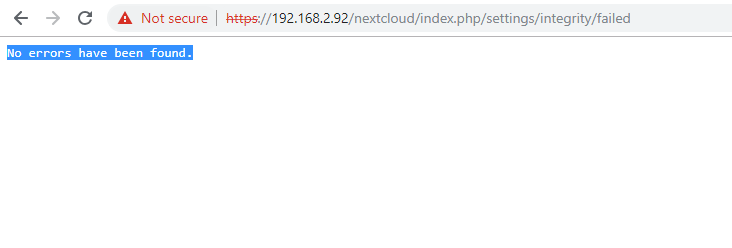
List of activated apps:
App list
???
Nextcloud is running in installed docker container.
I didn't change anything.
Nextcloud configuration:
Config report
???
Nextcloud is running in installed docker container.
I didn't change anything.
Are you using external storage, if yes which one: local/smb/sftp/... - no
Are you using encryption: yes/no n-
Are you using an external user-backend, if yes which one: LDAP/ActiveDirectory/Webdav/... - Webdav
Client configuration
Browser: no browser, windows power shell with installed curl.
Operating system: windows 10
Logs
Web server error log
Web server error log
???
Nextcloud log (data/nextcloud.log)
Nextcloud log
???
 aosyatnik
All 9 comments
Hello! It is implemented :)
https://docs.nextcloud.com/server/latest/developer_manual/client_apis/WebDAV/search.html
Working example:
curl 'https://cloud.xxx/remote.php/dav/' \
    --user admin:admin \
    -X SEARCH \
    -H 'content-type: text/xml' \
    --data-binary '<?xml version="1.0" encoding="UTF-8"?><d:searchrequest xmlns:d="DAV:" xmlns:oc="http://owncloud.org/ns"><d:basicsearch><d:select><d:prop><oc:fileid /><d:displayname /><d:getcontenttype /><d:getetag /><oc:size /></d:prop></d:select><d:from><d:scope><d:href>/files/admin/</d:href><d:depth>infinity</d:depth></d:scope></d:from><d:where><d:like><d:prop><d:getcontenttype /></d:prop><d:literal>image/%</d:literal></d:like></d:where><d:orderby><d:prop><oc:size /></d:prop><d:ascending /></d:orderby></d:basicsearch></d:searchrequest>'
 skjnldsv
on 3 Mar 2019
skjnldsv
on 3 Mar 2019
Hi, @skjnldsv .
Thank you for your answer, but it's NOT working.
I'm asking not about "usual" nextcloud. I'm asking about nextcloud application, that is running on UCS virtual machine.
The answer from nextcloud running on ucs is 501(Not implemented).
Should I turn on any settings in order to make it work?
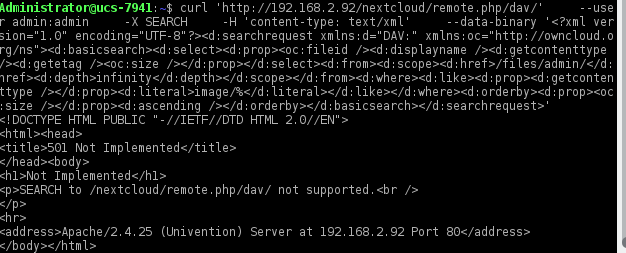
aosyatnik
on 4 Mar 2019
Hello @aosyatnik
Sorry for the misunderstanding! Those vm should come with the full set of nextcloud pre-installed.
There should not be any differences between the two.
skjnldsv
on 4 Mar 2019
@aosyatnik Nextcloud is behind SSL on UCS, thus use https://192.168.2.92…
I can reproduce the behaviour when using the wrong protocol.
 blizzz
on 4 Mar 2019
blizzz
on 4 Mar 2019
@blizzz , thank you for feedback. That's working fine.
Why I can not search for file id? If I search for fileid, then I get request search property is not a valid property for this scope
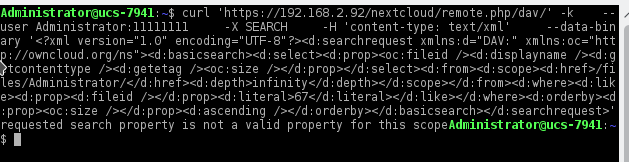
I'm pretty sure, that there is such file:
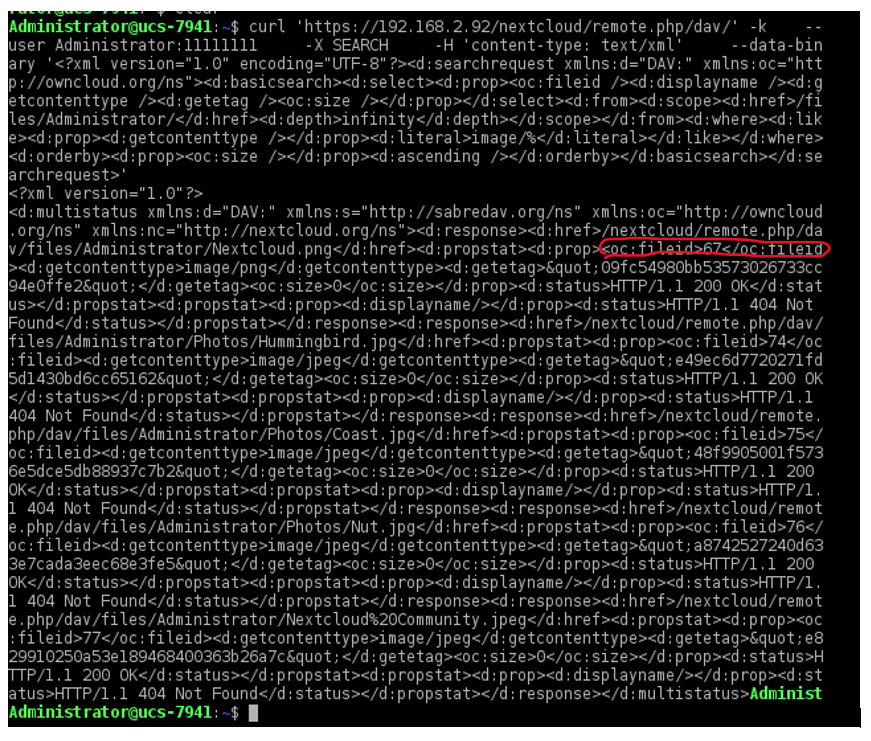
aosyatnik
on 4 Mar 2019
@aosyatnik
please check the docs: https://docs.nextcloud.com/server/latest/developer_manual/client_apis/WebDAV/search.html
You have an example of a fileid search.
<?xml version="1.0" encoding="UTF-8"?>
<d:searchrequest xmlns:d="DAV:" xmlns:oc="http://owncloud.org/ns">
    <d:basicsearch>
        <d:select>
            <d:prop>
                <d:displayname/>
            </d:prop>
        </d:select>
        <d:from>
            <d:scope>
                <d:href>/files/test</d:href>
                <d:depth>infinity</d:depth>
            </d:scope>
        </d:from>
        <d:where>
            <d:like>
                <d:prop>
                    <d:fileid/>
                </d:prop>
                <d:literal>12345</d:literal>
            </d:like>
        </d:where>
        <d:orderby/>
    </d:basicsearch>
</d:searchrequest>
EDIT: I can see you tried the doc example.
I get the same error. Let's investigate.
skjnldsv
on 4 Mar 2019
@aosyatnik we need to fix our docs for this.
If you take a look at https://tools.ietf.org/html/rfc5323#section-5.5
You'll see you can also use the property <d:eq>.
And since the fileid is an oc property, you need to do that:
        <d:where>
            <d:eq>
                <d:prop>
                    <oc:fileid/>
                </d:prop>
                <d:literal>339</d:literal>
            </d:eq>
        </d:where>
Doc change is here: https://github.com/nextcloud/documentation/pull/1284
Thanks for finding this one @aosyatnik 😊
skjnldsv
on 4 Mar 2019
@skjnldsv , great! It's working fine with eq. Thanks!
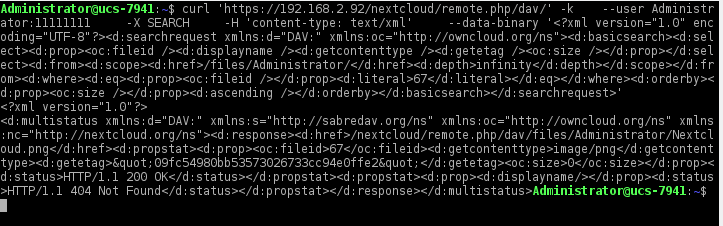
I'm happy 💃
aosyatnik
on 4 Mar 2019
Related issues
 MariusBluem
·
3Comments
MariusBluem
·
3Comments
 ChristophWurst
·
3Comments
ChristophWurst
·
3Comments
 ghost
·
3Comments
ghost
·
3Comments
 jancborchardt
·
3Comments
jancborchardt
·
3Comments
 mfechner
·
3Comments
mfechner
·
3Comments
Most helpful comment
@skjnldsv , great! It's working fine with

eq. Thanks!I'm happy 💃