Server: login not possible when behind a reverse proxy with http basic auth
Hi, I'm struggling to get the self hosted setup working.
I set up a completely new KVM instance in my proxmox with a basic Debian Stretch installation, installed docker-ce and docker-compose from the Docker repository (deb [arch=amd64] https://download.docker.com/linux/debian stretch stable) and followed all the other steps from the documentation.
I'm running this on a private IP address behind an existing nginx proxy, so I chose to not use any SSL on the installer. I didn't get asked if I was using another reverse proxy, though (I had seen that in other people's posts) has it been removed or do you need to meet certain criteria to be asked?
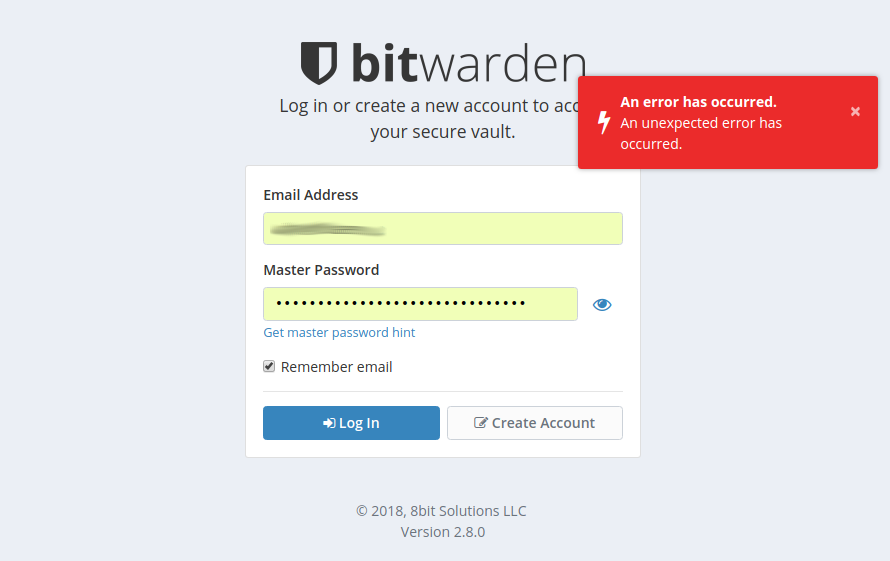
I'm not sure if that has anything to do with it, but after calling the main URL from my browser and creating an account successfully, I can't login.
Are there any other ports I need to pass through? Currently I only let the nginx do the SSL handshaking and then pass it to port 80 on the docker machine.
I don't even have a clue where to look for a reason. Any help would be appreciated.
Tech Data
OS: Debian 9.8
Kernel: 4.9.0-8-amd64
Docker Version: docker-ce 5:18.09.2~3-0~debian-stretch
CPU: 1 Core @2.60GHz
RAM: 4GB
HDD: 20GB
Installation Output
root@srv ~/docker $ ./bitwarden.sh install
 _     _ _                         _
| |__ (_) |___      ____ _ _ __ __| | ___ _ __
| '_ \| | __\ \ /\ / / _` | '__/ _` |/ _ \ '_ \
| |_) | | |_ \ V  V / (_| | | | (_| |  __/ | | |
|_.__/|_|\__| \_/\_/ \__,_|_|  \__,_|\___|_| |_|

Open source password management solutions
Copyright 2015-2019, 8bit Solutions LLC
https://bitwarden.com, https://github.com/bitwarden

===================================================

Docker version 18.09.2, build 6247962
docker-compose version 1.23.2, build 1110ad01

(!) Enter the domain name for your Bitwarden instance (ex. bitwarden.company.com): <domain>

(!) Do you want to use Let's Encrypt to generate a free SSL certificate? (y/n): n

1.29.0: Pulling from bitwarden/setup
Digest: sha256:780d9be9b39175649cec20c1f38100adce96f59b4c6ee52235c1d246cf1a55f0
Status: Image is up to date for bitwarden/setup:1.29.0

(!) Enter your installation id (get at https://bitwarden.com/host): <id>

(!) Enter your installation key: <key>

(!) Do you have a SSL certificate to use? (y/n): n

(!) Do you want to generate a self-signed SSL certificate? (y/n): n

Generating key for IdentityServer.
Generating a 4096 bit RSA private key
..++
..............++
writing new private key to 'identity.key'
-----

!!!!!!!!!! WARNING !!!!!!!!!!
You are not using a SSL certificate. Bitwarden requires HTTPS to operate.
You must front your installation with a HTTPS proxy or the web vault (and
other Bitwarden apps) will not work properly.

Building nginx config.
Building docker environment files.
Building docker environment override files.
Building FIDO U2F app id.
Building docker-compose.yml.

Installation complete

If you need to make additional configuration changes, you can modify
the settings in `./bwdata/config.yml` and then run:
`./bitwarden.sh rebuild` or `./bitwarden.sh update`

Next steps, run:
`./bitwarden.sh start` and then `./bitwarden.sh updatedb`

root@srv ~/docker $ ./bitwarden.sh start
 _     _ _                         _
| |__ (_) |___      ____ _ _ __ __| | ___ _ __
| '_ \| | __\ \ /\ / / _` | '__/ _` |/ _ \ '_ \
| |_) | | |_ \ V  V / (_| | | | (_| |  __/ | | |
|_.__/|_|\__| \_/\_/ \__,_|_|  \__,_|\___|_| |_|

Open source password management solutions
Copyright 2015-2019, 8bit Solutions LLC
https://bitwarden.com, https://github.com/bitwarden

===================================================

Docker version 18.09.2, build 6247962
docker-compose version 1.23.2, build 1110ad01

Removing network docker_default
WARNING: Network docker_default not found.
Pulling mssql         ... done
Pulling web           ... done
Pulling attachments   ... done
Pulling api           ... done
Pulling identity      ... done
Pulling admin         ... done
Pulling icons         ... done
Pulling notifications ... done
Pulling nginx         ... done
Creating network "docker_default" with the default driver
Creating bitwarden-attachments   ... done
Creating bitwarden-icons         ... done
Creating bitwarden-notifications ... done
Creating bitwarden-api           ... done
Creating bitwarden-nginx         ... done
Creating bitwarden-web           ... done
Creating bitwarden-mssql         ... done
Creating bitwarden-admin         ... done
Creating bitwarden-identity      ... done
Total reclaimed space: 0B
1.29.0: Pulling from bitwarden/setup
Digest: sha256:780d9be9b39175649cec20c1f38100adce96f59b4c6ee52235c1d246cf1a55f0
Status: Image is up to date for bitwarden/setup:1.29.0


Bitwarden is up and running!
===================================================

visit http://<domain>
to update, run `./bitwarden.sh updateself` and then `./bitwarden.sh update`

root@srv ~/docker $ ./bitwarden.sh updatedb
 _     _ _                         _
| |__ (_) |___      ____ _ _ __ __| | ___ _ __
| '_ \| | __\ \ /\ / / _` | '__/ _` |/ _ \ '_ \
| |_) | | |_ \ V  V / (_| | | | (_| |  __/ | | |
|_.__/|_|\__| \_/\_/ \__,_|_|  \__,_|\___|_| |_|

Open source password management solutions
Copyright 2015-2019, 8bit Solutions LLC
https://bitwarden.com, https://github.com/bitwarden

===================================================

Docker version 18.09.2, build 6247962
docker-compose version 1.23.2, build 1110ad01

1.29.0: Pulling from bitwarden/setup
Digest: sha256:780d9be9b39175649cec20c1f38100adce96f59b4c6ee52235c1d246cf1a55f0
Status: Image is up to date for bitwarden/setup:1.29.0

Migrating database.
Beginning transaction
Beginning database upgrade
Fetching list of already executed scripts.
The [dbo].[Migration] table could not be found. The database is assumed to be at version 0.
Executing SQL Server script 'Bit.Setup.DbScripts.2017-08-19_00_InitialSetup.sql'
Creating the [dbo].[Migration] table
The [dbo].[Migration] table has been created
Executing SQL Server script 'Bit.Setup.DbScripts.2017-08-22_00_LicenseCheckScripts.sql'
Executing SQL Server script 'Bit.Setup.DbScripts.2017-08-30_00_CollectionWriteOnly.sql'
Executing SQL Server script 'Bit.Setup.DbScripts.2017-09-06_00_CipherDetails.sql'
Executing SQL Server script 'Bit.Setup.DbScripts.2017-09-08_00_OrgUserCounts.sql'
Executing SQL Server script 'Bit.Setup.DbScripts.2017-10-25_00_OrgUserUpdates.sql'
Executing SQL Server script 'Bit.Setup.DbScripts.2017-11-06_00_FamilyPlanAdjustments.sql'
Executing SQL Server script 'Bit.Setup.DbScripts.2017-11-13_00_IndexTuning.sql'
Executing SQL Server script 'Bit.Setup.DbScripts.2017-11-24_00_UpdateProcs.sql'
Executing SQL Server script 'Bit.Setup.DbScripts.2017-12-12_00_Events.sql'
Executing SQL Server script 'Bit.Setup.DbScripts.2018-02-28_00_LoginUris.sql'
Executing SQL Server script 'Bit.Setup.DbScripts.2018-03-12_00_FixLoginUris.sql'
Executing SQL Server script 'Bit.Setup.DbScripts.2018-03-21_00_AdminPortal.sql'
Executing SQL Server script 'Bit.Setup.DbScripts.2018-04-02_00_Org2fa.sql'
Executing SQL Server script 'Bit.Setup.DbScripts.2018-04-24_00_CipherQueryTuning.sql'
Executing SQL Server script 'Bit.Setup.DbScripts.2018-06-11_00_WebVaultUpdates.sql'
Executing SQL Server script 'Bit.Setup.DbScripts.2018-07-28_00_DbTuning.sql'
Executing SQL Server script 'Bit.Setup.DbScripts.2018-08-14_00_UserKdf.sql'
Executing SQL Server script 'Bit.Setup.DbScripts.2018-08-28_00_PremiumOrgAbilities.sql'
Executing SQL Server script 'Bit.Setup.DbScripts.2018-09-25_00_OrgPurge.sql'
Executing SQL Server script 'Bit.Setup.DbScripts.2018-10-17_00_ManagerRole.sql'
Executing SQL Server script 'Bit.Setup.DbScripts.2018-12-19_00_OrgUserTwoFactorEnabled.sql'
Upgrade successful
Migration successful.
Database update complete
Error
Output of docker ps
root@srv ~/docker $ docker ps
CONTAINER ID        IMAGE                            COMMAND             CREATED             STATUS              PORTS                                                 NAMES
<id>                bitwarden/identity:1.29.0        "/entrypoint.sh"    36 minutes ago      Up 36 minutes       5000/tcp                                              bitwarden-identity
<id>                bitwarden/admin:1.29.0           "/entrypoint.sh"    36 minutes ago      Up 36 minutes       5000/tcp                                              bitwarden-admin
<id>                bitwarden/web:2.8.0              "/entrypoint.sh"    36 minutes ago      Up 36 minutes       5000/tcp                                              bitwarden-web
<id>                bitwarden/mssql:1.29.0           "/entrypoint.sh"    36 minutes ago      Up 36 minutes       1433/tcp                                              bitwarden-mssql
<id>                bitwarden/api:1.29.0             "/entrypoint.sh"    36 minutes ago      Up 36 minutes       5000/tcp                                              bitwarden-api
<id>                bitwarden/nginx:1.29.0           "/entrypoint.sh"    36 minutes ago      Up 36 minutes       80/tcp, 0.0.0.0:80->8080/tcp, 0.0.0.0:443->8443/tcp   bitwarden-nginx
<id>                bitwarden/notifications:1.29.0   "/entrypoint.sh"    36 minutes ago      Up 36 minutes       5000/tcp                                              bitwarden-notifications
<id>                bitwarden/icons:1.29.0           "/entrypoint.sh"    36 minutes ago      Up 36 minutes       5000/tcp                                              bitwarden-icons
<id>                bitwarden/attachments:1.29.0     "/entrypoint.sh"    36 minutes ago      Up 36 minutes       5000/tcp                                              bitwarden-attachments
 davidwinterstein
All 13 comments
I'd start by looking at the logs under ./bwdata/logs . Do you see any issues with nginx error_log or the Api logs?
 kspearrin
on 1 Mar 2019
kspearrin
on 1 Mar 2019
Sorry for the late reply.
Do you see any issues with nginx error_log or the Api logs?
No, but the access.log throws an HTTP 400 for calls to "POST /identity/connect/token HTTP/1.1". At first I wondered why this could possibly be, but then I realized that the line began with <ip address> - <myuser> [datetime] and figured it might be a problem that I got an http basic auth configured on the nginx reverse proxy. I disabled it and oh boy, yes indeed the login instantly worked.
I honestly don't think this should be a problem, though.
I usually prefer to have a basic auth in front of actual (login) pages and I don't know a reason why this should not be possible. I'd be happy if someone knows a workaround.
davidwinterstein
on 6 Mar 2019
Having the same issue but with an Apache reverse proxy with the basic auth. Couldn't figure out why it wouldn't let me log in until I disabled it and then it worked. Seems even shift-reload in Chrome won't wipe out whatever remembers that it logged into basic auth, so trying another browser session was necessary before I saw it working.
 hbh7
on 11 Jun 2019
hbh7
on 11 Jun 2019
Shift-Reload only clears the regular page cache, session cache remains untouched.
davidwinterstein
on 15 Aug 2019
Any idea on what could cause this issue or how to resolve it?
davidwinterstein
on 14 Jan 2020
It might seem odd, but I'd really like to have an HTTP basic auth in front of Bitwarden as a third layer of security (second is 2FA).
Handling for the clients shouldn't be too hard since the credentials could be manually passed through the URL (although this is deprecated through RFC 3986, so implementation of actual support for sending basic auth credentials from the client through HTTP header would be a suggested feature).
davidwinterstein
on 23 Jan 2020
I believe the problem is caused by the HTTP header name (Authorization) Bitwarden uses for authentication as it is the one used in HTTP basic auth as of RFC 7617.
I'm not very deep into the code though, so I'm not sure if the solution would be as easy as changing the value of _authHeader.
davidwinterstein
on 23 Jan 2020
@kspearrin Any feedback on this would be appreciated.
davidwinterstein
on 5 Feb 2020
Yes, we use the Authorization header for Bitwarden application authentication, so you could not re-use it for basic auth authentication as well.
kspearrin
on 5 Feb 2020
Ok, is this intended or would you consider changing the header so basic authentication can still be used?
And would it be as easy as changing the value of _authHeader, apart from adding support for supplying basic auth credentials to the clients and additionaly sending the Authorization header if applicable?
davidwinterstein
on 11 Feb 2020
The header is, as you said, specified in the HTTP standard for authenticating requests. Please stop trying to change its name (that is specified by an official standard) and possibly breaking stuff (e.g. because it silently relies on the HTTP standard) because you want to introduce a third layer of "security".
If you really need to have a proxy in front of it, I'd try to find out how to handle authenticated API requests through authenticated proxies - I bet you aren't the first person having this problem.
 edermi
on 12 Feb 2020
edermi
on 12 Feb 2020
Ok, after a lot of reading I got it, you're absolutely right. Sorry, should have done this just from the start.
To anyone interested, this helped me understand:
davidwinterstein
on 25 Feb 2020
No worries, I was in the same situation (with a different application) a few months ago and also had to figure out what was wrong.
edermi
on 25 Feb 2020
Related issues
 shillner
·
5Comments
shillner
·
5Comments
 Palf994
·
3Comments
Palf994
·
3Comments
 theontho
·
4Comments
theontho
·
4Comments
 Pulsar
·
6Comments
Pulsar
·
6Comments
 pannal
·
5Comments
pannal
·
5Comments