Server: file sizes are bad readable in dark theme
Steps to reproduce
- choose the dark theme beta in the user settings
- go back to files
Expected behaviour
- file size should be gray or white to have a good contrast to the background
Actual behaviour
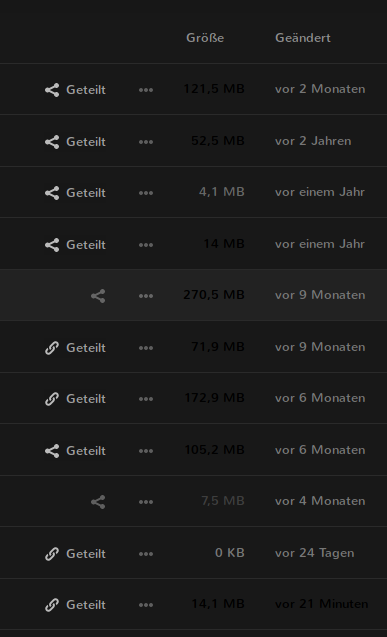
Server configuration
Operating system: Arch Linux
Web server: nginx
Database: sqlite
PHP version: 7.x
Nextcloud version: 15.0.2
Updated from an older Nextcloud/ownCloud or fresh install: update
Where did you install Nextcloud from: tar.gz
 fabianfrz
All 5 comments
cc @nextcloud/designers
it does not only happen in dark theme mode... I've the same in the light theme, there it is white font on white backgound...
the strange thing is not for all files/folders... maybe it depends on the actually displayed filesize? I see it for files/folders with more than ~20MB
 violoncelloCH
on 5 Feb 2019
violoncelloCH
on 5 Feb 2019
Yes, we should probably move this from a fixed color calclulation to just the main textcolor and setting the opacity depending on the size/modification date.
Related code in the file list: https://github.com/nextcloud/server/blob/master/apps/files/js/filelist.js#L1531
 juliushaertl
on 5 Feb 2019
juliushaertl
on 5 Feb 2019
There is a duplicate of this issue somewhere I think :)
 skjnldsv
on 5 Feb 2019
skjnldsv
on 5 Feb 2019
It was supposedly fixed in https://github.com/nextcloud/server/pull/11823 so I think all previous issues are closed.
 Lartza
on 9 Feb 2019
Lartza
on 9 Feb 2019
Closing since I cannot reproduce this on latest Nextcloud 15.
juliushaertl
on 11 Feb 2019
Related issues
 georgehrke
·
3Comments
georgehrke
·
3Comments
 dl5rcw
·
3Comments
dl5rcw
·
3Comments
 MorrisJobke
·
3Comments
MorrisJobke
·
3Comments
 j-ed
·
3Comments
georgehrke
·
3Comments
j-ed
·
3Comments
georgehrke
·
3Comments