Server: Exclude groups from sharing v14.06 not listing groups, javascript error
Steps to reproduce
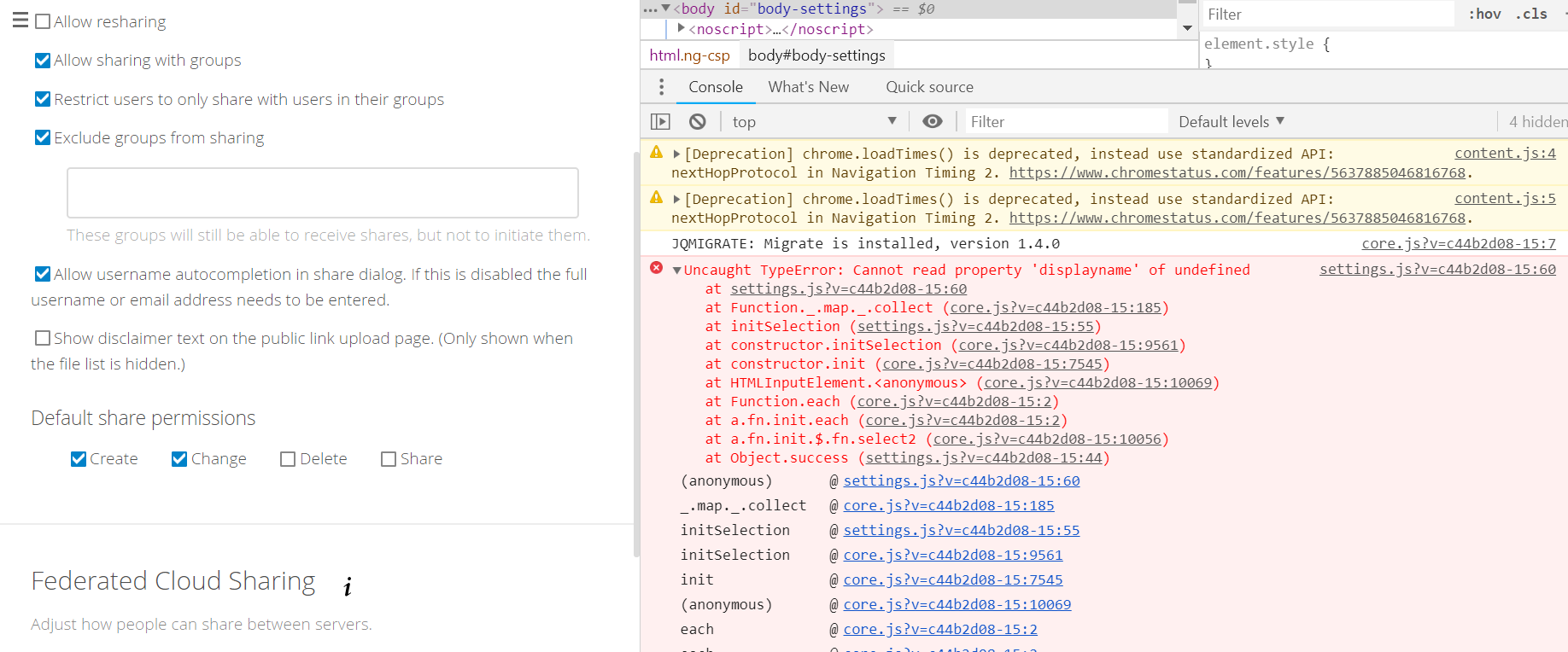
- on admin sharing page no groups show up to exclude from sharing, though with previous version there where groups allready selected
2.
3.
Expected behaviour
Show groups to exclude from sharing
Actual behaviour
No groups, javascript error
Server configuration
Operating system: ubuntu 16.04
Web server: nginx
Database: mysql 5.5
PHP version: 7.0
Nextcloud version: 14.0.6
Updated from an older Nextcloud/ownCloud or fresh install: upgrade from 13.0.10
Where did you install Nextcloud from: source package
Signing status: No errors have been found.
Signing status
Login as admin user into your Nextcloud and access
http://example.com/index.php/settings/integrity/failed
paste the results here.
List of activated apps:
Enabled:
- accessibility: 1.0.1
- activity: 2.7.0
- admin_audit: 1.4.0
- bruteforcesettings: 1.3.0
- calendar: 1.6.4
- cloud_federation_api: 0.0.1
- comments: 1.4.0
- contacts: 2.1.8
- dav: 1.6.1
- federatedfilesharing: 1.4.0
- files: 1.9.0
- files_accesscontrol: 1.4.0
- files_sharing: 1.6.2
- files_texteditor: 2.6.0
- files_trashbin: 1.4.1
- files_versions: 1.7.1
- files_videoplayer: 1.3.0
- gallery: 18.1.0
- logreader: 2.0.0
- lookup_server_connector: 1.2.0
- notifications: 2.2.1
- oauth2: 1.2.1
- password_policy: 1.4.0
- provisioning_api: 1.4.0
- ransomware_protection: 1.2.0
- serverinfo: 1.4.0
- support: 1.0.0
- systemtags: 1.4.0
- tasks: 0.9.8
- theming: 1.5.0
- twofactor_backupcodes: 1.3.1
- updatenotification: 1.4.1
- workflowengine: 1.4.0
Disabled:- encryption
- federation
- files_external
- files_pdfviewer
- firstrunwizard
- nextcloud_announcements
- sharebymail
- survey_client
- user_external
- user_ldap
If you have access to your command line run e.g.:
sudo -u www-data php occ app:list
from within your Nextcloud installation folder
Nextcloud configuration:
{
"system": {
"config_is_read_only": true,
"integrity.check.disabled": false,
"installed": true,
"dbtype": "mysql",
"dbname": "REMOVED SENSITIVE VALUE",
"dbuser": "REMOVED SENSITIVE VALUE",
"dbpassword": "REMOVED SENSITIVE VALUE",
"dbhost": "REMOVED SENSITIVE VALUE",
"dbtableprefix": "oc_",
"passwordsalt": "REMOVED SENSITIVE VALUE",
"forcessl": false,
"activity_expire_days": 90,
"blacklisted_files": [
".htaccess"
],
"theme": "",
"overwritehost": "REMOVED SENSITIVE VALUE",
"overwriteprotocol": "https",
"overwritecondaddr": "",
"proxy": "",
"proxyuserpwd": "REMOVED SENSITIVE VALUE",
"trusted_domains": [
"REMOVED SENSITIVE VALUE",
"192.168.41.17",
"REMOVED SENSITIVE VALUE",
"192.168.40.51"
],
"default_language": "et_EE",
"3rdpartyroot": "",
"3rdpartyurl": "",
"defaultapp": "files",
"knowledgebaseenabled": false,
"appstoreenabled": false,
"appcodechecker": true,
"apps_paths": [
{
"path": "/opt/www/jail/webroot2/pilv/apps",
"url": "/apps",
"writable": false
}
],
"mail_domain": "REMOVED SENSITIVE VALUE",
"mail_from_address": "REMOVED SENSITIVE VALUE",
"mail_smtpdebug": false,
"mail_smtpmode": "smtp",
"mail_smtphost": "REMOVED SENSITIVE VALUE",
"mail_smtpport": "465",
"mail_smtptimeout": 10,
"mail_smtpsecure": "ssl",
"mail_smtpauth": 1,
"mail_smtpauthtype": "LOGIN",
"mail_smtpname": "REMOVED SENSITIVE VALUE",
"mail_smtppassword": "REMOVED SENSITIVE VALUE",
"trashbin_retention_obligation": "30, auto",
"allow_user_to_change_display_name": true,
"updatechecker": false,
"has_internet_connection": false,
"check_for_working_webdav": false,
"check_for_working_htaccess": false,
"log_type": "syslog",
"syslog_tag": "Nextcloud",
"loglevel": "1",
"logdateformat": "F d, Y H:i:s",
"logtimezone": "Europe/Tallinn",
"log_query": false,
"cron_log": true,
"log_rotate_size": 10485760,
"log_rotate_sizerotation": 50485760,
"remember_login_cookie_lifetime": 1296000,
"session_lifetime": 86400,
"session_keepalive": true,
"custom_csp_policy": "default-src 'self'; script-src 'self' 'unsafe-eval'; style-src 'self' 'unsafe-inline'; frame-src ; img-src *; font-src 'self' data:; media-src *",
"xframe_restriction": true,
"datadirectory": "REMOVED SENSITIVE VALUE",
"maintenance": false,
"customclient_desktop": "",
"customclient_android": "",
"customclient_ios": "",
"sharing.maxAutocompleteResults": 100,
"sharing.minSearchStringLength": 3,
"enable_previews": true,
"preview_max_x": 2048,
"preview_max_y": 2048,
"preview_max_scale_factor": 10,
"preview_max_filesize_image": 10,
"enabledPreviewProviders": [
"OC\Preview\PNG",
"OC\Preview\JPEG",
"OC\Preview\GIF",
"OC\Preview\BMP",
"OC\Preview\XBitmap",
"OC\Preview\TXT",
"OC\Preview\MarkDown"
],
"enable_avatars": true,
"openssl": [],
"cipher": "AES-256-CFB",
"singleuser": false,
"mount_file": "",
"cache_path": "",
"quota_include_external_storage": false,
"filesystem_check_changes": 0,
"filesystem_cache_readonly": false,
"instanceid": "REMOVED SENSITIVE VALUE",
"version": "14.0.6.0",
"secret": "REMOVED SENSITIVE VALUE",
"memcache.local": "\OC\Memcache\Redis",
"filelocking.enabled": "true",
"memcache.distributed": "\OC\Memcache\Redis",
"memcache.locking": "\OC\Memcache\Redis",
"redis": {
"host": "REMOVED SENSITIVE VALUE",
"port": 6379,
"timeout": 0,
"password": "REMOVED SENSITIVE VALUE*",
"dbindex": 3
}
}
}
If you have access to your command line run e.g.:
sudo -u www-data php occ config:list system
from within your Nextcloud installation folder

or

Insert your config.php content here.
Make sure to remove all sensitive content such as passwords. (e.g. database password, passwordsalt, secret, smtp password, …)
Are you using external storage, if yes which one: no
Are you using encryption: no
Are you using an external user-backend, if yes which one: none
LDAP configuration (delete this part if not used)
LDAP config
With access to your command line run e.g.:
sudo -u www-data php occ ldap:show-config
from within your Nextcloud installation folder

Without access to your command line download the data/owncloud.db to your local
computer or access your SQL server remotely and run the select query:
SELECT * FROM `oc_appconfig` WHERE `appid` = 'user_ldap';


Eventually replace sensitive data as the name/IP-address of your LDAP server or groups.
Client configuration
Browser: Chrome 71.0.3578.98
Operating system: Win10 pro
Logs
Web server error log
Web server error log
no errors on logs
Nextcloud log (data/nextcloud.log)
Nextcloud log
Insert your Nextcloud log here
Browser log
Browser log
Insert your browser log here, this could for example include:

a) The javascript console log

> content.js:4 [Deprecation] chrome.loadTimes() is deprecated, instead use standardized API: nextHopProtocol in Navigation Timing 2. https://www.chromestatus.com/features/5637885046816768.
> (anonymous) @ content.js:4
> content.js:5 [Deprecation] chrome.loadTimes() is deprecated, instead use standardized API: nextHopProtocol in Navigation Timing 2. https://www.chromestatus.com/features/5637885046816768.
> (anonymous) @ content.js:5
> core.js?v=c44b2d08-15:7 JQMIGRATE: Migrate is installed, version 1.4.0
> settings.js?v=c44b2d08-15:60 Uncaught TypeError: Cannot read property 'displayname' of undefined
>     at settings.js?v=c44b2d08-15:60
>     at Function._.map._.collect (core.js?v=c44b2d08-15:185)
>     at initSelection (settings.js?v=c44b2d08-15:55)
>     at constructor.initSelection (core.js?v=c44b2d08-15:9561)
>     at constructor.init (core.js?v=c44b2d08-15:7545)
>     at HTMLInputElement.<anonymous> (core.js?v=c44b2d08-15:10069)
>     at Function.each (core.js?v=c44b2d08-15:2)
>     at a.fn.init.each (core.js?v=c44b2d08-15:2)
>     at a.fn.init.$.fn.select2 (core.js?v=c44b2d08-15:10056)
>     at Object.success (settings.js?v=c44b2d08-15:44)
> (anonymous) @ settings.js?v=c44b2d08-15:60
> _.map._.collect @ core.js?v=c44b2d08-15:185
> initSelection @ settings.js?v=c44b2d08-15:55
> initSelection @ core.js?v=c44b2d08-15:9561
> init @ core.js?v=c44b2d08-15:7545
> (anonymous) @ core.js?v=c44b2d08-15:10069
> each @ core.js?v=c44b2d08-15:2
> each @ core.js?v=c44b2d08-15:2
> $.fn.select2 @ core.js?v=c44b2d08-15:10056
> success @ settings.js?v=c44b2d08-15:44
> j @ core.js?v=c44b2d08-15:2
> fireWith @ core.js?v=c44b2d08-15:2
> x @ core.js?v=c44b2d08-15:4
> (anonymous) @ core.js?v=c44b2d08-15:4
> load (async)
> send @ core.js?v=c44b2d08-15:4
> ajax @ core.js?v=c44b2d08-15:4
> setupGroupsSelect @ settings.js?v=c44b2d08-15:28
> (anonymous) @ admin.js?v=c44b2d08-15:3
> each @ core.js?v=c44b2d08-15:2
> each @ core.js?v=c44b2d08-15:2
> (anonymous) @ admin.js?v=c44b2d08-15:2
> j @ core.js?v=c44b2d08-15:2
> fireWith @ core.js?v=c44b2d08-15:2
> ready @ core.js?v=c44b2d08-15:2
> I @ core.js?v=c44b2d08-15:2
> DevTools failed to parse SourceMap: https://********/apps/notifications/js/notifications.js.map


b) The network log
c) ...
 tkald
tkald
All 8 comments
Same issue in 15.0.2
I have about 30 groups excluded from sharing...
CentOS 7, Apache, PHP 7.0
 BornToBeRoot
on 28 Jan 2019
BornToBeRoot
on 28 Jan 2019
Same issue here with PHP 7.2 and 15.0.2.
Cannot exclude groups anymore...
 sit-bd
on 29 Jan 2019
sit-bd
on 29 Jan 2019
Same issue here with 15.0.4 PHP 7.2.
Cannot exclude groups any more...
Found out which problem causing the issue:
- Create a group
- Choose this group in "exclude from sharing" field
- Now delete the group -> exclude from sharing now broken!!!
It seems that having a deleted group chosen in "exclude from sharing" previously causes the issue
Workaround
- Remove group from "exclude from sharing" field
- Delete group
If broken, no idea to fix this in that state, anybody knows solution?
 AnotherSpecialist
on 17 Feb 2019
AnotherSpecialist
on 17 Feb 2019
Thanks @AnotherSpecialist !
I did have deleted group in table oc_appconfig under shareapi_exclude_groups_list configkey.
Manually removing deleted group from configkey array also resolved my issue.
So NC should also remove group from sharing exclusion when deleting a group.
tkald
on 17 Feb 2019
Same problem on 16.0.3 version
 vgdh
on 20 Aug 2019
vgdh
on 20 Aug 2019
Bug persists in 17.0.1.
results.find() in ./settings/js/settings.js throws an error, trying to resolve all members of shareapi_exclude_groups_list.
JSON data returning groups does not contain the deleted group.
 bob4os
on 27 Nov 2019
bob4os
on 27 Nov 2019
I had the same issue in 17.0.1 and updated to 17.0.2 today.
No change whatsoever.
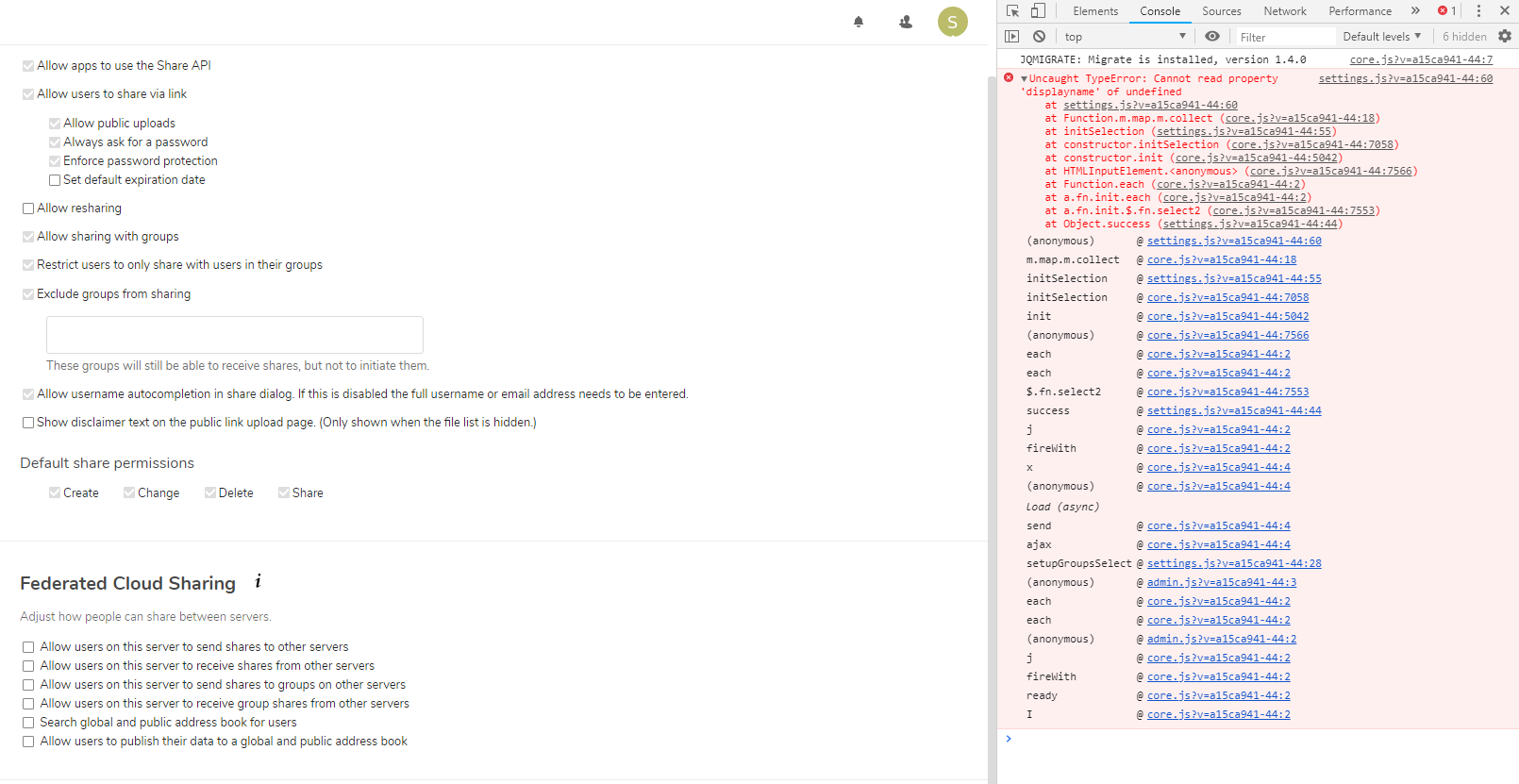
This is the console output from Opera:

 wouterVE
on 21 Jan 2020
wouterVE
on 21 Jan 2020
I 'solved' this problem thanks to the information from @tkald .
Here are the steps I undertook:
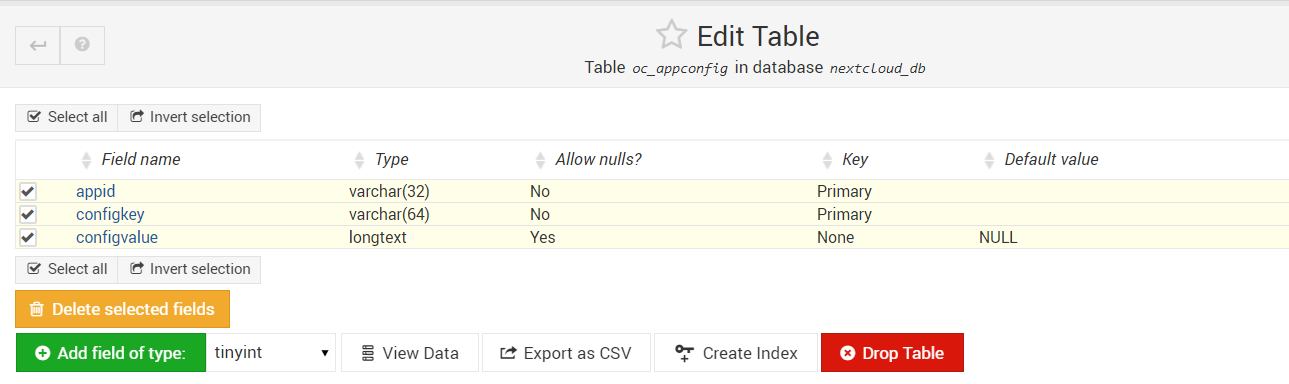
- connecting to the mysql database using webmin
- Selecting db from nextcloud and table
oc_appconfig
-Selecting all 3 rows and export to csv
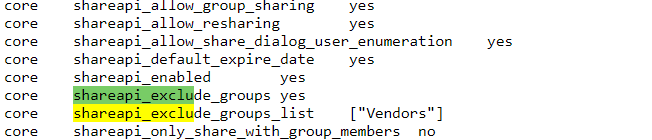
- Searching for the field
shareapi_exclude_groups_list - Then I found the group
vendorswas still excluded from sharing, but I deleted this group previously
- I re-created the group
vendors(no need to add users) and from that moment I was able to select groups from share exclusions - To solve the problem, I removed the group
vendorsfrom share exclusions and then deleted the group again
Of course you could use any other means to connect to your DB (or use a dump) as long as you are able to retrieve the name of the deleted group.
Hopefully this problem will be picked up to solve in a feature release...
wouterVE
on 22 Jan 2020
Related issues
 arno01
·
3Comments
arno01
·
3Comments
 mama21mama
·
3Comments
mama21mama
·
3Comments
 dl5rcw
·
3Comments
dl5rcw
·
3Comments
 williambargent
·
3Comments
williambargent
·
3Comments
 brylie
·
3Comments
brylie
·
3Comments
Most helpful comment
Thanks @AnotherSpecialist !
I did have deleted group in table oc_appconfig under shareapi_exclude_groups_list configkey.
Manually removing deleted group from configkey array also resolved my issue.
So NC should also remove group from sharing exclusion when deleting a group.