Server: WEB DAV Write Access broken from Nextcloud 14.0.3 to 15.0.0
After updating from nextcloud 14.03 to nextcloud 15 programtically copying a file from a windows pc to nextcloud fails. The other direction is still fine. Acces is made throug "net use" (without connecting a drive) using webdav access. The testcode is a three liner in python. Log Entries from nextcloud are included in the attached file. I can reproduce that this code works under nextcloud 14.03 and that it fails under nextcloud 15 (both tested today).
 tstreibl
All 55 comments
We are having the same issue, I did a fresh install of V15.02. It works perfectly fine from the web console i.e. I can add/delete/edit/create files inside External Storage drive. But from Webdav we cannot create new files in the External Storage Drives. It seems to be an issue with only External Storage, as I can create the files on the root of the webdav.
BTW we also have V13 of nextcloud (with exactly the same setup), and webdav works perfectly fine on that.
 dishu2511
on 21 Jan 2019
dishu2511
on 21 Jan 2019
Hello dishu2511,
in my case I don't have my data on an external storage and it makes no difference if I want to uploade a file to a root or a subdirectory. I can only reproduce that the code works in 14.03 and fails in nextcloud 15. Related issue in the community coud be https://help.nextcloud.com/t/solved-create-files-on-webdav-with-ad-integration-and-externeal-storage/45205. At least I get the same log entry"Error: feof(): supplied resource is not a valid stream resource". It's marked as solved there with the solution to downgrade to nc14 - must be a joke?
tstreibl
on 21 Jan 2019
Hi tstreibl,
Thanks for the quick response, I read somewhere that it will get fixed in 15.03 which is getting released on 21/02/2019, but not sure how valid is this argument. :).
dishu2511
on 21 Jan 2019
Hey @tstreibl, thank you for reporting this issue :+1:
Please help us and fill out the issue template.
 kesselb
on 26 Jan 2019
kesselb
on 26 Jan 2019
did my best:
Steps to reproduce
- run python example program (establish webdav connection through "net use"; copy file from pc to nextcloud 15=> fail; copy file from nextcloud to pc=> success)
Expected behaviour
copy action should be sucessful which is the case when you run the same example program on a nc 14.
Actual behaviour
python/windows error: copy error: [Errno 13] Permission denied; error in nextcloud log
copy action fails (no file in nc)
Server configuration
I only have access to the nc 15.0.2 and nc 15.0.0 server configuration (raspberry pi) and not to the 14.0.3 server (it's another professionally hosted machine); however I had no problem on the pi before updating to nc 15.
Operating system: Linux raspberrypi 4.14.79-v7
Web server:
Server version: Apache/2.4.25 (Raspbian)
Server built: 2018-11-03T18:46:19
Database: mysql
PHP version: PHP 7.0.33-0+deb9u1 (cli) (built: Dec 7 2018 11:36:49) ( NTS )
Nextcloud version:
fails with 15.0.2 and 15.0.0; works sucessfully with 14.0.3
configuration is given for nc 15.0.2
Updated from an older Nextcloud/ownCloud or fresh install:
the nc 15 versions are updated versions from nc 14. with nc 14 webdav worked properly on the raspberrypi as well
Where did you install Nextcloud from:
from nc homepage
Signing status:
Signing status
don't know what a signing status is;
http://example.com/index.php/settings/integrity/failed  shows:
"No errors have been found."
List of activated apps:
List of activated apps:
Enabled:
  - accessibility: 1.1.0
  - activity: 2.8.2
  - admin_audit: 1.5.0
  - announcementcenter: 3.4.1
  - bruteforcesettings: 1.3.0
  - calendar: 1.6.4
  - checksum: 0.4.2
  - cloud_federation_api: 0.1.0
  - comments: 1.5.0
  - contacts: 3.0.2
  - dashboard: 6.0.0
  - dav: 1.8.1
  - deck: 0.5.2
  - encryption: 2.3.0
  - federatedfilesharing: 1.5.0
  - federation: 1.5.0
  - files: 1.10.0
  - files_accesscontrol: 1.5.0
  - files_automatedtagging: 1.5.0
  - files_downloadactivity: 1.4.0
  - files_external: 1.6.0
  - files_linkeditor: 1.0.9
  - files_pdfviewer: 1.4.0
  - files_sharing: 1.7.0
  - files_texteditor: 2.7.0
  - files_trashbin: 1.5.0
  - files_versions: 1.8.0
  - files_videoplayer: 1.4.0
  - firstrunwizard: 2.4.0
  - gallery: 18.2.0
  - gpxedit: 0.0.10
  - gpxmotion: 0.0.8
  - gpxpod: 3.0.1
  - groupfolders: 2.0.2
  - logreader: 2.0.0
  - lookup_server_connector: 1.3.0
  - mail: 0.11.0
  - metadata: 0.8.0
  - nextcloud_announcements: 1.4.0
  - notifications: 2.3.0
  - oauth2: 1.3.0
  - password_policy: 1.5.0
  - polls: 0.9.5
  - provisioning_api: 1.5.0
  - radio: 0.6.4
  - serverinfo: 1.5.0
  - sharebymail: 1.5.0
  - spreed: 5.0.0
  - support: 1.0.0
  - survey_client: 1.3.0
  - systemtags: 1.5.0
  - tasks: 0.9.8
  - theming: 1.6.0
  - twofactor_backupcodes: 1.4.1
  - unsplash: 1.1.3
  - updatenotification: 1.5.0
  - user_usage_report: 1.1.1
  - w2g2: 2.2.4
  - workflowengine: 1.5.0
Disabled:
  - circles
  - files_trackdownloads
  - mindmaps
  - orcid
  - quicknotes
  - user_ldap
Nextcloud configuration:
Nextcloud Configuration
{
    "system": {
        "instanceid": "***REMOVED SENSITIVE VALUE***",
        "passwordsalt": "***REMOVED SENSITIVE VALUE***",
        "secret": "***REMOVED SENSITIVE VALUE***",
        "trusted_domains": [
            "example.de"
        ],
        "datadirectory": "***REMOVED SENSITIVE VALUE***",
        "overwrite.cli.url": "https:\/\/example.de\/nextcloud",
        "dbtype": "mysql",
        "version": "15.0.2.0",
        "dbname": "***REMOVED SENSITIVE VALUE***",
        "dbhost": "***REMOVED SENSITIVE VALUE***",
        "dbtableprefix": "oc_",
        "dbuser": "***REMOVED SENSITIVE VALUE***",
        "dbpassword": "***REMOVED SENSITIVE VALUE***",
        "logtimezone": "UTC",
        "memcache.local": "\\OC\\Memcache\\APCu",
        "installed": true,
        "updater.release.channel": "stable",
        "maintenance": false,
        "theme": "",
        "loglevel": 2,
        "mail_smtpmode": "smtp",
        "mail_smtpsecure": "ssl",
        "mail_from_address": "***REMOVED SENSITIVE VALUE***",
        "mail_domain": "***REMOVED SENSITIVE VALUE***",
        "mail_smtpauthtype": "LOGIN",
        "mail_smtpauth": 1,
        "mail_smtphost": "***REMOVED SENSITIVE VALUE***",
        "mail_smtpport": "465",
        "mail_smtpname": "***REMOVED SENSITIVE VALUE***",
        "mail_smtppassword": "***REMOVED SENSITIVE VALUE***",
        "updater.secret": "***REMOVED SENSITIVE VALUE***"
    }
}
Are you using external storage, if yes which one: local/smb/sftp/...
Issue Template:
no
Are you using encryption: yes
Are you using an external user-backend, if yes which one: Webdav backend (see python example program)
Client configuration
Python 3.7.1 (winpython edition)
Operating system:
Windows 10 Home Edition Version 1803
Logs
Web server error log
Web server error log
[Sat Jan 26 14:21:44.040421 2019] [authz_core:error] [pid 4351] [client 46.128.135.144:63896] AH01630: client denied by server configuration: /var/www/nextcloud/config
Nextcloud log (data/nextcloud.log)
Nextcloud log
{"reqId":"8s1TcNnbabNj8EPliBly","level":3,"time":"2019-01-26T15:38:35+00:00","remoteAddr":"46.128.135.144","user":"tstreibl","app":"PHP","method":"PUT","url":"\/nextcloud\/remote.php\/webdav\/test\/test_server_copy.txt","message":"feof(): supplied resource is not a valid stream resource at \/var\/www\/nextcloud\/apps\/dav\/lib\/Connector\/Sabre\/File.php#172","userAgent":"Microsoft-WebDAV-MiniRedir\/10.0.17134","version":"15.0.2.0"}
{"reqId":"8s1TcNnbabNj8EPliBly","level":3,"time":"2019-01-26T15:38:35+00:00","remoteAddr":"46.128.135.144","user":"tstreibl","app":"no app in context","method":"PUT","url":"\/nextcloud\/remote.php\/webdav\/test\/test_server_copy.txt","message":{"Exception":"Sabre\\DAV\\Exception","Message":"Error while copying file to target location (copied bytes: 0, expected filesize: 0 )","Code":0,"Trace":[{"file":"\/var\/www\/nextcloud\/apps\/dav\/lib\/Connector\/Sabre\/Directory.php","line":156,"function":"put","class":"OCA\\DAV\\Connector\\Sabre\\File","type":"->","args":[null]},{"file":"\/var\/www\/nextcloud\/3rdparty\/sabre\/dav\/lib\/DAV\/Server.php","line":1096,"function":"createFile","class":"OCA\\DAV\\Connector\\Sabre\\Directory","type":"->","args":["test_server_copy.txt",null]},{"file":"\/var\/www\/nextcloud\/3rdparty\/sabre\/dav\/lib\/DAV\/CorePlugin.php","line":525,"function":"createFile","class":"Sabre\\DAV\\Server","type":"->","args":["test\/test_server_copy.txt",null,null]},{"function":"httpPut","class":"Sabre\\DAV\\CorePlugin","type":"->","args":[{"absoluteUrl":"https:\/\/tilostreibl.de\/nextcloud\/remote.php\/webdav\/test\/test_server_copy.txt","__class__":"Sabre\\HTTP\\Request"},{"__class__":"Sabre\\HTTP\\Response"}]},{"file":"\/var\/www\/nextcloud\/3rdparty\/sabre\/event\/lib\/EventEmitterTrait.php","line":105,"function":"call_user_func_array","args":[[{"__class__":"Sabre\\DAV\\CorePlugin"},"httpPut"],[{"absoluteUrl":"https:\/\/tilostreibl.de\/nextcloud\/remote.php\/webdav\/test\/test_server_copy.txt","__class__":"Sabre\\HTTP\\Request"},{"__class__":"Sabre\\HTTP\\Response"}]]},{"file":"\/var\/www\/nextcloud\/3rdparty\/sabre\/dav\/lib\/DAV\/Server.php","line":479,"function":"emit","class":"Sabre\\Event\\EventEmitter","type":"->","args":["method:PUT",[{"absoluteUrl":"https:\/\/tilostreibl.de\/nextcloud\/remote.php\/webdav\/test\/test_server_copy.txt","__class__":"Sabre\\HTTP\\Request"},{"__class__":"Sabre\\HTTP\\Response"}]]},{"file":"\/var\/www\/nextcloud\/3rdparty\/sabre\/dav\/lib\/DAV\/Server.php","line":254,"function":"invokeMethod","class":"Sabre\\DAV\\Server","type":"->","args":[{"absoluteUrl":"https:\/\/tilostreibl.de\/nextcloud\/remote.php\/webdav\/test\/test_server_copy.txt","__class__":"Sabre\\HTTP\\Request"},{"__class__":"Sabre\\HTTP\\Response"}]},{"file":"\/var\/www\/nextcloud\/apps\/dav\/appinfo\/v1\/webdav.php","line":80,"function":"exec","class":"Sabre\\DAV\\Server","type":"->","args":[]},{"file":"\/var\/www\/nextcloud\/remote.php","line":163,"args":["\/var\/www\/nextcloud\/apps\/dav\/appinfo\/v1\/webdav.php"],"function":"require_once"}],"File":"\/var\/www\/nextcloud\/apps\/dav\/lib\/Connector\/Sabre\/File.php","Line":191,"CustomMessage":"--"},"userAgent":"Microsoft-WebDAV-MiniRedir\/10.0.17134","version":"15.0.2.0"}
{"reqId":"8s1TcNnbabNj8EPliBly","level":4,"time":"2019-01-26T15:38:35+00:00","remoteAddr":"46.128.135.144","user":"tstreibl","app":"webdav","method":"PUT","url":"\/nextcloud\/remote.php\/webdav\/test\/test_server_copy.txt","message":{"Exception":"Sabre\\DAV\\Exception","Message":"Error while copying file to target location (copied bytes: 0, expected filesize: 0 )","Code":0,"Trace":[{"file":"\/var\/www\/nextcloud\/apps\/dav\/lib\/Connector\/Sabre\/Directory.php","line":156,"function":"put","class":"OCA\\DAV\\Connector\\Sabre\\File","type":"->","args":[null]},{"file":"\/var\/www\/nextcloud\/3rdparty\/sabre\/dav\/lib\/DAV\/Server.php","line":1096,"function":"createFile","class":"OCA\\DAV\\Connector\\Sabre\\Directory","type":"->","args":["test_server_copy.txt",null]},{"file":"\/var\/www\/nextcloud\/3rdparty\/sabre\/dav\/lib\/DAV\/CorePlugin.php","line":525,"function":"createFile","class":"Sabre\\DAV\\Server","type":"->","args":["test\/test_server_copy.txt",null,null]},{"function":"httpPut","class":"Sabre\\DAV\\CorePlugin","type":"->","args":[{"absoluteUrl":"https:\/\/tilostreibl.de\/nextcloud\/remote.php\/webdav\/test\/test_server_copy.txt","__class__":"Sabre\\HTTP\\Request"},{"__class__":"Sabre\\HTTP\\Response"}]},{"file":"\/var\/www\/nextcloud\/3rdparty\/sabre\/event\/lib\/EventEmitterTrait.php","line":105,"function":"call_user_func_array","args":[[{"__class__":"Sabre\\DAV\\CorePlugin"},"httpPut"],[{"absoluteUrl":"https:\/\/tilostreibl.de\/nextcloud\/remote.php\/webdav\/test\/test_server_copy.txt","__class__":"Sabre\\HTTP\\Request"},{"__class__":"Sabre\\HTTP\\Response"}]]},{"file":"\/var\/www\/nextcloud\/3rdparty\/sabre\/dav\/lib\/DAV\/Server.php","line":479,"function":"emit","class":"Sabre\\Event\\EventEmitter","type":"->","args":["method:PUT",[{"absoluteUrl":"https:\/\/tilostreibl.de\/nextcloud\/remote.php\/webdav\/test\/test_server_copy.txt","__class__":"Sabre\\HTTP\\Request"},{"__class__":"Sabre\\HTTP\\Response"}]]},{"file":"\/var\/www\/nextcloud\/3rdparty\/sabre\/dav\/lib\/DAV\/Server.php","line":254,"function":"invokeMethod","class":"Sabre\\DAV\\Server","type":"->","args":[{"absoluteUrl":"https:\/\/tilostreibl.de\/nextcloud\/remote.php\/webdav\/test\/test_server_copy.txt","__class__":"Sabre\\HTTP\\Request"},{"__class__":"Sabre\\HTTP\\Response"}]},{"file":"\/var\/www\/nextcloud\/apps\/dav\/appinfo\/v1\/webdav.php","line":80,"function":"exec","class":"Sabre\\DAV\\Server","type":"->","args":[]},{"file":"\/var\/www\/nextcloud\/remote.php","line":163,"args":["\/var\/www\/nextcloud\/apps\/dav\/appinfo\/v1\/webdav.php"],"function":"require_once"}],"File":"\/var\/www\/nextcloud\/apps\/dav\/lib\/Connector\/Sabre\/File.php","Line":191,"CustomMessage":"--"},"userAgent":"Microsoft-WebDAV-MiniRedir\/10.0.17134","version":"15.0.2.0"}
{"reqId":"Vq7W8yE8TPyvkq5FTXHp","level":3,"time":"2019-01-26T16:05:02+00:00","remoteAddr":"46.128.135.144","user":"--","app":"index","method":"GET","url":"\/favicon.ico","message":{"Exception":"Exception","Message":"The requested uri(\/favicon.ico) cannot be processed by the script '\/nextcloud\/index.php')","Code":0,"Trace":[{"file":"\/var\/www\/nextcloud\/lib\/base.php","line":930,"function":"getRawPathInfo","class":"OC\\AppFramework\\Http\\Request","type":"->","args":[]},{"file":"\/var\/www\/nextcloud\/index.php","line":42,"function":"handleRequest","class":"OC","type":"::","args":[]}],"File":"\/var\/www\/nextcloud\/lib\/private\/AppFramework\/Http\/Request.php","Line":784,"CustomMessage":"--"},"userAgent":"Mozilla\/5.0 (Windows NT 10.0; Win64; x64; rv:64.0) Gecko\/20100101 Firefox\/64.0","version":"15.0.2.0"}
additional tests:
1) attached nextcloud as a network drive. Same behavior: download ok; deleting ok; copy folders within cloud ok; upload fails with "die Quelldatei oder vom Quelldatenträger kann nicht gelesen werden" (see picture)

Nextcloud shows the following log entries for uploading a non empty (filesize>0) text file :
[jsresourceloader] Error: Could not find resource vendor/strengthify/jquery.strengthify.min.js to load
GET /nextcloud/index.php/settings/user/security
from 46.128.135.144 by tstreibl at 2019-01-30T22:36:26+00:00[webdav] Fatal: Sabre\DAV\Exception: Error while copying file to target location (copied bytes: 0, expected filesize: 0 ) at <
>
- /var/www/nextcloud/apps/dav/lib/Connector/Sabre/Directory.php line 156
put(null)- /var/www/nextcloud/3rdparty/sabre/dav/lib/DAV/Server.php line 1096
createFile("testfile.txt", null)- /var/www/nextcloud/3rdparty/sabre/dav/lib/DAV/CorePlugin.php line 525
createFile("blub/testfile.txt", null, null)- <
>
httpPut(Sabre\HTTP\Reque ... "}, Sabre\HTTP\Response {})- /var/www/nextcloud/3rdparty/sabre/event/lib/EventEmitterTrait.php line 105
call_user_func_array([Sabre\DAV\CorePlugin {},"httpPut"], [Sabre\HTTP\Requ ... }])- /var/www/nextcloud/3rdparty/sabre/dav/lib/DAV/Server.php line 479
emit("method:PUT", [Sabre\HTTP\Requ ... }])- /var/www/nextcloud/3rdparty/sabre/dav/lib/DAV/Server.php line 254
invokeMethod(Sabre\HTTP\Reque ... "}, Sabre\HTTP\Response {})- /var/www/nextcloud/apps/dav/appinfo/v1/webdav.php line 80
exec()- /var/www/nextcloud/remote.php line 163
require_once("/var/www/nextcl ... p")PUT /nextcloud/remote.php/webdav/blub/testfile.txt
from 46.128.135.144 by tstreibl at 2019-01-30T22:33:31+00:00
2) updated from php 7.0 to php 7.3 (found 3 year old issue where webdav made problems with php<=7.03 on nginx system: https://github.com/owncloud/core/issues/21935 ). Nothing changed as expected since I have no ngnix
3) I ran the pc desctop client in latest version. Works like a charm (upload, download, delete all ok). Only after the pc recovers from sleep mode the client gets stuck with a red cross symbol saying "Beim öffnen eines Ordners ist ein Fehler aufgetreten. Der Zugriff auf das Netzwerk ist nicht gestattet. Nextcloud. jetzt". Closing the client and restarting the client makes everything work again. can reproduce this behavior.
no more ideas...
tstreibl
on 31 Jan 2019
Hi,
same issue here with a fresh installed Nextcloud 15.02.
We are using a Windows Server 2016 share as external drive.
Working from WebGUI does all: create file, create folder, delete both, edit file and store and so on.
When mounting the WebDAV share from a Windows 10 Explorer, we can create folders, but there is no chance to create or copy files.
Create a file is denied with this message:
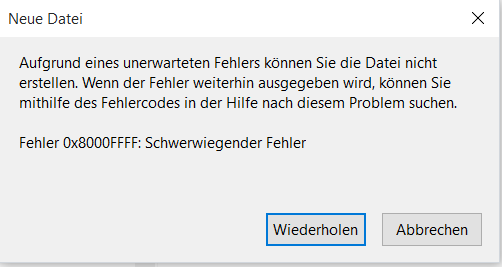
Copying a file shows the same error as already sent in the comment above.
Errors in the nextcloud log file begin with:
{"reqId":"XFoFbhJiicO8l36OHtTI-gAAAAw","level":3,"time":"2019-02-05T21:51:42+00:00","remoteAddr":"xx.xx.xx.xx","user":"FA83AB3D-A4A1-481E-B86F-3245BE0DF1C8","app":"PHP","method":"PUT","url":"\/remote.php\/webdav\/Energy-Daten\/05_Temps\/Test\/nochntest\/MountMerkur.bat","message":"feof(): supplied resource is not a valid stream resource at \/var\/www\/html\/nextcloud\/apps\/dav\/lib\/Connector\/Sabre\/File.php#172","userAgent":"Microsoft-WebDAV-MiniRedir\/10.0.10240","version":"15.0.2.0"}
Any ideas?
 IngoEF
on 5 Feb 2019
IngoEF
on 5 Feb 2019
same issue here with a nextcloud environment for 3000+ users
nextcloud 15.0.2
windows server 2016 as external storage
ldap windows active directory user integration
 SDWWHV
on 6 Feb 2019
SDWWHV
on 6 Feb 2019
https://github.com/nextcloud/server/pull/13468 could work for you. Will be released with Nextcloud 15.0.3 (2019-02-21).
kesselb
on 6 Feb 2019
"could" is a weak statement.
is there a way to verify this?
SDWWHV
on 6 Feb 2019
"could" is a weak statement.
https://github.com/nextcloud/server/issues/13596 and https://github.com/nextcloud/server/issues/13276 reporting the same error. I think there is a good chance. Usually the information from the issue template makes it easier to help.
is there a way to verify this?
https://patch-diff.githubusercontent.com/raw/nextcloud/server/pull/13468.patch try it ;-) dont forget a backup as always.
kesselb
on 6 Feb 2019
it doesn't work
nextcloud.log
{"reqId":"wn5BLgpwJ3JjG9csoVjD","level":4,"time":"2019-02-06T11:20:41+00:00","remoteAddr":"172.16.2.98","user":"C5C0116F-CD29-40EB-A050-291F66154123","app":"webdav","method":"PUT","url":"/remote.php/webdav/Home/uteb1/klett/Microsoft%20Excel-Arbeitsblatt%20(neu).xlsx","message":{"Exception":"Sabre\\DAV\\Exception","Message":"Error while copying file to target location (copied bytes: 0, expected filesize: 0 )","Code":0,"Trace":[{"file":"/var/www/html/nextcloud/apps/dav/lib/Connector/Sabre/Directory.php","line":156,"function":"put","class":"OCA\\DAV\\Connector\\Sabre\\File","type":"->","args":[null]},{"file":"/var/www/html/nextcloud/3rdparty/sabre/dav/lib/DAV/Server.php","line":1096,"function":"createFile","class":"OCA\\DAV\\Connector\\Sabre\\Directory","type":"->","args":["Microsoft Excel-Arbeitsblatt (neu).xlsx",null]},{"file":"/var/www/html/nextcloud/3rdparty/sabre/dav/lib/DAV/CorePlugin.php","line":525,"function":"createFile","class":"Sabre\\DAV\\Server","type":"->","args":["Home/uteb1/klett/Microsoft Excel-Arbeitsblatt (neu).xlsx",null,null]},{"function":"httpPut","class":"Sabre\\DAV\\CorePlugin","type":"->","args":[{"absoluteUrl":"https://schulcloud.wilhelmshaven.de/remote.php/webdav/Home/uteb1/klett/Microsoft%20Excel-Arbeitsblatt%20(neu).xlsx","__class__":"Sabre\\HTTP\\Request"},{"__class__":"Sabre\\HTTP\\Response"}]},{"file":"/var/www/html/nextcloud/3rdparty/sabre/event/lib/EventEmitterTrait.php","line":105,"function":"call_user_func_array","args":[[{"__class__":"Sabre\\DAV\\CorePlugin"},"httpPut"],[{"absoluteUrl":"https://schulcloud.wilhelmshaven.de/remote.php/webdav/Home/uteb1/klett/Microsoft%20Excel-Arbeitsblatt%20(neu).xlsx","__class__":"Sabre\\HTTP\\Request"},{"__class__":"Sabre\\HTTP\\Response"}]]},{"file":"/var/www/html/nextcloud/3rdparty/sabre/dav/lib/DAV/Server.php","line":479,"function":"emit","class":"Sabre\\Event\\EventEmitter","type":"->","args":["method:PUT",[{"absoluteUrl":"https://schulcloud.wilhelmshaven.de/remote.php/webdav/Home/uteb1/klett/Microsoft%20Excel-Arbeitsblatt%20(neu).xlsx","__class__":"Sabre\\HTTP\\Request"},{"__class__":"Sabre\\HTTP\\Response"}]]},{"file":"/var/www/html/nextcloud/3rdparty/sabre/dav/lib/DAV/Server.php","line":254,"function":"invokeMethod","class":"Sabre\\DAV\\Server","type":"->","args":[{"absoluteUrl":"https://schulcloud.wilhelmshaven.de/remote.php/webdav/Home/uteb1/klett/Microsoft%20Excel-Arbeitsblatt%20(neu).xlsx","__class__":"Sabre\\HTTP\\Request"},{"__class__":"Sabre\\HTTP\\Response"}]},{"file":"/var/www/html/nextcloud/apps/dav/appinfo/v1/webdav.php","line":80,"function":"exec","class":"Sabre\\DAV\\Server","type":"->","args":[]},{"file":"/var/www/html/nextcloud/remote.php","line":163,"args":["/var/www/html/nextcloud/apps/dav/appinfo/v1/webdav.php"],"function":"require_once"}],"File":"/var/www/html/nextcloud/apps/dav/lib/Connector/Sabre/File.php","Line":191,"CustomMessage":"--"},"userAgent":"Microsoft-WebDAV-MiniRedir/10.0.17134","version":"15.0.2.0","id":"5c5ac4f5b873a"}
{"reqId":"wn5BLgpwJ3JjG9csoVjD","level":3,"time":"2019-02-06T11:20:41+00:00","remoteAddr":"172.16.2.98","user":"C5C0116F-CD29-40EB-A050-291F66154123","app":"no app in context","method":"PUT","url":"/remote.php/webdav/Home/uteb1/klett/Microsoft%20Excel-Arbeitsblatt%20(neu).xlsx","message":{"Exception":"Sabre\\DAV\\Exception","Message":"Error while copying file to target location (copied bytes: 0, expected filesize: 0 )","Code":0,"Trace":[{"file":"/var/www/html/nextcloud/apps/dav/lib/Connector/Sabre/Directory.php","line":156,"function":"put","class":"OCA\\DAV\\Connector\\Sabre\\File","type":"->","args":[null]},{"file":"/var/www/html/nextcloud/3rdparty/sabre/dav/lib/DAV/Server.php","line":1096,"function":"createFile","class":"OCA\\DAV\\Connector\\Sabre\\Directory","type":"->","args":["Microsoft Excel-Arbeitsblatt (neu).xlsx",null]},{"file":"/var/www/html/nextcloud/3rdparty/sabre/dav/lib/DAV/CorePlugin.php","line":525,"function":"createFile","class":"Sabre\\DAV\\Server","type":"->","args":["Home/uteb1/klett/Microsoft Excel-Arbeitsblatt (neu).xlsx",null,null]},{"function":"httpPut","class":"Sabre\\DAV\\CorePlugin","type":"->","args":[{"absoluteUrl":"https://schulcloud.wilhelmshaven.de/remote.php/webdav/Home/uteb1/klett/Microsoft%20Excel-Arbeitsblatt%20(neu).xlsx","__class__":"Sabre\\HTTP\\Request"},{"__class__":"Sabre\\HTTP\\Response"}]},{"file":"/var/www/html/nextcloud/3rdparty/sabre/event/lib/EventEmitterTrait.php","line":105,"function":"call_user_func_array","args":[[{"__class__":"Sabre\\DAV\\CorePlugin"},"httpPut"],[{"absoluteUrl":"https://schulcloud.wilhelmshaven.de/remote.php/webdav/Home/uteb1/klett/Microsoft%20Excel-Arbeitsblatt%20(neu).xlsx","__class__":"Sabre\\HTTP\\Request"},{"__class__":"Sabre\\HTTP\\Response"}]]},{"file":"/var/www/html/nextcloud/3rdparty/sabre/dav/lib/DAV/Server.php","line":479,"function":"emit","class":"Sabre\\Event\\EventEmitter","type":"->","args":["method:PUT",[{"absoluteUrl":"https://schulcloud.wilhelmshaven.de/remote.php/webdav/Home/uteb1/klett/Microsoft%20Excel-Arbeitsblatt%20(neu).xlsx","__class__":"Sabre\\HTTP\\Request"},{"__class__":"Sabre\\HTTP\\Response"}]]},{"file":"/var/www/html/nextcloud/3rdparty/sabre/dav/lib/DAV/Server.php","line":254,"function":"invokeMethod","class":"Sabre\\DAV\\Server","type":"->","args":[{"absoluteUrl":"https://schulcloud.wilhelmshaven.de/remote.php/webdav/Home/uteb1/klett/Microsoft%20Excel-Arbeitsblatt%20(neu).xlsx","__class__":"Sabre\\HTTP\\Request"},{"__class__":"Sabre\\HTTP\\Response"}]},{"file":"/var/www/html/nextcloud/apps/dav/appinfo/v1/webdav.php","line":80,"function":"exec","class":"Sabre\\DAV\\Server","type":"->","args":[]},{"file":"/var/www/html/nextcloud/remote.php","line":163,"args":["/var/www/html/nextcloud/apps/dav/appinfo/v1/webdav.php"],"function":"require_once"}],"File":"/var/www/html/nextcloud/apps/dav/lib/Connector/Sabre/File.php","Line":191,"CustomMessage":"--"},"userAgent":"Microsoft-WebDAV-MiniRedir/10.0.17134","version":"15.0.2.0","id":"5c5ac4f5b878d"}
{"reqId":"wn5BLgpwJ3JjG9csoVjD","level":3,"time":"2019-02-06T11:20:41+00:00","remoteAddr":"172.16.2.98","user":"C5C0116F-CD29-40EB-A050-291F66154123","app":"PHP","method":"PUT","url":"/remote.php/webdav/Home/uteb1/klett/Microsoft%20Excel-Arbeitsblatt%20(neu).xlsx","message":"feof(): supplied resource is not a valid stream resource at /var/www/html/nextcloud/apps/dav/lib/Connector/Sabre/File.php#172","userAgent":"Microsoft-WebDAV-MiniRedir/10.0.17134","version":"15.0.2.0","id":"5c5ac4f5b8799"}
Without changing any config in our environment I found out now, that copying local files to the webdav-root is possible. From there the files can be moved to their final location in any subfolder. Copying directly from local to the same subfolder still ends unsuccessfully.
This is definitly no acceptable workaround.
It might be interesting to look in the code for differences in handling these ways.
My guess is an issue in transporting the user rights from local to remote subfolders.
Is there any need to open a new issue using the issue template?
IngoEF
on 6 Feb 2019
Is there any need to open a new issue using the issue template?
If you think the issues are related you can post the relevant information from the issue template here.
kesselb
on 6 Feb 2019
If you need more information, I'll provide it here.
For now I think it should be enough to reproduce the situation and debug it.
We are using Nextcloud for the first time, beside about five without errors working OC-installations and find it a disappointing, running into an error which is reported since three versions.
IngoEF
on 6 Feb 2019
"could" is a weak statement.
13596 and #13276 reporting the same error. I think there is a good chance. Usually the information from the issue template makes it easier to help.
is there a way to verify this?
https://patch-diff.githubusercontent.com/raw/nextcloud/server/pull/13468.patch try it ;-) dont forget a backup as always.
@IngoEF is this working for you?
kesselb
on 6 Feb 2019
no, doesn't work, I don't see any difference in the error messages.
I didn't expect improvement as we do not use encryption.
Only this one copy action throws 3 times 3 very similar lines in the error log.
filecopyerror.txt
IngoEF
on 6 Feb 2019
@IngoEF @SDWWHV could you share the list of activated apps?
If you have access to your command line run e.g.:
sudo -u www-data php occ app:list
from within your Nextcloud installation folder
@nextcloud/server-triage
kesselb
on 6 Feb 2019
Here you are:
occ app:list
Enabled:
- accessibility: 1.1.0
- activity: 2.8.2
- cloud_federation_api: 0.1.0
- comments: 1.5.0
- dav: 1.8.1
- federatedfilesharing: 1.5.0
- federation: 1.5.0
- files: 1.10.0
- files_external: 1.6.0
- files_pdfviewer: 1.4.0
- files_sharing: 1.7.0
- files_texteditor: 2.7.0
- files_trashbin: 1.5.0
- files_versions: 1.8.0
- files_videoplayer: 1.4.0
- firstrunwizard: 2.4.0
- gallery: 18.2.0
- logreader: 2.0.0
- lookup_server_connector: 1.3.0
- nextcloud_announcements: 1.4.0
- notifications: 2.3.0
- oauth2: 1.3.0
- password_policy: 1.5.0
- provisioning_api: 1.5.0
- serverinfo: 1.5.0
- sharebymail: 1.5.0
- support: 1.0.0
- survey_client: 1.3.0
- systemtags: 1.5.0
- theming: 1.6.0
- twofactor_backupcodes: 1.4.1
- updatenotification: 1.5.0
- user_ldap: 1.5.0
- workflowengine: 1.5.0
Disabled: - admin_audit
- encryption
Nextcloud 15.0.2 running on:
CentOS Linux release 7.6.1810
PHP 7.2.14 (cli) (built: Jan 8 2019 14:05:15) ( NTS )
Zend Engine v3.2.0, Copyright (c) 1998-2018 Zend Technologies
MariaDB Server version: 5.5.60
Apache/2.4.6 (CentOS) Server built: Nov 5 2018 01:47:09
IngoEF
on 6 Feb 2019

SDWWHV
on 6 Feb 2019
what exactly is the meaning of the last comment?
IngoEF
on 6 Feb 2019
deaktivated all my apps except the default encryption module (since I use encryption): nothing changed (upload fails; download ok); when I deactivate default encryption module then the download fails as well (which is no surprise).
tstreibl
on 7 Feb 2019
what exactly is the meaning of the last comment?
@IngoEF @SDWWHV could you share the list of activated apps?
If you have access to your command line run e.g.:
sudo -u www-data php occ app:list
from within your Nextcloud installation folder
@nextcloud/server-triage
currently no ssh access
SDWWHV
on 7 Feb 2019
disabled all apps excluding "user_ldap" and "files_external". The behaviour remains the same.
IngoEF
on 7 Feb 2019
no errors after changing the /var/www/html/nextcloud/apps/dav/lib/Connector/Sabre/File.php against the one out of version 14.0.6
Any explanations?
IngoEF
on 7 Feb 2019
Hy @IngoEF: you are a genious - thanks a lot! I can confirm that your solution works for me as well.
Feedback from developers side would be great. Especiall if the above cited change request will really solve the issue in 15.0.3?
tstreibl
on 7 Feb 2019
Could be another regression from https://github.com/nextcloud/server/pull/12072
If you restore the original File.php from nextcloud 15 and change it like in this pull request https://github.com/nextcloud/server/pull/13829 does it work for you as well?
kesselb
on 7 Feb 2019
Thank you for helping me to answer my question by myselfe:
I replaced in the original NC 15 file:
if ($partStorage->instanceOfStorage(Storage\IWriteStreamStorage::class)) {
by
if (false && $partStorage->instanceOfStorage(Storage\IWriteStreamStorage::class)) {
This version works for me as well. Great. As far as I saw for @SDWWHV it was no fix.
Great, thanks
tstreibl
on 7 Feb 2019
@MorrisJobke @rullzer @icewind1991 :ping_pong:
Sorry don't know how to reproduce this case. It could be related to external storage. Looks like they are accessing nextcloud by webdav.
kesselb
on 7 Feb 2019
@MorrisJobke @rullzer @icewind1991 🏓
Sorry don't know how to reproduce this case. It could be related to external storage. Looks like they are accessing nextcloud by webdav.
You are right, here we use auth trough LDAP / Active Directory and external drive which is bound to a windows share. The use case is upload files over Nextcloud's WebDAV to that external drive.
I also changed the original version 15.0.2 of "File.php#l168" like tstreibl did and confirm the error disappeared.
Hope the error will not be part of the next version.
Thanks for help.
IngoEF
on 7 Feb 2019
Hi Guys
I downgraded (fresh installed) to 14.06 and it works perfectly fine, no issues. can create/upload documents using WebDav.
If you just want to quickly test, then just rename the nextcloud folder (/var/www/nextcloud) to nextcloud.old and unzip the nextcloud 14.06 there with right permissions.
dishu2511
on 8 Feb 2019
I've got the same problem but none of the fixes here helped.
First the python script provided by @tstreibl connects to \\mycloudadress.de@ssl\nextcloud\remote.php\webdav but the docs are using \\mycloudadress.de@ssl\nextcloud\remote.php\dav\files\USERNAME instead https://docs.nextcloud.com/server/15/user_manual/files/access_webdav.html#mapping-drives-with-the-command-line
When I use the link of the docs, all I get is an empty folder. Might be related to #698 https://github.com/nextcloud/documentation/issues/698#issuecomment-396907025
Using the /remote.php/webdav link works, but shows the error discussed here.
I tried #13829 and replacing Files.php with this one https://github.com/nextcloud/server/blob/stable14/apps/dav/lib/Connector/Sabre/File.php but without success.
 SR4ven
on 13 Feb 2019
SR4ven
on 13 Feb 2019
Hi SR4ven,
in my configuration both kind of webdav links work identically. Tested for NC15.
In my example program you won't get an error message when the net use command fails - you only see errors after the first file access . So to test I would suggest to type in the "net use command" the python program creats on the windows command line and see what happens (should show "der Befehl wurde erfolgreich ausgeführt). Alternatively you can try to attach a windows network drive with the webdav address. But obviously you managed to connect.
Note that the proposed fix up till now is to make the above one line code replacement in the original NC15 file, although some users with external storage seem to report that it doesn't work for them. On my system (without external storage) it works perfectly.
tstreibl
on 13 Feb 2019
It might be a problem with the external storage then. I'm only using it for mounting local folders located on different disks, but I guess that's where the problem lies then.
Also, I'm able to mount the webdav with both of the provided links, it's just that the one listed in the docs doesn't show any files or folders.
SR4ven
on 14 Feb 2019
I think I might have a fix for this. There was an issue with empty files.
 rullzer
on 14 Feb 2019
rullzer
on 14 Feb 2019
our problem was related to any files. Empty or not.
IngoEF
on 14 Feb 2019
Here on 15.0.4 stable (NextcloudPi on Odroid-HC2)
1 - via web browser
file upload >2Go is broken. (Sabre\DAV\Exception: Error while copying file to target location (copied bytes: 0, expected filesize: -1)
Change File.php to Stable15 version and edit like in pull request #13829 adding (false &&)
Now i can upload >2Go file but can't empty trashbin with the uploaded file (loop).
Have to use oss trashbin:cleanup to empty trash
2 - via Webdav client (cyberduck)
webdav "not chunking", file is back shrinking to 2.15Go after refreshing page
 zedocrob
on 24 Feb 2019
zedocrob
on 24 Feb 2019
Not fixed in 15.05.
\\mycloudadress.de@ssl\nextcloud\remote.php\dav\files\USERNAME still opens an empty folder in Windows Explorer.
My installation is in a subdir and I'm using a local external storage.
SR4ven
on 2 Mar 2019
In nextcloud 15.05 with antivirus app enabled i have 0x8000FFFF error when i created a file in webdav folder. If i desactivate antivirus app no more error.
 Ludovicis
on 21 Mar 2019
Ludovicis
on 21 Mar 2019
Why is the "needs info" label still there? What additional information is required/missing for fixing that issue?
 rawbertp
on 13 Apr 2019
rawbertp
on 13 Apr 2019
Requested info was delivered on 26.1.2019 from my side. Can't change the label. My issues are fixed.
Issues of other people, especially with external storage, still seem to be unsolved.
tstreibl
on 13 Apr 2019
Hi,
I reported the issue on 5.February this year.
Because of workarounds beside the official release line there were no upgrades to test if anybody had repaired the webdav error.
Because of the insufficient nextcloud information flow concerning this error we turned away from this not really well working peace of software.
IngoEF
on 15 Apr 2019
This issue has been automatically marked as stale because it has not had recent activity and it seems to be missing some essential informations. It will be closed if no further activity occurs. Thank you for your contributions.
![nextcloud-stale[bot] picture](https://avatars1.githubusercontent.com/in/32530?v=4&s=40) nextcloud-stale[bot]
on 16 Jun 2019
nextcloud-stale[bot]
on 16 Jun 2019
Same Problem with Linux.
 AncalagonTheBlack
on 30 Jun 2019
AncalagonTheBlack
on 30 Jun 2019
This turned out to be the Text-editor and should be fixed in the next release.
https://github.com/nextcloud/server/issues/15897 for more details.
Same Problem with Linux.
For Could not find resource core/vendor/marked/marked.min.js to load see above. If you have troubles using webdav with finder, cyberduck, nautilus, etc. please use the issue template to create a new issue: https://github.com/nextcloud/server/issues/new?labels=bug%2C+0.+Needs+triage&template=Bug_report.md
This issue is very large. It's easier from this point to create new issue to keep this clear. Just reference this issue. ~I'm also locking this issue for the same reason.~ Unlocked again :see_no_evil: I thought people who contributed to this issue could still comment but not sure :thinking:
kesselb
on 30 Jun 2019
If this problem occurs with smb (or another external storage) you could try this config flag.
kesselb
on 30 Jun 2019
This issue has been automatically marked as stale because it has not had recent activity and seems to be missing some essential information. It will be closed if no further activity occurs. Thank you for your contributions.
nextcloud-stale[bot]
on 8 Aug 2019
This issue has been automatically marked as stale because it has not had recent activity and seems to be missing some essential information. It will be closed if no further activity occurs. Thank you for your contributions.
nextcloud-stale[bot]
on 13 Sep 2019
In my case, this issue was caused by a global ProxyErrorOverride setting in the apache config. https://github.com/nextcloud/android/issues/4059
Accessing the share with this link https://example.com/nextcloud/remote.php/dav/files/USERNAME/ still results in an empty directory.
https://example.com/nextcloud/remote.php/webdav works fine.
SR4ven
on 24 Sep 2019
This issue has been automatically marked as stale because it has not had recent activity and seems to be missing some essential information. It will be closed if no further activity occurs. Thank you for your contributions.
nextcloud-stale[bot]
on 26 Oct 2019
This issue has been automatically marked as stale because it has not had recent activity and seems to be missing some essential information. It will be closed if no further activity occurs. Thank you for your contributions.
nextcloud-stale[bot]
on 7 Dec 2019
This issue has been automatically marked as stale because it has not had recent activity and seems to be missing some essential information. It will be closed if no further activity occurs. Thank you for your contributions.
nextcloud-stale[bot]
on 18 Jan 2020
This issue has been automatically marked as stale because it has not had recent activity and seems to be missing some essential information. It will be closed if no further activity occurs. Thank you for your contributions.
nextcloud-stale[bot]
on 7 Mar 2020
seems to be solved
tstreibl
on 7 Mar 2020
I can't use WebDav. This is the log:
Any idea, please?
Thank you.
[webdav] Fatal: Sabre\DAV\Exception\ServiceUnavailable: Could not open file at <
- /home/m3jmr/public_html/ncl/3rdparty/sabre/dav/lib/DAV/CorePlugin.php line 90
OCA\DAV\Connector\Sabre\File->get() - /home/m3jmr/public_html/ncl/3rdparty/sabre/event/lib/WildcardEmitterTrait.php line 89
Sabre\DAV\CorePlugin->httpGet(Sabre\HTTP\Request {}, Sabre\HTTP\Response {}) - /home/m3jmr/public_html/ncl/3rdparty/sabre/dav/lib/DAV/Server.php line 474
Sabre\DAV\Server->emit("method:GET", [Sabre\HTTP\Requ ... }]) - /home/m3jmr/public_html/ncl/3rdparty/sabre/dav/lib/DAV/Server.php line 251
Sabre\DAV\Server->invokeMethod(Sabre\HTTP\Request {}, Sabre\HTTP\Response {}) - /home/m3jmr/public_html/ncl/3rdparty/sabre/dav/lib/DAV/Server.php line 319
Sabre\DAV\Server->start() - /home/m3jmr/public_html/ncl/apps/dav/lib/Server.php line 320
Sabre\DAV\Server->exec() - /home/m3jmr/public_html/ncl/apps/dav/appinfo/v2/remote.php line 35
OCA\DAV\Server->exec() - /home/m3jmr/public_html/ncl/remote.php line 167
require_once("/home/m3jmr/pub ... p")
 jmruas
on 1 Nov 2020
jmruas
on 1 Nov 2020
Related issues
rullzer
·
3Comments
 j-ed
·
3Comments
j-ed
·
3Comments
 georgehrke
·
3Comments
georgehrke
·
3Comments
 MariusBluem
·
3Comments
MariusBluem
·
3Comments
 ChristophWurst
·
3Comments
ChristophWurst
·
3Comments
Most helpful comment
Not fixed in 15.05.
\\mycloudadress.de@ssl\nextcloud\remote.php\dav\files\USERNAMEstill opens an empty folder in Windows Explorer.My installation is in a subdir and I'm using a local external storage.